
Note: This article contains affiliate links. If you click on these links and make a purchase, we may earn a small commission at no extra cost to you. This helps support our research and content. Read our full affiliate disclosure here.
When you install a video doorbell, it should safeguard your family and respect your privacy at the same time. Picking a Video Doorbell for Privacy focuses on how footage is stored, who can access live streams, and what controls you have over data retention. This guide walks you through six shortlisted options that emphasize privacy features and practical usability for everyday home use. We evaluated core security and privacy controls alongside video quality and installation flexibility. Below you will find the top privacy-focused picks, plus detailed buying factors and FAQs to help you pick the best fit for your home and comfort level.
Top Picks at a Glance
| Best Overall The best all-around choice for most situations | Google Nest Doorbell (Wired) |  |
| Best Quality Built to a higher standard if you want something more solid | eufy Security Video Doorbell E340 |  |
| Best Value The sweet spot between price and what you get | BOIFUN 2K Video Doorbell J1 | 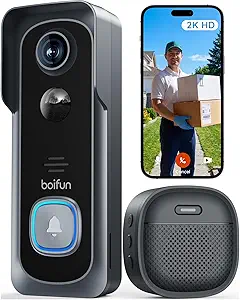 |
| Best Budget The cheapest option that still gets the job done reliably | KyraNexo Doorbell Camera P52 |  |
| Most Popular A crowd favorite that many people choose with confidence | Blink Video Doorbell |  |
| Best Seller A high-volume bestseller chosen again and again | Ring Battery Doorbell Retinal 2K |  |
Google Nest Doorbell (Wired)

| Connectivity Technology | Wired |
|---|---|
| Connectivity Protocol | Wi-Fi |
| Power Source | Corded Electric |
| Video Capture Resolution | 2000 HDR |
| Indoor Outdoor Usage | Outdoor |
The wired Nest Doorbell delivers high-resolution 2K HDR video and a tall, wide field of view to give a clear look at your front door both day and night. It mounts with supplied hardware and runs on continuous power so you do not worry about batteries, while Wi‑Fi connectivity streams live view and notifications to your phone or tablet. Intelligent alerts identify people, packages, vehicles, and animals and you can set Activity Zones to limit alerts to important areas. Deep integration with Google Home adds searchable event history, voice control, automations, and optional Gemini-enhanced summaries and descriptions with a Google Home Premium subscription. The unit uses encrypted video and supports two‑step verification for account security, though some advanced features require the subscription. Practical for everyday use, it is best where you want persistent power, detailed video, and Google ecosystem conveniences, but expect reliance on Google services for the full feature set.
Best for: Buyers who want a privacy-minded, always-on doorbell with high-resolution video and tight Google Home integration for searchable event history and smart alerts.
Less Ideal for: Those who need a battery-powered, easy-install option or who prefer a doorbell solution that avoids cloud-dependent smart features entirely.
- 2K HDR video provides clearer, more detailed footage than standard 1080p cameras
- Wired power eliminates battery maintenance and supports continuous recording
- Smart alerts for people, packages, vehicles, and animals reduce false notifications
- Activity Zones let you limit alerts to specific areas like a driveway or side door
- Encrypted video and two‑step verification help protect account and footage
- Some advanced features such as Gemini summaries require a separate Google Home Premium subscription
- Wired installation requires existing doorbell wiring or more involved installation than battery models
Verdict: Choose this wired Nest Doorbell if you want continuous 2K HDR video, smart Google Home search and alerts, and stronger account-level security for a privacy-focused front door camera.
eufy Security Video Doorbell E340

| Video Capture Resolution | 2k |
|---|---|
| Viewing Angle | 160 degrees |
| Battery Power | 6500 milliamp_hours |
| Night Vision Range | 16 feet |
| Local Storage | Device 8G Emmc |
The eufy E340 pairs a front-facing 2K camera with a downward-facing camera to give a head-to-toe view at your door while storing footage locally on an 8GB eMMC module so you can avoid monthly fees. It is typically installed on a porch or entryway and runs on a removable 6500mAh rechargeable battery (or wired power if preferred), with 160 degree field of view, two-way talk and motion notifications through the eufy Security app. Color night vision and a dual-light system improve low-light clarity out to roughly 16 feet, and the included extra battery option makes continuous coverage easier by letting you swap packs without long downtime. The doorbell uses 2.4GHz Wi-Fi and supports Alexa and Google Assistant, but not Apple HomeKit, and it requires the device to remain mounted even when wired. For privacy-focused buyers the local storage and no-subscription model reduce cloud exposure, though local storage capacity is limited and advanced cloud features are not available from this unit alone.
Best for: Buyers who prioritize clear on-device recording and reduced cloud exposure and want a performance-focused doorbell that captures detailed, privacy-friendly footage at the doorstep.
Less Ideal for: Users who need large cloud archives, HomeKit integration, or 5GHz Wi-Fi support should consider other solutions with broader cloud features and platform compatibility.
- Dual-camera setup provides head-to-toe coverage to reduce blind spots at the doorstep.
- Local 8GB eMMC storage lets you keep video on-device without mandatory cloud subscription.
- 6500mAh removable battery with optional extra battery pack enables quick swaps for near-continuous operation.
- 2K resolution and color night vision deliver clearer daytime detail and better nighttime identification.
- Works with Alexa and Google Assistant for hands-free alerts and viewing.
- Only supports 2.4GHz Wi-Fi, which may limit network placement in some homes.
- On-device local storage is limited to 8GB and can fill quickly in busy locations.
- No Apple HomeKit support and some advanced features require constant wired power or additional base stations.
Verdict: Choose the E340 if you want a performance-focused doorbell that captures detailed, privacy-friendly footage locally without a subscription.
BOIFUN 2K Video Doorbell J1
| Video Capture Resolution | 2k |
|---|---|
| Viewing Angle | 166 degrees |
| Battery Power | 5200 milliamp_hours |
| Connectivity Protocol | 2.4 GHz Wi‑Fi Only |
| Flash Memory Supported Size Maximum | 128 GB |
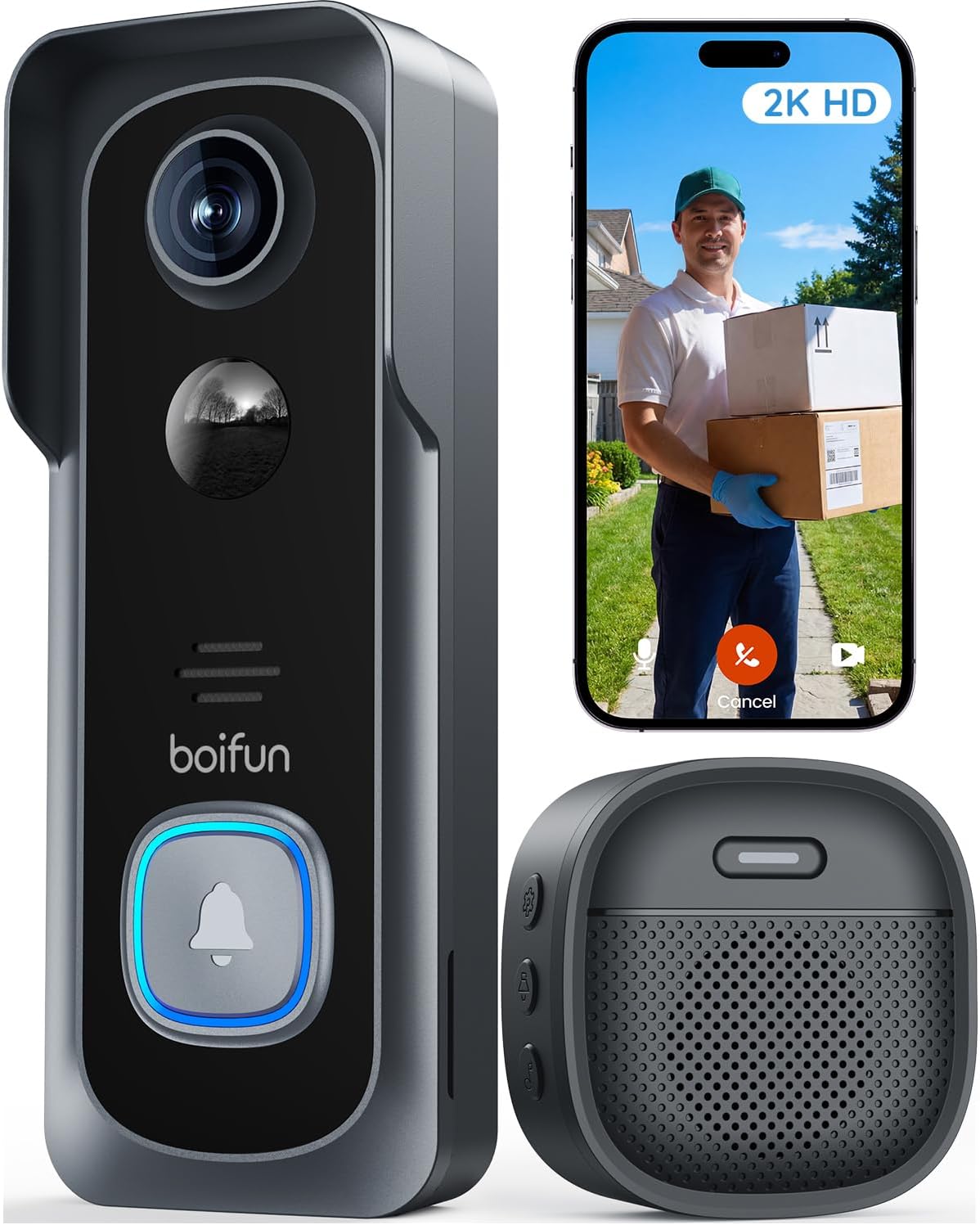
The BOIFUN 2K Video Doorbell J1 is a battery-powered, app-controlled doorbell camera designed for basic front-door monitoring without a required subscription. It records 2K video with a wide 166° field of view and uses HDR and invisible 940 nm IR for color night vision up to about 33 feet, which helps keep faces and porch activity clear in varied lighting. The unit supports two-way audio for live intercom use, human-detection alerts, and stores footage locally on a microSD card up to 128 GB while also offering optional cloud plans. Installation is wire-free and straightforward, and an included indoor chime, tamper alerts, and multi-user sharing add convenience for everyday use. Because it runs on a built-in rechargeable battery, frequent Live View sessions or high-traffic locations will shorten time between charges, and the device requires a 2.4 GHz Wi-Fi network only, which can limit placement if your router is distant. For buyers focused on straightforward, private local storage and basic smart features, this doorbell delivers sensible performance at a budget-friendly level.
Best for: Buyers who prioritize private, local storage and an easy, wire-free install while wanting clear daytime and night video for everyday front-door monitoring.
Less Ideal for: People who need continuous powered operation or who rely on 5 GHz Wi‑Fi networks or very long-range wireless connectivity.
- 2K video with wide 166° field of view for broad porch coverage
- HDR and 940 nm IR night vision that preserves color detail without a visible red glow
- Local microSD storage up to 128 GB with no mandatory subscription for core features
- Built-in rechargeable battery enables wire-free installation and indoor chime included
- Human-detection alerts and tamper detection for focused notifications and security
- Battery is non-removable and heavy Live View or frequent triggers reduce time between charges
- Only supports 2.4 GHz Wi‑Fi which can restrict placement in homes with distant routers
Verdict: Choose the BOIFUN J1 when you want clear 2K video and private local storage in an easy wire-free doorbell with no required subscription.
KyraNexo Doorbell Camera P52

| Power Source | Battery Powered |
|---|---|
| Video Capture Resolution | 1080p |
| Wireless Technology | Wi-Fi (2.4GHz only) |
| Other Special Features | 2-Way Audio, Motion Sensor, Night Vision |
The KyraNexo P52 is a compact battery-powered doorbell camera built for simple, private monitoring of entry points. It captures 1080p video with infrared night vision, uses on-device AI to prioritize human movement over pet or environmental motion, and offers two-way audio for live visitor interaction. The camera connects only to 2.4GHz Wi-Fi and is set up and managed via a smartphone app; cloud storage is available but sold separately and encrypted. In everyday use it works well for homes that need basic motion alerts, live view, and occasional two-way talk without hardwiring, and the ability to share access with a few household members is convenient. Limitations include reliance on a 2.4GHz network (no 5GHz support), the mobile-only management interface, and the extra cost and dependency of a subscription for cloud playback and longer-term storage.
Best for: Buyers who want an affordable, standalone doorbell camera that emphasizes simple, private monitoring and reduced false alerts without running wires.
Less Ideal for: Users who need 5GHz Wi-Fi support, direct PC/web access to footage, or long-term local storage without a subscription should look elsewhere.
- 1080p video with infrared night vision for clear day and low-light captures
- AI human detection reduces false motion alerts from pets or environment
- Battery power allows installation without wiring
- Two-way audio for real-time communication with visitors
- Encrypted cloud storage option for secure remote access and playback
- Only supports 2.4GHz Wi-Fi, which limits placement if router range is weak
- Cloud storage requires a paid subscription for live view playback and history
- Managed only through the smartphone app with no computer access
Verdict: A budget-friendly, battery-powered doorbell camera that prioritizes private, useful alerts and basic encrypted cloud storage for everyday home monitoring.
Blink Video Doorbell

| Battery | 3 AA Energizer lithium batteries included |
|---|---|
| Field of view | Head-to-toe HD view |
| Night vision | Infrared night vision |
| Includes | Sync Module Core and mounting kit |
The Blink Video Doorbell is a second-generation, battery-first smart doorbell designed for simple installation and low maintenance. It records head-to-toe HD video with infrared night vision, delivers two-way audio through the Blink app, and sends alerts on button presses or motion events. The unit ships with three AA Energizer lithium batteries and a Sync Module Core so you can get it running without requiring a separate hub. It supports wire-free or wired installation so the doorbell can sound through existing chimes when connected, and you can use an indoor Blink Mini 2 as a plug-in chime if you keep it battery-powered. The included Sync Module and Blink subscription options enable cloud storage and stitched clips, while native Alexa support lets you answer the door with voice. Important limits to consider are the reliance on Blink cloud features for advanced detection and clip saving and fewer on-device privacy controls compared with some competing brands.
Best for: Buyers who prioritize easy setup, long battery life, and a simple cloud-backed doorbell experience with mainstream smart assistant integration and visible social proof from other users.
Less Ideal for: Users who want primarily local-only storage, extensive on-device privacy controls, or advanced edge-based person recognition should consider alternatives focused on local recording and privacy.
- Long battery life claim of up to two years with included AA Energizer lithium batteries
- Head-to-toe HD field of view with infrared night vision for day/night monitoring
- Includes Sync Module Core and mounting hardware for quick out-of-box setup
- Flexible installation: works wire-free or can connect to existing doorbell wiring
- Two-way talk and Alexa integration for hands-free answering and basic smart home control
- Advanced detection features and cloud storage require a Blink subscription for full functionality
- Fewer local on-device privacy or storage options compared with some privacy-focused models
Verdict: Choose this Blink doorbell if you want a low-maintenance, battery-first camera with a wide HD view and a simple cloud workflow backed by included Sync Module support.
Ring Battery Doorbell Retinal 2K

| Video resolution | Retinal 2K |
|---|---|
| Zoom | Up to 6x Enhanced Zoom |
| Power | Built-in rechargeable battery |
| Connectivity | Wi‑Fi |
| Voice | Two‑way talk |
The Ring Battery Doorbell Retinal 2K is a wireless doorbell camera meant for straightforward home monitoring without hardwiring. It records wide-angle 2K video for clearer footage than 1080p and lets you zoom in up to 6x to inspect faces or distant details. You can view live video, speak through two-way talk, and receive motion alerts on your phone in real time, and the unit is rechargeable via a removable doorbell that charges over USB‑C. Setup and daily use suit typical homeowners: mount the bracket, connect to your Wi‑Fi, and use the Ring app for notifications and playback. Notable conveniences include the removable battery for easy charging and Alexa compatibility for hands-free viewing. Important trade-offs for privacy-conscious buyers are that some advanced features require a Ring Protect subscription and the device streams to cloud services rather than local-only storage, which means managing account settings and sharing preferences is necessary to control who can access footage.
Best for: Buyers who prioritize straightforward, battery-powered video monitoring that is easy to set up and offers clearer-than-1080p footage and remote alerts for everyday home security.
Less Ideal for: Those who require local-only storage, fully offline operation, or want a doorbell that never depends on cloud services for footage access should consider alternatives with local recording options.
- Retinal 2K resolution for sharper, more detailed video than 1080p
- Up to 6x Enhanced Zoom for inspecting distant details
- Removable rechargeable battery with USB‑C for easy charging
- Live View and two-way talk let you see and communicate with visitors in real time
- Motion alerts push to your phone for immediate awareness
- Relies on cloud storage and a subscription for many advanced features and history playback
- No included USB‑C cable for recharging the battery
Verdict: Choose this Ring battery doorbell if you want an easy-to-install, rechargeable camera that delivers sharper 2K video and real-time alerts for typical home monitoring needs.
Choosing the Right Video Doorbell for Privacy: Key Factors to Consider
Local Vs Cloud Storage
Where footage is stored is the single biggest privacy decision when choosing a Video Doorbell for Privacy. Local storage keeps recordings on a device you control, such as a microSD card or a local network video recorder, which reduces third-party access risks and legal data requests. Cloud storage can be convenient for offsite backup and remote access but creates additional vectors for data exposure if account credentials are compromised.
When assessing storage options, look for devices that offer multiple choices: local-only, local-first with optional encrypted cloud backup, or end-to-end encrypted cloud storage. Also check whether the vendor exposes encryption keys or offers zero-knowledge storage models that prevent the company from accessing your footage.
Encryption and Network Protections
Encryption protects video and audio while they travel across your network and when they are saved. Strong transport encryption prevents easy interception on Wi-Fi or the internet, and storage encryption limits access if a device or cloud account is breached. Verify that the doorbell supports up-to-date TLS for streaming and AES-level encryption for stored files.
Network protections matter too. Support for modern Wi-Fi security protocols, such as WPA3 or WPA2 with strong passphrases, reduces the chance of local network compromise. Features like forced firmware updates, certificate pinning, and manufacturer transparency about security practices are additional indicators of a privacy-minded product.
On‑Device Processing and Edge Detection
Devices that process motion events on-device can minimize what data is sent off the camera. On-device person detection, facial obfuscation, or activity classification can generate metadata locally and avoid streaming raw video to the cloud for analysis. This reduces privacy exposure and can lower bandwidth usage.
Check whether sensitive processing tasks are done on the camera itself and whether these features are configurable. Some systems allow privacy-sensitive processing by default and only upload clips when you explicitly request or consent to cloud analytics.
User Controls and Access Management
Strong user controls let you manage who can view live video, access recordings, and share clips. Look for role-based access, temporary sharing links, and granular permissions rather than an all-or-nothing account model. Multi-factor authentication for accounts and the ability to audit login activity improve long-term security.
Also assess how easy it is to change settings, revoke access for former users, and set automatic deletion windows. Usable controls encourage consistent privacy maintenance and help enforce household rules about monitoring and data retention.
Physical Privacy Features
Physical privacy measures help limit what the camera records. Configurable privacy zones, the ability to schedule disabling of video during certain hours, and mechanical shutters or covers are practical ways to reduce unnecessary capture. These features also help with neighbor relations by avoiding accidental filming of public walkways or adjacent properties.
Consider whether the installed position and field of view can be adjusted to avoid sensitive areas. A doorbell with an easily angled lens or a narrower field of view can provide better privacy by design than a unit that constantly records wide-angle scenes.
Firmware Updates and Vendor Transparency
Regular firmware updates fix security vulnerabilities that could otherwise expose footage or allow unauthorized access. A vendor that documents its update cadence, publishes security advisories, and supports over-the-air updates demonstrates a commitment to ongoing protection. Transparency about data handling practices, such as what metadata is collected and how long logs are retained, lets you make an informed privacy decision.
Avoid devices from vendors that do not disclose basic security practices or that force users to accept broad data-sharing terms without clear opt-outs. The long-term privacy posture of a device often depends on the maker's maintenance and communication habits.
How Local Storage Works and What to Expect
Local storage usually means footage is kept on a removable card in the device or on a local network drive. This keeps data physically within your control and can allow for direct access without passing through a vendor's servers.
Expect tradeoffs: local-only setups require you to manage backups and may not provide remote access out of the box unless paired with a secure gateway. Check how the device exposes local files and whether they are encrypted at rest.
- MicroSD or onboard storage: simple and self-contained
- Network video recorder (NVR): centralizes clips from multiple cameras
- Local-first with optional encrypted cloud: hybrid convenience
Balancing Privacy with Remote Access
Remote access is convenient but can expose data if credentials or cloud services are compromised. You can balance convenience and privacy by using services that support end-to-end encryption or by routing remote access through a secure home server.
Another option is to limit remote access to read-only streams and require local network presence or multi-factor authentication for playback of recorded clips.
- End-to-end encrypted streams prevent provider-side access
- Temporary share links reduce persistent exposure
- Restricting archival uploads to manual triggers minimizes cloud retention
Practical Installation Tips to Preserve Privacy
Placement matters. Aim the camera to cover your entryway while avoiding adjacent windows, private yards, or public sidewalks when possible. Adjust mounting height and tilt to minimize incidental capture.
Use wired power when feasible to avoid frequent battery-swapping that could disrupt security settings. If using battery models, enable power-saving modes that do not disable essential privacy features.
- Position to minimize neighbor and street capture
- Block or mask reflective surfaces that can reveal interiors
- Test motion zones after installation to avoid false recordings
Managing Shared Access for Households and Contractors
Households often need to share short-term access with guests, caregivers, or contractors. Use role-based accounts and temporary access codes to grant limited-time viewing without giving full account control.
For contractors or services that need entry, create time-limited links or enable live view-only access. Revoke access promptly when it is no longer needed and review sharing logs periodically.
- Use time-limited permissions for short-term access
- Prefer view-only roles over administrator privileges
- Regularly audit connected devices and active sessions
Understanding Legal and Neighborhood Considerations
Privacy expectations and recording laws vary by jurisdiction. In many places you may record video in public areas, but audio recording and private interior views can raise legal issues. Familiarize yourself with local rules about audio capture and notice requirements.
Beyond legality, consider neighborhood relations. Avoid directing cameras into neighbors' private spaces and communicate about your installation when appropriate to reduce conflicts.
- Check local rules for audio recording consent
- Avoid persistent surveillance of public sidewalks or neighbors' yards
- Post discreet notification if required by local regulations
How We Chose the Best Video Doorbell for Privacy
We prioritized features that materially affect homeowner privacy and real-world security. Primary evaluation criteria included the availability of local storage options, strength and transparency of encryption for video in transit and at rest, and the breadth of user controls for data access and retention. We also measured on-device processing capabilities that reduce cloud dependency, such as on-device person detection or pre-set privacy zones. Other important filters were network security features, including support for modern Wi-Fi security standards and two-factor authentication, and clear, accessible privacy settings in the companion app. Ease of installation and compatibility with common doorbell wiring or battery operation were considered because owners are more likely to adopt privacy features they can actually use. We excluded products that rely solely on opaque cloud-only storage without any local alternative or that lack basic encryption. Entries that made the list offer a balance of privacy-respecting design, practical installation, and usable controls that matter for everyday homeowners.
Our full evaluation process is outlined in our review methodology.
FAQ
Can a video doorbell record without sending footage to the cloud?
Often yes. Many privacy-focused devices support local storage options such as microSD or a local NVR. In those setups, footage can be kept on-site and only uploaded to the cloud if you choose to enable that feature.
Does encryption stop companies from accessing my videos?
It depends on the encryption model. End-to-end or zero-knowledge encryption prevents the vendor from decrypting stored video. Transport encryption protects data in transit but may still allow provider-side access if they hold the keys.
Are there privacy tradeoffs with battery-powered doorbells?
Battery models are convenient but sometimes limit continuous processing to save power. That can affect on-device detection or prompt vendors to rely on cloud analysis. Look for battery devices that still offer configurable privacy modes and on-device event filtering.
How can I share access temporarily without exposing all my footage?
Use temporary or time-limited sharing links and view-only permissions. Avoid adding guests as full account users and revoke access immediately after the need ends.
Should I disable audio recording for better privacy?
Disabling audio removes a sensitive data stream and can reduce legal risk in some areas. If you need audio for security, consider recording it only when specific events occur and make sure you understand local consent laws.
Final Verdict
Prioritize storage and encryption when choosing a Video Doorbell for Privacy. Decide whether local-first storage or end-to-end encrypted cloud fits your lifestyle, then confirm the device supports on-device processing and granular user controls. Remember that installation, placement, and access management are as important as technical specs. Pick a solution that matches the level of control you want and that provides transparent security practices. That approach will help you protect footage, limit external access, and keep surveillance targeted and appropriate.