
Note: This article contains affiliate links. If you click on these links and make a purchase, we may earn a small commission at no extra cost to you. This helps support our research and content. Read our full affiliate disclosure here.
Choosing the right Wi-Fi smart switch makes daily lighting control more convenient, can reduce wasted energy, and lets you set schedules or integrate with home automation. You want a switch that connects reliably to your network, fits your wiring and wallbox, and gives consistent app and voice control without frequent resets. This guide shortlists the top Wi-Fi smart switches across common home setups and explains the practical differences that matter. We evaluated units for connection stability, installation complexity, safety features, and compatibility with typical household wiring. Below are the top picks and the criteria we used so you can pick a switch that suits your technical comfort level and home layout.
Top Picks at a Glance
| Best Overall The best all-around choice for most situations | Shelly 1PM Gen4 |  |
| Best Quality Built to a higher standard if you want something more solid | Leviton Decora Smart Switch D315S |  |
| Best Value The sweet spot between price and what you get | Tapo S505 Smart Light Switch (2-Pack) | 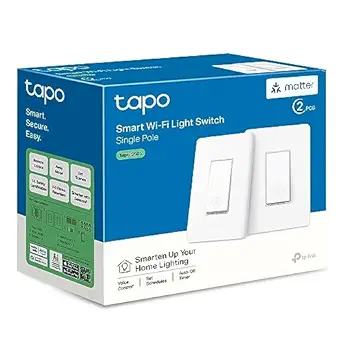 |
| Best Budget The cheapest option that still gets the job done reliably | Amazon Basics Smart Light Switch WS29-01 |  |
| Top Rated A top-rated pick with lots of positive feedback | Tapo S500 Smart Light Switch (4-Pack) |  |
| Most Popular A crowd favorite that many people choose with confidence | Kasa Smart HS200 Light Switch |  |
| Best Seller A high-volume bestseller chosen again and again | Kasa Matter Smart Light Switch KS205P3 |  |
Shelly 1PM Gen4

| Current Rating | 16 A |
|---|---|
| Wattage | 1920 watts |
| Connector Type | Screw |
| Contact Type | Normally Open |
| Operation Mode | Automatic |
The Shelly 1PM Gen4 is a small in-wall relay designed to retrofit behind switches or into sockets to give remote on/off control plus real-time power monitoring. It connects over Wi‑Fi and also supports Zigbee and Matter, which makes it flexible for voice assistants and smart home hubs; it can act as a Bluetooth gateway as well. Typical use cases are automating lights, controlling heaters or kitchen appliances, and tracking consumption to identify energy hogs. Setup is straightforward through the Shelly app and the compact casing fits into most switch boxes for an unobtrusive installation. The device is rated for up to 16 A (1920 W) and offers normally open screw terminals for secure wiring. Expect practical benefits like schedules, scenes, and remote shutdowns combined with simple energy reports that can help trim electricity use. Limitations are that installation requires basic electrical wiring skills and the unit is meant for single-channel switching only, so multi-gang or multi-circuit needs require additional modules.
Best for: Buyers who want a versatile, energy-aware smart relay to retrofit individual switches or sockets and value broad integration with voice assistants and smart hubs.
Less Ideal for: People who need multi-channel switching from a single device or who prefer plug-and-play plug-in modules that do not require in-wall wiring.
- Multi-protocol connectivity: Wi‑Fi plus Zigbee and Matter for wide smart home compatibility
- Built-in power metering for real-time energy monitoring and usage insights
- Compact form factor that fits behind standard wall switches and sockets
- Can act as a Bluetooth gateway to extend connectivity options
- Requires electrical wiring knowledge for safe installation
- Single-channel relay only, so one unit controls one circuit
Verdict: Pick the Shelly 1PM Gen4 if you want a compact, retrofit smart relay that adds reliable remote switching and accurate power metering with broad smart home protocol support.
Leviton Decora Smart Switch D315S

| Connectivity | 2.4 GHz Wi‑Fi |
|---|---|
| Compatibility | Matter, Alexa, Google Assistant, Apple Siri, SmartThings, Home Assistant |
| Load rating | 15A / 1/3 HP |
| Requires | Neutral wire |
| Control app | My Leviton |
The Leviton Decora Smart Switch D315S is a hub‑free Wi‑Fi wall switch designed to replace a standard Decora toggle and add smart control to lights, fans, pumps, and similar loads. It connects to 2.4 GHz networks and integrates with the My Leviton app for remote on/off, scheduling, and timers, and it supports Matter for local integration with popular smart home platforms and voice assistants. Installation is simplified by a reduced product depth and a screwless wallplate, but a neutral wire is required. The switch is rated for up to 15A and 1/3 HP so it handles a variety of load types including LEDs, CFLs, incandescent, and motor loads. You can expand control to additional locations using a wire‑free Anywhere Switch or a wired companion for traditional 3‑way setups. Practical perks include an LED locator light and optional color change faceplates for matching decor, while the one‑year limited warranty offers basic coverage. If you want a reliable, performance‑focused smart switch that works with multiple ecosystems and can drive moderate motor loads, this model delivers solid, real‑world functionality with straightforward app and voice control.
Best for: Buyers who need a robust, performance‑focused smart switch that integrates with multiple voice assistants and can reliably handle lighting and motor loads for everyday home automation.
Less Ideal for: Homes without a neutral wire at the switch box or users who require 5 GHz Wi‑Fi support or advanced dimming features for specialty lighting.
- Hub‑free Wi‑Fi with My Leviton app for remote control and scheduling
- Matter certified for local integration with major smart home platforms
- Rated for 15A and 1/3 HP to support lights, fans, and small motor loads
- Supports multi‑location control via wire‑free or wired companions
- Slim depth and screwless wallplate simplify installation and appearance
- Requires a neutral wire which may limit retrofit installs
- Only connects on 2.4 GHz Wi‑Fi networks, no 5 GHz support
Verdict: A high‑performance, Matter‑ready Decora smart switch built for reliable app and voice control plus the ability to drive moderate motor and lighting loads.
Tapo S505 Smart Light Switch (2-Pack)

| Current Rating | 15 A |
|---|---|
| Operating Voltage | 120 volts |
| Connectivity Protocol | Matter, Wi-Fi |
| Control Method | App, Touch, Voice |
| Wattage | 600 watts |
The Tapo S505 is a 2-pack of Matter-certified single-pole smart switches designed to replace standard wall switches and add app, voice, and local network control to lights and fixtures. Installation follows an app-guided process but requires a neutral wire and basic wiring familiarity or an electrician; the package includes wall plates, wire nuts, and screws to simplify swap-in. Once installed, the switches work over 2.4 GHz Wi‑Fi and Matter to offer LAN control, multi-admin access across Apple Home, Alexa, Google Home, and SmartThings, and scheduling, timers, and away modes from the Tapo app. Voice control via major assistants is supported and the switches are UL certified with flame-retardant materials. Limitations to note are the one-way (single-pole) design and 15 A/600 W load rating, so they are best for typical lighting circuits rather than high‑wattage loads or three-way installs without a different model.
Best for: Buyers who want a practical, future-proof way to add reliable smart control to standard light circuits and prefer broad platform compatibility and local control.
Less Ideal for: Homes without neutral wiring or users who need three-way/multi-location switching without purchasing a different switch model.
- Matter-certified for broad compatibility with Apple Home, Alexa, Google Home, and SmartThings
- Supports local LAN control so paired Matter devices can interact even if internet is down
- App-guided installation and included hardware simplify replacement of standard switches
- Scheduling, timers, multi-admin sharing, and voice control provide flexible automation
- Requires a neutral wire which may not be present in older homes
- Rated for single-pole circuits only, not suitable for three-way configurations
Verdict: A practical, Matter-certified 2-pack that adds reliable local and voice control to standard single-pole light circuits for buyers focused on compatibility and dependable everyday automation.
Amazon Basics Smart Light Switch WS29-01

| Operating Voltage | 120 volts |
|---|---|
| Current Rating | 5 A |
| Connectivity Protocol | Wi-Fi 2.4 GHz (802.11 b/g/n) |
| Switch Type | Single Pole |
| Compatible Devices | Amazon Alexa |
This Amazon Basics single-pole smart switch lets you convert a standard wall switch into a voice‑controllable Alexa device using your home 2.4 GHz Wi‑Fi network. It installs in place of a traditional switch and is used like a normal on/off switch while adding remote control, scheduling, and Alexa routines through the Alexa app. The switch requires a neutral wire and supports typical home lighting loads including LEDs/CFLs up to 150W and incandescent up to 600W. Setup is straightforward if you follow the included guide and the LED status indicator shows setup progress and reset states. The product is optimized exclusively for Alexa, so it offers tight integration with Alexa routines and voice commands but does not support other voice assistants or hubs. It also only works on 2.4 GHz Wi‑Fi networks and is rated for indoor use, so multi-band or mesh quirks could require placement attention. For a budget-friendly smart switch that gives reliable Alexa control and scheduling, this unit covers the essentials without extra platform complexity.
Best for: Buyers wanting an inexpensive, no-frills way to add Alexa voice control and scheduling to existing lights and who prioritize simplicity and native Alexa integration.
Less Ideal for: Users who need compatibility with Google Assistant, Apple HomeKit, third‑party hubs, or who do not have a neutral wire in their switch box.
- Native Alexa integration for voice control, routines, and scheduling without an external hub
- Simple guided installation with included wall plate, mounting frame, and wiring accessories
- Supports common lighting loads (LED/CFL and incandescent) suitable for most home circuits
- Works over standard 2.4 GHz Wi‑Fi so no separate hub or paid service is required
- Requires a neutral wire which may not be available in older switch boxes
- Limited to Alexa and 2.4 GHz Wi‑Fi only, so it does not work with other smart assistants or 5 GHz networks
Verdict: A budget-friendly smart switch that delivers straightforward Alexa voice control and scheduling without a hub.
Tapo S500 Smart Light Switch (4-Pack)

| Current Rating | 15 A |
|---|---|
| Operating Voltage | 120 volts |
| Connectivity Protocol | Wi‑Fi |
| Wattage | 600 watts |
| Included Components | Tapo S500×4, Wall Plate×4, Wire Nuts×16, Screws×8, Quick Start Guide |
The Tapo S500 converts standard single‑pole wall switches into Wi‑Fi smart switches that you control with the Tapo app, voice assistants, or the physical push button. Installation requires a neutral wire and matches typical one‑way wiring; the app offers guided setup, scheduling, timers, away mode and grouping so you can automate lights or simulate occupancy. In daily use the switches provide local control when the network is offline and remote control when you are away, plus voice control via Alexa or Google Assistant. The 15 A rating and 600 W load spec cover most residential lighting and ceiling fans, and included wall plates, wire nuts and screws make a complete kit for multiple rooms. Limitations to note are the need for 2.4 GHz Wi‑Fi only and the requirement of a neutral, which means older two‑wire switch boxes may need professional wiring work before install.
Best for: Buyers who prioritize reliable, easy to manage smart lighting across multiple rooms and want factory‑quality smart switches that integrate with Alexa or Google for everyday automation.
Less Ideal for: People with older two‑wire switch wiring or those who need a 5 GHz or hub‑based smart system should consider alternatives or an electrician before buying.
- App‑guided installation with clear setup steps for typical single‑pole wiring
- Remote control and local control via the Tapo app even when offline
- Works with Alexa and Google Assistant for hands‑free voice control
- Includes 4 switches plus wall plates, wire nuts and screws for multiple installs
- Scheduling, timers and Away Mode for automation and security simulation
- Requires a neutral wire so it is not compatible with all existing switch boxes
- Only connects on 2.4 GHz Wi‑Fi, no 5 GHz or hubless mesh features listed
- Rated for typical residential loads but not for high‑wattage commercial circuits
Verdict: A dependable, app‑guided 4‑pack of Wi‑Fi smart switches for homeowners who want straightforward, voice‑ready lighting automation across several rooms.
Kasa Smart HS200 Light Switch

| Current Rating | 15 A |
|---|---|
| Operating Voltage | 120 volts |
| Connectivity Protocol | Wi-Fi |
| Control Type | Remote, Scheduled |
| Wattage | 600 watts |
The Kasa HS200 is a straightforward single-pole smart switch that replaces a standard wall switch to give remote, scheduled, and voice control for lights and other fixtures. It connects directly to 2.4 GHz Wi‑Fi and works with the Kasa app to set schedules, timers, away mode, and group scenes, while voice control is available via Amazon Alexa and Google Assistant. Installation requires a neutral wire and basic wiring work, and the app provides step-by-step guidance, though users unfamiliar with electrical wiring may want an electrician. The switch is UL certified and rated for typical household circuits at 15 A and 120 V, handling common lighting and fan loads up to the listed wattage. Benefits include reliable cloud and voice control, scheduling features for automation and security, and a compact design that fits standard wall boxes. Limitations are the neutral-wire requirement and 2.4 GHz only Wi‑Fi support, which can restrict where it can be installed in older homes or networks that prefer 5 GHz devices.
Best for: Buyers who want a well-reviewed, reliable smart switch for everyday lighting automation and voice control and who are comfortable confirming neutral wiring or hiring simple electrical help.
Less Ideal for: Homes without a neutral wire in the switch box or users who need 5 GHz Wi‑Fi or a hub-based smart home integration should look elsewhere.
- Direct 2.4 GHz Wi‑Fi connection with no hub required
- Works with Alexa and Google Assistant for hands-free voice control
- App scheduling, away mode, and scene grouping for automation and security
- UL certified and rated for standard 15 A / 120 V circuits
- Requires a neutral wire so it may not fit older two‑wire switch boxes
- Supports only 2.4 GHz Wi‑Fi, not 5 GHz
Verdict: Choose the HS200 if you want a proven, app-driven single-pole smart switch with voice control and dependable scheduling for typical home lighting setups.
Kasa Matter Smart Light Switch KS205P3

| Operation Mode | ON-OFF |
|---|---|
| Current Rating | 15 A |
| Operating Voltage | 120 volts |
| Connectivity Protocol | Wi-Fi (2.4 GHz) |
| Control Type | on/off, scheduling |
The Kasa Matter Smart Light Switch KS205P3 is a single-pole, neutral-wire smart switch sold as a three-pack that brings Matter compatibility and standard smart‑switch features to typical home wiring. It replaces a wall switch and gives on/off control through the Kasa app, voice assistants (Siri, Alexa, Google Assistant), or local LAN when the internet is down. Setup is guided in the app and requires a neutral wire and 2.4 GHz Wi‑Fi, while included wall plates, wire nuts, and screws simplify installation. Scheduling, timers, away mode, and scene controls make it easy to automate lights and reduce wasted energy. Rated at 15 A and 600 watts it handles most household lighting circuits and meets UL specs. The Matter support and Multi-Admin capability make it straightforward to add to mixed smart-home ecosystems and let trusted users share control. The main limitations are the neutral-wire requirement and single-pole design, which mean it is not suitable for homes without a neutral at the switch or for multi‑way circuits without additional hardware.
Best for: Buyers who want a reliable, standards-based smart switch that integrates easily with major voice assistants and prefers guided installs and predictable, factory-quality behavior.
Less Ideal for: Homes lacking a neutral wire at the switch location or users who need multi-way switching without adding extra compatible devices.
- Matter certified for cross-platform compatibility with Apple Home, Alexa, Google Home, and SmartThings
- App-guided installation with included plates, wire nuts, and screws
- Local LAN control keeps devices responsive even if internet is offline
- Built-in scheduling, timers, away mode, and scene support for automation
- Requires a neutral wire, so installation may need additional wiring in older homes
- Single-pole only, not directly suitable for existing multi-way switch setups
Verdict: Choose this Matter-certified Kasa switch if you want a straightforward, reliable smart replacement that works across major platforms and keeps local control when the internet is down.
Choosing the Right Wi-Fi Smart Switch: Key Factors to Consider
Neutral Wire Requirement
Many Wi-Fi smart switches require a neutral wire to power the device when the load (lights) is off. If your switch box lacks a neutral, you may need to run new wiring or choose a switch designed for no-neutral setups. Installing without the correct wiring can result in flickering, unreliable connectivity, or failure to function.
Before buying, check your wallbox for a bundle of white wires or consult a circuit diagram. If you are not comfortable opening the box, take a photo for an electrician to confirm. The neutral requirement affects compatibility more than any single feature because it determines whether the switch can be used in your existing home without rewiring.
Wi-Fi Band and Coverage
Most smart switches operate on the 2.4 GHz Wi-Fi band because it offers better range through walls than 5 GHz. Confirm that the switch supports the band available from your router and that your signal reaches the switch location reliably. Devices that only support 2.4 GHz will not work on 5 GHz-only networks.
Placement matters. Routers centrally located and mesh extenders can improve connectivity for switches in basements or exterior walls. If your home has weak Wi-Fi in switch locations, consider boosting coverage before installing multiple smart switches, since repeated drops are a primary source of frustration.
Load Type and Dimming Support
Not all switches handle all load types. Incandescent, LED, halogen, and CFL lights have different electrical characteristics, and dimming support varies by switch. If you plan to control dimmable fixtures, verify the switch's compatibility with your bulbs and whether it requires specific dimmable LEDs.
Using a switch rated only for resistive loads with LED fixtures can cause buzzing, flicker, or premature bulb failure. For multi-gang boxes where one switch shares a circuit with others, confirm the switch's rated current and whether it supports a range of wattages for safe operation.
Physical Size and Wallbox Fit
Smart switches are larger than standard toggles because they contain electronics and sometimes load-sensing components. Measure the depth of your wallbox and check the switch's dimensions before purchase to ensure the device fits without crowding other wiring. Overcrowding a box can make installation difficult and increase the risk of loose connections.
Also consider the switch's faceplate style and whether it will align with existing decor. Some switches offer modular plates or adapters for multi-gang installations; these options can simplify replacement in older homes with nonstandard openings.
Local Control and Cloud Dependence
Some Wi-Fi smart switches rely heavily on cloud services for basic control, while others offer local control that keeps lights responsive even if the internet is down. If you prioritize reliable local operation for safety or convenience, look for switches that run automations locally or maintain LAN control in the absence of cloud connectivity.
Cloud-dependent devices can offer convenient remote access and extra features but may introduce latency or outages tied to the vendor's servers. Decide how important local fallback is for your use case, especially for entryways, exterior lights, or other circuits where predictable behavior is essential.
Firmware Updates and Long-Term Support
Ongoing firmware updates address security vulnerabilities and add features. Check whether the manufacturer provides regular updates and has a clear policy for end-of-life support. A switch that stops receiving security patches can expose your home network and connected devices to risks.
Long-term support also matters for integration with voice assistants and smart home platforms. Choose switches backed by active development or a clear roadmap to ensure compatibility with future router or ecosystem changes.
Installation Tips for a Smooth Swap
Turn off the circuit breaker before removing an existing switch and verify power is off with a noncontact tester. Label each wire or take a clear photo before disconnecting anything so you can restore connections correctly.
Follow the manufacturer's wiring diagram carefully. Tighten terminal screws firmly and tuck wiring neatly to avoid pinching the device when it is seated in the box. Use wire nuts rated for the number and gauge of conductors you are joining.
If the switch requires a neutral and none is present, do not attempt to jury-rig a connection. Contact a qualified electrician to add a neutral or recommend a compatible no-neutral switch alternative.
- Keep the switch manual and wiring diagram with the device for future troubleshooting.
- Use a deep wallbox or a reducer if space is tight.
- Test Wi-Fi signal strength at the switch location before final mounting.
Maximizing Reliability and Performance
Place Wi-Fi extenders or mesh nodes to strengthen the 2.4 GHz coverage near clusters of smart switches. Avoid placing the router behind large metal objects or in enclosed cabinetry which can degrade signals.
Use consistent naming in the app and group switches into rooms or circuits to reduce confusion. Reliable automations use conservative timing and status checks rather than rapid-fire polling, which can overload small device CPUs and the network.
Monitor device firmware updates and apply them during periods of low activity. If a switch starts disconnecting after a firmware update, check release notes and vendor support resources before reverting hardware.
- Favor 2.4 GHz-capable switches for wall-mounted controls.
- Limit the number of devices per Wi-Fi access point if possible.
- Schedule periodic reboots of flaky network hardware outside peak hours.
Integrating Switches Into Automation Routines
Design automations around human behavior, such as occupancy-based lighting or sunrise/sunset schedules, and test them for edge cases like power outages or manual overrides. Include simple fallback rules so lights do not stay off if a cloud service is unavailable.
Use scenes and groups to coordinate multiple switches for whole-room control. Avoid chaining many dependent automations that can create race conditions or unexpected states when one device is offline.
Document your automation logic and keep a map of which physical switches correspond to each virtual group. This helps when troubleshooting or when multiple household members need to understand how the system works.
- Prefer time-based triggers for routine lighting and occupancy sensors for dynamic control.
- Include manual overrides in your routines to respect occupant preferences.
- Test automations thoroughly after adding new switches.
Troubleshooting Common Problems
If a switch loses connectivity, first check Wi-Fi reach and router logs, then power-cycle the switch. Many connection issues are network-related rather than hardware failures.
Flickering or buzzing often indicates incompatibility between the switch and the bulb type or an improper dimming configuration. Try a known-compatible bulb or disable dimming features temporarily to isolate the problem.
For intermittent behavior, inspect wire terminations for looseness and ensure the wallbox is not overcrowded. Re-seating the switch and retightening screws can resolve many electrical contact problems.
- Confirm router SSID and password are unchanged after installation.
- Check for overlapping IP addresses or DHCP lease issues if multiple devices lose connectivity.
- Use vendor support logs and community forums for persistent issues.
Safety Considerations and Best Practices
Always follow electrical codes and, when in doubt, hire a licensed electrician. Proper grounding and secure wire connections reduce fire risk and improve long-term reliability.
Avoid overloading a switch beyond its rated current. For high-wattage loads like large lighting arrays or heaters, choose devices rated for the expected current or use a dedicated relay.
Keep firmware up to date to maintain security. Change default passwords where applicable and isolate smart home devices on a separate VLAN or guest network when supported by your router to limit exposure.
- Do not install a switch that lacks required safety markings or documentation.
- Turn off power at the breaker before maintenance.
- Prefer switches with thermal protection or overload safeguards for high-load circuits.
How We Chose the Best Wi-Fi Smart Switch
We focused on practical, repeatable criteria that reflect real-world use of Wi-Fi smart switches. Key factors included Wi-Fi connectivity reliability and range, because frequent disconnections undermine automation; installation compatibility with common wiring configurations and neutral-wire requirements; app and voice-control responsiveness; build quality and safety features including overload protection and thermal management; and long-term firmware support and update frequency. We looked for devices that offered clear wiring diagrams and robust documentation to reduce installation errors. Energy reporting and scheduling flexibility were included as separate evaluation points because some buyers prioritize power monitoring while others prefer scene and timer options. We excluded devices that require a proprietary hub or rely exclusively on nonstandard wiring solutions. Units with unclear safety certifications or missing essential documentation were not considered. The final shortlist balances ease of setup, dependable connectivity, and features most owners use daily.
Our full evaluation process is outlined in our review methodology.
FAQ
Will a Wi-Fi smart switch work without a neutral wire?
Some models are designed for no-neutral installations, but many require a neutral to power the electronics. If your wallbox lacks a neutral, verify compatibility or consult an electrician to run the required conductor.
Can Wi-Fi smart switches be used with LED bulbs and dimmers?
Yes, but compatibility varies. Dimming LEDs may need switches specifically rated for LED loads or compatible dimmer modes. Test with known-compatible bulbs or check the switch documentation before installing widely.
What happens to automations if my internet goes down?
Behavior depends on the switch and its reliance on cloud services. Some switches offer local control or run schedules locally, while cloud-dependent devices may lose remote access. Choose a switch with local fallback if continuous automation is critical.
How do I improve Wi-Fi connectivity for switches in distant rooms?
Adding a mesh node or Wi-Fi extender for better 2.4 GHz coverage near the switch locations is the most effective fix. Repositioning the main router or moving interfering devices can also help.
Are firmware updates necessary for smart switches?
Yes. Firmware updates address security vulnerabilities and compatibility issues. Apply updates when available, but schedule them for low-traffic times and review release notes if stability is a concern.
Final Verdict
Prioritize compatibility with your wiring and the reliability of the Wi-Fi connection when selecting a Wi-Fi smart switch. Decide whether local control or cloud features matter more for your home and balance that against installation complexity and safety ratings. Focus on switches that clearly document wiring, support the load types you use, and receive regular firmware updates. With those priorities, you can choose a switch that reduces daily friction and provides dependable automated lighting for years.