
Note: This article contains affiliate links. If you click on these links and make a purchase, we may earn a small commission at no extra cost to you. This helps support our research and content. Read our full affiliate disclosure here.
If you want instant, reliable doorstep visibility without relying solely on a smartphone, a wireless video doorbell with a monitor puts a live feed and two-way talk on a dedicated screen inside your home. Choosing the right system matters because video quality, connection reliability, and monitor placement all affect how quickly you can see who is at the door and respond. This guide covers six shortlisted wireless video doorbells with a monitor that work well for everyday home security and convenience. We evaluated each option for video clarity, ease of installation, local monitoring features, and audio performance to help you pick the best fit. Read on for the key tradeoffs and practical setup tips before the product list.
Top Picks at a Glance
| Best Overall The best all-around choice for most situations | WISDOM VIEW Video Doorbell1 |  |
| Best Quality Built to a higher standard if you want something more solid | Bvavo Wireless Video Doorbell with Monitor |  |
| Best Value The sweet spot between price and what you get | SwitchBot Video Doorbell |  |
| Best Budget The cheapest option that still gets the job done reliably | Taishixing Video Doorbell Camera B01 |  |
| Top Rated A top-rated pick with lots of positive feedback | ACEBELL Dual Camera Video Doorbell |  |
| Most Popular A crowd favorite that many people choose with confidence | TKMARS Doorbell Camera 016 |  |
WISDOM VIEW Video Doorbell1

| Video Capture Resolution | 1080p |
|---|---|
| Connectivity Protocol | Wi-Fi |
| Power Source | Battery Powered |
| Night Vision Range | 10 meters |
| Water Resistance Level | Waterproof |
This WISDOM VIEW kit pairs a 1080p outdoor doorbell camera with a 7-inch touchscreen indoor monitor to give a fully local, no-subscription video doorbell system. The outdoor unit mounts at your door and runs on a rechargeable 5000 mAh battery or optional AC/DC power for continuous use, while the monitor displays live video, lets you speak two-way, unlock an electric lock, and stores events to an included TF card. Setup is designed to be simple and wireless, using 2.4/5 GHz Wi-Fi and the TuyaSmart app for remote alerts and viewing; motion detection and a 160-degree lens reduce blind spots and trigger short recordings when movement is sensed. Night color vision and IP55 rain protection help it work day and night in typical outdoor conditions. Expect straightforward features and local control without recurring fees, but plan for occasional battery charging if you do not hook the camera to constant power and accept the system is focused on monitor-based local storage rather than cloud backup or advanced smart-home integrations beyond Tuya/HomeKit references.
Best for: Buyers who want a simple, self-contained wireless doorbell system with an indoor touchscreen monitor and no monthly subscription, and who value local storage and straightforward setup.
Less Ideal for: Users who need cloud recording, deep smart-home ecosystem integration, or a permanently hardwired, maintenance-free camera that never requires recharging should consider other options.
- Includes 7-inch 1080p touchscreen monitor for in-home viewing and door control
- True wireless install with 5000 mAh rechargeable battery and optional AC/DC power for continuous operation
- Local TF card storage with no subscription fees
- 160-degree wide-angle lens and adjustable motion detection to reduce blind spots
- Two-way audio and an unlocking module for electric locks
- Monitor battery life is limited to a few hours if unplugged, so it is best used plugged in
- Storage is local only on the TF card, so there is no cloud backup provided
Verdict: A practical, no-subscription wireless doorbell kit with a 7-inch monitor that delivers local 1080p video, two-way audio, and easy installation for buyers who prefer an all-in-one, monitor-centric system.
Bvavo Wireless Video Doorbell with Monitor

| Video Capture Resolution | 1080p |
|---|---|
| Viewing Angle | 160 degrees |
| Night Vision Range | 50 meters |
| Flash Memory Installed Size | 32 GB |
| Flash Memory Supported Size Maximum | 128 GB |
This Bvavo kit pairs an outdoor 1080p doorbell camera with an 8-inch touchscreen indoor monitor to give a self-contained video doorphone that needs no cloud subscription. The camera records locally to the included 32 GB microSD and supports up to 128 GB for continuous capture, while motion detection and 160 degree wide-angle optics help catch activity at the porch. Two-way audio and app access via Tuya let you answer and speak remotely, and the unit is rated IP55 for outdoor use. The bundled rechargeable 7,000 mAh battery promises long standby between charges, though active live-monitoring drains power fast so the monitor is intended to stay plugged in for regular use. Setup is wire-free between doorbell and monitor and the system supports dual-band Wi-Fi for mobile viewing, but one camera can only be linked to a single display at a time. For buyers wanting local storage and an integrated indoor screen without monthly fees, this system delivers a capable, practical option; power management and single-display pairing are the main practical limits to plan around.
Best for: Buyers who prioritize clear local recording, an integrated indoor monitor, and long camera standby for hands‑on home monitoring without cloud subscriptions.
Less Ideal for: People who need multi-display sharing, fully wired power for the monitor, or enterprise-grade cloud features and advanced ecosystem integrations.
- 1080p camera with 160° field of view for wide, clear porch coverage
- Local microSD recording with included 32 GB card and support up to 128 GB — no subscription required
- Two-way audio plus Tuya app remote access for live interaction and alerts
- IP55 weather resistance and infrared night vision with color night mode for round‑the‑clock use
- Large 8" touchscreen monitor provides local viewing and control without relying on phone only
- Monitor battery life is short for unplugged use and the display is designed to be kept plugged in
- A camera can be paired with only one indoor display at a time, limiting multi-monitor setups
- Signal performance can be affected by metal surfaces and installation environment
Verdict: Choose this bundle if you want a self-contained, subscription-free doorbell system with local storage and a built-in 8" monitor for reliable porch monitoring.
SwitchBot Video Doorbell

| Video Capture Resolution | 1920p |
|---|---|
| Waterproof Rating | IP65 |
| Connectivity Protocol | Wi-Fi (2.4 GHz) |
| Flash Memory Installed Size | 4 GB |
| Night Vision | Starlight |
The SwitchBot Video Doorbell is a wireless, battery-powered outdoor camera designed to work with a dedicated 4.3-inch indoor monitor for a self-contained doorbell setup. It records 2K (1920p) video with a 165-degree ultra-wide 16:9 field of view and color night vision, so you can see head-to-toe activity on your porch. The doorbell supports two-way audio and quick-reply presets from the monitor, and the indoor unit acts as a Wi-Fi repeater to stabilize a 2.4 GHz connection for smoother live streaming. Local storage is included via a 4 GB microSD card with support up to 512 GB, avoiding mandatory cloud subscriptions, and the system can optionally connect to cloud services for trial access. The unit is IP65 rated for outdoor use and integrates with smart ecosystems like Alexa and Home Assistant (RTSP) and SwitchBot locks via Matter for remote unlocking. Practical benefits include easy Type-C charging, tamper alerts, and a monitor that lets you answer visitors without using a phone. Trade-offs to consider are reliance on the paired indoor monitor for the full experience and the need to keep monitor and doorbell reasonably close for best performance in apartment or house layouts.
Best for: Buyers who want a practical, subscription-free wireless doorbell system that gives instant local monitoring via a simple indoor screen and prioritizes reliable local storage and easy setup.
Less Ideal for: Users who need a phone-first solution without a dedicated indoor monitor or those who require a hardwired, always-on power installation for the doorbell.
- 2K video with 165° ultra-wide lens and color night vision for broad, clear coverage
- Includes 4.3-inch indoor monitor that provides local live view, playback, and quick-reply controls
- Local recording with supplied 4 GB microSD and support up to 512 GB to avoid subscription fees
- IP65 rating and tamper detection suitable for outdoor installation
- Indoor monitor functions as a 2.4 GHz Wi-Fi repeater to improve connection between doorbell and network
- Full feature set depends on using the included indoor monitor rather than only a phone app
- Battery requires periodic recharging via USB Type-C rather than hardwired continuous power
Verdict: A practical, monitor-first wireless doorbell that delivers subscription-free 2K local recording and straightforward indoor monitoring for buyers who prefer a self-contained system.
Taishixing Video Doorbell Camera B01

| Video Capture Resolution | 1080p |
|---|---|
| Effective Video Resolution | 1080 |
| Power Source | Battery Powered |
| Water Resistance Level | Waterproof |
| Night Vision | yes |
This Taishixing doorbell system links a battery-powered outdoor camera to a dedicated 4.3-inch indoor monitor over a private 2.4GHz wireless channel, so it works without WiFi or a smartphone app. The camera records 1080p video with a 170-degree wide angle and infrared night vision, and pressing the doorbell instantly brings live video and two-way semi-duplex audio to the monitor. The system stores footage locally to an SD card (sold separately) and is rated IP65 for outdoor weather resistance. Setup is plug-and-play: charge the camera, plug in the monitor, mount the camera, and you have a working doorbell with no subscription fees. Limitations include no motion detection and reliance on the monitor for remote viewing, so you will not get mobile alerts or cloud backup without adding other equipment. With a modest feature set and simple local operation, it is a straightforward option for buyers who want a self-contained, privacy-focused doorbell with a physical home monitor.
Best for: Buyers who prioritize a low-cost, self-contained doorbell system that is simple to install, preserves privacy, and does not require WiFi or ongoing subscriptions.
Less Ideal for: Users who need mobile app access, cloud storage, real-time remote alerts, or advanced smart-home integrations should consider networked or cloud-enabled alternatives.
- Works without WiFi or smartphone apps thanks to a private 2.4GHz link to the included indoor monitor
- 1080p HD video with 170° wide-angle lens and infrared night vision for day/night visibility
- IP65 waterproof rating suitable for outdoor installation in rain and snow
- Built-in two-way audio and local SD card recording option for on-site evidence without subscription fees
- No motion detection capability
- Cannot view live feed remotely or receive mobile alerts without additional networked devices
- SD card for recording is not included
Verdict: A budget-friendly, subscription-free doorbell system for homeowners who want a simple, local monitor-based camera with day/night 1080p video.
ACEBELL Dual Camera Video Doorbell
| Video Capture Resolution | 1080p |
|---|---|
| Night Vision Range | 50 meters |
| Viewing Angle | 160 degrees |
| Flash Memory Installed Size | 32 GB |
| Waterproof Rating | IP55 |
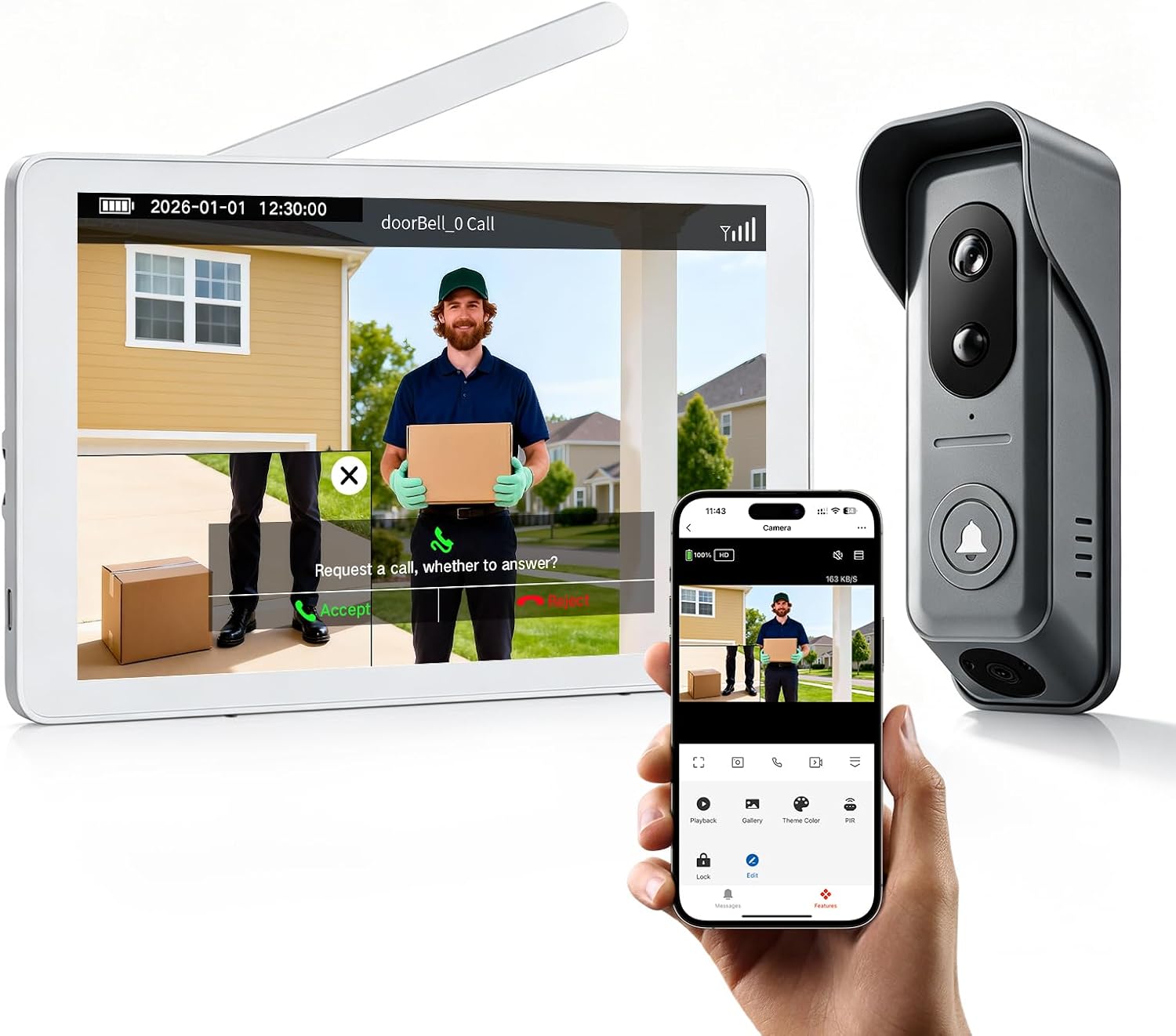
This ACEBELL kit pairs a dual 1080p doorbell camera with an 8‑inch touchscreen indoor monitor to provide a self‑contained wireless doorbell and monitoring system. It is typically installed at the front door and set up either wire‑free using the internal batteries or wired to existing doorbell power; the outdoor unit offers two wide‑angle cameras (main 160 degrees, sub 130 degrees) for broader coverage and infrared night vision that switches automatically. The monitor supports local recording to the included 32 GB card, shares clips to the TuyaSmart app for remote viewing, and offers two‑way audio and PIR motion alerts with adjustable sensitivity. Practical benefits include no monthly fees for storage, dual‑band Wi‑Fi support for remote access, and an IP55 rating for weather resistance. Limitations to consider are dependence on battery life for truly wireless operation (monitor and camera have different battery needs), possible signal degradation through metal surfaces or multiple walls, and the monitor's internal battery requiring frequent charging if left unplugged for long monitoring sessions.
Best for: Buyers who prioritize a self‑contained, monitor‑based wireless doorbell that avoids subscription storage and delivers reliable local recording and remote app access.
Less Ideal for: People who need continuous always‑on cloud recording or who cannot place the monitor near power for prolonged use should consider alternatives.
- Dual 1080p cameras with wide angles to cover more approach angles
- Local recording to included 32 GB card with no subscription required
- 8‑inch touchscreen indoor monitor for local control and live view
- PIR motion detection with adjustable sensitivity and push alerts
- Supports dual‑band Wi‑Fi and TuyaSmart app for remote access and multi‑user sharing
- Monitor battery life is limited for extended unplugged use
- Wireless signal can be affected by metal surfaces and multiple walls
Verdict: Choose this kit if you want a subscription‑free, monitor‑centric wireless doorbell with dual 1080p cameras and local storage for reliable home entry monitoring.
TKMARS Doorbell Camera 016

| Video Capture Resolution | 1080p |
|---|---|
| Viewing Angle | 170 degrees |
| Screen Size | 4.3 inches |
| Power Source | Battery Powered |
| Night Vision Range | 2 meters |
This TKMARS doorbell camera is designed as a self-contained home entry system that connects the outdoor unit directly to a dedicated 4.3-inch IPS monitor indoors, eliminating the need for WiFi, an app, or cloud subscriptions. It records 1080p video, captures up to about 50 photos on internal memory, and supports local recording to a TF card (8–32GB) for MP4 clips when inserted. The push-to-talk two-way intercom uses a walkie-talkie style hold-to-speak operation that is simple for children or seniors, and the 170 degree lens plus IP65 weather resistance make it practical for most doorways. Rechargeable batteries power both units, with the doorbell rated for long standby and the monitor intended for mains power with a small backup battery. Expect easy, tool-free installation and a solid privacy profile since data stays local, but be aware range can drop significantly through walls and advanced features like app alerts, cloud history, or smart-home integration are not available on this model.
Best for: Buyers who prioritize privacy, simple setup, and a self-contained solution for monitoring an entrance without relying on smartphones or cloud services.
Less Ideal for: Users who want smartphone notifications, cloud storage, smart-home integration, or long-range/wide-area remote access should consider WiFi-enabled alternatives.
- Direct monitor-to-doorbell pairing requires no WiFi, app, or subscription for simpler setup and improved privacy.
- 1080p camera and 170° field of view provide clear, wide coverage of most entry areas.
- Supports local TF card video recording and automatic photo capture without cloud storage.
- IP65 weatherproofing and rechargeable batteries make it suitable for outdoor use and occasional power outages.
- 4.3" IPS dedicated monitor offers one-click answering that is easy for less technical users.
- Push-to-talk intercom can produce audio echo if monitor is placed too close to the doorbell.
- Limited transmission range and penetration through walls compared with WiFi/cloud systems may restrict placement options.
- Monitor is not intended for continuous long-term wireless use and needs mains power for reliable operation.
Verdict: Choose this kit if you want a private, plug-and-play video doorbell with a dedicated indoor monitor and no WiFi or subscription required.
Choosing the Right Wireless Video Doorbell with a Monitor: Key Factors to Consider
Video Resolution and Low-Light Performance
Higher resolution and good low-light imaging make it easier to identify visitors and capture useful details on footage. Look for doorbell cameras that provide at least 720p to 1080p resolution and expose low-light sensors or IR illumination so the image remains usable at dusk or at night.
Poor nighttime performance or heavy compression can render footage useless when you most need it. Also consider how the monitor handles scaling and whether it can display a crisp live feed from different distances so you can quickly assess the scene without guessing.
Monitor Size, Placement, and User Interface
A larger, high-contrast monitor is easier to glance at from across a room, while touch or button-driven interfaces affect daily usability. Consider where you will place the monitor and whether it needs wall-mounting, tabletop stability, or battery operation for portable viewing.
The monitor UI should make it simple to switch live view, review saved clips, and talk to visitors. If multiple household members need access, check how the monitor handles multiple user profiles or simple shared operation without requiring extra devices.
Wireless Connectivity and Signal Range
The functional distance between the outdoor camera and the indoor monitor determines reliability. Construction materials, distance, and interference can reduce range, so choose systems rated for your home's layout and typical interference environment.
Some systems use dedicated RF links between camera and monitor instead of Wi-Fi to improve local reliability. Verify advertised range and prefer models with clearer specifications on expected indoor performance. A stable connection reduces missed rings and ensures live video is available when you need it.
Audio Quality and Conversation Latency
Two-way audio must be intelligible at both ends and have minimal delay to make doorstep conversations feel natural. Speaker volume, microphone sensitivity, and echo suppression vary substantially between units, which affects whether you can hear a quiet visitor or if background noise drowns out speech.
If you plan to use the intercom function in noisy environments, prioritize systems with adjustable volume, noise reduction features, and clear microphone placement so both parties can communicate without shouting.
Power Options and Installation Needs
Consider whether you want a battery-powered doorbell for easy, drill-free installation or a wired option that provides continuous power. Battery units trade off periodic recharging or replacement for installation simplicity, while wired systems avoid downtime but may require access to existing doorbell wiring or professional help.
Also check whether the monitor requires its own power source, if it supports battery backup, and how the camera handles power-saving modes that affect motion detection and live view responsiveness.
Local Storage and Privacy Controls
Local recording options let you retain footage without relying on subscription-based cloud services. Look for doorbells that offer microSD slots, local network storage, or monitor-based clip saving so events are preserved on-site.
Privacy controls such as configurable motion zones, time-based recording schedules, and the ability to disable remote access are important if you want to limit data sharing. Verify how easily you can manage storage capacity and export clips when needed.
Wired Vs Battery Doorbells With Monitors
Both power approaches have tradeoffs. Battery doorbells reduce installation complexity and let you place the camera where it has the best view without running cable, but they require periodic recharging or battery swaps. Wired doorbells can offer continuous operation and may support higher-power features such as stronger night illumination, but installing them may require access to existing chime wiring or an electrician.
The monitor's power setup is also important. Some monitors run on mains power and stay permanently on, while others include rechargeable batteries for portable viewing. Match the camera and monitor power styles to your tolerance for maintenance and where you want to place the monitor in the home.
- Battery models: easy placement, periodic maintenance
- Wired models: continuous operation, higher-power features
- Monitor power: fixed placement vs portable viewing
Placement Tips to Maximize Coverage
Position the doorbell at about chest height angled slightly downward to capture faces naturally while minimizing distortion. Avoid pointing the camera directly at strong backlighting like reflective windows or direct sunlight that can wash out the image.
For the indoor monitor, choose a central, high-traffic area where quick glances are useful but the screen does not become a distraction. If the monitor is portable, test several spots to find the balance between signal strength and visibility.
- Mount camera at chest height and angle for faces
- Avoid direct backlight and reflective surfaces
- Place monitor in a central, visible location
Network and Interference Practicalities
Interference from Wi-Fi networks, cordless phones, and neighboring devices can affect systems that use Wi-Fi for video transmission. If the system uses a proprietary RF link between the camera and monitor, it can reduce dependence on home Wi-Fi but still be affected by thick walls and distance.
Before buying, identify likely monitor locations and test signal strength if a store demo is available, or estimate range needs based on home size and construction. Consider adding a dedicated Wi-Fi access point or a signal extender if you must use a Wi-Fi-based system across a large or segmented house.
- Check if the system uses Wi-Fi or a proprietary RF link
- Assess wall thickness and typical interference sources
- Plan for extenders or access points for large homes
Privacy and Legal Considerations
Place cameras to avoid capturing neighbors' private property or public areas you are not authorized to record. Use configurable motion zones and privacy masking features to limit recording to your doorway and immediate approach paths.
Check local laws or community rules about recording audio and video. Some jurisdictions require notice or consent to record audio, so use the monitor's privacy controls and labeling to stay compliant and respectful.
- Use motion zones to limit unwanted captures
- Avoid pointing cameras at neighbors' windows
- Confirm local rules on audio and video recording
Monitoring Multiple Entrances
If you need coverage for more than one entry, consider systems that support adding a second camera tied to the same monitor or that offer multi-monitor setups. Confirm how easily the monitor switches between feeds and whether it can display a split view or quick toggle.
Think about how you want notifications and manual access to other cameras. Some monitors provide a one-button cycle through cameras, while others require a menu selection. Choose the interaction model that fits your household routines.
- Verify multi-camera support and feed switching
- Consider split screens or quick toggles for faster checks
- Plan monitor placement if using multiple screens
How We Chose the Best Wireless Video Doorbell with a Monitor
We selected products that deliver consistent local live-view monitoring through a dedicated indoor screen and that simplify everyday door monitoring for typical homes. Key evaluation dimensions included video resolution and low-light performance to ensure clear identification at varying times of day; monitor screen size, brightness, and mounting flexibility for practical indoor placement; wireless connectivity reliability and range to reduce dropouts between the outdoor unit and the monitor; two-way audio clarity and speaker/microphone placement to support easy conversations at the door; power options and battery life or wiring compatibility to match different installation preferences; and storage options for local recording or snapshot capture to preserve important events without mandatory cloud subscriptions. We excluded units that require complex network configurations, setups that depend solely on smartphones without a dedicated monitor, and products that do not provide at least basic local recording or on-device snapshot features. The shortlist favors systems that balance out-of-the-box simplicity with durable wireless performance and straightforward monitoring for everyday use.
Our full evaluation process is outlined in our review methodology.
FAQ
Do monitors for wireless doorbells need their own internet connection?
Not always. Some monitor-and-doorbell systems use a direct wireless link between the camera and the monitor and can operate without internet. Others rely on Wi-Fi and may need internet for remote viewing and cloud features. Check the product's connectivity model before buying.
Can I record footage locally instead of using cloud storage?
Many doorbell systems with monitors offer local storage options such as microSD slots or monitor-based clip saving. Local recording keeps footage on-site and can reduce ongoing fees, but check storage limits and export options for long-term retention.
How often will I need to recharge a battery-powered doorbell?
Battery life varies based on activity levels, motion alerts, and how often you view live video. Typical battery-powered doorbells last from a few weeks to several months between charges. Lowering motion sensitivity and reducing frequent manual live checks can extend run time.
Will bad weather affect performance?
Outdoor doorbell cameras are usually rated for weather resistance, but extreme conditions can degrade video clarity or wireless signal. Check the unit's weather rating and position the camera under some shelter when possible to improve longevity and performance.
Can a monitor be mounted in multiple rooms?
Some monitors are designed for tabletop use and wall mounting and include battery options for portability. If you want permanently accessible screens in several rooms, confirm whether the system supports additional monitors and how they pair with the camera.
Final Verdict
Choosing a wireless video doorbell with a monitor comes down to prioritizing the features you use most: clear day-and-night video for identification, a reliable wireless link for consistent live feed, and a monitor that fits where you will actually check the door. Balance installation ease against ongoing maintenance when deciding between battery and wired cameras, and factor in local storage and privacy controls if you prefer on-site recordings. Focus on the concrete criteria outlined here when evaluating options and prioritize video clarity, monitor usability, and connection reliability. Those tradeoffs will guide you to an option that provides dependable, immediate doorstep awareness for everyday use.