
Note: This article contains affiliate links. If you click on these links and make a purchase, we may earn a small commission at no extra cost to you. This helps support our research and content. Read our full affiliate disclosure here.
If you want a more convenient, secure way to lock and unlock your doors, Z-Wave smart locks put networked access control on your home automation hub. The right Z-Wave smart lock makes daily entry effortless while protecting against tampering and preserving battery life. This guide covers six top shortlisted options chosen for reliable Z-Wave integration, strong security features, and realistic daily performance. Below we summarize the key evaluation points you should consider and why each shortlisted lock earned a spot, then walk through practical buying factors to help you pick the best fit for your setup.
Top Picks at a Glance
| Best Quality Built to a higher standard if you want something more solid | Schlage Connect BE469 Century Deadbolt |  |
| Best Value The sweet spot between price and what you get | Yale Assure Lock Touchscreen YRD226 |  |
| Best Budget The cheapest option that still gets the job done reliably | Alfred DB1-C Smart Deadbolt |  |
| Top Rated A top-rated pick with lots of positive feedback | ULTRALOQ Bolt Z-Wave Deadbolt |  |
| Most Popular A crowd favorite that many people choose with confidence | Kwikset SmartCode 888 Z-Wave |  |
| Best Seller A high-volume bestseller chosen again and again | Kwikset HomeConnect 620 |  |
Schlage Connect BE469 Century Deadbolt

| Connectivity Protocol | Z-Wave |
|---|---|
| Controller Type | Amazon Alexa, Google Assistant, Nexia, SmartThings, Vera |
| Lock Type | Keypad |
| Additional Features | Alarm, Touchscreen |
The Schlage Connect BE469 Century is a heavy-duty touchscreen deadbolt designed to integrate into Z-Wave smart home systems. It provides keyless entry via a backlit touchscreen that stores up to 30 unique access codes, and includes a fingerprint-resistant surface for everyday use. Paired with a compatible hub the lock can be controlled remotely and tied into automations and alerts, and it uses S2 Security for encrypted Z-Wave connections. Installation is straightforward with a snap-in design and runs on four AA batteries with a low-battery indicator and roughly a year of typical battery life. Build quality is solid metal hardware with an ANSI/BHMA Grade 1 certification and a built-in alarm for forced-entry detection. Limitations to note are the requirement of a Z-Wave hub for remote features and that advanced integrations depend on the hub or security system you choose rather than the lock alone. If you prioritize a durable, hub-compatible smart lock with keypad access and proven security standards, this model delivers practical performance.
Best for: Buyers who want a high-performance, professionally rated smart deadbolt that integrates with Z-Wave home automation and prioritizes durability and secure remote control.
Less Ideal for: Users who need a fully standalone Wi‑Fi lock without a hub or those who prefer app-native remote control without adding a smart home controller.
- Strong ANSI/BHMA Grade 1 mechanical security for residential and light commercial doors
- Z-Wave Plus with S2 Security for encrypted smart home integration
- Stores up to 30 unique access codes with backlit, fingerprint-resistant touchscreen
- Built-in alarm and robust metal construction for added protection
- Battery operation with low-battery indicator and easy screwdriver installation
- Remote locking and advanced automation require a separate Z-Wave hub or security system
Verdict: Choose this lock if you need a robust, Grade 1 Z-Wave deadbolt that delivers secure keypad access and reliable hub-based smart home control.
Yale Assure Lock Touchscreen YRD226

| Connectivity Protocol | Z-Wave |
|---|---|
| Lock Type | Keypad |
| Included Components | Z-Wave Smart Module, Deadbolt Strike, Mounting Hardware, 4 AA Batteries, 2 Keys |
| Controller Type | SmartThings |
The Yale Assure Lock Touchscreen (YRD226) replaces a standard deadbolt with a backlit keypad and Z-Wave smart module so you can use unique entry codes or control the lock from a compatible hub and app. Installation is straightforward with just a screwdriver on most standard doors and the package includes mounting hardware, 4 AA batteries, and two physical keys for backup. The motorized BHMA Grade 2 bolt operates quietly and the lock can be set to auto-relock after closing, which helps reduce the chance of leaving the door unlocked. Because it uses Z-Wave, features such as remote locking, code management, voice control via a hub, and integration with systems like SmartThings or Ring Alarm are possible, though a compatible hub is required and Yale does not use a proprietary app for direct cloud access. Practical touches include a rubber gasket to protect the door finish and battery low alerts, but full smart features depend on the controller you pair it with rather than built-in cloud services.
Best for: Buyers who prioritize a practical, upgradeable smart deadbolt that offers keypad access and reliable motorized locking while fitting into an existing Z-Wave smart home setup.
Less Ideal for: People who want native cloud-based app control or a lock that works standalone with manufacturer cloud services without adding a separate hub.
- Z-Wave module enables integration with compatible smart home hubs for remote control and automation
- Backlit touchscreen keypad supports permanent, scheduled, or temporary user codes for flexible access control
- BHMA Grade 2 motorized deadbolt provides quiet, reliable locking
- Includes physical keys and battery low alerts for reliable backup and maintenance awareness
- Requires a separate compatible Z-Wave hub for remote and voice features rather than offering native cloud connectivity
- Some advanced features and voice control depend on the capabilities of the paired controller and may vary by system
Verdict: A solid, BHMA Grade 2 touchscreen deadbolt that adds Z-Wave smart functionality for buyers who want a dependable, hub-integrated upgrade to a standard door lock.
Alfred DB1-C Smart Deadbolt

| Connectivity Protocol | Bluetooth, Z-Wave |
|---|---|
| Control Method | App |
| Additional Features | Keyless |
| Material Type | Metal |
The Alfred DB1-C is a motorized deadbolt that replaces a standard keyed lock with touchscreen keypad, Bluetooth one-touch entry, and built-in Z-Wave Plus for hub integration. Typical use is front-door access control for homeowners or short-term rental hosts who want keyless entry, temporary or scheduled PIN codes, and remote locking via the Alfred mobile app. Notable features include up to 20 programmable PINs, an emergency micro USB power port, an adjustable latch for standard doors, and compatibility with Z-Wave smart hubs like SmartThings and Vera. In practice the unit offers convenient hands-free entry when your phone is nearby and straightforward app-based code management for guests or service workers. Installation is designed for a standard 2-1/8 inch bore and uses common tools, which keeps setup approachable for DIYers. Limitations to consider are reliance on Bluetooth range for direct phone unlocks and battery power (four AA cells), and the Z-Wave feature requires a compatible hub to enable remote automation beyond basic app control.
Best for: Buyers who want a budget-minded Z-Wave deadbolt that adds keypad and app control without requiring a factory Wi-Fi module, and who prioritize hub integration and straightforward DIY installation.
Less Ideal for: People who need native Wi-Fi remote access without a hub or those who prefer locks with built-in professional monitoring and cellular fallback.
- Built-in Z-Wave Plus enables integration with smart home hubs for automation
- Touchscreen keypad with up to 20 programmable PINs for flexible access control
- Motorized deadbolt provides secure, keyless one-touch entry
- Emergency micro USB power port prevents lockouts if batteries die
- Designed to fit standard door preparations for easy DIY installation
- Depends on four AA batteries for normal operation which require periodic replacement
- Bluetooth unlock range is limited compared with Wi-Fi enabled models
Verdict: A cost-conscious Z-Wave deadbolt that adds keypad, app control, and hub integration for buyers who want smart home automation without paying for built-in Wi‑Fi.
ULTRALOQ Bolt Z-Wave Deadbolt

| Connectivity Protocol | Z-Wave, Z-Wave LR |
|---|---|
| Control Method | App, Push Button, Remote |
| Lock Type | Deadbolt, Keypad |
| Additional Features | Auto-Lock, Back-Lit Keypad, App/Passcode/Key Unlock |
| Weather Resistance | IP65 |
The ULTRALOQ Bolt Z-Wave is a heavy-duty smart deadbolt built around long-range Z-Wave connectivity for reliable remote control and integration with Alarm.com, Home Assistant, and SmartThings. Installation is simple and screwdriver-only, and it supports keypad codes, app unlock, and traditional keyed entry so you can choose the access method that fits each user. Its Z-Wave LR chipset is designed to keep a stable connection across larger properties and detached structures, and ULTRALOQ highlights long battery life using four AA cells. The lock is ANSI BHMA Grade 1 and IP65 rated, so it feels robust for front doors and exterior entry points exposed to weather. Practical benefits include activity notifications, shared codes, auto-locking, and the ability to create automations with other Z-Wave devices. Expect a straightforward DIY setup and strong mechanical security, but plan to use a compatible Z-Wave hub to unlock remote features and full automation capabilities. Overall, this model is aimed at reliability and integration rather than stand-alone Wi-Fi convenience.
Best for: Buyers who prioritize a dependable, professionally graded deadbolt and need robust Z-Wave integration for larger homes or multi-building properties.
Less Ideal for: Users who want a standalone Wi-Fi lock without a hub or who prefer locks with built-in rechargeable batteries and direct cloud setup.
- Z-Wave Long Range chipset for stable, extended-range connectivity
- ANSI BHMA Grade 1 mechanical security
- IP65 weather resistance suitable for exterior doors
- Multiple access methods: keypad, app, and keyed entry
- Easy DIY installation with no wiring required
- Requires a compatible Z-Wave hub for remote access and full smart features
- Uses 4 AA batteries rather than built-in rechargeable power
Verdict: Choose the ULTRALOQ Bolt Z-Wave when you need a highly reliable, Grade 1 deadbolt with Z-Wave Long Range for dependable integration across larger properties.
Kwikset SmartCode 888 Z-Wave
| Connectivity Protocol | Z-Wave |
|---|---|
| Controller Type | Amazon Alexa, SmartThings, Vera |
| Additional Features | Auto-Lock, Back-Lit Keypad, Battery Indicator |
| Lock Type | Keyed One Side |
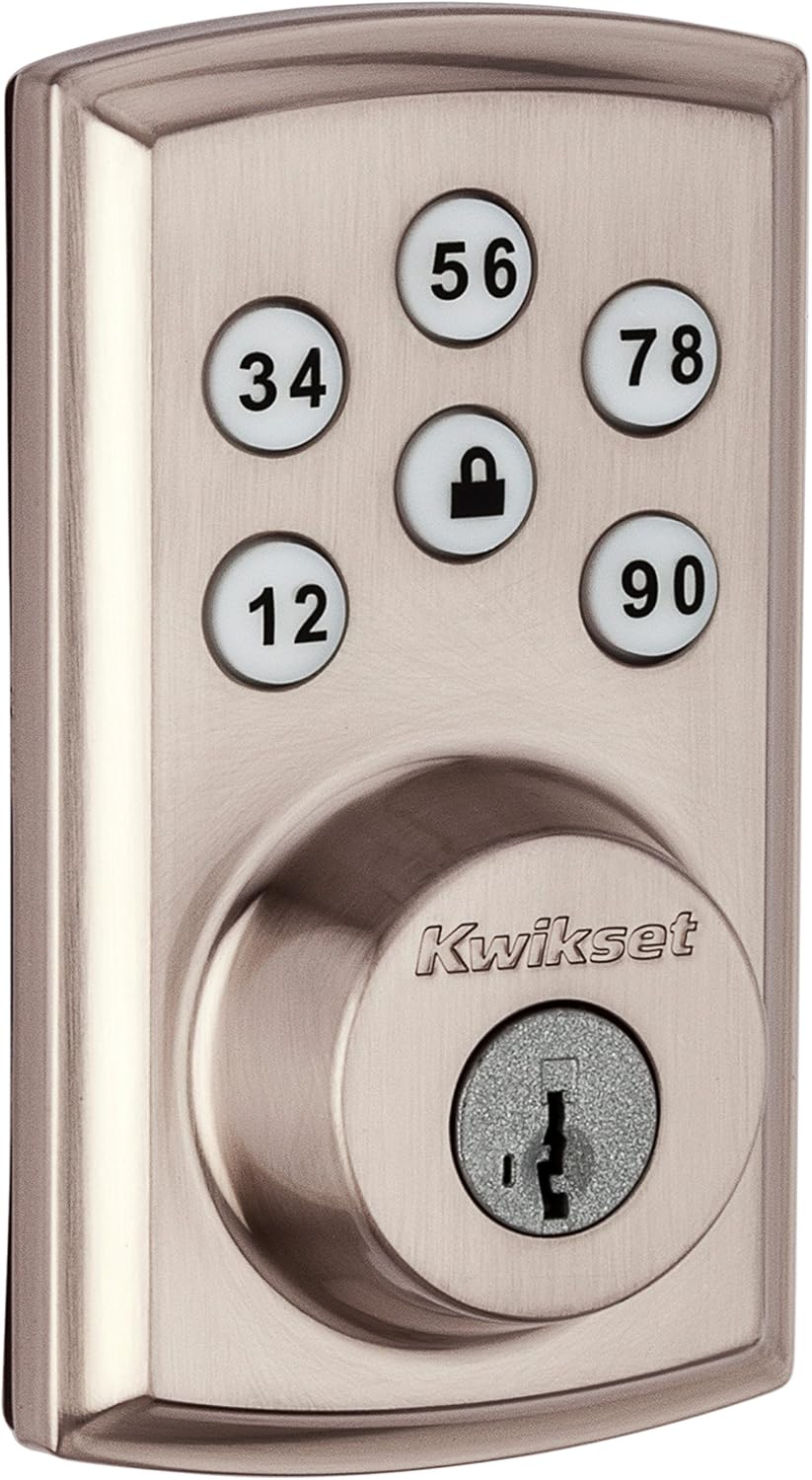
The Kwikset SmartCode 888 Z-Wave is a motorized electronic deadbolt designed to replace a standard single-cylinder deadbolt and add remote control when paired with a Z-Wave hub. It installs with basic tools and runs on four AA batteries, offering a backlit touchpad for entering up to 30 user codes and an automatic relock feature for convenience. Because it uses Z-Wave, the lock can be controlled through compatible systems like SmartThings, Vera, or Z-Wave hubs to lock and unlock remotely and receive notifications. The built-in SmartKey lets you re-key the lock yourself in seconds without removing it, and Bump Guard improves resistance to lock bumping compared with conventional pin-and-tumbler designs. Practical limits include the need for a Z-Wave hub for remote features and reliance on battery power, so users should plan battery replacement and hub setup; the lock does not include Wi-Fi on its own. For buyers who want a straightforward, factory-quality smart deadbolt that ties into a Z-Wave network, this model balances usability, security features, and DIY-friendly installation.
Best for: Buyers who prioritize proven security features and want a Z-Wave smart deadbolt that integrates with an existing home automation hub while offering multiple user codes and easy re-keying.
Less Ideal for: Users who need a standalone Wi-Fi lock without a hub or those who prefer locks with built-in cloud services and native smartphone connectivity out of the box.
- Z-Wave compatibility enables remote control and automation through supported hubs
- Backlit touchpad stores up to 30 user codes for flexible keyless access
- SmartKey re-key technology allows quick re-keying without removing the lock
- Motorized deadbolt with automatic relock improves convenience and security
- Bump Guard design offers better resistance to lock bumping than standard pin-and-tumbler locks
- Requires a Z-Wave hub for remote access and notifications
- Depends on four AA batteries so performance drops if batteries are low
Verdict: Choose this Kwikset if you want a reliable, Z-Wave smart deadbolt with robust local security features and easy DIY installation that ties into your existing hub.
Kwikset HomeConnect 620

| Connectivity Protocol | Z-Wave |
|---|---|
| Additional Features | Auto-Lock, Back-Lit Keypad, Battery Indicator, One-Touch Lock, Passcode Unlock |
| Lock Type | Deadbolt, Keypad |
| Control Method | Touch |
The Kwikset HomeConnect 620 is a touchscreen keypad deadbolt designed to replace a standard exterior deadbolt and tie into a Z-Wave smart home hub. It provides keyless entry via a backlit keypad, customizable user codes (up to 250), and one-touch locking for daily convenience, while included physical keys preserve a mechanical backup. The lock uses Z-Wave 700 Long Range for extended hub connectivity and supports SmartStart and S2 encryption for more secure pairing with compatible hubs and systems like Ring Alarm. Practical benefits include auto-lock scheduling, a battery indicator and an advertised 12-month battery life using four AA cells, plus a relatively straightforward screwdriver-only installation. Important limitations are that it requires a separate Z-Wave hub for remote control and advanced automation, and some buyers may need to verify compatibility with their chosen hub before purchase. The lock prioritizes secure, familiar operation and long-range Z-Wave connectivity over standalone Wi-Fi control.
Best for: Buyers who prioritize secure, hub-based smart lock integration and long-range Z-Wave connectivity and want a familiar keypad experience with robust code management.
Less Ideal for: Users wanting standalone Wi-Fi remote access without purchasing a hub or those who prefer voice or cloud-native smart lock setups without a dedicated Z-Wave controller.
- Z-Wave 700 Long Range for improved hub connectivity across larger homes
- S2 encryption and SmartStart support for more secure and simplified hub pairing
- Back-lit touchscreen keypad with support for up to 250 user codes
- Auto-lock scheduling and one-touch lock for everyday convenience
- Includes keys and installation hardware for screwdriver-only installation
- Requires a separate Z-Wave hub for remote control and smart integrations
- No built-in Wi-Fi, so smartphone control depends on hub compatibility
Verdict: Choose this lock if you want a secure, long-range Z-Wave keypad deadbolt that integrates cleanly with a hub for reliable smart-home control.
Choosing the Right Z-Wave Smart Lock: Key Factors to Consider
Z-Wave Compatibility and Security Level
Z-Wave compatibility matters because it determines how reliably a lock will pair with and respond to your existing hub. Look for explicit support for modern Z-Wave stacks and mention of S2 security or equivalent encryption standards.
Security level affects both wireless communications and local access control. Locks that support advanced Z-Wave security modes reduce the risk of interception or replay attacks. Confirm whether the lock supports secure inclusion, encrypted command classes, and firmware updates to address future vulnerabilities.
Mechanical Fit and Door Preparation
A good mechanical fit reduces rattles, misalignment, and premature wear. Check whether the lock is compatible with your deadbolt type and backset, and whether it requires modifying the door or strike plate.
Door preparation also influences installation time and long-term reliability. Some locks are drop-in replacements for common single-cylinder deadbolts, while others need shims or new strike plates for secure mounting. Consider door thickness and handle clearance when planning an install.
Battery Life and Low-Power Behavior
Battery life determines how often you need to replace cells and how the lock behaves when power is low. Longer battery life reduces maintenance and the risk of lockouts, while clear low-battery alerts let you act before access is affected.
Also evaluate how the lock handles emergency power scenarios. Some locks accept a temporary external power source to unlock when the batteries are dead, while others provide physical override features. Consider typical household usage and the consequences of extended outages.
Access Control and User Management
How you create, share, and revoke access codes or digital keys matters for household security and convenience. Look for straightforward scheduling, temporary codes, and a clear user management interface either on the hub or through local configuration.
Consider whether access events are logged and how easily you can audit who entered and when. Locks that work with your hub may centralize user management, whereas locks that rely on local code programming require a different workflow for guests and service personnel.
Installation Complexity and Tools Required
Installation complexity ranges from true drop-in swaps to multi-step custom installations. Evaluate whether you can install the lock yourself with basic tools or whether it requires drilling, wiring, or professional help.
Clear instructions and available online resources shorten setup time and reduce frustration. Also consider whether the lock needs firmware updates immediately after installation and whether those updates can be applied over the air via Z-Wave.
Maintenance, Firmware Updates, and Support
Ongoing maintenance includes battery replacement, firmware updates, and occasional re-calibration. Locks with straightforward user-replaceable batteries and accessible update mechanisms reduce long-term ownership friction.
Good manufacturer or community support matters if you run into pairing problems or need firmware patches. Confirm the availability of firmware updates via Z-Wave and whether the vendor publishes update notes so you can track security improvements.
Preparing Your Door and Deadbolt
Before you start installation, inspect the door, deadbolt, and strike plate. Ensure the deadbolt extends and retracts smoothly and that the door frame is square. Tighten loose screws and test the existing hardware to identify potential alignment issues.
Measure backset and door thickness so you can confirm mechanical compatibility. If the new lock requires a different strike plate position, mark and pre-drill carefully. Taking these preparatory steps reduces the risk of an incorrect fit and makes the final installation faster.
- Check deadbolt type and backset measurement
- Verify door thickness range and clearance
- Test existing deadbolt operation before removal
- Tighten or replace loose screws on the strike plate
Integrating With Your Home Automation Hub
Z-Wave locks typically pair to a hub using secure inclusion. Place the hub and lock within recommended range during the initial pairing and follow any secure inclusion steps required by the hub. Some hubs require putting the hub into inclusion mode first, then activating the lock's inclusion sequence.
After pairing, confirm basic commands such as lock, unlock, and battery status work reliably. Test automations and scenes that include the lock and verify event reporting so you know when remote commands fail or are blocked by security settings.
- Put hub in inclusion mode before starting
- Test lock/unlock commands and status reporting
- Verify scene and automation triggers after pairing
Managing Access Codes and Temporary Entry
Decide how you will issue temporary or recurring access codes for guests, cleaners, or service personnel. Use scheduling where available to automatically expire codes and reduce manual management burden.
If your hub centralizes user management, create groups or roles for different access levels. Keep a rotation schedule for codes used by frequent contractors to limit long-term exposure.
- Prefer time-limited codes for temporary access
- Use centralized management when available
- Audit access logs regularly to spot unusual activity
Troubleshooting Common Installation Issues
Common problems include misaligned strike plates, noisy operation from loose hardware, and pairing failures due to range or interference. Start by checking the physical installation, then move to the hub and radio environment if issues persist.
For pairing failures, restart the hub and follow the lock manufacturer's secure inclusion instructions. If radio range is the issue, consider temporary relocation or using a Z-Wave repeater on the same network to improve connectivity.
- Re-check mechanical alignment and tighten mounting screws
- Restart hub and repeat secure inclusion steps
- Use a repeater to mitigate range and interference problems
Maintaining Security Over Time
Keep firmware current and apply security updates when available. Periodic firmware updates can close vulnerabilities and improve compatibility with hub software updates.
Rotate temporary codes regularly and remove unused users. Revoke access promptly when a keyholder no longer requires entry, and enable logs or notifications so you receive alerts on unusual activity.
- Apply firmware updates via your hub when possible
- Regularly audit and prune user access
- Enable notifications for lock events and failed attempts
How We Chose the Best Z-Wave Smart Lock
We screened locks that use the Z-Wave radio protocol and prioritized devices that integrate cleanly with commonly used home automation hubs. Our evaluation emphasized concrete, measurable features that affect day-to-day use: Z-Wave compatibility and pairing reliability, encryption and tamper protection, mechanical build and fit for standard deadbolts, battery life and power management, and installation clarity for homeowners. Products were excluded if they relied primarily on other wireless standards, lacked clear Z-Wave S0/S2 security support, or required specialized hardware beyond a typical hub. We also excluded locks that do not offer clear mechanical compatibility with standard US deadbolts or that lacked documented firmware update paths. The shortlist favors locks with clear technical documentation, proven battery longevity, and robust local and remote access controls. We weighted pairing reliability and security highest because these directly impact both automation reliability and resident safety. Installation effort, ongoing maintenance, and support resources were also considered to reflect real-world ownership.
Our full evaluation process is outlined in our review methodology.
FAQ
Will a Z-Wave smart lock work with my existing deadbolt?
Often it will, but compatibility depends on deadbolt type, backset, and door thickness. Many Z-Wave locks are designed as retrofit kits for common single-cylinder deadbolts. Measure your door and review mechanical fit specifications before purchasing.
How secure is Z-Wave compared with other wireless standards?
Z-Wave supports secure inclusion and modern encryption standards such as S2 when implemented. Security depends on both the lock's firmware and proper setup. Use secure inclusion and keep firmware updated to maintain strong protections.
What happens when the batteries die?
Most locks provide low-battery alerts through the hub and allow manual physical key override. Some models accept a temporary external power input to unlock in emergencies. Plan for routine battery replacement and note how the lock signals low power.
Can I automate locking and unlocking based on presence?
Yes. When integrated with a hub that supports presence detection or geofencing, you can create automations to lock or unlock based on device presence. Test automations carefully to avoid unintended unlocks, and consider safety rules that require confirmation for remote unlocks.
Do Z-Wave locks require an internet connection to operate?
No. Local lock and unlock operations over Z-Wave can work without internet access when commands come from a local hub. Remote access typically requires the hub to have internet connectivity or a gateway that exposes remote control securely.
Final Verdict
Focus first on secure Z-Wave integration and mechanical compatibility when choosing a smart lock. Prioritize locks that support secure inclusion, offer clear battery-life management, and fit your door without significant modification. Balance installation complexity against the access control features you need. If you rely on automations and centralized user management, emphasize pairing reliability and firmware update paths. For straightforward home use, mechanical fit and low maintenance often deliver the best long-term experience.