
Note: This article contains affiliate links. If you click on these links and make a purchase, we may earn a small commission at no extra cost to you. This helps support our research and content. Read our full affiliate disclosure here.
If you want dependable, locally controlled automation for lamps, small appliances, or holiday lights, Z-Wave smart plugs are a practical way to add on/off scheduling and remote control to outlets. Choosing the right Z-Wave smart plug matters because differences in range, load rating, and feature set affect safety and day-to-day reliability. This guide covers seven shortlisted Z-Wave smart plugs that represent the most useful feature sets for typical homes. We evaluated each pick for network performance, electrical capacity, installation ease, and ongoing usability so you can match a plug to where and how you intend to use it. Read on for the key considerations that should guide your choice and the criteria we used to select these top options.
Top Picks at a Glance
| Best Overall The best all-around choice for most situations | GE Enbrighten Z-Wave Plug-In Switch |  |
| Best Quality Built to a higher standard if you want something more solid | Leviton Decora Smart DZPA1 Plug-In Outlet | 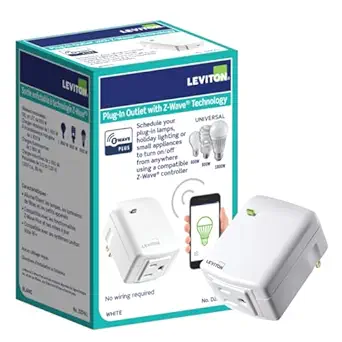 |
| Best Value The sweet spot between price and what you get | new one Z‑Wave Smart Plug N4011-800 |  |
| Best Budget The cheapest option that still gets the job done reliably | NEO Z-Wave Smart Mini Plug |  |
| Top Rated A top-rated pick with lots of positive feedback | Zooz ZEN04 800LR Smart Plug |  |
| Most Popular A crowd favorite that many people choose with confidence | Minoston Z‑Wave Smart Plug MP21Z |  |
| Best Seller A high-volume bestseller chosen again and again | Minoston Z‑Wave Smart Plug MP21Z |  |
GE Enbrighten Z-Wave Plug-In Switch
| Wattage | 1800 watts |
|---|---|
| Switch Type | 1-way |
| Mounting Type | Plug-In Mount |
| Switch Style | 2-outlet Switch |
| Certification | cULus |
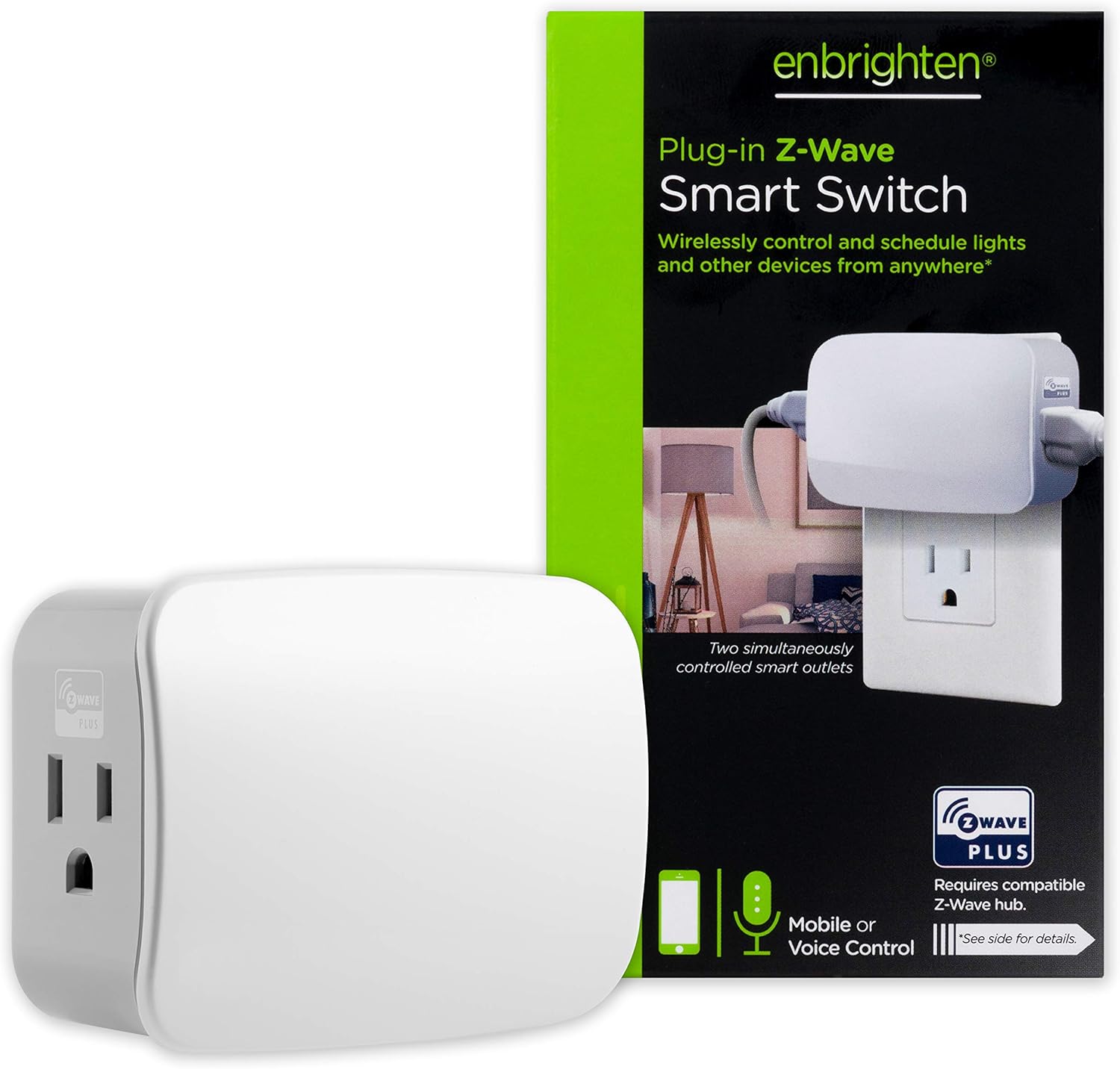
The GE Enbrighten Z-Wave Plug-In Switch is a compact smart outlet that plugs into a standard indoor receptacle and gives Z-Wave control of two grounded outlets at once. Once paired to a compatible Z-Wave certified hub, it supports remote on/off, scheduling, and voice control via assistants linked to the hub. The unit is rated for typical lamp and small-appliance loads up to 1800 watts and is backward compatible with older Z-Wave devices thanks to Z-Wave Plus support and repeater functionality. Installation is simple with no wiring required and the slim form factor preserves the second outlet behind furniture. The main limitation is that the two outlets operate together rather than independently, so you cannot control each plug separately, and a separate hub is required to unlock smart features. For buyers who want a reliable, hub-based Z-Wave plug that extends network range and controls two devices simultaneously, this is a practical, straightforward choice.
Best for: Buyers who want a dependable, hub-based Z-Wave plug that extends network coverage and easily automates lamps or small appliances without rewiring.
Less Ideal for: Customers who need independent control of two separate outlets or who prefer a cloud-only Wi-Fi plug that does not require a hub.
- Z-Wave Plus support for better range and backward compatibility with older Z-Wave devices
- Two grounded outlets controlled wirelessly to operate two lamps or small appliances together
- Plug-in installation requires no wiring and fits behind furniture thanks to a compact profile
- Works with many major Z-Wave certified hubs for scheduling, scenes, and voice control via linked assistants
- Both outlets switch together and cannot be controlled individually
- Requires a Z-Wave certified hub to access remote control and voice features
Verdict: A reliable Z-Wave Plus plug-in switch for hub-based home automation that controls two devices together while also boosting Z-Wave range.
Leviton Decora Smart DZPA1 Plug-In Outlet

| Voltage | 120 volts |
|---|---|
| Connector Type | Plug In |
| Plug Type | Type B |
| Amperage | 15 A |
The Leviton Decora Smart DZPA1 is a plug-in Z-Wave Plus smart outlet designed to add remote on/off control and scheduling to lamps, fans, holiday lighting, and small appliances without new wiring. You install it by plugging the unit into a standard 120V receptacle, enrolling it to a Z-Wave hub such as SmartThings or Wink, then plugging your device into the DZPA1. It supports two-way status updates so the hub shows immediate on/off state, and it preserves the last ON/OFF state through minor power interruptions. The unit handles general 15A loads and is rated for a range of lighting and motor loads including 1/2 HP motors, making it suitable for heavier plug loads than many consumer smart plugs. Because it requires a hub, it integrates well into multi-device scenes, schedules, and voice setups via a hub-linked assistant. The key limitations are hub dependence for remote control and the lack of built-in Wi‑Fi, so it is not a standalone, cloud-free option for users who do not already run a Z-Wave controller.
Best for: Buyers who prioritize reliable Z-Wave mesh performance and need a plug-in outlet that can handle heavier lamp and motor loads within a hub-based smart home setup.
Less Ideal for: Casual users who want a standalone Wi‑Fi smart plug or those without any Z-Wave hub in their home should consider hubless alternatives instead.
- Z-Wave Plus certified for reliable mesh networking and hub integration
- Handles up to 15A and 1/2 HP motor loads suitable for heavier plug-in appliances
- Two-way status updates preserve accurate state reporting in the hub
- Simple plug-and-play installation with no wiring required
- Requires a separate compatible Z-Wave hub for remote control and voice integration
- No native Wi‑Fi or hubless operation
Verdict: Choose the DZPA1 if you need a hub-integrated Z-Wave plug that reliably handles heavier plug-in loads and participates in scene-based automations.
new one Z‑Wave Smart Plug N4011-800

| Current Rating | 15 A |
|---|---|
| Operating Voltage | 125 volts |
| Connectivity Protocol | Z-Wave |
| Wattage | 1875 watts |
| International Protection Rating | IP54 |
The new one N4011-800 is a compact Z-Wave smart plug that adds remote app and voice control to standard outlets while also acting as a mesh repeater. It pairs to a Z-Wave hub using the 800 series chip for extended range — the manufacturer cites up to 1,300 feet in open areas — and supports S2 security with a unique DSK QR code for encrypted pairing. Setup is done through your Z-Wave hub (SmartThings, Hubitat, Vera, Wink and others) using Smart Start or a button press, and the plug exposes basic on/off control plus scheduling in the hub app. The slim housing is designed so two plugs can sit side-by-side in a duplex receptacle, and the unit is rated for typical household loads up to 1875 watts. Practical benefits include expanded network coverage from its repeater function and peace of mind from S2 encryption, but you will need a compatible Z-Wave hub to use it and it will not pair with certain hubs like Echo Plus or Vivint.
Best for: Buyers who want to extend a Z-Wave mesh and reliably control outlets from a hub while prioritizing secure pairing and compact form factor.
Less Ideal for: Users who do not already have a Z-Wave hub, or who need advanced standalone app features or guaranteed compatibility with proprietary hubs like Vivint.
- 800 series Z-Wave chip for longer transmission range (up to 1300 ft in open areas)
- Built-in Z-Wave repeater that boosts mesh coverage up to four hops
- S2 security with unique DSK QR code for encrypted pairing
- Compact side-by-side design fits two plugs in a duplex outlet
- Supports common appliance loads up to 1875 watts
- Requires a separate Z-Wave hub and is incompatible with some hubs like Echo Plus and Vivint
- Limited to basic on/off control and scheduling via the hub rather than advanced standalone app features
Verdict: Choose this compact, S2-secure Z-Wave plug if you want to extend your Z-Wave mesh and control outlets through a hub with reliable range and encrypted pairing.
NEO Z-Wave Smart Mini Plug

| Amperage | 15 A |
|---|---|
| Voltage | 110 volts |
| Plug Type | Type A |
| Radio Protocol | Z-Wave |
The NEO Z-Wave Smart Mini Plug is a compact plug-in module that adds simple remote on/off control and basic energy monitoring to Z-Wave systems. You install it by plugging into a standard Type A outlet and pairing it with a Z-Wave hub where it reports power use and accepts on/off commands and timers. It also operates as a signal repeater, which can help extend Z-Wave coverage in larger homes. The unit supports 110–230V input and a 15 A maximum current rating, and it carries ETL and FCC certifications for safety. Expect straightforward, reliable switching and usable energy readouts on compatible hubs like SmartThings, but know it does not provide advanced power regulation, detailed scheduling parameters, or extensive hub-specific integrations, so power-hungry or highly configurable device control is outside its scope. For buyers focused on a low-cost way to add basic automation and boost Z-Wave range, this plug delivers what matters without complexity.
Best for: Buyers who want an inexpensive, no-frills way to add remote on/off control and basic energy monitoring to a Z-Wave system while also improving network coverage.
Less Ideal for: Users who need fine-grained power control, complex automation rules, or guaranteed deep compatibility with every Z-Wave hub should consider a more fully featured smart plug.
- Supports basic on/off control and simple timers via Z-Wave hub
- Built-in energy metering compatible with SmartThings
- Acts as a Z-Wave repeater to extend network range
- Compact plug-in form fits standard Type A outlets and keeps a low profile
- Does not support advanced power regulation or detailed scheduling settings
- Some third-party hubs may show occasional incorrect readings
Verdict: A budget-friendly Z-Wave mini plug that delivers reliable basic on/off control, energy metering, and network repeating for expanding and simplifying a Z-Wave smart home.
Zooz ZEN04 800LR Smart Plug

| Connector Type | Plug-in |
|---|---|
| Amperage | 15 A |
| Power | 110-120 V AC, 60 Hz |
| Z-Wave Range | Up to 300 feet line of sight |
| Maximum Load | 960W incandescent, 150W LED, 15A resistive |
The Zooz ZEN04 800LR is a plug-in Z-Wave smart outlet that brings long-range connectivity, power monitoring, and signal repeating to indoor lamps and small appliances. You install it by plugging into a standard outlet and pairing with a compatible Z-Wave hub; once added it supports scheduling, power reports, and can act as a network range extender on classic Z-Wave networks. The unit uses the 800 series Z-Wave chipset with SmartStart and S2 security for easier pairing and authenticated communications, and reports real-time energy usage to help spot high-draw devices. Practical limits include no dimming control and load caps (15 A resistive, 150 W for LED bulbs), so it is intended for switches and non-dimmable loads rather than motors or high-power appliances. Repeater functionality improves mesh reliability for many setups but is disabled on Z-Wave Long Range networks, so behavior depends on your controller. For buyers who prioritize a secure, robust Z-Wave node with energy data, this delivers a dependable, well-supported option.
Best for: Buyers who want a secure, dependable Z-Wave node with energy monitoring and mesh boosting to increase reliability and visibility in a hub-based smart home.
Less Ideal for: Users who need dimming for lights, want to control very high-wattage appliances, or who require repeater behavior specifically on Z-Wave Long Range-only networks.
- Z-Wave 800 series chipset with S2 security and SmartStart for secure reliable pairing
- Built-in power monitoring gives real-time energy usage for savings and troubleshooting
- Acts as a signal repeater on classic Z-Wave meshes to improve network range
- Rated for standard US outlets and a 15 A resistive load for broad device compatibility
- Lifetime tech support and registration option for extended warranty
- Repeater function is not available when used on Z-Wave Long Range networks
- Does not provide dimming control and has lower wattage limits for LED bulbs
Verdict: Choose the ZEN04 800LR when you need a secure, energy-reporting Z-Wave smart plug that also strengthens your classic Z-Wave mesh for greater day-to-day reliability.
Minoston Z‑Wave Smart Plug MP21Z

| Voltage | 125 volts |
|---|---|
| Amperage | 15 A |
| Plug Type | Plug in |
| Material Type | Polycarbonate (PC) |
The Minoston MP21Z is a mini Z‑Wave 800‑series smart plug designed to add remote control and automation to ordinary appliances through a Z‑Wave hub. You add it to a compatible Z‑Wave controller using SmartStart or the device inclusion process, then use the hub app or voice assistant integrations to turn connected devices on and off, set schedules, and include it in scenes. The 800‑series chipset brings longer range and faster communication, and the plug can act as a signal repeater to strengthen mesh coverage. S2 security protects pairing and data, and the unit supports loads up to 15 A (1875 W), so it handles most household lamps and small appliances. The plug is very small, which helps avoid blocking the second outlet, but that compact size also means the control button and indicator are small and can be fiddly during pairing. A Z‑Wave hub is required and features like dimming or energy monitoring depend on the specific model variant, so check the exact SKU for those capabilities.
Best for: Buyers who want a compact, mesh‑boosting Z‑Wave plug to add reliable remote control and scheduled automation to lamps and appliances while prioritizing secure pairing and real user reviews.
Less Ideal for: Anyone who needs a plug that works without a hub or who requires guaranteed dimming or energy‑monitoring on every unit should consider alternatives or confirm the exact model variant before buying.
- Uses Z‑Wave 800 series for improved range and faster communication
- Built‑in repeater to extend and strengthen Z‑Wave mesh networks
- S2 security and SmartStart make pairing and secure inclusion easier
- Compact form factor that minimizes outlet blocking
- Handles up to 15 A (1875 W) for most household devices
- Requires a Z‑Wave hub or controller to function
- Dimming and energy monitoring are model dependent and not guaranteed for this SKU
Verdict: A compact, secure Z‑Wave 800‑series smart plug that also strengthens the mesh, making it a sensible pick for hub‑based smart homes seeking reliable range and secure pairing.
Minoston Z‑Wave Smart Plug MP21Z

| Voltage | 125 volts |
|---|---|
| Amperage | 15 A |
| Plug Type | Type A |
| Z‑Wave Frequency | 908.42 MHz |
The Minoston MP21Z is a mini Z‑Wave 800 series smart plug designed to add wireless on/off control and scheduling to lamps and small appliances without any wiring. It pairs to a Z‑Wave certified hub and supports S2 security and SmartStart for smoother, authenticated inclusion. The unit is rated for 15 A at 125 VAC, uses the Z‑Wave 908.42 MHz frequency, and includes a built‑in repeater to extend network range when your hub supports long range, which can improve reliability in larger homes. Typical use is simple: plug it into a wall outlet, pair with your hub, and create schedules or scenes to automate lights or devices and reduce standby power. The compact polycarbonate body keeps it from blocking adjacent outlets and ETL/FCC listing indicates basic safety compliance. Limitations are that it strictly requires a Z‑Wave hub (it will not pair directly with Wi‑Fi assistants) and it is intended for indoor plug‑in loads only, so it is not a drop‑in replacement for hardwired in‑wall modules or high current appliances.
Best for: Buyers who prioritize reliable, secure Z‑Wave automation and want a compact plug that extends mesh coverage while adding timed control to lamps and small appliances.
Less Ideal for: Users who need a plug that pairs directly over Wi‑Fi or those wanting a hardwired in‑wall replacement or a device for heavy duty appliances.
- Z‑Wave 800 series chip with S2 security and SmartStart for easier, secure pairing
- Built‑in repeater/extender to improve Z‑Wave network coverage when supported
- Compact design that minimizes blocking the second outlet
- 15 A rating suitable for most lamps and small household appliances
- ETL and FCC listings for basic safety and regulatory compliance
- Requires a Z‑Wave certified hub and cannot connect directly to Wi‑Fi hubs or Echo devices without a hub
- Not intended for permanently wired or very high‑current loads
Verdict: A compact, hub‑based Z‑Wave smart plug that adds secure remote control and mesh repeating for dependable home automation.
Choosing the Right Z-Wave Smart Plug: Key Factors to Consider
Z-Wave Connectivity and Mesh Behavior
A plug's ability to join and strengthen the Z-Wave mesh determines how reliable remote control and automation will be across your home. Devices that act as repeaters extend range and reduce latency for other Z-Wave nodes. Consider whether the plug supports the Z-Wave Plus or newer protocols and whether it is listed as a mains-powered repeater.
Placement matters because wall cavities, appliances, and distance from the hub all affect signal strength. Choose plugs with proven mesh participation for locations that are farther from your hub or where other devices already create a weak link in the network.
Electrical Load Rating and Safety
Check the maximum continuous current and wattage rating. Many smart plugs are rated for lamp loads and small appliances but are not suitable for high-current devices like space heaters or large pumps. Picking a plug with an adequate safety margin reduces the risk of overheating or tripping breakers.
Also look for built-in safety features such as thermal protection, overload detection, and compliance information for relevant electrical standards. Properly rated plugs paired with mindful placement prevent nuisance failures and improve long-term reliability.
Physical Size and Outlet Compatibility
The plug's physical footprint affects whether it blocks adjacent outlets or fits in tight spaces behind furniture. Right-angle designs or slim profiles can be essential for bedside tables, power strips, or duplex outlets. Consider plug orientation and whether the unit includes pass-through outlets if you need continuous power for multiple devices.
Also evaluate how the plug sits in older, recessed, or tamper-resistant outlets. A plug that sticks out excessively can be a trip hazard or get unplugged accidentally, while one that is too large may not physically fit in common outlet layouts.
Local Control, Scheduling, and Automation Features
For many Z-Wave users, local control and scheduling are primary reasons to choose the technology. Confirm which command classes and features the plug exposes to your hub, such as basic on/off, multilevel switching, scene support, and association groups. Local scheduling reduces dependence on cloud services and improves reliability during internet outages.
Also consider manual override options, status LED behavior, and whether the plug supports advanced hub-side automations like conditional triggers or multi-button scenes.
Energy Monitoring and Reporting
Energy monitoring helps you track consumption and identify inefficient appliances. If metering is important, check the plug's measurement resolution, reporting intervals, and whether the hub can access cumulative and instantaneous power data. Higher-quality meters provide more consistent readings that are useful for automation based on usage thresholds.
For basic use, even on/off energy counts can show patterns. For billing-grade monitoring, look for products that document measurement accuracy and sampling rates.
Durability and Environmental Considerations
Consider the expected environment where the plug will be used. Indoor living-room or bedroom use usually requires standard ratings, while garage, workshop, or sun-exposed locations may demand higher durability. Look for plugs with robust housings and temperature tolerance ranges that match your installation area.
Also check whether the device specifies protection against dust or moisture for semi-exposed locations. Durability affects how often you might need to replace a plug and whether it will continue to perform well in marginal conditions.
Where to Place Z-Wave Smart Plugs
Strategic placement optimizes both network performance and convenience. Install repeater-capable plugs in central areas to strengthen the mesh, and reserve higher-capacity plugs for outlets powering heavier loads.
Avoid putting smart plugs in metal enclosures or behind large appliances that can attenuate the Z-Wave signal. Use slim-profile models in stacked outlets or bedside locations to prevent blocking the second receptacle.
- Put repeater plugs near the periphery of the existing mesh to extend coverage.
- Use metering plugs where you want ongoing consumption data, like entertainment centers or home office equipment.
- Reserve compact or right-angle plugs for recessed outlets or narrow bedside tables.
Understanding Z-Wave Command Classes
Z-Wave communication uses command classes to expose device capabilities to your hub. For smart plugs, the common classes are Basic, Switch Binary, Meter, and Association. Knowing which classes a plug supports tells you if the device will report energy usage, accept direct on/off commands, or participate in association-based scenes.
Check the hub's device details after pairing to confirm the available command classes and whether the plug exposes multiple endpoints. This affects what automations and direct-device triggers you can build without intermediary cloud services.
- Basic and Switch Binary handle simple on/off control.
- Meter provides power and energy reporting.
- Association enables device-to-device communication without hub mediation.
Power Limits and Matching Devices to Loads
Match the plug's rated capacity to the intended appliance. Lamps, phone chargers, and small fans typically draw little current and work fine with most smart plugs. High-wattage heaters, microwaves, and air conditioners often exceed the ratings of common smart plugs and should be avoided.
When in doubt, check the appliance nameplate for amperage or wattage. Leave a safety margin and prefer plugs with higher continuous current ratings for devices that cycle on and off frequently.
- Identify the appliance's running wattage before installing a smart plug.
- Avoid using smart plugs with inductive loads like large motors unless explicitly rated for them.
- Consider dedicated heavy-duty outlet solutions for permanently installed high-power equipment.
Energy Monitoring: Practical Uses
Energy monitoring on a plug can reveal phantom loads and help prioritize efficiency upgrades. For example, use metered plugs on entertainment centers, printers, or aquariums to detect unusual patterns or continuous draws when devices should be idle.
Use historical consumption data to schedule when devices should be fully powered down. Metering is especially useful when you want automations that react to thresholds, such as disabling secondary devices when total current exceeds a set limit.
- Track standby draw to reduce phantom power losses.
- Set alerts for unexpected increases in consumption.
- Use cumulative energy readings to estimate appliance run costs.
Maintaining Your Z-Wave Network
Periodic network maintenance ensures responsiveness. Rebuild the mesh from the hub if you move devices or add many nodes at once. Keep firmware current on both the hub and smart plugs if updates are available and documented to be safe.
Label plugs or maintain a simple inventory so you know which outlet each device controls and where metering is active. This helps when troubleshooting automation triggers or unexpected behavior.
- Re-route or relocate repeaters if coverage gaps appear.
- Document device endpoints and their assigned automations.
- Test manual override and local control occasionally to verify reliability.
How We Chose the Best Z-Wave Smart Plug
We prioritized traits that directly influence day-to-day reliability and electrical safety for in-wall or plug-in Z-Wave smart plug use. Our selection criteria focused on connection stability and mesh behavior, load handling and safety features, compatibility with Z-Wave hubs and controller functions, ease of installation and physical footprint, and practical convenience features such as local scheduling, energy monitoring, and manual override. We tested candidate specs and documentation for signal range and whether the device acts as a Z-Wave repeater, checked published maximum continuous current and wattage ratings, and examined supported Z-Wave command classes for hub feature parity. We also considered size and plug orientation to ensure the devices fit common outlet layouts without blocking adjacent sockets. Exclusions included units that lack clear electrical specs, devices that are explicitly battery-only, and smart plugs that require cloud-only control paths without local Z-Wave command handling. The shortlist reflects devices that balance safe electrical capacity, robust mesh participation, and practical installation form factors. Where product documentation was unclear or manufacturer support for local control was absent, we excluded the item from consideration.
Our full evaluation process is outlined in our review methodology.
FAQ
Can I use a Z-Wave smart plug with any Z-Wave hub?
Most Z-Wave smart plugs work with standards-compliant Z-Wave hubs, but compatibility depends on supported command classes and the hub's device handling. Check that the plug exposes the command classes you need, such as Switch Binary or Meter, and verify the hub recognizes those classes after pairing.
Are Z-Wave smart plugs safe for space heaters or air conditioners?
Usually not. Space heaters and many air conditioners draw high continuous current and can exceed typical plug ratings. Use plugs rated specifically for high-current or consult a dedicated outlet solution to avoid overloads.
Will a smart plug extend my Z-Wave network range?
Mains-powered Z-Wave smart plugs that are designated as repeaters do extend the mesh and can improve range. Battery-powered devices do not repeat. Place repeater-capable plugs strategically to fill coverage gaps.
How accurate is energy metering on smart plugs?
Metering accuracy varies by product. Many smart plugs provide useful relative and historical data but may not be billing-grade. For precise measurements verify the documented accuracy and sample rate before relying on the numbers for billing calculations.
What should I do if a plug frequently drops from the network?
First check physical placement and nearby sources of interference. Reboot the hub and try re-pairing the plug. If problems persist, move the plug closer to the hub or insert repeater-capable nodes between the hub and the plug to strengthen the mesh.
Final Verdict
Prioritize network reliability and electrical safety when choosing a Z-Wave smart plug. Focus first on whether the plug participates in the Z-Wave mesh and has sufficient continuous current and wattage ratings for the devices you plan to control. Consider features like local scheduling and metering only after confirming compatibility and fit for your outlets. Balancing connectivity, capacity, and physical fit will lead to the most dependable installations. Choose a plug whose documented specs match your use case and remember that strategic placement in the mesh often matters as much as raw feature lists.