
Note: This article contains affiliate links. If you click on these links and make a purchase, we may earn a small commission at no extra cost to you. This helps support our research and content. Read our full affiliate disclosure here.
If you want to bring small-scale fabrication, hobby projects, or quick prototyping into your living space, choosing the right 3D printer for home use matters. The right machine balances consistent print quality, a tolerable footprint, and straightforward setup so you spend less time troubleshooting and more time printing functional parts or creative models. This guide shortlists the top home-oriented 3D printers across common user needs and skill levels. Each pick was chosen for real-world factors like print resolution, bed size, software usability, and maintenance demands. Read on to find options that match your workspace, materials, and experience level, followed by clear buying guidance to narrow the choice.
Top Picks at a Glance
| Best Overall The best all-around choice for most situations | Bambu Lab P1S 3D Printer |  |
| Best Quality Built to a higher standard if you want something more solid | QIDI Max4 Combo 3D Printer |  |
| Best Value The sweet spot between price and what you get | Creality K1C 3D Printer |  |
| Best Budget The cheapest option that still gets the job done reliably | Entina Tina2C Mini 3D Printer |  |
| Top Rated A top-rated pick with lots of positive feedback | ANYCUBIC Photon Mono 4 Ultra |  |
| Most Popular A crowd favorite that many people choose with confidence | Creality Ender 3 V3 SE |  |
| Best Seller A high-volume bestseller chosen again and again | Bambu Lab P1S Combo |  |
Bambu Lab P1S 3D Printer
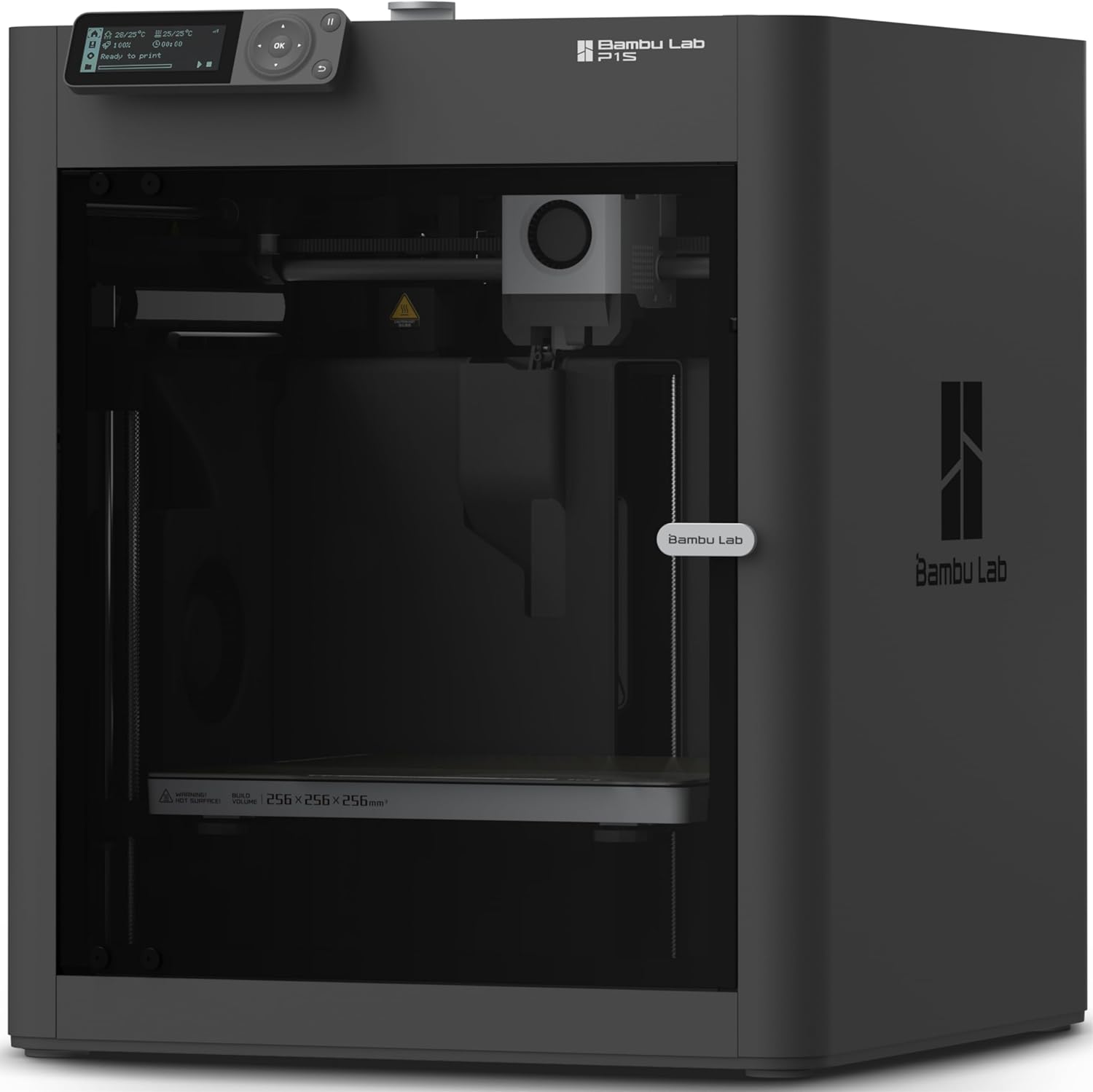
| Build Volume | 256×256×256 mm³ |
|---|---|
| Max Speed | 500 mm/s |
| Max Acceleration | 20 m/s² |
| Supported Filaments | PLA, PETG, TPU, PVA, PET, ABS, ASA, PA, PC |
The Bambu Lab P1S is an enclosed CoreXY FDM printer designed to get users printing quickly while offering high speed and solid print quality. It ships ready-to-use with automatic bed leveling and a user-friendly setup that the brand says can be completed in about 15 minutes, so beginners and hobbyists can start with minimal assembly. Performance highlights include very high travel speed and acceleration for shorter print times, a direct-drive extruder that widens compatible filament types, and an enclosed body that helps with printing temperature-sensitive materials. The P1S integrates with Bambu Lab MakerWorld model library and includes a camera for time-lapse recording. Practical limits to note are the machine size and weight for small workspaces and that certain reinforced filaments like carbon or glass-filled materials are not recommended, so advanced industrial materials are outside its intended scope. For a home user seeking a fast, mostly hands-off printer that balances ease of use with capable material support, the P1S is a strong option.
Best for: Buyers who want a home 3D printer that balances ease of use and high-speed performance for everyday prototyping, hobby parts, and multi-material prints within a beginner-to-intermediate workflow.
Less Ideal for: Users who need industrial-grade composite printing or a very compact, portable machine for tight workspaces should look elsewhere.
- Enclosed CoreXY design improves stability and helps print higher-temperature or more warp-prone filaments.
- Very high travel speed and acceleration reduce print times compared with typical hobby printers.
- Direct-drive extruder extends usable filament range to flexible and tougher materials.
- Automatic bed leveling and quick setup lower the barrier for new users.
- Integrated ecosystem and camera support simplify model sourcing and time-lapse capture.
- Not recommended for carbon or glass fiber reinforced filaments.
- Relatively heavy and larger footprint may be awkward for cramped desks or frequent relocation.
Verdict: The P1S is the pick for home users who want a fast, easy-to-use enclosed printer that handles a wide range of common filaments and gets you printing quickly.
QIDI Max4 Combo 3D Printer

| Build volume | 390×390×340 mm |
|---|---|
| Max hotend temperature | 370°C |
| Chamber temperature | 65°C |
| Max tool head speed | ≤800 mm/s |
The QIDI Max4 Combo is a performance-focused desktop 3D printer built for large parts and engineering-grade materials. It provides a 390×390×340mm build volume and an actively heated chamber up to 65°C, which helps reduce warping when printing ABS, PC, nylon, and carbon-fiber composites. The 370°C hotend and hardened-steel nozzle support abrasive and high-temperature filaments while a full-surface silicone heated bed improves first-layer adhesion. Motion hardware includes closed-loop motors, a CoreXY-style arrangement with linear rails and dual Z lead screws, and a high-speed tool head rated up to 800 mm/s with high acceleration for faster prints when tuned properly. Practical additions such as an AI camera for print-failure detection, a large touch screen, and multiple network options (Wi-Fi, Ethernet, cloud) make remote monitoring and control straightforward. The Polar Cooler for advanced cooling is optional and sold separately, and real-world top speeds will be limited by material, extrusion setup, and part complexity, so expect to spend time dialing profiles for best results. For builders focused on engineering prints and throughput, the Max4 brings the hardware needed to deliver them.
Best for: Someone who prioritizes high-speed, engineering-grade prints and needs a large build area for prototypes, molds, or functional parts and is willing to tune profiles for optimal results.
Less Ideal for: Casual hobbyists who want a plug-and-play, low-maintenance printer for occasional small models or educators wanting the simplest out-of-box experience.
- Very large 390×390×340mm build volume for single-piece large parts
- 65°C actively heated chamber reduces warping on high-temp materials
- 370°C hotend with hardened-steel nozzle supports abrasive and engineering filaments
- Closed-loop motors, dual Z lead screws, and linear rails for stable, precise motion
- AI camera and network options enable remote monitoring and automated pause on failures
- Polar Cooler sold separately rather than included
- Top rated tool-head speeds are theoretical and require tuning and appropriate filament to approach in practice
Verdict: Buy this if you need a large-format, high-temperature desktop printer built to handle engineering materials and high-throughput workflows.
Creality K1C 3D Printer

| Max print temperature | 300 ℃ |
|---|---|
| Build volume | 8.66 x 8.66 x 9.84 inch |
| Extruder type | Clog-free direct extruder |
| Auto leveling | Auto Z offset and auto bed leveling |
The Creality K1C is a plug-and-play desktop FDM printer built for quick setup and fast printing of everyday home projects. It ships mostly assembled so you can power up, follow the guided boot sequence and start printing within minutes; auto Z offset and auto bed leveling reduce the fiddly calibration steps that slow beginners down. The machine emphasizes speed and reliability with a claimed 600 mm/s top speed, a clog-resistant direct extruder that supports higher-temperature filaments up to 300 C, and an upgraded cooling arrangement to improve layer detail and reduce stringing. An onboard AI camera offers basic print monitoring and failure detection, and the enclosed frame with glass door helps with temperature stability for ABS-like materials. Room for improvement includes a relatively small build volume compared with larger hobby printers and the usual need to tune print settings when switching abrasive or carbon-fiber-filled filaments. For home users who want fast setup and reliable daily prints, the K1C keeps the routine simple while handling a wide range of common filaments.
Best for: Buyers who prioritize fast, low-friction setup and regular home printing of toys, props, jigs, and prototypes and who want a machine that minimizes calibration time.
Less Ideal for: Users needing large-format builds or professional-grade dimensional accuracy for end-use parts should consider larger or more precise printers.
- Ready-to-print out of the box with guided boot and auto-leveling for quick setup
- Clog-free direct extruder that supports higher-temperature filaments including carbon-fiber blends
- High claimed print speed and acceleration for faster part turnaround
- AI camera for real-time monitoring and time-lapse capture
- Enclosed frame with glass door and multi-fan cooling improves print quality and reduces warping
- Relatively small build volume compared with larger desktop printers
- High speeds may still require tuning to avoid artifacts on detailed prints
Verdict: Choose the K1C if you want a fast, mostly plug-and-play desktop printer that gets home projects printing quickly with minimal setup.
Entina Tina2C Mini 3D Printer

| Print volume | 3.9 × 3.9 × 3.9 inches |
|---|---|
| Connectivity | 2.4G WiFi, TF card |
| Compatibility | Windows, macOS, Linux, Chromebook; Cura and Simplify3D |
| Operation | Auto leveling, power-loss recovery |
The Entina Tina2C is a fully assembled mini FDM 3D printer aimed at first-time users and kids, with an app-guided setup that the brand says can get you printing in about eight minutes. It supports 2.4 GHz Wi‑Fi printing or TF card offline jobs and works with common slicers like Cura and Simplify3D for more advanced control. Notable features for beginners include AI-assisted model search in the Poloprint Cloud app, auto bed leveling, power-loss recovery, a flexible magnetic build plate for easy part removal, and a quick-swap printhead to simplify maintenance. The small build volume limits projects to simple models and school STEM tasks, but the compact footprint, low-noise operation, integrated LED lighting, and child-friendly design make it a good fit for living rooms and classrooms. Buyers should expect entry-level speed and resolution rather than professional-grade prints, and the tiny print area means larger designs must be split or scaled down. For a budget home printer focused on learning and quick, low-friction setup, the Tina2C covers the essentials well.
Best for: Buyers looking for an affordable, plug-and-play 3D printer to teach kids or start learning at home will appreciate the ease of setup, app features, and classroom-friendly design.
Less Ideal for: Advanced hobbyists or makers who need large build volume, high-resolution professional prints, or faster industrial speeds should consider larger desktop machines instead.
- Fully assembled and app-guided setup enables fast first prints for beginners
- Wi‑Fi and TF card support give flexible ways to send jobs
- Auto bed leveling and power-loss recovery improve first-layer success and print continuity
- Flexible magnetic build plate and quick-swap printhead simplify post-print removal and maintenance
- Compact, low-noise design with integrated LED lighting suits home and classroom use
- Very small 3.9 × 3.9 × 3.9 inch print volume restricts project size
- Designed for beginners so print speed and ultimate resolution are limited compared with larger hobby printers
Verdict: If you want an inexpensive, ready-to-run printer for home STEM projects and first-time users, the Tina2C delivers quick setup, app-driven guidance, and easy maintenance in a compact package.
ANYCUBIC Photon Mono 4 Ultra

| Screen resolution | 9024 x 5120 |
|---|---|
| Screen size | 7 inches |
| Max print speed | 120 mm/h |
| Printing area | 6.04" x 3.42" x 6.49" |
The ANYCUBIC Photon Mono 4 Ultra is a desktop resin LCD printer built to produce very fine prints quickly. It uses a 7-inch 10K monochrome LCD (9024 x 5120) and a COB light source with a Fresnel lens to deliver high pixel density and strong light uniformity for crisp surface detail and tight tolerances. The printer adds an 8mm T-type lead screw and precision guide rails for steadier motion and includes an upgraded ACF film and intelligent release algorithm to reduce release force, letting you print faster—up to 120 mm/h with compatible high-speed resin. A 4.3-inch touchscreen with an updated UI and multilingual support makes basic setup and daily operation straightforward, and built-in self-check routines reduce time spent troubleshooting. Important trade-offs are those common to resin machines: you need post-processing (washing and curing), ventilation and careful handling of resin, and consumables like FEP/ACF film and resins affect long-term cost. For home users focused on reliable, high-detail output this model brings strong hardware and automation that reduce fiddling and failed prints.
Best for: Home makers who want a dependable resin printer that minimizes setup and print failures while delivering highly detailed results for miniatures, prototypes, or hobby parts.
Less Ideal for: Users who want a fully odorless, maintenance-free printer or refuse to handle liquid resins and post-processing should consider filament FDM options instead.
- Extremely high native resolution 10K LCD for fine detail
- COB light source with Fresnel lens for uniform exposure and accurate tolerances
- Sturdy motion components (8mm T-type screw rod and precision guide rails) for stable prints
- Faster max print speed up to 120 mm/h with high-speed resin and reduced release force
- 4.3-inch touchscreen and self-check routines simplify setup and daily use
- Requires normal resin workflow: post-wash and curing plus ventilation and careful resin handling
- Ongoing costs for resins and replaceable films (ACF/FEP)
Verdict: Choose the Photon Mono 4 Ultra if you want a home resin printer engineered for high-detail, faster prints and fewer setup headaches.
Creality Ender 3 V3 SE

| Printing speed | Up to 250 mm/s |
|---|---|
| Extruder type | Sprite direct extruder |
| Mainboard | 32-bit silent mainboard |
| Build plate | PC spring steel flexible plate |
The Ender 3 V3 SE is a compact FDM desktop printer designed for quick setup and everyday home use. It ships in a mostly assembled kit and Creality says initial setup can be completed in about 20 minutes; built-in CR Touch and a strain sensor handle auto leveling and Z offset so getting a good first layer is simpler for new users. The Sprite direct extruder supports PLA, PETG and TPU and includes one-touch auto filament load and unload, which reduces the fiddliness of filament changes. A dual Z-axis and dual Y-axis linear shafts improve stability for taller prints, while a 32-bit silent mainboard and stepper drivers keep noise and vibration lower during runs. The spring steel build plate is flexible and makes part removal easier. Limits to consider are that the build volume is modest compared with larger hobby machines and faster top speeds may require tuning to maintain the best surface finish. The Ender 3 V3 SE is a practical, user-friendly option for hobbyists and first-time home users who want a balance of speed and convenience without a steep learning curve.
Best for: Buyers who want a beginner-friendly home printer that minimizes setup friction and handles a range of common filaments while offering quieter operation.
Less Ideal for: Users who need a large build volume or who plan to print high-end, ultra-fine finishes at maximum speeds without additional tuning should consider larger or more specialized machines.
- Auto-leveling with CR Touch and strain sensor for easier first-layer setup
- Sprite direct extruder supports flexible and common filaments and offers one-touch load/unload
- Dual Z-axis and robust Y-axis linear shafts for improved print stability
- 32-bit silent mainboard reduces noise during printing
- Flexible spring steel build plate simplifies part removal
- Modest build volume compared with larger desktop printers
- High advertised top speeds may need tuning to preserve surface quality
Verdict: A user-friendly, quieter desktop 3D printer that speeds up the path from unboxing to successful home prints.
Bambu Lab P1S Combo

| Build Volume | 256×256×256 mm |
|---|---|
| Max Speed | 500 mm/s |
| Max Acceleration | 20 m/s² |
| Supported Filaments | PLA, PETG, TPU, PVA, PET, ABS, ASA, PA, PC |
The Bambu Lab P1S Combo is a ready-to-use CoreXY 3D printer package aimed at fast, multi-color desktop printing. It ships as an enclosed printer with an AMS filament system attached, enabling up to 16-color or multi-material prints when the AMS is connected. The machine emphasizes speed with a reported top travel speed of 500 mm/s and very high acceleration for short print times, while features like a direct-drive extruder, automatic bed leveling, and a built-in camera simplify setup and monitoring. Build volume is 256×256×256 mm, making it large enough for most home projects and prototypes. It supports a broad range of consumer filaments including PLA, PETG, TPU, PVA and many engineering plastics, though highly reinforced carbon or glass fiber composites are not recommended. For a cautious home user the P1S Combo offers a fast, largely hands-off workflow, but it is a more advanced machine than basic plug-and-play hobby printers and may require attention to filament handling and settings to consistently hit top speeds without artifacts.
Best for: Home users who want a reliable, faster-than-average desktop printer that can grow into multi-color and multi-material projects while minimizing routine setup hassles.
Less Ideal for: Beginners who prefer the simplest, lowest-maintenance entry-level machines or users who only need occasional single-color hobby prints.
- High top speed and acceleration for much faster print times than typical desktop printers
- Enclosed design plus automatic bed leveling improves success with temperature-sensitive filaments
- Direct-drive extruder expands material compatibility including TPU and tougher filaments
- Built-in camera and MakerWorld model library streamline monitoring and accessing print files
- Large 256×256×256 mm build volume suitable for most home projects
- High-speed tuning and filament management can be more demanding than on beginner printers
- Requires the AMS to achieve full multi-color/multi-material capability
Verdict: If you want a home 3D printer that delivers much faster prints and easy multi-color capability while keeping setup and monitoring straightforward, the P1S Combo is a top practical choice.
Choosing the Right 3D Printer for Home Use: Key Factors to Consider
Print Quality and Resolution
Layer height, nozzle size, and motion system stiffness determine how fine details and smooth surfaces will be. Higher resolution is useful for miniatures, functional prototypes with tight tolerances, and parts that need a smooth finish without heavy postprocessing.
But higher resolution often increases print time and can demand better calibration. For home use, balance the resolution you need against acceptable print durations and the amount of time you are willing to spend on calibration and tuning.
Ease of Setup and Software
How quickly you can assemble, level the bed, and produce a first successful print makes a big difference in adoption. Printers with clear assembly guides, assisted bed leveling, or pre-calibrated profiles in popular slicers reduce initial friction.
Software friendliness also matters. Intuitive slicer workflows, reliable default settings for common filaments, and active community profiles cut down trial-and-error time. Consider whether the printer works with a slicer you are comfortable using and whether it supports common file transfer methods like SD card, USB, or network printing.
Build Volume and Workspace Fit
The printable envelope determines the maximum size of parts you can produce. Larger build volumes expand possibilities but increase the printer's footprint and often the heat-up time for heated beds.
Measure your available bench or shelf space and think about where the printer will live during long prints. For enclosed printers, also consider clearance for door openings and ventilation in your room.
Material Compatibility and Heated Bed
Common filaments such as PLA, PETG, and ABS have different temperature and adhesion requirements. A heated bed enlarges the range of usable materials and reduces warping for higher-temperature filaments.
If you plan to print engineering plastics, check the printer's maximum hotend and bed temperatures, as well as whether it supports an enclosure. For general home projects, good PLA performance plus the option to run PETG reliably covers most needs.
Reliability and Maintenance
Regular filament changes, nozzle clogs, and bed re-leveling are typical maintenance tasks. A design that makes those tasks straightforward shortens downtime and keeps printing enjoyable.
Look for accessible extruder assemblies, clear instructions for nozzle replacement, and easily cleaned build surfaces. Consider the availability of common replacement parts such as belts and fans since those are usual service items in home use.
Safety and Noise Levels
Printers can run for many hours and may be used in shared living spaces. Enclosures, filament path shielding, and thermal protection reduce the risk of accidental contact with hot components.
Noise from stepper motors and fans affects where you can comfortably place the printer. If you will run prints overnight or in a shared room, prefer quieter designs or plan for a dedicated, ventilated area to reduce disturbance.
Common Filaments and When To Use Them
PLA is the easiest filament for home users because it prints at low temperatures, warps little, and produces good surface finish with minimal fuss. It is ideal for decorative pieces, models, and simple functional parts that do not need high temperature resistance.
PETG offers a balance between strength and ease of printing, useful for mechanical parts that require impact resistance or mild temperature tolerance. ABS and higher-temperature materials need heated, preferably enclosed chambers and are more demanding to print reliably at home.
- PLA: low temp, low warp, decorative and prototypes
- PETG: stronger, more durable, slightly more challenging
- ABS/ASA: requires enclosure and more controlled environment
Setting Up a Home Printing Workspace
Choose a stable surface that is resistant to vibration and large enough for the printer and any post-processing tools you use. Good lighting and a small parts tray help keep tools and printed parts organized. Ensure the area has adequate ventilation, especially when printing filaments that emit fumes.
Keep consumables like spare nozzles, glue stick or adhesive sheets, and common hand tools in a nearby drawer. A small camera or webcam can help monitor long prints without staying in the same room for the entire print duration.
- Stable, level bench or table
- Good lighting and ventilation
- Organized storage for spares and tools
Maintenance Tasks You Can Expect
Routine maintenance includes cleaning the build surface, checking belt tension, lubricating linear rails or lead screws if applicable, and replacing consumables like nozzles or PTFE tubing. Establish a simple checklist to perform after every 20 to 50 printing hours to prevent small issues from becoming failures.
Learn basic troubleshooting steps such as re-leveling the bed, adjusting extrusion multiplier, and performing test calibration prints. Those skills save time and frustration and are part of owning a reliable home 3D printer.
- Daily/weekly simple checks
- Periodic part replacements
- Basic troubleshooting steps to learn
Upgrades Worth Considering Later
Once you are comfortable with the basics, small upgrades can improve results without replacing the whole machine. Common upgrades include all-metal hotends for higher-temperature filaments, improved part cooling fans, and better build surface materials for adhesion and ease of part removal.
Automatic bed leveling sensors and enclosure panels are upgrade options that reduce daily tuning and expand material compatibility. Prioritize upgrades that address the limitations you actually encounter during regular use rather than chasing theoretical improvements.
- All-metal hotend for higher temps
- Improved cooling for better bridged prints
- Enclosures for advanced materials
How We Chose the Best 3D Printer for Home Use
We selected printers that perform well in everyday home environments rather than industrial settings. Our editorial filters prioritized machines with dependable first-layer adhesion and consistent layer registration, since those characteristics most directly affect user frustration at home. We also valued printers that ship with usable software or offer straightforward slicer compatibility, because software hurdles are a frequent barrier for new users. Key evaluation criteria included achievable layer resolution and dimensional accuracy, the ease and speed of getting the first successful print, bed and build-volume practicalities for household projects, and the maintenance burden for typical filament types. We excluded printers that require specialized facilities, complex industrial controllers, or commercial-only materials. Machines that demanded extensive custom modification before reliable operation were not considered. The resulting list focuses on models that balance print fidelity, setup simplicity, and day-to-day reliability for home makers and hobbyists.
Our full evaluation process is outlined in our review methodology.
FAQ
What is the easiest filament to start with for home printing?
PLA is usually the easiest because it prints at lower temperatures, has minimal warping, and is forgiving of small setup issues. It is a good starting point for learning calibration and post-processing.
How big of a build volume do I need?
It depends on your typical projects. Small models and toys fit comfortably in a 150–200 mm cube, while functional parts or multi-piece projects may benefit from 200–300 mm on at least one axis. Consider the physical space the printer will occupy in your home as well.
Do I need a heated bed at home?
A heated bed is helpful if you want to print materials beyond PLA, such as PETG or ABS, because it reduces warping and improves first-layer adhesion. For PLA-only users, it is convenient but not strictly required.
Can I leave a 3D printer running overnight at home?
Many people do, but take basic safety precautions: place the printer on a stable, nonflammable surface in a ventilated area, use reliable firmware with thermal protections, and avoid leaving printers unsupervised in high-risk locations. Consider smoke detectors and avoid flammable clutter nearby.
How noisy are home 3D printers?
Noise varies by design and components. CoreXY and belt-driven printers with quiet stepper drivers are typically quieter, while older stepper drivers and high-RPM cooling fans increase noise. If noise is a concern, look for printers advertised with low-noise drivers or plan to locate the machine in a dedicated space.
Final Verdict
Focus on the tradeoffs that matter most for your workflow: print quality versus print speed, build volume versus footprint, and material capability versus maintenance demands. Prioritize machines that minimize setup friction and provide reliable first-layer adhesion, since those factors most affect daily satisfaction in a home environment. With a clear sense of the materials you plan to use and the sizes you need to print, you can confidently choose a home 3D printer that balances usability and capability. Invest time in basic calibration and a few small upgrades later if needed to extend material options and reduce troubleshooting.