
Note: This article contains affiliate links. If you click on these links and make a purchase, we may earn a small commission at no extra cost to you. This helps support our research and content. Read our full affiliate disclosure here.
If you want dependable small-format photos for albums, parties, or quick client proofs, the right 4×6 photo printer makes a big difference. These compact printers are designed to produce borderless 4×6 prints with consistent color, minimal fuss, and fast turnaround so you can print on demand without a computer or specialist setup. This guide highlights the top shortlisted 4×6 photo printers chosen for real-world home and small-business use. We focus on ease of setup, print speed, color fidelity, and operating cost so you can pick a printer that fits your workflow and print volume. Scroll down for concise product summaries and our evaluation criteria to help you decide.
Top Picks at a Glance
| Best Overall The best all-around choice for most situations | Canon SELPHY CP1500 |  |
| Best Quality Built to a higher standard if you want something more solid | Epson PictureMate PM-400 |  |
| Best Value The sweet spot between price and what you get | Liene 4×6 Photo Printer |  |
| Best Budget The cheapest option that still gets the job done reliably | HPRT CP4100 Photo Printer |  |
| Top Rated A top-rated pick with lots of positive feedback | HPRT CP4100 4×6 Photo Printer |  |
| Most Popular A crowd favorite that many people choose with confidence | KODAK Dock Plus PD460 |  |
| Best Seller A high-volume bestseller chosen again and again | Liene 4×6 Photo Printer DHP513 |  |
Canon SELPHY CP1500

| Printer Type | Dye Sublimation |
|---|---|
| Maximum Media Size | 4 x 6 inch |
| Printer Connectivity Type | Wi-Fi |
| Maximum print Resolution Color | 300 x 300 dots_per_inch |
| Wattage | 7.2 watts |
The Canon SELPHY CP1500 is a small, travel-friendly dye-sublimation photo printer built to produce glossy, marker-ready 4×6 prints and smaller square or sticker formats from smartphones, cameras, USB drives, or memory cards. It connects over Wi‑Fi and supports AirPrint and Canon's mobile apps for quick editing, collages, and pattern effects before printing. Prints come out instantly dry and water resistant with selectable glossy, semi-gloss, or satin finishes, and Canon rates print longevity for archival storage. The CP1500 is straightforward to use thanks to a 3.5-inch display for previewing and basic edits and an optional battery pack that turns it into a true portable printer. Expect modest throughput — individual 4×6 prints take several dozen seconds — and the paper cassette and ink cassette system means you must replace consumables as packs run out, which adds to ongoing cost. It is not intended for high-volume photo production but delivers reliable, lab-like 4×6 prints when you want convenience and mobility over speed or low cost per page.
Best for: Buyers who want a reliable, portable 4×6 photo printer to produce lab-quality, ready-to-handle prints from phones or cameras for scrapbooks, events, and travel.
Less Ideal for: Users who need fast, high-volume photo production or the lowest possible cost per print should look at larger desktop or commercial photo printers instead.
- Produces instantly dry, water resistant 4×6 prints with glossy, semi-gloss, or satin finish options.
- Multiple input methods including Wi‑Fi, AirPrint, USB, and memory cards make it easy to print from phones, cameras, or flash drives.
- Compact, lightweight design with an optional battery pack for true portable printing.
- 3.5-inch display and Canon apps let you preview, edit, and create collages or sticker layouts before printing.
- Print speed is modest — single 4×6 prints take several dozen seconds each.
- Uses dedicated paper and ink cassettes so running costs depend on proprietary consumable packs.
Verdict: Choose the SELPHY CP1500 when you want convenient, portable 4×6 prints with durable, camera-lab quality finishes and easy smartphone connectivity.
Epson PictureMate PM-400

| Printer Type | Inkjet |
|---|---|
| Maximum print Resolution Color | 5760 x 1440 dpi |
| Paper Size | 4 inch x 6 inches, 5 inch x 7 inches |
| Printer Connectivity Type | USB, Wi-Fi |
| Maximum Sheet Capacity | 50 |
The Epson PictureMate PM-400 is a portable inkjet photo printer built for quick, high-resolution 4×6 and 5×7 borderless prints from phones, tablets, or a PC. It connects via Wi-Fi or USB and is controlled through an app for easy mobile printing at events or at home. Notable features include a high optical resolution listed at 5760 x 1440 dpi, an LCD control, single-tray feed that handles glossy photo paper, and the ability to hold up to 50 sheets for short print runs. In practice it turns digital photos into sharp, color-rich prints suitable for albums and displays, and a 4×6 print can be produced in roughly 36 seconds in default mode. The PM-400 is designed to work with genuine Epson cartridges, which helps ensure consistent color and longevity but limits third-party ink options. Its compact, lightweight build makes it easy to move or store, though it is optimized for photo output rather than high-volume document printing.
Best for: Photographers and hobbyists who prioritize high-quality, borderless 4×6 and 5×7 photo prints from mobile devices and value a compact, portable printer for events or home use.
Less Ideal for: Users who need an all-purpose office printer for heavy document workloads or those who want flexibility to use third-party ink supplies.
- High maximum print resolution of 5760 x 1440 dpi for detailed photo output
- Compact, lightweight design that is easy to move and store
- Wireless and USB connectivity with app control for direct mobile printing
- Borderless 4×6 and 5×7 printing with quick single-print times (~36 seconds)
- Requires genuine Epson cartridges and may not accept third-party inks
- Not intended for high-volume document production despite some B&W speed claims
Verdict: Choose the PM-400 when you want a compact, mobile-ready printer that delivers high-resolution borderless 4×6 and 5×7 photos from your phone or tablet.
Liene 4×6 Photo Printer

| Printer Type | Dye Sublimation, Thermal |
|---|---|
| Maximum Media Size | 4×6 inches |
| Connectivity | Bluetooth, Wi-Fi, USB |
| Print Resolution | 300 dpi |
| Included Media | 180 sheets + 5 ink cartridges |
The Liene 4×6 Photo Printer is a compact dye-sublimation printer aimed at quick, on-demand 4×6 color prints from phones or computers. Setup is straightforward: load the included photo paper cassette and one of the bundled ink cartridges, power the unit, then print from the Liene app or directly via the printer's built-in Wi‑Fi hotspot, Bluetooth, or USB. The thermal dye-sublimation process produces vibrant, protected prints with a durable topcoat that resists water, scratches, and fading, and the app offers templates and step-by-step guidance during printing. This bundle ships with a large supply—180 sheets and five cartridges—so you can print many photos before needing consumables. Connection stability is strong thanks to the printer's hotspot and support for up to five devices simultaneously, which is handy for group events or parties. Limitations include a modest 300 dpi resolution, simplex-only printing, and a focus on single-purpose photo output rather than multi-function office use, so it is not a replacement for a full photo-lab workflow or high-resolution archival prints.
Best for: Buyers who want a practical, ready-to-use 4×6 photo printer for printing lots of durable family photos, event snapshots, or party keepsakes without fuss.
Less Ideal for: Those who need high-resolution archival prints, multifunction office features, or professional lab-quality output should consider higher-end printers or lab services instead.
- Dye-sublimation prints with protective topcoat for durable, water- and scratch-resistant photos.
- Bundle includes 180 sheets of 4×6 photo paper and five ink cartridges so you can print large batches immediately.
- Built-in Wi‑Fi hotspot plus Bluetooth and USB connectivity simplifies device pairing and avoids home network issues.
- App controls, templates, and step-by-step guidance make printing from phones or computers easy, even for beginners.
- Maximum print resolution is 300 dpi, so fine detail and large professional enlargements are limited.
- Simplex-only output and single-function design mean no scanning, copying, or duplex options.
Verdict: If you want an easy, all-in-one 4×6 photo printer that prints durable, ready-to-use photos straight from your phone and comes with plenty of paper and ink, this bundle is a practical choice.
HPRT CP4100 Photo Printer
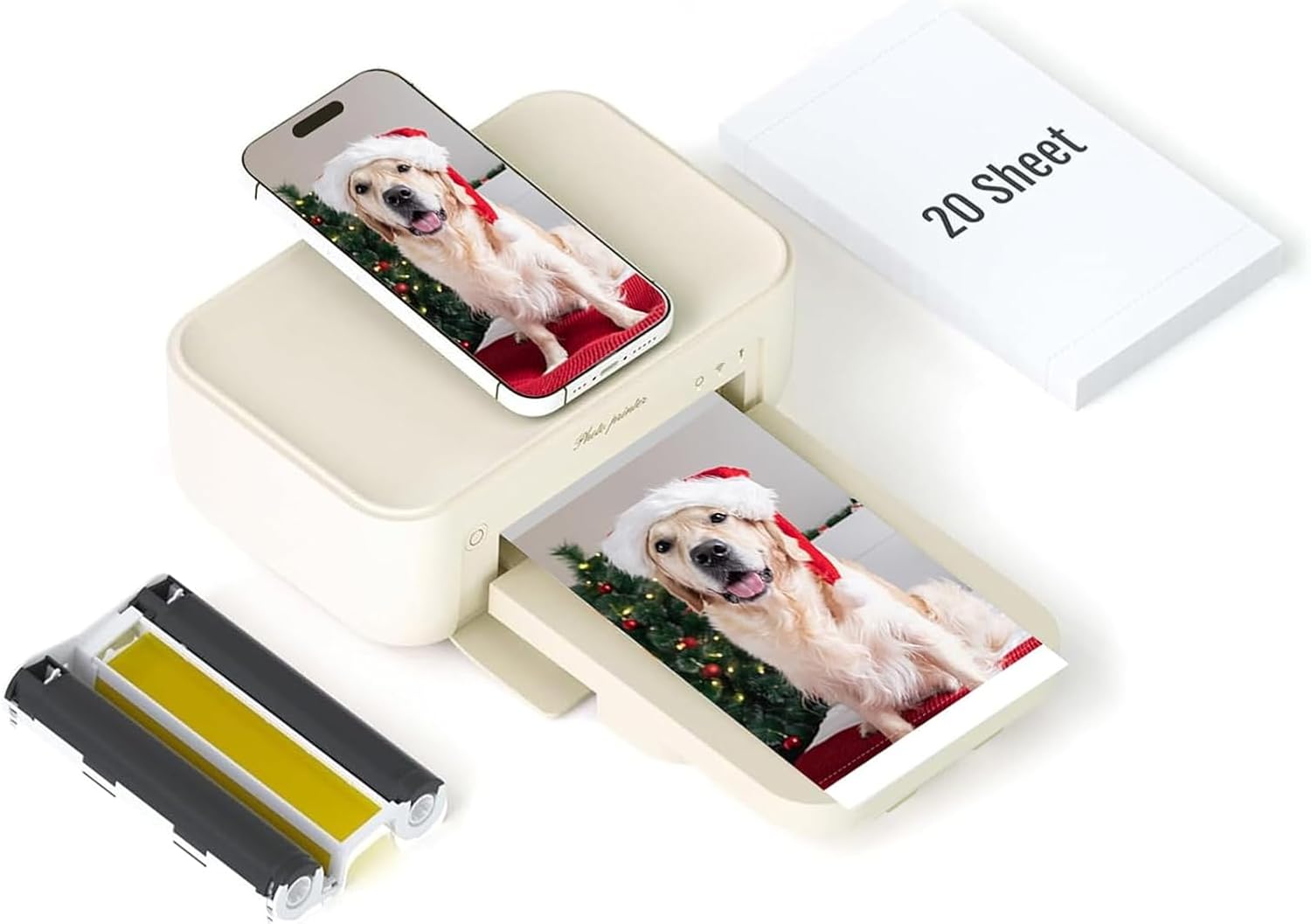
| Printer Type | Dye Sublimation |
|---|---|
| Maximum Media Size | 4 x 6 inch |
| Maximum Sheet Capacity | 20 |
| Print Resolution | 300×300 |
| Printer Connectivity Type | Wi-Fi |
The HPRT CP4100 is a small, portable dye-sublimation photo printer built to produce 4×6 prints directly from iPhone and Android devices via Wi-Fi and the HEY Photo app. It uses thermal dye-sublimation at a maximum 300 dpi to create glossy 4×6 photos with a laminated protective coating that resists water, scratches, and fingerprints, and the bundle includes a power adapter, one ribbon, and 20 sheets so you can print right away. Setup is straightforward: connect through the app, apply filters or AR video frames, then print single 4×6 photos at roughly one page per minute. The printer is clearly aimed at casual home use or parties where instant, durable physical photos are desired and ongoing running costs can be controlled by buying HPRT paper and ribbons from the brand. Limitations to note are the single-sheet capacity and 20-sheet maximum tray, slow single-sheet throughput, and dependence on proprietary HPRT paper and ribbons, which means supplies must come from the same ecosystem for reliable results.
Best for: Buyers who want an affordable, easy-to-use 4×6 photo printer for casual home use, events, or quick smartphone snapshots and who prioritize low upfront cost and simple wireless printing.
Less Ideal for: Users who need high-volume, fast photo production or broader media compatibility should consider higher-capacity or professional photo printers instead.
- Dye-sublimation printing with 300 dpi for durable, photo-quality 4×6 prints
- Wi-Fi connection and HEY Photo app for direct smartphone printing and AR/video print features
- Includes starter supplies (20 sheets and one ribbon) so you can print right away
- Laminated prints resist water, scratches, fingerprinting and fading
- Small 20-sheet capacity and single-sheet throughput limits bulk printing
- Requires proprietary HPRT paper and ribbons, restricting third-party supply options
Verdict: A budget-friendly 4×6 dye-sublimation printer that delivers durable smartphone prints via Wi-Fi and an easy app workflow.
HPRT CP4100 4×6 Photo Printer

| Maximum Media Size | 4 x 6 inch |
|---|---|
| Maximum Sheet Capacity | 108 |
| Print Resolution | 300 dpi |
| Printer Connectivity Type | Wi‑Fi |
| Hardware Interface | Bluetooth |
The HPRT CP4100 is a compact dye‑sublimation photo printer designed to produce 4×6 prints from smartphones and other devices. It connects via Wi‑Fi or Bluetooth and works with the Heyphoto app to crop, apply filters, and print border or borderless photos on glossy paper. The unit ships with 108 sheets and two ribbons (enough for about 180 prints), which keeps running costs low for casual printing. Dye‑sublimation printing yields laminated, fade‑resistant images that feel dry to the touch and resist fingerprints and moisture. Print speed is modest at about one 4×6 per minute, so it fits social or home use rather than high‑volume jobs. Setup and mobile printing are straightforward, but resolution is limited to 300 dpi, so expect good everyday snapshots rather than archival gallery enlargements. Its portable size and included consumables make it convenient for events, trips, and family albums, while the two‑year replacement promise adds peace of mind for reliability‑minded buyers.
Best for: Buyers who want a dependable, portable solution to print smartphone photos on durable 4×6 paper for events, trips, and family keepsakes and who value bundled supplies and straightforward mobile printing.
Less Ideal for: People who need high‑resolution or high‑volume professional prints or those who require heavier duty throughput for commercial use.
- Dye‑sublimation prints that are laminated, water‑resistant, and fingerprint‑resistant
- Wi‑Fi and Bluetooth for easy mobile printing from phones
- Bundle includes 108 sheets plus 2 ribbons (approx. 180 prints) to lower initial running costs
- Compact, portable footprint suitable for events and travel
- Two year free replacement warranty for added reliability
- Print resolution capped at 300 dpi so fine detail is limited
- Print speed is about one 4×6 per minute, not suited for bulk printing
Verdict: If you want a compact, reliable 4×6 printer that delivers durable dye‑sublimation photos and includes starter paper and ribbons, the HPRT CP4100 is a practical choice.
KODAK Dock Plus PD460

| Printer Type | 4PASS Dye Sublimation |
|---|---|
| Maximum Media Size | 4 x 6 inches |
| Maximum Sheet Capacity | 20 |
| Printer Connectivity Type | Bluetooth, Docking |
| Maximum print Resolution Color | 300 |
The KODAK Dock Plus PD460 is a desktop 4×6 photo printer that uses 4PASS dye-sublimation to produce glossy, laminated prints from smartphones. It is typically used as a home printing station: dock your phone or connect via Bluetooth, edit in the KODAK Photo Printer app, then print borderless 4×6 photos that are finished with a protective laminate to resist fingerprints, water, and fading. The integrated dock both stabilizes the phone and charges it while printing, and the printer supports USB-C connectivity for wired use. Prints take about 55 seconds each and the machine accepts cartridge-and-paper all-in-one supplies for straightforward refills. Practical benefits include consistent, durable prints without complex setup and a compact footprint suited to albums, frames, and casual photo projects. Limitations are modest throughput and single-sheet run behavior—this is designed for occasional home use rather than high-volume tasks, and resolution tops out at 300 dpi so it is not intended for large fine-art enlargements.
Best for: Buyers who want an easy, reliable home photo printer that makes durable 4×6 keepsakes straight from a smartphone and value simple setup and consistent print quality.
Less Ideal for: Photographers or small businesses needing high-volume output, faster throughput, or very high-resolution enlargements should consider more advanced photo printers.
- 4PASS dye-sublimation with laminated finish for water, fingerprint, and fade resistance
- Integrated smartphone dock that charges while printing for a stable connection
- Bluetooth and USB‑C connectivity plus an iOS/Android app for editing before printing
- Borderless 4×6 prints designed for home albums, framing, and gifting
- Slow single-print speed around one 4×6 print per minute, so not ideal for bulk jobs
- Maximum resolution of 300 dpi limits fine detail compared with higher-resolution photo printers
Verdict: A compact, easy-to-use 4×6 docked photo printer that produces durable, app-editable prints ideal for home albums and gifts.
Liene 4×6 Photo Printer DHP513

| Printer Type | Dye Sublimation |
|---|---|
| Maximum Media Size | 4 x 6 inch |
| Maximum Sheet Capacity | 20 |
| Printer Connectivity Type | USB, Wi-Fi |
| Maximum print Resolution Color | 300 x 300 dpi |
The Liene DHP513 is a compact 4×6 dye-sublimation photo printer designed for easy instant prints from smartphones, laptops, and desktops. It uses thermal dye sublimation to produce laminated, water- and scratch-resistant 4×6 photos and connects via built-in Wi‑Fi (including a printer hotspot) or USB‑C for direct printing without a home network. Setup is straightforward: load the included cartridge and paper cassette, connect through the Liene app or device album, and print in about a minute per photo. The printer supports app-based editing, basic filters, and ID-photo templates, and holds up to 20 sheets in the cassette for short print sessions. Practical benefits include good color saturation and durable finishes suited to keepsakes, plus a small footprint for storage. Important limitations are the modest 300×300 dpi resolution, relatively slow per‑photo print time compared with some alternatives, and reliance on Liene proprietary cartridges and paper which adds ongoing supply considerations.
Best for: Buyers who want an easy, low‑risk way to make durable 4×6 keepsake photos at home and value simple setup, built‑in Wi‑Fi, and a compact footprint.
Less Ideal for: Users who need high‑resolution or fast batch printing for professional workflows or who prefer printers that accept generic inks and third‑party paper.
- Dye-sublimation prints with laminated surface that resists water, scratches, and fingerprints
- Built-in Wi‑Fi hotspot plus USB‑C lets phones and computers print without a separate network
- Includes starter cartridge and 100 sheets (combined) so you can begin printing out of the box
- Compact, minimalist design that stores easily and accepts a 4×6 paper cassette
- App offers basic editing, filters, and ID-photo templates for quick customization
- Print resolution and speed are modest at 300×300 dpi and about one minute per photo
- Uses proprietary cartridges and paper, which limits sourcing options and can raise running costs
Verdict: A compact, easy-to-use 4×6 dye‑sublimation printer that delivers durable, ready-to-display photos with minimal setup, ideal for cautious buyers who want reliable home photo printing.
Choosing the Right 4X6 Photo Printer: Key Factors to Consider
Print Quality and Color Reproduction
Print quality is the primary reason to choose a dedicated 4×6 photo printer. Look for printers that deliver fine detail, smooth gradients, and consistent skin tones. Color gamut and color management support affect how closely prints match the originals or screen previews.
High-quality dye-sublimation or dedicated photo ink systems typically produce richer color and more stable results than generic inkjet setups. Consider whether the printer offers color calibration options or profiles for consistent results across sessions.
Print Speed and Throughput
Speed matters when you are printing dozens of photos for events or quick client proofs. Check the single-print time as well as sustained throughput for batch jobs. Fast warm-up time and minimal per-print processing reduce overall wait time.
Also factor in how the machine handles consecutive prints. Some compact printers slow down with continuous jobs due to cooling or internal buffer limits. If you expect frequent batch prints, prioritize models designed for higher sustained throughput.
Connectivity and Workflow Integration
How you connect to the printer affects convenience and flexibility. Wireless printing from phones or tablets is essential for casual users and event photographers who want direct prints. USB and optional memory-card slots provide fallback when wireless is unavailable.
Look for easy mobile apps, reliable Wi-Fi setup, and direct-print features like Bluetooth or AirPrint support. Clear status indicators and simple mounting of paper and consumables also improve workflow during busy sessions.
Paper Handling and Finish Options
Paper handling determines how reliably the printer accepts borders, edge-to-edge photo paper, and different finish types. Choose a printer with a built-in tray or direct feed that supports the 4×6 size without manual trimming. A borderless option is important for standard photo prints.
Consider whether the printer supports glossy, matte, or specialty surfaces and whether it can print on thicker media. Ease of loading and a stable output path reduce jams and scuffed prints in high-volume use.
Operating Cost and Consumables
Long-term cost depends on the price and yield of paper and ink or ribbon packs. Some 4×6 printers use combined paper-and-ink packs that simplify replacement but can raise per-print cost. Others rely on separate ink cartridges and paper rolls, which can be more economical at higher volumes.
Evaluate consumable availability in your region and the unit cost per 4×6 print. Consider whether bulk paper packs or subscription services are available to lower ongoing expenses and how simple replacement is during events.
Size, Durability, and Portability
Compact footprint and light weight are advantages for countertop use and for taking a printer to events. Check the unit's dimensions and whether the design protects prints and paper during transport. A durable chassis and stable paper path help prevent damage when moving the printer between locations.
Also consider storage for spare supplies and how fast the device powers up and is ready to print after being moved. If you plan to use the printer in different venues, portability and quick setup are key.
Dye-Sub Versus Inkjet for 4X6 Prints
Dye-sublimation printers and photo-focused inkjets are the two main technologies used for 4×6 prints. Dye-sub systems heat a ribbon to transfer color dyes into the paper, producing smooth gradations and a durable finish with minimal drying time. Photo inkjets spray microscopic droplets that can achieve excellent detail and broader color gamut with the right inks and papers.
For casual and event printing, dye-sub often wins on speed and consistency with instant-dry output. For archival or studio work where color depth and subtle shadow detail matter, an inkjet with specialized photo inks can be a better fit. Consider what matters most for your prints—speed and durability or maximum tonal range.
- Dye-sub: fast, durable, typically borderless, instant-dry
- Inkjet: high detail potential, wider color options, may need drying time
- Choose based on tradeoffs between speed and maximum color depth
Mobile Printing and On-Device Editing
Printing directly from a phone or tablet is a core feature for many buyers. Check whether the printer has a dedicated mobile app that supports cropping, basic edits, and color adjustments before printing. Built-in editing tools reduce the need to pre-edit on a computer.
Some models include simple touch interfaces on the device for cropping and layout. If you will be printing at events, prioritize reliable wireless performance and straightforward on-device controls to keep lines moving.
- Look for apps that support templates and borderless 4×6 presets
- Prioritize models with fast pairing and offline printing options
Paper Finishes and Print Longevity
Paper choice affects both the look and the lifespan of prints. Glossy finishes offer punchy color and contrast, while matte finishes reduce glare and are easier to handle. Some photo printers apply a protective overcoat that adds scratch resistance and UV protection.
If print longevity matters, check what types of archival or long-life papers are supported. Protective coatings and pigment-based inks typically outlast standard dye inks under everyday display conditions.
- Glossy for vibrant color, matte for handling and display under lights
- Protective overcoats and pigment inks increase resistance to fading
Common Setup and Troubleshooting Tips
To avoid sticky startup issues, unpack and set up the printer before your first big print job and run any recommended calibration or test prints. Keep spare paper and consumables on hand to prevent interruptions during events.
If prints show color shifts, check the app or driver color settings and ensure the paper type matches the loaded media. For frequent jams, verify that the paper tray is fully seated and that the feed path is clear of dust and debris.
- Run a test print and alignment check when you first set up the printer
- Match paper type settings in the app to the loaded media
- Store paper flat and in its original packaging until use
Where 4X6 Printers Fit in a Workflow
A dedicated 4×6 photo printer is ideal as a final-step device for quick physical delivery. Use it for guest photos at events, instant proofs for clients, or printing snapshots at home. They complement larger-format printers rather than replace them when you need bigger prints or higher-resolution enlargements.
Integrate the printer into a simple workflow: capture, light edit on a mobile device, then print directly or via a laptop. This minimizes transfer steps and reduces the potential for color inconsistency between screen and paper.
- Best for instant small-format outputs and event use
- Pairs well with mobile editing apps for same-session prints
How We Chose the Best 4X6 Photo Printer
We prioritized features and performance that matter most for compact 4×6 photo printers intended for home users and small-scale events. Primary evaluation criteria included color accuracy and print quality, since faithful color reproduction is the main reason buyers choose a dedicated 4×6 device. We measured practical throughput by assessing advertised print speed and paper handling, because fast single-print turnaround matters in busy settings. Connectivity and ease of use were weighted heavily to reflect plug-and-print convenience, including wireless options and mobile printing support. Operating cost and consumable availability were considered by looking at paper and ink formats and typical yield. Finally, build quality and footprint were reviewed to ensure the units suit countertop use and frequent transport. We excluded multi-function and full-size photo printers that do not support native borderless 4×6 printing or that require complex setup. Our shortlist only includes compact devices that match the above performance and usability filters.
Our full evaluation process is outlined in our review methodology.
FAQ
How long do 4×6 printed photos typically last?
Print longevity depends on the printing technology and paper. Dye-sublimation and pigment-based prints on archival paper can last years with minimal fading. Stored or displayed prints will last longer if kept out of direct sunlight and handled carefully.
Can I print directly from my phone without a computer?
Often you can. Many compact 4×6 printers support wireless printing via a mobile app, Bluetooth, or AirPrint. Reliability depends on the specific model's app and wireless setup, so test the connection before critical events.
Are 4×6 photo printers easy to carry to events?
Most are designed to be compact and lightweight, making them easy to transport. Check the unit's footprint, weight, and whether consumables are secured for transit. A protective case helps prevent damage during travel.
Do these printers require special paper?
Yes, dedicated 4×6 printers typically require specific photo paper sizes and sometimes proprietary paper packs or ribbons. Using the correct paper type ensures accurate color, proper feed, and the intended finish.
How do I reduce per-print costs?
Reduce costs by buying larger bulk packs of paper or higher-yield consumables when available. Choosing a printer with replaceable ink and widely available paper can lower the per-print expense over time. Evaluate yield and consumable formats before deciding.
Final Verdict
A good 4×6 photo printer should match your priorities for color accuracy, speed, and ongoing cost. If you need instant, durable prints at events, prioritize fast dye-sub-style solutions with reliable wireless printing. If you value the deepest color nuance and finish options, consider a photo-ink system that supports a range of papers and calibration. Weigh the tradeoffs between speed, consumable cost, and finish options to pick the best fit for your usage. Focus on proven color performance, straightforward mobile integration, and a paper path that handles borderless 4×6 sheets reliably.