
Note: This article contains affiliate links. If you click on these links and make a purchase, we may earn a small commission at no extra cost to you. This helps support our research and content. Read our full affiliate disclosure here.
When you ship regularly, a reliable 4×6 shipping label maker can save time and prevent costly scanning errors. You want clear, scannable labels that feed consistently and attach securely to parcels, not a device that jams or produces faint prints. This guide covers seven top picks chosen for consistent print quality, dependable connectivity, and real-world ease of use. Below we summarize the key strengths of each shortlisted option and explain the evaluation criteria used. Use this guide to match a label maker to the volume, connectivity, and maintenance needs in your workspace.
Top Picks at a Glance
| Best Overall The best all-around choice for most situations | iDPRT SP410BT 4×6 Label Printer | 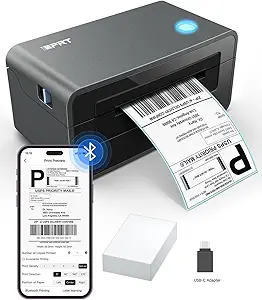 |
| Best Quality Built to a higher standard if you want something more solid | DYMO LabelWriter 4XL |  |
| Best Value The sweet spot between price and what you get | Nelko PL70E Bluetooth Label Printer |  |
| Best Budget The cheapest option that still gets the job done reliably | TATTMUSE 2411bt 4×6 Thermal Printer |  |
| Top Rated A top-rated pick with lots of positive feedback | Rollo USB Shipping Label Printer |  |
| Most Popular A crowd favorite that many people choose with confidence | JADENS JD268BT 4×6 Label Printer |  |
| Best Seller A high-volume bestseller chosen again and again | NULLTONEX Y813 4×6 Thermal Label Printer |  |
iDPRT SP410BT 4×6 Label Printer

| Printing Method | Thermal monochrome printing |
|---|---|
| Maximum Print Resolution | 203 DPI |
| Maximum Media Size | 4 x 6 inch |
| Printer Connectivity Type | Bluetooth, USB |
| Maximum Sheet Capacity | 50 |
The iDPRT SP410BT is a compact direct thermal 4×6 label printer built for small business shipping and fulfillment. It prints monochrome labels at up to 203 dpi using thermal media, so there is no ink or toner to replace, and it accepts 2"–4.25" widths including standard 4×6 shipping labels. Connect via Bluetooth with the HereLabel app for phones or tablets, or use the USB port for stable desktop printing from Windows, macOS, Linux, or Raspberry Pi. The unit supports roll and fan-fold media and holds up to about 50 sheets/labels for moderate batch runs. Practical benefits include quick setup through the app, broad platform compatibility for common carrier label PDFs, and lower operating cost thanks to thermal printing. Limitations to note are the 203 dpi resolution, which is fine for shipping and most barcodes but not for high-detail graphics, and the lack of built-in networking beyond Bluetooth so high-volume teams may prefer a wired network model for shared office use.
Best for: Buyers who need a reliable, low-maintenance 4×6 label printer for shipping and fulfillment that works from phones and desktops and keeps running costs low.
Less Ideal for: Large operations that require networked shared printers, extremely high-volume throughput, or photo-quality label printing should consider higher-end or network-enabled models.
- Direct thermal printing eliminates ink and toner replacement
- Bluetooth and USB connectivity for phones, tablets, and computers
- Supports standard 4×6 shipping labels and multiple label widths
- Accepts roll and fan-fold media for bulk printing
- Compact footprint useful for small business or home office counters
- 203 DPI resolution may not suit high-detail graphics or tiny print
- No built-in Ethernet or Wi-Fi for multi-user networked printing
Verdict: A practical, low-cost 4×6 thermal label printer that pairs phone and desktop Bluetooth/USB printing with minimal upkeep, ideal for small businesses handling shipping labels.
DYMO LabelWriter 4XL

| Printer Type | Thermal |
|---|---|
| Maximum Media Size | 4 x 6 inches |
| Print Resolution | 300 x 300 dpi |
| Printer Connectivity Type | USB |
The DYMO LabelWriter 4XL is a compact direct-thermal printer built to produce 4 x 6 shipping labels, warehouse labels, barcodes, and identification tags without ink or toner. It connects via USB 2.0 and ships with DYMO Connect software that provides over 60 label templates and simple data import for batch printing. With 300 dpi resolution the printed text, logos, and barcodes are crisp and readable for carrier scanners, and the 4×6 maximum media size matches standard shipping label dimensions for USPS, UPS, and FedEx. Because it uses thermal media, running costs are limited to label rolls and there is no need for cartridges, which lowers operating expense for high-volume sellers. The printer is optimized for desktop use in small offices or shipping stations and can handle continuous runs up to the listed sheet capacity. Limitations include single USB connectivity only and dependence on DYMO label stock for best performance, so it is less flexible for wireless setups or alternative label types.
Best for: Buyers who need a reliable, fast desktop printer for high-volume 4×6 shipping labels and clear barcode printing for e-commerce or small warehouse operations.
Less Ideal for: Users who require wireless or networked printing, multi-format media flexibility, or a standalone label maker without a connected PC.
- Prints standard 4 x 6 shipping labels compatible with major carriers
- Direct thermal printing eliminates ink or toner purchases
- 300 dpi resolution produces clear barcodes and graphics
- Includes DYMO Connect software with templates and data import
- USB-only connection limits wireless or network printing options
- Requires thermal label rolls for printing, limiting media flexibility
Verdict: If you need a fast, low‑running‑cost desktop printer dedicated to crisp 4×6 shipping and barcode labels, the LabelWriter 4XL is a practical high‑performance choice.
Nelko PL70E Bluetooth Label Printer

| Printer Type | Thermal |
|---|---|
| Maximum Media Size | 4 x 6 inch |
| Print Resolution | 203 x 203 DPI |
| Printer Connectivity Type | Bluetooth, USB |
| B&W Pages per Minute | 72 |
The Nelko PL70E is a direct thermal 4×6 label printer aimed at small shipping stations and home sellers who need fast, low-cost label printing. It connects over Bluetooth for printing from the Nelko mobile app on iOS and Android, and also supports USB for Windows, Mac and Chrome OS workflows. The printer uses thermal technology so there is no ink or toner to buy, and it accepts both fanfold and roll labels with widths from about 1.54 to 4.1 inches. At 203 x 203 DPI it produces clear monochrome shipping and barcode labels, and the manufacturer lists a top speed of roughly 150 mm/s (about 72 four-by-six labels per minute) which helps during busy packing runs. Setup is straightforward with included cables and a small starter pack of 4×6 labels, and Nelko supplies drivers, a quick-start manual and app-based editing. Limitations are typical of entry-level thermal units: no color printing, modest print resolution compared with higher-end 300 DPI models, and some Mac Bluetooth restrictions that require using USB for certain Mac systems.
Best for: Buyers who want a compact, budget-friendly 4×6 label printer to speed up shipping and order fulfillment without ongoing ink costs and who value straightforward app or USB workflows.
Less Ideal for: Shoppers who need high-resolution 300 DPI printing, color labels, or enterprise-grade drivers and integration should consider higher-end or specialist models instead.
- Wireless Bluetooth printing from iOS and Android via the Nelko app
- Supports USB connection for Windows, Mac and Chrome OS workflows
- No-ink thermal printing keeps consumable cost low
- Accepts common label sizes including 4×6 and narrow widths, and both roll and fanfold media
- Relatively fast listed print speed useful for high-volume packing
- 203 x 203 DPI limits fine-detail and small-font sharpness compared with 300 DPI models
- Bluetooth printing can be limited on some Mac setups which may require USB
- Monochrome-only output, not suitable for color labels
Verdict: A compact, no-ink 4×6 thermal printer that delivers fast, simple shipping-label printing for small sellers and busy packing stations.
TATTMUSE 2411bt 4×6 Thermal Printer

| Printer Type | Thermal |
|---|---|
| Maximum Print Resolution | 203 dots_per_inch |
| Maximum Media Size | 4 x 6 inches |
| Printer Connectivity Type | Bluetooth |
| Hardware Interface | USB |
The TATTMUSE 2411bt is a compact 4×6 thermal label printer built for small shipping and labeling workflows. It prints monochrome labels using a thermal print head at 203 DPI and supports Bluetooth pairing through the Labelife app as well as USB connection to Windows, macOS and ChromeOS systems. Setup is straightforward via the app for phones and tablets or by installing the driver for computers, and the printer handles common label sizes from 1" up to 4.6" wide so it covers 4×6 shipping labels, barcode tags, and inventory stickers. Notable practical features include automatic calibration to reduce misalignment, anti-jam adapters, and an advertised long lifespan for the print head, which helps lower running costs. The machine is small and lightweight, making it easy to tuck into a home office or take to pop-up shipping stations. Limitations to be aware of are monochrome-only output, a modest 203 DPI resolution that is standard for shipping but not for fine graphics, and the need to use the app pairing flow for mobile devices rather than system-level Bluetooth pairing.
Best for: Buyers wanting an inexpensive, no-frills thermal printer to produce professional 4×6 shipping labels and basic barcode or inventory tags from a phone or laptop.
Less Ideal for: Users who need color printing, high-resolution label graphics, or enterprise-grade throughput for heavy daily volume.
- Prints standard 4×6 shipping labels and common smaller label sizes
- Bluetooth and USB connectivity with phone app and desktop drivers
- Automatic calibration and anti-jam adapters reduce misfeeds
- Compact, lightweight design suitable for small workspaces
- Monochrome-only printing, no color capability
- 203 DPI resolution is basic and not ideal for fine graphics
Verdict: A budget-friendly, compact thermal printer that reliably handles 4×6 shipping labels and basic barcode tags from mobile or desktop devices.
Rollo USB Shipping Label Printer

| Print Resolution | 203 x 203 DPI |
|---|---|
| Paper Size | 4 inch x 6 inches |
| Maximum Media Size | 4.1 Inch Width |
| Hardware Interface | USB |
| Printer Type | Thermal |
The Rollo USB Shipping Label Printer is a commercial-grade direct thermal printer built to crank out 4×6 shipping labels quickly and without ink. It connects over USB to Windows and macOS systems and works with major shipping platforms and Rollo's Ship app, so typical use is printing postage, barcode, and product labels from a laptop or desktop. Notable features include automatic label detection, a 203 dpi print head for clear, scannable output, and a claimed throughput of about one 4×6 label per second, which keeps packing workflows moving. Because it uses direct thermal technology there are no cartridges or toners to replace, lowering ongoing costs, but labels must be thermal-compatible and can darken over time or in heat. Setup is straightforward with downloadable drivers for supported OS versions, and the unit is compact enough to sit on a busy packing table. The printer is clearly aimed at small and medium businesses that print labels regularly and value speed, simplicity, and low consumable costs rather than color printing or wireless flexibility.
Best for: Small business and ecommerce operators who prioritize reliable, fast printing and low running costs for high-volume 4×6 shipping and barcode labels.
Less Ideal for: Shops that need wireless printing from phones or tablets, color label printing, or frequent label archiving where thermal fading would be a problem.
- Direct thermal printing eliminates the need for ink or toner, reducing consumable costs
- High-speed output capable of about one 4×6 label per second to support busy packing workflows
- Automatic label detection and support for label widths from 1.57" to 4.1" for versatile label types
- 203 DPI print resolution produces clear, scannable barcodes and addresses
- USB-only wired connectivity limits setup to a directly connected computer and lacks built-in Wi-Fi
- Direct thermal labels are sensitive to heat and light and may fade over long-term storage
Verdict: Choose the Rollo USB printer when you need a fast, dependable, inkless 4×6 label printer that lowers consumable costs for regular shipping and barcode printing.
JADENS JD268BT 4×6 Label Printer

| Printer Type | Thermal |
|---|---|
| Resolution | 203 x 203 DPI |
| Maximum Media Size | 4 x 6 inches |
| Printer Connectivity Type | Bluetooth |
| Total Usb Ports | 1 |
The JADENS JD268BT is a thermal 4×6 shipping label printer designed for small businesses and home shipping stations. It uses a 203 x 203 DPI thermal print head so labels print clearly without ink or toner, and it accepts both roll and fan-fold media in common sizes up to 4 x 6 inches. Connectivity includes Bluetooth for wireless printing and a USB 2.0 port for Windows and macOS, while Android and iOS users can print through the vendor app. Setup is straightforward with included cables and test labels, and a feed/calibrate button helps detect label size after roll changes. Practical benefits include low running cost because no ink is required, small footprint for tight workspaces, and compatibility with popular shipping platforms for streamlined fulfillment. Limitations to note are modest print resolution compared with higher-end thermal heads, slightly uneven documentation about phone Bluetooth support that requires the app, and a basic feature set focused on printing only with no cutter or advanced network features.
Best for: Buyers who want a compact, low-running-cost label printer for regular 4×6 shipping labels and value easy setup and cross-platform USB or Bluetooth connections.
Less Ideal for: If you need enterprise network features, built-in cutters, higher-than-203 DPI print quality, or guaranteed native phone Bluetooth printing without an app, look at more advanced models.
- No-ink thermal printing reduces consumable cost and mess
- Supports 4×6 and multiple label sizes including roll and fan-fold media
- Bluetooth and USB connectivity for flexible setup with computers and mobile devices
- Includes test labels, USB cable and quick setup materials to get started quickly
- Mobile Bluetooth printing requires the vendor app and may not pair natively with all phones
- 203 x 203 DPI is adequate for text and barcodes but not as crisp as higher-resolution units
Verdict: A simple, affordable thermal 4×6 printer that cuts running costs and gets shipping labels printed quickly for small businesses and home shippers.
NULLTONEX Y813 4×6 Thermal Label Printer

| Printer Type | Thermal |
|---|---|
| Maximum Media Size | 4 x 6 Inches |
| Resolution | 203 x 203 dpi |
| Printer Connectivity Type | Bluetooth, USB, wireless |
| Power Consumption | 24 watts |
The NULLTONEX Y813 is a direct-thermal 4×6 shipping label printer built for small businesses and home shippers that need fast, reliable label output without ink or toner. It connects via Bluetooth or USB to phones, Macs, and PCs and works with the vendor FlashLabel Pro app to design templates, add barcodes and print common shipping formats. The printer produces 203 dpi monochrome output, handles standard 4×6 labels (and narrower widths down to about 1.57 inches), and prints quickly enough for moderate volume use — the vendor quotes up to 72 labels per minute. Its compact, reinforced matte housing and built‑in overheat protection make it convenient on a desk and suitable for continuous runs. Expect straightforward setup but occasional driver or Bluetooth quirks on Windows that require following the app and driver instructions; cleaning the printhead and using proper direct thermal labels are necessary for consistent scans. The unit ships with some starter labels and cables so you can begin printing right away.
Best for: Buyers who want a reliable, ready-to-use 4×6 shipping label printer for regular small-business or ecommerce shipping and who prioritize simple setup and low running costs.
Less Ideal for: Those needing color printing, advanced paper handling, or an industrial high-capacity desktop printer for very large volume fulfillment should consider a different class of device.
- Direct thermal printing requires no ink or toner and lowers ongoing supplies costs.
- Bluetooth plus USB connectivity supports phones, tablets, and computers for flexible setup.
- 203 dpi resolution produces sharp barcodes and addresses that scan reliably when using proper labels.
- Compact, reinforced design with overheat protection suits busy desktop shipping stations.
- Includes cables and starter 4×6 labels so you can start printing out of the box.
- Bluetooth pairing and Windows driver installation can be fiddly and may need troubleshooting.
- Print is black and white only, so no color labels or graphics.
- Maximum sheet capacity and feed options are basic compared with higher-end desktop models.
Verdict: A compact, low‑maintenance 4×6 thermal label printer that delivers sharp, fast monochrome shipping labels and works well for risk-averse small shippers who want a plug-and-print solution.
Choosing the Right 4X6 Shipping Label Maker: Key Factors to Consider
Print Quality and Barcode Legibility
Print density and contrast determine whether carrier scanners can read tracking barcodes on the first scan. High resolution and consistent ink or thermal transfer density reduce misreads and reprints, which saves labor and prevents shipping delays.
Also consider edge-to-edge consistency and margin control. Uneven printing or faint edges can cause automated sorters to misalign labels or reject shipments, so look for devices that produce consistently dark, uniform labels.
Label Feed Mechanism
A dependable feed prevents jams, off-center prints, and partially printed labels. For daily shipping, a mechanism that keeps label roll tension steady and aligns labels before printing will cut downtime.
Evaluate features like roll capacity, adjustable guides, and whether the device supports gap, black mark, or continuous sensing. These affect how reliably the machine detects label boundaries and advances the media.
Connectivity and Software Compatibility
How the label maker connects to your computer or network affects workflow speed. USB is simple for single-station setups, wired Ethernet suits shared workrooms, and wireless lets mobile devices send labels without a PC.
Also check driver and software support for the shipping platforms and operating systems you use. Native driver support and straightforward template tools reduce integration headaches and printing errors.
Speed and Duty Cycle
Print speed matters when you process many shipments. Look beyond pages-per-minute numbers to realistic throughput for 4×6 thermal labels and how the device manages sustained runs.
Duty cycle or recommended monthly volume indicates whether the unit is meant for occasional, moderate, or heavy use. Choosing a device rated above your expected monthly label count reduces wear and service needs.
Media Versatility and Cost
Support for common 4×6 label materials — direct thermal and thermal transfer — gives you flexibility for different carriers and environmental conditions. Thermal transfer with ribbon is better for labels exposed to heat or abrasion.
Also consider roll size and core diameter for how often you reload media. Larger rolls reduce interruptions but require compatible holders. Factor in ongoing media costs when evaluating total cost of ownership.
Maintenance and Serviceability
Ease of cleaning, replacing cutters, and swapping printheads affects uptime. Devices designed for straightforward maintenance minimize the need for service calls and reduce long-term operating costs.
Check for user-replaceable parts, accessible printheads, and clear maintenance intervals. Availability of firmware updates and stable vendor support also contributes to a lower total ownership burden.
Choosing the Right Connection for Your Workflow
If you print from a single packing station, a direct USB connection is the most straightforward option and minimizes network troubleshooting. For shared shipping stations or multi-user environments, wired Ethernet offers stability and consistent performance without wireless dropouts.
Wireless connectivity frees you from desktop constraints and lets tablets or mobile printers send labels from anywhere in the room. However, wireless setups can introduce pairing and signal issues, so ensure the device supports your operating systems and network security standards.
- USB: simple and reliable for single-user setups
- Ethernet: best for shared workspaces and stable networking
- Wi-Fi/Bluetooth: convenient for mobile printing but check compatibility
Media Choices: Direct Thermal Vs Thermal Transfer
Direct thermal labels are common for typical shipping use because they require no ribbon and keep supplies management simple. They are fine for short-to-medium-term labels that are not exposed to heat or prolonged sunlight.
Thermal transfer uses a ribbon to produce more durable labels that resist fading and abrasion. If your parcels may be stored in warmer trucks or handled roughly, thermal transfer can be worth the added supply complexity.
- Direct thermal: lower supplies complexity, good for standard shipping
- Thermal transfer: greater durability, needs ribbons
Workflow Tips to Minimize Downtime
Keep spare rolls and common replacement parts on hand so label production never stops. Standardize on roll sizes and core diameters across your shipping stations to make restocking faster.
Create a simple maintenance checklist that includes cleaning the printhead and checking label guides weekly if you have moderate to heavy volume. Routine preventive care extends printhead life and reduces print defects.
- Store backup rolls in labeled bins by size
- Schedule weekly quick-clean tasks
- Train staff on basic troubleshooting steps like clearing jams
Integration With Shipping Software
Confirm that the label maker can accept print jobs from your shipping solution without manual template adjustments. Native driver support or a stable command language simplifies layout and barcode control.
Support for standard label command languages and common page sizes minimizes the need for per-shipment reformatting. If your shipping software can send raw label commands, you reduce overhead and keep labels consistent.
- Check driver availability for your OS
- Look for support of common label command languages
- Test a sample print before rolling out across multiple stations
Sizing and Space Considerations
A 4×6 label maker will vary in physical footprint depending on roll capacity and cutter type. Measure the available bench or shelf space and factor in roll diameter when loaded to ensure the unit fits comfortably.
Also consider how the device's feed path opens for media changes. Units with easy top-loading mechanisms reduce the time and frustration of swapping rolls.
- Measure bench area including cable clearance
- Prefer top-loading designs for faster media swaps
- Verify roll diameter fits inside the machine when loaded
How We Chose the Best 4X6 Shipping Label Maker
We shortlisted products based on objective, task-focused criteria that matter to people printing 4×6 shipping labels regularly. Primary filters included native 4×6 print support and reliable label feed mechanisms to avoid jams and misfeeds. We prioritized print resolution and contrast because barcode scannability is essential for carrier acceptance and warehouse workflows. Connectivity options were evaluated for flexibility in typical setups, including USB direct connection, wired network, and common wireless protocols for ease of integration. Ease of setup and software compatibility were considered to reduce the time between unboxing and first label. Durability and serviceability were assessed so machines can withstand sustained daily use. We excluded devices that require continual workarounds to print standard 4×6 labels, units with unreliable paper handling, and gadgets that lack clear driver or software support. The final list focuses on devices that offer a balance of print reliability, connectivity, and long-term usability for shipping operations.
Our full evaluation process is outlined in our review methodology.
FAQ
Can a 4×6 shipping label maker print other label sizes?
Many units can handle a range of widths if the roll media and sensor support smaller labels. However, confirm the model explicitly lists the sizes you need and supports the sensing method required for those labels.
How often should I clean the printhead?
For moderate to heavy use, a weekly quick clean is common. If you see streaks or fading, clean the printhead immediately. Regular cleaning extends printhead life and improves label consistency.
Is direct thermal or thermal transfer better for shipping?
Direct thermal is simpler and fine for most short-term shipping labels. Thermal transfer produces more durable labels that resist heat and abrasion, which is better if labels face harsh conditions during transit.
Do these label makers require special drivers or software?
Most label printers use drivers or a native command language. Check that the device offers drivers compatible with your operating system or that your shipping software can send supported label commands. Built-in template tools can simplify everyday printing.
What print speed do I need for a busy shipping station?
Print speed depends on your daily volume. Higher speeds reduce wait time per label but also increase heat and wear. Choose a model with a duty cycle comfortably above your typical monthly label count for reliable operation.
Final Verdict
Pick a 4×6 shipping label maker that matches your print volume, connectivity needs, and media preferences. Prioritize devices with consistent print quality and reliable feed mechanisms if you process many shipments. For shared workspaces, favor networked options and proven driver support; for single-station setups, a straightforward USB device with easy media loading will minimize setup time. Balancing print durability, maintenance needs, and software compatibility will help you choose a machine that reduces packing friction and keeps labels scannable. Focus on the factors outlined here to select a unit that fits your workflow and expected monthly volume.