
Note: This article contains affiliate links. If you click on these links and make a purchase, we may earn a small commission at no extra cost to you. This helps support our research and content. Read our full affiliate disclosure here.
If you regularly print posters, spreadsheets, or wide-format documents, an A3 printer can save time and preserve image detail compared with standard printers. You want a machine that handles bigger paper without frequent jams, produces consistent color and sharp text, and connects cleanly to your devices. This guide highlights a short list of top A3 printers chosen for dependable large-format output and real-world usability. Each shortlisted option was evaluated on print quality, speed, media handling, and connection flexibility so you can pick the right fit for your workspace.
Top Picks at a Glance
| Best Overall The best all-around choice for most situations | HP DesignJet T210 24-inch |  |
| Best Quality Built to a higher standard if you want something more solid | Epson EcoTank Photo ET-8550 |  |
| Best Budget The cheapest option that still gets the job done reliably | Canon PIXMA iX6820 |  |
| Top Rated A top-rated pick with lots of positive feedback | Canon PIXMA PRO-200S |  |
| Most Popular A crowd favorite that many people choose with confidence | Epson EcoTank ET-15000 |  |
HP DesignJet T210 24-inch

| Maximum media size | Up to 24-inch wide paper |
|---|---|
| Resolution | 2400 x 1200 dpi |
| Print speed (A1/D) | Up to 45 seconds per page |
| Connectivity | Ethernet, USB, Wi-Fi |
| Memory | 500 MB onboard memory |
The HP DesignJet T210 is a 24-inch large-format inkjet plotter aimed at small offices and studios that need accurate CAD prints and poster output. It prints up to 24-inch-wide media from rolls or sheets, and includes HP Click software for simple drag-and-drop job submission, PDF error checking, and auto-nesting to reduce waste. The printer delivers high-resolution output (2400 x 1200 dpi) with four-color HP Bright Office inks and an automatic horizontal cutter for roll-fed jobs. Connectivity is flexible with Gigabit Ethernet, USB, and Wi-Fi, plus mobile printing through the HP Smart app. Practical benefits include fast A1/D prints in roughly 45 seconds, a compact footprint for tight spaces, and starter inks and spindle included so you can start printing right away. Limitations to keep in mind are modest sheet capacity and throughput compared with higher-end plotters, and the recommendation to use HP genuine cartridges for best results which affects running costs. If you need reliable, high-detail A3/A2 prints and simple software-driven workflows, this model covers those needs well.
Best for: Buyers who want a compact, easy-to-use large-format printer for accurate CAD drawings, posters, and occasional high-quality maps where simple workflow and print quality matter.
Less Ideal for: Workplaces that need heavy daily production or very high sheet throughput should consider higher-capacity production plotters instead.
- High maximum print resolution (2400 x 1200 dpi) for crisp line work and detailed posters
- Includes HP Click software for easy drag-and-drop printing, PDF error checking, and auto-nesting
- Flexible media handling: roll and sheet feed with automatic sheet/roll switching and horizontal cutter
- Multiple connectivity options including Gigabit Ethernet, USB 2.0, and Wi‑Fi for mobile and networked workflows
- Starter ink cartridges are trial size so you may need to buy full cartridges soon after setup
- Not designed for high-volume production; sheet capacity and pages-per-minute are modest compared with production plotters
Verdict: A compact, user-friendly 24-inch plotter that delivers high-resolution A3/A2 prints and simple software workflows for small offices and studios.
Epson EcoTank Photo ET-8550

| Printer Type | Inkjet |
|---|---|
| Ink System | Refillable 6-color Claria ET Premium |
| Maximum Media Size | 13 x 19 inch |
| Maximum print Resolution Color | 1440 dots_per_inch |
| Duplex | auto |
The Epson EcoTank Photo ET-8550 is a wide-format all-in-one inkjet designed for photo enthusiasts and home studios that need high-quality color prints without frequent cartridge changes. It uses a 6-color Claria ET Premium ink system with refillable bottles, which makes long print runs far cheaper and reduces interruptions for ink swaps. The printer supports borderless 13 x 19 inch media, cardstock up to 1.3 mm, and prints at up to 1440 dpi color resolution and very fine copy resolution for detailed photos and graphics. It offers wireless and USB connectivity plus app and touch controls for mobile printing and scanning, and automatic duplexing for two-sided documents. Practical benefits include low running cost per photo, versatile media handling, and strong image quality for creative projects. Important limitations are its relatively large footprint and moderate document print speeds compared with shorter-run desktop printers, and the product is optimized for genuine Epson inks to maintain quality and warranty coverage.
Best for: Print-savvy creators and small home studios who prioritize image quality and low per-page ink cost for frequent photo and wide-format projects.
Less Ideal for: Those who need the fastest office document throughput or have very limited desk space should consider more compact or faster laser models instead.
- Cartridge-free EcoTank system with high-capacity ink bottles for very low running costs
- Supports wide-format borderless printing up to 13 x 19 inches and thick media up to 1.3 mm
- Six-color Claria ET Premium inks deliver high-resolution, photo-quality color and smooth gradations
- Wireless printing with mobile app control plus USB connection and touch interface
- Automatic duplex printing and integrated scanner/copier add workflow flexibility
- Large physical footprint that requires dedicated workspace
- Slower document throughput compared with smaller office-focused laser printers
Verdict: Choose the ET-8550 if you want professional-looking A3 and larger photo prints with very low ink costs for frequent creative work.
Canon PIXMA iX6820
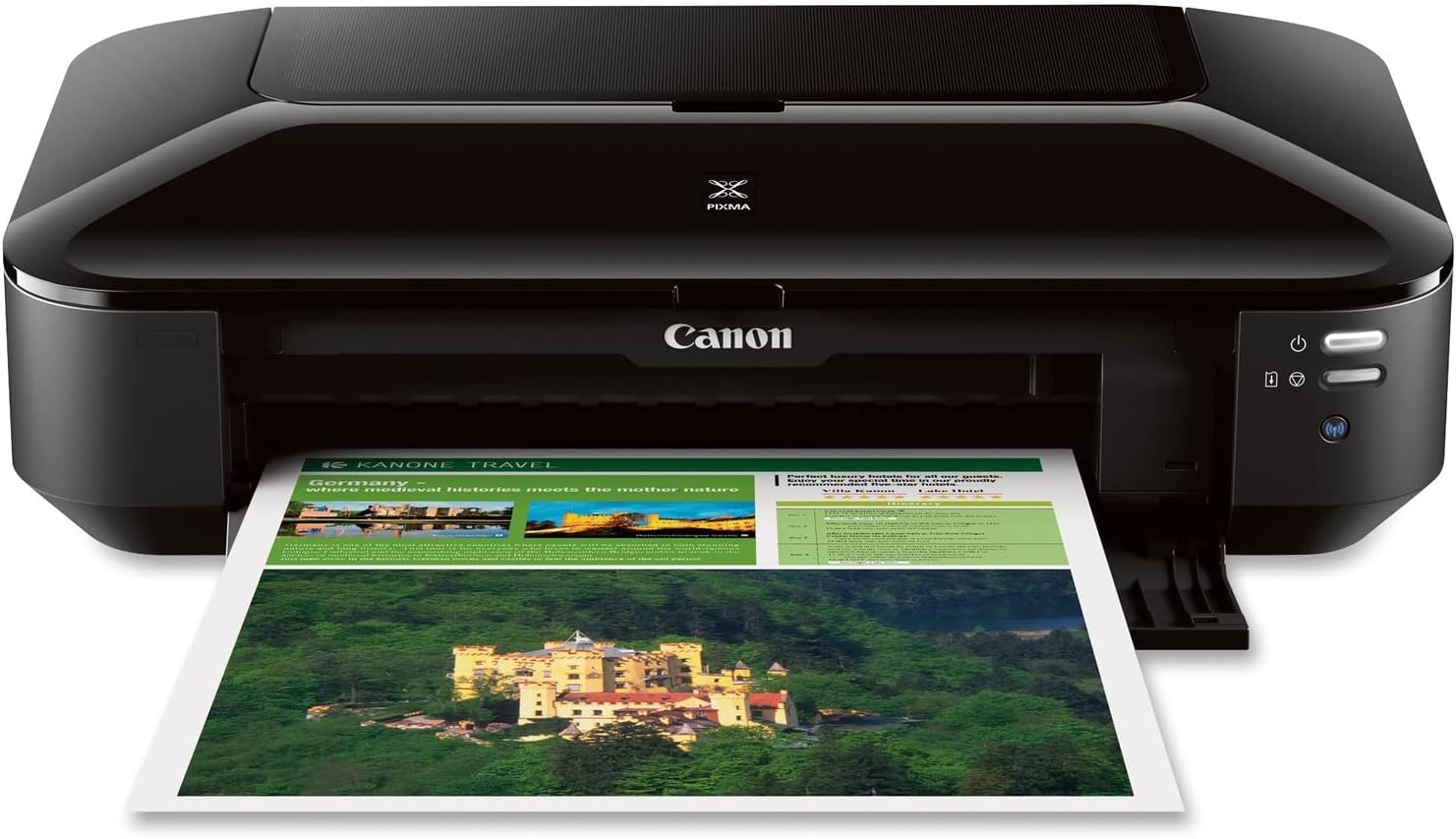
| Printer Type | Inkjet |
|---|---|
| Maximum Media Size | 13 x 19 inch |
| Maximum print Resolution Color | 9600 x 2400 dpi |
| Printer Connectivity Type | Wireless;Ethernet; USB |
| Ink Color | Cyan, Magenta, Yellow, Black |
The PIXMA iX6820 is Canon's wide-format inkjet aimed at small offices and creators who need A3 (13 x 19 inch) output without an industrial footprint. It uses a five-tank system with a pigment black plus four dye color inks so text is crisp and color prints show strong detail at the printer's 9600 x 2400 dpi maximum. You can print borderless photos and large spreadsheets, and the printer supports wireless printing, AirPrint, Google Cloud Print and Ethernet for mixed setups. Practical perks include auto power on, quiet mode, and Canon's My Image Garden and template tools for quick office and photo projects. It lacks duplexing and has a single tray with modest sheet capacity, so heavy double-sided or high-volume jobs will require manual handling and frequent reloading. The iX6820 is not a scanner/copier combo despite some bundled software mentions, and replacement ink costs and cartridge yield should be considered for ongoing running costs.
Best for: Buyers who need affordable A3-capable printing for occasional wide-format photos, posters, or spreadsheets and prioritize print quality over heavy duplexed volume.
Less Ideal for: Users who require high-volume, double-sided production or an all-in-one device with scanning and copying should look elsewhere.
- Prints up to 13 x 19 inch A3+ media for wide-format documents and photos
- High maximum resolution (9600 x 2400 dpi) for detailed color and photo prints
- Five individual ink tanks let you replace only the color that runs out
- Multiple connectivity options including Wi‑Fi, Ethernet, AirPrint and USB
- Features like borderless printing, quiet mode and auto power on simplify office and photo workflows
- No automatic duplexing for double-sided prints
- Single tray and limited sheet capacity increase manual handling for larger jobs
- Does not include a built-in scanner or automatic document feeder
Verdict: A cost-conscious option for buyers who want high-resolution A3-capable prints without a large office printer footprint.
Canon PIXMA PRO-200S

| Printer Type | Inkjet |
|---|---|
| Maximum print Resolution Color | 4800 x 2400dpi |
| Printer Connectivity Type | Wi-Fi |
| Hardware Interface | Ethernet, USB |
| Maximum Media Size | A3+ (13" x 19") |
The PIXMA PRO-200S is a 13-inch professional inkjet designed for photographers and graphic artists who need vibrant, gallery-quality color prints up to 13" x 19". It uses an 8-color dye-based ink set and supports borderless printing across many photo sizes, with a 3.0" color LCD for easy status checks and setup. Typical use is single-sided photo and fine-art printing where color gamut, smooth gradations, and quick turnaround matter; Canon quotes an A3+ bordered print in about 90 seconds. Connectivity includes Wi-Fi plus Ethernet and USB for direct workflows. Paper handling covers a wide range of sizes and media types and a 100-sheet maximum capacity helps when running batches. Expect accurate, richly saturated prints and a relatively compact footprint for an A3-capable device. Downsides to consider are modest rated print speeds for large jobs and simplex-only printing, so it is not suited for high-volume duplex office copying or fastest production throughput.
Best for: Photographers and creative pros who prioritize reliable, high-quality color and versatile media handling for A3+ prints and want a straightforward, dependable photo printer.
Less Ideal for: Offices that need fast duplex printing or very high daily page volumes should choose a production or laser device instead.
- Eight-color dye-based ink delivers wide color gamut and smooth gradations for photo and art prints.
- Borderless printing up to 13" x 19" (A3+) for edge-to-edge photos and posters.
- Multiple connectivity options including Wi‑Fi, Ethernet, and USB for flexible workflows.
- 3.0" color LCD makes checking ink levels and settings simple and approachable.
- Printer is simplex only so it cannot do automatic two-sided printing.
- Rated sheet capacity and print speeds are moderate compared with production photo printers.
Verdict: Buy this if you need a reliable A3+ photo printer that produces vibrant, gallery-quality color with flexible connectivity and easy operation.
Epson EcoTank ET-15000

| Printer Type | Inkjet |
|---|---|
| Maximum Media Size | 11 x 17 inch |
| Maximum print Resolution Color | 4800 x 1200 |
| B&W Pages per Minute | 17 pages_per_minute |
| Printer Connectivity Type | Wi-Fi |
The ET-15000 brings Epson's refillable EcoTank system to a wide-format all-in-one designed for home offices and small businesses. It prints up to 13 x 19 inches through the rear feed, handles two paper trays with a 250-sheet front capacity, and includes an automatic document feeder for multi-page scanning and copying. The supersized ink tanks and included bottles dramatically lower running costs and reduce cartridge waste, so you can print large volumes without frequent replacements. Connectivity options include Wi-Fi and Ethernet plus a 2.7-inch color touchscreen and hands-free voice printing for simple jobs from mobile devices. Print quality is strong for documents and photos thanks to high color and print resolution, though color throughput is slower than mono at about 9 ppm. The unit is large and somewhat heavy, so it needs a dedicated workspace, and initial setup uses some ink for priming which reduces the first-bottle yield. For buyers prioritizing low ongoing ink cost and A3-capable output, this model delivers practical, wide-format performance in a single package.
Best for: Buyers who want an A3-capable all-in-one that lowers long-term ink expenses and handles frequent, business-style print jobs with reliable connectivity and wide-format output.
Less Ideal for: People with very limited desk space or those who need the fastest color printing available should consider smaller or faster models instead.
- Refillable EcoTank bottles cut ink costs and reduce cartridge waste.
- Supports wide-format printing up to 13 x 19 inches for posters and large documents.
- 250-sheet front tray and rear specialty feed give flexible paper handling.
- Built-in ADF, auto-duplex, and Ethernet plus Wi-Fi cover typical office connectivity.
- Includes a 2.7-inch color touchscreen and voice-activated printing for easy operation.
- Physically large and heavy, requiring substantial desk or shelf space.
- Color print speed is modest compared with black-and-white throughput.
Verdict: Choose the ET-15000 if you need true wide-format A3 printing in an all-in-one and want dramatically lower ink costs with supertank refillable bottles.
Choosing the Right A3 Printer: Key Factors to Consider
Print Quality and Resolution
Print quality determines how usable your A3 output will be for graphics, photos, and fine text. Higher native resolution and better color management mean crisper lines, smoother gradients, and more accurate color reproduction. When evaluating an A3 printer, look for specifications that indicate resolution for both black and color channels and whether the driver supports color profiles.
Quality also depends on the print engine and the ink or toner formulation. Inkjet A3 printers usually excel at photos and color blends, while laser-based A3 models can deliver crisp text and fast monochrome runs. Consider the types of documents you produce most often when prioritizing resolution and color fidelity.
Media Handling and Paper Support
A3 work requires reliable feeding and support for heavier stocks and larger sheets. Check whether the printer supports duplex printing on A3 and what paper weight ranges are compatible. A printer with a manual bypass or dedicated tray for heavy media makes switching between standard and specialty paper simpler.
Edge-to-edge printing, maximum printable area, and tray capacity also affect usability. If you plan to run long batches of A3 posters or prints, larger input and output trays reduce interruptions. Robust feed mechanisms and jam-recovery features are especially valuable when using coated or card stock.
Connectivity and Compatibility
How the printer connects to your devices has a big impact on daily workflow. For shared environments, wired Ethernet and reliable Wi-Fi are essential. Look for printers that support modern network protocols and offer easy mobile printing via standard APIs or built-in apps.
Driver support across operating systems matters too. Ensure the manufacturer provides updated drivers or universal protocols like AirPrint or Mopria if you use macOS, Windows, Linux, or mobile devices. Web-based management and cloud print options can simplify administration for small teams.
Speed and Duty Cycle
Print speed affects productivity when you handle frequent A3 jobs. Manufacturers quote speeds in pages per minute, but realistic throughput depends on print mode, color versus mono output, and media type. Look for measured speeds for A3 or comparable settings rather than relying only on A4 numbers.
Duty cycle indicates how many pages the printer is designed to handle monthly. Match that number to your expected workload to avoid overtaxing a device and shortening its service life. Higher duty cycles and faster engines generally correlate with more robust internal components.
Operating Costs and Consumables
Long-term costs are driven by ink or toner yield, the price of replacement cartridges or drums, and maintenance supplies. A printer with a low sticker price can become expensive if it uses small high-cost cartridges. Look for published yield figures and consider whether high-capacity or bulk ink options are available.
Also consider user-replaceable maintenance parts and the ease of performing routine tasks. Devices that require frequent professional servicing will increase total cost of ownership. Factor consumable availability in your region when assessing value.
Ease of Use and Maintenance
A3 printers should be straightforward to operate and maintain, especially in small offices without full-time IT support. Controls that offer clear status reporting, simple front-access panels for replacing cartridges or clearing jams, and intuitive driver interfaces reduce downtime.
Maintenance tasks such as printhead cleaning, calibration, and firmware updates should be manageable without specialized tools. Consider whether the device offers helpful diagnostics or mobile alerts to simplify upkeep.
When to Choose an A3 Printer Over Print Services
Owning an A3 printer makes sense if you need frequent access to large-format output, want faster turnaround for iterative design proofs, or require control over color and media choices. For occasional A3 jobs, a print service can be cheaper, but repeated runs, emergency prints, or sensitive documents are easier to handle in-house.
Having an on-site printer reduces workflow friction for teams that iterate on posters, brochures, or full-size schematics. It also allows you to test color and layout quickly without the delay of external queues.
- Tight deadlines or frequent revisions justify an in-house A3 device
- Regular use of specialty papers or coated media favors ownership
- Confidential or branded materials are safer when produced internally
Paper Types and Finishing Options
Different projects require different paper types. Matte, glossy, and heavyweight cardstocks all behave differently in printers. Verify that the printer supports the weight and coating of the media you plan to use to avoid curl, smudging, or feed errors.
Consider trimming, scoring, and other finishing needs. Some printers integrate well with stackers or cutters in a production environment, while others are intended solely for single-sheet output.
- Check maximum paper weight and recommended settings for coated stock
- Look for manual feed options for specialty media
- Confirm printable margins and whether borderless A3 is supported
Color Management and Calibration
Accurate color on A3 prints often requires more than default settings. Built-in color profiles, ICC support, and calibration utilities help maintain consistent output across runs. If color is critical, choose a printer with robust color control and the ability to import or adjust profiles.
For teams producing marketing materials or proofs, consistent color between monitors and prints is vital. Invest time in calibrating your workflow to reduce unexpected shifts between batches.
- Use ICC profiles when available for predictable color
- Perform periodic calibration for consistent results
- Test prints on the intended paper stock before full runs
Placement and Workspace Considerations
A3 printers are larger than standard desktop models and may need dedicated space. Consider clearance for paper trays and output stacking, and ensure adequate ventilation. Noise levels can also matter in open office areas, so factor acoustic impact into placement decisions.
Power requirements and network placement influence where the printer should sit. If you will rely on wired networking, plan for cable runs and accessible ports.
- Measure required footprint including open trays
- Allow access to front and rear panels for maintenance
- Plan for noise and ventilation in shared spaces
Security and Network Management
When a printer is shared on a network, security protections matter. Look for support for encrypted connections, user authentication, and administrative controls to restrict usage. Firmware update mechanisms should be straightforward to keep the device patched against vulnerabilities.
In small offices, web-based admin interfaces and simple logging features make it easier to monitor usage and troubleshoot problems without dedicated IT staff.
- Enable encryption and secure protocols where available
- Use access controls to prevent unauthorized use
- Keep firmware up to date to address security issues
How We Chose the Best A3 Printer
We focused on practical performance measures that matter for A3 printing in home and small office settings. We prioritized consistent print quality on A3 media for both graphics and text, because color accuracy and edge sharpness are primary drivers of satisfaction for large-format jobs. Media handling earned heavy weight, including supported paper sizes, duplex A3 capability, and reliable feed mechanisms to minimize jams with heavier stock. Connectivity and driver support were judged for wired network, Wi-Fi, and mobile printing options so the printer is easy to integrate into existing workflows. Speed under typical office loads and the cost and availability of replaceable consumables were assessed to gauge ongoing runtime efficiency. We excluded specialty production presses and industrial devices that require dedicated service contracts or commercial finishing; the list focuses on office and prosumer A3 printers that can be operated without specialized infrastructure. Finally, we screened for documented reliability and basic ease-of-use features such as clear control panels and straightforward maintenance access.
Our full evaluation process is outlined in our review methodology.
FAQ
Can I print A3 from a laptop or phone?
Yes. Most modern A3 printers support printing from laptops and mobile devices via Wi-Fi, network, or mobile printing standards. Check that the printer supports your operating system and any mobile printing protocols you rely on.
Do A3 printers cost much more to operate than A4 models?
Operating costs depend on the print technology and consumable yields. A3-capable devices may use larger cartridges or have higher yield options that reduce per-page costs, but heavier media and color printing increase expenses compared with basic A4 mono prints.
Is duplex A3 printing common?
Some A3 printers offer duplex printing on large sheets, but not all do. If you need automatic double-sided A3 output, verify that duplex A3 is explicitly supported and check any paper weight restrictions.
What maintenance should I expect with an A3 printer?
Routine maintenance includes replacing ink or toner, cleaning printheads or rollers, and clearing occasional paper jams. Some models require periodic calibration or replacement of maintenance kits depending on usage volumes.
How do I ensure color accuracy on A3 prints?
Use proper color profiles, calibrate your monitor, and run test prints on the same paper stock. If precise color matching is essential, allow time for profile adjustments and consider using printers that support ICC profiles and manual calibration.
Final Verdict
Choose an A3 printer by matching its strengths to your typical workload. Prioritize print quality and media handling if you produce graphics or coated prints. If you run frequent large-format documents, give extra weight to duty cycle, speed, and consumable yields to control operating costs. For shared environments, emphasize connectivity and security features. Balanced consideration of these tradeoffs will help you pick an A3 printer that delivers reliable large-format results without unnecessary complexity.