
Note: This article contains affiliate links. If you click on these links and make a purchase, we may earn a small commission at no extra cost to you. This helps support our research and content. Read our full affiliate disclosure here.
If you want straightforward remote control of your heating and cooling without a steep learning curve, a basic Wi-Fi thermostat can deliver. These simpler smart thermostats let you adjust temperature from a phone, set basic schedules, and gain insight into runtime without the complexity of advanced features. Choosing the right one matters for day-to-day comfort, compatibility with your HVAC, and avoiding frustrating connectivity or setup problems. This guide covers seven shortlisted Basic Wi-Fi Thermostats that fit the needs of most homes. We evaluated each pick on connectivity, installation effort, user interface clarity, and energy reporting so you can pick a model that matches your technical comfort level and system type. Read on for the decision factors that matter and practical tips for installation and daily use.
Top Picks at a Glance
| Best Overall The best all-around choice for most situations | ecobee Smart Thermostat Essential |  |
| Best Quality Built to a higher standard if you want something more solid | Google Nest Learning Thermostat (4th Gen) |  |
| Best Value The sweet spot between price and what you get | Amazon Smart Thermostat |  |
| Best Budget The cheapest option that still gets the job done reliably | Riseem STN701W Smart Thermostat |  |
| Top Rated A top-rated pick with lots of positive feedback | Sensi Touch ST75 |  |
| Most Popular A crowd favorite that many people choose with confidence | Google Nest Thermostat |  |
| Best Seller A high-volume bestseller chosen again and again | Honeywell Home X2S Smart Thermostat |  |
ecobee Smart Thermostat Essential

| Connectivity Technology | Wi-Fi |
|---|---|
| Controller Type | Amazon Alexa, Android, Apple HomeKit, Google Assistant, iOS |
| Power Source | Battery Powered |
| Display Type | LCD |
The ecobee Smart Thermostat Essential is a pared-down smart thermostat that gives you remote control, scheduling, and basic energy-saving automation without the premium frills. It mounts to the wall and uses a color touchscreen for local control while the ecobee app and voice assistants let you change temperature and schedules from anywhere. Key conveniences include auto-scheduling and an Auto-Away mode that helps reduce runtime when the house is empty, plus compatibility with HomeKit, Google Assistant, and Alexa for hands-free adjustments. It works with most 24 VAC HVAC systems and can use a Power Extender Kit when a C-wire is missing, which simplifies DIY installs in older homes. The Essential model focuses on core functions rather than advanced sensors or air quality monitoring, so you get straightforward temperature control and energy reports but not the extra sensors or built-in air monitoring found on higher-end models. For buyers who want reliable remote thermostat control, simple energy savings features, and broad smart home support, this model covers the essentials with easy setup and a clear touchscreen interface.
Best for: Buyers who want a straightforward, app-accessible smart thermostat that delivers dependable remote control and basic energy-saving automation without paying for premium extras.
Less Ideal for: Homeowners who want integrated air quality monitoring, multiple-room sensor bundles, or advanced HVAC diagnostics should consider more feature-rich models.
- Works with Apple HomeKit, Google Assistant, and Amazon Alexa for voice and remote control
- Auto-Away and auto-scheduling features reduce energy use without manual programming
- Battery powered with optional Power Extender Kit for homes without a C-wire
- Simple color touchscreen and mobile app make daily adjustments easy
- Does not include advanced room sensors or built-in air quality monitoring
- Limited to core thermostat features compared with higher-end ecobee models
Verdict: A budget-friendly smart thermostat that delivers reliable app and voice control plus basic automated energy savings for buyers who want essential smart functionality.
Google Nest Learning Thermostat (4th Gen)

| Connectivity Technology | Wi-Fi |
|---|---|
| Power Source | Battery Powered |
| Voltage | 24 volts |
| Display Type | Touchscreen |
| Number of Batteries | 1 CR2 batteries required. (included) |
The Nest Learning Thermostat (4th gen) is a high-end smart thermostat designed to learn your schedule and help reduce heating and cooling use while keeping rooms comfortable. It pairs with Wi‑Fi and the Google Home app for remote control and voice commands through Alexa, Siri, or Google Assistant, and includes a Nest Temperature Sensor to manage hot or cold spots. The larger touchscreen and Dynamic Farsight make status and adjustments easy to read from across a room, and features like Adaptive Eco, Smart Schedule suggestions, and Natural Heating & Cooling let the thermostat pause systems when outdoor conditions or occupancy indicate savings opportunities. Installation is intended to be DIY-friendly for most 24V systems and it reports system health alerts if something needs attention. Limitations are typical of learning thermostats: some users may find auto-schedule suggestions intrusive or prefer manual control, and advanced HVAC setups should verify compatibility before installing.
Best for: Buyers who prioritize smart energy performance and automated temperature management and want a thermostat that learns habits and integrates with major smart assistants.
Less Ideal for: People seeking a purely manual thermostat or those with unusual HVAC systems who do not want to verify compatibility should look elsewhere.
- Learns your schedule and suggests energy-saving adjustments automatically.
- Remote control and voice control via Google Home, Alexa, and Siri for convenient operation.
- Includes a Nest Temperature Sensor to target specific rooms and manage hot/cold spots.
- Adaptive Eco and Natural Heating & Cooling features help reduce runtime based on outdoor conditions.
- Auto-schedule suggestions may not match every household routine and can require manual approval.
- Not all HVAC configurations are guaranteed compatible without checking the compatibility tool.
Verdict: Choose this Nest thermostat if you want a performance-focused, learning Wi‑Fi thermostat that automates temperature control and targets hot or cold spots for energy savings.
Amazon Smart Thermostat

| Works with | Alexa and Ring |
|---|---|
| C-wire | Required |
| Manufacturer tech | Honeywell Home |
| Control | Alexa app |
The Amazon Smart Thermostat is a straightforward Wi‑Fi thermostat designed to replace a conventional wall unit and give remote and voice control through Alexa. Installation is DIY with a C‑wire required and guided setup in the Alexa app, and once installed you can create home, away, and sleep schedules or let Alexa adjust temperature automatically based on device presence. The unit integrates with Alexa and Ring for voice control and presence-based automations and uses Honeywell Home thermostat technology for reliable temperature sensing. Practical benefits include app-based away control for energy savings, programmable schedules, and potential utility rebates called out after purchase. Limitations are that advanced HVAC features and detailed on‑device controls are minimal compared with premium smart thermostats, and some users will need to confirm C‑wire compatibility before buying. For buyers who want a basic, Alexa-first smart thermostat focused on easy scheduling and remote control, this covers the essentials without extra complexity.
Best for: Buyers who want a simple, energy-focused Wi‑Fi thermostat that prioritizes Alexa voice control and easy scheduling without advanced HVAC features.
Less Ideal for: Homes needing advanced zoning, multi-stage HVAC programming, or users who prefer robust on‑device controls and diagnostics.
- Alexa and Ring integration for voice and presence-based temperature control
- App-guided DIY installation with scheduling and remote control
- Built with Honeywell Home thermostat technology for reliable sensing
- Promotes energy savings with programmable schedules and rebate information
- Requires a C‑wire, which may need professional wiring in some homes
- Lacks advanced HVAC controls and detailed on‑device options found on higher-end models
Verdict: A no-frills, Alexa-centric smart thermostat that delivers reliable remote scheduling and basic energy savings for buyers who want simplicity and voice control.
Riseem STN701W Smart Thermostat
| Connectivity Technology | Wi-Fi |
|---|---|
| Temperature Control Type | Smart/Remote |
| Power Source | Corded Electric |
| Voltage | 24 volts_of_alternating_current |
| Display Type | LCD |
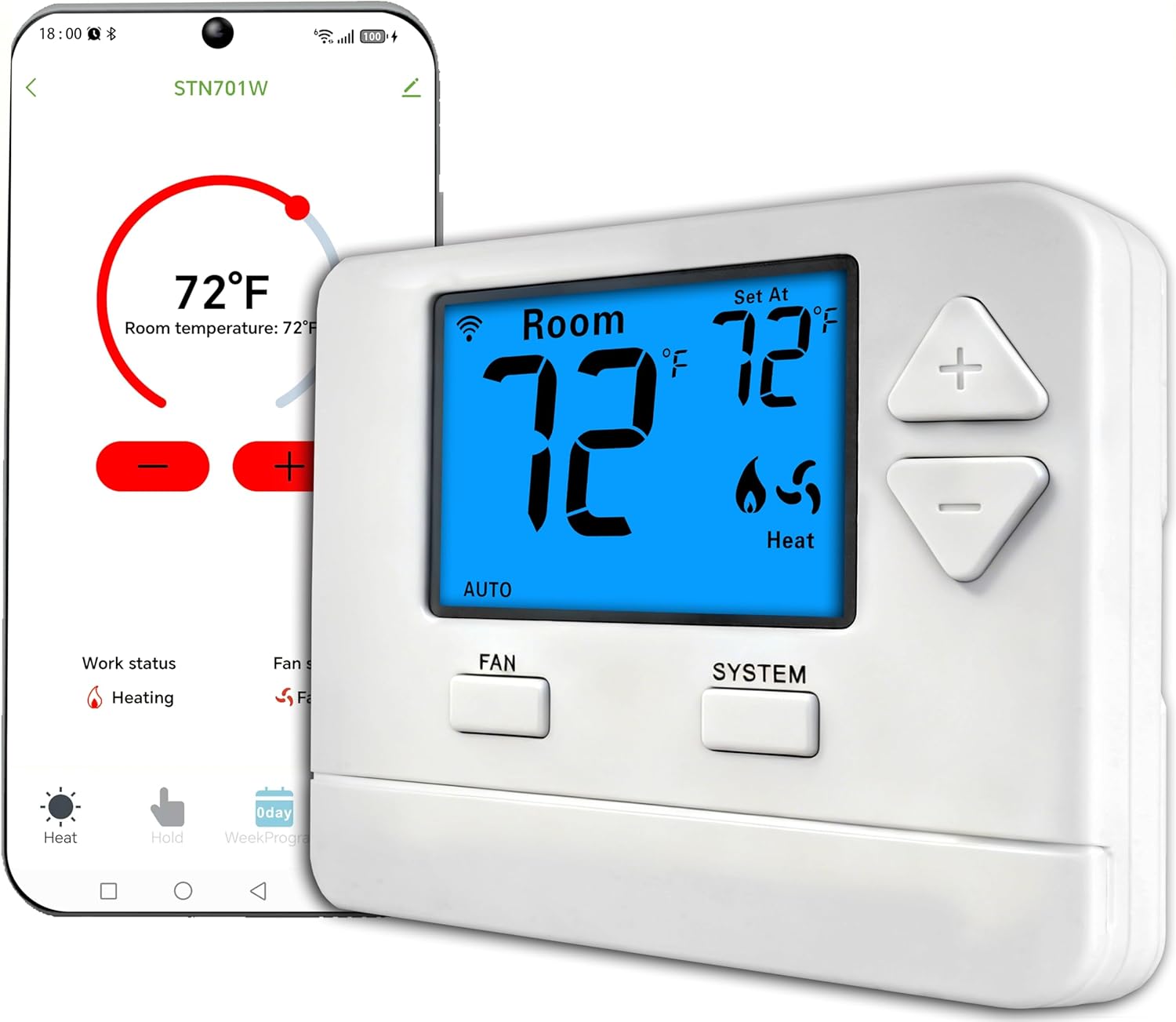
The Riseem STN701W is a budget-oriented smart thermostat that connects to your home Wi‑Fi for remote control and 7-day scheduling via a mobile app. It is built for single-stage 1 heat/1 cool systems and gives a straightforward LCD interface with app and button control for setting temperature and weekly programs. Installation is wall-mounted and requires a C‑wire since it does not run on batteries, so expect to supply 24 VAC power from your HVAC wiring or add a common wire adapter. Practical benefits include remote access for adjusting comfort on the go, simple programming for weekday/weekend or daily schedules, and a compact plastic housing that fits typical thermostat openings. Limitations are its single-stage compatibility and the mandatory C‑wire requirement, which means it is not suitable for multistage systems or homes without an accessible common conductor without additional wiring work. For buyers who want an inexpensive, no-frills Wi‑Fi thermostat with basic scheduling and remote control, this model delivers the essentials without advanced energy reports or multi-zone features.
Best for: Buyers looking for an affordable entry-level smart thermostat to add remote control and basic scheduling to a single-stage home HVAC system and who are comfortable handling simple wiring or hiring a basic install.
Less Ideal for: Homes with multistage heating or cooling, or users who need advanced energy reporting, multi-zone control, or a battery-powered install without a common wire.
- Wi‑Fi connectivity with smartphone app for remote temperature control
- 7-day programmable schedule for customizing comfort by day
- Simple LCD and button interface that is easy to operate
- Compatible with most single-stage heating and cooling residential systems
- Requires a C‑wire and cannot operate on batteries
- Limited to single-stage (1H/1C) systems, not suitable for multistage HVAC
Verdict: A low-cost, no-frills Wi‑Fi thermostat that adds remote control and week-long scheduling to single-stage systems for buyers prioritizing value.
Sensi Touch ST75

| Connectivity Technology | Wi-Fi |
|---|---|
| Controller Type | Amazon Alexa, Apple HomeKit, Google Assistant, SmartThings, Vera |
| Screen Size | 4.3 inches |
| Power Source | AC/DC |
| Temperature Control Type | programmable |
The Sensi Touch ST75 is a straightforward smart thermostat that replaces a basic wall stat and brings remote control, scheduling, and energy reports to your HVAC system. Installation is designed for DIYers with illuminated easy-click terminals and a built-in level, though a common wire (c-wire) is required for power. Once installed, the Sensi mobile app provides remote temperature control, usage reports, smart alerts, and geofencing for automatic comfort adjustments. The 4.3-inch color touchscreen and app make daily interaction simple, and compatibility with Alexa, Google Assistant, Apple HomeKit, and SmartThings lets you add voice control. Practical benefits include Energy Star certification and maintenance reminders such as filter alerts, which can help reduce run time and energy use. Limitations are that it needs a C-wire, and advanced HVAC installers may prefer thermostats with larger ecosystems or deeper professional diagnostics. For buyers wanting a reliable, app-driven upgrade from a basic thermostat, the Sensi Touch covers the essentials without extra complexity.
Best for: Buyers who want a dependable, no-frills smart thermostat that upgrades a standard wall unit to app and voice control while prioritizing straightforward installation and consistent performance.
Less Ideal for: Homeowners without a C-wire or those who need an installer-grade thermostat with deep diagnostic tools and advanced HVAC tuning.
- Easy DIY installation with illuminated easy-click terminals and built-in level
- Wi‑Fi remote control and scheduling via a dedicated mobile app
- 4.3-inch color touchscreen that simplifies local control
- Works with major voice platforms and smart home hubs
- Energy Star certification with usage reports and maintenance alerts
- Requires a common (C) wire for proper installation
- Does not offer advanced professional diagnostics for complex HVAC setups
Verdict: A reliable, easy-to-install smart thermostat that brings basic Wi‑Fi control, voice integration, and energy-saving features to a standard HVAC setup.
Google Nest Thermostat

| Connectivity Technology | Bluetooth, Wi-Fi |
|---|---|
| Power Source | Battery Powered |
| Display Type | LCD |
| Screen Size | 2 inches |
| Number of Batteries | 2 A batteries required. (included) |
The Google Nest Thermostat is a compact smart thermostat aimed at simplifying temperature control and trimming energy use. It connects to your home Wi‑Fi and is controlled via the Google Home app or voice assistants, letting you change temperature remotely, set schedules, and accept suggested savings from the app. Installation is designed for do-it-yourself setup and the unit often works without a C wire, though some systems require additional power. Notable features include Savings Finder recommendations, Eco Temperatures when the house is empty, HVAC monitoring alerts, and a simple side swipe touch control on the device. The thermostat runs on 2 included A batteries and supports both 2.4 GHz and 5 GHz Wi‑Fi plus Bluetooth Low Energy. Practical benefits are easy remote management, straightforward scheduling, and basic system alerts that can flag potential HVAC issues early. Limitations include dependency on the Google Home app and working internet for remote features and voice control, and the device may need a C wire or power accessory for certain HVAC configurations.
Best for: Buyers who want a simple, app-controlled smart thermostat with energy-saving suggestions and easy DIY installation, and who value devices that integrate into a Google-centered smart home.
Less Ideal for: People who lack reliable home Wi‑Fi or who need advanced programmable features and deep HVAC diagnostics beyond basic alerts should consider other options.
- Remote control via Google Home app and voice assistants for convenient temperature changes from anywhere
- Savings Finder and Eco Temperature features that help reduce energy use automatically
- Designed for DIY installation with included mounting hardware and quick setup guidance
- Supports dual-band Wi‑Fi and Bluetooth Low Energy for reliable connectivity
- Includes HVAC monitoring alerts to catch potential system issues early
- Requires internet and the Google Home app for full functionality and voice control
- Some HVAC setups may need a C wire or a power accessory to operate reliably
Verdict: A straightforward, app-first smart thermostat that delivers easy installation and automated energy-saving features for buyers seeking a basic Wi‑Fi thermostat with Google integration.
Honeywell Home X2S Smart Thermostat

| Compatibility | Up to 2H/2C conventional or Up to 2H/1C heat pump |
|---|---|
| Connectivity | WiFi (2.4/5 GHz), Matter |
| Power | C‑wire required (24 VAC) |
| Scheduling | 7 day, 5‑1‑1, 5‑2, 1 week, or non‑programmable option |
The Honeywell Home X2S is a no-frills smart thermostat that brings remote control and basic energy-saving features to typical homes. It connects to 2.4 or 5 GHz Wi‑Fi and integrates with Alexa, Google Assistant, and Apple HomeKit via Matter, letting you change settings from the app, voice, or the push‑button interface. Scheduling options include 7‑day, 5‑1‑1, 5‑2 and single‑week setups, and auto‑away plus filter reminders help reduce wasted runtime. The display is a simple LCD and the unit ships with interchangeable accent pieces to fit different decors. Installation requires a C‑wire for reliable power, so older homes without one may need an adapter or pro install. It supports up to 2 heat/2 cool conventional systems and up to 2 heat/1 cool heat pumps, which covers most single‑family systems but not large multi‑stage setups. For buyers who want straightforward smart control and ENERGY STAR rated efficiency without complex learning features, the X2S delivers dependable performance at a basic level.
Best for: Buyers who want a simple, reliable smart thermostat with standard scheduling and broad smart‑home compatibility and who prefer predictable, energy‑focused features over complex automation.
Less Ideal for: Homes that need multi‑stage HVAC control beyond 2 heat/2 cool or owners looking for learning thermostats that automatically adapt to daily patterns.
- ENERGY STAR certified for baseline efficiency
- Matter certification for reliable integration with Alexa, Google Assistant, and HomeKit
- Flexible weekday/weekend scheduling plus auto‑away to reduce energy use
- Custom reminders and humidity display option for basic home monitoring
- Interchangeable accent pieces to match decor
- Requires a C‑wire for proper operation, which may need an adapter or professional install
- No advanced learning algorithms or adaptive energy optimization
Verdict: A straightforward, ENERGY STAR certified smart thermostat that gives mainstream buyers dependable remote control and basic scheduling with wide smart‑home compatibility.
Choosing the Right Basic Wi-Fi Thermostat: Key Factors to Consider
Connectivity and Network Requirements
A basic Wi-Fi thermostat needs a stable connection to your home network to provide remote control and update scheduling. Check whether the thermostat supports your router frequency and encryption standards. Dual-band routers may require the thermostat to use 2.4 GHz, so confirm compatibility to avoid connection drops.
Network reliability directly affects whether you can change settings remotely, receive alerts, or rely on cloud-based energy reports. Consider placement relative to your router and whether your home has Wi-Fi dead zones that might require a mesh node or extender.
Installation and Wiring
Most basic Wi-Fi thermostats replace a standard wall thermostat and require common control wires. Verify whether your HVAC system provides a dedicated common wire (C-wire). Some basic models include adapters or power-stealing options that avoid the need for a C-wire, but those approaches can be less reliable on certain systems.
Assess the physical mounting, label clarity on the terminal board, and whether the unit's adapter fits over existing wall plates. If you have a multi-stage heat pump, proprietary furnace controls, or unusual wiring, professional help may be needed even for basic units.
User Interface and App Simplicity
The whole point of a basic Wi-Fi thermostat is low-friction control. Evaluate both the on-device interface for quick adjustments and the mobile app for remote temperature changes and scheduling. Apps should offer straightforward scheduling with clear modes for home, away, and sleep.
Look for intuitive feedback such as clear temperature readouts, easy-to-find schedule editing, and simple alert notifications. If you prefer minimal tinkering, a thermostat with a clean, limited set of options will be less likely to confuse or overwhelm you.
Compatibility With Your HVAC System
Not all thermostats work with every heating or cooling setup. Confirm support for your system type, such as conventional forced-air, heat pump, radiant, or millivolt systems. Also check compatibility with any zoned setups or systems that use proprietary control protocols.
Understanding your system upfront prevents returns and installation headaches. If your home uses older or uncommon equipment, consult documentation or an installer to confirm the thermostat will control heating stages, cooling stages, and auxiliary heat correctly.
Energy Reporting and Scheduler Features
Even basic models often collect runtime and setpoint data to present simple energy summaries. Decide whether you want daily or monthly usage reporting, and whether the thermostat provides actionable tips to reduce runtime. Basic reporting helps you spot inefficient schedules or excessive heating and cooling.
Consider scheduler flexibility: do you need multiple temperature periods per day, weekday/weekend differentiation, or a simple fixed schedule? The right scheduler reduces manual adjustments and supports modest energy savings without complexity.
Security and Data Privacy
A connected thermostat exchanges data with cloud services, making security and privacy important. Look for devices that receive regular firmware updates and use secure authentication for app access. Check the vendor's privacy policy for data retention and what types of telemetry are collected.
Secure setup practices, such as using strong Wi-Fi passwords and keeping the router firmware updated, reduce risks. For those focused on privacy, choose thermostats that limit cloud dependency or that offer clear options to manage data sharing.
Common Installation Pitfalls and How to Avoid Them
Even basic Wi-Fi thermostats can encounter installation snags that are easy to prevent with a few checks. Start by turning off power at the furnace or breaker and photographing your existing wiring labels before removal so you can match terminals at the new device. If the old thermostat has fewer wires than the new unit requires, examine whether an adapter is included or if a C-wire upgrade is necessary.
Watch for loose or corroded terminal screws and for wire colors that do not match modern conventions. If your furnace uses a proprietary control module, consult the system documentation. For tricky cases, a brief phone call to a local HVAC technician can save hours.
- Turn off power before touching thermostat wiring.
- Label and photograph existing wires for reference.
- Confirm C-wire presence or adapter options.
- Check terminal screw condition and wire insulation.
Optimizing Wi-Fi Placement for Reliable Control
A thermostat's location relative to your router matters less for on-site sensing and more for reliable remote access. If your thermostat sits far from the router or behind thick walls, you may see intermittent cloud connectivity. Consider moving a mesh node or adding a small Wi-Fi extender to maintain a strong signal.
Aim to maintain at least a couple of bars of signal at the mounting location and avoid placing the thermostat inside metal enclosures or directly above large appliances that create interference.
- Test signal with a phone before final mounting.
- Avoid placement near microwaves, cordless phones, or large metal objects.
- Use a mesh system to eliminate isolated dead zones.
Simple Scheduling That Saves Energy
A few modest scheduling changes often yield better savings than complex automations. Set slightly lower heating setpoints or higher cooling setpoints for times when the house is empty, and keep short setback periods for sleep hours. Basic thermostats make these edits easy without learning algorithms or multi-zone management.
Use the app's built-in scheduling templates if available. They provide a quick starting point and reduce the need for repeated adjustments. For renters or short-term residents, favor lockable schedules or password protections to prevent unintended changes.
- Use 2 to 4 daily periods for simplicity.
- Implement gradual setpoint changes to avoid comfort shocks.
- Enable temporary hold functions for unexpected schedule changes.
Maintenance and Firmware Updates
Basic Wi-Fi thermostats require minimal physical maintenance, but you should check for firmware updates periodically. Updates can repair connectivity bugs and patch security issues. Set your phone app to notify for firmware availability or check the settings occasionally.
Also confirm that batteries, if present, are replaced on schedule. Low battery conditions can cause erratic behavior on some models that rely on battery-backed memory.
- Enable automatic app notifications for firmware updates.
- Replace backup batteries yearly where applicable.
- Reboot the thermostat if the app shows stale status for extended periods.
When to Call a Professional
While many basic Wi-Fi thermostats are DIY-friendly, certain conditions justify professional help. Call an HVAC technician if your system uses unconventional wiring, if you have multi-stage or multi-zone equipment, or if you detect wiring damage. Professionals can also test system voltage and verify proper control of heat strips, compressors, and reversing valves.
If the thermostat triggers frequent short-cycling or if the system behaves differently after installation, stop and consult a technician to avoid stress on HVAC components.
- Unusual wiring or missing documentation
- Multi-stage heat or cooling control
- System short-cycling after installation
How We Chose the Best Basic Wi-Fi Thermostat
We limited our selection to thermostats that focus on core smart features: remote access, simple scheduling, and basic energy reporting. Products had to support common residential HVAC control modes, offer persistent Wi-Fi connectivity, and be designed for straightforward home installation without requiring professional zoning or advanced wiring. We prioritized units with clear mobile apps and on-device controls so daily adjustments are intuitive. Key evaluation criteria included connectivity reliability, installation complexity, compatibility with standard HVAC wiring (including a C-wire or offered C-wire alternatives), clarity of the user interface on both the device and app, and basic energy tracking or reporting. We also considered firmware update policies and safety-related certifications. We excluded thermostats whose primary differentiator is advanced learning algorithms, complete home automation hubs, or models that mandate professional installation due to specialized wiring. Units that rely on obscure or discontinued cloud services were also removed. The result is a compact list of reliable, easy-to-use basic Wi-Fi thermostats that suit typical single-zone residential systems.
Our full evaluation process is outlined in our review methodology.
FAQ
Do I always need a C-wire for a basic Wi-Fi thermostat?
Not always. Some basic models can operate without a dedicated C-wire by using power-stealing methods or included adapters, but those solutions are not universally reliable. If your system lacks a C-wire, check for adapter options or consider having a common wire installed for the best stability.
How much technical skill is required to install a basic Wi-Fi thermostat?
Many basic Wi-Fi thermostats are designed for DIY installation and use labeled terminal blocks that match existing wiring. Basic electrical safety and the ability to match wire labels are usually sufficient. If your system uses complex wiring or you are uncomfortable turning off HVAC power, hiring a professional is sensible.
Will a basic Wi-Fi thermostat save energy on its own?
A thermostat by itself does not guarantee savings. Energy reductions come from smarter scheduling and disciplined setpoint changes. Basic Wi-Fi models make it easier to stick to efficient schedules and to make remote adjustments that reduce wasted runtime.
Can I control a basic Wi-Fi thermostat if my internet goes out?
Local control on the thermostat display usually still works without internet. Remote control via the app and cloud-based reports require internet access. Some thermostats may retain limited local network control if your phone is on the same Wi-Fi network, but cloud features will be unavailable during outages.
How secure are connected thermostats?
Security varies by vendor, but reputable devices use encrypted communication and require authenticated app access. To reduce risk, use strong router passwords, enable device and app updates, and limit guest network access. If privacy is a major concern, favor devices that minimize cloud dependency.
Final Verdict
For most homeowners, a basic Wi-Fi thermostat strikes the right balance between convenience and simplicity. Prioritize proven Wi-Fi connectivity, clear app and on-device controls, and compatibility with your specific HVAC wiring. Be realistic about installation needs: a unit that avoids C-wire work can be convenient, but a true C-wire connection typically yields the most reliable performance. Focus on the scoring criteria when comparing options: stable connectivity, low installation complexity, usable interfaces, and relevant energy reporting. With those priorities in mind, you can choose a basic Wi-Fi thermostat that provides remote access and modest energy savings without unnecessary complexity.