
Note: This article contains affiliate links. If you click on these links and make a purchase, we may earn a small commission at no extra cost to you. This helps support our research and content. Read our full affiliate disclosure here.
If you want photo prints that look sharp, last well, and reproduce color faithfully, a color laser printer for photos can be a sensible choice. Laser devices deliver fast, smudge-resistant output and predictable color across long print runs, which matters if you print batches of images, portfolios, or family photos regularly. This guide shortlists the top options for photo printing and explains the practical tradeoffs you should expect from laser-based photo output. Below are our top picks for color laser photo printers, followed by clear guidance on what to prioritize based on print fidelity, media support, and running cost. Use the evaluation criteria to match a printer to your typical photo sizes and workflow.
Top Picks at a Glance
| Best Overall The best all-around choice for most situations | Xerox C235 Color Multifunction Printer |  |
| Best Quality Built to a higher standard if you want something more solid | Brother HL-L8360CDW Color Laser Printer |  |
| Best Value The sweet spot between price and what you get | Canon imageCLASS MF662Cdw |  |
| Best Budget The cheapest option that still gets the job done reliably | Canon imageCLASS LBP646Cdw |  |
| Top Rated A top-rated pick with lots of positive feedback | Brother MFC-L8930CDW |  |
| Most Popular A crowd favorite that many people choose with confidence | HP Color LaserJet Pro MFP 3301sdw |  |
Xerox C235 Color Multifunction Printer

| Print speed | 24 pages per minute |
|---|---|
| Resolution | 1200 dpi color |
| ADF capacity | 50-sheet |
| Maximum sheet capacity | 250 |
| Connectivity | Ethernet, USB, Wi‑Fi |
The Xerox C235 is a compact color laser multifunction printer designed for home and small office users who need reliable daily color output. It handles printing, scanning, copying and faxing, with a 50-sheet automatic document feeder, automatic two‑sided printing and a 2.8-inch color touchscreen for simple control. Performance is geared to moderate workloads—up to 24 ppm and a recommended monthly volume around 1,500 pages—and print resolution up to 1200 dpi for sharper color graphics. Built‑in Wi‑Fi, Wi‑Fi Direct and mobile printing support let you send jobs from phones and tablets, and the Easy Assist app simplifies setup. Practical benefits include low running cost options via high‑yield toners, a 250‑sheet input capacity and basic security features aimed at small teams. Trade‑offs include a relatively small duty cycle and modest copy resolution compared with higher‑end office models, and the unit is fairly compact but still heavier than typical home inkjets, which may matter for very tight spaces.
Best for: Buyers who want a balanced, space‑efficient color laser that covers everyday office tasks and produces better-than-inkjet color for presentations and occasional photos.
Less Ideal for: Not a good fit for photographers or users needing lab‑quality photo prints or for busy offices that need high monthly volumes and advanced connectivity.
- True all‑in‑one: print, scan, copy and fax in one compact machine.
- Good color output at up to 1200 dpi for business graphics and photos on plain paper.
- Built‑in Wi‑Fi, Wi‑Fi Direct and mobile printing for easy smartphone and tablet workflows.
- Automatic duplex and a 50‑sheet ADF speed routine multi‑page jobs and two‑sided printing.
- Supports high‑yield toner cartridges to lower per‑page costs for moderate volumes.
- Recommended monthly volume (~1,500 pages) limits suitability for high‑demand workgroups.
- Color photo quality on plain paper cannot match dedicated photo printers or high‑end color lasers.
- Only one USB port and basic connectivity compared with larger office models.
Verdict: A compact, well‑rounded color laser MFP that delivers reliable business‑quality color and low running costs for balanced home and small office use.
Brother HL-L8360CDW Color Laser Printer
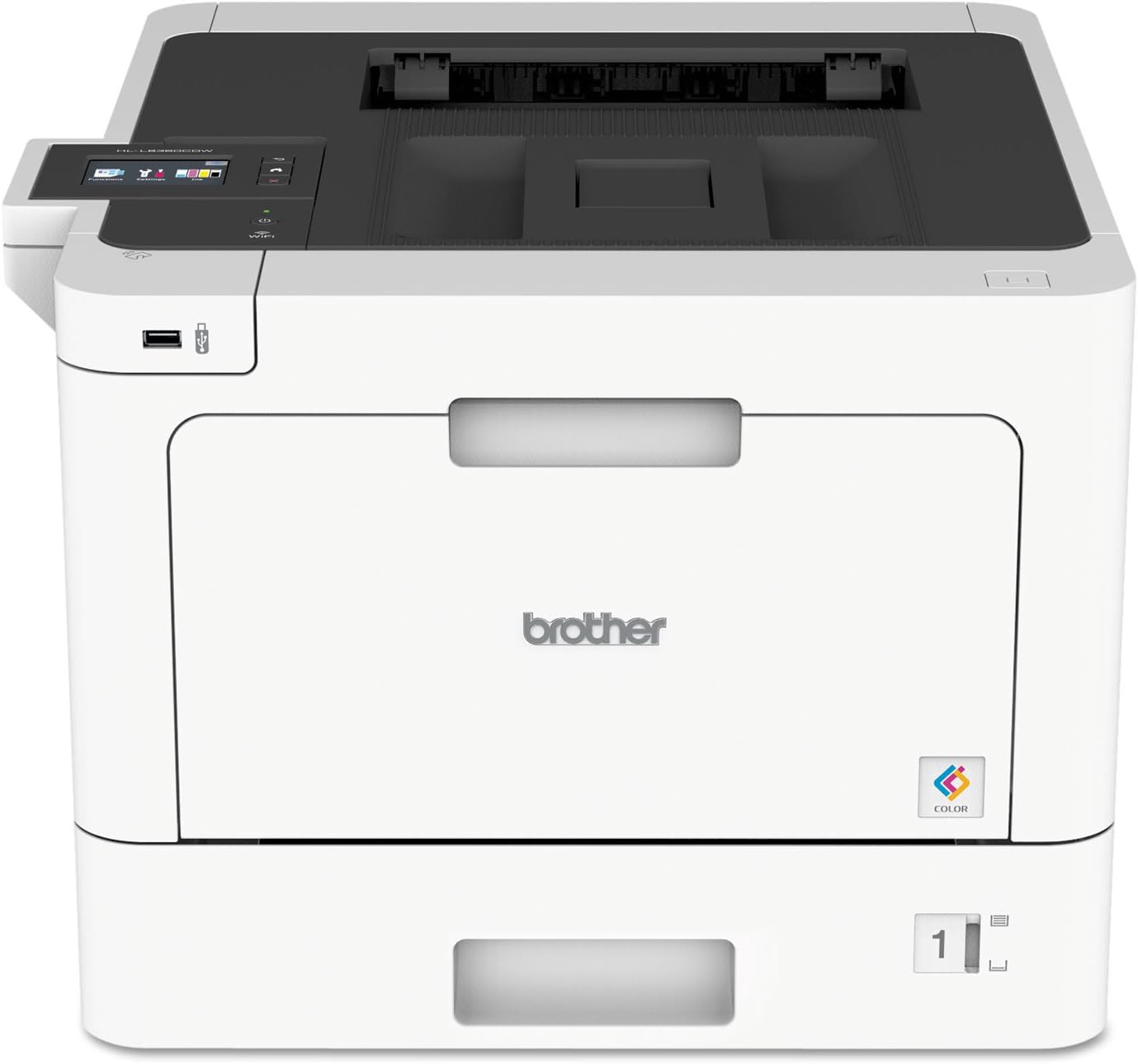
| Print speed (Color/B&W) | 33 ppm |
|---|---|
| Maximum print resolution | 2400 x 600 dpi |
| Paper capacity (standard) | 300 sheets |
| Connectivity | Ethernet, USB, Wi‑Fi |
| Duplex | Automatic |
The Brother HL-L8360CDW is a workhorse color laser designed for busy offices that need reliable, high-volume output. It prints up to 33 ppm in color and black, supports automatic duplexing, and accepts a range of media from envelopes to card stock, so it handles photos and business graphics better than many office lasers. A 2.7-inch color touchscreen, Gigabit Ethernet, Wi-Fi, NFC and mobile printing provide flexible ways to send jobs, and Brother offers very high-yield toner options to keep running costs lower on heavy workloads. Print resolution rated at 2400 x 600 dpi produces sharp text and fine detail, though color photo quality will not match a dedicated photo inkjet for smooth gradients or glossy output. The unit is relatively large and draws significant power in operation, and color calibration options are limited compared with photo-focused printers, so expect capable, fast color prints suitable for proofing, flyers, and everyday color documents rather than gallery-quality photographic prints.
Best for: Buyers who prioritize fast, reliable color output and low running costs for high-volume office use and need a printer that can produce sharp color proofs and marketing materials quickly.
Less Ideal for: Photographers or users seeking gallery-quality, glossy photo prints with smooth continuous tones should choose a dedicated photo inkjet instead.
- Fast 33 ppm color and mono printing for quick turnaround on photo proofs and color documents
- High 2400 x 600 dpi resolution for crisp text and detailed graphics
- Automatic duplexing and robust paper handling for efficient batch jobs
- Multiple connectivity options including Wi-Fi, Gigabit Ethernet, NFC and mobile printing
- Available super high-yield toner cartridges reduce cost per page for heavy use
- Color output and tonal gradation are not on par with dedicated photo inkjet printers
- Large footprint and relatively high power consumption compared with small office printers
Verdict: Choose the HL-L8360CDW if you need fast, high-resolution color printing and low operating costs for photo proofs, marketing materials, and high-volume office color work.
Canon imageCLASS MF662Cdw

| Printer Type | Laser |
|---|---|
| Print Speed | 26 ppm |
| Connectivity | Ethernet, USB, Wi-Fi |
| Duplex | Automatic |
| Compatible Cartridge | Canon Genuine Toner 075 |
The Canon imageCLASS MF662Cdw is a compact color laser all-in-one aimed at small offices and home workspaces that need reliable everyday color output. It prints, copies, and scans from a 5-inch color touchscreen and supports Wi-Fi, Ethernet, USB and mobile printing via Canon PRINT, AirPrint and Mopria. Rated for up to 26 ppm in both color and black/white with a roughly 10.3 second first-page time, it is useful for producing business documents, flyers and moderate-volume color prints without frequent toner swaps thanks to Canon Genuine Toner 075 high-capacity options and a 250-sheet cassette plus a manual feed. Automatic two-sided printing and Energy Star certification help reduce paper and energy use. For photo printing, the 600 x 600 dpi resolution produces crisp text and solid color blocks but lacks the fine photographic detail and color depth of photo-dedicated inkjet or high-resolution color laser models, so expect good everyday graphics and snapshots rather than gallery-quality photos. Setup and mobile printing are straightforward, and the touchscreen makes routine tasks quick.
Best for: Buyers who prioritize dependable, low-maintenance color printing for business documents, marketing materials and casual photo prints and value fast throughput and easy mobile connectivity.
Less Ideal for: Users seeking top-tier photographic prints with deep color gradations and fine detail should choose a dedicated photo inkjet or a higher-resolution color printer instead.
- Fast 26 ppm color and black-and-white printing for quick document turnaround
- Built-in Wi-Fi, Ethernet and mobile printing support for easy connectivity
- Automatic duplex printing and 250-sheet cassette reduce paper handling
- 5-inch color touchscreen simplifies setup and routine tasks
- Uses high-capacity Canon Genuine Toner 075 to lower frequency of toner changes
- 600 x 600 dpi maximum resolution limits fine photographic detail compared with photo printers
Verdict: Choose this Canon if you want fast, low-maintenance color output and easy mobile connectivity for everyday office and casual photo printing.
Canon imageCLASS LBP646Cdw
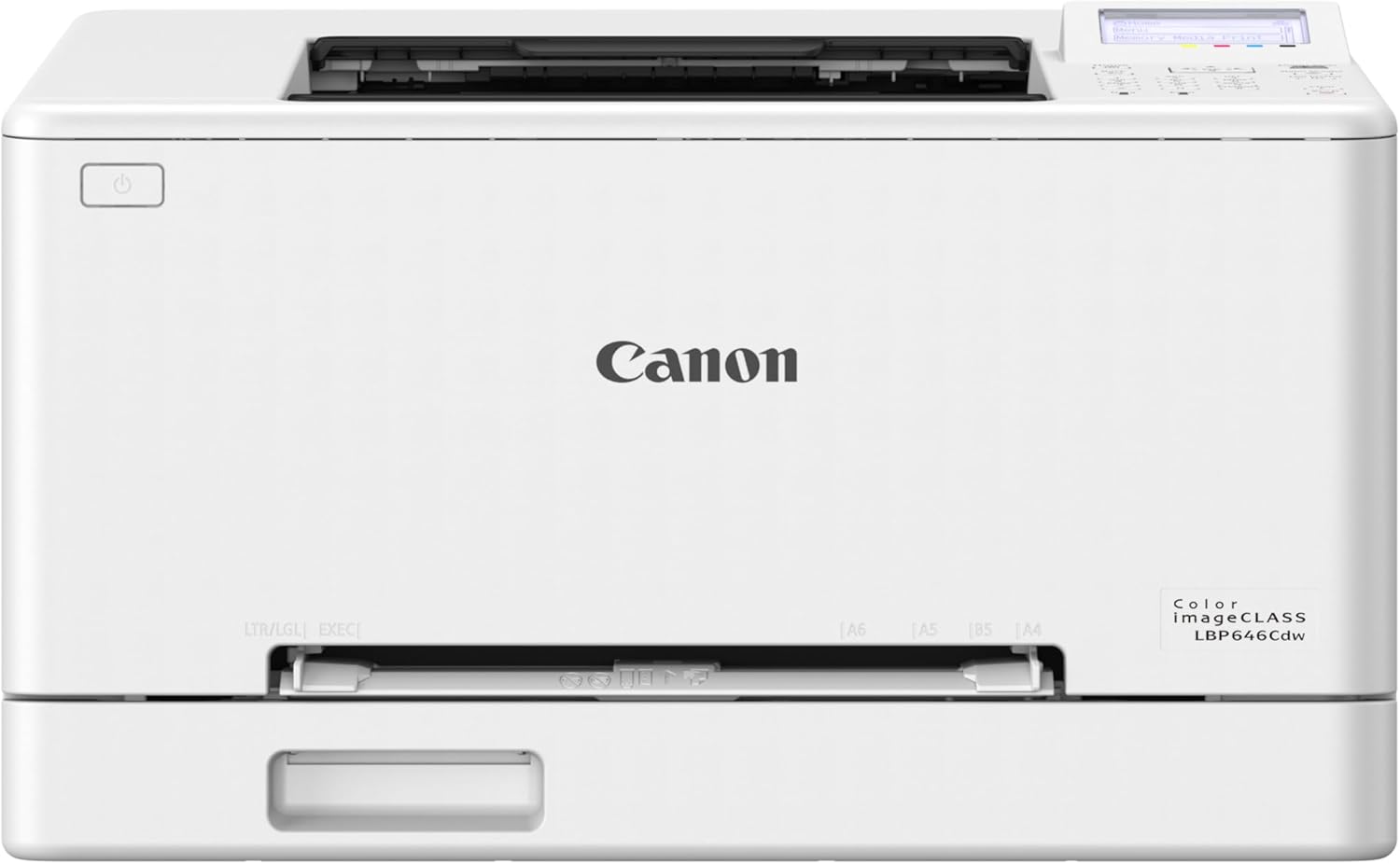
| Printer Type | Laser |
|---|---|
| Print Speed | 26 ppm (color & B&W) |
| Duplex | Automatic |
| Paper Capacity | 250-sheet standard cassette |
| Connectivity | USB, Wi-Fi, Ethernet |
The Canon imageCLASS LBP646Cdw is a print-only color laser aimed at small and home-office users who need reliable, relatively fast color output without extra scanning or copying features. It prints up to 26 pages per minute in both color and black and white, wakes to its first page in about 10 seconds, and supports automatic two-sided printing to reduce paper use. Setup and everyday use are straightforward thanks to Wi-Fi, Ethernet, USB connectivity and a simple 5-line LCD for control, and mobile printing is supported via Canon PRINT, AirPrint and Mopria. The printer accepts Canon Genuine Toner 075 cartridges including high-capacity options to keep replacement frequency down, and a 250-sheet cassette plus a multipurpose tray handle varied media sizes up to legal. Important limitations: this model does not scan or copy, so it is not a multifunction solution, and while it produces crisp text and business graphics the listed resolutions suggest photo output will be competent for casual color documents but not on par with dedicated photo printers or high-resolution inkjets for fine photographic detail.
Best for: Buyers who need an affordable color laser that delivers dependable, mid-volume color documents and straightforward wireless printing for a small office or home workspace.
Less Ideal for: Photography enthusiasts seeking high-fidelity photo prints or users who need an all-in-one device with scanning and copying functions.
- Consistent 26 ppm color and monochrome printing for steady office throughput
- Automatic duplex printing saves paper and simplifies two-sided jobs
- Multiple connectivity options including Wi-Fi, Ethernet, USB and mobile printing apps
- 250-sheet standard cassette plus multipurpose tray for flexible media handling
- Uses Canon Genuine Toner 075 with high-capacity options to reduce replacements
- Print-only design with no scanning or copying capability
- Not optimized for high-detail photographic prints compared with photo-focused printers
Verdict: Choose this printer if you want a budget-friendly color laser that reliably handles mid-volume office color printing with easy wireless setup.
Brother MFC-L8930CDW

| Printer Type | Laser |
|---|---|
| Print Speed (Color) | 33 pages_per_minute |
| Resolution | 2400 x 600 dpi |
| Printer Connectivity Type | Ethernet, USB, Wi-Fi |
| Duplex | Automatic |
The Brother MFC-L8930CDW is a business-grade color laser all-in-one designed for busy office teams that need fast, reliable output and robust document workflows. It handles printing, copying and duplex scanning with an 80-page single-pass ADF, a 7" color touchscreen for job previews and shortcuts, and flexible connectivity via dual-band Wi-Fi, Gigabit Ethernet or USB. Output quality is aimed at sharp business graphics and documents with a maximum 2400 x 600 dpi resolution, and Brother ships standard-yield toners with the unit while offering high- and super-high-yield replacements to lower running costs. Security-conscious environments benefit from triple-layer device protections and an integrated NFC card reader for secure release. For photo work, the printer produces crisp color for marketing collateral and proofs, but as a laser device it will not match the fine color gradations or glossy finish of dedicated photo inkjet printers. It is best used where speed, duty cycle and network security matter more than gallery-quality photo prints.
Best for: Buyers who prioritize dependable, secure, high-throughput color printing for office or small-studio use where fast turnaround and low running cost matter more than museum-quality photographic output.
Less Ideal for: Photographers or hobbyists seeking ultra-fine color gradation and glossy, lab-quality photo prints should consider a dedicated photo inkjet instead.
- Fast 33 ppm color and black printing speeds for high-volume jobs
- Single-pass duplex ADF and 7" touchscreen speed common scanning and workflow tasks
- Dual-band Wi-Fi and Gigabit Ethernet for flexible network deployment
- Supports high-yield and super-high-yield Brother toners to reduce operating costs
- Triple-layer security and NFC badge authentication for protected printing
- Laser output is less suitable for high-gloss, fine-detail photo prints compared with dedicated photo inkjets
- Large and heavy design may be unwieldy in small home setups
Verdict: Choose the MFC-L8930CDW when you need fast, secure, and cost-effective color laser printing for office or business photo proofs rather than gallery-quality photos.
HP Color LaserJet Pro MFP 3301sdw

| Printer Type | Laser |
|---|---|
| Print Speed (Color) | 30 ppm |
| Duplex | Automatic |
| Maximum Print Resolution Color | 600×600 dots_per_inch |
| Printer Connectivity Type | USB, Wi-Fi |
The HP Color LaserJet Pro MFP 3301sdw is an all-in-one laser designed to handle everyday office printing, scanning and copying with fast speeds and network flexibility. It prints color and black documents at up to 30 pages per minute, supports automatic two-sided printing and includes an automatic document feeder and flatbed scanner for multi-page jobs. Connectivity options include Wi-Fi, USB and an Ethernet port, and the HP app lets you print and scan from smartphones. The printer uses HP TerraJet toner and is built for consistent, business-oriented output rather than gallery-quality photo reproduction; its maximum print resolution is 600 x 600 dpi, which delivers sharp text and graphics but will not match high-resolution inkjet photo detail. Practical benefits include reliable duty-oriented performance, a 250-sheet tray for longer runs, and basic security features for office networks. Expect trade-offs if you need fine photographic color gradations or glossy photo finishes, and note it is intended to be used with HP toner cartridges that include HP chips.
Best for: Buyers who prioritize dependable, business-ready color printing and networked convenience and who value peer feedback and proven office performance over studio-level photo output.
Less Ideal for: Photographers or hobbyists seeking high-resolution glossy photo prints and fine color gradations should consider a dedicated photo inkjet instead.
- Fast print speeds up to 30 pages per minute for both color and black
- Automatic duplexing and a 250-sheet input tray reduce manual handling
- Built-in Wi-Fi, Ethernet and USB plus smartphone printing via the HP app
- All-in-one functions with flatbed scanner and automatic document feeder
- Maximum print resolution of 600 x 600 dpi limits fine photo detail compared with photo-focused inkjets
- Requires HP toner cartridges with chips, which restricts third-party cartridge use
Verdict: Choose this MFP if you need fast, reliable office color printing and scanning with solid network features rather than studio-quality photo prints.
Choosing the Right Color Laser Printer for Photos: Key Factors to Consider
Color Accuracy and Gamut
Accurate color reproduction is essential for photo printing because slight shifts in hue or saturation are obvious on faces and skies. Look for devices with wide color gamuts and support for color management options such as ICC profile loading or manual color adjustments.
A printer with limited gamut will struggle with saturated blues and reds, producing muted prints. For photo work you plan to display or sell, prioritize machines that provide tools for calibrating output to your viewing conditions or paper choice.
Resolution and Tonal Detail
High nominal resolution and good halftone rendering both contribute to how much fine detail and smooth tonal transitions a printer can produce. Photos with subtle gradients, skin textures, and fine patterns expose weaknesses in tonal mapping more than text does.
Consider printers that advertise higher dpi and mention enhanced halftone screens or dithering algorithms. These features help maintain detail in shadows and highlights and reduce banding in gradient areas.
Media Compatibility and Paper Handling
Photo printing requires support for heavier, coated, or glossy stocks and often nonstandard sizes. Check maximum paper weight, whether the printer has a rear or manual feed for specialty paper, and how well it handles thick or glossy sheets without feeding errors.
A straight-through or manual rear feed is valuable when using heavyweight photo media because it minimizes bend and surface contact. Also confirm supported printable sizes if you plan to print square, panorama, or borderless formats.
Print Durability and Finish Options
Durability covers resistance to fading, smudging, and surface abrasion. Some laser printers fuse toners in a way that yields robust, water-resistant prints, which is helpful for handling and framing. Finish options like glossy versus matte-compatible toners affect final appearance.
If longevity or resistance to handling is a priority, prioritize models with proven permanence characteristics or recommend post-print protective options. Also consider how the printer renders blacks and deep shadows for perceived depth in photos.
Speed and Consistency for Batch Work
Laser printers generally excel at speed, but consistent color from page to page is crucial when printing multiple copies or series. A fast printer that shifts color across a run can produce uneven results.
Look for machines that warm up quickly, maintain stable color across long jobs, and offer reliable paper feeding. For photographers producing portfolios or multiple prints, throughput and steady output reduce time spent reprinting and correcting.
Operating Cost and Consumables
Toner yield, replacement frequency, and maintenance items determine long-term cost of ownership. Photo printing can consume more toner per page, especially on vivid or dark images, so check stated yields and whether high-capacity cartridges are available.
Also consider routine maintenance needs such as drum replacements, fuser life, and whether the printer supports user-replaceable parts. Lower ongoing costs are important if you plan to print large batches regularly.
Paper Types and Finishes to Match Your Photos
Choosing the right paper finish has as much impact on the final result as the printer itself. Glossy papers emphasize color saturation and perceived sharpness, while matte stocks soften reflections and suit fine-art or portrait work. Satin or luster finishes offer a middle ground with controlled glare and good color rendition.
For laser printing, pick papers specified as laser-compatible to avoid surface defects and fusing issues. Test a small batch of your preferred stock before committing to large projects to confirm how toners sit on the surface and how colors translate from screen to print.
- Glossy: vivid colors, higher perceived sharpness, more reflections
- Matte: lower glare, classic fine-art look, hides fingerprints
- Luster/Satin: balanced sheen, good for portraits and galleries
- Laser-compatible labels: prevent tackiness and fusing problems
Color Management and Workflow Tips
A consistent color workflow reduces surprises. Calibrate your monitor and use ICC profiles that match the printer and paper combination. When provided, use the printer manufacturer or third-party ICC profiles built for the specific stock you plan to use.
For critical prints, soft-proof in your photo editor to preview how colors will map. Adjust exposure and saturation conservatively; images that look perfect on screen often need shifts for printing because paper reflectivity and room lighting differ from a monitor.
- Calibrate your monitor regularly
- Use ICC profiles for printer-paper combinations
- Soft-proof and make small tonal adjustments before printing
- Print test strips to verify color and density
Borderless and Large-Format Considerations
If you plan to produce borderless photos or sizes larger than standard letter or A4, verify a printer's maximum printable area and whether it supports borderless modes. Borderless printing can make finishing and framing easier but often consumes extra paper and may require careful alignment.
Large-format printing introduces additional demands on paper handling and toner coverage. Ensure the printer has a straight paper path or rear feed for heavier sheets and that firmware supports the target sizes to avoid cropping or scaling surprises.
- Confirm borderless capabilities for common photo sizes
- Check maximum paper width and length for large prints
- Use rear/manual feed for heavy or specialty media
Maintenance Practices to Keep Photo Quality Consistent
Regular maintenance preserves print quality. Clean feed rollers and follow manufacturer guidance for fuser and drum care. Periodic alignment and color calibration routines help maintain consistent output, especially after installing replacement consumables.
Store toner and papers in stable, low-humidity environments. Avoid exposing freshly printed photos to high humidity until the toner has fully set and cured according to the printer's recommendations.
- Schedule routine roller and path cleaning
- Perform color calibrations after cartridge changes
- Store paper flat in original packaging to prevent curl
- Allow prints to cool and cure before handling extensively
When a Dedicated Photo Printer Might Be Better
Laser photo printers balance convenience and durability, but they may not match dye-sublimation or inkjet photo printers for continuous-tone smoothness or expanded color gamut. If you need gallery-grade color fidelity or very deep shadow detail, consider whether a dedicated photographic printer fits your priorities better.
For casual display prints and projects that require fast, water-resistant output, a color laser printer for photos often offers a good compromise between speed and resilience.
- Inkjet: typically wider gamut and smoother gradients
- Dye-sublimation: excellent continuous tones and durable surfaces
- Laser: fast, water-resistant, good for batches and handling
How We Chose the Best Color Laser Printer for Photos
We focused on attributes that actually affect photo printing quality and real-world usability. Key evaluation criteria included color accuracy and gamut, which determine how faithfully a printer reproduces skin tones and saturated hues; print resolution and halftone rendering, which affect detail and tonal transitions in images; media compatibility, covering supported paper sizes, weights, and specialty photo stocks; output permanence and finish options, meaning how well prints resist fading and handle glossy or matte surfaces; print speed and consistency for users who produce multiple photos in a session; and operating cost considerations like toner yield and maintenance frequency. We excluded devices designed solely for office document throughput that lack photo-friendly paper paths or restricted media weights. We also filtered out models with limited color calibration control or poor manual paper handling that would compromise image alignment or surface finish. The remaining printers were shortlisted for their combination of color control, media handling, resolution capability, and sustainable running characteristics that matter most for photographic prints.
Our full evaluation process is outlined in our review methodology.
FAQ
Can a color laser printer produce true photographic quality?
Often, yes for many everyday and display uses. Laser printers can produce sharp, water-resistant prints with good color, but they may not reach the continuous-tone smoothness or extended gamut of high-end photo inkjets or dye-sublimation printers.
What paper should I use for the best photo results?
Use papers specifically labeled as compatible with laser printers and available in the finish you want, such as glossy, satin, or matte. Heavier, coated stocks that tolerate the fuser process deliver better surface feel and color saturation.
How do I ensure color consistency across multiple prints?
Calibrate your monitor, use ICC profiles for your printer and paper, and perform regular print head or color maintenance routines. Print test strips and make small profile-based adjustments before printing large batches.
Are laser photo prints durable and resistant to smudging?
Yes. Toner is fused to the paper, creating prints that are typically water-resistant and less prone to smudging than many ink-based prints. Longevity also depends on paper quality and display conditions.
Do laser printers support borderless printing for photos?
Some models do support borderless printing, but capability varies. Check the printer's specifications for supported sizes and borderless modes before planning projects that require edge-to-edge prints.
Final Verdict
Choosing the right color laser printer for photos comes down to matching color fidelity, media handling, and running costs to your priorities. Prioritize color accuracy and paper compatibility if you print gallery-worthy images, or favor throughput and durability if you produce many handled prints. Balance the tradeoffs between gamut and tonal smoothness versus speed and water resistance. With the evaluation criteria above, you can pick a machine that fits your workflow and delivers photo prints that meet your display and longevity expectations.