
Note: This article contains affiliate links. If you click on these links and make a purchase, we may earn a small commission at no extra cost to you. This helps support our research and content. Read our full affiliate disclosure here.
If space is limited but you still want dependable desktop fabrication, a compact 3D printer can deliver. The right small-footprint machine saves bench space while still offering the print quality and reliability needed for prototypes, hobby projects, and functional parts. In this guide we shortlisted the seven best compact 3D printers across common user needs and workflows. We evaluated each option for print quality, ease of setup, and day-to-day usability so you can choose a model that fits your workspace and skills. Read on for concise, practical guidance and the criteria we used to pick these top small printers.
Top Picks at a Glance
| Best Overall The best all-around choice for most situations | Bambu Lab P1S 3D Printer |  |
| Best Quality Built to a higher standard if you want something more solid | Bambu Lab A1 mini 3D Printer |  |
| Best Value The sweet spot between price and what you get | Asani TINA2S Mini 3D Printer |  |
| Best Budget The cheapest option that still gets the job done reliably | Tangxi Mini FDM 3D Printer |  |
| Top Rated A top-rated pick with lots of positive feedback | ELEGOO Neptune 3 Pro |  |
| Most Popular A crowd favorite that many people choose with confidence | Creality Ender 3 V3 SE |  |
| Best Seller A high-volume bestseller chosen again and again | FLASHFORGE Adventurer 5M |  |
Bambu Lab P1S 3D Printer

| Build Volume | 256×256×256 mm³ |
|---|---|
| Max Speed | 500 mm/s |
| Max Acceleration | 20 m/s² |
| Supported Filaments | PLA, PETG, TPU, PVA, PET, ABS, ASA |
The P1S is a ready-to-use, compact CoreXY 3D printer that targets hobbyists and small workshops wanting faster prints without a complex setup. It ships mostly assembled and promises a 15-minute setup, automatic bed leveling, and an enclosed body that stabilizes temperature for PETG, ABS and other advanced filaments. Notable features include a direct-drive extruder for broader material support, a built-in camera for timelapse captures, and a 256 × 256 × 256 mm build volume that handles most small-to-medium projects. The printer advertises very high top speeds and acceleration, which shortens print times when tuned, but achieving the fastest settings typically requires careful slicer profiles and quality filament. Multi-color/multi-material printing is possible when paired with the optional AMS unit. Practical limits include the learning curve around dialing in high-speed settings and that extremely abrasive filaments are not recommended. For buyers who want a compact, capable machine that balances speed, enclosure benefits, and ease of use, the P1S is a strong choice.
Best for: Buyers who want a compact, easy-to-start desktop printer that balances speed, print quality, and material flexibility for a wide range of hobby and prototyping projects.
Less Ideal for: Users who need fully industrial-grade abrasion resistance or those who need multi-color printing out of the box without buying accessories should consider other solutions.
- Compact enclosed CoreXY design improves print stability and supports higher-temperature filaments
- Direct-drive extruder broadens material compatibility including TPU and PETG
- Automatic bed leveling and quick setup reduce initial fiddling for beginners
- Built-in camera for timelapse and monitoring prints
- Large enough 256×256×256 mm build volume for most desktop projects
- Achieving advertised top speeds requires careful tuning and good filament
- Multi-color printing needs the optional AMS accessory to reach full capability
Verdict: The P1S is the best compact option for buyers who want a fast, enclosed desktop printer that balances ease of use with broad material support.
Bambu Lab A1 mini 3D Printer
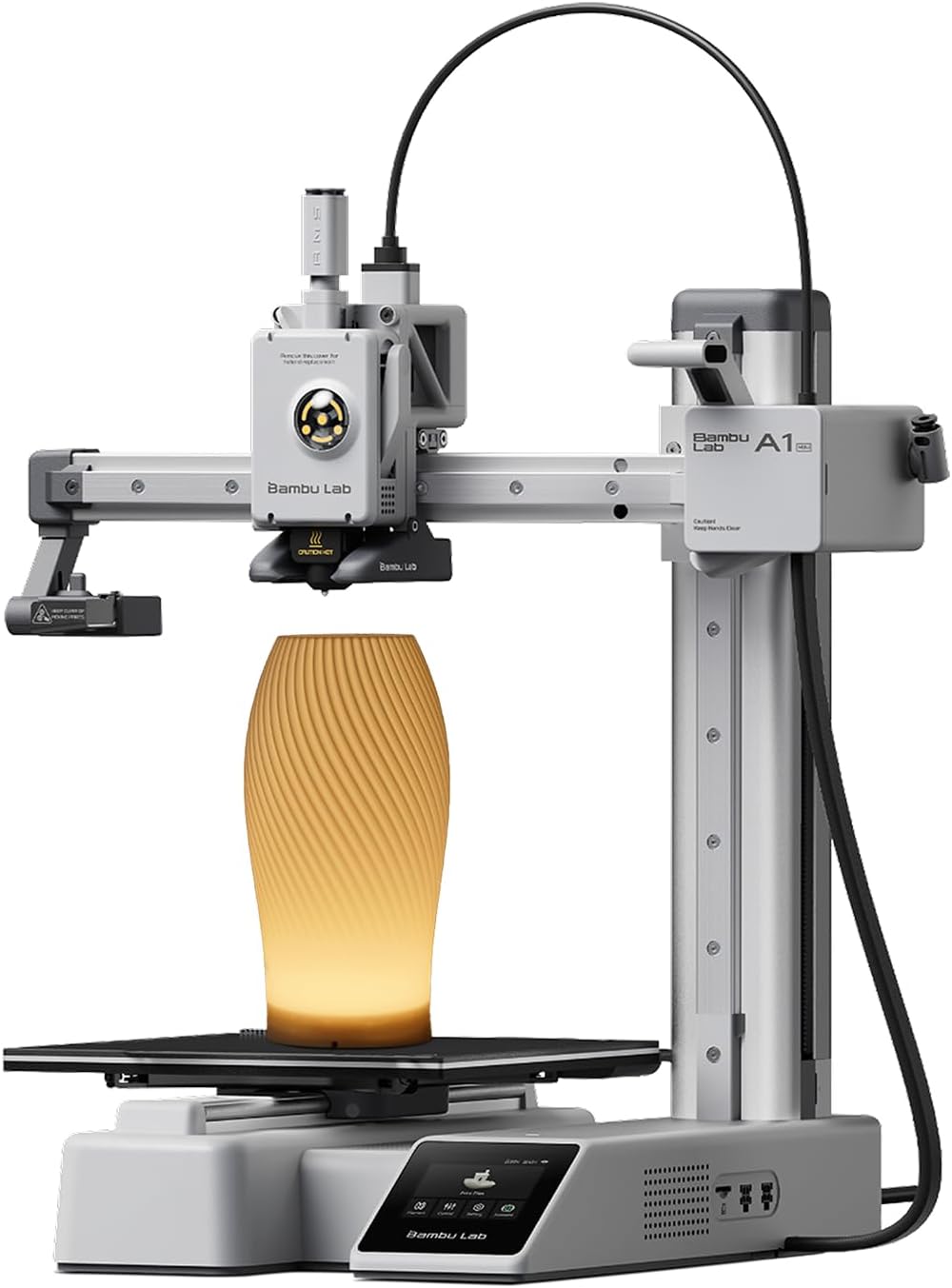
| Item model number | PF002-M-EU |
|---|---|
| Item Weight | 12.1 pounds |
| Build Volume | 180*180*180 mm³ |
| Max Speed | 500mm/s |
The Bambu Lab A1 mini is a compact, beginner-friendly desktop 3D printer sold as a ready-to-use kit with an LED lamp accessory for lighting projects. It is designed for quick setup with full-auto calibration and active flow rate compensation so prints start reliably without much fiddling, and it connects to the Bambu ecosystem for access to ready-to-print MakerWorld models and app-based job management. In practice the A1 mini delivers faster print speeds than typical entry-level machines while remaining quiet at or below the advertised noise level, making it suitable for a home office or small studio. The included lamp kit adds a small creative use case for decorative or functional light projects. Limitations are its small build volume compared with larger hobby printers and the open-frame design, which can make printing high-temperature materials more challenging; advanced users seeking large-format or enclosure-required workflows may find those constraints restrictive.
Best for: Buyers who prioritize print speed, reliable out-of-the-box performance, and a compact footprint for home or small-studio use will appreciate this printer.
Less Ideal for: People who need large build volume, frequent high-temperature or enclosure-dependent printing, or industrial-scale production should consider larger enclosed machines instead.
- Fast print speeds for a compact desktop printer
- Full-auto calibration and flow rate compensation that reduce setup and tuning time
- Quiet operation suitable for home or studio use
- Access to MakerWorld model library and app-based print management
- Includes LED lamp kit for creative lighting projects
- Small build volume compared with larger hobby printers
- Open-frame design limits temperature-sensitive materials and enclosure-dependent workflows
Verdict: If you want a compact, fast, and easy-to-use desktop printer that performs well out of the box for everyday creative and prototyping tasks, the A1 mini is a strong choice.
Asani TINA2S Mini 3D Printer

| Print Volume | 3.9" x 3.9" x 4.7" |
|---|---|
| Compatible Filaments | 1.75mm PLA, PLA pro, TPU |
| Connectivity | WiFi, USB, Micro SD Card |
| Print Accuracy | 0.01mm |
| Screen | 2.4" LCD |
The Asani TINA2S is a small, ready-to-run 3D printer aimed at first-time users, classrooms, and hobbyists who want a low-friction entry into 3D printing. It ships fully assembled with a microSD card, a short spool of PLA filament, basic tools, and an AC adapter so you can start printing right away. The printer uses a dual Z-axis rail and an auto-leveling proximity sensor to simplify first-layer calibration, and a removable magnetic flexible build plate makes part removal straightforward. Controls are handled through a backlit 2.4" LCD and shuttle knob, and you can print from USB, microSD, or via WiFi and the vendor app if you prefer remote control. It accepts standard 1.75mm PLA, PLA pro, and TPU and works with common slicers such as Cura and Simplify3D. The main limitation is the small build volume, which restricts projects to miniatures and small prototypes, and larger filament spools require an external holder. For buyers who need a compact, easy-to-use machine for learning and small prints, the TINA2S delivers solid convenience and sensible features in a portable package.
Best for: Buyers who want a compact, low-effort introduction to 3D printing for learning, classroom projects, or small home prototypes and value a plug-and-play experience over large build capacity.
Less Ideal for: Users who need to print large parts, scale up production, or run long jobs with full-size filament spools should choose a larger-format printer instead.
- Comes fully assembled with starter filament and microSD card for immediate use
- Auto leveling and dual Z-axis rail improve first-layer reliability and stability
- Removable magnetic flexible build plate simplifies print removal
- Multiple connectivity options: WiFi, USB, and microSD card
- Very small build volume limits projects to small parts and miniatures
- Integrated spool holder only fits compact spools, larger spools need an external holder
Verdict: A tiny, fully assembled starter printer that lets beginners and classrooms start printing quickly with minimal setup.
Tangxi Mini FDM 3D Printer

| Build volume | 100 x 100 x 100 mm |
|---|---|
| Supported filament | 1.75mm PLA, TPU |
| Nozzle material | All-metal nozzle |
| Layer resolution | 0.05 mm |
| Warm-up time | Nozzle to 180°C in ~5 minutes |
This Tangxi mini FDM printer is a small, entry-level machine aimed at first-time users and classrooms. It ships fully assembled and prints from G-code files on a memory card so you can get started without learning complex slicing workflows right away. The all-metal nozzle and claimed layer resolution down to 0.05mm help produce sharper small models, and the heater reaches 180°C in about five minutes, which is adequate for PLA and short TPU runs. Controls are basic but simple: a plus key to load filament, a minus key to unload, and straightforward start/stop keys. The 100×100×100mm build area limits you to small parts, but that size, plus the rugged ABS frame, makes it easy to fit on a desk or in a classroom. Expect the printer to be best for quick prototypes, educational projects, and hobbyist minis; advanced features like heated beds, Wi‑Fi, or large-format printing are not present, so users who need bigger prints or more control will want a different machine.
Best for: Buyers who want an affordable, ready-to-run compact 3D printer for learning, classroom projects, or making small prototypes without a steep setup curve.
Less Ideal for: Users needing large prints, advanced print controls, or production-level reliability should consider larger or more feature-rich machines instead.
- Fully assembled and easy to operate for beginners
- All-metal nozzle and claimed 0.05mm layer resolution for fine detail
- Rapid nozzle heating (about 5 minutes to 180°C) reduces wait time
- Compact 100×100×100mm build volume fits small desks and classrooms
- Very small build area limits part size
- Basic controls and memory-card-only workflow lack advanced connectivity options
- No mention of a heated bed or advanced material support for higher-temperature filaments
Verdict: A compact, budget-friendly starter FDM printer that gets beginners printing small, detailed PLA and TPU parts with minimal setup.
ELEGOO Neptune 3 Pro

| Build volume | 225 x 225 x 280 mm (8.85 x 8.85 x 11 in) |
|---|---|
| Extruder | Dual-gear direct drive |
| Auto bed leveling | 36-point auto leveling |
| Filament diameter | 1.75 mm |
| Noise level | Approx. 47 dB |
The ELEGOO Neptune 3 Pro is a compact FDM desktop printer built for steady, everyday use. It arrives partially assembled with the main parts preinstalled and a toolkit, so you can get to first prints quickly. The printer uses a dual-gear direct drive extruder with stainless steel gears and a titanium throat tube plus brass nozzle, which improves filament feeding and reduces clogging when running PLA, TPU, PETG and ABS. Practical reliability features include 36-point auto bed leveling, a filament runout sensor and power-loss resume to protect long prints, while dual lead screws and dual Z motors keep the Z axis stable for consistent layer alignment. Thermal management is aided by a widened heat sink and front cooling fan, and the PEI flexible magnetic bed makes part removal easier. Noise levels are modest at about 47 dB, making the unit suitable for a small workshop or hobby desk. Trade-offs are its modest build volume compared with larger machines and the lack of enclosure for aggressive ABS work, so users should plan filament choice and part size around those limits.
Best for: Buyers who want a compact, dependable desktop printer that minimizes setup time and interruptions for regular hobby or prototyping use.
Less Ideal for: Users who need a large build area or who plan to print high-temperature materials regularly without adding an enclosure.
- Quick to set up with preassembled main parts and included toolkit
- Dual-gear direct drive extruder for consistent filament feeding and fewer clogs
- 36-point auto bed leveling and filament runout detection reduce failed prints
- Dual lead screws and dual Z motors improve Z-axis stability for precise layers
- PEI magnetic flexible platform simplifies part removal
- Not enclosed, so printing temperature-sensitive materials may require an enclosure
- Build volume is modest compared with larger printers for big parts
Verdict: A compact, reliability-focused desktop printer that delivers consistent, low-fuss printing for hobbyists and small-scale prototyping.
Creality Ender 3 V3 SE

| Printing Technology | Fused deposition modeling |
|---|---|
| Build Volume | 220×220×250mm |
| Extruder Type | Sprite Direct Extruder |
| Leveling Mode | CR Touch Auto Leveling |
| Supported Filaments | PLA, PETG, TPU(95A) |
The Creality Ender 3 V3 SE is a small-format FDM printer designed to make printing easier for beginners while still offering features useful to hobbyists. It ships partially assembled and uses CR Touch auto leveling plus a strain sensor for automatic Z-offset so getting a reliable first layer requires less manual tweaking. The Sprite direct drive extruder handles PLA, PETG, and flexible TPU with straightforward filament loading and unloading on the touchscreen UI. Mechanically the dual Z-axis lead screws and hardened Y-axis linear shafts reduce wobble for steadier layers, and a 32-bit silent board keeps noise low during longer prints. The unit is aimed at faster desktop printing with listed speeds up to 250 mm/s and an acceleration of 2500 mm/s², though practical print quality at top speeds will depend on material and tuning. The flexible PC spring steel build plate simplifies part removal, but the 220×220×250 mm build volume is modest if you need larger prototypes. For its size, the V3 SE balances user-friendly automation with competent hardware for consistent small-to-medium prints.
Best for: Buyers who want a compact, beginner-friendly desktop printer with automated leveling and reliable extrusion for everyday PLA/PETG/TPU projects and value low noise and easy setup.
Less Ideal for: Users who need large-format printing capacity or who prioritize out-of-the-box ultra-high-speed production without additional tuning should consider a different model.
- CR Touch auto leveling and strain sensor simplify bed setup and first-layer calibration
- Sprite direct drive extruder supports PLA, PETG, and TPU with easy filament load/unload
- Stable dual Z-axis and hardened Y-axis shafts reduce Z wobble for more consistent layers
- 32-bit silent mainboard keeps operating noise low during prints
- Flexible PC spring steel build plate makes printed part removal easier
- Build volume (220×220×250 mm) is small for users who need larger prints
- Top-rated speeds (up to 250 mm/s) may require tuning and compromise print quality
Verdict: A compact, easy-to-use desktop 3D printer that blends auto-leveling and a direct drive extruder for reliable small-to-medium prints with minimal fuss.
FLASHFORGE Adventurer 5M

| Build Volume | 220 x 220 x 220 mm |
|---|---|
| Max Nozzle Temp | 280°C Direct Drive |
| Travel Speed | 600 mm/s |
| Platform Type | Double-Sided PEI Platform |
| Structure | All-metal Core XY Structure |
The FLASHFORGE Adventurer 5M is a compact CoreXY desktop 3D printer aimed at speeding up prototyping while keeping setup simple. It uses one-button automatic bed leveling and a removable double-sided PEI platform to simplify first-layer adhesion and part removal, and its 280°C direct-drive extruder plus multiple nozzle sizes support a range of filaments from PLA to PETG and carbon-fiber blends. The CoreXY all-metal structure, 600 mm/s travel speed and high acceleration are engineered for much faster print cycles than typical hobby machines, while features like a quick-change nozzle and fast warm-up reduce downtime between jobs. The printer integrates with FlashPrint and a mobile app for remote monitoring, which helps risk-averse users check prints without constant supervision. Important limitations are that the build volume is moderate at 220×220×220 mm and multicolor or advanced filament handling features are restricted on this model, so very large parts or complex multi-material prints may require other machines. Regular nozzle and platform maintenance is needed to sustain high-speed reliability.
Best for: Buyers who want a compact, low-hassle desktop printer that emphasizes reliable first layers and faster prototyping cycles while preferring tested, easy-to-run hardware.
Less Ideal for: Users who need very large build volume, heavy-duty industrial throughput, or complex multi-material/multi-color production should consider larger or specialized systems.
- One-button automatic bed leveling for easier first layers
- CoreXY all-metal structure enabling high travel speeds and acceleration
- 280°C direct drive extruder with multiple nozzle sizes for versatile filament use
- Double-sided PEI removable platform simplifies part removal and adhesion
- Quick 3-second nozzle changes and fast warm-up reduce downtime
- Build volume is limited to 220×220×220 mm, not suited for very large parts
- Advanced multi-material or multicolor printing is limited on this specific model
Verdict: Choose the Adventurer 5M if you want a compact, worry-minimizing desktop printer that speeds up prototyping with automatic leveling and high travel speeds.
Choosing the Right Compact 3D Printer: Key Factors to Consider
Print Volume Relative to Desk Space
Compact printers save physical space, but usable build volume varies. Measure the printable dimensions and compare them to your most frequent part sizes. A slightly smaller footprint that sacrifices too much build height forces you to split prints or redesign parts, which can slow projects and complicate post-processing.
Also consider the overall footprint with accessories attached. Some small machines use top-mounted spools or require extra clearance for doors and filament paths. Confirm the machine's installed dimensions, not just the build area, so it fits under shelves or in shared workspaces.
Ease of Setup and First Prints
Setup complexity affects time to useful prints. Look for units with pre-calibrated components, guided bed leveling, and clear manufacturer instructions. Assisted or automatic bed leveling reduces initial frustration and improves first-layer success. A straightforward control interface or touchscreen can shorten the learning curve for new users.
Consider whether the printer supports common slicers and includes ready-to-print test files. Quick, reliable first prints let you focus on workflow rather than troubleshooting hardware or firmware issues.
Material Support and Extruder Design
Compact machines differ in the types of filament they handle. If you plan to print PLA, PETG, and flexible filaments, check for an extruder and hotend that handle those materials without frequent jams. All-metal hotends tolerate higher temperatures needed for engineering filaments, while geared extruders help with flexible materials.
Also verify spool mounting and filament path routing. Short, constrained filament paths reduce drag and make filament changes smoother, which is especially helpful when working in tight spaces.
Enclosure and Temperature Control
An enclosed or partially enclosed cabinet stabilizes ambient conditions and improves warping resistance when printing temperature-sensitive materials. For compact printers, a small enclosure can make a disproportionate difference in print success for ABS and nylon variants.
However, fully enclosed models can restrict access and make maintenance trickier. Check how easy it is to reach the bed, extruder, and electronics for routine cleaning, and whether ventilation options are available to manage fumes when printing higher-temperature filaments.
Maintenance Accessibility and Parts Availability
A compact printer that is hard to service becomes costly over time. Prioritize designs with accessible belts, lead screws, and modular extruder assemblies that allow quick replacement. Clear documentation and community support are helpful when troubleshooting.
Consider the availability of common replacement parts like nozzles, belts, and thermistors. Well-documented machines typically have more aftermarket options and easier DIY repairs, reducing downtime and long-term maintenance cost.
When to Choose a Compact 3D Printer
Compact 3D printers are ideal if you need a machine that fits in small apartments, classroom desks, or crowded maker benches. They work well for prototyping small parts, producing hobby models, and performing light production runs where full-size printers would be impractical.
If your projects regularly require large-format parts or heavy-duty engineering materials, a compact unit may introduce limitations. For most home and light-professional uses, the benefits of a smaller footprint and typically lower noise outweigh the drawbacks.
- Great for limited bench or shelf space
- Faster warm-up times and lower power needs
- Easier to contain and ventilate in small rooms
Workflow Tips for Small-Bed Printers
Optimize part orientation and nesting to make the most of limited build volume. Split large models into bolted or interlocking sections when full-size printing is not possible. Use brim or raft settings to improve adhesion on smaller beds.
Keep a small toolkit nearby for quick nozzle swaps, bed cleaning, and belt tension checks. Regularly update slicer profiles and maintain a set of proven print settings for common filament types to reduce trial-and-error runs.
- Orient parts to minimize supports and maximize bed usage
- Maintain a library of tuned slicer profiles
- Schedule routine maintenance checks to preserve uptime
Managing Noise and Ventilation in Small Spaces
Noise and fumes become more noticeable with compact printers placed in living areas. Consider models with quieter stepper drivers and options for enclosure filtration. Position the printer on vibration-dampening feet or a dedicated shelf to reduce transmitted noise.
If you plan to print materials that emit fumes, ensure adequate ventilation or use an enclosure with a filtered exhaust. Even PLA prints can give off odors when adhesives and bed treatments are involved, so local airflow matters in tightly confined rooms.
- Use vibration-damping mounts for quieter operation
- Add a small fume extractor or filtered enclosure for sensitive materials
- Keep the printer in a ventilated corner away from frequent human traffic
Upgrading a Compact Printer Over Time
Compact printers often benefit from incremental upgrades that extend functionality without increasing footprint. Common upgrades include better nozzles, all-metal hotends, improved bed surfaces, and enhanced extruders that broaden material compatibility.
Before modifying, verify that parts fit the compact chassis and that upgrades do not compromise thermal stability. Small changes like switching to a stiffer build plate or a quieter fan can improve print consistency without major installations.
- Start with non-invasive upgrades like bed surface swaps
- Prioritize thermal upgrades for high-temp filament support
- Document changes and keep a rollback plan in case of issues
Slicer Settings for Reliable Small-Scale Prints
Tuning slicer settings helps extract the best performance from a compact 3D printer. Use conservative print speeds for fine details, and adjust retraction settings to prevent stringing on short filament paths. Layer height and extrusion width choices have a large impact on perceived print quality at small scales.
Enable gradual infill and thin-wall support options when printing intricate models to save time and material. When switching filaments, reload with a purge routine to avoid cross-contamination in the extruder.
- Lower print speed for detailed small parts
- Tune retraction for the specific extruder geometry
- Use thin-wall and fine-detail slicer modes where available
How We Chose the Best Compact 3D Printer
Our selection process focused on practical criteria that matter to people buying a compact 3D printer for home, classroom, or small workshop use. We prioritized machines with consistently demonstrable print quality across multiple filament types, dependable hardware and motion systems, and compact enclosure or footprint that fits tight workspaces. Ease of setup and user experience were crucial, so we looked for models with clear documentation, intuitive controls, and tooling that reduces the learning curve for new users. Reliability and maintenance needs were assessed through reports of day-to-day uptime, bed leveling approaches, and parts accessibility. Finally, we considered connectivity and workflow features such as USB/SD card support, local networking, and slicer compatibility. We excluded large-format and industrial machines, kits that require extensive fabrication, and experimental builds that demand advanced electronics skills. The resulting list favors ready-to-run compact units with balanced performance, manageable maintenance, and a clear upgrade path for hobbyists and prosumers.
Our full evaluation process is outlined in our review methodology.
FAQ
Can a compact 3D printer handle engineering filaments?
Often, but it depends on the hotend and enclosure. All-metal hotends and a heated bed are usually required for higher-temperature filaments, and an enclosure helps prevent warping.
How much space do I need to operate a compact printer comfortably?
Plan for the printer footprint plus clearance for doors, filament spools, and filament paths. A small shelf or dedicated corner with an extra 6 to 12 inches of clearance around the unit is a practical minimum.
Are compact printers harder to maintain than larger ones?
Not necessarily. Compact printers can be easier to access for routine tasks, but cramped internal layouts can complicate some repairs. Choose designs with modular components and clear access to wear items.
Will a smaller build volume reduce print quality?
No. Build volume is separate from print resolution. Small machines can achieve excellent surface detail and accuracy if the motion system, hotend, and slicer settings are tuned properly.
Is a fully enclosed compact printer better for beginners?
A partially enclosed printer can help with temperature stability without making maintenance difficult. For beginners, features like assisted bed leveling and easy-to-use controls are often more valuable than full enclosure alone.
Final Verdict
When choosing a compact 3D printer, prioritize the balance between usable build volume and the machine's footprint, along with setup ease and long-term reliability. Decide which materials you want to print and verify the extruder and hotend can handle them. Expect tradeoffs: the smallest machines save space but may limit part size and certain upgrades. Focus on a unit with accessible maintenance, clear documentation, and slicer compatibility to maximize uptime and reduce frustration. That approach will help you pick a small printer that meets daily needs and grows with your projects.