
Note: This article contains affiliate links. If you click on these links and make a purchase, we may earn a small commission at no extra cost to you. This helps support our research and content. Read our full affiliate disclosure here.
Picking the right compact laser printer matters when space is tight but document output still needs to be fast and dependable. You want a machine that fits a small desk, starts up quickly, and handles everyday black-and-white or color jobs without frequent intervention. This guide shortlists the top compact laser printers available for home and small-office use and explains the practical tradeoffs among speed, print quality, and running costs. Below we cover the key features that separate reliable daily drivers from frustrating, maintenance-heavy devices and summarize why each shortlisted model earned a place on the list.
Top Picks at a Glance
| Best Overall The best all-around choice for most situations | Xerox B230 Laser Printer |  |
| Best Quality Built to a higher standard if you want something more solid | HP LaserJet Pro M15w |  |
| Best Value The sweet spot between price and what you get | Canon imageCLASS LBP122dw |  |
| Best Budget The cheapest option that still gets the job done reliably | HP LaserJet M209dw |  |
| Top Rated A top-rated pick with lots of positive feedback | Brother HL-L2480DW Laser Printer |  |
| Most Popular A crowd favorite that many people choose with confidence | Canon imageCLASS LBP6030w |  |
| Best Seller A high-volume bestseller chosen again and again | Brother HL-L2405W Laser Printer |  |
Xerox B230 Laser Printer
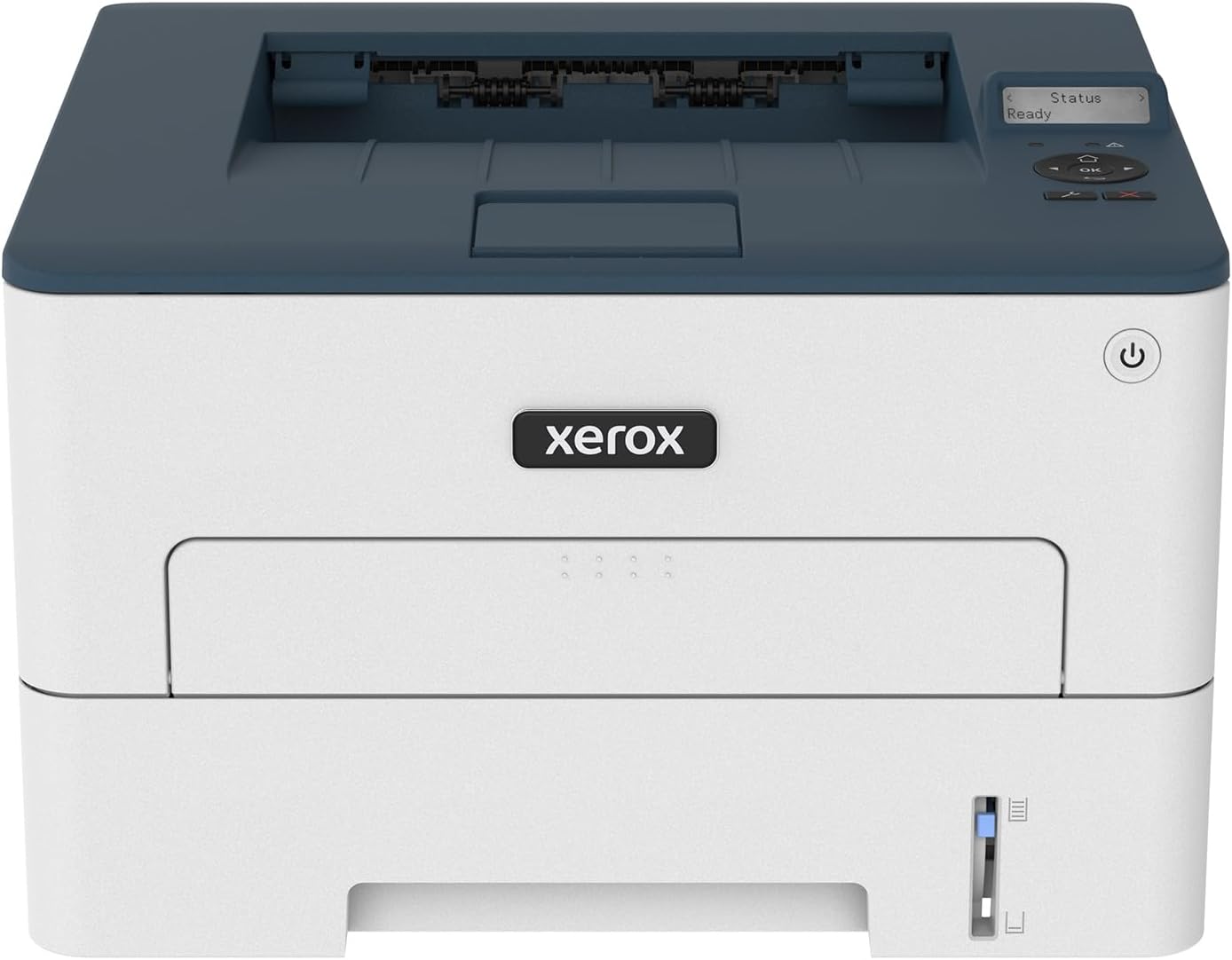
| Printer Type | Laser |
|---|---|
| Printer Output Type | Monochrome |
| Maximum Copy Speed Black and White | 36 pages_per_minute |
| Maximum Sheet Capacity | 250 |
| Duplex | Automatic |
The Xerox B230 is a small, business-focused black-and-white laser printer that delivers fast, reliable single-function printing for tight workspaces. It prints up to 36 pages per minute and supports automatic two-sided printing, a 250-sheet tray and legal-size media, which makes it useful for routine office tasks like reports, invoices and handouts. Built-in Wi-Fi with Wi‑Fi Direct plus support for AirPrint and Mopria lets phones, tablets and laptops print without a PC, and the 1 GHz dual-core processor with 256 MB memory keeps short jobs moving. Setup is straightforward with Xerox Smart Start and the unit includes an LCD for basic control. Practical benefits include low running costs typical of monochrome lasers and a cartridge recycling program. Trade-offs are that it is print-only with no scanning or faxing, limited memory for very large, complex jobs, and it is not suited to color printing or multifunction needs. For a small team that needs dependable, fast black-and-white output in a compact footprint, the B230 performs well.
Best for: Buyers who want a compact, dependable black-and-white printer for a small office or home workspace and prioritize speed, simple wireless setup and low running costs.
Less Ideal for: Those who need color printing, an all-in-one scanner/copier, or heavy multifunction workflows should choose a multifunction or color laser instead.
- Fast monochrome printing up to 36 ppm for quick document turnaround
- Automatic duplexing reduces paper use and speeds two-sided jobs
- Built-in Wi‑Fi, Wi‑Fi Direct and mobile print support (AirPrint, Mopria) for easy mobile printing
- 250-sheet standard paper capacity and legal-size support for typical office loads
- Print-only device with no scanning, copying or fax capability
- Limited memory and single tray may struggle with very large or complex print jobs
Verdict: A compact, fast monochrome laser that delivers dependable, low-cost black-and-white printing for small offices and home workspaces.
HP LaserJet Pro M15w

| Printer Type | Laser |
|---|---|
| Print Speed | Up to 19 ppm |
| Print Resolution | 600 x 600 dpi |
| Connectivity | USB, Wi-Fi |
| Maximum Sheet Capacity | 150 |
The HP LaserJet Pro M15w packs laser printing into a very small footprint and is aimed at users who need reliable black-and-white output without a large office setup. It prints up to 19 ppm with a first page out time around 8.1 seconds, and offers USB and Wi‑Fi connectivity including Wi‑Fi Direct for mobile and cloud printing via the HP Smart app. The printer is easy to place on a crowded desk and its auto-on/auto-off feature helps reduce standby power. Paper handling is basic with a single 150-sheet input and simplex printing only, so it is best for one to three users with light monthly volumes under 1,000 pages. Expect professional-looking monochrome text and sharp 600 x 600 dpi output, but no automatic duplexing, high-capacity trays, or advanced finishing. Also note HP enforces cartridge security, so replacement cartridges need compatible HP chips to function properly.
Best for: Buyers who prioritize compact, fast black-and-white printing and reliable wireless/mobile workflow for a small home office or individual workstation.
Less Ideal for: People who need high monthly duty cycles, automatic duplexing, large input capacity, or color printing should choose a larger or more feature-rich model.
- Very compact design fits small desks or tight workspaces
- Fast first page and up to 19 ppm for quick monochrome prints
- Wireless printing with Wi‑Fi, Wi‑Fi Direct, and HP Smart app cloud/mobile support
- Energy-saving auto-on/auto-off technology
- No automatic duplexing or advanced paper handling features
- Intended for light-volume use only with a single 150-sheet tray
- Uses dynamic cartridge security that requires original HP-chipped cartridges
Verdict: Choose this if you want a very small, fast monochrome laser printer with dependable wireless and mobile printing for light-duty office use.
Canon imageCLASS LBP122dw

| Printer Type | Laser |
|---|---|
| B&W Pages per Minute | 30 |
| Duplex | Automatic |
| Printer Connectivity Type | USB, Wi-Fi |
| Compatible Cartridge | Canon GENUINE Toner 071 / 071 H |
The Canon imageCLASS LBP122dw is a compact monochrome laser printer built for straightforward document printing in home or small office settings. It delivers up to 30 pages per minute and a short first-page time, so it keeps up with everyday stacks of black-and-white documents. The LBP122dw supports automatic two-sided printing to save paper, has a 150-sheet input capacity and simple wireless and USB connectivity for printing from PCs and mobile devices via the Canon PRINT app. The front LCD makes basic setup and status checks easier, and Canon Genuine Toner 071 cartridges are used for reliable output and predictable yield. Expect minimal maintenance and a small footprint, though it is print-only with no scanning or copying functions and has a modest paper capacity compared with larger office models. Power consumption is relatively high for its class, so it is best suited to users who prioritize speed and compact size over multifunction features or low energy draw.
Best for: Buyers who need a small, speedy black-and-white printer that handles regular document jobs efficiently and values simple wireless printing and automatic duplexing.
Less Ideal for: Users who need an all-in-one device, frequent large-volume printing, or lower energy consumption should consider multifunction or higher-capacity models instead.
- Fast monochrome printing up to 30 ppm for quick document throughput
- Automatic duplex printing reduces paper use without manual feeding
- Compact footprint fits easily in home offices or small workspaces
- Wireless and USB connectivity plus mobile app printing simplify setup and remote printing
- Print-only device with no scan, copy, or fax capabilities
- 150-sheet max input may require frequent refills for heavier users
- Reported power consumption is relatively high for a compact printer
Verdict: A compact, fast monochrome laser that delivers reliable two-sided printing and easy wireless setup for home and small-office document work.
HP LaserJet M209dw

| Printer Type | Laser |
|---|---|
| Printer Output Type | Monochrome |
| B&W Pages per Minute | 30 pages_per_minute |
| Maximum Print Resolution Black and White | 600 dpi |
| Printer Connectivity Type | Bluetooth, Ethernet, USB, Wi-Fi |
The HP LaserJet M209dw is a compact black-and-white laser printer aimed at small offices and home workspaces that need fast, reliable text printing without color. It delivers up to 30 ppm single-sided and around 19 ppm two-sided thanks to automatic duplexing, making it practical for multi-page reports and forms. Setup and everyday use are simplified by dual-band Wi-Fi, Bluetooth and Ethernet plus the HP Smart app for printing, scanning and copying from phones and tablets. Print quality is typical for the class at 600 dpi, which produces crisp text and simple graphics; the 150-sheet tray keeps reloads infrequent for light to moderate workloads. Because this listing is renewed, buyers should expect previous use and a limited 90-day warranty, and replacement toner compatibility is the HP 134A series. It lacks color printing and higher-resolution photo output, so it is focused squarely on document tasks, and power use reflects laser operation. For anyone prioritizing a small footprint and dependable monochrome throughput, this model covers the essentials efficiently.
Best for: Buyers who need an affordable, space-saving printer that reliably handles text-heavy documents and occasional multi-page jobs for a home office or small business.
Less Ideal for: Users who require color printing, photo-quality output, or long-run heavy-duty production should consider a different class of printer.
- Fast monochrome printing up to 30 pages per minute for quick document production
- Automatic duplexing saves time and paper on two-sided jobs
- Multiple connectivity options including dual-band Wi-Fi, Ethernet, Bluetooth and USB
- Compact footprint and 150-sheet tray suitable for small desks and moderate print volumes
- Renewed condition with only a 90-day limited warranty rather than new-product coverage
- Monochrome only, so it cannot produce color documents or photos
Verdict: A compact, no-frills monochrome laser that delivers fast, dependable document printing for budget-minded home offices and small businesses.
Brother HL-L2480DW Laser Printer

| Printer Type | Laser |
|---|---|
| B&W Pages per Minute | 36 pages_per_minute |
| Maximum Print Resolution Black and White | 1200 x 1200 dots_per_inch |
| Printer Connectivity Type | Ethernet, USB, Wi-Fi |
| Maximum Sheet Capacity | 250 |
The Brother HL-L2480DW is a compact monochrome 3-in-1 laser designed for small offices and home workspaces that need dependable black-and-white output. It prints up to 36 ppm with a 250-sheet tray and automatic duplex to reduce paper handling, and the flatbed scanner and copy functions make routine office tasks simple. Connectivity options include dual-band Wi-Fi, Ethernet, and USB, plus a 2.7-inch touchscreen and the Brother Mobile Connect app for printing and scanning from mobile devices or cloud services. Using Brother Genuine TN830 or TN830XL toners yields consistent, sharp text and the Refresh subscription option can simplify supply management. Expect fast first-page times and energy-efficient operation thanks to ENERGY STAR and EPEAT Silver ratings. Limitations are its monochrome-only output and a single tray design, so users who need color printing, high-capacity paper handling, or integrated fax will want a different model. For reliability-focused buyers who prioritize steady daily black-and-white printing in a small footprint, this printer covers the core needs well.
Best for: Buyers who need a compact, dependable monochrome printer for steady daily printing, copying, and scanning in a home office or small workplace and who value uptime and consistent text quality.
Less Ideal for: Users who require color printing, higher-capacity paper handling, or advanced multifunction features like integrated fax or large ADF capacities.
- Fast monochrome printing up to 36 pages per minute for high-throughput tasks
- Automatic duplexing and 250-sheet tray reduce paper refills and waste
- Multiple connectivity options including dual-band Wi-Fi, Ethernet, and USB
- 2.7-inch touchscreen plus Brother Mobile Connect app for easy mobile and cloud workflows
- ENERGY STAR and EPEAT Silver ratings for energy-efficient operation
- Prints only in black and white so not suitable for color documents
- Single paper tray and limited media handling compared with larger office models
Verdict: If you want a compact, reliable monochrome laser that delivers fast, consistent black-and-white prints and simple mobile/cloud workflows, the HL-L2480DW is a smart choice.
Canon imageCLASS LBP6030w

| Print speed (B&W) | 19 pages per minute |
|---|---|
| First page out | 8 seconds |
| Connectivity | Wi-Fi, USB 2.0 |
| Input capacity | 150 sheets |
| Compatible cartridge | Canon Genuine Toner 125 (1,600 page yield) |
The Canon imageCLASS LBP6030w is a small, print-only monochrome laser built for personal or home-office use. It prints up to 19 pages per minute with an 8-second first page out time, and connects via Wi‑Fi or USB for direct printing from laptops and mobile devices. Its compact footprint and low energy consumption in sleep mode make it easy to tuck on a shelf or desk, and it uses Canon Genuine Toner 125 cartridges with an advertised 1,600-page yield for steady monthly output. The 150-sheet input tray and 100-sheet output capacity suit moderate printing demands, though there is no duplexing so double-sided jobs require manual flipping. Setup and mobile app control are straightforward for typical documents and text-heavy jobs, but the unit is limited to black-and-white output and lacks scanning or copying features. For buyers prioritizing a reliable, space-saving laser for everyday monochrome printing, this model delivers sensible performance; buyers needing color, automatic duplex, or multifunction features should look elsewhere.
Best for: Buyers who want a space-saving, dependable monochrome laser for routine home or small-office document printing and who value simple wireless setup and steady toner yields.
Less Ideal for: Users who need color printing, an all-in-one scanner/copier, or automatic two-sided printing for higher-volume duplex workflows.
- Compact footprint suitable for small desks or tight workspaces
- Wireless and USB connectivity for printing from laptops and mobile devices
- Decent black-and-white speed at up to 19 pages per minute
- 150-sheet input and 100-sheet output capacity for moderate home/office workloads
- Low power consumption in energy saver mode
- No automatic duplex printing
- Print-only device with no scanning or copying functions
- Monochrome-only output limits use for color needs
Verdict: A compact, no-frills monochrome laser that reliably handles everyday home or small-office printing with easy wireless setup.
Brother HL-L2405W Laser Printer

| Printer Type | Laser |
|---|---|
| Printer Output Type | Monochrome |
| Print Speed | 30 pages_per_minute |
| Maximum Print Resolution Black and White | 1200 x 1200 dots_per_inch |
| Printer Connectivity Type | USB, Wi-Fi |
The Brother HL-L2405W is a straightforward compact monochrome laser printer aimed at reliable everyday black-and-white printing. It prints one-sided documents at up to 30 pages per minute with a 250-sheet input tray and a manual feed for envelopes or specialty media, making it useful for home offices, students, and small business tasks. Built-in dual-band Wi-Fi plus a USB 2.0 port enable mobile and desktop printing, and Brother Mobile Connect simplifies printing from phones and managing toner. Print quality is sharp at 1200 x 1200 dpi for text and basic graphics, and the unit ships with a starter toner and drum so you can start printing right away. Limitations include manual duplex only and no scanning or copying functions, so it is strictly a print-only machine, and power consumption figures are relatively high for a small desktop printer. For buyers who want a compact, dependable monochrome printer with easy wireless setup and low fuss, this model delivers consistent, economical prints without extra multifunction complexity.
Best for: Buyers who want a low-maintenance, single-purpose black-and-white printer for reliable daily document printing in a home or small office and who prioritize consistent output over multifunction features.
Less Ideal for: Users who need scanning, copying, automatic duplex, or color printing should consider a multifunction or color model instead.
- Fast monochrome printing up to 30 ppm for quick document runs
- 250-sheet paper tray reduces how often you reload paper
- Dual-band Wi-Fi plus USB connection for flexible wireless and local printing
- Sharp 1200 x 1200 dpi output for crisp text and basic graphics
- Compatible with Brother Mobile Connect app for remote printing and supply management
- No built-in scanner or copier functions since it is print-only
- Duplex printing is manual rather than automatic
Verdict: A compact, dependable monochrome laser printer that delivers fast, sharp single-function printing for risk-averse buyers who want a simple, no-nonsense device.
Choosing the Right Compact Laser Printer: Key Factors to Consider
Print Speed and Warm-Up Time
Print speed determines how quickly you get batches of documents and affects productivity during busy periods. Measured pages per minute for typical office text is the most useful number, but warm-up time from sleep to first page also matters in small printers that spend long stretches idle.
A compact laser printer with a faster first-page-out time and higher sustained ppm will reduce wait time for short jobs, which is common in home and small-office workflows. If you plan to print occasional multi-page documents, prioritize sustained throughput; if you mainly need occasional single-page prints, lower warm-up time can be more important.
Output Quality for Text and Graphics
Laser technology is typically strong for crisp, high-contrast text. Evaluate resolution and real-world rendering of small fonts and line art when assessing output quality. Color compact laser printers will also vary in how accurately they reproduce charts and simple graphics.
If your work includes client-facing documents, forms, or marketing handouts, choose a printer that produces sharp text and consistent solid fills. For mostly internal documents, focus on text clarity and toner consistency rather than photo-level color fidelity.
Toner Yield and Running Costs
A compact printer's purchase price is only part of ownership cost. Toner yield per cartridge and the availability of high-yield replacements directly affect ongoing expense. Consider the estimated cost per page based on standard-yield cartridges and the typical volume you print monthly.
Lower running costs matter more when you print dozens or hundreds of pages a month. If your monthly volume is light, smaller cartridges may be acceptable, but verify how often you will need to replace consumables to avoid unexpected interruptions.
Connectivity and Mobile Printing
Connectivity options determine how easily you integrate the printer into your workflow. Wired Ethernet is useful for small offices that want a shared device on a stable network. Wi-Fi convenience is critical for home users who print from multiple devices. Mobile printing support and compatibility with common printing standards simplify printing from phones and tablets.
Consider whether you need features such as automatic reconnection, guest network printing, or support for printing over a local network without cloud services. Poor connectivity can negate other advantages of a compact unit.
Physical Footprint and Placement
Compact laser printers are chosen for small spaces, so physical dimensions and weight matter. Check how much clearance is required for paper trays, top output, and access to toner cartridges. A small footprint that still allows comfortable paper handling and maintenance will reduce frustration.
Think about where the printer will live: a desk corner, shelf, or dedicated stand. Also consider noise when printing and whether a device will disturb nearby occupants during use.
Maintenance and Ease of Use
Maintenance needs include how often consumables are replaced and how easy the device is to service without technical help. Simple cartridge access, clear status indicators, and minimal required adjustments reduce downtime. A light-touch maintenance design is particularly valuable for users without an IT resource.
Consider whether the printer offers automatic firmware updates and straightforward diagnostic reporting. Units that require frequent calibration or complex servicing should be avoided for home or small-office contexts.
Color Vs Black-and-White Compact Laser Printers
Deciding between a color and a monochrome compact laser printer comes down to the types of documents you print. Monochrome models are typically faster, cheaper to run, and better suited to high-volume text jobs. Color compact laser printers add flexibility for charts, highlighted forms, and occasional marketing materials but often increase initial cost and running expenses.
If you rarely need color, a monochrome unit keeps operating costs predictable. If you need color for branding or client deliverables, choose a color model with reasonable toner yields and color consistency rather than expecting photo-grade output.
- Monochrome: faster, lower toner cost, ideal for text-heavy work
- Color: more versatile for graphics, higher running costs and complexity
- Assess your typical documents to decide which tradeoff fits your workflow
Paper Handling for Small Workloads
Compact printers often reduce tray capacity to save space. Think about the typical job size and whether you need an automatic document feeder or duplex printing. Built-in duplexing saves time and paper for double-sided documents but can add to the device's internal complexity.
Consider how frequently you will refill paper and whether the tray design allows for mixed-media printing. If you print occasional envelopes or labels, verify supported media types and manual-feed access.
- Tray capacity influences how often you refill paper
- Duplexing conserves paper and time for two-sided workflows
- Manual feed slots are useful for specialty media
Energy Use and Idle Behavior
Compact laser printers can draw a relatively high power during warm-up, then fall into low-power standby. Look for models with efficient sleep modes and short warm-up times to balance energy use with responsiveness. Energy-efficient designs reduce ongoing electricity costs and lessen heat output in small rooms.
If the printer will sit idle for long periods, prefer units that return quickly from sleep and provide a low-power idle state. This reduces the annoyance of repeated long warm-ups for short print jobs.
- Check sleep mode behavior and first-page-out times
- Efficient standby reduces power consumption in small spaces
- Warm-up power spikes are normal; frequency matters more than peak draw
Space-Saving Setup Tips
Position compact printers on a low shelf or corner of a desk where paper access and output stacking are unobstructed. Leave enough clearance for top output and for removing toner cartridges. If desk space is extremely limited, consider mounting on a small dedicated stand or integrating into existing shelving.
Route cables neatly and prefer models with wireless connectivity to avoid extra adapters and clutter. Evaluate noise and ventilation needs before placing the unit in a tight cabinet or enclosed space.
- Allow clearance for paper trays and cartridge access
- Use wireless setups where possible to reduce desktop clutter
- Avoid fully enclosed spaces that restrict airflow
Common Consumables and Replacement Guidance
Understand the main consumables beyond toner, such as drum units or maintenance kits, and how frequently they require replacement relative to page volume. Some compact designs combine consumables for easier replacement but may increase cost per replacement.
Keep a spare toner cartridge on hand if your workflow is time-sensitive. For light users, standard-yield cartridges are often adequate, but frequent printing benefits from high-yield options to reduce changeover frequency.
- Identify whether drums are separate or integrated
- High-yield toners reduce replacement frequency for heavy users
- Store spare consumables if uptime is important
How We Chose the Best Compact Laser Printer
We focused on the traits that most directly affect everyday experience with a compact laser printer. Primary evaluation criteria included measured print speed for typical office documents, consistent output quality for text and basic graphics, toner yield and operating cost estimates, and the physical footprint plus ease of placement in small workspaces. We also weighed connectivity features such as reliable wired networking, Wi-Fi stability, and mobile printing support because a compact unit that cannot connect easily undermines its usefulness. Durability and maintenance were assessed by looking at recommended monthly duty cycles and the complexity of user-replaceable consumables. Usability factors included straightforward control panels, clear status reporting, and simple setup. We excluded large office or production-grade printers and any units that require proprietary service plans that add significant ongoing cost. The final shortlist prioritizes machines that deliver predictable, low-friction performance for daily document tasks in homes and small offices.
Our full evaluation process is outlined in our review methodology.
FAQ
How noisy are compact laser printers during operation?
Noise varies by model and job size. Short single-page prints are usually quiet aside from a brief warm-up. Longer or higher-speed jobs can be noticeably louder, so check user reports or noise ratings if quiet operation matters.
Can compact laser printers handle photo printing?
Laser printers are not optimized for high-fidelity photo printing. They can reproduce simple color graphics and charts adequately, but for true photo quality you should use a dedicated photo printer or a service designed for photo output.
What monthly page volume is safe for a compact laser printer?
Manufacturers often publish a recommended monthly duty cycle. For compact models, light to moderate use—typically a few hundred pages per month—is common. Exceeding the recommended range regularly can increase wear and maintenance needs.
Are wireless connections reliable for shared small-office use?
Wireless connections are convenient but can be less stable than wired Ethernet, especially on busy networks. For small offices with multiple users, wired networking or a robust Wi-Fi setup reduces intermittent connectivity problems.
How do I estimate cost per page for a compact laser printer?
Estimate cost per page by dividing the cartridge price by its rated page yield. Include potential costs for drum units or maintenance kits if they are sold separately. Compare those numbers against your expected monthly volume to forecast monthly running expense.
Final Verdict
When choosing a compact laser printer, prioritize the features that match how you print most often. If you print predominantly text and need speed and low running costs, a monochrome unit with high toner yield and short warm-up times will serve you best. If occasional color output is important, accept somewhat higher running costs and look for a color model with consistent color handling and reasonable toner yields. Balance physical footprint and connectivity against maintenance demands. Focus on reliable paper handling, straightforward consumable replacement, and the connectivity that fits your setup. With those priorities in mind, you can select a compact laser printer that delivers dependable daily performance without unnecessary complexity.