
Note: This article contains affiliate links. If you click on these links and make a purchase, we may earn a small commission at no extra cost to you. This helps support our research and content. Read our full affiliate disclosure here.
Upgrading to a Deadbolt Smart Lock changes how you control access to your home. The right deadbolt adds remote access, scheduled codes, and better auditability without sacrificing door fit or reliability. Choosing poorly can leave you with hard-to-install hardware, weak authentication, or frustrating daily use. This guide shortlists the top Deadbolt Smart Locks across common household needs and evaluates them on security, installation, and everyday convenience. Read on for a focused look at the features and tradeoffs that matter when replacing a traditional deadbolt.
Top Picks at a Glance
| Best Overall The best all-around choice for most situations | August Wi‑Fi Smart Lock (4th Gen) |  |
| Best Quality Built to a higher standard if you want something more solid | Schlage Arrive WiFi Deadbolt |  |
| Best Value The sweet spot between price and what you get | ULTRALOQ Bolt SE |  |
| Top Rated A top-rated pick with lots of positive feedback | eufy Security Familock E32 |  |
| Most Popular A crowd favorite that many people choose with confidence | Schlage Encode WiFi Deadbolt |  |
August Wi‑Fi Smart Lock (4th Gen)

| Included Components | August Wi‑Fi Smart Lock, Batteries, Mounting Hardware |
|---|---|
| Connectivity Protocol | Wi‑Fi |
| Lock Type | Biometric, Deadbolt, Smart Lock, Wi‑Fi |
| Controller Type | Amazon Alexa, Google Assistant, Vera |
The August Wi‑Fi Smart Lock replaces the interior thumbturn on a standard deadbolt to add remote locking, guest access, and activity monitoring without changing your exterior hardware. It connects directly to your home Wi‑Fi, so you get voice control and remote access out of the box and can integrate with Alexa, Google Assistant, Apple HomeKit, and SmartThings. Typical use involves installing the unit on the inside of the door, pairing it with the August app, and using your phone or voice to lock and unlock, grant time-limited guest keys, and view an activity feed. Notable features include built‑in Wi‑Fi, DoorSense status reporting, Auto‑Lock/Auto‑Unlock, and support for biometric phone authentication. Practical benefits are hands‑free entry, temporary access for visitors or service people, and fewer lost-key headaches while preserving your existing exterior look. Limitations to consider are reliance on the August app and phone for full functionality and the need for a compatible single‑cylinder deadbolt and home Wi‑Fi to use remote features.
Best for: Buyers who want a simple retrofit smart lock that adds remote control, guest access, and smart home integrations while keeping their existing exterior door hardware.
Less Ideal for: If you need a lock that replaces the entire deadbolt or you lack reliable home Wi‑Fi and smartphone access, this unit is not the best choice.
- Built‑in Wi‑Fi for direct remote access without an external hub
- Retrofits to most single‑cylinder deadbolts preserving exterior hardware
- Auto‑Lock and Auto‑Unlock for hands‑free convenience
- Guest keys with time limits and activity feed for tracked access
- Works with Alexa, Google Assistant, Apple HomeKit, and SmartThings
- Full functionality depends on the August app and phone access
- Requires a compatible single‑cylinder deadbolt and a home Wi‑Fi network
Verdict: Choose this August Wi‑Fi Smart Lock if you want an easy, interior‑mounted retrofit that adds remote access and guest keys without changing your exterior deadbolt.
Schlage Arrive WiFi Deadbolt
| Connectivity Protocol | Bluetooth, Wi-Fi |
|---|---|
| Lock Type | Keypad |
| Control Method | Touch |
| Included Components | Installation Hardware, Installation Instructions |
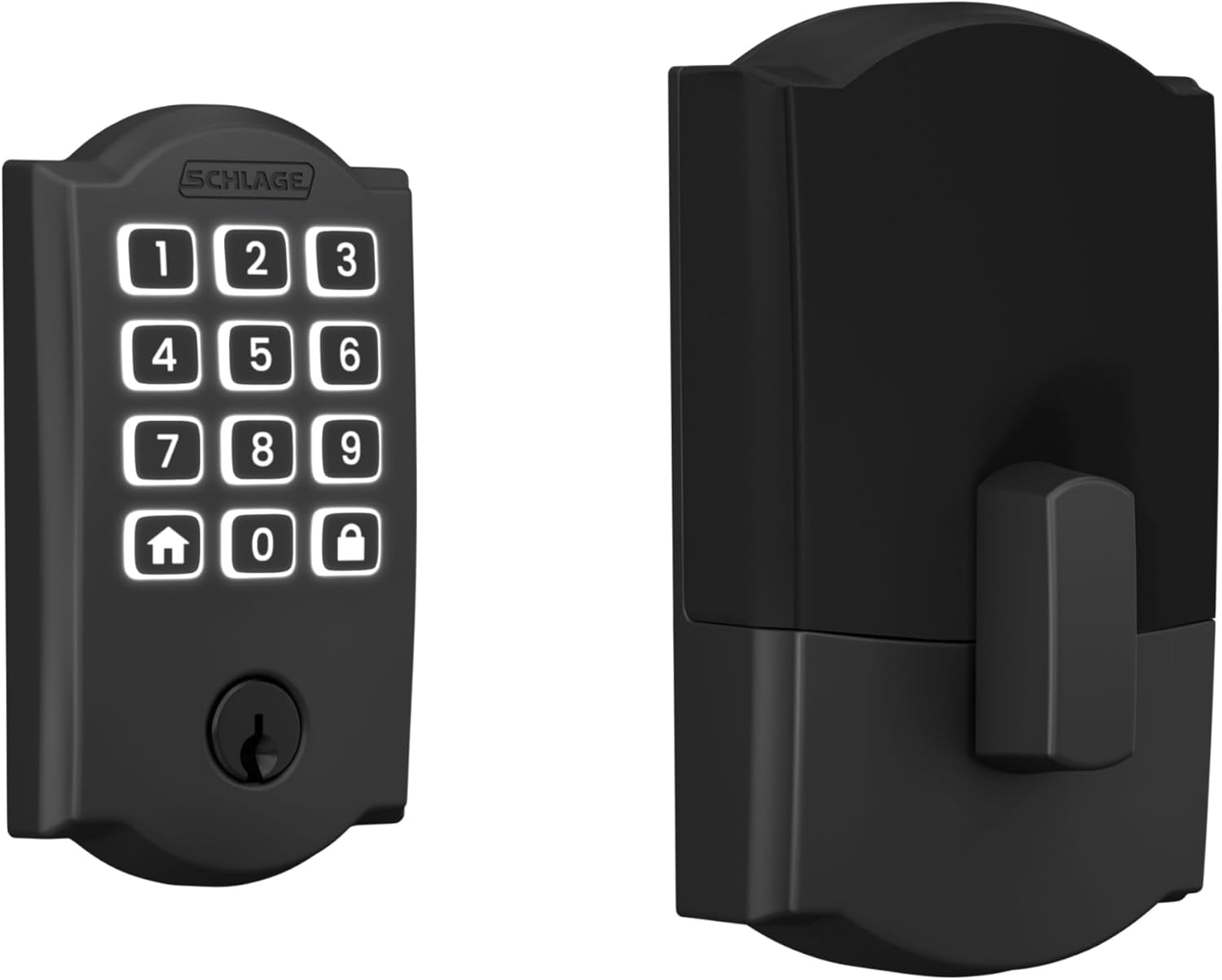
The Schlage Arrive WiFi Deadbolt is a battery-powered, keypad-style smart lock designed to replace a standard deadbolt and provide remote access without extra hubs. It uses a push-button, backlit silicone keypad for code entry and supports up to 250 unique access codes, making it useful for families, frequent guests, or short-term rentals. Built-in WiFi and the Schlage Home app let you lock and unlock from anywhere, view entry history, receive notifications, and set schedules; Bluetooth works for local control when away from WiFi. The lock integrates with Alexa, Google Home, and Ring for voice control and automations. Installation is straightforward with just a screwdriver and the lock fits common door thicknesses and backsets. Notable strengths are the BHMA-certified security and durable metal construction backed by Schlage's long-standing reputation. Limitations include reliance on battery power so you must monitor battery levels, and advanced smart features require the manufacturer app and a secure home WiFi network to access remotely.
Best for: Buyers who prioritize robust security and dependable smart features and want a straightforward upgrade that delivers remote control, many access codes, and voice integration.
Less Ideal for: People who want a fully wired, maintenance-free lock or those who prefer a minimalist keyless option without a physical keypad.
- Built-in WiFi for remote lock/unlock and notifications without a separate hub.
- Supports up to 250 access codes for flexible, scheduled access control.
- Backlit, all-weather silicone keypad that is easy to use in low light.
- BHMA-certified security, durability, and finish with solid metal components.
- Quick DIY installation with included hardware and batteries.
- Runs on 4 AA batteries so you must replace them periodically to avoid lockouts.
- Full feature set depends on using the Schlage Home app and a secure WiFi connection.
Verdict: Choose the Schlage Arrive if you want a high-security, easy-to-install smart deadbolt with built-in WiFi and extensive code management for performance-focused use.
ULTRALOQ Bolt SE

| Connectivity Protocol | Bluetooth, Matter, Wi-Fi |
|---|---|
| Lock Type | Biometric, Deadbolt, Keypad |
| Additional Features | Auto Lock, AI-driven Fingerprint Scanner, App Remote Control |
| Waterproof Rating | IP65 |
The ULTRALOQ Bolt SE is a versatile smart deadbolt that combines biometric access, keypad codes, mechanical keys, and smartphone control into one exterior-ready unit. It unlocks via an AI-driven fingerprint reader in about 0.3 seconds, accepts up to 50 fingerprints and 50 passcodes, and offers remote locking and access sharing through its built-in Wi‑Fi or via Matter over Thread for compatible hubs. The lock supports Apple Home, Alexa, Google Assistant, and SmartThings and includes features like auto-lock, activity history, and real-time notifications in the app. Thread-powered connectivity extends battery life—ULTRALOQ claims up to 18 months on four AA batteries—and the lock is built to an IP65 waterproof rating and BHMA standards for residential durability. Installation is DIY-friendly and requires only a screwdriver. Important caveats: Matter features need a Thread border router to work, and the door sensor is not included, so some automations may require extra hardware. For buyers who want fast fingerprint entry, broad smart-home integration, and reliable remote access, this Bolt SE covers the essentials well.
Best for: Buyers who prioritize practical, reliable smart-home security with fast biometric entry and broad ecosystem support, and who want a durable, DIY-installable deadbolt that minimizes battery swaps.
Less Ideal for: People who do not have a Matter/Thread hub and do not want to add any extra smart-home hardware, or those who need a lock that includes a door sensor out of the box.
- Fast, AI-driven fingerprint reader with up to 50 stored fingerprints for quick entry
- Built-in Wi‑Fi plus Matter over Thread support enables remote access and broad smart-home integration
- Long claimed battery life (up to 18 months) using 4 AA batteries thanks to Thread efficiency
- IP65 waterproof and BHMA certified construction suitable for exterior doors
- Multiple access methods including app, keypad codes, voice, and backup mechanical keys
- Matter features require a compatible Thread border router, adding setup complexity
- Door sensor is not included, so some auto-lock or door-close automations need extra purchases
Verdict: Choose the Bolt SE if you want a durable, fast-fingerprint smart deadbolt that integrates with modern smart-home platforms and supports remote control via built-in Wi‑Fi or Matter over Thread.
eufy Security Familock E32
| Connectivity Protocol | Wi‑Fi |
|---|---|
| Lock Type | Deadbolt |
| Additional Features | Auto‑Lock, Fingerprint |
| Style Name | Matter + WiFi + Fingerprint + 8AA battery |
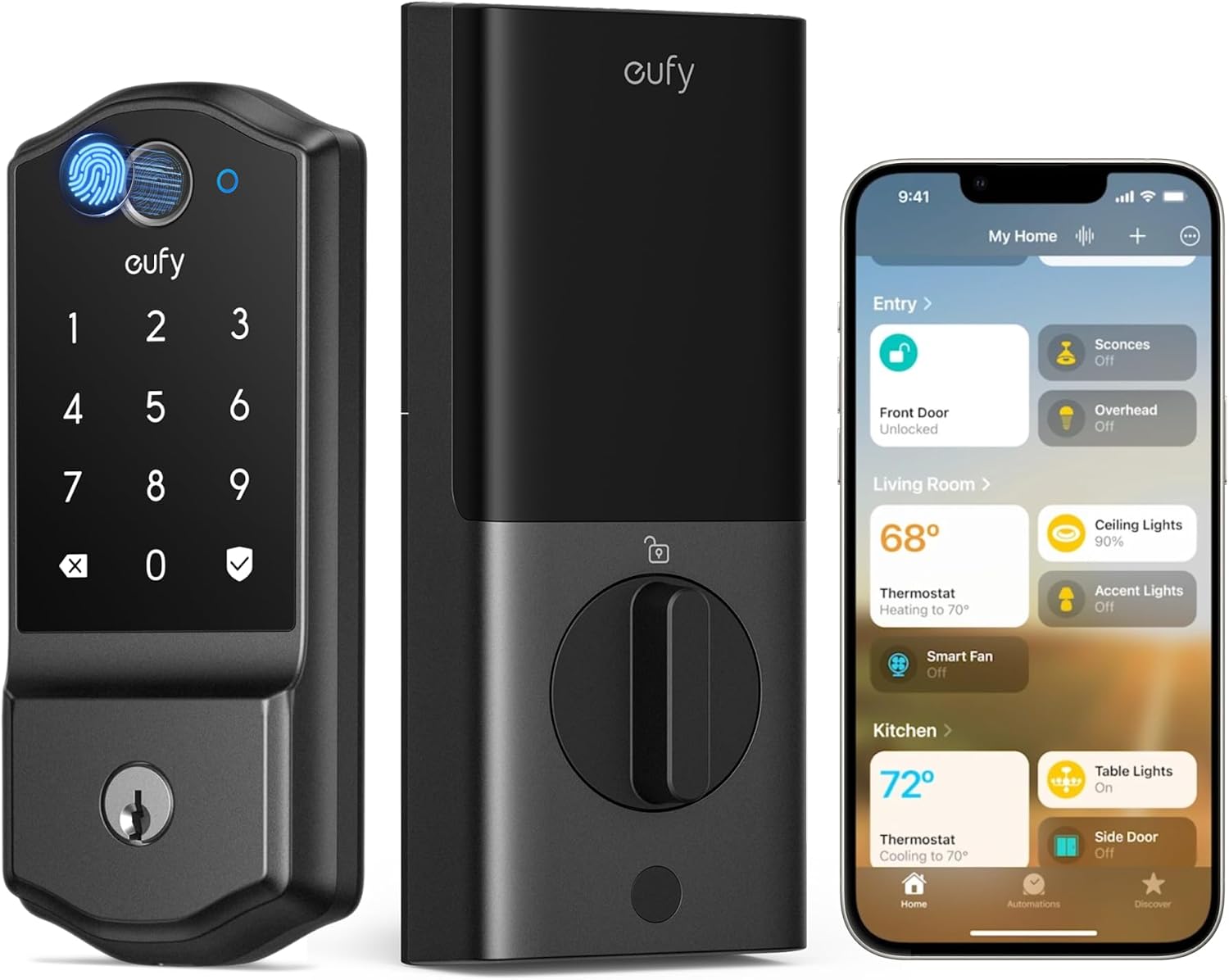
The eufy Familock E32 is a front‑door deadbolt that combines multiple unlocking methods with built‑in Wi‑Fi and Matter compatibility so you can control it from popular smart home platforms. It supports fingerprint, keypad, app, voice, and remote unlocking and sends real‑time notifications and event history through the eufy app. The lock uses eight AA batteries and eufy rates typical battery life at about eight months, with low battery alerts to avoid surprises. It is ANSI/BHMA certified and IP53 rated for the exterior side, so it is built to handle weather and everyday use, while installation is aimed at standard single‑cylinder deadbolts and is DIY friendly for most doors. Practical limits include a recommended Thread border router for full Apple Home integration and the interior module being designed for indoor use only, so placement matters for harsh exteriors. For buyers prioritizing straightforward integration, multiple access methods, and solid battery life, the E32 is a dependable choice; buyers needing a nonstandard mortise or round‑faceplate solution should look elsewhere.
Best for: Buyers who want a reliable, full‑featured smart deadbolt that integrates with major smart home ecosystems and prioritizes consistent performance and long battery life.
Less Ideal for: Homes with nonstandard mortise or round faceplate locks or users who need a lock rated for fully exposed interior components outdoors.
- Multiple unlocking options including fingerprint, keypad, app, voice, and remote for flexible entry control.
- Built‑in Wi‑Fi and Matter support enable native integration with Apple Home, Google Home, Alexa, and SmartThings without a proprietary bridge.
- Long battery runtime using 8 AA batteries with low‑battery alerts to give ample notice before replacement.
- ANSI/BHMA certification and IP53 exterior rating for weather resistance and certified security performance.
- Customizable auto‑lock timing and real‑time notifications for convenient, automated security management.
- Requires a Thread border router (recommended) to unlock full Apple Home Matter experience.
- Interior rear module is intended for indoor use only, limiting installation options in exposed locations.
Verdict: Choose the eufy Familock E32 if you want a weather‑resistant, Matter‑ready smart deadbolt with multiple access methods and long battery life for dependable everyday security.
Schlage Encode WiFi Deadbolt

| Connectivity Protocol | Bluetooth, Wi-Fi |
|---|---|
| Lock Type | Keypad |
| Controller Type | Amazon Alexa, Google Assistant, Vera |
| Power | 4 AA batteries included |
The Schlage Encode is a full-featured smart deadbolt intended to replace a standard keyed deadbolt with app control and keypad access. It installs with just a screwdriver and runs on four AA batteries, providing one-touch locking, customizable auto-lock timing, and a fingerprint-resistant touchscreen for guests to enter codes. Built-in Wi‑Fi means no separate hub is required to lock or unlock remotely, view access history, and receive low-battery or access notifications through the Schlage Home app. The lock also includes a built-in alarm to detect forced-entry attempts and is BHMA-graded for security, durability, and finish. Integration with voice assistants and Ring makes it easy to add to an existing smart home. Practical limits include battery dependence for electronics and wireless features, and some users may need time to navigate app settings and access-code management. The keypad and physical backup key keep the door usable if batteries fail or connectivity is lost.
Best for: Buyers who want a proven, professionally built smart deadbolt with remote access, robust security credentials, and easy guest code management for homes or short-term rentals.
Less Ideal for: Those who prefer a hardwired solution, want biometric unlocking beyond a touchscreen, or need an ultra-low-maintenance lock that never relies on batteries or app setup.
- Built-in Wi‑Fi for remote control without a hub
- Easy DIY installation that fits standard residential doors
- Manages up to 100 unique access codes for hosted or family use
- BHMA-graded security and a built-in alarm for forced-entry detection
- Works with Alexa, Google Assistant, and Ring for voice and smart-home routines
- Runs on AA batteries so electronics and Wi‑Fi depend on battery health
- Advanced app features require setup and occasional troubleshooting
Verdict: Choose the Schlage Encode if you want a durable, BHMA-graded smart deadbolt with built-in Wi‑Fi and strong remote access and access-code controls.
Choosing the Right Deadbolt Smart Lock: Key Factors to Consider
Physical Bolt Strength and ANSI Grade
A smart deadbolt is still a mechanical barrier first. Look for a solid metal bolt with a throw length that fully extends into the strike plate and hardware rated to resist kick-in and pry attacks.
Higher ANSI grades and thicker bolts reduce the chance of forced entry and also affect how the lock performs over time. If your door gets heavy use or you live in an area with higher break-in rates, prioritize stronger mechanical grading even if that increases installation complexity.
Authentication Methods and Security Protocols
How the lock verifies users determines both convenience and risk. Common options include PIN codes, Bluetooth proximity, Wi-Fi bridge access, and Z-Wave or Zigbee connectivity. Prefer locks that support encrypted communications and local verification where possible.
Also check whether the lock supports two-factor approaches, temporary codes for guests, and audit logging. Locks that fall back to simple, unencrypted radio or use insecure default codes increase exposure to unauthorized access.
Installation Footprint and Door Compatibility
Smart deadbolts must fit the door thickness, backset, and existing bore. Some models are direct replacements while others require additional drilling or changes to the strike plate.
Measure door thickness and backset before choosing and review whether the lock supports the common 2-3/8 or 2-3/4 inch backsets. If you rent or prefer minimal modification, prioritize retrofit designs that work with standard single-cylinder deadbolts.
Power Source, Battery Life, and Recovery
Deadbolt smart locks run on batteries and need a reliable power strategy. Longer battery life reduces maintenance and the risk of lockouts. Consider whether the lock uses AA/AAA cells you can swap quickly or a proprietary rechargeable pack.
Also check low-battery alerts and emergency power options such as an external 9V terminal or mechanical key override. A clear power-fail behavior policy matters: some locks auto-unlock on power loss, which is a safety issue, while others stay locked until manually operated.
Connectivity, Integration, and Privacy
Decide how the lock will integrate into your home ecosystem. Local protocols like Z-Wave or Bluetooth let you control locks without relying on cloud services and can improve responsiveness and privacy. Wi-Fi bridged systems give remote control but may introduce more cloud dependency.
Review how the vendor handles data, whether access logs are stored locally or in the cloud, and whether the lock supports firmware updates securely. Integration choices affect automation, voice assistant compatibility, and long-term maintainability.
Types of Deadbolt Smart Lock Mechanisms
Deadbolt smart locks install as single-cylinder or double-cylinder units, or as retrofit modules that replace one side of an existing deadbolt. Single-cylinder systems allow an electronic or keyed cylinder outside and a thumbturn inside. Double-cylinder designs use a keyed cylinder on both sides and are typically used where a thumbturn is undesirable for safety reasons.
- Retrofit modules: replace only the interior assembly, preserving the exterior keyed cylinder
- Full-replacement deadbolts: swap both interior and exterior hardware for a complete unit
- Single vs double cylinder: trade off emergency egress against forced-entry resistance
Installation Tips and Common Pitfalls
Prior to purchase, measure door thickness, backset, and the diameter of the existing bore hole. Confirm whether your door uses an ANSI strike box or a simple plate, since strike reinforcement often improves security and may be necessary for heavier deadbolts. During installation, keep the mounting plate tight and ensure the bolt retracts and extends smoothly without binding. A common mistake is misaligning the strike, which leads to rattling, lock failures, or accelerated wear.
- Test bolt operation with the door open before finalizing mounting screws
- Use longer screws into the frame for the strike plate to increase resistance to kick-in
- Follow manufacturer torque guidance to avoid stripping the spindle or internal gears
Managing Access for Households and Guests
Modern deadbolt smart locks offer PIN codes, temporary access codes, and app-based permissions. For families, create stable permanent codes for household members and temporary or scheduled codes for cleaners, dog walkers, or short-term guests. Set expiration times for guest codes and regularly audit active codes. If multiple administrators are allowed, use role-based controls where available to limit who can create or delete permanent credentials.
- Use time-limited codes for service workers
- Rotate or delete unused codes periodically
- Enable audit logging to see who unlocked the door and when
Routine Maintenance and Firmware Updates
Keep the lock mechanics clean and periodically lubricate the bolt and strike area with a recommended dry lubricant. Check battery levels monthly and replace cells proactively to avoid power-related lockouts. Install firmware updates promptly when they address security issues. Before updating, note any integration dependencies so you can restore settings if an update changes connectivity behavior.
- Inspect mounting screws and tighten annually
- Replace batteries before the low-battery warning becomes critical
- Back up configuration and note user codes in a secure place before major updates
How We Chose the Best Deadbolt Smart Lock
We evaluated available deadbolt-style smart locks with a focus on real-world homeowner concerns. Selection started with models that use a secure keyway or electronic override and offer persistent locking capability rather than temporary latching. We excluded devices that only retrofit doorknobs, require proprietary door modification, or depend entirely on a cloud-only control path without local backup. Our editorial filters prioritized concrete, testable dimensions: cryptographic authentication methods and tamper resistance, physical deadbolt strength and ANSI grading compatibility, installation footprint and fit for standard exterior doors, battery life and power-fail behavior, and user access management including code programming and audit logs. We also assessed integration options such as local Bluetooth or Z-Wave support versus cloud-only apps, since connectivity affects reliability and privacy. What we excluded: units with limited mechanical security, prototype or one-off designs lacking robust certifications, and solutions that require major doorframe alteration. The result is a shortlist that balances secure hardware, practical installation, and usable software features suitable for most homeowners seeking a Deadbolt Smart Lock.
Our full evaluation process is outlined in our review methodology.
FAQ
Will a deadbolt smart lock fit any exterior door?
Many deadbolt smart locks are designed for standard exterior doors, but fit depends on door thickness, backset, and bore diameter. Measure these dimensions and check compatibility before buying.
Can I still use a physical key with a smart deadbolt?
Most deadbolt smart locks retain a physical keyway or offer a keyed option for mechanical override. This provides redundancy for power failures or lost devices, but check that the keyway meets your security expectations.
How secure are wireless unlock methods like Bluetooth or Wi-Fi?
Wireless methods can be secure when they use strong encryption and up-to-date protocols. Local Bluetooth with encrypted pairing limits exposure, while Wi-Fi access typically depends on a bridge and cloud services, which increases the attack surface if not properly secured.
What happens if the batteries die while I am away?
Good deadbolt smart locks offer low-battery alerts and emergency options such as an external power terminal or mechanical key override. Plan for periodic battery replacement and verify recovery methods before relying solely on electronic access.
Are these locks compatible with home automation systems?
Compatibility varies by model and chosen connectivity protocol. Locks that support Z-Wave or Zigbee typically integrate with many hubs for automation, while Wi-Fi or proprietary Bluetooth models may rely on vendor bridges or specific smart home ecosystems.
Final Verdict
When choosing a Deadbolt Smart Lock, balance mechanical strength and secure authentication with the installation demands of your door. Prioritize locks that offer a robust physical bolt and encrypted access methods, paired with clear battery and recovery options. Tradeoffs are inevitable: stronger mechanical grades and local protocol support may require slightly more installation effort but deliver better long-term security and reliability. Focus on the criteria most important to your household and pick a solution that fits your door and daily routine with minimal friction.