
Note: This article contains affiliate links. If you click on these links and make a purchase, we may earn a small commission at no extra cost to you. This helps support our research and content. Read our full affiliate disclosure here.
Picking the right smart lock for front doors changes daily use more than you might expect. The right unit improves convenience with keyless entry, simplifies guest access, and strengthens the door's defensive features without requiring constant fiddling or frequent battery swaps. For homeowners focused on reliability and straightforward setup, shortlisted smart locks offer a mix of secure communications, tamper resistance, and practical control options. This guide covers the top picks for front-door use and explains the evaluation criteria used to compare them. Read on to see which features matter most and which locks are best suited to common front-door scenarios.
Top Picks at a Glance
| Best Overall The best all-around choice for most situations | Schlage Encode WiFi Deadbolt |  |
| Best Quality Built to a higher standard if you want something more solid | Lockly Visage Zeno Smart Lock |  |
| Best Value The sweet spot between price and what you get | eufy Security Smart Lock C220 |  |
| Best Budget The cheapest option that still gets the job done reliably | TEEHO TE001 Keypad Deadbolt |  |
| Top Rated A top-rated pick with lots of positive feedback | ULTRALOQ Bolt SE Smart Deadbolt |  |
| Most Popular A crowd favorite that many people choose with confidence | TEEHO TE002 Fingerprint Deadbolt |  |
| Best Seller A high-volume bestseller chosen again and again | Wyze Lock Bolt v2 |  |
Schlage Encode WiFi Deadbolt

| Connectivity Protocol | Bluetooth, Wi‑Fi |
|---|---|
| Lock Type | Keypad |
| Controller Type | Amazon Alexa, Google Assistant, Vera |
| Power | Uses 4 AA batteries |
| Included Components | Installation Hardware, Installation Instructions |
The Schlage Encode is a keyless deadbolt designed for front doors that pairs a touchscreen keypad with built‑in Wi‑Fi so you can control and monitor access from your phone without buying a separate hub. Installation is straightforward and typically done with a screwdriver using the provided hardware and batteries, and the lock fits standard residential doors. In daily use you can create and manage up to 100 access codes, set auto‑lock timing, view access history, and receive low‑battery and entry notifications through the Schlage Home app. The lock also offers voice integrations for Alexa and Google Assistant and a built‑in alarm that detects forced entry attempts. Practical benefits include no-hassle remote control, guest code scheduling for rentals, and a sturdy metal build backed by strong security ratings. Limitations to note are reliance on AA batteries which require occasional replacement and that advanced smart automations depend on the app and your home Wi‑Fi reliability rather than a local hub or LAN fallback.
Best for: Buyers who want a reliable, secure front‑door smart lock that provides remote control, easy guest access management, and simple DIY installation without adding a hub.
Less Ideal for: People who prefer fully hardwired locks or those who need offline local automations independent of cloud or Wi‑Fi connectivity should consider other options.
- Built‑in Wi‑Fi for remote lock/unlock and status checks without a separate hub
- Supports up to 100 unique access codes for flexible guest and family access
- One‑touch exterior touchscreen locking and customizable auto‑lock for convenience
- Certified high BHMA ratings for security, durability, and finish
- Works with Alexa, Google Assistant, Ring and has a built‑in forced‑entry alarm
- Runs on 4 AA batteries so you must monitor and replace power periodically
- Some advanced integrations and notifications depend on stable home Wi‑Fi and the Schlage Home app
Verdict: Choose the Schlage Encode if you want a secure, easy‑to‑install front‑door smart deadbolt with built‑in Wi‑Fi and robust guest access controls.
Lockly Visage Zeno Smart Lock

| Connectivity Protocol | Wi‑Fi (2.4GHz) |
|---|---|
| Lock Type | Deadbolt |
| Controller Type | Alexa, Apple HomeKit, Google Assistant |
| Additional Features | Facial Recognition, 0.2s AI Fingerprint, IP65 Waterproof, Rechargeable batteries |
The Lockly Visage Zeno is a high-performance front‑door deadbolt that combines facial recognition, a 0.2s 3D biometric fingerprint reader, and multiple keyless access methods into a single Wi‑Fi smart lock. In everyday use it can auto-unlock as you approach using its dual-infrared facial sensor, accept fast fingerprint scans, or let guests in with time-limited PIN codes from the app. Built‑in 2.4 GHz Wi‑Fi removes the need for a hub and enables remote unlocks, activity alerts, and integrations with Siri, Alexa and Google Assistant. Practical benefits include a rechargeable battery solution (two 10000mAh cells) that lessens battery swapping, an IP65 exterior rating for weather resistance, and a tamper‑resistant PIN Genie keypad that randomizes digits. The lock is engineered for heavy use and wider door compatibility with an optional extension kit. Tradeoffs to consider are the premium feature set and cost relative to simpler smart deadbolts, and reliance on the vendor app for the fullest remote and guest access features.
Best for: Buyers who prioritize speed, advanced biometrics, and robust remote control for a front‑door smart lock and who want a weatherproof, feature‑rich upgrade that supports voice assistants and Apple Home Key.
Less Ideal for: Shoppers who want a minimal, low-cost replacement deadbolt or prefer to avoid reliance on a companion app and cloud‑based features should consider simpler models or basic electronic locks.
- Facial recognition that unlocks automatically and works day or night with dual-infrared sensors
- Very fast 3D fingerprint reader with AI learning and 0.2 second recognition
- Built‑in Wi‑Fi for direct remote access and app controls without a hub
- Rechargeable battery system reduces the need for frequent battery changes and includes USB‑C backup power option
- Hack‑resistant PIN Genie keypad and support for Apple Home Key and voice assistants
- Higher price and feature complexity compared with basic smart deadbolts
- Full functionality depends on the Lockly app and cloud services for guest codes and remote features
Verdict: Choose the Lockly Visage Zeno if you want a front‑door smart lock built around fast, reliable biometrics and direct Wi‑Fi remote control for high-performance everyday use.
eufy Security Smart Lock C220
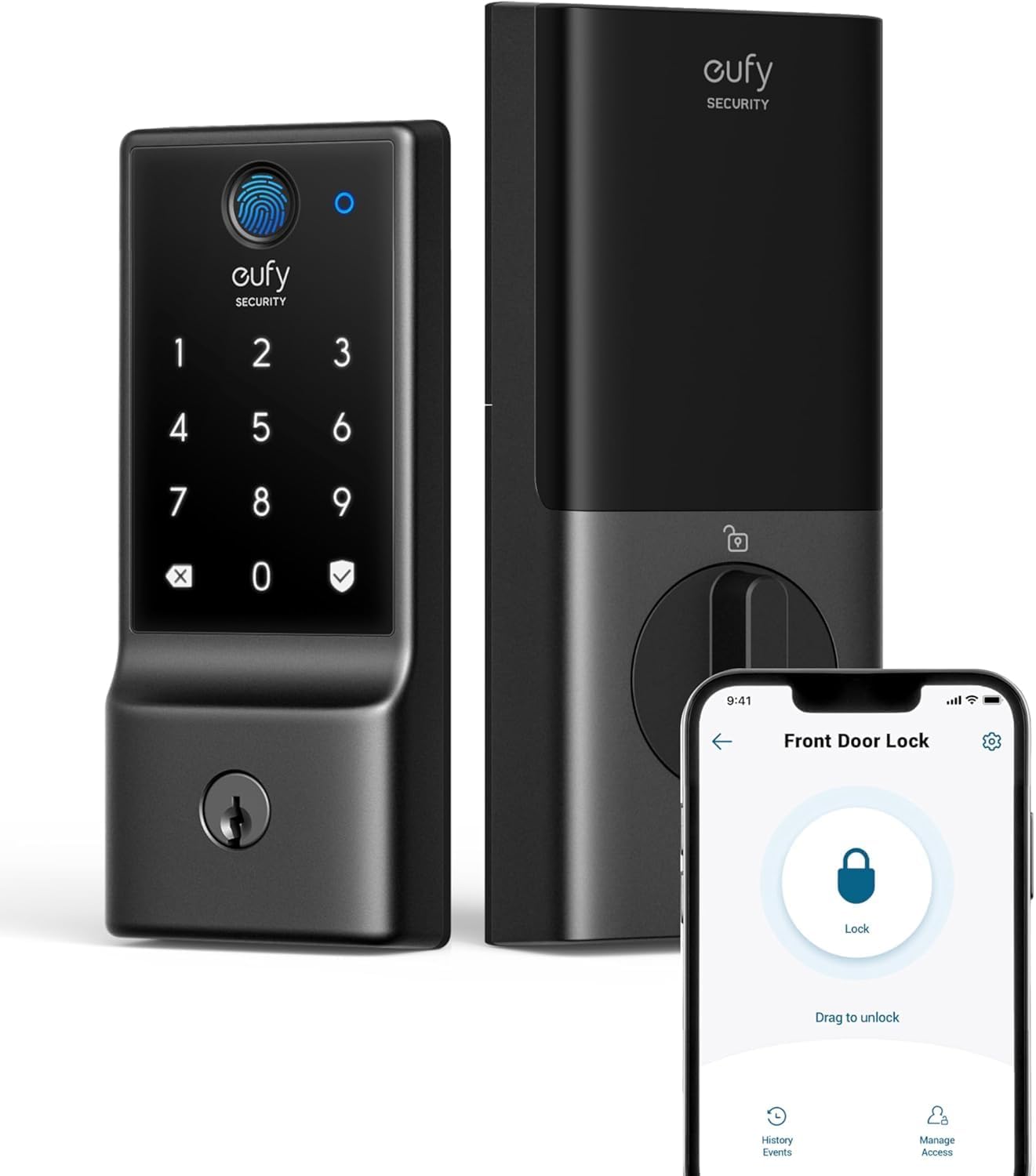
| Unlock methods | Fingerprint, App, Voice, PIN, Physical Key |
|---|---|
| Connectivity protocol | Wi‑Fi |
| Battery | 8×AA (included), ~8 months |
| Storage | Up to 50 fingerprints, 100 passcodes |
| Exterior rating | IP53 |
The eufy Security Smart Lock C220 is a front‑door deadbolt that combines fingerprint unlocking with built‑in Wi‑Fi, keypad, app control and physical key backup. It is typically installed in place of a standard deadbolt and managed from the eufy Security app to add remote locking, user codes and activity history; it also supports voice assistants for hands‑free use. Notable features include a self‑learning AI fingerprint reader for quick biometric entry, storage for up to 50 fingerprints and 100 passcodes, an Auto‑Lock function and real‑time notifications through Wi‑Fi without needing a separate bridge. Practical benefits include long battery runtime from the included eight AA batteries, BHMA Grade 3 durability testing, IP53 exterior protection and easy installation on most standard doors. Important limitations are lack of Apple HomeKit, Matter or IFTTT support and that it cannot be rekeyed, so integration with some smart home setups or existing keyed systems may be restricted.
Best for: Buyers who want a practical, reliable front‑door smart deadbolt that emphasizes easy app control, biometric convenience and long battery life without needing a separate Wi‑Fi bridge.
Less Ideal for: People who require HomeKit, Matter or broad smart‑home automation support or who need a lock that can be rekeyed to match existing keys should look elsewhere.
- Built‑in Wi‑Fi allows remote control and notifications without a separate bridge
- Multiple unlock methods including fingerprint, passcode, app, voice and physical key
- Stores up to 50 fingerprints and 100 passcodes for flexible user management
- Long battery life using eight AA batteries, with low‑battery alerts
- BHMA Grade 3 tested and IP53 rated for durable front‑door use
- Not compatible with Apple HomeKit, Matter or IFTTT
- Cannot be rekeyed to match existing keyed systems
Verdict: A straightforward front‑door smart deadbolt for buyers who want built‑in Wi‑Fi, fast fingerprint access and long battery life without adding a bridge.
TEEHO TE001 Keypad Deadbolt

| Access Codes | 20 |
|---|---|
| Waterproof level | IP54 |
| Lock Type | Combination Lock, Deadbolt, Keypad |
| Connectivity Protocol | No |
The TEEHO TE001 is a keypad deadbolt designed to replace a standard deadbolt so you can use PIN codes instead of keys. It supports up to 20 user codes plus a one‑time code for guests, has an anti‑peep feature that lets you add extra digits before or after the real code, and offers one‑touch lock and adjustable auto‑lock timing. The lock runs on four AA batteries with a low‑battery indicator and claims up to a year of battery life, and the metal housing is rated IP54 for rain resistance and operation across a wide temperature range. Installation is straightforward for standard 2‑1/8" bore holes and the unit includes two backup keys and mounting hardware. Limits for buyers include no Wi‑Fi or app control and an ANSI Grade 3 security rating rather than higher commercial grades, so it is best as a reliable, affordable upgrade for home entrances rather than a full smart home hub component.
Best for: Buyers who want an affordable, keyless front door lock that replaces a standard deadbolt and prioritizes simple PIN access and basic weather resistance over smart home integration.
Less Ideal for: People seeking remote app control, integration with smart home systems, or the highest commercial security grades should look at Wi‑Fi or higher‑grade smart locks instead.
- Offers 20 individual PIN codes and a one‑time code for guests
- Anti‑peep PIN lets users obscure the actual code by adding extra digits
- IP54 weather resistance suitable for exterior doors in most climates
- Long battery life on four AA cells with a low battery indicator
- Includes two mechanical backup keys and necessary installation hardware
- No Wi‑Fi, Bluetooth, or app connectivity for remote control or logging
- ANSI Grade 3 security is basic compared with higher security smart locks
Verdict: A budget-friendly keypad deadbolt that adds PIN access and weather resistance to a front door without any smart‑home complexity.
ULTRALOQ Bolt SE Smart Deadbolt

| Connectivity Protocol | Bluetooth, Matter, Wi-Fi |
|---|---|
| Lock Type | Biometric, Deadbolt, Keypad |
| Fingerprints Supported | Up to 50 fingerprints |
| Passcodes Supported | Up to 50 passcodes |
| Water Resistance | IP65 |
The ULTRALOQ Bolt SE is a feature-rich smart deadbolt built for everyday front-door security and remote access. It offers seven entry methods including an AI-driven fingerprint reader, up to 50 passcodes, app control with built-in Wi‑Fi, keypad, voice via major assistants, and two mechanical backup keys, so families and hosts can choose convenient access options. Matter-over-Thread support and 2.4 GHz Wi‑Fi let you control the lock remotely through familiar apps and smart home ecosystems, while Thread's low-power mesh helps extend battery life up to about 18 months on four AA cells. The lock is BHMA/ANSI certified, IP65 weather resistant, and made from zinc alloy for outdoor durability, and the vendor highlights a DIY installation that takes ten minutes with a screwdriver. Important limits to note are Matter features that require a compatible Thread border router and the lock's dependence on a nearby 2.4 GHz router for optimal Wi‑Fi range; also the package does not include the required AA batteries or a door sensor. For buyers prioritizing dependable, multi‑method entry and long battery life at the front door, this lock covers the essentials well.
Best for: Buyers who put reliability first and want a durable, standards‑certified front‑door lock that supports multiple dependable access methods and long battery life.
Less Ideal for: Users who lack a compatible Thread border router or who need hubless Matter functionality out of the box, or those who cannot provide a nearby 2.4 GHz Wi‑Fi connection.
- Multiple entry methods including fast AI fingerprint, keypad codes, app control, voice, and physical keys for flexible access.
- Built-in Wi‑Fi plus Matter-over-Thread support enables remote control and integration with Apple Home, Alexa, Google, and SmartThings.
- Thread-powered efficiency and low-power design claim up to 18 months battery life on four AA cells.
- ANSI/BHMA certification and IP65 weather resistance make it suitable for exterior doors and variable climates.
- Easy DIY installation with no drilling or wiring required and included installation kit and keys.
- Matter-over-Thread features require a compatible Thread border router to enable remote Matter functionality.
- Requires 2.4 GHz Wi‑Fi within range for best remote performance and batteries are not included.
Verdict: A hard‑working, standards‑certified smart deadbolt that prioritizes reliable multi‑method access and long battery life for front doors.
TEEHO TE002 Fingerprint Deadbolt

| Unlock methods | Fingerprint, Password, Keys |
|---|---|
| User capacity | Up to 20 fingerprints & 20 passcodes |
| Waterproof level | IP54 |
| ANSI level | Grade 3 |
| Power | 4 AA batteries (up to 365 days) |
The TEEHO TE002 is a battery-powered deadbolt that offers four ways to unlock: fingerprint, passcode, two physical keys, and one-time PINs for temporary access. It is typically mounted on a front door and used as a primary entry lock for families or rentals, with support for up to 20 fingerprints and 20 passcodes so multiple users can be set up without an app. Notable features include a fast AI-assisted fingerprint sensor that claims 0.3 second recognition and 1 second unlock, adjustable auto-lock timing, anti-peep passcode entry, an IP54 weather rating for exterior use, silent and away modes, and a low-battery indicator. In practice the lock simplifies daily entry for households that want keyless convenience while keeping backup mechanical keys available, and the one-time PINs are useful for visitors or service workers. Limitations are the lack of Wi-Fi or Bluetooth connectivity for remote control or history logs and reliance on 4 AA batteries for power, so you should expect to manage battery replacement and not expect app-based notifications or remote locking.
Best for: Buyers who value proven, on-device access options and straightforward installation for a front-door deadbolt and prefer locks with established user reviews rather than cloud-connected features.
Less Ideal for: People who want remote app control, integration with home automation, or detailed access logs should consider a Wi-Fi or Bluetooth enabled model instead.
- Multiple access methods: fingerprint, passcode, two mechanical keys, and one-time PINs
- Fast fingerprint unlocking with AI-assisted recognition for quick entry
- IP54 weather resistance and wide operating temperature range for exterior use
- Adjustable auto-lock timer and silent/away modes for flexible security
- Low-battery indicator and long stated battery life on four AA cells
- Nonconnected design means no remote access, app control, or activity logs
- Requires periodic battery replacement and offers no smart power backup
Verdict: A reliable, weather-resistant front-door deadbolt that prioritizes fast on-device fingerprint and passcode access without cloud connectivity.
Wyze Lock Bolt v2

| Connectivity Protocol | Wi-Fi |
|---|---|
| Lock Type | Biometric, Deadbolt, Keypad |
| Additional Features | Auto-Lock |
| Style Name | Fingerprint Smart Lock Bolt v2 |
The Wyze Lock Bolt v2 is a front-door deadbolt that emphasizes fast fingerprint access and remote control. It uses an AI-learning fingerprint scanner that opens in under a second and improves recognition over time, and also supports up to 50 stored fingerprints or keypad codes for family and guests. Built-in Wi‑Fi lets you lock and unlock from the Wyze app and integrate with Wyze doorbells and voice assistants, while auto-lock, tamper alarms and IP53 weather resistance add basic security and outdoor durability. Power comes from eight AA batteries with an advertised eight-month life and a USB‑C emergency power option, plus a physical backup key if electronics fail. For risk-averse buyers the combination of multiple entry methods, tamper alerts and a physical key is reassuring, though battery dependency means you must monitor power and allow a moment for app-based commands to reach the lock over Wi‑Fi. Installation and app setup are typical for smart locks and require following Wyze instructions for best performance.
Best for: Buyers who prioritize straightforward, reliable front-door security with modern access options and want a product that includes physical-key backup and tamper alerts for peace of mind.
Less Ideal for: People who want a maintenance-free mechanical lock with no batteries or those who need an ultra-heavy‑duty commercial deadbolt for high-traffic public entrances.
- Fast, AI-learning fingerprint scanner for quick unlocks
- Built-in Wi‑Fi for remote control and integration with Wyze ecosystem
- Multiple entry options: fingerprint, keypad codes, app, and physical key backup
- IP53 weather resistance and tamper alarm for added security and durability
- Runs on AA batteries so you must monitor and replace power periodically
- App-based actions depend on Wi‑Fi which can introduce delays compared with direct mechanical unlocks
Verdict: Choose the Wyze Lock Bolt v2 if you want a front-door smart deadbolt that combines fast, self-learning fingerprint access with Wi‑Fi remote control and a physical key backup for added reassurance.
Choosing the Right Smart Lock for Front Doors: Key Factors to Consider
Lock Type and Mechanical Fit
Front doors vary in deadbolt size and backset. Choosing a smart lock that matches your existing deadbolt type reduces the need for carpentry and keeps installation straightforward. Some smart locks replace only the interior thumbturn while leaving the exterior hardware intact. Others replace the entire deadbolt; that can be fine but requires ensuring the new unit fits your door thickness and bolt spacing.
A correct mechanical fit matters because misaligned bolts or improper backset can cause the lock to bind, wear prematurely, or fail to secure the door properly. Measuring your existing deadbolt and checking the new lock's compatibility specifications prevents surprises at installation and ensures the lock will operate smoothly for years.
Security Features and Certification
Security measures include the physical strength of the deadbolt, anti-tamper sensors, and the cryptographic protocols used for wireless control. Look for locks that support strong encryption for Bluetooth or wireless communications and that implement protections against replay or brute-force attacks. Built-in tamper detection, forced-entry alerts, and automatic relocking after a failed access attempt add meaningful layers of protection.
Consider whether the lock supports local authentication methods as a fallback in case cloud services are unavailable. Locks that provide a physical-key override or local PIN entry ensure you will not be locked out if batteries die or network issues occur. Certification or third-party testing for residential security standards is an added reassurance, though not the only indicator of a secure product.
Connectivity and Smart Home Integration
Connectivity choices affect how you control the lock and whether you can grant remote access. Bluetooth-only locks are often simpler to install and more private but require proximity for mobile unlocking. Locks that offer optional Wi-Fi via a bridge or hub let you operate the lock remotely and integrate with automation routines, voice assistants, or security systems.
Decide which integrations you need. If remote guest access, activity logs, or automations triggered by arrival are important, choose a lock that supports those services without forcing complex networking setups. Also evaluate whether the lock supports local control and firmware updates over LAN to reduce dependence on internet-based services.
Power, Battery Life, and Emergency Options
Battery performance directly affects reliability. Frequent battery changes are an annoyance and a security risk if the lock stops responding unexpectedly. Look for locks rated for long run times on standard batteries and that provide clear low-battery warnings through the lock itself and via the companion app.
Also examine emergency power options and fail-safes. Some locks include an external contact point for a temporary power supply, while others retain a physical key or PIN-based entry that works without power. Knowing the expected battery life, the type of batteries required, and the lock's behavior as power declines helps you plan maintenance and avoid lockouts.
Access Controls and User Management
How you share access is a major practical consideration for front-door smart locks. Good systems let you create permanent users, temporary codes, one-time passes, and scheduled access windows for cleaners or delivery personnel. The granularity of those permissions and how easy they are to manage in the app affects daily convenience and household security.
Also consider audit capability. Activity logs that record who unlocked the door and when are useful for troubleshooting and for checking arrivals. Look for locks that present clear permission controls, easy revocation of credentials, and straightforward guest setup workflows to reduce friction when multiple people need access.
Durability and Weather Resistance
Front-door hardware is exposed to temperature swings, moisture, and direct sunlight in some climates. Choose locks rated for outdoor use with appropriate IP ratings or manufacturer guidance for weather exposure. Corrosion-resistant finishes and robust internal mechanisms reduce the risk of failure over time.
Also consider how the lock handles extreme temperatures. Batteries perform differently in hot or cold conditions, so a lock designed to maintain reliable operation across a wide temperature range is preferable for many front-door installations.
Installing a Smart Lock on a Front Door
Most front-door smart locks are designed to install using standard tools and to replace the interior portion of an existing deadbolt. Before you start, measure door thickness, backset distance, and the borehole size to confirm compatibility. Remove the interior trim and follow manufacturer torque recommendations to avoid over-tightening.
During installation, test the bolt movement manually before reattaching the exterior hardware. Ensure the strike plate is aligned so the bolt enters smoothly. After mechanical installation, complete the electronic setup by pairing with the companion app and configuring basic user credentials.
- Measure backset and door thickness before buying
- Keep original exterior hardware if you only replace the interior unit
- Test manual bolt movement to prevent binding
- Set up at least one backup access method during initial configuration
Managing Access for Guests and Service Providers
Use scheduled codes or temporary access tokens to give time-limited entry without sharing permanent credentials. Many apps let you create one-time PINs or codes that expire after use or at a preset time. This reduces the need to hand out keys and lets you track who used the door.
For frequent visitors, create named accounts or reusable codes with limited permissions. Be mindful of notification settings so you receive alerts for important unlock events but avoid constant minor notifications.
- Create temporary codes for deliveries and cleaners
- Use scheduling to allow access only during predefined hours
- Enable activity notifications for unfamiliar access events
Troubleshooting Common Smart Lock Issues
Typical problems include misalignment causing jams, intermittent Bluetooth connections, and drained batteries. Start with a mechanical check to confirm the bolt moves freely and the strike plate is properly positioned. If wireless connectivity is inconsistent, reload the lock's firmware and verify the controller or bridge is within range.
For battery-related failures, replace with fresh, recommended battery types and confirm contacts are clean. Keep a physical key or a known working PIN as an emergency option while you diagnose recurring issues.
- Realign strike plate if the bolt scrapes
- Re-pair the lock if Bluetooth drops frequently
- Check firmware status and update when available
- Confirm battery orientation and contacts for consistent power
Privacy and Data Considerations
Smart locks collect usage logs and often connect to cloud services. Review the lock's privacy policy to understand what data is stored, how long logs are retained, and whether user data is shared with third parties. Prefer systems that provide explicit controls for data retention.
If local-only operation is important for privacy, choose a lock that supports local authentication and avoids mandatory cloud dependency. When connecting to third-party platforms, use unique account passwords and enable two-factor authentication where available.
- Check log retention and data-sharing policies
- Prefer local control if you want minimal cloud dependency
- Use unique passwords and two-factor authentication for accounts
Preparing Your Door for a Smart Lock Upgrade
Inspect the door edge and frame for wear, rot, or loose hardware before installing a smart lock. Reinforcing the strike plate with longer screws or a metal strike box can significantly improve resistance to forced entry. Ensure hinges are secure and the door sits square in the frame to prevent binding.
If your door has decorative hardware that interferes with the deadbolt, consider whether the new lock will clear the trim or if minor adjustments are necessary. A little preparatory work will help the smart lock operate reliably and extend its service life.
- Reinforce strike plate with at least 3-inch screws
- Ensure door sits square and hinges are tight
- Clear decorative trim that might block the bolt
How We Chose the Best Smart Lock for Front Doors
We shortlisted smart locks based on criteria that matter for everyday front-door use and long-term ownership. We prioritized installation simplicity because most front doors require only a screwdriver and basic alignment to replace an existing deadbolt. Security features were a top filter: we looked for robust encryption, tamper detection or alarm capability, and secure local fallback options such as physical keys or trusted PINs. Battery life and power management were included because a lock that dies quickly becomes a major inconvenience. Connectivity options were assessed to match different household tech setups, including reliable Bluetooth and optional hub-based remote access. Usability and mobile app design were evaluated for clear permissions, shared access controls, and simple firmware updates. We excluded units that rely solely on obscure vendor cloud services with no local access fallback or that require invasive door modification. Overall, the list favors locks that combine proven lock mechanics with sensible smart features and clear owner controls.
Our full evaluation process is outlined in our review methodology.
FAQ
Can a smart lock for front doors be installed without replacing the exterior hardware?
Often yes. Many smart locks replace only the interior thumbturn and leave the exterior key cylinder and faceplate in place. Check the compatibility specifications to confirm your particular deadbolt design supports a partial replacement.
What happens if the smart lock batteries die while I am away?
Good smart locks include low-battery alerts well before failure and offer emergency options such as a physical key override or an external power contact for temporary power. Planning battery maintenance and registering a backup access method prevents lockouts.
Do smart locks require a hub to work with home automation?
It depends. Some locks provide Bluetooth-only operation for local control, while others offer optional hub or bridge accessories to enable Wi-Fi or integration with automation platforms. Choose based on whether you need remote access or advanced automations.
Are smart locks secure against hacking?
Security varies by implementation. Locks that use strong encryption, frequent firmware updates, and local authentication options reduce risk. It is also important to follow good account hygiene, such as strong unique passwords and enabling two-factor authentication when supported.
Will extreme weather affect smart lock performance?
Weather can affect battery life and mechanical operation. Look for locks rated for outdoor use and designed to operate across a wide temperature range. Proper door sealing and weatherstripping also help maintain reliable performance.
Final Verdict
When choosing a smart lock for front doors, prioritize mechanical fit and security features first, then match connectivity and access controls to how you use the door. Expect tradeoffs between simplicity and remote capability: Bluetooth-only options are private and easy to install while hub-enabled locks offer remote access and integrations. Plan for battery maintenance and keep a reliable fallback method to avoid lockouts. Focus on locks that offer clear permission management, solid tamper protection, and straightforward installation to achieve secure, dependable keyless access.