
Note: This article contains affiliate links. If you click on these links and make a purchase, we may earn a small commission at no extra cost to you. This helps support our research and content. Read our full affiliate disclosure here.
If you are just getting started with direct-to-film printing, choosing the right DTF printer matters more than you might think. The wrong machine can add a steep learning curve, increase consumable waste, or produce inconsistent transfers that frustrate new users. This guide focuses on entry-level DTF printers built for newcomers, highlighting models that prioritize straightforward setup, predictable color output, and manageable maintenance. Below you will find our top shortlisted picks for beginners along with the evaluation criteria we used to narrow the field. Use this guide to compare key features like user-friendly workflows, print reliability, and ongoing operating costs before you buy.
Top Picks at a Glance
| Best Overall The best all-around choice for most situations | MZK A3 Pro F1080 DTF Printer |  |
| Best Quality Built to a higher standard if you want something more solid | PLK A3 UV DTF Printer H300-X |  |
| Best Value The sweet spot between price and what you get | PUNEHOD R1390 DTF Printer |  |
| Best Budget The cheapest option that still gets the job done reliably | HIXSOP A4 L805 DTF Printer |  |
| Top Rated A top-rated pick with lots of positive feedback | Lancelot M1630 Pro DTF Printer |  |
| Most Popular A crowd favorite that many people choose with confidence | WJTZXY A3+ XP600 DTF Printer |  |
MZK A3 Pro F1080 DTF Printer

| Maximum print Resolution Color | 2880×1440 dpi |
|---|---|
| Printer Type | self-cleaning Inkjet |
| Maximum Media Size | 13 x 41 inches |
| Printer Connectivity Type | USB |
| Ink Color | cyan, magenta, yellow, black, white |
The MZK A3 Pro F1080 is a dedicated direct-to-film (DTF) printer built for makers and small apparel shops that need reliable, high-resolution transfers. It uses an upgraded F1080 printhead and a circulating white-ink system to reduce nozzle clogging, and the timed automatic cleaning and one-click ink extraction simplify maintenance for occasional users. The smart 5" touchscreen and a higher-performance motherboard make routine tasks like nozzle checks, ink fills, and layout adjustments possible without constant PC interaction, and the included 100m film roll, starter inks, powder, and moisturizing solution mean you can print right away. Image quality benefits from a max 2880×1440 dpi resolution and ICC-calibrated profiles, and the negative-pressure suction plus preheating keep film flat for consistent prints. Expect decent throughput for hobby or light production—the listing cites roughly one A3 film every 4 minutes—but note connectivity is USB-only and macOS is not supported, so workflow depends on a Windows PC. For beginners the built-in maintenance features and bundled consumables lower the setup friction, though larger shops may need faster, wider machines and more robust interface options.
Best for: A beginner or small apparel entrepreneur who wants a ready-to-run DTF setup with built-in anti-clog maintenance and bundled consumables to shorten the learning curve and start printing quickly.
Less Ideal for: High-volume production shops or users who require networked printing or native macOS support should consider more industrial or network-capable alternatives.
- 3-in-1 white ink circulation system to reduce clogging and stabilize prints
- Timed automatic cleaning and one-click ink extraction simplify maintenance
- High maximum resolution (2880×1440 dpi) for detailed transfers
- Includes starter kit: inks, 100m film roll, powder, and maintenance supplies
- Onboard 5" touchscreen and upgraded motherboard for stand-alone operation
- USB-only connectivity limits networked or macOS workflows
- Not the fastest option for high-volume production despite improved speed
Verdict: An easy-to-start A3 DTF printer that pairs high-resolution output with automatic anti-clog maintenance and bundled supplies, making it a strong pick for beginners and small apparel businesses.
PLK A3 UV DTF Printer H300-X

| Printer Type | UV DTF |
|---|---|
| Maximum Media Size | 13 x 19 inches |
| Resolution | 2880 x 1440 |
| Ink Color | Cyan, Magenta, Yellow, Black, White, Varnish |
| Printer Connectivity Type | USB |
The PLK A3 UV DTF Printer H300-X is an all-in-one A3 UV direct-to-film system aimed at producing ready-to-apply transfers without a separate laminator or powder workflow. It uses dual XP600 print heads and supports up to 2880 x 1440 dpi with selectable pass modes for detailed, saturated prints, and an integrated vacuum flatbed to keep substrates aligned. Notable practical features include an automatic white-ink mixing and circulation system to reduce nozzle clogging, an integrated laminating function so prints come out finished, and USB connectivity with bundled software and maintenance tools to get started. Because it uses UV curing rather than powder and ovens, setup and cleanup are cleaner and faster, which helps newcomers get usable transfers sooner. The unit is large and built for tabletop or small shop use, and its print speed is modest, so throughput is best for small batches or high-quality single jobs rather than heavy production runs. Expect to learn some maintenance steps for the print heads and to source compatible consumables for long-term reliability.
Best for: Beginners focused on print quality who want a single machine to produce high-resolution A3 transfers with a cleaner UV curing workflow and are willing to learn basic maintenance.
Less Ideal for: Users who need high-volume, high-speed production or a compact portable solution should consider dedicated production printers or smaller desktop models instead.
- All-in-one print and laminate workflow removes need for separate laminator
- Dual XP600 heads and up to 2880 x 1440 dpi deliver high-resolution, color-rich prints
- Automatic white ink mixing and circulation reduces clogging and stabilizes white output
- Built-in vacuum flatbed holds A3 workpieces steady for accurate, repeatable prints
- Includes inks, films, software and basic maintenance tools to start printing
- Relatively slow listed page speed, making it better suited to small batches than high-volume production
- Heavy and bulky footprint requires dedicated workspace and handling
Verdict: If you are a beginner who prioritizes professional-looking A3 transfers and a cleaner UV curing workflow, this all-in-one PLK unit gets you printing finished transfers without a separate laminator.
PUNEHOD R1390 DTF Printer

| Maximum Media Size | A3 (13 inches) |
|---|---|
| Print Resolution | 1440 x 1440 DPI |
| Ink Type | Punehod Pigment Ink (CMYK+WW) |
| Ink Supply Mode | CISS (continuous ink supply system) |
| Power Consumption | 60 watts |
The PUNEHOD R1390 is an A3 DTF printer package aimed at small shops and hobbyists getting started with garment transfers. It prints up to 13 inches wide using a CMYK+WW ink set and uses a continuous ink supply system (CISS) with a white ink circulation, stirring and automatic cleaning routine to reduce clogging. The bundle includes a detachable roll feeder that handles long PET film rolls, a cut device, RIP software, and an A3 oven plus starter consumables so you can print and cure transfers right away. Resolution and print quality are strong on paper specs, and Windows drivers make it usable from typical laptops. Expect routine maintenance for printhead care and some setup and calibration time when learning RIP workflows and transfer pressing. The unit is relatively heavy and sized for a dedicated workspace, and connectivity is USB-centric with manual duplex only, so it is best where a local workstation is available. For beginners who want an all-in-one DTF starter kit that emphasizes reliability of white ink handling, this covers the key bases.
Best for: Buyers who want a practical, ready-to-run DTF starter system for producing custom apparel transfers at small scale and value a turnkey bundle with white ink reliability and included oven.
Less Ideal for: Large production shops that need high-throughput, networked press lines or users who require lightweight, portable equipment for pop-up events.
- Includes oven, 100m PET film roll, inks, powder and RIP software for an out-of-box start
- White ink circulation, stirring and automatic cleaning reduce clogging risk with pigment white ink
- Detachable roll feeder and cutting device let you run long PET rolls and improve workflow
- A3 (13-inch) max print width supports printing on standard transfer sizes for T-shirts and small apparel
- Windows-compatible drivers and USB connectivity keep setup straightforward with a single workstation
- Large and heavy so it needs a dedicated table or bench and is not portable
- USB-focused connectivity and manual duplex limit flexible networked workflows
Verdict: A complete A3 DTF starter bundle that prioritizes white ink circulation and includes the oven and consumables needed for beginners to start producing transfers quickly.
HIXSOP A4 L805 DTF Printer

| Printer Type | Direct To Film |
|---|---|
| Maximum Media Size | A4 |
| Maximum print Resolution Color | 1440 x 1400 dpi |
| Printer Connectivity Type | USB |
| Color Pages per Minute | 5 pages_per_minute |
The HIXSOP A4 L805 is a small-format DTF printer built for beginners and small runs, combining an A4 roll feeder, integrated cutter, and a white ink circulation system to reduce clogging. You load back-print film or rolled media, send designs from a Windows PC over USB, and the machine prints color plus white for transfers that are finished with a separate oven or heat press. The included white-ink circulation and filtration aim to keep pigment suspended and protect the printhead, which is useful for intermittent use common among hobbyists. At 1440 x 1400 dpi and a six-color workflow it can produce vibrant detail for tees and hoodies, though color speed is modest and setup requires learning about film handling and curing. USB-only connectivity and a modest 5 ppm color speed mean it is best for low-volume projects rather than continuous production. Some buyers report a learning curve with maintenance and calibration, so expect some hands-on tuning when you start printing.
Best for: Beginners and small-batch makers who want a compact, lower-cost DTF entry point for printing tees and fabric transfers and who are willing to learn basic maintenance to keep prints consistent.
Less Ideal for: Users who need networked connectivity, high-speed production, or large-format/A3 printing for regular commercial output should consider more robust, higher-capacity equipment.
- Integrated roll feeder and automatic cutter reduce film waste and simplify handling for single-operator workflows.
- White ink circulation with stirring and filtration helps prevent sedimentation and lowers the risk of white-ink clogs.
- High-resolution output (up to 1440 x 1400 dpi) yields detailed, vibrant transfers suitable for apparel graphics.
- Includes starter workflow features and software compatibility with Windows for easier setup by beginners.
- USB-only connectivity limits workflow flexibility compared with networked printers.
- Designed for A4 media and low-volume use, so throughput is limited for larger or high-volume jobs.
Verdict: A compact, beginner-friendly DTF printer that delivers high-resolution transfers with built-in white ink circulation, making it a sensible low-cost starting point for hobbyists and small-batch creators.
Lancelot M1630 Pro DTF Printer

| Print resolution | 720 x 1440 dpi |
|---|---|
| Ink colors | Cyan, Magenta, Yellow, Black, White |
| Paper size | 13*19 inches |
| Printer connectivity type | USB |
| Color pages per minute | 12 pages_per_minute |
The Lancelot M1630 Pro is a DTF inkjet printer bundle aimed at small studios and beginners who want to print durable transfers for apparel and fabric projects. It prints color and white ink at up to 720×1440 dpi and offers dual modes for sheets or roll film, plus an auto film cutter to speed finishing. The bundle includes a preloaded laptop and consumables to simplify setup, while features such as white ink circulation, waste-ink monitoring, and a Holiday Mode auto-maintenance routine reduce nozzle clogging and downtime. Practical benefits include faster throughput compared with older hobby models, simplified feed handling to avoid frequent jams, and real-time alerts for low ink or waste levels. Limitations to note are USB-only connectivity and simplex printing only, so networked workflows or automatic double-sided jobs are not supported, and the unit is sizeable and requires appropriate workspace and ventilation. It also recommends using the brand's inks and films for best results, which narrows consumable choices for long-term operation.
Best for: Beginners and small DIY apparel shops who prioritize reliable uptime and low maintenance overhead while learning DTF workflows and producing small runs.
Less Ideal for: Users who need networked printing, high-volume industrial throughput, or automatic duplexing should look at larger production-class machines instead.
- Auto-maintenance Holiday Mode that runs periodic cleaning to prevent printhead clogs
- Supports A3/A4 sheets and roll film with an auto film cutter for faster finishing
- White ink circulation and ink-monitoring alerts to extend printhead life and reduce waste
- Includes preloaded laptop and starter consumables for easier out-of-box setup
- Connectivity limited to USB rather than wired or Wi‑Fi networking
- Simplex-only printing so no automatic duplex capability
Verdict: If you want a beginner-friendly DTF bundle built to minimize clogs and downtime, the Lancelot M1630 Pro delivers dependable, low-maintenance operation for small apparel shops and hobbyists.
WJTZXY A3+ XP600 DTF Printer
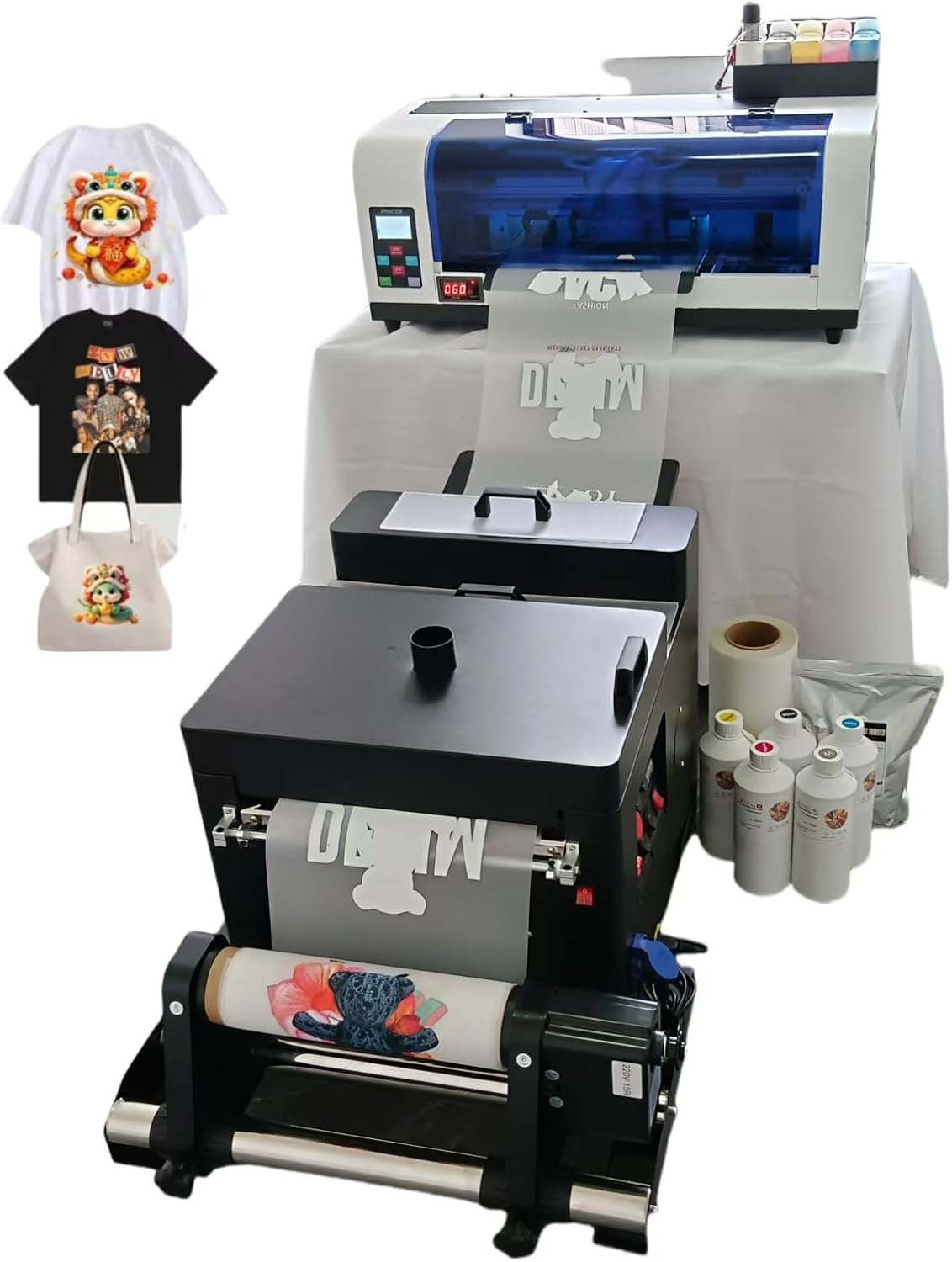
| Printhead | F1080 (XP600) |
|---|---|
| Max printing width | 13 inches |
| Colors | K C M Y WH WH |
| Power | 50W |
| Software | RIIN (Hosonsoft) |
This WJTZXY A3+ XP600 DTF printer arrives as a ready-to-run kit with a single XP600 (F1080) printhead, Hoson/Riin software, five 500 ml inks (K C M Y WH), a shaking dryer with auto feed, a 1 kg hot melt powder, and a roll of double-sided film. It is designed for fabric and garment printing workflows and aims at faster throughput than L1800-style desktop DTF setups by using the XP600 head and a white-ink circulation system that stirs, filters, and loops white ink to reduce clogging. Typical use is roll-fed film printing with the included dryer to fix powder and prepare transfers for heat-pressing; the kit's software supports common image formats and Windows platforms. Practical benefits include the integrated dryer, factory-supplied consumables to start printing right away, and a built-in white circulation system that helps reliability for white ink jobs. Limitations to consider are the USB-only connectivity, basic control options aimed at Windows PCs, and the industrial weight and footprint that makes it more of a small shop machine than a hobby desktop unit.
Best for: Beginners who want a complete, shop-capable DTF starter kit with supplied consumables and a focus on reliable white-ink handling and faster throughput.
Less Ideal for: Users who need compact desktop printers for occasional hobby use or those who require networked or macOS-native workflows.
- Includes printer plus dryer, inks, film, and powder for immediate startup
- Uses Epson F1080/XP600 printhead for faster print speed than many L1800-based DTF setups
- White ink circulation system with stirring and filtration to reduce clogging
- Supports up to 13-inch print width for A3+ transfers
- USB-only connectivity limits workflow flexibility and networked operation
- Designed as a shop-level machine with heavier weight and larger footprint than hobby printers
Verdict: A complete A3+ DTF starter kit that helps beginners get into reliable, faster white-ink transfer printing right away.
Choosing the Right DTF Printer for Beginners: Key Factors to Consider
Print Quality and Color Consistency
Print quality determines how well designs transfer to fabric and how true colors appear after curing. For beginners, consistent droplet formation and predictable color profiles reduce trial-and-error. A machine that produces sharp edges and smooth gradients reduces the need for complex post-processing or repeated prints.
Color consistency across prints matters when you run small production runs or multiple items for a single order. Machines that offer simple profiling options or stable default profiles help newcomers match expectations without advanced color management knowledge.
Ease of Setup and First Print
How quickly you can install the driver, load ink, align the film, and complete a first test print dramatically affects your learning curve. Clear step-by-step setup, accessible online documentation, and intuitive control panels let you reach competent operation faster.
Look for printers that include guided alignment tools, preconfigured media profiles, and bundled starter consumables sized for multiple test runs. These features minimize the time spent troubleshooting basic problems and shorten the path to repeatable results.
Maintenance Requirements and Accessibility
Routine maintenance affects long-term uptime. For beginners, simple daily and weekly tasks are preferable to machines that demand frequent deep cleaning. Consider how easy it is to access printheads, perform nozzle checks, and replace dampers or ink lines.
Also evaluate whether common maintenance parts are user-replaceable without specialized tools. Systems that clearly document maintenance steps and provide visual cues for service tasks reduce the risk of damage from incorrect procedures.
Software, Drivers, and Workflow Integration
Printing workflow covers RIP software, driver stability, and how the printer handles white underbase generation, halftoning, and color separation for transfers. For beginners, bundled or low-cost RIP solutions with preset profiles are helpful because they reduce initial complexity.
Software that supports previewing white underbase and simulates final output helps prevent wasted film and ink. Stable drivers and straightforward file import options improve day-to-day productivity and reduce time spent troubleshooting file-related problems.
Consumables Availability and Ongoing Cost
Consumables include inks, films, powders, and cleaning supplies. Easy access to commonly used inks and films lowers operating risk and helps control costs. Beginners should consider how frequently supplies must be reordered and how much typical runs consume.
Some printers use proprietary consumables that can be more expensive or harder to source. Machines compatible with standard, widely available films and inks simplify sourcing and often reduce per-print costs as you scale.
Size, Workspace Needs, and Heat/Curing Options
Physical footprint and ventilation needs are practical factors often overlooked by new users. DTF systems can vary from compact desktop units to larger floor-standing machines. Ensure your workspace accommodates the printer plus film drying and curing equipment.
Curing solutions influence throughput and final transfer durability. Consider the space and power needs for an oven or heat press that matches the printer's output rate. A workflow that keeps drying and curing close to the printer minimizes handling and speeds production.
Starter Workflows That Minimize Waste
For beginners, a workflow that reduces wasted film and ink speeds learning and protects your budget. Start with small test prints to fine-tune density and underbase settings before committing to larger runs.
Use printable guides and standardized test files to check registration and color density. Holding a consistent test regimen helps isolate whether a problem is media, ink, or printer setup related.
- Begin with single-color tests, then move to multi-color gradients
- Log every adjustment so you can revert settings that worked
- Keep a small inventory of test films and ink sets to avoid interruptions
Simple Maintenance Routines for New Owners
Adopt a daily brief check and a weekly deeper routine. Daily checks might include a quick nozzle test and a wipe of exposed surfaces. Weekly tasks can include timed flushing of ink lines and checking dampers or filters.
Document maintenance actions and intervals so you build a predictable service rhythm. Regular maintenance prevents nozzle clogs and keeps color output consistent across runs.
- Perform nozzle checks at the start of each production day
- Use manufacturer-recommended cleaning solution and avoid harsh chemicals
- Schedule deeper cleaning when you change ink types or colors
Choosing the Right RIP and Presets
A RIP that provides ready-made profiles for common films and clear white-underbase controls simplifies early printing. Look for software that can generate previews and simulate final transfers on common garment colors.
If the included RIP is limited, consider affordable third-party options that focus on ease of use rather than exhaustive professional features. Being able to import layered artwork and control white opacity is more important than advanced curve editing when you are starting out.
- Prioritize RIPs with white underbase preview
- Choose presets for common film types to avoid custom profiling initially
- Ensure the RIP supports common file formats used by designers
Workspace Setup and Curing Considerations
Plan for a contiguous workflow from printing to powdering, drying, and curing. Fans, drying racks, or inline ovens can be used depending on throughput and space. A neat, organized area reduces handling mistakes that cause misalignment or contamination.
Curing affects transfer adhesion and washability. For beginners, using a heat press with clear temperature and dwell-time controls is often the most controllable option. Verify that your chosen curing method matches the film and powder specifications for consistent results.
- Provide adequate ventilation for drying and curing
- Keep curing equipment calibrated and document temperatures
- Allow space for film to hang or rest after powdering to avoid smudging
Scaling From Hobby to Small Production
As confidence grows, you may want to increase batch sizes. Anticipate changes in consumable usage, maintenance frequency, and curing throughput when scaling. Small production requires a slightly more disciplined approach to inventory and scheduling.
Consider adding drying or curing capacity before increasing print volume so that production bottlenecks do not form. Automation is possible, but prioritize reliability over speed when moving beyond purely hobby work.
- Track ink and film usage per job to forecast supply needs
- Increase cleaning frequency as print volume rises
- Test washability and durability on representative garments before larger runs
How We Chose the Best DTF Printer for Beginners
We shortlisted machines that make the first months of DTF printing less frustrating for new users. Key filters included straightforward setup procedures, clear user interfaces, and accessible documentation so a beginner can go from unboxing to first transfer without guessing at core steps. We prioritized printers that support stable color output and consistent droplet formation because early experience depends heavily on reliable prints rather than marginal gains in speed. Maintenance burden was another explicit filter. We favored printers with simple cleaning routines, easy-to-replace consumables, and clear matching of inks and films to reduce downtime. Compatibility with commonly available inks and transfer films was considered, but models requiring obscure or high-maintenance chemistries were excluded. We also evaluated serviceability and parts availability as a proxy for long-term ownership risk. Performance dimensions that mattered in selection include print quality and color consistency, ease of setup and day-to-day operation, software and driver stability, and total cost of consumables and routine maintenance. We excluded units that demand advanced tuning or professional-level calibration for acceptable results. The picks reflect a balance between approachable user experience and the technical features needed to make crisp, durable transfers.
Our full evaluation process is outlined in our review methodology.
FAQ
Do I need special training to use a DTF printer as a beginner?
Specialized training is not strictly necessary, but reading the manual and following step-by-step setup guides will save time. Many users learn by running controlled tests and following maintenance checklists. Short online tutorials and community guides can also accelerate the learning curve.
How long does it take to produce a usable transfer from start to finish?
Timing depends on printer speed, drying method, and curing approach. A single small transfer can often be printed, powdered, and partially dried within 20 to 40 minutes, with final curing requiring additional press time. Expect longer total times when you are testing settings.
What consumables should I plan to buy regularly?
Plan on purchasing inks, transfer films, adhesive powder, and cleaning supplies on a recurring basis. The rate of consumption depends on how many transfers you produce and the coverage of each design. Keeping spare basic parts and cleaning materials reduces downtime.
Can I use standard heat presses for curing DTF transfers?
Yes. A heat press with reliable temperature and pressure control is the most common curing method for DTF transfers. Ensure the press can hold the target temperature consistently and follow the film and powder manufacturer's recommended settings for best results.
How do I troubleshoot common white-underbase issues?
Start by running a nozzle check and verifying white ink density settings in the RIP. White underbase problems often stem from clogged nozzles, incorrect underbase opacity, or incompatible film. Performing a controlled print and adjusting white opacity incrementally helps isolate the cause.
Final Verdict
For beginners, prioritize machines and workflows that reduce variables during initial learning. Focus on printers with simple setup, stable color output, and clear maintenance guidance so you can produce reliable transfers without becoming an expert technician. Balance consumable availability and software simplicity against any extra features you do not need right away. Start small, establish consistent testing and maintenance routines, and scale capacity only after you have a repeatable process. That approach will make the transition from hobby projects to small production predictable and sustainable.