
Note: This article contains affiliate links. If you click on these links and make a purchase, we may earn a small commission at no extra cost to you. This helps support our research and content. Read our full affiliate disclosure here.
If you want to print multi-material parts, soluble supports, or two-color prototypes without spending a fortune, a dual-extruder 3D printer is a practical next step. Choosing the right dual-extruder 3D printer under $1,000 matters because these machines vary in reliability, filament handling, and the amount of tuning they need to deliver usable parts for production or prototyping. This guide shortlists the top options that balance print quality, filament compatibility, and day-to-day usability. We evaluated machines for print results, setup and maintenance, and features that matter when running two filaments. Read on for the key tradeoffs and what matters for your workflow before the product list.
Top Picks at a Glance
| Best Overall The best all-around choice for most situations | OLAPRIN T300D Pro |  |
| Best Quality Built to a higher standard if you want something more solid | FLASHFORGE AD5X 4-Color 3D Printer |  |
| Best Value The sweet spot between price and what you get | LNL3D Vulcan Dual Extruder 3D Printer |  |
| Best Budget The cheapest option that still gets the job done reliably | Anycubic Kobra X |  |
| Top Rated A top-rated pick with lots of positive feedback | Creality K2 Pro Combo |  |
| Most Popular A crowd favorite that many people choose with confidence | FLASHFORGE AD5X 3D Printer | 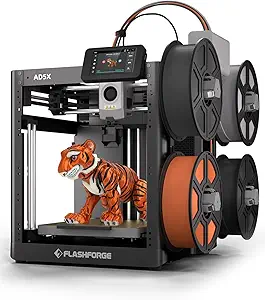 |
| Best Seller A high-volume bestseller chosen again and again | Anycubic Kobra S1 Combo |  |
OLAPRIN T300D Pro

| Compatible filament diameter | 1.75 mm |
|---|---|
| Filament types supported | PLA, PETG, ABS, TPU |
| Frame material | All-metal |
| Item model number | T300D Pro |
The OLAPRIN T300D Pro is a dual-extruder desktop 3D printer built to produce two-color and multi-material parts without post-painting. It uses two independent spool holders feeding a single or dual nozzle setup to mix colors and print complex multicolor models, while an all-metal frame and dual Z-axis aim to keep layers consistent at higher speeds. The unit arrives mostly preassembled and includes an intuitive color screen and manual bed-leveling knobs, which makes first prints easier for hobbyists and makers upgrading from single-extruder machines. It supports common 1.75 mm filaments such as PLA, PETG, ABS, and TPU, and the advertised dual-drive extrusion and optimized hotend help reduce jams and stringing in routine use. Expect straightforward setup and capable multicolor output, but keep in mind that multicolor prints still require tuning and that advanced features like automatic mesh bed leveling or proven brand ecosystem support are not highlighted. For ensemble projects and colorful prototypes this printer balances speed, stability, and accessible controls for everyday use.
Best for: Buyers who want an affordable, capable dual-extruder printer for colorful prototypes and hobby projects and who value a balance of speed, stability, and ease of setup.
Less Ideal for: Users who need factory-grade automatic leveling, extensive ecosystem support, or turnkey industrial reliability for production runs should consider more premium alternatives.
- Independent dual spool holders for two-color or multi-material prints
- Sturdy all-metal frame and dual Z-axis for improved stability at higher speeds
- Supports common 1.75 mm filaments including PLA, PETG, ABS, and TPU
- Mostly preassembled with a full-color display and simple bed leveling for faster first prints
- No explicit automatic bed leveling or advanced sensors mentioned
- Higher-speed claims may require user tuning to achieve reliable quality
Verdict: The T300D Pro is a budget-friendly dual-extruder option that delivers accessible multicolor printing with solid stability for makers wanting more capability than a single-extruder desktop printer.
FLASHFORGE AD5X 4-Color 3D Printer

| Travel speed | 600mm/s |
|---|---|
| Acceleration | 20m/s² |
| Extruder max temp | 300℃ Direct Drive |
| Nozzle options | 0.4mm (optional 0.25/0.6/0.8) |
| Bed surface | 110℃ Dual-Texture PEI Plate |
The FLASHFORGE AD5X targets users who need speed and multi-material color capability in a compact desktop package. It uses a CoreXY metal motion system and vibration compensation to push travel speeds up to 600 mm/s while preserving layer alignment, and the 300C direct-drive extruder supports flexible and composite filaments. The built-in Intelligent Filament System holds four spools side-by-side for simultaneous multi-color or multi-material prints, and full-auto one-click leveling simplifies first-layer setup. In practice the AD5X is best for short cycle production runs, rapid prototyping, and colorful models where turnaround time matters; prints complete far faster than typical hobby printers, and the dual-texture PEI bed helps with adhesion. Limitations include an opened chamber that can make high-temperature ABS-style printing less consistent and a focus on speed that may require tuning to match peak surface finish on highly detailed parts.
Best for: Buyers who prioritize fast, multi-color prototyping and short-run production and want a machine that minimizes setup time while supporting a wide range of filaments.
Less Ideal for: Users who need a fully enclosed, temperature-stable build volume for consistent high-temperature materials or those who prioritize out-of-the-box ultra-fine surface finish without tuning.
- High maximum travel speed (600 mm/s) and high acceleration for fast prints
- Four-spool Intelligent Filament System for multi-color and multi-material printing
- Full-auto one-click bed leveling reduces setup time and first-layer failures
- All-metal CoreXY structure with vibration compensation improves dimensional accuracy at speed
- Open chamber design may limit high-temperature material stability
- Speed-focused settings may require tuning for the best surface finish on detailed parts
Verdict: Choose the AD5X if you need one of the fastest desktop multi-material printers for rapid, colorful prototyping under $1,000.
LNL3D Vulcan Dual Extruder 3D Printer

| Build plate | PEI-coated springsteel magnetic |
|---|---|
| Nozzle max temp | 300°C |
| Extruder | Dual (BMG-style) |
| Power | 600W |
The LNL3D Vulcan is a dual-extruder desktop FDM printer built for practical, repeatable prints. It ships with a springsteel PEI-coated magnetic build plate that flips for smooth or textured surfaces, and an insulated edge-to-edge heated bed that shortens warm-up time for more consistent first layers. Dual symmetric part cooling fans improve bridging and overhang performance while the BMG-style extruder and 300 C capable nozzle expand material options. The chassis revisions include silicone spacers for more stable bed leveling and retractable cable management to reduce strain on E1/E2 wiring during homing. Setup is aimed at hobbyists and small print farms with written instructions and video tutorials included. Trade-offs are typical for this class: it requires some tuning and maintenance to get optimal dual-extrusion alignment and the unit is designed for users comfortable with occasional adjustments rather than fully plug-and-play operation. For buyers focused on productivity and material flexibility under a $1,000 cap, the Vulcan packs useful factory-quality upgrades in a compact package.
Best for: Buyers who prioritize practical productivity and material flexibility on a budget and who are willing to tune and maintain a dual-extrusion machine to get consistent multi-material results.
Less Ideal for: Those wanting a completely hands-off, plug-and-play printer or users who prefer minimal setup and no ongoing calibration work.
- Dual extruders and a 300°C-capable nozzle support multi-material and higher-temperature filaments
- PEI-coated springsteel magnetic build plate offers reversible smooth or textured surfaces for better part release and adhesion
- Insulated edge-to-edge heated bed reduces warm-up time and helps first-layer consistency
- Dual symmetric part cooling improves bridges, overhangs, and print speed control
- Retractable cable management and silicone spacers improve reliability and bed-level stability
- Not fully turnkey—dual-extrusion alignment and tuning require user skill and time
- Limited official documentation beyond basic setup may require relying on community resources
Verdict: A productivity-focused dual-extruder printer with factory-quality build-plate and heating upgrades that deliver reliable multi-material capability under $1,000.
Anycubic Kobra X

| Build volume | 260 x 260 x 260 mm |
|---|---|
| Nozzle max temperature | 300°C |
| Top speed | 600 mm/s |
| Connectivity | Dual-band Wi‑Fi (2.4G/5G) and LAN |
The Anycubic Kobra X is a consumer-focused FDM 3D printer built for fast multicolor printing and easy setup. It ships with four built-in ACE 2 Pro extruders and can expand its palette up to 19 colors, letting you produce multi-hued parts without manual filament swaps. The machine emphasizes speed and efficiency, claiming much shorter purge paths and top speeds up to 600 mm/s so simple models can print extremely quickly. Practical features include LeviQ 3.0 auto bed leveling with 49-point calibration for a reliable first layer, a hardened steel nozzle and vibration compensation for durability and cleaner layers, and smart AI monitoring with spaghetti and foreign-object detection plus app control over Wi-Fi or LAN. It also supports a wide range of filaments from PLA to TPU and PVA with a 300°C nozzle limit. Trade-offs are typical for high-speed, multimaterial setups: achieving top speeds will require tuning and may reduce fine-detail quality, and multicolor printing adds mechanical complexity versus a single-extruder printer. For buyers who want fast, colorful prints on a budget the Kobra X offers an appealing feature set in a compact package.
Best for: Buyers on a tight budget who want multicolor, high-speed prints and are willing to tune settings to get the most from a multi-extruder system.
Less Ideal for: Users who prioritize the finest surface detail with minimal setup or who prefer a simpler, maintenance-free single-extruder machine.
- Native multi-extruder design (4 ACE 2 Pro units) enables multicolor printing without frequent filament swaps
- Very fast top speeds up to 600 mm/s reduce print time for simple models
- LeviQ 3.0 49-point auto bed leveling yields consistent first-layer adhesion
- Smart monitoring features (AI camera, spaghetti and foreign-object detection) and app/LAN connectivity
- High-speed multimaterial printing may require tuning and can compromise fine-detail surface quality
- Multicolor/extruder setup increases mechanical complexity and maintenance compared with single-extruder printers
Verdict: If you want budget-friendly multicolor printing with fast turnaround and built-in monitoring, the Kobra X packs advanced multi-extruder features into an affordable package.
Creality K2 Pro Combo

| Printing speed | 600mm/s |
|---|---|
| Nozzle temperature | up to 300°C |
| Chamber temperature | up to 60°C |
| Extruder type | Direct Drive |
| Hotend flow | 40mm³/s |
The Creality K2 Pro Combo is a ready-to-run 3D printer package aimed at fast, multi-color FDM printing using a Creality filament system. It pairs a direct-drive extruder with a quick-swap hotend and hardened steel nozzle capable of high temperatures, which helps when printing abrasive or engineering filaments. The kit adds intelligent features: step‑servo motors for consistent extrusion, smart probing that only levels where the model prints, and two AI cameras that monitor nozzle flow and chamber problems in real time. An actively heated chamber that reaches moderate temperatures helps reduce warping on materials like ASA and PA blends, and the high-flow hotend supports quicker extrusion for larger prints. Practical limitations include a substantial footprint and weight for a desktop machine and a focus on the Creality ecosystem for multi-color printing, which may require learning its CFS filament workflow. For buyers under $1,000 the K2 Pro Combo stands out for its factory-focused extrusion hardware and monitoring tools, though you should plan for setup space and some tuning when switching advanced materials.
Best for: A buyer who prioritizes a robust, factory-style extrusion system and on-machine monitoring for reliable runs and who wants multi-color capability without moving to industrial equipment.
Less Ideal for: Casual hobbyists with limited bench space or those who prefer a minimal, plug-and-play single-filament printer without learning a multi-filament system.
- Multi-color printing support up to 16 colors via Creality CFS system
- Active heated chamber to reduce warping with engineering filaments
- Direct-drive extruder with hardened steel gears and high-flow hotend for durable, consistent extrusion
- Dual AI cameras that monitor nozzle flow and chamber issues in real time
- Smart auto-leveling that probes only the model area to speed setup
- Large and heavy for a desktop workspace
- Relies on Creality CFS workflow for multi-color capability which has a learning curve
Verdict: Choose the K2 Pro Combo if you want a sturdy, monitored dual-extrusion system that tackles multi-color and engineering filaments with factory-grade extrusion hardware.
FLASHFORGE AD5X 3D Printer

| Build volume | 220×220×220mm |
|---|---|
| Extruder max temp | 300°C |
| Structure | Open, Core XY |
| Travel speed | 600mm/s |
The FLASHFORGE AD5X is a Core XY desktop FDM printer aimed at faster prototyping and multicolor parts. It supports up to four-color printing through an intelligent filament system and uses a 300°C direct-drive extruder with quick‑detach nozzles, so switching filament types and colors is straightforward. A one‑click auto leveling and resume‑print function reduce setup fuss and recover from power interruptions, while a dual-channel cooling system and vibration compensation help maintain part detail at higher speeds. Travel speeds up to 600mm/s and high acceleration make the AD5X noticeably quicker than typical hobby printers, which is useful for batch runs or iterative design work. Practical limits include an open-frame design that limits enclosed-temperature control for materials like ABS and a relatively small 220×220×220mm build volume for larger multi-part assemblies. The printer also exposes advanced settings that may require some tuning for optimal multi‑color results. For buyers who value speed and multicolor capability in a compact footprint, the AD5X offers a capable balance of features and real-world performance.
Best for: Buyers who want a fast, compact desktop printer that can produce multicolor or multi‑material prototypes quickly and who prefer features that reduce routine setup and recover from interruptions.
Less Ideal for: Those who need large single-part builds, strict enclosed-temperature printing for high‑temperature engineering plastics, or a fully domestic-safe enclosed machine for classrooms or unmonitored spaces.
- Supports up to four-color printing for multi‑color or multi‑material parts.
- High-speed Core XY motion with up to 600mm/s travel and strong acceleration for faster prints.
- 300°C direct-drive extruder and quick‑detach nozzles allow a wide range of filaments and easy nozzle swaps.
- One‑click auto leveling and resume-printing reduce failed prints and setup time.
- Expandable camera and lighting options and mobile app control for remote monitoring.
- Open frame limits controlled ambient temperature for temperature-sensitive filaments.
- 220×220×220mm build volume constrains single-piece print size for larger projects.
Verdict: Choose the AD5X if you want a compact Core XY printer that prioritizes multicolor capability and high printing speed for rapid prototyping.
Anycubic Kobra S1 Combo

| Hotend max temp | 320℃ |
|---|---|
| Build volume | 250×250×250mm |
| Print speed | Up to 600mm/s |
| Heated bed max temp | 120℃ |
The Anycubic Kobra S1 Combo pairs two ACE PRO modules to enable multicolor FDM printing and integrates active filament drying and camera-based monitoring for higher first-time success. Its enclosed CoreXY chassis and 320°C metal hotend let you print a wide range of materials including ABS and ASA while the heated bed reaches elevated temperatures for better part adhesion. The ACE PRO units add PTC heating and 360° circulation to keep filament dry and reduce jams when running multiple colors, and the system supports up to four native colors with expandability through dual modules. Anycubic also supplies a slicer profile set and a companion app for remote control and job tracking. Expect fast potential speeds thanks to the CoreXY design, but real-world multicolor setups will require careful filament management and tuning to avoid color transitions and oozing. The built-in camera and belt-tension checks help reduce surprises, making this a practical option if you value out-of-the-box drying and monitoring over a fully hands-off multicolor workflow.
Best for: Buyers who prioritize reliable multicolor capability and want built-in filament drying and monitoring to reduce failed prints rather than spending hours modifying hardware and firmware.
Less Ideal for: If you need a completely plug-and-play instant multicolor solution with minimal tuning or you only print single-color prototypes cheaply, a simpler single-extruder machine may be a better fit.
- Built for multicolor printing with dual ACE PRO modules and native multi-filament support
- Active drying system with PTC heaters and 360° hot-air circulation to reduce filament moisture and jams
- Enclosed CoreXY design and 320°C metal hotend broaden material compatibility to ABS/ASA/PETG
- Built-in camera and belt-tension monitoring improve print reliability and let you watch jobs remotely
- Companion app and slicer profiles simplify setup and filament parameter management
- Multicolor printing still requires tuning and careful filament handling to avoid oozing and color contamination
- High advertised speeds are theoretical; practical multicolor prints run slower due to tool change and retraction management
Verdict: Choose the Kobra S1 Combo when you want factory-style multicolor printing with active drying and monitoring to lower the risk of failed multi-filament jobs.
Choosing the Right Dual-Extruder 3D Printer: Key Factors to Consider
Dual-Extrusion Accuracy
Accurate alignment between the two nozzles or the switching mechanism determines how cleanly multi-color or multi-material prints join. Poor alignment causes ghosting, thin seams, or offsets where parts must mate. Consider whether the printer uses independent dual extruders or a single print head with a filament switch; each approach has different alignment tolerances and calibration needs.
Calibration routines, hardened steel nozzles, and robust carriage assemblies reduce shifting during long prints. Also look for hardware or software features that compensate for nozzle offsets automatically, since manual adjustments can be time-consuming and error-prone.
Filament Compatibility
Different filament materials require different hotend temperatures, feed mechanisms, and often different nozzle materials. If you plan to print with abrasive or high-temperature filaments alongside PLA or soluble supports, verify the hotend and nozzles support those materials. Bowden versus direct-drive extruder types will affect the ease of printing flexible filaments and the quality when swapping materials mid-print.
Also consider filament path accessibility for clearing jams and the quality of filament sensors or retraction settings provided by the firmware. Good filament handling reduces failed prints and material waste when running two filaments.
Ease of Setup and Calibration
Dual-extruder systems add complexity to bed leveling, nozzle height tuning, and slicer setup. Machines that include guided calibration routines, automatic bed leveling, or preconfigured slicing profiles will save you time. Detailed documentation and community resources matter for troubleshooting fine offsets and retraction settings specific to dual extrusion.
A printer that is straightforward to assemble, with accessible adjustment points and clear calibration instructions, will shorten the learning curve and keep downtime low for iterative prototyping.
Reliability and Long-Term Serviceability
Running two filaments increases the chance of jams, filament runouts, and nozzle wear. Assess build quality, cooling design, and whether common wear parts are easy to replace. Look for machines with modular extruders and accessible hotends so you can swap or service components without a major teardown.
Supportive firmware features like resume-after-power-loss, filament runout detection, and thermal protection also reduce the risk of failed prints and equipment damage during extended runs.
Build Volume and Mechanical Stability
Dual extrusion can add weight and dynamic forces to the print head, which affects tolerable travel speeds and the final print quality. Choose a machine whose frame and motion system minimize wobble at the sizes you intend to print. A larger build volume lets you print assemblies in one piece, but only if the printer maintains stability across that area.
Look for reinforced frames, well-supported gantries, and lead screws or linear rails that match the intended print scale. Consider how bed adhesion and heater consistency perform across the whole print surface.
Understanding Dual-Extrusion Architectures
Dual-extrusion printers implement two-filament workflows in a few common ways: independent dual extruders that move separately, stacked or side-by-side nozzles on a single carriage, or single-nozzle systems that switch filaments. Each design trades off complexity, maintenance, and print quality. Independent systems can reduce nozzle collision and allow separate toolpaths, but they add mechanical complexity and weight.
Single-nozzle filament-switch systems simplify carriage mass but rely on purging routines that waste filament and can leave slight color contamination. When evaluating options under a budget, pay attention to how the architecture affects calibration, material switching overhead, and required slicer settings.
- Independent dual extruders: better separation, more moving mass.
- Dual-nozzle carriage: simpler but needs precise height matching.
- Filament switching heads: lower weight, more wasteful purges.
Slicer and Firmware Support for Two Materials
Successful dual-material printing depends as much on slicer settings and firmware features as on hardware. Look for printers that either ship with dual-extrusion profiles or have active community profiles for common slicers. Key slicer features include prime towers or ooze shields, customizable wipe/purge behavior, and per-extruder retraction settings.
Firmware features like configurable nozzle offsets, tool-change scripts, and filament sensors make the dual-extrusion pipeline more reliable. If the machine supports common firmware or is open-source friendly, you will have an easier time adjusting advanced settings when problems arise.
- Check for prebuilt dual-extrusion profiles in popular slicers.
- Verify firmware allows per-extruder offsets and tool-change hooks.
- Look for options to tune purge size, prime tower placement, and wipe moves.
Practical Tips to Reduce Failed Dual-Material Prints
Start with two similar-temperature filaments when you are learning dual extrusion. Using dramatically different materials increases stringing and layer-adhesion issues. Keep retraction and wipe settings conservative at first, then iterate based on observed ooze and blending between colors or materials.
Use small calibration prints to dial in nozzle offsets and check for layer registration before committing to long jobs. Enable filament runout detection and power-loss recovery where available, since a mid-print stoppage with two filaments can ruin a complex part.
- Begin with PLA paired with a soluble support or a second PLA color.
- Print calibration towers to verify height and XY alignment.
- Reduce travel speed and acceleration for better registration on long parts.
Maintenance and Common Repairs
Dual-extrusion printers need regular maintenance focused on hotend cleaning, nozzle inspection, and extruder gear checks. Flexible or abrasive materials accelerate wear on drive gears and nozzles, so plan for replacement parts. Clean filament paths and check couplers or Bowden tubes for wear to avoid intermittent feeding issues.
Keep spare nozzles and a simple tool kit on hand. Learning how to swap a hotend or clear a jam quickly reduces downtime and prevents abandoned prints that waste filament and time.
- Inspect and replace nozzles periodically, especially after abrasive filaments.
- Lubricate linear rods or rails per the manufacturer recommendations.
- Check extruder tension and clean drive gears to prevent slipping.
When Dual Extrusion Is Worth the Tradeoff
Dual extrusion is most useful when you need soluble supports for complex overhangs, true two-color parts, or combining functional materials in a single print. If you frequently produce assemblies that would otherwise require glueing or post-assembly, multi-material prints can save time and improve part strength.
If your work is primarily single-color or single-material prototypes, the added setup and maintenance of dual extrusion may not be justified. Consider whether the benefits of fewer assembly steps and integrated support removal outweigh the extra calibration and potential filament waste.
- Great for complex geometries with soluble supports.
- Good for prototyping multi-color visual parts.
- Less advantageous if you rarely need more than one filament per part.
How We Chose the Best Dual-Extruder 3D Printer
We evaluated dual-extruder 3D printers under $1,000 using criteria that reflect real-world use cases for makers, small shops, and advanced hobbyists. Primary considerations included print quality with dual-nozzle setups, filament compatibility and hotend design, and reliability in extended multi-material prints. We also weighed ease of setup and calibration because dual extrusion adds alignment complexity, and we tested whether included firmware and slicer support made dual-material workflows practical. Build volume and mechanical stability were factored in to ensure the listed machines can produce usable parts at useful sizes. Finally, we checked parts accessibility and serviceability to assess long-term ownership costs. We excluded single-extruder machines, resin printers, and units without clear dual-extrusion capability. Printers that required extensive, undocumented modifications to handle two filaments were not considered. Our process favored devices that shipped with or documented reliable dual-extrusion workflows and that offer reasonable access to hotends, extruders, and bed leveling systems. The result is a shortlist focused on machines that lower the learning curve for dual-material printing while offering good print fidelity and operational reliability.
Our full evaluation process is outlined in our review methodology.
FAQ
Do dual-extruder printers always require more maintenance than single-extruder machines?
Often they do because there are additional feed paths, nozzles, and tool-change events that can introduce jams or wear. However, machines with modular extruders and good access can be serviced quickly, which limits downtime.
Can I use different filament types on each extruder at the same time?
Usually yes, but success depends on the hotend temperature range and nozzle materials. Using filaments with similar melting ranges and compatible adhesion characteristics reduces the risk of delamination or poor layer bonding.
Will dual extrusion significantly increase print times?
It can, because tool changes, purges, and extra travel for prime towers or wipe routines add overhead. Optimizing slicer strategies and minimizing purges where possible will reduce added time.
How important is nozzle height matching between two nozzles?
Very important. Small height differences create inconsistent first layers, dragging, or nozzle collisions. Reliable machines provide an easy way to set and store nozzle offsets to maintain consistent layer registration.
Is it better to have independent dual extruders or a single switching hotend?
It depends on priorities. Independent extruders reduce contamination between filaments and can print two-tool operations more cleanly but add weight and mechanical complexity. Switching hotends keep the carriage lighter but require purging and can produce more waste.
Final Verdict
Prioritize dual-extrusion accuracy, filament handling, and ease of setup when choosing a dual-extruder 3D printer under $1,000. Expect tradeoffs between mechanical simplicity and print fidelity; machines that simplify calibration and offer robust filament paths will save time over the long run. Focus on the features that match your workflow: if you need soluble supports or true multi-color prints, favor printers with stable alignment and slicer support. If you prioritize low maintenance, consider architectures that reduce nozzle collisions and simplify serviceability.