
Note: This article contains affiliate links. If you click on these links and make a purchase, we may earn a small commission at no extra cost to you. This helps support our research and content. Read our full affiliate disclosure here.
If you make tabletop figures, model kits, or display miniatures, the right FDM 3D printer can mean the difference between visible layer lines and near-smooth, paint-ready parts. Small-scale printing emphasizes fine layer height, stable extrusion, and tight XY accuracy more than sheer build volume. This guide shortlists the top options in the category and explains the practical tradeoffs you will face. We evaluated machines based on print resolution, extrusion and filament control, mechanical stability, and ease of post-processing. Read on for the best picks and the criteria that matter when choosing an FDM 3D printer for miniatures.
Top Picks at a Glance
| Best Overall The best all-around choice for most situations | Anycubic Kobra X |  |
| Best Quality Built to a higher standard if you want something more solid | Bambu Lab A1 mini 3D Printer |  |
| Best Value The sweet spot between price and what you get | ELEGOO Neptune 3 Pro |  |
| Best Budget The cheapest option that still gets the job done reliably | FDM Mini 3D Printer 100mm |  |
| Top Rated A top-rated pick with lots of positive feedback | Creality Ender 3 V3 SE |  |
| Most Popular A crowd favorite that many people choose with confidence | FLASHFORGE Adventurer 5M |  |
| Best Seller A high-volume bestseller chosen again and again | FLASHFORGE Creator 5 |  |
Anycubic Kobra X

| Build volume | 260×260×260 mm³ |
|---|---|
| Nozzle max temp | 300°C |
| Supported materials | PLA, PETG, TPU, PVA, ABS |
| Auto leveling | LeviQ 3.0 49‑point |
| Monitoring camera | 720P AI camera |
The Anycubic Kobra X is an FDM desktop printer aimed at makers who want multicolor prints without complex add-ons. It ships with LeviQ 3.0 automatic 49‑point leveling, spool‑runout and power‑loss recovery, and an ACE multicolor system that natively handles up to four colors and can expand to more with additional hubs. The machine supports common filaments—PLA, PETG, TPU, PVA, and ABS—and uses a hardened steel nozzle rated to 300 C for tougher materials. Anycubic emphasizes speed with a claimed top speed up to 600 mm/s; in practice the Kobra X's vibration compensation and Kobra OS help retain detail at higher speeds but the fastest settings are best used for simple or draft parts. Built‑in 720p camera, AI spaghetti detection, and quiet operation under 48 dB make it convenient for hobby or home use. For miniature printing you get reliable first layers from auto leveling and good material versatility, though extreme fine detail will still be limited by typical FDM layer heights and nozzle diameter compared with resin printers.
Best for: Hobbyists and tabletop modelers who want convenient multicolor FDM printing with dependable first‑layer calibration and robust material options for varied miniatures and props.
Less Ideal for: Collectors or painters seeking ultra‑fine, castable miniatures where resin printers deliver smoother fine detail and thinner layer resolution.
- Native multicolor printing (4 colors, expandable to 19) for more complex color models
- LeviQ 3.0 automatic 49‑point bed leveling for consistent first layers
- Supports a wide range of filaments including TPU and PVA and a hardened steel nozzle to 300°C
- Quiet operation with filament run‑out and power‑loss recovery for reliable long prints
- Built‑in camera and AI monitoring reduce failed prints and enable remote checks
- FDM technology limits ultra‑fine miniature detail compared with resin printers
- Top advertised speeds are higher than practical for high‑resolution miniature work
Verdict: Choose the Kobra X if you want an easy‑to‑use, multicolor FDM printer that balances speed, material flexibility, and reliable first layers for hobby miniature production.
Bambu Lab A1 mini 3D Printer
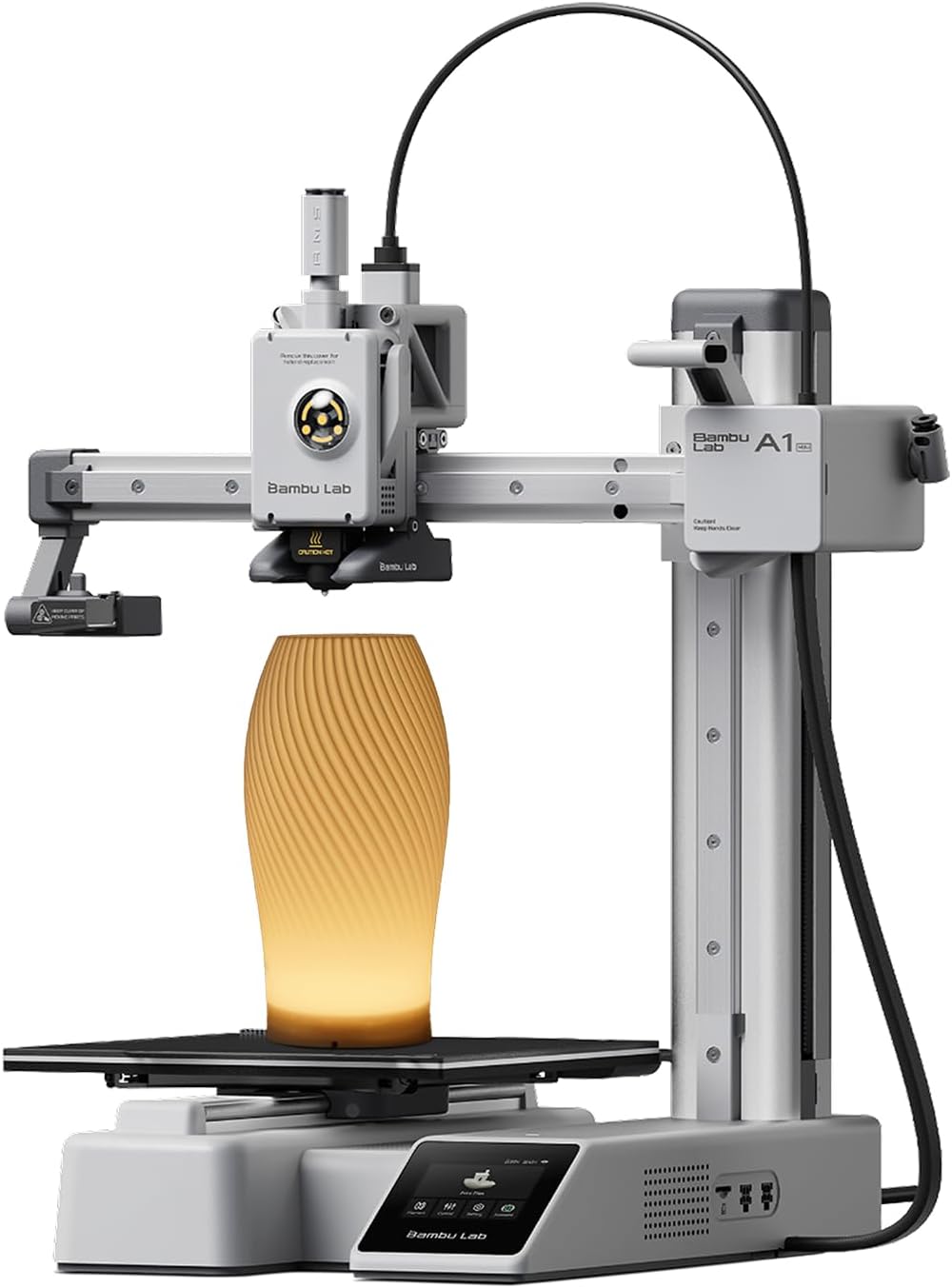
| Build Volume | 180×180×180 mm³ |
|---|---|
| Max Speed | 500 mm/s |
| Ideal Supported Filaments | PLA, PETG, TPU, PVA |
| Item model number | PF002-M-EU |
The Bambu Lab A1 mini is a compact, user-friendly FDM printer aimed at getting prints running quickly with minimal setup. It ships as a ready-to-use kit and includes a small LED lamp accessory for creative lighting projects, while the printer itself emphasizes full-auto calibration, active flow rate compensation, and quiet operation for day-to-day use at home or in a small studio. Typical workflows lean on the Bambu ecosystem and MakerWorld model library and the Bambu Handy app to send and manage jobs, which speeds iteration for hobbyists and model makers. Performance highlights are its high-speed print capability and automated features that reduce manual tuning, so fine-detail miniatures can be produced faster than many entry-level machines. Limitations include a smaller build volume compared with larger hobby printers and a focus on PLA/PETG-class materials rather than demanding engineering filaments, so advanced material flexibility and very large parts are not the target here.
Best for: A performance-minded hobbyist who values fast, reliable miniature prints with minimal setup and wants a smooth ecosystem for iterating on models at home.
Less Ideal for: Users who need large build volumes, industrial material compatibility, or a fully enclosed heated chamber for high-temperature filaments should consider larger, more heavy-duty machines.
- Full-auto calibration and active flow rate compensation reduce manual tuning for consistent first prints
- Integrated Bambu ecosystem and MakerWorld library simplify finding and running miniature models
- Compact and quiet design suitable for home or small studio use
- Includes LED lamp kit to turn prints into finished decorative projects
- Smaller build volume limits large or multiple miniatures per run
- Less suited for high-temperature engineering materials that require enclosed heated chambers
Verdict: If you want a fast, low-fuss printer that turns out high-quality miniatures quickly using a beginner-friendly ecosystem, the A1 mini delivers.
ELEGOO Neptune 3 Pro

| Build volume | 225×225×280 mm |
|---|---|
| Noise level | ~47 dB |
| Extruder type | Dual-gear direct drive |
| Filament diameter | 1.75 mm |
| Auto bed leveling | 36-point |
The ELEGOO Neptune 3 Pro is a ready-to-run FDM printer aimed at hobbyists who want reliable, repeatable results without a lot of fiddling. Its pre-assembled main parts, one-click 36-point auto bed leveling, and filament runout sensor make setup and long prints less stressful, while the dual-gear direct-drive extruder and titanium throat/brass nozzle combo reduce clogs and improve feeding on flexible and standard filaments. Precision Z control from dual lead screws and dual motors helps deliver steady layer alignment for fine details, and the PEI magnetic platform makes part removal straightforward. Noise levels reported around 47 dB are reasonable for desktop use. Limitations include a modest build volume that constrains very large multi-part projects and the printer is not enclosed, so printing ABS or other temperature-sensitive materials may require an enclosure. Also, while the Neptune 3 Pro is tuned for smooth operation, achieving the highest miniature-level surface finish still depends on slicer tuning and user patience with calibration and post-processing.
Best for: A practical hobbyist who values dependable, low-maintenance printing for small detailed models and wants features that reduce failed prints and downtime.
Less Ideal for: Users needing a large enclosed build area for big ABS or industrial parts, or those wanting a turnkey sealed system for high-temperature materials without extra accessories.
- Direct-drive dual-gear extruder improves filament feeding and handles flexible filaments better than bowden setups
- 36-point auto bed leveling simplifies first-layer setup and reduces manual adjustments
- Dual lead screws and dual motors on Z provide stable layer registration for finer details
- PEI flexible magnetic build plate speeds part removal and reduces bed adhesion hassles
- Filament runout sensor and power-loss resume add reliability for longer prints
- Open-frame design limits high-temperature materials without a separate enclosure
- Build volume is modest for users who want to print many minis at once or larger display pieces
Verdict: If you want a compact, practical FDM printer that minimizes setup headaches and reliably produces detailed small prints, the Neptune 3 Pro is a strong choice.
FDM Mini 3D Printer 100mm

| Build volume | 100 x 100 x 100 mm |
|---|---|
| Filament diameter | 1.75 mm |
| Supported materials | PLA, TPU |
| Layer resolution | Up to 0.05 mm |
| Nozzle material | All-metal |
This small FDM printer targets first-time users who want a ready-to-run machine for tiny models and learning basics. It ships fully assembled and runs prints from G-code on a memory card, so you can avoid slicing software initially and get started quickly. The all-metal nozzle and reported 0.05 mm layer resolution make it capable of fine detail for small miniatures, and fast heating—reaching 180°C in about five minutes—reduces idle time between jobs. The 100 x 100 x 100 mm build volume limits you to very small figures or segmented prints, but that size also keeps the unit compact and easy to tuck into a hobby desk or classroom. It supports PLA and TPU, letting you try rigid and flexible materials, and the simple key controls for loading and unloading filament suit less technical users. Construction in ABS and the beginner-focused workflow are practical for hobby learning, though advanced features like onboard slicing, larger build area, or higher-temperature materials are not part of this package.
Best for: Hobbyists or educators on a tight budget who want a plug-and-play miniature-focused FDM printer for learning, classroom demos, or producing small miniatures without an initial software learning curve.
Less Ideal for: Users who need larger build volume, advanced slicing features, higher-temperature printing, or a machine for production-scale miniature batches should consider a more capable printer.
- Comes fully assembled for quick out-of-the-box printing
- All-metal nozzle with up to 0.05 mm layer resolution for fine detail
- Fast nozzle heat-up (about 5 minutes to 180°C) reduces wait time
- Supports common 1.75 mm PLA and TPU filaments for versatile materials
- Very small 100 x 100 x 100 mm build volume restricts print size
- No onboard slicing workflow; requires pre-sliced G-code on a memory card
Verdict: If you want an inexpensive, ready-to-run FDM printer specifically for tiny miniatures and beginner practice, this compact machine gets you printing fast with fine-layer detail.
Creality Ender 3 V3 SE

| Print speed | Up to 250 mm/s |
|---|---|
| Extruder type | Sprite direct drive |
| Auto-leveling | CR Touch |
| Mainboard | 32-bit silent mainboard |
| Build plate | PC spring steel flexible plate |
The Ender 3 V3 SE is a desktop FDM printer aimed at delivering reliable, repeatable prints with features that reduce setup and mid-print failures. It uses CR Touch auto-leveling and a flexible PC spring steel build plate to help get the first layer right without constant manual calibration, and power-loss recovery reduces wasted jobs when power blips occur. The Sprite direct drive extruder brings the filament closer to the hotend for smoother feeding and better handling of flexible filaments, while dual Z-axis lead screws improve vertical stability for taller or detailed parts. A 32-bit silent mainboard and optimized stepper control lower noise and enable smoother motion, and automatic filament loading/unloading plus an upgraded visual UI speed routine tasks. The printer is capable of faster prints up to 250 mm/s, though achieving top speed may require tuning and can affect fine-detail surface finish for miniatures. Overall it balances ease-of-use and stability, making common failure modes less likely but still benefiting from user tuning for the best fine-detail results.
Best for: Buyers who prioritize consistent, low-failure printing and want a machine that minimizes manual calibration and mid-print interruptions for frequent hobby or small-batch miniature work.
Less Ideal for: Users who need out-of-the-box ultra-fine detail without any tuning or those who require a heated enclosure for specialty high-temperature filaments.
- CR Touch auto-leveling reduces manual bed calibration
- Sprite direct drive extruder improves filament control and flexible filament handling
- Dual Z-axis lead screws increase vertical stability and reduce layer shifting
- Power-loss recovery and automatic filament loading/unloading reduce failed prints and setup time
- 32-bit silent mainboard for smoother, quieter operation
- Maximum advertised speeds may require tuning and can compromise fine detail needed for miniatures
- No explicit enclosure or temperature-controlled chamber included, which can limit some high-temperature materials
Verdict: If you want a dependable, easy-to-use FDM printer that cuts manual setup and mid-print failures, the Ender 3 V3 SE is a strong pick for frequent miniature printing after modest tuning.
FLASHFORGE Adventurer 5M
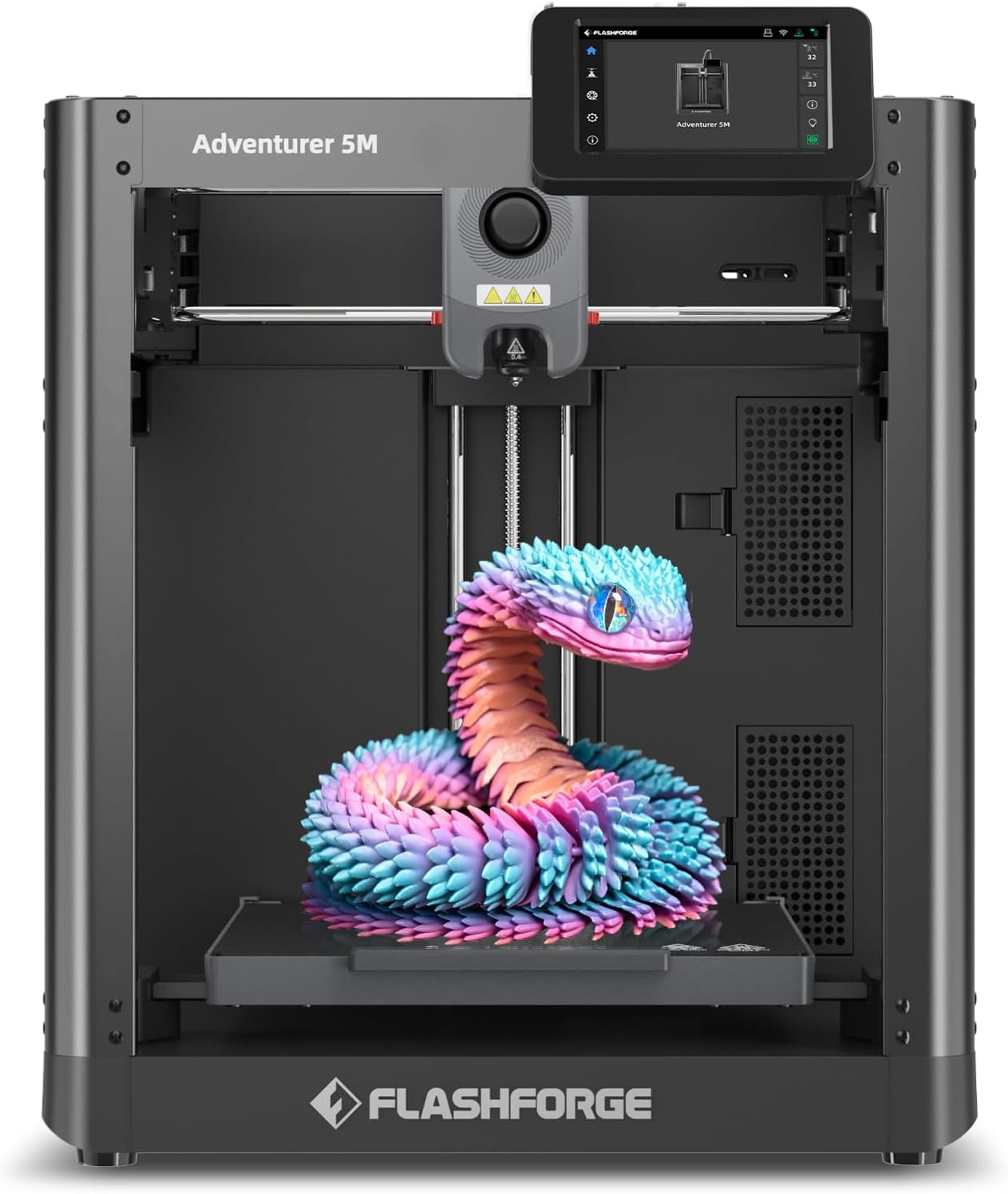
| Build Volume | 220 x 220 x 220 mm |
|---|---|
| Leveling Type | One-Button Auto Leveling |
| Travel Speed and Acceleration | 600mm/s and 20,000mm/s² |
| Extruder Type | Max.280°C Direct Drive |
| Platform Type | Double-Sided PEI Platform |
The FLASHFORGE Adventurer 5M is a CoreXY FDM printer aimed at fast, reliable desktop production. It uses an all-metal CoreXY frame and a 280°C direct-drive extruder with quick 3-second nozzle swaps, and prints on a double-sided PEI platform sized for 220×220×220 mm parts. The one-button automatic bed leveling and vibration compensation simplify setup and help deliver consistent first layers, while a high travel speed (600 mm/s) and aggressive acceleration reduce cycle time for small batches or rapid prototyping. Practical features include multiple nozzle sizes, a fast warmup time and mobile app monitoring for remote job checks. For miniature printing it can produce detailed parts when tuned, though the emphasis on speed means dialing in slower, finer print settings and cooling will be necessary for the best surface detail. Also, features like multi-color heads and an intelligent filament system are only on other variants, so this model is focused primarily on single-nozzle fast prints rather than built-in multi-material color printing.
Best for: A buyer who values a stable, factory-built CoreXY machine that reduces setup friction and speeds small-batch production while still allowing dialing in finer settings for detailed parts.
Less Ideal for: If you need native multi-color or multi-material printing or want out-of-the-box ultra-fine miniature results without tuning, consider printers designed specifically for multi-extrusion or micro-detail work.
- CoreXY all-metal structure for precise, high-speed motion
- One-button automatic bed leveling simplifies first-layer setup
- 280°C direct-drive extruder with quick nozzle swaps for material flexibility
- Double-sided PEI platform for reliable adhesion and easy part removal
- Mobile app monitoring and vibration compensation for remote oversight and cleaner prints
- Designed for high-speed throughput so extra tuning and slower print profiles are needed for best miniature surface detail
- Some advanced multi-material or multi-color features are available only in other variants
Verdict: Choose the Adventurer 5M if you want a fast, factory-ready CoreXY FDM printer that balances speed and reliable first layers for rapid miniature production when you are willing to tune for the finest detail.
FLASHFORGE Creator 5

| Extruder Quantity | 4 Independent Toolhead |
|---|---|
| Color Switching Speed | 7 Seconds |
| Build Volume | 256 x 256 x 256 mm |
| Extuder Type | Max.320℃ Direct Drive,Hardened |
| Travel Speed and Acceleration | 600mm/s and 30,000mm/s² |
The Creator 5 is a CoreXY FDM printer built around four independent toolheads to enable true multi-color and multi-material prints without the heavy purge waste of single-nozzle systems. It swaps toolheads in about seven seconds using background preheating, so color changes are quick and avoid long purge cycles, and you can dedicate a nozzle to soluble or breakaway support material for cleaner support removal. The machine targets speed with a stated 600mm/s travel capability and automatic calibration plus vibration and flow compensation to keep high-speed parts accurate. Practical benefits for miniature printing include the ability to combine colors and use specialized support filaments for fine detail and smooth surfaces, and a rigid motion system that helps preserve small-feature fidelity. Important limitations are that high advertised travel speeds rarely translate to maximum print speeds for detailed miniatures, and multi-head setups increase mechanical complexity and maintenance compared with single-nozzle hobby printers. Expect more setup and calibration attention than entry-level machines, but a clear upside if you need multi-color, multi-material capability for miniature work.
Best for: Someone who prioritizes reliable, low-waste multi-color or multi-material miniature prints and is willing to spend time on setup and maintenance to get factory-quality multi-material results.
Less Ideal for: Buyers seeking a simple, low-maintenance entry-level printer purely for single-color minis or those who prefer plug-and-play ease should consider simpler single-nozzle models instead.
- Four independent toolheads enable true multi-color printing without color mixing
- 7-second FlashSwap toolhead changes reduce filament purge waste
- Supports multiple materials including PLA, PETG, TPU and carbon-fiber blends
- CoreXY structure with auto calibration and vibration compensation for stable, detailed prints
- Higher mechanical complexity requires more maintenance and tuning than single-nozzle printers
- Top travel speed specs are optimistic for highly detailed miniature prints
Verdict: Choose the Creator 5 if you need fast, low-waste multi-color and multi-material capability for high-quality miniatures and accept the extra upkeep that comes with a multi-head professional printer.
Choosing the Right FDM 3D Printer for Miniatures: Key Factors to Consider
Layer Height and Nozzle Diameter
Layer height and nozzle diameter directly determine the smallest vertical and surface features the printer can reproduce. For miniatures you will often want layer heights well under 0.2 mm and sometimes down to 0.05–0.1 mm for very fine detail. Smaller nozzles deliver finer XY fidelity but slow prints and can clog more easily.
Balancing nozzle size and layer height matters because ultra-fine settings increase print time and demand more from the extrusion system. Choose hardware that reliably extrudes at low flow rates and has a hotend capable of consistent melt control to make thin layers practical for miniature work.
XY Accuracy and Motion System
The printer's motion design, belt quality, rail types, and stepper resolution affect how accurately small horizontal details are reproduced. Backlash, loose belts, or frame flex manifest as blurring or double edges on tiny features.
A rigid frame, well-tensioned belts or leadscrews, and precise stepper drivers help maintain clean edges and crisp shapes. When evaluating options, consider reported XY tolerances and whether the motion system supports microstepping or higher-resolution drivers for smoother small-movement control.
Extruder Type and Filament Path
Extruder design influences how consistently filament is fed at low extrusion rates required for miniature prints. Direct-drive setups shorten the filament path and generally improve control with flexible or specialty filaments, while Bowden systems can be lighter on the carriage but harder to tune at low flow rates.
Look for extruders with good gear traction, accessible filament loading, and options for fine-tuning extrusion. A short, constrained filament path and a reliable hotend that resists heat creep reduce the chance of under-extrusion or blobs that spoil small details.
Hotend Stability and Thermal Control
Stable hotend temperature is critical when printing thin layers because small fluctuations affect flow rate and layer adhesion. A hotend that holds temperature precisely and recovers quickly after retractions will reduce stringing and inconsistent layer lines.
Consider whether the hotend supports common nozzle materials and has good cooling for the heat break to prevent heat creep. Effective part cooling fans and ducting also help solidify tiny features quickly, improving overhangs and fine detail.
Part Cooling and Fan Ducting
Efficient part cooling helps thin layers freeze quickly so details hold their shape. For miniatures, targeted airflow is often more important than brute-force cooling; too much turbulent airflow can create uneven layers while poor cooling yields drooping or soft details.
Check for adjustable fan speeds, well-directed ducts, and the ability to tune cooling settings per layer in your slicer. Cooling matters especially when printing small features that benefit from rapid solidification.
Bed Adhesion and First-Layer Control
Secure first-layer adhesion and precise bed leveling affect the base of the miniature, which is important for stability and surface finish. An uneven or poorly adhered first layer can cause artifacts that propagate up the print and spoil delicate features.
Look for reliable bed surfaces, fine Z-offset adjustments, and consistent leveling systems. A printer that offers effective first-layer calibration and predictable adhesion reduces failed miniature prints and saves time.
Why FDM Can Work for Miniatures
FDM is often associated with larger, rougher prints, but with the right hardware and tuning it can produce excellent tabletop miniatures. Advances in hotend design, finer nozzles, and improved motion systems allow FDM printers to resolve small features without the resin-level surface finish.
FDM's advantages include lower material cost, easier post-processing workflows like sanding and gap filling, and the ability to use a wide range of filaments for strength or flexibility. For many hobbyists, the tradeoff of slightly more visible layer lines is acceptable when balanced against durability and material options.
- Lower ongoing material cost than resin
- Stronger, more durable prints for gameplay handling
- Easier to finish with sanders, primers, and fillers
Slicing Settings That Improve Miniature Quality
Slicer settings make as much difference as hardware when printing miniatures. Focus on layer height, print speed, retraction settings, and perimeter counts. Start with conservative speeds and small layer heights, then tune retraction to minimize stringing without inducing under-extrusion.
Other useful adjustments include increasing perimeter shells for crisper edges, enabling linear advance or pressure advance if supported to stabilize extrusion during speed changes, and using variable layer heights to preserve fine top detail while saving time on bulk areas.
- Use 0.05–0.15 mm layer heights for fine detail
- Lower print speeds for small features, 20–35 mm/s typical
- Tune retraction length and speed to your filament and extruder
Post-Processing Tips for Cleaner Miniatures
Post-processing is where FDM miniatures shine. Sanding, filling gaps with putty, and applying primer can dramatically reduce visible layer lines. Start with a coarse grit to remove big ridges, then work down to fine grit for a smooth paintable surface.
Use a thin filler-primer to fill micro-grooves and a careful wet-sanding regimen for the best results. For very small textures or engraved details, mask and preserve those areas while smoothing larger flat surfaces.
- Sand progressively from 200 to 1000+ grit
- Use a filler-primer to hide small layer lines
- Avoid over-sanding fine sculpted details
Filament Selection for Miniatures
PLA is the most common filament for miniatures because it prints easily, holds detail well, and sands smoothly. Specialty PLAs and blends can offer better toughness or finer surface finish. Some users prefer matte or low-ooze formulations that reduce post-print cleanup.
ABS and PETG provide more durability but require better temperature control and can be harder to get perfectly smooth without warping. Consider filament color and finish too; light neutral colors often show imperfections less and make priming easier.
- PLA for ease of printing and sanding
- PETG or ABS for tougher parts, with better enclosure and thermal control
- Choose filament colors that simplify priming and painting
Workspace Setup and Vibration Control
Small vibrations and external movement can blur tiny features, so place your printer on a stable surface with minimal foot traffic. Simple measures like anti-vibration pads, a rigid table, and secure cable routing reduce resonance that harms miniature fidelity.
Environmental factors such as drafts, room temperature swings, and direct sunlight can influence cooling and adhesion. A modest enclosure stabilizes ambient temperature and reduces drafts without the need for a full heated room.
- Use a stable, level surface and anti-vibration pads
- Consider a small enclosure to reduce drafts
- Keep filament spools and cables secured to avoid tugging
How We Chose the Best FDM 3D Printer for Miniatures
We focused on attributes that directly affect small-feature fidelity and repeatable miniature prints. Primary evaluation criteria included minimum practical layer height and XY accuracy to measure how well a printer can resolve fine detail. We also assessed extrusion consistency and filament control because smooth, clog-free extrusion reduces surface defects on tiny parts. Mechanical rigidity and frame design were considered to evaluate how much vibration or wobble could degrade fine features. Ease of post-processing and compatibility with common finishing techniques were included since most miniature makers sand, prime, and paint printed parts. We excluded machines that prioritize large-format volume over print fidelity or those with unresolved reliability issues that impair small-feature printing. We filtered out printers lacking basic filament management features such as a reliable filament path or accessible hotend. The list favors printers that combine tight motion systems, stable extrusion, and practical workflow features that matter to miniature printing rather than raw speed or oversized build plates.
Our full evaluation process is outlined in our review methodology.
FAQ
Can an FDM 3D printer produce tabletop-quality miniatures?
Often, yes. With fine layer heights, a well-tuned extrusion system, and good part cooling, FDM printers can produce tabletop-ready miniatures that respond well to sanding and priming.
What minimum layer height should I target for small miniatures?
Aim for 0.05–0.15 mm layer heights for the best balance of detail and print time. Very small figures benefit most from the lower end of that range, but prints will take longer.
Is a direct-drive extruder better for miniature printing?
Direct-drive extruders often offer better control with low flow rates and flexible filaments, which helps with small-feature extrusion. However, a well-tuned Bowden setup can also work if it provides consistent retraction and filament path control.
How important is part cooling when printing miniatures?
Part cooling is critical. Fast, directed cooling helps thin layers set quickly and preserves fine overhangs. Adjustable fan control allows you to tune airflow for different filaments and geometries.
Will smaller nozzles always improve detail?
Smaller nozzles increase XY resolution and can improve fine detail, but they slow prints and increase the chance of clogs. They also demand precise extrusion settings and stable thermal control to be effective.
Final Verdict
Choosing an FDM 3D printer for miniatures comes down to prioritizing fine layer control, steady extrusion, and a rigid motion system. Expect to trade slower print speeds for better detail and to invest time in slicer tuning and post-processing to reach paint-ready results. Focus on machines that make precise adjustments easy and support stable thermal and extrusion behavior so you can produce consistent, high-detail miniatures.