
Note: This article contains affiliate links. If you click on these links and make a purchase, we may earn a small commission at no extra cost to you. This helps support our research and content. Read our full affiliate disclosure here.
Picking the right FDM 3D printer under $1,000 shapes how quickly you can move from idea to finished part. You want consistent print quality, materials compatibility, and a machine that does not demand constant tinkering. This guide covers seven shortlisted printers that hit practical performance and usability targets for hobbyists, tinkerers, and small-scale prototyping. We evaluated machines for print quality, ease of setup, material handling, and ongoing reliability. Below are our top picks, plus the buying guidance you need to match a printer to your workflow and skill level.
Top Picks at a Glance
| Best Overall The best all-around choice for most situations | Snapmaker U1 3D Printer |  |
| Best Quality Built to a higher standard if you want something more solid | Original Prusa MK4S Kit |  |
| Best Value The sweet spot between price and what you get | Anycubic Kobra X 3D Printer |  |
| Best Budget The cheapest option that still gets the job done reliably | ELEGOO Neptune 3 Pro |  |
| Top Rated A top-rated pick with lots of positive feedback | Bambu Lab A1 3D Printer |  |
| Most Popular A crowd favorite that many people choose with confidence | FLASHFORGE Adventurer 5M |  |
| Best Seller A high-volume bestseller chosen again and again | Bambu Lab P1S Combo |  |
Snapmaker U1 3D Printer

| Build volume | 270 × 270 × 270 mm |
|---|---|
| Print system | CoreXY FDM |
| Toolheads | 4 independent with SnapSwap changer |
| Max speed | 500 mm/s |
| Compatible materials | PLA, PVA, TPU, PETG, PCTG, ABS, ASA, PA, PC |
The Snapmaker U1 is an FDM CoreXY machine designed around a four-toolhead SnapSwap system that swaps preloaded, preheated heads in about five seconds, letting you print true multi-color and multi-material parts without long purges. Typical use cases include multi-color prototypes, mixed-material functional parts with soluble supports, and higher-throughput runs where changing filaments would otherwise waste time and material. The printer combines a rigid CoreXY frame and carbon-fiber X rails to support speeds up to 500 mm/s while keeping dimensional accuracy across a 270 × 270 × 270 mm build volume. Smart calibration, automatic toolhead offset compensation, vibration compensation, and fine-tuned extrusion aim to reduce setup fiddling and improve first-layer reliability. The ecosystem includes Snapmaker Orca slicing, a model library, touchscreen and remote app control, plus AI print monitoring for more hands-off operation. Limitations include the usual complexity of maintaining multiple hot ends and the need to source compatible filament types for mixed-material prints, and the machine remains relatively large and heavier than entry-level hobby printers. For buyers who want fast, low-waste multi-color prints, the U1 delivers a practical, production-oriented workflow.
Best for: Buyers who want a balanced, all-round FDM printer that speeds up multi-color and mixed-material workflows while cutting filament waste, suitable for serious hobbyists, makers, and small workshops.
Less Ideal for: If you need a compact, ultra-simple desktop printer for occasional single-color prints or you prefer minimal maintenance, a single-nozzle hobby printer is a better fit.
- Four independent preloaded toolheads with a 5-second SnapSwap changer for true multi-color and multi-material prints
- Significantly reduces filament waste compared with purge-based color changes
- CoreXY motion with carbon-fiber X-axis enables high-speed printing up to 500 mm/s
- Smart automatic calibration, vibration compensation, and AI monitoring reduce manual tuning and failed prints
- More components to maintain and troubleshoot compared with single-nozzle printers
- Requires compatible filaments and workflow planning for mixed-material prints
Verdict: Choose the U1 if you want fast, low-waste multi-color and mixed-material FDM printing in a near-production-capable machine under $1,000.
Original Prusa MK4S Kit

| Print volume | 9.84 x 8.3 x 8.6 in |
|---|---|
| Item model number | MK4S-KIT-PEI |
| Item weight | 15.4 pounds |
The Prusa MK4S Kit is a DIY FDM printer kit built for users who want strong performance and long-term upgradability. You assemble the machine from parts with a step‑by‑step guide that also teaches the printer's mechanics and electronics, and the finished unit prints parts up to roughly 9.84 x 8.3 x 8.6 inches. The MK4S targets speed and surface quality: input shaping and refined motion control reduce ringing so you can print faster while retaining sharp edges. Practical benefits include a mature, well-supported ecosystem, firmware updates, modular hardware for future upgrades, and a sample of Prusament PLA to get started. Because it is a kit, expect hands-on build time and tuning during the first setup and a learning curve if you are new to FDM assembly. The kit approach is great for someone who values performance and serviceability, but it is less convenient than a fully assembled plug-and-play machine.
Best for: Buyers who prioritize print speed, surface quality, and a platform they can maintain and upgrade over time, and who welcome a hands-on build experience to reach that performance.
Less Ideal for: Users who want a fully assembled, plug-and-play machine with minimal setup time or who prefer a no‑build warranty experience.
- High-speed FDM performance with input shaping for reduced ringing
- Designed for reliable, repeatable prints and stable motion control
- Open-source, modular design with ongoing firmware and upgrade support
- Includes step-by-step assembly guide and sample Prusament PLA to start printing
- Requires hands-on assembly and initial tuning as a kit
- Not ready-to-run out of the box compared with preassembled printers
Verdict: If you want a high-performance, upgradeable FDM printer under $1,000 and do not mind building it yourself, the MK4S kit delivers speed, precision, and long-term support.
Anycubic Kobra X 3D Printer

| Build volume | 260 × 260 × 260 mm |
|---|---|
| Nozzle temperature | 300℃ |
| Connectivity | 2.4G/5G Wi‑Fi and LAN |
| Auto leveling | LeviQ 3.0 49-point |
The Anycubic Kobra X is a user-focused FDM printer built for fast multicolor printing and everyday use. It ships with four ACE 2 Pro color units installed and can be expanded up to 19 colors, which reduces manual filament swaps and lets you produce color-differentiated parts without complex post-processing. The machine emphasizes speed and durability with a hardened steel nozzle, vibration compensation, and a claimed peak travel speed up to 600 mm/s for rapid prototyping. LeviQ 3.0 auto bed leveling (49 points) and features like power/filament recovery, spaghetti detection, and object detection improve first-layer success and rescue interrupted prints. Connectivity options include dual-band Wi-Fi and LAN plus an Anycubic app with real-time camera monitoring for remote oversight. Practical limits are typical for high-speed, colorful printing: achieving top speed depends on model geometry and settings, and multicolor setups increase mechanical complexity and tuning. Still, the Kobra X packages multicolor convenience, robust first-layer leveling, and helpful monitoring tools into a platform suited to hobbyists, educators, and small workshops.
Best for: Buyers who want to maximize print throughput and color capability on a single FDM machine and value remote monitoring and reliable first-layer results.
Less Ideal for: Those who need the absolute simplest single-filament printer with minimal maintenance or users who prioritize industrial enclosed systems for high-temperature engineering materials.
- Native multicolor printing with 4 ACE 2 Pro units and expandable palette up to 19 colors
- High claimed top speed (up to 600 mm/s) for fast prototyping
- LeviQ 3.0 49-point auto bed leveling for consistent first layers
- AI camera and remote monitoring with spaghetti and object detection
- Multi-material compatibility including PLA, PETG, TPU, PVA and 300°C nozzle capability
- High-speed and multicolor setups require tuning to reach advertised performance
- More complex color hardware increases maintenance and potential points of failure
Verdict: If you want fast, multicolor FDM prints with robust auto-leveling and remote oversight, the Kobra X delivers a practical, productivity-focused package under $1,000.
ELEGOO Neptune 3 Pro

| Build volume | 225 x 225 x 280 mm |
|---|---|
| Noise level | 47 dB |
| Filament diameter | 1.75 mm |
| Extruder type | Dual-gear direct drive |
The ELEGOO Neptune 3 Pro is a ready-to-print FDM machine aimed at hobbyists and makers who want a capable desktop printer without a lot of setup. It ships with most main parts pre-assembled, a PEI magnetic bed for easy part removal, and a dual-gear direct drive extruder that handles PLA, TPU, PETG and ABS more reliably than a basic bowden setup. Practical touches like 36-point auto bed leveling, filament runout detection and power-loss resume reduce failed prints and make longer jobs less stressful. The printer uses dual lead screws and dual Z motors for steady layer registration and quiet stepper drivers keep noise down to roughly 47 dB during prints. Limitations include a modest 225 x 225 x 280 mm build volume compared with larger hobby machines and the unit is not enclosed, so printing high-warp materials may require a heated enclosure or careful tuning. For the price it balances ease of use, reliable filament feeding and sensible safety features, making it a strong pick for budget-focused buyers who want consistent results without a steep learning curve.
Best for: Buyers on a budget who want a reliable, mostly pre-assembled FDM printer that prints common filaments well and reduces failed prints with smart sensors.
Less Ideal for: Users who need very large build volume, an enclosed heated chamber for ABS/nylon work, or an industrial-grade production machine.
- Dual-gear direct drive extruder improves filament feeding and reduces clogs with flexible materials
- 36-point auto bed leveling simplifies setup and improves first-layer reliability
- Filament runout sensor and power-loss resume protect long prints from interruptions
- Dual lead screws and dual Z motors deliver stable Z-axis motion and consistent layer alignment
- Open-frame design and modest build volume limit printing of very large parts and make high-warp materials harder to print without enclosure
Verdict: A well-rounded, budget-friendly FDM printer that prioritizes reliable filament feeding and print continuity for hobbyists and makers under $1,000.
Bambu Lab A1 3D Printer

| Build volume | 256 × 256 × 256 mm |
|---|---|
| Supported filaments | PLA, PETG, TPU, PVA |
| Calibration | Full-auto (Z-offset, bed-level, nozzle pressure) |
| Noise | ≤48 dB |
The Bambu Lab A1 is a ready-to-use FDM 3D printer aimed at making reliable printing accessible to newcomers and hobbyists. It automates key setup steps with full-auto calibration for Z-offset, bed leveling, vibration resonance, and nozzle pressure so you do not need to tinker before each print, and active flow rate compensation helps maintain consistent extrusion. The open-frame build offers a 256 × 256 × 256 mm print volume for larger single-piece prints, and the system supports multi-color work when paired with the AMS lite accessory and Bambu filaments. Built-in monitoring and a simplified touchscreen plus LAN/cloud connectivity let you start and supervise jobs conveniently, and active motor noise canceling keeps operation relatively quiet. Trade-offs are the open-frame design if you need an enclosed heated-chamber for advanced materials and the AMS lite is an extra purchase for true multi-color printing, but for dependable, fast, largely maintenance-free FDM prints the A1 covers the essentials well.
Best for: Buyers who prioritize a dependable, low-maintenance FDM printer that just works out of the box and who value automated calibration and consistent print results over manual tweaking.
Less Ideal for: Users who need an enclosed, high-temperature chamber for ABS or other heat-sensitive materials or those who require integrated multi-material printing without buying accessories.
- Full-auto calibration that eliminates manual tuning before prints
- Active flow rate compensation for consistent extrusion quality
- Generous 256×256×256 mm build volume compared with many entry models
- Supports multi-color printing with AMS lite and RFID-synced filament profiles
- Quiet operation thanks to active motor noise canceling and simplified touchscreen controls
- Open-frame design lacks a heated enclosure for printing temperature-sensitive filaments
- Multi-color capability requires purchasing the AMS lite accessory separately
Verdict: If you want a fast, low-maintenance FDM printer that reliably produces good prints with minimal setup, the Bambu Lab A1 is an excellent choice under $1,000.
FLASHFORGE Adventurer 5M
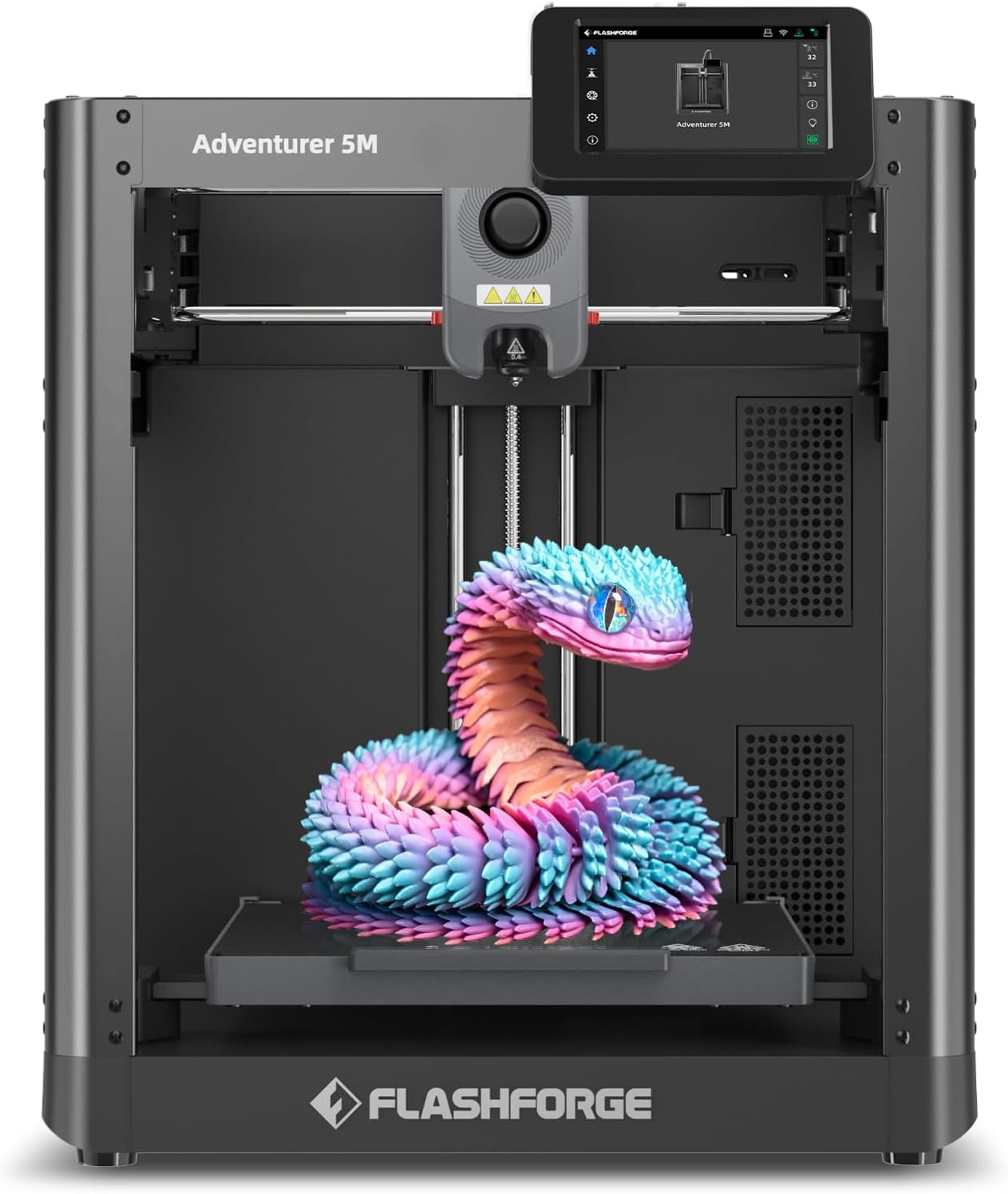
| Build Volume | 220 x 220 x 220 mm |
|---|---|
| Extruder Max Temp | 280°C Direct Drive |
| Travel Speed | 600 mm/s |
| Platform Type | Double-sided PEI Platform |
| Structure | All-metal Core XY Structure |
The Adventurer 5M is a CoreXY desktop FDM printer aimed at faster prototyping without lots of setup fuss. It uses one-button automatic bed leveling and a double-sided PEI platform to simplify first-layer adhesion and part removal, while a 280°C direct extruder and quick-change nozzle (3 seconds) make filament swaps and higher-temperature materials easier. The CoreXY all-metal frame and advertised 600 mm/s travel speed with high acceleration target rapid print cycles, and multiple nozzle sizes (0.25–0.8 mm) let you trade layer detail for throughput. Practical benefits include a fast warm-up, dual-fan cooling for more consistent overhangs, and app-based monitoring for remote checks. Limitations to expect are that real-world top speed will be lower than headline numbers to keep quality acceptable, materials like carbon-fiber composites may still need tuned profiles, and users who want full open-frame modification will find the factory design more closed. For the budget-minded maker or small workshop, it balances ease of use and higher throughput, but it still needs routine nozzle and platform maintenance to stay reliable.
Best for: Buyers who want a relatively hassle-free desktop FDM printer that prioritizes faster prototyping and reliable first layers while still offering some capability with higher-temperature filaments.
Less Ideal for: Users seeking an ultra-hackers tool for deep hardware modification or facilities needing continuous industrial production should consider more open or industrial-focused systems.
- One-button automatic bed leveling reduces setup time and improves first-layer consistency
- CoreXY all-metal structure with high travel speed and acceleration for faster print cycles
- 280°C direct extruder and quick 3-second nozzle change for easier high-temp and nozzle swaps
- Double-sided PEI platform simplifies part removal and offers good adhesion options
- App-based monitoring enables remote job checks and basic printer control
- Advertised top speeds are optimistic; maintaining quality requires dialing in settings at lower speeds
- Factory configuration is not aimed at heavy open-source modification or industrial-grade continuous operation
Verdict: Pick the Adventurer 5M if you want a faster CoreXY desktop FDM printer that minimizes setup time and supports higher-temp materials for rapid prototyping under $1,000.
Bambu Lab P1S Combo

| Build Volume | 256×256×256 mm³ |
|---|---|
| Max Speed | 500 mm/s |
| Max Acceleration | 20 m/s² |
| Supported Filaments | PLA, PETG, TPU, PVA, PET, ABS, ASA; capable: PA, PC |
The P1S Combo pairs Bambu Lab's CoreXY P1S printer with an AMS multi-spool feeder to enable up to 16-color or multi-material prints while keeping setup simple. It is built as an enclosed machine with a direct-drive extruder and automatic bed leveling, which helps with printing flexible and higher-temp filaments and improves first-layer reliability. The P1S targets fast production: the hardware supports very high travel speeds and acceleration, and the enclosed frame plus AMS make multicolor prints more practical than single-extruder setups. Setup is straightforward and aimed at users who prefer a ready-to-run experience, and an integrated camera supports time-lapses and basic monitoring. Limitations include the recommended filament list (some high-performance nylons and reinforced composites are not advised) and the larger footprint and weight compared with compact hobby printers, which may matter for small workspaces. For buyers focused on reliable multi-color FDM printing under a $1,000 budget, the P1S Combo delivers an unusually capable, user-friendly package.
Best for: Buyers who want a reliable, mostly turn-key FDM printer that can handle fast single- and multi-color jobs with minimal tinkering and predictable results.
Less Ideal for: Those who need a very small, portable machine or who plan to print abrasive fiber-filled composites and need a purpose-built industrial extruder.
- High-speed CoreXY motion system for much faster prints than typical hobby FDM printers
- AMS multi-spool system enables multi-color and multi-material prints without manual filament swaps
- Enclosed frame and direct-drive extruder improve compatibility with flexible and higher-temp filaments
- Automatic bed leveling and user-friendly setup reduce setup time and print failures
- Not recommended for carbon or glass fiber reinforced filaments
- Relatively heavy and larger footprint compared with compact desktop printers
Verdict: If you want a fast, user-friendly FDM printer that can deliver reliable multi-color prints, the P1S Combo offers that capability in a near-ready package.
Choosing the Right FDM 3D Printer: Key Factors to Consider
Print Quality & Resolution
Layer height range, nozzle diameter, and frame stiffness determine the level of detail you can achieve. A printer that can consistently reproduce fine layers will deliver smoother surfaces and more accurate parts, but very fine resolution increases print time and may require more tuning.
Consider whether your projects prioritize cosmetics, dimensional accuracy, or strength, because each emphasis favors different settings and hardware choices. A stable motion system and a properly calibrated extruder matter as much as the advertised minimum layer height.
Build Volume and Form Factor
The usable build volume sets the maximum size of parts you can print without splitting them into multiple pieces. Larger volumes add versatility but often increase the printer footprint and warm-up time.
Think about the physical space where the printer will live and whether you need a tall versus wide build area for your typical prints. For small workshops, a compact but efficiently shaped build volume can be more practical than maximum cubic capacity.
Material Compatibility
Different filaments require different hotend temperatures, heated-bed performance, and sometimes an enclosed chamber. PLA prints easily but is less heat-resistant, while PETG and ABS need better temperature control and bed adhesion strategies.
If you plan to experiment with flexible or engineering filaments, check the extrusion system, nozzle compatibility, and feeder design to ensure reliable feeding and consistent extrusion without jams.
Ease of Setup and Daily Use
A printer that boots quickly, has guided bed leveling, and offers clear user controls saves time and frustration. Features like filament runout detection, resume-after-power-loss, and well-documented presets can make routine tasks smoother.
Evaluate how much calibration is expected before the first reliable print and whether the software workflow aligns with your comfort level. For newcomers, simpler workflows with robust defaults are preferable to machines that demand frequent manual tuning.
Reliability and Maintenance
Long-term uptime depends on component quality and maintainability. Look for accessible hotends, replaceable nozzles, and modular assemblies that you can service with basic tools. A reliable filament path and sturdy bed surface reduce print failures and the need for rework.
Consider the availability of replacement parts and the clarity of service documentation. Machines that tolerate a bit of neglect and still produce usable parts are especially valuable for busy makers.
Software and Ecosystem
Slicer compatibility, firmware openness, and community resources affect how easily you can optimize prints and troubleshoot issues. Some printers work well with a variety of slicers and have active user communities that share profiles and fixes.
Check whether the printer supports common file transfer methods and firmware updates. A flexible ecosystem shortens the learning curve and helps you adopt advanced settings as your skills grow.
How Print Speed Affects Part Strength and Surface Finish
Faster print speeds reduce production time but can compromise layer adhesion and surface quality. When you increase speed, the extruder may struggle to melt filament evenly or the cooling profile may not keep up, leading to gaps or poor interlayer bonding.
For load-bearing parts, slower speeds and higher extrusion temperatures often produce stronger bonds between layers. For visible prototypes where appearance matters most, moderate speeds with refined cooling and tuned retraction tend to yield the best-looking results.
- Reduce speed for fine-detail or thin-walled prints to improve accuracy.
- Increase temperature slightly when printing stronger parts to enhance layer adhesion.
- Tune cooling fan settings based on filament type to balance strength and finish.
Bed Adhesion Options and Practical Tips
Successful first layers start with an appropriate bed surface and correct nozzle height. Common surfaces include textured PEI, glass, and magnetic spring steel sheets, each offering different adhesion and release behavior.
Simple practices such as cleaning the bed, using a light adhesive aid for challenging filaments, and calibrating Z-offset can prevent warping and failed first layers. For filaments prone to warping, a heated bed and enclosure are often the most effective solutions.
- Use a clean, flat bed for the best first-layer adhesion.
- Adjust Z-offset in small increments rather than large changes.
- Consider brim or raft strategies for thin or warped parts.
Upgrading and Modding Your Printer Safely
Many FDM machines accept incremental upgrades like all-metal hotends, improved extruders, or quieter stepper drivers. Prioritize upgrades that address your most significant pain points, such as frequent clogs or noisy operation.
When modifying firmware or hardware, follow community-tested guides and keep backups of original settings. Small, reversible upgrades minimize downtime and preserve the ability to restore factory behavior if needed.
- Start with spool-holder and filament path improvements before replacing core mechanical systems.
- Document changes and test after each upgrade to isolate issues.
- Prefer upgrades that improve safety and reliability, such as thermal runaway protections.
Practical Maintenance Schedule
Routine maintenance keeps prints reliable and reduces the need for major repairs. Daily checks should include filament path inspection and a quick bed-clean if required, while weekly tasks can address belt tension and lubrication points.
Every few months, inspect the hotend and nozzle for wear and replace consumables as needed. Keep a small set of spare nozzles and common fasteners on hand to reduce downtime.
- Clean the bed and remove residue after each print session.
- Check belts and pulleys monthly for proper tension and wear.
- Replace nozzles based on print hours or when extrusion becomes inconsistent.
Choosing the Right Filament for the Job
Filament selection influences final part properties more than many users expect. PLA is easy to print and useful for concept models, PETG balances strength and ease of use, and engineering filaments like nylon or polycarbonate require higher temperatures and sometimes an enclosure.
Match filament choice to your part requirements: cosmetic models benefit from PLA, functional prototypes that need impact resistance perform well with PETG, and high-temperature applications call for specialty filaments and appropriate hardware support.
- Store filaments dry to prevent moisture-related print defects.
- Print test coupons to dial in settings before committing to long prints.
- Adjust retraction and print temperature when switching filament brands.
How We Chose the Best FDM 3D Printer
We focused on criteria that matter for everyday FDM 3D printing under a budget cap. Print quality was assessed by layer resolution capability and mechanical stability indicators such as frame rigidity and motion system design. Ease of use covered setup time, out-of-the-box calibration, and the presence of helpful user-facing features like a touchscreen, preloaded profiles, or assisted bed leveling. Material support and hotend/bed specifications were included because filament variety and print temperatures determine what you can produce. Reliability looked at filament feeding design, bed adhesion options, and common failure points cited in community feedback. Throughput and practical speed were considered by reviewing maximum safe print speeds and build-volume efficiency. Finally, upgradeability and spare-parts availability were used to judge long-term ownership costs. We excluded specialty resin, SLA, and industrial-class systems that do not use FDM extrusion or that exceed the stated price boundary. Products were filtered for active user communities and accessible documentation so owners can troubleshoot and extend capability without expert service.
Our full evaluation process is outlined in our review methodology.
FAQ
Can I print engineering plastics on budget FDM machines?
Often you can print some engineering plastics if the printer supports higher nozzle and bed temperatures and you can add an enclosure. Success depends on the machine's thermal capability and the filament's moisture sensitivity.
How important is an all-metal hotend?
An all-metal hotend lets you print higher-temperature filaments and reduces the risk of heat creep in some setups. It is helpful if you plan to use nylon, polycarbonate, or other high-temp materials, but not essential for basic PLA printing.
Do I need to level the bed before every print?
It depends on the printer. Some machines have reliable automatic bed leveling that reduces the need for manual checks, while others benefit from a quick manual check or micro-adjustment to the Z-offset before important prints.
What maintenance items should I keep on hand?
Keep spare nozzles, a set of basic hand tools, replacement PTFE tubing if applicable, and cleaning supplies for the bed surface. These items help you resolve most common issues quickly.
Is a larger build volume always better?
Not always. Larger volume increases versatility but also consumes more space and can complicate temperature stability. Choose a volume that fits your typical part sizes and available workspace.
Final Verdict
When shopping for an FDM 3D printer under $1,000, prioritize the characteristics that match how you intend to use the machine. If you value fine detail and surface finish, focus on printers with stable motion systems and proven layer resolution. If you need functional parts, emphasize material support, a reliable extrusion path, and bed adhesion features. Balance build volume against workshop space and consider ease of setup as a multiplier on how quickly you will get productive. With these tradeoffs in mind, select a printer that aligns with your most common projects and the level of hands-on tuning you are prepared to do.