
Note: This article contains affiliate links. If you click on these links and make a purchase, we may earn a small commission at no extra cost to you. This helps support our research and content. Read our full affiliate disclosure here.
If you want gallery-quality prints from your home or small studio, picking the right inkjet printer for photos matters. Photo inkjets differ from general-purpose printers in color gamut, print resolution, and paper handling, and those differences affect final image detail, color accuracy, and long-term print stability. This guide shortlists the top options in the photo-focused inkjet category and walks through the features that matter for hobby photographers and content creators. We evaluate print quality, color management, media support, and running cost so you can pick the best match for your workflow. Read on to see our top picks and what to consider before you buy.
Top Picks at a Glance
| Best Overall The best all-around choice for most situations | Brother Work Smart MFC-J1360DW |  |
| Best Quality Built to a higher standard if you want something more solid | Canon imagePROGRAF PRO-310 |  |
| Best Value The sweet spot between price and what you get | HP Envy 6155 All-in-One Printer |  |
| Best Budget The cheapest option that still gets the job done reliably | Epson Expression Premium XP-6100 |  |
| Top Rated A top-rated pick with lots of positive feedback | Canon imagePROGRAF PRO-1100 |  |
| Most Popular A crowd favorite that many people choose with confidence | Epson Expression Photo HD XP-15000 |  |
| Best Seller A high-volume bestseller chosen again and again | HP Envy Photo 7975 |  |
Brother Work Smart MFC-J1360DW

| Printer Type | Inkjet |
|---|---|
| Functions | Print, Copy, Scan |
| Duplex | Automatic |
| Maximum Sheet Capacity | 150 |
| Printer Connectivity Type | USB, Wi-Fi |
The Brother Work Smart MFC-J1360DW is a small all-in-one inkjet aimed at home and home-office use, combining printing, copying, and flatbed plus ADF scanning in a space-saving chassis. It prints color documents at up to 9 ppm and black at up to 16 ppm, and supports automatic two-sided printing for routine duplex jobs. Connectivity includes Wi‑Fi and USB, plus mobile printing via AirPrint and Mopria and cloud upload/download directly from the printer's 1.8" color display or the Brother Mobile Connect app. The 150-sheet tray and 20-sheet single-sided ADF keep modest workloads flowing, and Brother's Page Gauge and compatibility with LC501 ink make replacement cartridges straightforward. For photo work you can get vibrant color and sharp detail on plain and glossy media, though it is still an inkjet designed for mixed document/photo use rather than studio-grade photo printing; print resolution is high on Windows but color management and advanced photo controls are limited compared with dedicated photo printers. Setup and app-driven mobile printing are user-friendly, but expect medium ink yield from standard cartridges unless you opt for high-yield options.
Best for: Buyers who want a compact, easy-to-use all-in-one that handles everyday color documents and occasional photo prints while offering wireless and mobile convenience.
Less Ideal for: Photographers or users who need gallery-quality photo prints, advanced color profiling, or large-format photo output should choose a dedicated photo printer instead.
- Automatic duplex (two-sided) printing for efficient document workflows
- Wireless printing with AirPrint, Mopria and Brother Mobile Connect for easy mobile/cloud printing
- 20-sheet ADF plus flatbed scanner covers both single- and multi-page scanning needs
- 150-sheet input tray reduces frequent paper refills for small offices
- High nominal print resolution on Windows for detailed output
- Not a dedicated photo printer so color management and long-term archival print quality are limited compared with pro photo models
- Standard yield cartridges offer modest page counts unless you choose high-yield ink options
Verdict: A practical compact all-in-one that delivers reliable color prints and easy mobile/cloud workflow for balanced home and home-office photo and document needs.
Canon imagePROGRAF PRO-310

| Printer Type | Inkjet |
|---|---|
| Ink System | 9-color pigment + Chroma Optimizer |
| Maximum Media Size | 13" x 19" (A3+) |
| Connectivity | Wi-Fi, Ethernet, USB |
| Display | 3.0-inch color LCD |
The Canon imagePROGRAF PRO-310 is a compact 13" wide inkjet designed for photographers who need gallery-quality color and black-and-white prints. It uses a 9-color plus Chroma Optimizer pigment ink set including a Matte Black for deeper blacks and improved shadow gradation, and the LUCIA PRO II system aims to boost gloss uniformity and scratch resistance on fine art papers. Typical use is single-sheet photo and fine-art printing where color accuracy, smooth tonal transitions, and archival pigment inks matter more than speed. The printer supports a wide range of media up to 13" x 19" and connects via Wi-Fi, Ethernet, or USB, with a 3.0-inch color LCD for status and controls. Practical benefits include excellent color gamut, strong black density for monochrome work, and features such as an anti-clogging nozzle recovery system and skew correction to reduce wasted prints. Limitations are modest throughput at about 2 ppm and simplex-only output, so it is not optimized for high-volume document runs or duplex workflows.
Best for: Photographers and serious hobbyists prioritizing color accuracy, smooth tonal range, and archival pigment prints for gallery and fine-art output rather than fast throughput.
Less Ideal for: Office users or studios that need fast, high-volume duplexed document printing or frequent bulk throughput should consider larger production-focused printers instead.
- Nine-color pigment ink plus Chroma Optimizer for wide gamut and smooth gradations
- Matte Black ink improves black density and shadow detail for B&W prints
- Supports wide media sizes up to 13" x 19" including panoramic and square formats
- Multiple connectivity options (Wi‑Fi, Ethernet, USB) and a 3.0-inch color LCD for easy operation
- Anti-clogging and skew correction help reduce print failures and wasted media
- Slow print speed around 2 pages per minute, so not suited to high-volume jobs
- No duplex printing capability, limiting two-sided workflows
Verdict: Buy this printer if you want a compact 13" photo printer that delivers gallery-quality pigment prints with superior black density and wide color gamut for fine-art and professional photo work.
HP Envy 6155 All-in-One Printer

| Printer Type | Inkjet |
|---|---|
| Color Output | Color |
| Maximum print Resolution Color | 4800 x 1200 dots_per_inch |
| Color Pages per Minute | 7 pages_per_minute |
| Printer Connectivity Type | Wi-Fi |
The HP Envy 6155 is an entry-level all-in-one inkjet aimed at home users who want everyday color documents and photos without a big footprint. It handles printing, flatbed scanning, and copying, and includes automatic two-sided printing and a 100-sheet input tray for moderate print runs. The 2.4-inch color touchscreen and HP mobile app make setup and basic tasks straightforward, while dual-band Wi-Fi supports wireless and mobile printing. For photo printing it uses HP's true-to-screen P3 technology and a maximum color resolution of 4800 x 1200 dpi, which helps produce vibrant, edge-to-edge snapshots from common photo sizes. Print speeds are modest at about 10 ppm black and 7 ppm color, so photo jobs take longer than on dedicated photo printers. The unit ships with starter cartridges and offers an Instant Ink trial for ongoing supply management, but it is designed to use factory cartridges and may block third-party chips. Overall, it is a practical, space-efficient choice for households that print photos occasionally and want easy wireless operation rather than professional photo-lab quality.
Best for: Buyers who want a compact, user-friendly home printer that can produce good-looking photos and handle everyday document tasks with straightforward wireless setup and app control.
Less Ideal for: Photographers or users who need fast, lab-quality photo output or high-volume photo printing; those seeking a printer that accepts third-party refill cartridges.
- Automatic duplex printing saves paper and simplifies two-sided documents
- High maximum color resolution (4800 x 1200 dpi) for vibrant photo prints
- Compact footprint with a 100-sheet input tray suitable for home use
- Intuitive 2.4-inch color touchscreen and HP mobile app for easy control and wireless printing
- Print speeds are modest, so photo jobs can be slow compared with dedicated photo printers
- Requires original HP cartridges with chips, which limits use of third-party refill options
Verdict: A small, easy-to-use home all-in-one that produces vibrant photos at a reasonable quality for casual photo printing and everyday tasks.
Epson Expression Premium XP-6100

| Printer Type | Inkjet |
|---|---|
| Maximum print Resolution Color | 5760 x 1440 dpi |
| Color Pages per Minute | 11.3 pages_per_minute |
| B&W Pages per Minute | 15.8 pages_per_minute |
| Printer Connectivity Type | Wi-Fi |
The Epson Expression Premium XP-6100 is a small all‑in‑one inkjet aimed at home photo enthusiasts who want sharp color prints without a bulky unit. It uses five Claria ink cartridges and a high maximum resolution (5760 x 1440 dpi) to deliver borderless photos up to 8.5 x 11 inches and quick 4×6 prints in as little as 15 seconds in draft mode. The unit supports Wi‑Fi and Wi‑Fi Direct for phone and tablet printing, has a 2.4-inch color LCD for previews, built‑in USB and memory card slots, and automatic two‑sided printing for documents. Paper handling covers common photo sizes and a 100-sheet capacity for everyday use. Practical downsides include reliance on genuine Epson cartridges and modest screen size and control compared with higher-end photo printers, so workflow and long runs may be limited for heavy photo users. For casual photographers and families who want good-looking prints from phones and cameras, the XP-6100 balances photo quality, compact size, and convenient wireless features.
Best for: Buyers seeking a compact, photo-focused inkjet that can produce high-quality, borderless prints from phones or cameras without taking much desk space and who prioritize image quality over the lowest running cost.
Less Ideal for: Professional photographers or users needing high-volume, fast photo production or those who prefer third-party refillable ink systems to reduce consumable costs.
- High maximum print resolution (5760 x 1440 dpi) for detailed photo output
- Five-color Claria ink set and dedicated photo/DVD trays for better photo color and borderless prints up to 8.5 x 11 inches
- Fast photo and document speeds including ~15 second 4×6 photo prints in draft mode
- Wireless printing plus Wi‑Fi Direct and built-in USB/memory card slots for easy phone and camera printing
- Automatic duplexing and a 100-sheet capacity make it practical for mixed document and photo use
- Designed to work only with genuine Epson cartridges which can raise ongoing ink costs
- Small 2.4-inch LCD limits on-device preview and menu navigation
Verdict: A compact wireless photo-focused inkjet that delivers high-resolution borderless prints and easy mobile printing, making it a strong choice for home photographers on a modest budget.
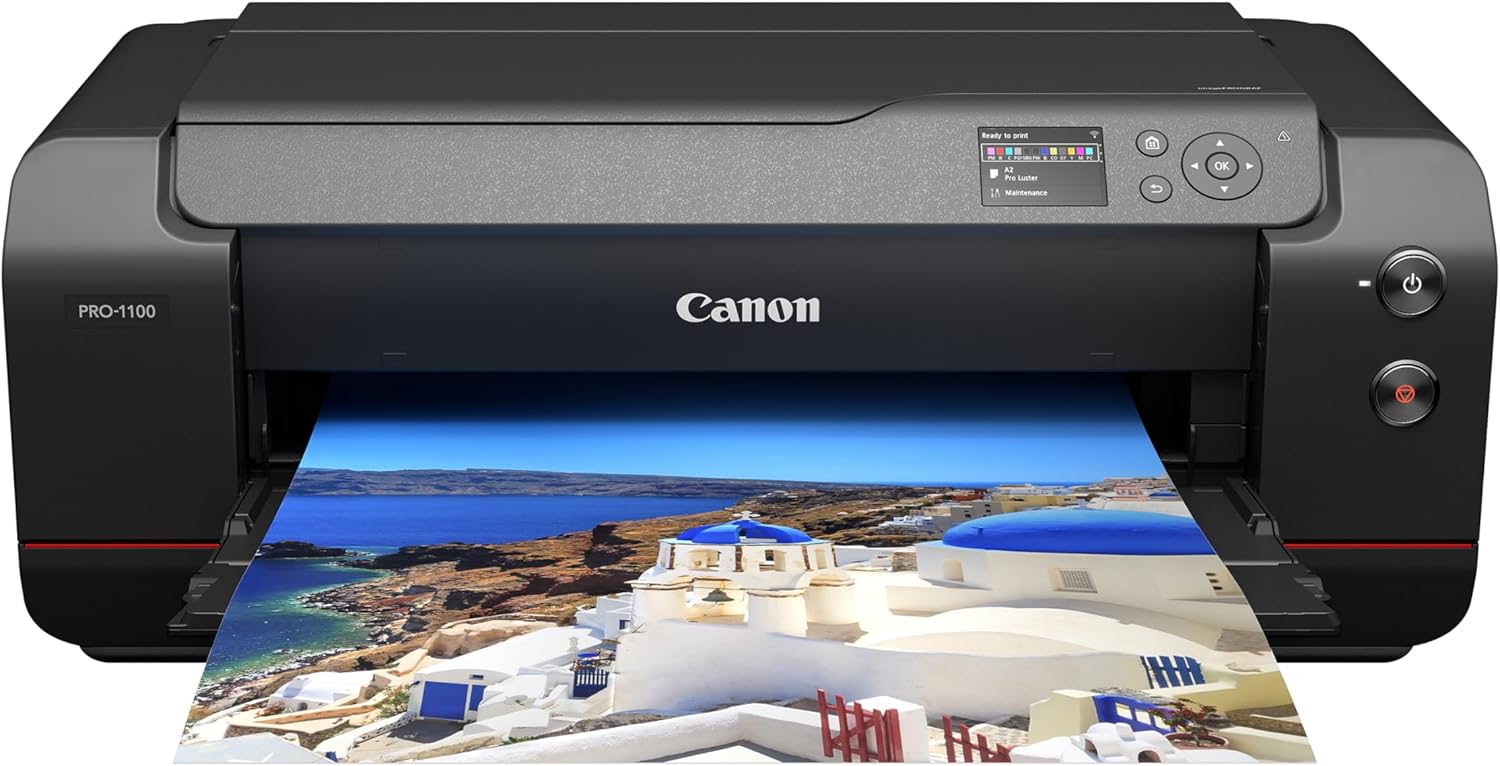
Canon imagePROGRAF PRO-1100
| Printer Type | Inkjet |
|---|---|
| Maximum Media Size | 17 X 22 Inch |
| Resolution | 4800 x 2400 |
| Printer Connectivity Type | USB, Wi-Fi |
| Duplex | Automatic |
The Canon imagePROGRAF PRO-1100 is a 17-inch wide-format photo printer built for studio-quality photo and fine-art prints using an 11-color pigment-based LUCIA PRO II ink system plus Chroma Optimizer. It is typically used by photographers and studios that need large borderless prints up to 17 x 22 inches and consistent color across matte and glossy media. Notable features include high optical resolution, an anti-clogging FINE print head, air feeding to prevent paper skew, automatic duplex capability, and bundled professional print and layout software for color management and calibration. In practice the printer delivers deep blacks, a wide color gamut, and uniform gloss with reduced bronzing thanks to the Chroma Optimizer, and the management tools help maintain predictable output for repeatable results. Important trade-offs are the slow page-per-minute throughput and the physical footprint and weight that make it a studio device rather than a casual home printer, and running costs for 11 pigment inks are relatively high compared with consumer photo printers.
Best for: Photographers and small studios that prioritize consistent, gallery-quality photo output and want reliable color management and long-term print stability.
Less Ideal for: Casual users who need fast everyday document printing or compact, low-cost printers for occasional photos.
- 11-color pigment ink set with Chroma Optimizer for wide gamut, deep blacks, and improved gloss uniformity
- Supports large borderless media up to 17 x 22 inches for professional-size prints
- Anti-clogging FINE print head and air feeding system improve print reliability and reduce paper skew
- Includes professional print and layout software plus color calibration and management tools
- Slow print speed not suited for high-volume rapid output
- Large physical size and weight limit placement to studios or dedicated workspaces
- Operating cost is higher due to 11 individual pigment ink tanks
Verdict: Choose the PRO-1100 when you need reliable, studio-grade 17-inch photo prints with wide color gamut and consistent gloss control.
Epson Expression Photo HD XP-15000

| Maximum Media Size | 13 x 19 inch |
|---|---|
| Resolution | 5760 x 1440 dpi |
| Printer Connectivity Type | wired, wireless |
| Duplex | Automatic |
| Number of Trays | 2 |
The Epson Expression Photo HD XP-15000 is a wide-format inkjet designed for photographers and serious hobbyists who need borderless prints up to 13 x 19 inches. It uses a six-color Claria Photo HD ink set including red and gray inks to expand color gamut and improve black-and-white tones, and it produces high-resolution output up to 5760 x 1440 dpi. The printer offers a 50-sheet rear specialty tray for cardstock and specialty media plus a 200-sheet front tray for larger document jobs, and it supports both wireless and Ethernet connections for easy photo printing from computers and mobile devices. The 2.4-inch color LCD and app control simplify basic setup and print tasks, while automatic duplexing and relatively fast ISO document speeds make it practical for mixed photo and document workflows. Expect good color range and sharp detail on photographic media, but note Epson requires genuine cartridges for full functionality and firmware updates can affect third-party ink compatibility. The unit is moderately large and aimed at desktop use in a home studio rather than truly compact portable setups.
Best for: Photographers and home-studio users who prioritize high-quality, wide-format photo prints and want reliable color and tonal accuracy backed by a factory ink system.
Less Ideal for: Users who need a compact all-in-one for occasional home documents or those who rely on inexpensive third-party inks and want maximum aftermarket flexibility.
- Wide-format borderless printing up to 13 x 19 inches for pro-style photos
- Six-color Claria Photo HD inks (including Red and Gray) expand gamut and improve B&W prints
- High maximum resolution of 5760 x 1440 dpi for fine detail
- 50-sheet rear specialty tray for cardstock and a 200-sheet front tray for document batches
- Both wireless and Ethernet connectivity plus app control for convenient printing from mobile devices
- Requires genuine Epson cartridges and some firmware updates may disable third-party inks
- Relatively large footprint for a desktop printer and not optimized for travel or tight spaces
- Primarily a photo printer so multifunction scanning/copier features are limited
Verdict: Choose the XP-15000 when you want wide-format, pro-quality photo prints with an expanded six-color ink set and reliable factory ink support.
HP Envy Photo 7975

| Printer Type | HP Thermal Inkjet |
|---|---|
| Resolution | 1200 x 1200 dpi (B/W), 4800 x 1200 dpi (Color) |
| Scanner Type | ADF; Flatbed |
| Printer Connectivity Type | USB, Wi-Fi |
| Duplex | Automatic |
The HP Envy Photo 7975 is a home-focused all-in-one inkjet that blends photo-oriented output with everyday document tasks. It prints borderless photos from a dedicated photo tray and delivers high color resolution up to 4800 x 1200 optimized dpi, while the flatbed plus 35-sheet ADF handle scanning and batch copying. Setup and daily use are simplified by a 2.7-inch color touchscreen and Wi‑Fi/mobile printing, and HP AI formatting aims to remove unwanted web page content for cleaner prints. Auto-duplex and a 125-sheet maximum capacity make it practical for light office work, and it accepts HP 64 and 64XL cartridges for straightforward replacement. Expect moderate print speeds (around 10 ppm color, 15 ppm black) and the usual ongoing ink cost of dye-based photo printing, so high-volume photo projects will be slower and more expensive than pro photo printers. The unit is compact for a photo-capable MFP and includes a three-month Instant Ink trial to ease initial ink costs.
Best for: Buyers who want a reliable home all-in-one that can produce good borderless photos as well as everyday documents and prefer a straightforward, low-friction setup and workflow.
Less Ideal for: People who need a high-volume, low-cost photo production solution or professional photographers who require the fastest speeds and the lowest per-print ink cost.
- High optimized color resolution up to 4800 x 1200 dpi for detailed photos
- Dedicated photo tray and borderless photo printing for easier desktop photo output
- Automatic duplexing and 35-sheet ADF for convenient document scanning and two-sided printing
- Simple touchscreen controls and Wi‑Fi/mobile printing for easy setup and daily use
- Ink for high-quality color photos uses dye-based cartridges which can be costly for heavy photo printing
- Print speeds are modest for larger print jobs compared with laser or pro photo printers
Verdict: Choose the Envy Photo 7975 if you want a user-friendly home all-in-one that produces high-resolution borderless photos alongside everyday printing and scanning tasks.
Choosing the Right Inkjet Printer for Photos: Key Factors to Consider
Print Resolution and Detail
Higher DPI and more precise dot placement translate to finer detail and smoother tonal transitions in photographic prints. For portraits and landscape work, resolution affects how well subtle texture and small features reproduce. When inspecting sample prints, look for banding, graininess, or loss of detail in shadow areas.
Resolution alone is not the whole story. Print head technology, droplet size, and the printer's ability to lay down microscopic ink droplets influence perceived sharpness. Consider whether the printer supports borderless printing for full-bleed photos and check how it handles upsampling from your image files.
Color Accuracy and Gamut
Color reproduction is central to photo printing. Wide color gamut inks and multiple color channels help reproduce saturated blues, deep reds, and subtle greens more faithfully. Printers that support additional color cartridges beyond CMYK, such as light cyan and light magenta or dedicated photo black, generally produce smoother gradients and less metamerism under varied lighting.
Look for models that support ICC profiles and color calibration so you can match on-screen previews to printed output. If you shoot in RAW or use color-managed workflows, compatibility with standard profiling tools will make a big difference in predictable color results.
Media Support and Paper Handling
Photographic media comes in many sizes, weights, and finishes. A photo-focused inkjet should accept thick fine-art papers, glossy and luster photo papers, and common large formats if you plan to print bigger than standard sizes. Paper path design matters for heavy stock; straight-through or rear-feed options reduce the chance of curling or jams.
Check supported paper sizes and whether the printer offers borderless printing for popular photo sizes. Adjustable trays, removable rear feed, and reliable sheet feeding are practical features that reduce frustration when switching media types frequently.
Ink System and Long-Term Cost
The type of ink and cartridge configuration affects print longevity, color stability, and ongoing cost. Pigment-based inks typically resist fading better than dye inks and are preferable for archival prints, while dye inks often give slightly more vibrant colors at first. Ink sets with dedicated photo blacks or multiple light inks improve tonal range and shadow detail.
Consider ink yield, refillability, and how easy maintenance cycles are. Some photo printers require periodic head cleaning that uses ink; understanding how often this occurs and the cost impact is important for frequent printers. Also check for replaceable maintenance tanks or waste-ink containers for high-volume use.
Paper Size Flexibility
If you plan to print a mix of wallet-size, 4×6, and larger fine-art sizes, choose a printer that supports the sizes you actually use without awkward cropping or manual intervention. Some photo printers handle roll paper for panoramic prints, while others are limited to cut sheets and cardstock.
Size flexibility reduces the need for trimming and makes batch printing easier. Confirm whether the printer can feed multiple sheet sizes or whether you must swap trays to change formats, as frequent tray swaps add time to production workflows.
Workflow, Connectivity, and Software
Good software support and connectivity streamline photo printing from your preferred tools. Native drivers that expose color management settings, support for standard file types, and options for USB, wired network, or Wi-Fi printing matter depending on your environment. Some printers offer mobile printing or direct USB and card-reader options that speed single-print jobs.
Also evaluate the included software for layout, borderless printing, and print-preview accuracy. Built-in color correction is convenient, but professional photographers usually prefer raw control through their editing app and ICC profiles. Ease of use in the control panel and the availability of on-printer calibration routines are practical workflow considerations.
Choosing Between Dye and Pigment Inks
Dye and pigment inks behave differently in color, longevity, and finish. Dye inks can produce vivid, saturated colors and are often favored for fast, striking prints. Pigment inks generally offer better fade resistance and more neutral blacks, which benefits archival and gallery work.
Think about your priorities. If you need prints that last under display lighting and want archival stability, pigment-based systems often provide a longer lifespan. If immediate pop and brighter colors are your priority for casual prints, dye-based systems may be satisfactory.
- Dye inks: typically brighter color, faster initial vibrance
- Pigment inks: superior fade resistance and neutral tonal blacks
- Mixed ink sets: some printers use both types strategically for best results
Color Management Basics for Better Prints
Accurate color begins with a color-managed workflow. Calibrating your monitor, using the correct ICC profile for your paper and printer, and soft-proofing in your editing software reduces surprises between screen and print.
Many photo printers accept custom ICC profiles. If you use several paper types, create or download profiles for each so colors remain consistent across media. When precise color is essential, perform test strips and make small adjustments before committing to a full print run.
- Calibrate your display regularly
- Use ICC profiles matched to paper and printer
- Soft-proof to preview output before printing
Paper Choices and Finishes
Paper finish and weight dramatically affect the look and feel of your photos. Glossy papers provide punchy contrast and saturated color, satin or luster offers a balanced look with reduced glare, and matte or fine-art papers give a textured, gallery-ready appearance.
Match paper to subject and viewing intent. Portraits often benefit from satin finishes that reduce reflections, while landscapes and still life may shine on glossy stock. For exhibitions, choose acid-free fine-art paper designed for long-term display.
- Glossy: high contrast and saturation
- Luster/satin: good compromise between gloss and matte
- Matte/fine-art: textured, archival presentation
Maintenance and Storage Tips
Regular maintenance preserves print head health and color consistency. Follow the manufacturer's recommended cleaning routines and keep the printer in a stable environment to reduce clogging. For occasional printers, occasional print head cycling minimizes drying of ink lines.
Store unused paper in a cool, dry place and handle sheets by the edges to avoid fingerprints. If you produce prints for sale or display, use archival sleeves or acid-free backing to protect from dust and environmental damage.
- Run short test prints weekly if the device sits idle
- Keep spare cartridges or maintenance supplies on hand
- Avoid high-humidity storage that can warp paper
Setting Up for Accurate Test Prints
Before committing to a large print run, use test strips and small proof prints to validate color and exposure. Print at actual size or at a scale that preserves the pixel-per-inch relationship for critical evaluation.
Inspect proofs under consistent, neutral lighting and use a loupe when checking fine detail. Make incremental adjustments to color balance and sharpness in your editing software rather than relying solely on printer corrections.
- Print color patches and gray ramps to check neutrality
- Use consistent lighting for proof evaluation
- Adjust in small steps and reprint until satisfied
How We Chose the Best Inkjet Printer for Photos
We focused on photo-centric inkjet printers that deliver consistently high-resolution output and wide color gamut suitable for photographic prints. Selection criteria emphasized measurable print attributes and real-world usability rather than general office features. Key evaluation dimensions included print resolution and color accuracy, support for photographic media sizes and weights, ink system and longevity, and workflow features such as connectivity and color management tools. We prioritized printers with proven pigment or dye-based ink sets designed for photo reproduction, robust paper handling for common photo sizes, and accessible color-matching options like built-in ICC profile support or easy calibration. We also considered operational factors that affect ownership, including ink yield relative to print quality and the availability of maintenance routines to preserve head performance. Excluded from consideration were general-purpose office printers with only basic photo modes, devices that lack specific photo media support, and models intended solely for label or specialty printing. The resulting shortlist balances technical print fidelity with practical usability for dedicated photo printing at home or in small studios.
Our full evaluation process is outlined in our review methodology.
FAQ
How often should I run maintenance on a photo inkjet printer?
Maintenance frequency depends on usage. For regular printing, a weekly light nozzle check and occasional head-clean cycle are common. If the printer is seldom used, run a short print cycle every one to two weeks to prevent clogs.
Is pigment or dye ink better for portrait prints?
Both can work, but pigment inks often give more neutral blacks and longer fade resistance which benefits archival portraits. Dye inks can render more vivid color out of the box, so choose based on your desired look and longevity needs.
Can I use fine-art papers in a standard photo inkjet?
Many photo inkjets accept heavier fine-art stocks, but check the maximum paper weight and feed method. Printers with a straight-through or rear-feed path handle thicker media more reliably than those designed only for thin photo paper.
Do I need to use ICC profiles for good prints?
ICC profiles are highly recommended for consistent color, especially across different paper types. They help translate on-screen color to printed output and reduce trial-and-error, though casual prints may be acceptable without strict profiling.
How can I reduce running costs when printing photos?
Reduce costs by printing in batches to minimize maintenance cycles, choosing refillable or high-yield ink options if available, and optimizing file edits to avoid excessive reprints. Using economical proofing strategies such as low-resolution test strips also saves ink.
Final Verdict
When choosing an inkjet printer for photos, prioritize print resolution, color fidelity, and the printer's media handling for the sizes and finishes you plan to use. Balance the benefits of pigment versus dye-based inks according to whether archival longevity or immediate vibrance is more important to you. Also weigh practical concerns such as ink system maintenance, connectivity, and workflow integration. Focusing on these criteria will help you select a photo printer that meets both your creative vision and daily printing needs.