
Note: This article contains affiliate links. If you click on these links and make a purchase, we may earn a small commission at no extra cost to you. This helps support our research and content. Read our full affiliate disclosure here.
A smart lock with geofencing automates locking and unlocking based on your phone's location, turning a simple walk-up into a hands-free entry. Choosing the right model matters because geofencing behavior depends on phone GPS stability, local wireless setup, and how the lock manages power and security. In this guide we shortlist the top smart locks with geofencing that balance dependable location triggers, robust security features, and practical battery life. Below you will find concise evaluations and clear criteria so you can pick a model that fits your home and daily routine. The next sections summarize what we tested conceptually and how each shortlisted lock compares on the most important decision points.
Top Picks at a Glance
| Best Overall The best all-around choice for most situations | Kwikset Aura Reach |  |
| Best Quality Built to a higher standard if you want something more solid | Lockly Visage Zeno Smart Lock |  |
| Best Value The sweet spot between price and what you get | eufy Security Smart Lock C220 |  |
| Best Budget The cheapest option that still gets the job done reliably | Philips Wi‑Fi Smart Deadbolt DDL242X-1HW |  |
| Most Popular A crowd favorite that many people choose with confidence | Kwikset Halo Wi‑Fi Smart Lock |  |
| Best Seller A high-volume bestseller chosen again and again | Yale Assure Lock 2 YRD410-WF1 |  |
Kwikset Aura Reach

| Connectivity Protocol | Bluetooth, Matter |
|---|---|
| Controller Type | Amazon Alexa, Apple HomeKit, Google Assistant, SmartThings |
| Additional Features | Alarm, Auto-Lock, Battery Indicator, One-Touch Lock, Passcode Unlock |
| Included Components | Exterior, Interior, Latch, Strike, Mounting Plate, Keys, SmartKey Tool, Installation Hardware, Guide, Batteries |
The Aura Reach is a connected deadbolt that puts phone-based and voice control front and center while keeping installation simple. It supports Matter over Thread plus Bluetooth, so it integrates with Apple Home, Google Home, Alexa, and other hubs and can be managed from the Kwikset app to create and share up to 250 access codes. Practical features include a backlit touchpad with proximity wakeup, one-touch locking, auto-lock, tamper alarm notifications, and SmartKey rekeying to match existing Kwikset locks. Hands-free auto-unlock via geofencing works reliably in everyday use when the phone and Bluetooth are present, and Duracell batteries are included for immediate setup. The main limitations are reliance on the phone for many conveniences and the need for a Thread border router for Matter over Thread functionality in some setups, which may add a hub requirement for full smart-home integration. For buyers who want modern connectivity with familiar deadbolt hardware, the Aura Reach delivers a good mix of convenience and security.
Best for: Buyers who want a modern smart deadbolt that blends app-driven conveniences, broad platform compatibility, and traditional deadbolt security for everyday home use.
Less Ideal for: People who need a fully standalone smart lock without any reliance on a smartphone or those who cannot provide a Thread border router for Matter functionality.
- Matter and Bluetooth connectivity for broad smart home compatibility
- Geofence-based hands-free auto-unlock through the Kwikset app
- Backlit touchpad with proximity wakeup for easier code entry
- Supports up to 250 user codes and SmartKey rekeying for keying convenience
- Some Matter features require a Thread border router or compatible hub
- Many conveniences depend on having your phone and Bluetooth active
Verdict: Choose the Aura Reach if you want a straightforward smart deadbolt with geofencing auto-unlock and wide Matter-compatible smart home integration.
Lockly Visage Zeno Smart Lock

| Lock Type | Deadbolt |
|---|---|
| Connectivity Protocol | Wi-Fi (2.4 GHz) |
| Control Method | App, Remote, Touch, Voice |
| Additional Features | Facial Recognition, 0.2s AI Fingerprint, PIN Genie, IP65 Waterproof, Type-C Backup Power socket |
| Battery | 2×10000mAh Rechargeable |
The Lockly Visage Zeno is a performance-focused smart deadbolt that prioritizes fast, touchless entry and remote control without a hub. It uses dual-infrared facial recognition to detect and unlock as you approach, a 0.2s 3D biometric fingerprint sensor with AI learning, and the PIN Genie keypad to reduce code guessing, giving several reliable unlocking options for busy households. Built-in 2.4 GHz Wi‑Fi lets you manage access, get instant notifications, and unlock remotely through the Lockly Home app while also working with Apple Home Key, Siri, Alexa, and Google Assistant. Two included 10000 mAh rechargeable batteries claim up to six months of use under typical conditions and the exterior assembly is IP65 rated for weather resistance. Installation is designed for common U.S. doors and can be completed DIY in about 15 minutes. Limitations to note are its reliance on a proprietary app for many advanced features and that real-world battery life and facial recognition speed can vary with setup, lighting, and usage patterns.
Best for: Buyers who want the quickest, most automated entry experience and care about fast biometrics and reliable remote control for everyday front door use.
Less Ideal for: Users who prefer simple mechanical locks, highly customized open ecosystems without proprietary apps, or who need an off-grid, battery-free solution.
- Facial recognition unlocks hands-free as you approach with dual-infrared sensors for day and night use.
- Very fast 3D fingerprint sensor with AI learning for reliable biometric unlocking.
- Built-in Wi‑Fi enables remote control and notifications without a separate hub.
- Robust keypad security with PIN Genie to prevent code-guessing.
- Two large rechargeable batteries included reduce waste and frequent battery swaps.
- Proprietary app controls many features which may limit integration flexibility for some users.
- Actual battery life and facial recognition performance depend on usage, lighting, and environment.
Verdict: Choose the Lockly Visage Zeno when you want top-tier, hands-free entry speed and built-in Wi‑Fi remote control for a performance-oriented smart lock.
eufy Security Smart Lock C220
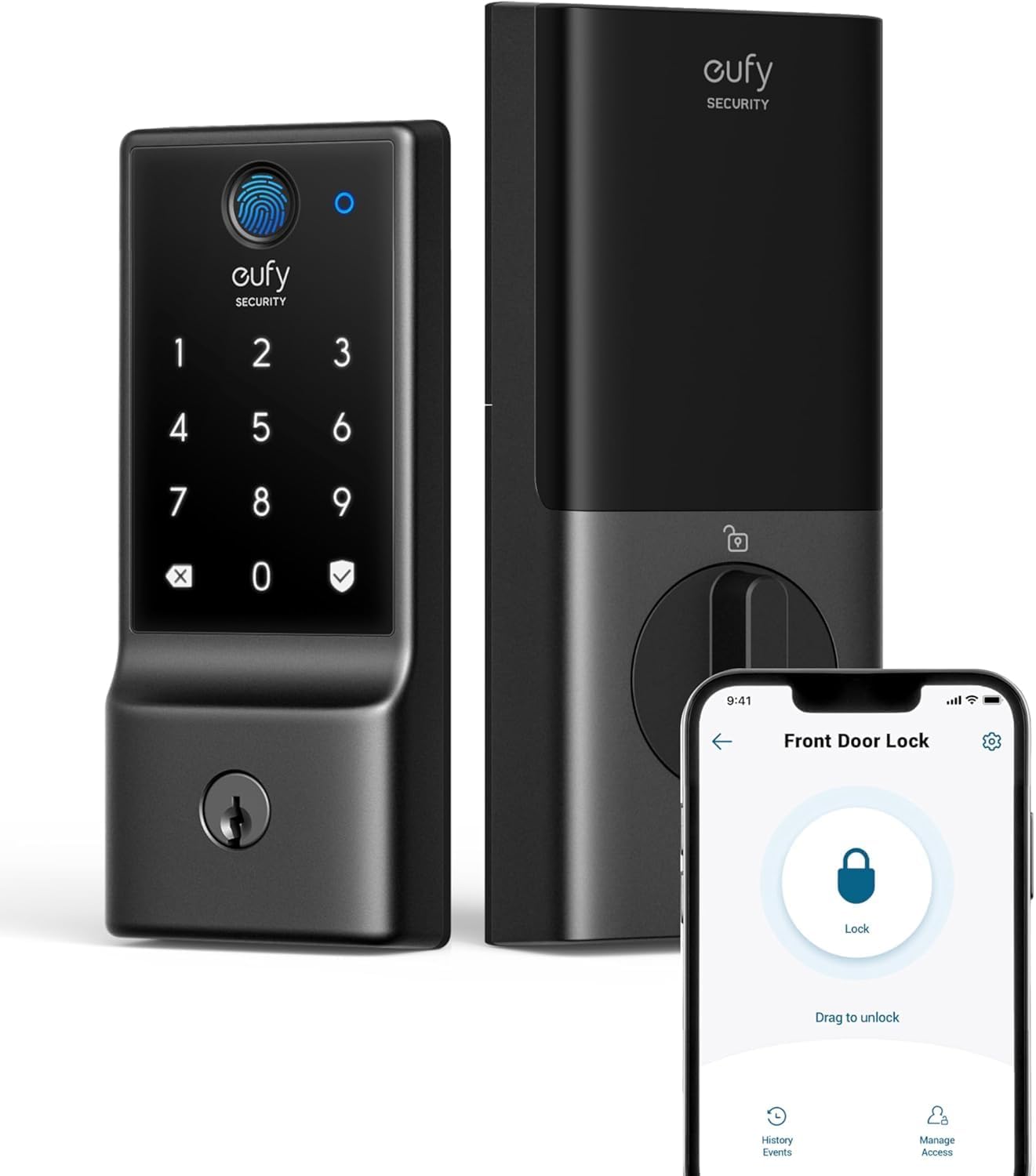
| Lock Type | Deadbolt |
|---|---|
| Connectivity Protocol | Wi‑Fi |
| Additional Features | 6‑way unlocking; Auto‑Lock; real‑time notifications |
| Battery | 8 AA (included) — ~8 months |
| Waterproof (exterior assembly) | IP53 |
The eufy Security Smart Lock C220 is a multi-method deadbolt designed to replace a standard exterior deadbolt and let you manage access remotely without a separate bridge. It supports six unlocking methods including an AI-enhanced fingerprint reader, passcodes, physical keys, app control with built-in Wi‑Fi, voice assistants, and Apple Watch control, which makes everyday entry flexible for family members and guests. The lock is rated BHMA Grade 3 for durability, is IP53 splash resistant, and runs on eight AA batteries claimed to last about eight months under moderate use; a bottom power port lets you temporarily power the lock if the batteries die. Setup is meant to be straightforward for standard bore doors and the app provides user and event management plus real‑time notifications. Limitations to note are its lack of HomeKit, IFTTT, or Matter support and that compatibility excludes mortise locks and some nonstandard door preparations, so confirm door specs before buying.
Best for: Buyers who want a practical, all‑in‑one smart deadbolt that prioritizes reliable remote access, fingerprint convenience, and minimal extra hardware for everyday front door security and access management.
Less Ideal for: People who need HomeKit, Matter, or advanced third‑party automation integrations or who have nonstandard mortise locks or door bores that the product does not support.
- Multiple convenient unlock methods including fast fingerprint and built‑in Wi‑Fi for remote control without a bridge
- Long nominal battery life with 8 AA cells and a backup power port for emergency power
- BHMA Grade 3 durability rating and IP53 exterior resistance for everyday use
- App-managed user profiles, passcodes, and real‑time activity notifications for access control
- Not compatible with Apple HomeKit, IFTTT, or Matter at this time
- Requires specific door bore and thickness; not compatible with mortise locks
Verdict: A straightforward, bridge‑free smart deadbolt that delivers fingerprint access and remote Wi‑Fi control for buyers who want reliable, low‑maintenance front door security.
Philips Wi‑Fi Smart Deadbolt DDL242X-1HW

| Lock Type | Wifi Lock |
|---|---|
| Connectivity Protocol | Wi‑Fi |
| Control Method | Remote, Voice |
| Style Name | Keypad |
| Material Type | Aluminum |
The Philips Wi‑Fi Smart Deadbolt is a feature-rich keypad deadbolt meant for front doors that combines biometric access, passcodes, and remote control through built‑in Wi‑Fi. Installation follows a typical smart lock fit and the lock can be controlled with the Philips app to create and manage up to 100 user codes, issue one‑time or scheduled codes, and receive real‑time access notifications. The fingerprint sensor is fast, advertised at about 0.3 seconds, and the lock supports voice unlocking via Alexa and Google Assistant for hands‑free entry. Security features include auto‑lock scheduling, anti‑tamper alarm, low battery alerts, and emergency key override. Because Wi‑Fi is onboard there is no separate bridge required for remote access, which simplifies geofencing and remote unlock when paired with the app. Expect practical convenience for households, rentals, or frequent travelers, though advanced enterprise features and detailed installation fit checks may be needed for nonstandard doors.
Best for: Buyers who want a full‑featured smart deadbolt with easy remote access and flexible entry methods for everyday home use, rentals, or frequent travelers focused on convenience over enterprise features.
Less Ideal for: People who need specialized commercial or enterprise access control or those wanting guaranteed geofencing details documented by the manufacturer should consider other options.
- Multiple unlocking options: fingerprint, keypad codes, physical key, voice, and remote app control.
- Built‑in Wi‑Fi enables remote access and notifications without a separate hub.
- Supports up to 100 custom passcodes and scheduled or one‑time codes for guests and short‑term rentals.
- Fast biometric recognition for quick entry and real‑time lock activity history.
- Security extras like auto‑lock, anti‑tamper alarm, low battery alerts, and emergency key access.
- No detailed mention of geofencing specifics in the product text beyond remote Wi‑Fi control.
- May require checking door prep and dimensions to ensure proper fit on nonstandard doors.
- Advanced integrations or enterprise management features are not described.
Verdict: If you want a budget-conscious smart deadbolt that gives fast fingerprint entry plus built‑in Wi‑Fi remote control and flexible passcode sharing, this Philips model is a practical choice.
Kwikset Halo Wi‑Fi Smart Lock
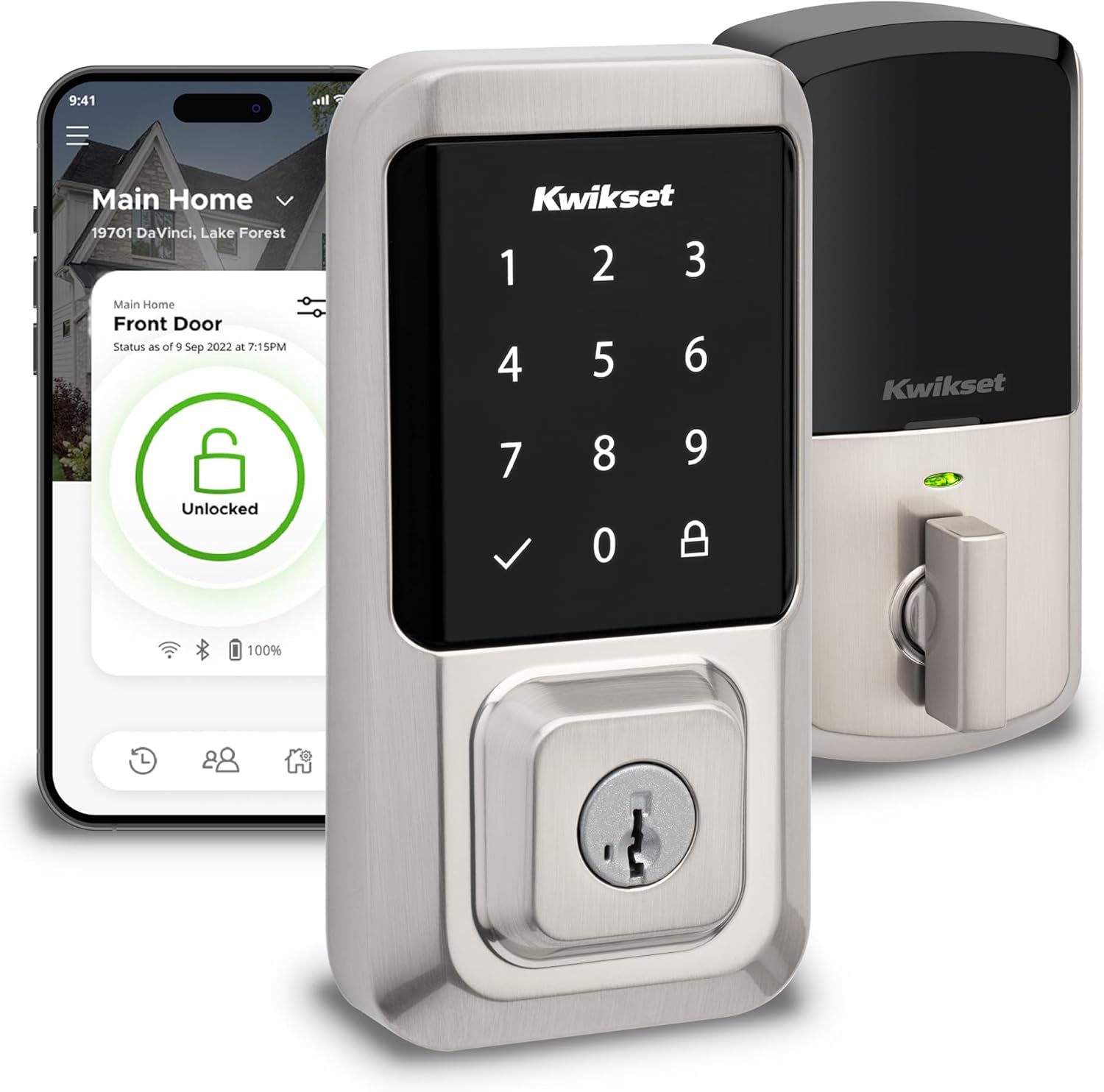
| Connectivity Protocol | Wi-Fi |
|---|---|
| Lock Type | Keypad |
| Controller Type | Amazon Alexa, Google Assistant, Vera |
| Additional Features | Auto-Lock, One-Touch Lock, Passcode Unlock, Touchscreen, Weather Resistant |
The Kwikset Halo Wi‑Fi Smart Lock is a touchscreen deadbolt designed to replace a standard exterior deadbolt and add remote access plus geofence auto-unlock. Installation is DIY-friendly and typically requires only a screwdriver and the included hardware, and the app walks you through setup. The built-in Wi‑Fi removes the need for a separate hub so you can lock or unlock from anywhere, share up to 250 access codes with guests, and receive real-time alerts for tamper or invalid code attempts. It also integrates with Amazon Alexa and Google Home for voice control and simple automations. Practical benefits include automatic rekeying with SmartKey, an auto-lock timer for hands-free security, and weather-resistant metal construction for outdoor use. Limitations to note are occasional connectivity or app complaints reported by users and the touchscreen keypad may need occasional cleaning or recalibration in harsh conditions, so those expecting flawless remote behavior should plan for some setup and troubleshooting time.
Best for: Buyers who prioritize convenient, hands-free entry and remote control with robust guest access management and want a familiar brand backed by mechanical warranties.
Less Ideal for: Users who need flawless, zero-setup remote reliability in challenging Wi‑Fi environments or who prefer a Z-Wave/Zigbee hub-based lock for local smart home ecosystems.
- Built-in Wi‑Fi lets you lock/unlock and manage codes from anywhere without a hub
- Geofence auto-unlock provides hands-free entry as you approach the door
- Supports up to 250 access codes for flexible guest and family access
- Auto-lock timer and tamper/invalid-code alerts improve day-to-day security
- Simple guided DIY installation with SmartKey rekeying capability
- Some users report intermittent app or connectivity issues
- Touchscreen keypad can require cleaning or may be sensitive in extreme weather
Verdict: Choose the Kwikset Halo if you want a touchscreen deadbolt with built-in Wi‑Fi and geofence auto-unlock for convenient, app-based and voice-controlled entry without a hub.
Yale Assure Lock 2 YRD410-WF1

| Connectivity Protocol | Bluetooth, Wi‑Fi |
|---|---|
| Control Method | App, Voice |
| Lock Type | Deadbolt, Keypad |
| Additional Features | Auto Unlock, Auto‑Lock, Passcode Unlock, Battery Indicator |
The Yale Assure Lock 2 is a touchscreen keypad deadbolt with built-in Wi‑Fi and Bluetooth that replaces most standard US deadbolts without professional help. It supports keypad codes, a traditional key, voice assistants, and remote control through the Yale Access app so you can lock or unlock the door and share temporary codes from anywhere. The lock includes Auto‑Lock and optional Auto‑Unlock with DoorSense, which pairs with the geofencing-style benefit of unlocking as you approach; notifications and activity logs make it easy to track guests, deliveries, or family arrivals. Built to industry standards, it is ANSI/BHMA Grade 2 certified and rated IPx5 for weather resistance. Practical limits are that it requires 2.4 GHz Wi‑Fi and is intended for use in the U.S. and Canada, and some users may need to adapt settings in the app for consistent Auto‑Unlock behavior in mixed phone and network environments. Installation is straightforward for DIYers but full smart features depend on reliable home Wi‑Fi and app setup.
Best for: Buyers who want a reliable, professionally minded smart deadbolt that minimizes hassle and provides secure, trackable remote access and hands‑free entry for everyday home use.
Less Ideal for: Users outside the U.S. or Canada, or those without stable 2.4 GHz Wi‑Fi and who do not want to manage app permissions or occasional connectivity tuning.
- Built‑in Wi‑Fi for remote locking, unlocking, and notifications without an extra hub
- Multiple access methods: keypad, app, voice assistants, Auto‑Unlock and physical key
- Auto‑Lock and DoorSense for hands‑free locking and presence-aware unlocking
- ANSI/BHMA Grade 2 certification and IPx5 rating for solid security and weather resistance
- Requires 2.4 GHz Wi‑Fi and is limited to U.S. and Canada for full functionality
- Auto‑Unlock can be sensitive to phone settings and network conditions which may need tuning
Verdict: If you want a secure, easy‑to‑use smart deadbolt that adds geofencing-style Auto‑Unlock and remote control without a hub, this Yale Assure Lock 2 delivers.
Choosing the Right Smart Lock with Geofencing: Key Factors to Consider
Geofence Accuracy and Trigger Methods
How a lock determines arrival or departure is critical. GPS-based geofencing relies on the phone's location services and can be affected by tall buildings, dense tree cover, or inconsistent GPS signal. Some systems blend GPS with Wi-Fi or Bluetooth beacons to improve local accuracy.
You should look for locks that offer adjustable geofence radii and alternative trigger methods like Bluetooth proximity or manual 'arrive' and 'leave' actions. Adjustable triggers let you reduce false unlocks near property boundaries and tune the system to your commute patterns. Clear options to require a confirmation or to disable automatic unlock are useful for households that prioritize explicit control over full automation.
Security and Communication Encryption
Geofencing convenience should not come at the cost of security. Locks must use robust cryptographic methods for local and cloud communications to prevent replay attacks or unauthorized access. End-to-end or strong TLS-level encryption for cloud interactions and secure BLE pairing procedures for phone-to-lock setup are important.
Also consider how the system authenticates users and issues temporary access codes. Look for multi-factor options, guest-code expiration, and auditing features that record who unlocked the door and when. Locks that default to safe behaviors during connectivity failures are preferable to those that expose the door when cloud services are unavailable.
Battery Life and Power Management
Geofencing can be power intensive because it may require frequent location checks or maintain background Bluetooth connections. The lock's own battery life is affected by motorized locking actions, wireless radios, and sensor polling. Choose locks with efficient power management, clear low-battery notifications, and easy battery replacement or backup power options.
Understand how manufacturers report battery life and whether real-world use with geofencing typically shortens stated durations. Some locks throttle location polling to conserve energy or let you select less aggressive location checks. Backup options such as a mechanical key, external power contacts, or a battery pack are valuable safeguards against lockouts.
Network Connectivity and Local Vs Cloud Control
Connectivity determines whether geofencing triggers happen locally on the phone or require cloud routing. Local triggers that use Bluetooth or local Wi-Fi can be faster and more private but may have limited range. Cloud-based geofencing can offer wider remote control but depends on internet reliability and introduces potential latency and privacy considerations.
Check whether the lock needs an intermediary hub to bridge to Wi-Fi, how that hub handles security updates, and whether the lock retains functionality if cloud services are interrupted. Integration with smart home platforms can enhance automation but also complicate the network architecture and potential points of failure.
User Controls, Guest Access, and Auditability
Practical geofencing systems let you control who can access the home and how automatic actions are applied. Look for granular guest access that supports temporary codes, scheduled access windows, and role-based permissions. A reliable activity log helps you verify entry events and troubleshoot unexpected triggers.
Consider how easy it is to change settings, revoke access, and set up safe defaults for different household members. Usability matters because complex or opaque permission systems lead to misconfigurations that can either block expected automation or open unintended access.
How Geofencing Interacts with Other Smart Home Automations
Geofencing can be the central trigger for many home automations beyond locking and unlocking. You can tie arrival and departure events to lighting scenes, thermostat setpoints, or security system arming. When designing automations, ensure the timing of geofence triggers meshes with other devices to avoid conflicting actions.
Using local triggers when possible reduces latency for time-sensitive automations. If you rely on cloud-based routines, factor in potential delays and design fallback states so doors are not unintentionally left unlocked during connectivity hiccups.
- Use arrival triggers to turn on exterior lights before you reach the door.
- Combine geofence departure with automatic security arming and thermostat setback.
- Test automations at different times and with different household members to catch edge cases.
Privacy Considerations and Data Storage
Geofencing depends on location data, and some systems store timestamps and coordinates in the cloud. Review how location information is stored, whether it is retained long term, and if it is used for analytics or shared with partners. Privacy-focused users should prefer solutions with minimal cloud logging or clear retention policies.
Look for locks that allow you to opt out of location data collection or to limit sharing to essential operational data. Local-only solutions will generally expose less of your daily movement patterns, though they may trade off convenience for privacy.
- Check the privacy policy for data retention and third-party sharing.
- Prefer systems that anonymize or aggregate data when possible.
- Opt for local processing if you want to minimize cloud-stored location logs.
Tips to Reduce False Unlocks and Lockouts
False triggers happen when a phone briefly leaves and re-enters a geofence or when multiple household members have differing location behaviors. To reduce nuisance unlocks, use a slightly larger or smaller geofence radius based on local landmarks and tune sensitivity in the app. Enabling an approach delay or requiring a device to remain within the fence for a short time before unlocking can also help.
Have fallback access ready such as a keypad code, mechanical key, or temporary access code for guests. Regularly test low-battery alerts and document how to supply emergency power to the lock so you do not get locked out when batteries die.
- Adjust geofence radius based on real-world testing at your property.
- Require a confirmation or short dwell time before automatic unlock.
- Keep a backup access method configured and tested.
Installation and Compatibility Considerations
Most smart locks with geofencing are designed to fit standard deadbolts, but confirm mechanical compatibility with your door and existing hardware. Check whether the lock requires a separate bridge or hub to enable remote features and whether that hub needs a dedicated power outlet near your router.
Pay attention to door thickness, latch types, and whether the lock's interior footprint interferes with door trim or handles. Ease of installation and clear instructions reduce the chances of improper setup that can affect geofencing performance.
- Measure door thickness and existing deadbolt dimensions before buying.
- Verify whether a Wi-Fi bridge is required for remote control and where it will be placed.
- Ensure the interior mounting does not obstruct other hardware or access.
Managing Multiple Users and Household Policies
Households often need different access rules for adults, children, and service providers. Create profiles with appropriate access windows and decide which users get automatic geofence-based unlocking versus manual codes. Educate family members about how their phone settings, battery saving modes, and location permissions affect geofencing behavior.
Set policies for lost or replaced phones so you can revoke access quickly. Use activity logs to audit access and adjust permissions if unexpected unlocks occur.
- Set role-based permissions and temporary codes for guests.
- Document steps to remove a lost device from authorized users.
- Regularly review audit logs for anomalies.
How We Chose the Best Smart Lock with Geofencing
We focused on features and real-world behaviors that affect how well geofencing works day to day. Selection prioritized locks that implement reliable location-triggered actions, maintain strong cryptographic protections, and handle network connectivity in ways that minimize false locks or unlocks. We valued models with configurable geofence radii or trigger methods so users can tune sensitivity, and those that offer fallback access options such as keypad codes or mechanical keys for redundancy. Security controls were a core filter. We excluded any product lacking standard encryption for communications or clear support for secure local control. Battery life and power management were another key screen since frequent location polling can drain batteries; we favored solutions with efficient power profiles and low-battery alerts. Integration with local Wi-Fi or a secure bridge was considered when it affected geofencing reliability. Finally, we checked for user-facing features like guest access controls, audit logs, and reasonable setup flows that matter to everyday use. Products missing basic access redundancy, clear security controls, or that relied solely on cloud-only unlocks without local fallback were rejected.
Our full evaluation process is outlined in our review methodology.
FAQ
Will geofencing work if my phone battery is low or dead?
Often geofencing depends on the phone providing location updates, so a dead phone typically cannot trigger automatic unlocks. Low-power modes that restrict background location can also prevent geofencing. Keep backup entry methods like keypad codes or a mechanical key configured for such cases.
Can geofencing unlock the door for everyone in the house automatically?
It depends on how you configure user profiles. Many systems let you set which accounts use automatic unlocking and which require manual codes. You can usually enable geofencing for specific users while keeping stricter controls for others.
Is geofencing more private than other location-based systems?
Privacy varies by implementation. Local Bluetooth-based triggers keep location data mostly on your phone, while cloud-based geofencing may log timestamps and coordinates on remote servers. Review the product's privacy settings and retention policies if minimizing stored location data is important.
What happens if my internet or cloud service is down?
Many locks still allow local Bluetooth or keypad access when the internet is down, but remote features and cloud-synced settings may be unavailable. Choose a lock with reliable local fallback options and confirm what features remain functional without internet access.
Can geofencing be used to trigger other devices at home?
Yes. Geofencing events are commonly used to trigger lights, thermostats, and security systems. For fast or time-sensitive actions, prefer local automations; cloud-based routines may introduce delays.
Final Verdict
Prioritize geofencing reliability and secure communications when choosing a smart lock with geofencing. Balance location accuracy against battery impact by looking for adjustable triggers and efficient power management. Ensure redundant access methods such as keypad codes or mechanical keys are available and test them before relying on automation. Focus on the factors that matter most to your household: whether you need tight privacy controls, wide remote access, or simple local-only automation. With the right balance of security, connectivity, and user controls, you can enjoy the convenience of hands-free entry without compromising safety or reliability.