
Note: This article contains affiliate links. If you click on these links and make a purchase, we may earn a small commission at no extra cost to you. This helps support our research and content. Read our full affiliate disclosure here.
If you make stickers for crafts, small-business packaging, or personal projects, the right laminator can protect artwork while preserving adhesive strength and finish. A laminator for stickers needs gentler heat, a steady feed path, and consistent pressure to avoid bubbling, warping, or glue migration. This guide shortlists the top options for sticker lamination and explains the practical tradeoffs you should consider. Below we spotlight the best laminators for stickers and evaluate them on speed, temperature management, and ease of use to help you pick the right tool for your workflow.
Top Picks at a Glance
| Best Overall The best all-around choice for most situations | Scotch PRO TL906 Thermal Laminator |  |
| Best Quality Built to a higher standard if you want something more solid | Chilino 13" 4-Roller Laminator |  |
| Best Value The sweet spot between price and what you get | bonsaii 9-Inch Laminator L418-50P |  |
| Best Budget The cheapest option that still gets the job done reliably | MYKLLIFF 9-Inch Laminator |  |
| Top Rated A top-rated pick with lots of positive feedback | Scotch TL901X Thermal Laminator |  |
| Most Popular A crowd favorite that many people choose with confidence | Amazon Basics 9-Inch Thermal Laminator |  |
Scotch PRO TL906 Thermal Laminator

| Warm Up Time | 5 Minutes |
|---|---|
| Speed | 1.25 feet_per_minute |
| Number of Rollers | 2 |
| Max Pouch Width | 9 in. |
The Scotch PRO TL906 is a small thermal laminator intended for home, school, or light office use that accepts pouches up to 9 inches wide. It uses two heated rollers with selectable temperature for 3- and 5-mil pouches and warms up in about five to six minutes, producing bubble- and wrinkle-free results at roughly 15 inches per minute. LED controls, Auto Shutoff after one hour, and Never Jam Technology make it easy to run single sheets, recipe cards, photos, event flyers, and small craft items without frequent supervision. The unit is compact and portable, so it tucks into a craft corner when not in use. Limitations are its modest speed and narrow maximum width, so larger poster-sized projects are not possible, and it is designed for pouch laminating only rather than cold laminates or roll-based continuous jobs. For everyday laminating of stickers, labels, and small prints this machine balances ease of use with reliable finishes.
Best for: Buyers wanting a reliable, easy-to-use laminator for craft projects, stickers, labels, photos, and school or home-office documents who value simple controls and clean results.
Less Ideal for: People who need to laminate wide posters, continuous roll jobs, or who require cold lamination for heat-sensitive materials should look at other solutions.
- Accepts 3- and 5-mil pouches for durable, photo-safe finishes
- Two heated rollers and temperature settings for smooth, bubble-free laminations
- Relatively fast warm-up (about 5–6 minutes) and 15 in./min laminating speed
- Never Jam Technology and Auto Shutoff improve ease of use and safety
- Maximum pouch width limited to 9 inches so larger items cannot be laminated
- Not suitable for continuous roll laminating or cold lamination methods
Verdict: A compact, user-friendly thermal laminator that delivers clean, durable laminations for stickers and small crafts without fuss.
Chilino 13" 4-Roller Laminator
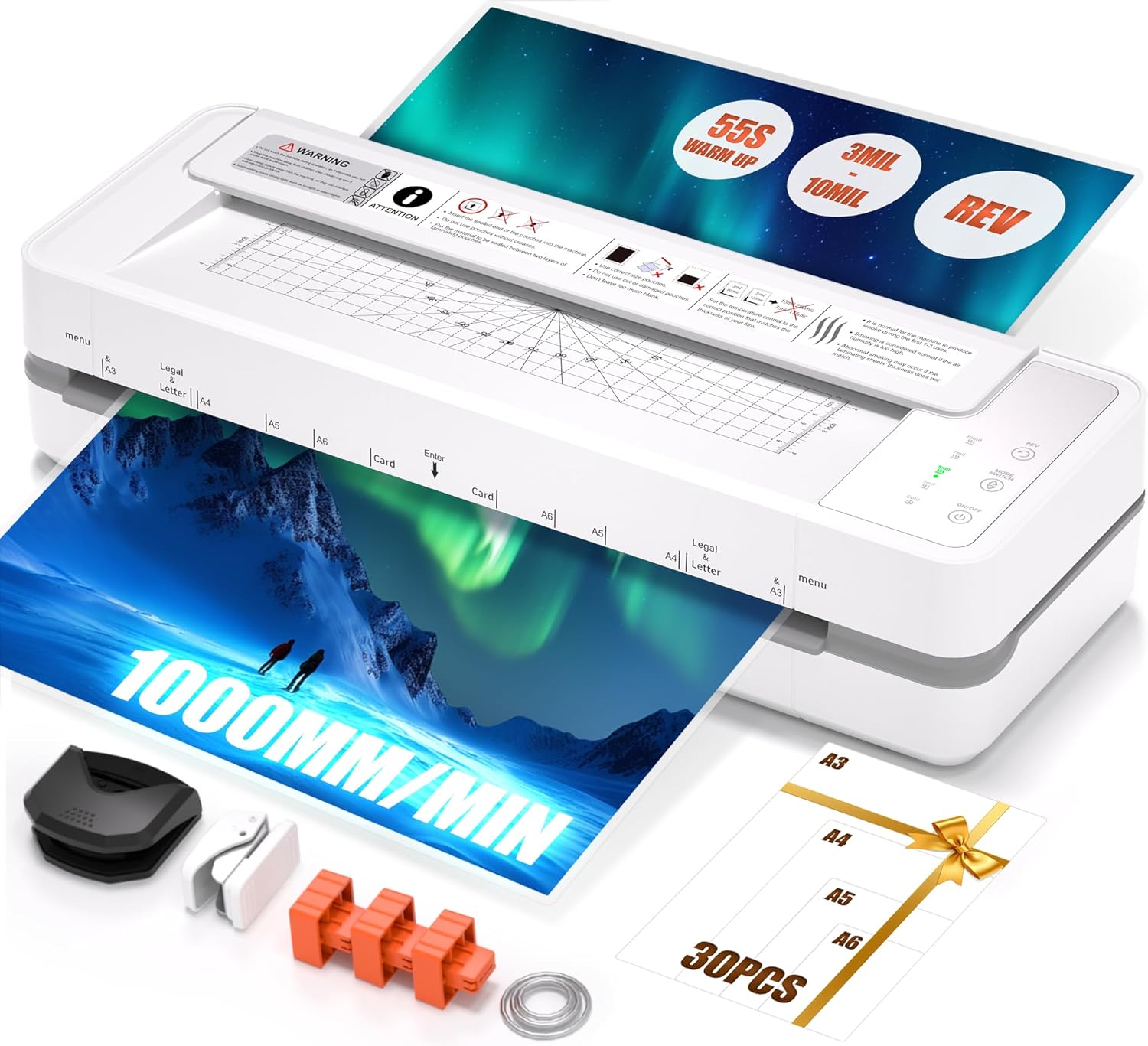
| Warm up time | 55 seconds |
|---|---|
| Speed | 1000 mm/min |
| Rollers | 4 |
| Pouch thickness | 3–10 mil |
| Maximum width | 13 inches |
The Chilino 13" 4-roller laminator is built for high-throughput, professional laminating tasks and works well for larger media up to A3/11×17. Its four-roller design (two heat, two pressure) promotes even heat distribution and reduces bubbles and wrinkles compared with two-roller units, while a fast 55-second warm-up and 1000 mm/min feed speed let you finish batches quickly. The machine accepts 3–10 mil pouches, so it can protect delicate sticker sheets and sturdier items like signage, and the REV jam-release plus one-touch reverse helps rescue misfeeds without damage. It also includes a starter kit of 30 pouches, a cutter, corner rounder, hole punch, and binder rings so you can trim and finish prints right away. Practical limitations are that this is a purpose-built laminator so it is larger than compact home models and its 13-inch throat limits maximum sticker widths to that size; heavier use will also favor appropriate pouch types to avoid over-thick stacking. For people making stickers and decals sized to A3 or smaller, it delivers reliable, fast, bubble-free results.
Best for: Buyers who need a fast, professional laminator for producing bubble-free stickers, signage, and prints up to 13 inches wide and who prioritize consistent results and throughput over a compact footprint.
Less Ideal for: Casual hobbyists who only laminate occasional small sheets or users who need a portable, desk-sized machine for very narrow sticker jobs.
- Four-roller system for more even heat and pressure, reducing bubbles and wrinkles
- Fast 55-second warm-up and 1000 mm/min laminating speed for quick batch processing
- Supports 3–10 mil pouches so it can handle thin sticker sheets and thicker protective covers
- REV jam-prevention with easy reverse to remove misfeeds without damaging media
- Includes starter kit (30 pouches, cutter, corner rounder, hole punch, binder rings) for immediate use
- 13-inch inlet limits the maximum width of stickers to A3/11×17
- Larger, commercial-style footprint compared with compact home laminators
Verdict: If you need fast, consistent, bubble-free laminating for stickers and prints up to 13 inches, this commercial-style four-roller machine is a performance-focused choice.
bonsaii 9-Inch Laminator L418-50P
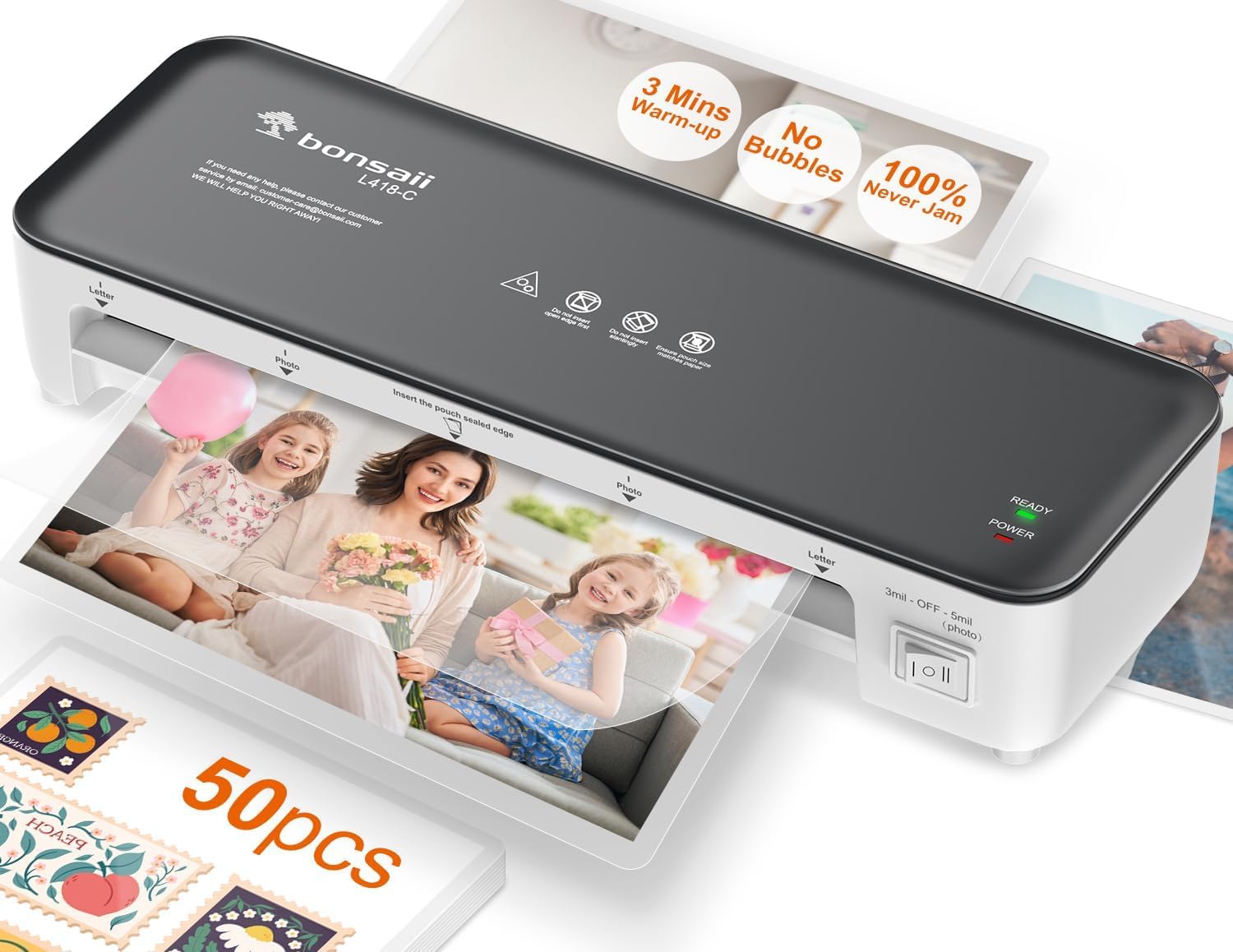
| Unit Count | 50 Count |
|---|---|
| Speed | 0.98 feet_per_minute |
| Warm Up Time Description | 1-3 Minute |
| Number of Rollers | 2 |
The bonsaii 9-inch laminator is a small thermal unit intended for everyday lamination tasks like IDs, photos, labels, and small sticker sheets. It uses 3-5 mil pouches and reaches operating temperature in about 1 to 3 minutes, feeding items through two rollers at just under 1 foot per minute for steady, bubble-resistant results. The machine highlights a patented anti-jam system that helps prevent common feeding problems, and the lightweight footprint makes it easy to store or move between a desk and a classroom. Included 50 pouches make it usable out of the box for projects and trial runs. Limitations are its narrow 9-inch width and modest speed, which restricts it to small-format stickers and occasional runs rather than high-volume or wide-format sticker production, and heavier laminated items require the 5 mil setting to avoid wrinkling. For straightforward sticker sealing, ID cards, labels, and craft pieces this unit is practical and user friendly.
Best for: Buyers who want a compact, reliable laminator for occasional sticker sealing, classroom crafts, and personal document protection where ease of use and jam prevention matter most.
Less Ideal for: People who need to laminate wide-format stickers, large posters, or run long high-volume jobs should consider larger, faster laminators instead.
- Patented anti-jam technology reduces feed problems and protects materials.
- Fast warm-up (1–3 minutes) so you can start projects quickly.
- Compatible with 3–5 mil pouches for light to medium-duty laminating.
- Includes 50 starter pouches so you can begin laminating immediately.
- Compact and lightweight design is easy to store and move.
- 9-inch maximum width limits use to small-format stickers and documents.
- Moderate lamination speed not suited for high-volume production.
Verdict: A compact, easy-to-use 9-inch laminator with anti-jam tech and included pouches that is ideal for sealing small stickers and craft projects.
MYKLLIFF 9-Inch Laminator

| Number of Rollers | 1 |
|---|
This 9-inch MYKLLIFF laminator is a small, user-friendly machine aimed at light home and classroom tasks. It heats up in about three minutes and supports both hot thermal pouches and cold self-adhesive sheets, so you can protect standard documents, photos, and heat-sensitive items like some stickers. The single-roller feed and ABS jam-release button make clearing misfeeds straightforward, and the unit is designed to run quietly for low-disruption use. The included 6-in-1 photo laminator kit gives starters some pouches and accessories, and the compact footprint makes it easy to store or move between workspaces. Limitations include a single roller (so it is not built for heavy continuous production) and guidance to use 3–4.5 mil pouches for best results, which constrains pouch thickness choices for very heavy-duty protection. For occasional sticker sealing and classroom laminating it performs well, but it is not intended as a high-volume commercial laminator.
Best for: Buyers who want an inexpensive, easy-to-use laminator for occasional home, classroom, or craft tasks and who prioritize quick setup and simple jam recovery.
Less Ideal for: People needing a high-volume, commercial-grade laminator or users who require very thick-pouch lamination for heavy-duty protection.
- Hot and cold modes let you laminate heat-sensitive items as well as standard documents
- Fast 3-minute warm-up reduces wait time for quick jobs
- ABS jam-release lever simplifies clearing jams without damaging documents
- Compact and lightweight for easy storage and portability
- Single roller design limits heavy or continuous use
- Cold-mode requires separate self-adhesive sheets which are not included
Verdict: A budget-friendly, compact laminator with hot and cold modes and a jam-release lever that is well suited for occasional sticker and classroom use.
Scotch TL901X Thermal Laminator

| Warm Up Time Description | 5 minutes |
|---|---|
| Speed | 1 feet_per_minute |
| Number of Rollers | 2 |
| Included Components | Two 9.4" x 11" laminating pouches |
The Scotch TL901X is a straightforward thermal laminator built for everyday document and photo protection. It uses two heated rollers and offers two temperature settings so you can run 3-mil or 5-mil pouches for a clear, photo-safe finish without wrinkles or bubbles. Setup is simple: the unit warms up in about five minutes and laminates at roughly one letter-size page per minute, and there is a release lever to recover misfed pouches. Its compact footprint and compatibility with common pouch sizes make it handy for laminating stickers, school projects, ID cards, and small photos. Because it is a basic thermal machine, it does not offer cold lamination for heat-sensitive materials and accepts items only up to about 9 inches wide, so larger prints require a different model. For buyers who want a reliable, no-frills laminator that produces consistent, durable laminates for stickers and small craft projects, the TL901X performs well.
Best for: Buyers who prioritize a dependable, easy-to-use laminator for frequent home, classroom, or craft use and want consistent, professional-looking laminates for stickers and small documents.
Less Ideal for: Those who need cold lamination, want to laminate large-format sheets, or require advanced speed or commercial throughput should consider a different model.
- Two heated rollers and dual temperature settings produce smooth, bubble-reduced laminates.
- Accepts common 3-mil and 5-mil pouches for durable, photo-safe finishes.
- Fast enough for small batches at about one letter-size page per minute with a quick warm-up.
- Compact design and simple controls suit home, classroom, or small-office workflows.
- Only thermal lamination is supported, so heat-sensitive materials cannot be laminated safely.
- Maximum width limit (~9 inches) prevents laminating larger sheets or wide sticker sheets.
Verdict: A reliable, compact thermal laminator that consistently produces bubble-minimized, durable laminates for stickers and small craft projects.
Amazon Basics 9-Inch Thermal Laminator

| Warm up time | 5 minute |
|---|---|
| Number of rollers | 2 |
This 9-inch Amazon Basics thermal laminator is a simple, no-frills machine for laminating letter and legal papers, photos, business cards, and stickers when used with compatible pouches. It warms up in about 3 to 5 minutes and offers two heat settings for 3-mil and 5-mil pouches, so you can protect thin prints or standard documents. The two-roller system feeds pouches steadily and the built-in jam release lever makes it easy to clear stuck items without disassembly. The unit ships with a couple of 3-mil pouches to get started and its narrow footprint fits easily on a desk or craft table. For sticker makers, pairing this laminator with cut-to-size pouches or laminating sheets makes sealing and protecting sticker sheets straightforward, though you will need a separate cutter or trimmer to finish individual stickers neatly. It is not intended for heavy production use, and it cannot laminate materials like cloth, wood, or foil, so keep expectations realistic for craft runs.
Best for: Crafters and casual sticker makers who want an affordable, easy-to-use laminator to protect sticker sheets and small prints for home projects.
Less Ideal for: Users needing a heavy-duty, high-throughput laminator or those who want to laminate atypical materials like fabric, wood, or metal foil.
- Quick warm-up (about 3–5 minutes) so you can start projects fast
- Two heat settings for 3-mil and 5-mil pouches to handle different pouch thicknesses
- Jam release lever simplifies clearing stuck pouches without taking the unit apart
- Compact footprint fits easily on a desk or craft table
- Designed for light to moderate use and not built for high-volume production
- Cannot laminate non-paper materials such as cloth, wood, foil, or plastic sheets
Verdict: A simple, inexpensive 9-inch laminator that reliably handles 3- and 5-mil pouches and is well suited for hobby sticker projects and light office use.
Choosing the Right Laminator for Stickers: Key Factors to Consider
Temperature Management
Accurate, adjustable temperature matters because sticker backings and adhesives respond differently to heat. Too much heat can warp thin vinyl, soften adhesive layers, or cause glue to bleed through lamination film. Conversely, too little heat may yield poor adhesion between film and print, resulting in delamination over time.
Look for models with incremental temperature settings or a warm-up indicator so you can reach and maintain the target heat before feeding stickers. Consistent temperature across the roller path prevents hot spots that create bubbles or uneven gloss.
Feed Path and Roller Design
A straight, stable feed path with matched rollers reduces the chance of jams, wrinkles, and trapped air. Rollers with rubberized, textured surfaces help maintain grip on small sheets and die-cut sticker rolls without slipping or shifting during lamination.
The distance between rollers and the presence of guide plates or edge clamps can make it easier to align sticker sheets. For irregular or small pieces, a slow, steady feed is preferable to a fast feed that can tug or misplace art.
Supported Materials and Thickness
Sticker projects use a range of substrates: thin paper stickers, coated photo paper, and different vinyl weights. Match the laminator's minimum and maximum thickness ratings to your typical media and the protective film weight you plan to use.
Also check whether the machine supports both carrier-based and pouch-style laminates if you occasionally need a cold or carrier-assisted option. Using a laminator outside its intended thickness range risks poor bonding or mechanical damage.
Operational Speed and Batch Handling
Speed affects throughput for small-business or event prep. Faster machines process more sheets per hour but can increase the risk of bubbles and misalignment with delicate sticker stocks. If you laminate many small pieces, a moderate speed with precise roller control often yields better consistent results than sheer throughput.
Consider whether the unit has a continuous-feed mode or a platen/flatbed option for slow, careful passes when aligning multiple stickers on a single sheet.
Ease Of Use And Alignment Features
Controls that are clear and simple reduce setup time and mistakes. Features such as removable edge guides, indexed alignment marks, and visible entry slots help you center sticker sheets quickly. A warm-up indicator, ready light, and an obvious reverse function for clearing jams are particularly useful.
For hobbyists, a compact footprint and lightweight design make storage and occasional transport easier. For more frequent use, look for units with intuitive controls that shorten the learning curve.
Maintenance and Long-Term Reliability
Regular maintenance keeps laminators running smoothly. Consider how easy it is to access and clean rollers, replace worn parts, or clear adhesive buildup. Some machines allow user maintenance without tools, which saves downtime.
Durable construction and readily available replacement parts matter if you expect sustained use. Machines with protective covers and simple maintenance routines typically deliver more predictable long-term results for sticker projects.
Cold Vs Warm Lamination for Stickers
Cold lamination uses pressure-sensitive films and is best when heat could damage a sticker's adhesive or printed surface. It is the safer option for heat-sensitive materials, like some vinyls or specialty inks that may smear or soften with heat.
Warm lamination bonds a film to the sticker surface using heat and pressure, often resulting in a more permanent seal and a smoother finish. Use warm lamination when the sticker stock and adhesive are rated for heat and when you need a high-gloss or long-lasting protective layer.
- Choose cold lamination for heat-sensitive adhesives and delicate inks.
- Choose warm lamination for durable, high-gloss protection when materials tolerate heat.
- Some laminators offer both modes or have adjustable temperature controls for flexibility.
Preparing Sticker Sheets for Best Results
Clean, dust-free surfaces and flat sheets give the biggest improvement in lamination quality. Wipe sheets gently to remove debris, and store sticker sheets flat before lamination to avoid curling.
If you work with small die-cut stickers, consider mounting them on a carrier sheet the same size as the pouch or film to help feed stability. Trim irregular edges so the laminator can grip the sheet evenly.
- Remove loose debris and lint before laminating.
- Use a carrier sheet for small or oddly shaped stickers.
- Trim edges slightly for a consistent feed surface.
Choosing The Right Film Finish And Thickness
Matte, gloss, and satin finishes change the sticker's appearance and tactile feel. Gloss films accentuate color and make stickers pop, while matte films reduce glare and give a more subtle look. Satin sits between the two.
Film thickness affects durability and flexibility. Thicker films increase scratch resistance but can stiffen a sticker and make application to curved surfaces harder. Match film thickness to your intended use and the flexibility needed for final application.
- Gloss for vibrant colors, matte for low glare, satin for compromise.
- Use thinner films for flexible decals and thicker films for protection on flat surfaces.
- Check laminator thickness limits before selecting heavy films.
Troubleshooting Common Lamination Issues
Bubbles often result from trapped air or incorrect temperature. Try a slower feed speed, ensure the film and sheet are flat, and check temperature settings. For persistent bubbles, experiment with slightly higher or lower heat in small increments.
Wrinkling or misfeeds usually indicate alignment or roller pressure problems. Verify guides, inspect rollers for debris, and use a carrier sheet for small items. If a jam occurs, use the reverse function if available and clear the path before continuing.
- Slow feed and re-check temperature for bubbles.
- Clean rollers and use carrier sheets for small or irregular pieces.
- Use reverse function to clear jams and realign sheets before retrying.
Safety And Workspace Setup
Place the laminator on a stable, heat-resistant surface with adequate clearance for feed and exit paths. Keep flammable materials away from the unit, and allow proper ventilation during extended runs.
Observe basic safety for heated equipment: let the machine warm up fully before use, avoid touching hot surfaces, and unplug the unit when performing cleaning or maintenance. Keep fingers and loose clothing away from roller openings.
- Use a stable, heat-resistant work surface and maintain a clear feed path.
- Allow warm-up time and avoid contact with hot surfaces.
- Unplug before cleaning and keep hands clear of rollers while operating.
How We Chose the Best Laminator for Stickers
We focused on features that directly affect sticker outcomes rather than generic gadget specs. Key evaluation criteria included temperature control accuracy because excess heat can deform sticker backing and weaken adhesive; feed consistency and roller design to minimize dust, bubbles, and misfeeds; maximum and minimum supported thickness to cover common sticker stocks and protective films; and build quality and maintenance requirements to ensure reliable operation over repeated runs. We also considered operational speed for batch work and ease of alignment for small-format sheets or die-cut rolls. We excluded devices meant solely for heavy-duty industrial lamination or for cold-only document lamination that lack fine temperature regulation. Products lacking basic safety features such as thermal cutouts or those without clear thickness/temperature specs were not considered. The shortlisted laminators demonstrate practical performance for sticker applications, combining controlled heat, dependable mechanics, and user-focused controls.
Our full evaluation process is outlined in our review methodology.
FAQ
Can I laminate die-cut stickers with a pouch laminator?
Often yes, but small die-cut pieces can be tricky. Use a carrier sheet or mount the die-cut stickers on a larger backing sheet to stabilize the feed. Choose a laminator with a slow feed option and consistent roller pressure for best results.
Will lamination affect the adhesive on my stickers?
It depends on temperature and film type. Excess heat can soften some adhesives and reduce tack, so use controlled temperatures or cold films when adhesive sensitivity is a concern. Test a sample before processing larger batches.
How do I avoid bubbles and wrinkles when laminating stickers?
Work with clean, flat sheets, use a carrier for small pieces, and run the laminator at a moderate speed. Ensure even temperature and roller pressure, and slow down the feed if bubbles appear.
Is a cold laminator as durable as a warm laminator for sticker protection?
Cold lamination provides good protection for many applications and avoids heat-related risks, but warm lamination can create a stronger bond in cases where materials tolerate heat. Durability depends on film quality and correct application rather than heat alone.
How often should I clean or service my laminator when making stickers regularly?
Clean rollers and remove adhesive buildup after noticeable residue appears or after extended runs. Routine inspection and occasional deep cleaning every few months for moderate use will keep performance consistent. Follow manufacturer maintenance guidance for best results.
Final Verdict
When choosing a laminator for stickers, prioritize temperature control, a stable feed path, and a supported thickness range that matches your materials. Balance speed against the need for precise alignment and bubble-free results, and plan for routine maintenance to maintain consistent output. Focus on the features that protect printed surfaces and adhesives rather than raw throughput. With the right combination of temperature management, roller design, and film selection, you can achieve durable, attractive stickers that hold up in real use.