
Note: This article contains affiliate links. If you click on these links and make a purchase, we may earn a small commission at no extra cost to you. This helps support our research and content. Read our full affiliate disclosure here.
If you need to print big prototypes, jigs, or functional end-use parts, a Large 3D Printer changes what you can produce at home or in a small shop. Larger-format printers let you print fewer assemblies, scale up models, and test full-size parts without cutting or gluing. But bigger machines also bring new challenges around bed leveling, enclosure, material handling, and print time. This guide shortlists the top Large 3D Printers suited for larger builds and more demanding applications. We evaluated machines for build volume, reliability, and ease of use so you can pick the one that best fits your workflow. Read on for the criteria we used and practical considerations to help you choose the right large-format printer for your projects.
Top Picks at a Glance
| Best Overall The best all-around choice for most situations | Snapmaker Artisan 3D Printer |  |
| Best Quality Built to a higher standard if you want something more solid | Original Prusa XL 5-Toolhead |  |
| Best Value The sweet spot between price and what you get | Creality Ender 5 Max |  |
| Best Budget The cheapest option that still gets the job done reliably | LONGER LK5 Pro 3D Printer |  |
| Top Rated A top-rated pick with lots of positive feedback | QIDI Max4 Combo |  |
| Most Popular A crowd favorite that many people choose with confidence | Creality K2 Plus Combo 3D Printer |  |
| Best Seller A high-volume bestseller chosen again and again | Anycubic Kobra 3 Max |  |
Snapmaker Artisan 3D Printer
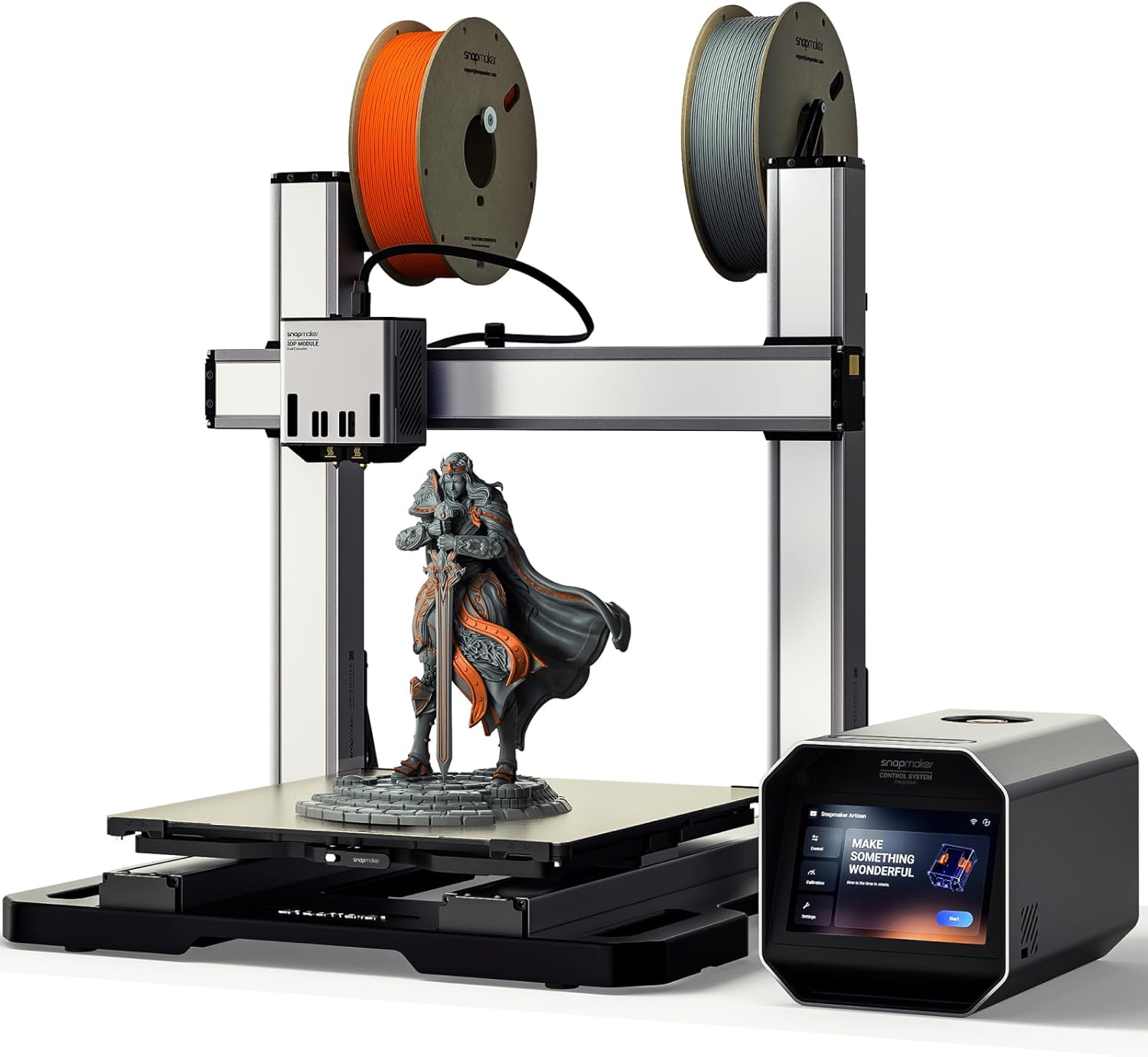
| Build volume | 400×400×400 mm |
|---|---|
| Touchscreen | 7 inch |
| Extrusion | Dual-extrusion capable |
| Materials supported | 600+ materials |
The Snapmaker Artisan is designed as a heavy-duty desktop machine for makers who need a large build volume and the option to expand into laser engraving and CNC work. In 3D-printing configuration it offers dual-extrusion capability and industrial-grade linear rails for improved stiffness and accuracy during long prints, while a 7-inch touchscreen and Snapmaker Luban software simplify job setup and monitoring. The Artisan's quick-swap modular design makes upgrading to laser or CNC straightforward if you later buy the addons, and the enclosed frame with door sensors and emergency stop improves workshop safety. Practical benefits include a true 400×400×400 mm workspace for large prototypes, support for a wide range of filaments, and a rigid metal base that holds up to higher-speed or larger prints. Limitations to consider are that the base listing is the 3D-printing unit only so laser and CNC require separate purchases, and the machine's size and weight mean it needs a dedicated bench or workshop area and some assembly and calibration effort before first use.
Best for: Buyers who want a single, upgradeable desktop machine capable of full-size prints and who value a rigid, professional-feeling platform that can grow into laser and CNC workflows.
Less Ideal for: If you need a compact, lightweight printer for occasional small prints or want an all-in-one 3-in-1 out of the box without extra purchases, this is not the best choice.
- Large 400×400×400 mm build volume for big prints and prototypes
- Industrial-grade linear rails and die-cast base for improved rigidity and precision
- Dual-extrusion module enables multi-material or support-printing workflows
- 7-inch touchscreen and bundled Luban software simplify setup and monitoring
- Modular quick-swap design allows adding laser engraving or CNC later
- Laser engraving and CNC functions are not included and must be purchased separately
- Large footprint and weight require a dedicated workspace and can complicate setup
Verdict: Choose the Artisan if you need a large, workshop-grade printer that starts as a capable dual-extruder 3D printer and can be upgraded to laser and CNC as your projects grow.
Original Prusa XL 5-Toolhead

| Build volume | 14.17 × 14.17 × 14.17 inches |
|---|---|
| Control platform | 32-bit with Input Shaper and Pressure Advance |
| Toolheads | Up to five-tool multi-material system |
| Heated bed | Segmented heated bed system |
The Prusa XL 5-Toolhead is a large-format CoreXY system built for professional prototyping and advanced multi-material work. It offers a 14.17 × 14.17 × 14.17 inch build volume and a five-tool multi-material platform that lets you print multiple colors or materials in a single job, which is useful for functional assemblies and realistic visual models. The machine runs on a modern 32-bit controller with Input Shaper and Pressure Advance for higher speed and cleaner prints, and the Nextruder with Loadcell helps deliver consistent first-layer adhesion across the bed. Segmented heated bed zones reduce energy use and warping for large parts, and Prusa supplies a Satin sheet and 1 kg spool to get started. Setup requires installing some transport-packed components, but they are described as straightforward to fit. The trade-offs are that this is a heavy, professional-grade system that assumes a workshop environment and operator familiarity with multi-tool workflows rather than a plug-and-play hobby desktop printer.
Best for: Engineers, product designers, and advanced makers who need a reliable large-format printer that handles multi-material prototypes and higher throughput with precision.
Less Ideal for: Hobbyists seeking a small, simple plug-and-play machine or users who lack space for a heavy, professional printer should consider smaller desktop options instead.
- Five-tool multi-material system enables complex color and material combinations in a single print
- 32-bit controller with Input Shaper and Pressure Advance for faster, more accurate motion
- Nextruder with Loadcell sensor promotes consistent first-layer adhesion across the full bed
- Segmented heated bed reduces energy use and helps prevent warping on large parts
- Includes Satin print sheet and 1 kg Prusament PLA spool to start printing right away
- Heavy, large machine better suited to a dedicated workspace than casual desktop use
- Requires assembly of transport-packed components which may be intimidating for first-time large-format builders
Verdict: Choose the Prusa XL 5-Toolhead when you need a robust large-format, multi-material printer that delivers industrial-class precision for professional prototyping.
Creality Ender 5 Max

| Build volume | 400×400×400 mm |
|---|---|
| Motion system | CoreXY |
| Auto leveling | 64-point automatic |
| Heated bed | 1000W rapid-heating |
| Extruder | Dual-gear direct drive |
The Creality Ender 5 Max is a large-format CoreXY printer built for higher-volume and professional small-farm use. It offers a 400×400×400 mm build volume for single-piece large models or batch runs, a rigid all-metal frame and X-axis linear rail to reduce vibration, and a direct-drive dual-gear extruder aimed at stable continuous extrusion. The 64-point automatic leveling and auto Z-offset simplify first-layer setup, while a 1000W rapid-heating bed shortens warm-up time and broadens material support for PLA, PETG, ABS, ASA and nylons. Print-farm features include WLAN multi-printer control and a tri-color status indicator for remote monitoring. The CoreXY motion system and high-torque motors push print speeds up to 700 mm/s, which can significantly raise throughput when tuned, though achieving top speeds requires calibrated profiles and may sacrifice surface finish compared with moderate speeds. This is a workhorse for creators who need large parts or steady batch output, but it still benefits from experienced tuning for best reliability and print quality at high speeds.
Best for: Practical buyers who need a dependable large-format printer for producing single big parts or steady batch runs and who value factory-like automation and print-farm management features.
Less Ideal for: Hobbyists with limited space or casual users who prioritize plug-and-play simplicity over the setup and tuning needed to optimize high-speed, large-volume prints.
- Extra-large 400×400×400 mm build volume for one-piece large models or batch printing
- Rigid all-metal frame and X-axis linear rail for reduced vibration and improved accuracy
- 64-point auto leveling with auto Z-offset for consistent first layers and less setup time
- 1000W rapid-heating bed that reaches temperature quickly and supports a wide range of materials
- WLAN multi-printer control and tri-color status indicator for managing print farms
- Top advertised speeds require careful tuning and may compromise surface finish
- Large footprint and weight make it less suitable for small workspaces
Verdict: Choose the Ender 5 Max when you need a rugged, large-volume printer with farm-friendly controls and fast heating for efficient, high-throughput production.
LONGER LK5 Pro 3D Printer
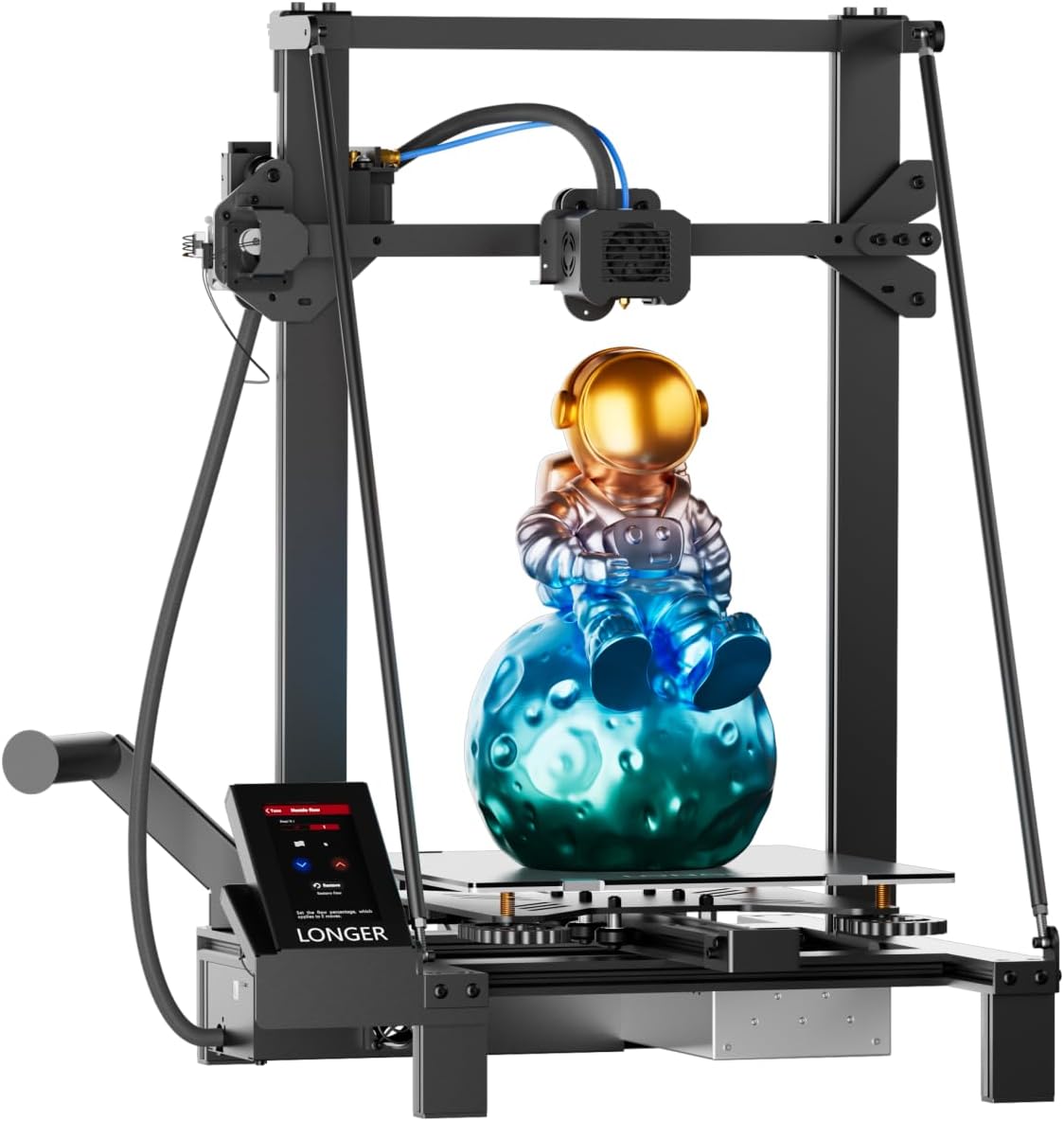
| Build volume | 300×300×400 mm |
|---|---|
| Pre-assembly | 95% pre-assembled |
| Driver type | TMC2209 silent drivers |
| Resume print | Power-loss resume |
| Filament detection | Filament runout sensor |
The LONGER LK5 Pro is a 95% pre-assembled FDM printer aimed at users who want a large build volume without a steep assembly or tuning curve. It prints on a lattice glass bed and uses a reinforced triangular frame to reduce vibration, which helps when producing taller parts in the 300×300×400 mm build area. The open source mainboard and TMC2209 silent stepper drivers mean it runs quietly and can be customized by someone comfortable editing firmware or G-code. Useful practical features include filament-out detection and power-loss resume so long prints are less likely to fail, and the printer claims up to 180 mm/s top speed with about 0.1 mm precision for typical prints. Being mostly pre-assembled and targeted at beginners, setup is faster than fully kit-based machines, though you may still need to tweak slicer settings and bed leveling for optimal results. The main compromises are that very high-speed claims depend on tuned settings and filament quality, and advanced users may prefer a more fully featured control interface or enclosure for temperature-sensitive materials.
Best for: Buyers who want a big, mostly ready-to-run printer for home or school projects and value reliability features that protect long prints while staying on a budget.
Less Ideal for: Users who need a fully enclosed, industrial-grade machine for high-temperature engineering filaments or those who want plug-and-play professional accuracy with no tuning.
- Large 300×300×400 mm build volume for bigger prints
- 95% pre-assembled for quicker out-of-box setup
- Filament runout detection and power-loss resume reduce failed prints
- Quiet TMC2209 stepper drivers for low operational noise
- Open source mainboard allows firmware tweaks and customization
- Top printing speed and claimed 0.1 mm precision require careful tuning and may not be achieved by default
- No enclosure included, which limits printing high-temperature filaments
Verdict: If you want an affordable large-volume printer that arrives mostly assembled and includes practical protections for long prints, the LK5 Pro is a strong choice.
QIDI Max4 Combo

| Build volume | 390×390×340mm |
|---|---|
| Chamber temperature | ≤65℃ |
| Hotend temperature | ≤370°C |
| Max tool head speed | ≤800mm/s |
The QIDI Max4 Combo is a purpose-built large-format desktop 3D printer aimed at professional and serious hobby workflows that need engineering material capability. It offers a 390×390×340mm build volume inside an actively heated chamber up to 65°C and a 370°C capable hotend, which together let you print materials like PC, Nylon, and carbon-fiber composites with far less warping than an open-frame machine. The printer includes a full-surface silicone heated bed for uniform first-layer adhesion, closed-loop X/Y motors and dual Z lead screws for stable motion, and an HD AI camera that monitors prints and can pause on visible failures. Connectivity includes Wi‑Fi, Ethernet and cloud control plus USB offline printing, and the touch screen simplifies local operation. Expect high-speed capability up to 800mm/s for appropriate profiles, though practical speeds will be constrained by material and flow limits. The unit is sizable and built for a workshop rather than a casual desktop, and the Polar Cooler for some advanced workflows is sold separately, so plan accessories accordingly.
Best for: Buyers who prioritize reliable, workshop-grade printing of large engineering parts and need a stable enclosed platform for high-temperature materials.
Less Ideal for: Casual hobbyists who only print small PLA parts or users who need a lightweight, portable printer for occasional use.
- Very large 390×390×340mm build volume for single-piece industrial-scale parts
- 370°C hotend and 65°C heated chamber support engineering filaments like PC, Nylon, and carbon-fiber composites
- Closed-loop X/Y motors and dual Z lead screws improve motion stability and print surface quality
- Full-surface silicone heated bed promotes uniform adhesion and reduces warping on large prints
- Built-in AI camera and touch screen provide real-time monitoring and easier local control
- Large physical footprint and weight make it less suitable for small desks or frequent relocation
- Polar Cooler is not included and must be purchased separately for some multi-material workflows
Verdict: Choose the QIDI Max4 Combo when you need a large, enclosed, and stable printer that reliably handles high-temperature engineering materials for single-piece industrial-size parts.
Creality K2 Plus Combo 3D Printer
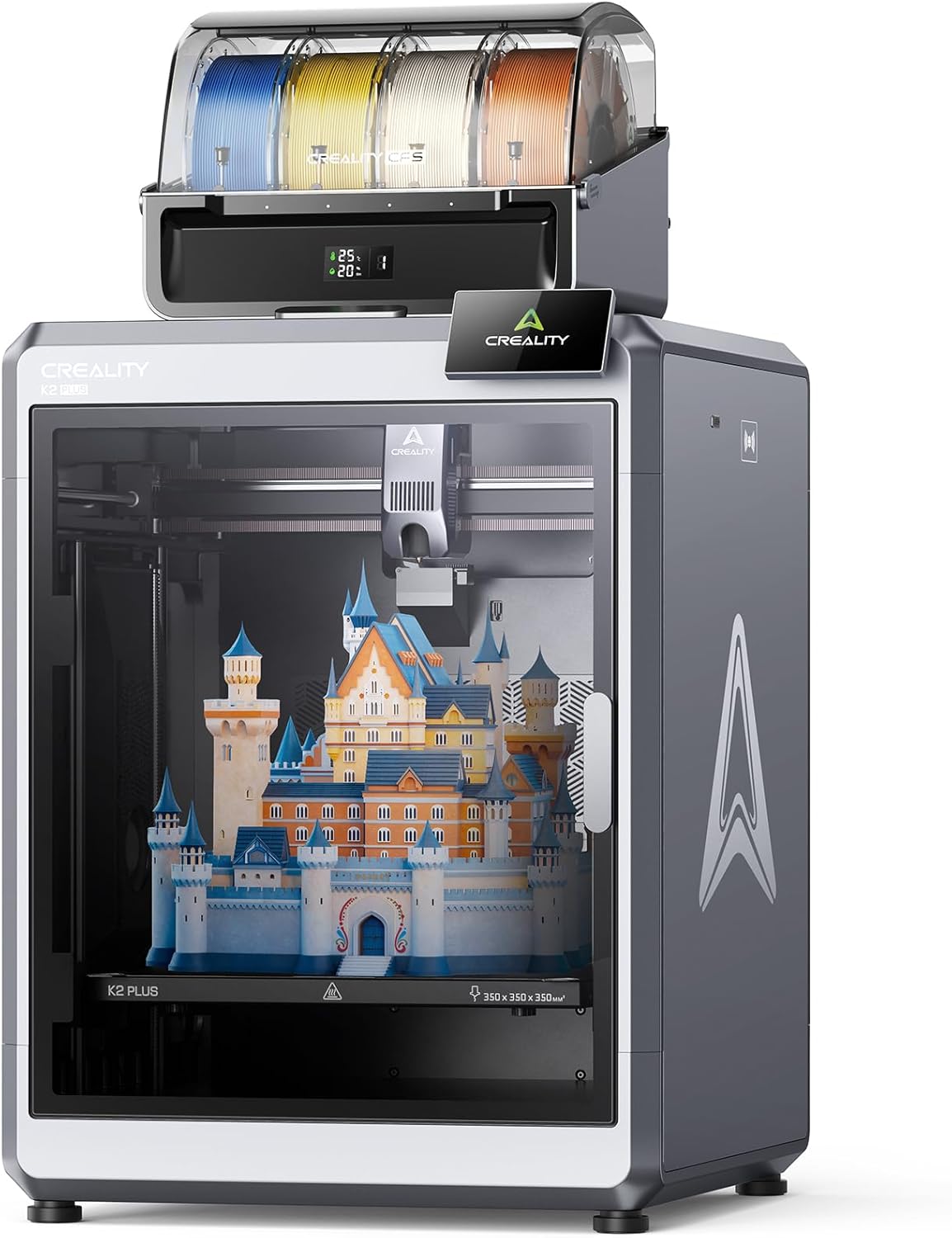
| Build volume | 350×350×350 mm |
|---|---|
| Max nozzle temp | 350°C |
| Printing speed | Up to 600 mm/s |
| Filament management | CFS multi-color system with RFID |
The Creality K2 Plus Combo is a large-format FDM printer aimed at fast, multi-color production and hands-off operation. It combines a four‑unit CFS system for up to 16-color prints with automatic filament selection and RFID recognition, so you can print multi‑colored parts without post-painting. The 350 × 350 × 350 mm build volume lets you print bigger models or larger batches, and the dual-core direct-drive extrusion with hardened steel nozzle supports high-temp filaments up to 350°C for engineering materials. Speed-focused hardware includes step-servo motors rated to 600 mm/s top speed and very high acceleration for shorter print times on large parts. Automation features such as dual AI cameras, 18 sensors, dual Z motors, and full auto-leveling reduce the need for manual tuning and help catch print failures early. Trade-offs are its substantial size and weight that demand a dedicated workspace and the complexity of a high-end machine that may require occasional advanced troubleshooting for optimal results.
Best for: Buyers who want a production-capable, large-format printer that minimizes manual intervention and prioritizes fast multi-color and engineering-material prints while valuing built-in monitoring and automation.
Less Ideal for: Casual hobbyists with limited space or first-time users seeking a plug-and-play desktop printer should consider simpler, smaller machines instead.
- True multi-color printing via Creality Flexible Switching (CFS) with automatic filament switching and RFID color/type detection
- Large 350×350×350 mm build volume for bigger parts and batch printing
- High-speed step‑servo motors offering up to 600 mm/s and rapid acceleration to cut print times
- Supports high-temperature filaments with a hardened steel nozzle and hotend to 350°C
- Extensive automation and monitoring including dual AI cameras, 18 sensors, dual Z motors, and auto-leveling to reduce failed prints
- Large footprint and heavy weight require a dedicated, well-ventilated workspace
- Advanced feature set adds system complexity that can require technical familiarity to troubleshoot
Verdict: For large-format makers who need fast, multi-color and high-temperature printing with strong automation, the K2 Plus Combo delivers production-ready capability and monitoring.
Anycubic Kobra 3 Max

| Build Volume | 420 × 420 × 500mm |
|---|---|
| Printing Speed | Up to 600mm/s (recommended 300mm/s) |
| Leveling Type | Auto Leveling Smart Z-offset |
| Materials | PLA, PETG, TPU, ABS, PVA, ASA |
The Anycubic Kobra 3 Max is a jumbo-format FDM printer built to handle big, single-piece prints and faster batch jobs. It provides a 420 × 420 × 500mm build area so you can print large models without splitting them, and it supports multicolor workflows when paired with Anycubic ACE Pro modules. The machine emphasizes speed via Kobra OS firmware, upgraded motion hardware and a claimed top speed near 600mm/s while recommended prints run slower for quality. Practical features include automatic leveling and AI print monitoring that pauses on common failure modes, which helps reduce failed long prints. That said, the focus on very high speeds means users should dial in print settings and expect tuning for large-format reliability, and multicolor printing requires buying the ACE Pro add-on rather than being native. For a buyer who prefers proven, conservative results the Kobra 3 Max offers factory testing and support, but achieving flawless, high-speed large prints will take some setup and patience.
Best for: Buyers who want a tested, factory-backed large-format printer for reliably producing big models and are willing to follow setup and tuning guidance to avoid wasted prints.
Less Ideal for: People who need out-of-the-box multicolor printing without extra accessories or those who want a plug-and-play machine with minimal tuning for intricate, high-detail small parts.
- Very large 420×420×500mm build volume for single-piece large prints
- High-speed capable motion system and firmware to shorten print times
- Auto-leveling and AI print monitoring reduce failed long prints
- Supports multicolor printing when paired with ACE Pro modules
- True multicolor requires optional ACE Pro add-on
- High-speed claims need careful tuning to balance quality on large parts
Verdict: Choose the Kobra 3 Max when you need a large, factory-tested FDM printer that can handle big parts and faster batch prints with careful setup and optional multicolor expansion.
Choosing the Right Large 3D Printer: Key Factors to Consider
Build Volume and Usable Print Area
A printer labeled as large can vary widely in usable dimensions. Look beyond headline numbers and consider the usable build plate after accounting for carriage, mountings, and any required clearance. Larger printable height is useful for tall parts, while a broad X-Y area matters for nesting multiple parts in a single run.
Usable print area influences the way you design, orient, and slice parts. Bigger volumes reduce assembly work but increase print times and material usage. Think about the sizes you actually need to print regularly and prioritize a machine with a build area that matches those parts rather than the biggest possible volume.
Mechanical Rigidity and Motion System
Long travel distances magnify small mechanical errors. A rigid frame, well-supported gantry, and quality linear guides or rails reduce vibration and ringing that become more visible at scale. Dual Z leadscrews or dedicated gantry supports help keep the X-axis level across wide spans.
Check how the printer maintains accuracy over long prints. Stiffer components reduce the need for frequent calibrations and help preserve layer alignment on large models. Also consider the type and quality of belts, pulleys, and stepper drivers since these impact positional repeatability during multi-hour builds.
Thermal Management and Enclosure
Large prints are more prone to warping, delamination, and layer adhesion problems because they cool unevenly. An enclosure or the ability to add one helps stabilize ambient temperature and supports printing semi-crystalline and engineering filaments. Heated beds with consistent temperature across the whole surface are essential for large flat parts.
Also consider active chamber heating versus passive enclosures. For temperature-sensitive materials, controlled chamber conditions and good part adhesion strategies significantly improve first-layer success and long-term print reliability.
Filament Handling and Material Support
Longer prints consume more filament, so spool mounting, filament routing, and the ability to use larger spools matter. Filament runout detection and reliable feed systems prevent failed prints late in a long job. If you expect to use engineering plastics, look for high-temperature hotends and hardened nozzles that can handle abrasive or high-temp filaments.
Material support also includes compatibility with your preferred slicer and the availability of profiles for large prints. Good cable management and filament guides reduce the chance of tangles or feed interruptions during multi-hour builds.
Ease of Setup, Calibration, and Maintenance
Large-format printers typically require more effort to set up and maintain. Features like automatic bed leveling, guided calibration routines, and clear access to maintenance points lower the barrier to reliable operation. Consider how easy it is to access the build plate, remove large prints, and service components such as belts or lead screws.
Maintenance burden directly affects uptime. A machine that is easier to calibrate and maintain reduces failed prints and keeps projects moving, which is particularly valuable when prints take many hours or days to complete.
Choosing the Right Build Volume for Your Projects
Start by mapping the largest parts you expect to print and add a margin for support structures and orientation changes. If you print tall parts, prioritize Z height. If you print wide parts or multiple components in one job, focus on X and Y dimensions.
Remember that larger volumes increase print time and material use, so pick a size that matches common projects rather than a theoretical maximum you rarely use.
- Measure the largest finished part you want to print and add 10 to 20 percent for fixtures and supports
- Consider whether splitting a model into multiple pieces and assembling post-print is acceptable
- Factor in the available workshop footprint and safe access around a larger machine
Slicing Strategies for Large Prints
Slicer settings are critical at scale. Slower print speeds, increased perimeters, and reduced cooling near the end of layers often improve large-part strength and surface finish. Pay attention to layer height and wall counts to balance strength with print time.
Use adaptive infill and variable layer height features to save time while maintaining strength where it matters. Additionally, enable features like gradual infill or seam hiding to improve visual quality across large surfaces.
- Increase outer perimeter count for stronger shells
- Reduce part cooling or disable fans for engineering plastics
- Use adhesion helpers such as brims or rafts for large flat bases
Managing Long Prints and Reliability
Long-duration prints require attention to reliability. Ensure your printer has filament runout detection, a stable power source, and robust cooling for electronics. Plan for mid-print inspection points where you can safely pause and check adhesion without risking layer shifts.
Consider using remote monitoring or camera systems to catch early failures. Regular maintenance such as belt tension checks and lead screw lubrication reduces the chance of a print failing after many hours of progress.
- Schedule periodic checks during multi-day prints
- Keep spare consumables on hand, such as nozzles and belts
- Use print queues and UPS devices when power interruptions are a concern
Safety and Workshop Considerations
Large 3D Printers often require dedicated space. Ensure you have adequate ventilation, a stable surface, and room to remove large finished parts. Enclosures can trap fumes from some materials, so pair them with ventilation when printing materials that off-gas.
Accounting for clearance around the machine reduces the risk of accidental knocks and allows for proper maintenance access. Also plan for safe handling of heavy or hot parts when prints finish.
- Confirm floor or bench load capacity for heavier machines
- Provide adequate ventilation, especially when printing ABS or other high-temp filaments
- Use heat-resistant gloves and tools for removing large or hot prints
Upgrading and Accessory Options
Think about upgrade paths such as hardened nozzles, larger spool holders, improved bed surfaces, or enclosure kits. Upgrades can extend capabilities without replacing the entire machine and may be essential for adopting new materials.
Accessories like dedicated slicer profiles, bed adhesion sheets, and filament dryers help maintain print quality when working at larger scales and with moisture-sensitive materials.
- Prioritize upgrades that improve thermal stability and filament handling
- Check community resources for tested upgrade guides
- Consider professional installation for complex upgrades to motors or electronics
How We Chose the Best Large 3D Printer
We focused on traits that matter when moving from desktop to large-format 3D printing. Primary evaluation criteria included maximum usable build volume and dimensional accuracy across the full build plate, because a large printer is only useful if it prints accurately at scale. We also prioritized mechanical robustness and frame rigidity, as larger axes amplify wobble and layer inconsistencies. Motion system quality and electronics were evaluated for their ability to maintain consistent extrusion and positioning during long prints. Thermal performance and enclosure options were included to support temperature-sensitive materials and reduce warping on large parts. Usability factors such as bed leveling, slicer compatibility, and filament management were weighed to reflect the real-world time investment required to run big prints. We excluded machines that offer only marginally larger volumes than standard desktop printers or that lack the structural features necessary for sustained large prints. Units with poor community support or limited firmware flexibility were deprioritized. The resulting shortlist emphasizes printers that combine genuinely large build envelopes with the mechanical and thermal systems needed to produce reliable, dimensionally accurate parts.
Our full evaluation process is outlined in our review methodology.
FAQ
How big is a large 3D printer compared to a desktop model?
Large 3D Printers typically offer significantly greater X, Y, and/or Z travel than standard desktop machines. The exact difference varies, but large-format units are designed to print much larger single parts or multiple parts in one job. The tradeoffs are bigger footprints and longer print times.
Can I print engineering plastics on a large-format printer?
Often yes, provided the machine has a high-temperature hotend, a stable heated bed, and an enclosure to control ambient temperature. Thermal control and a rigid frame are especially important when printing engineering materials at larger sizes.
Do large prints require special slicer settings?
Yes. Larger parts usually need adjusted cooling, slower speeds for outer shells, and more perimeters to ensure structural integrity. Using adaptive infill and variable layer height can help balance print time and strength.
How do I prevent warping on large flat parts?
Use a heated bed with consistent temperature across the surface, add an enclosure to reduce temperature gradients, and apply adhesion aids such as brims or specialized bed surfaces. Controlling cooling and ensuring first-layer adhesion are key.
How much maintenance do large printers need?
Maintenance is typically higher than on small desktop machines because larger mechanical systems experience more wear. Regular checks of belt tension, lead screw lubrication, and rail cleanliness help maintain accuracy and reduce print failures.
Final Verdict
Choosing a large 3D printer is about matching the machine to the parts you want to produce and accepting the operational tradeoffs of bigger builds. Prioritize true usable build volume, mechanical rigidity, and thermal control to reduce warping and maintain dimensional accuracy. Also consider filament handling, ease of calibration, and long-print reliability when deciding. If you focus on the specific dimensions you need and the materials you plan to use, you can select a large-format printer that delivers dependable results for bigger prototypes and functional parts. Favor machines that make setup and maintenance straightforward to maximize uptime on long jobs.