
Note: This article contains affiliate links. If you click on these links and make a purchase, we may earn a small commission at no extra cost to you. This helps support our research and content. Read our full affiliate disclosure here.
A laser printer for home can transform routine document work, homework, and household printing into a faster, cleaner process. You want a machine that fits a modest footprint, keeps consumable costs down, and produces sharp text without frequent service calls. This guide highlights seven shortlisted options that suit typical home use, focusing on speed, running cost, connectivity, and ease of upkeep. Below you will find our top picks and concise evaluations based on practical home-office needs, followed by the factors that matter most when choosing a home laser printer. Read on to compare features that affect daily use and long-term ownership.
Top Picks at a Glance
| Best Overall The best all-around choice for most situations | Xerox B230 Laser Printer |  |
| Best Quality Built to a higher standard if you want something more solid | Brother HL-L2480DW Laser Printer |  |
| Best Value The sweet spot between price and what you get | Canon imageCLASS LBP172dw |  |
| Best Budget The cheapest option that still gets the job done reliably | HP LaserJet M402N |  |
| Top Rated A top-rated pick with lots of positive feedback | HP LaserJet Pro MFP 3101sdw |  |
| Most Popular A crowd favorite that many people choose with confidence | Canon imageCLASS LBP6030w |  |
| Best Seller A high-volume bestseller chosen again and again | Brother DCP-L2640DW Laser MFP |  |
Xerox B230 Laser Printer
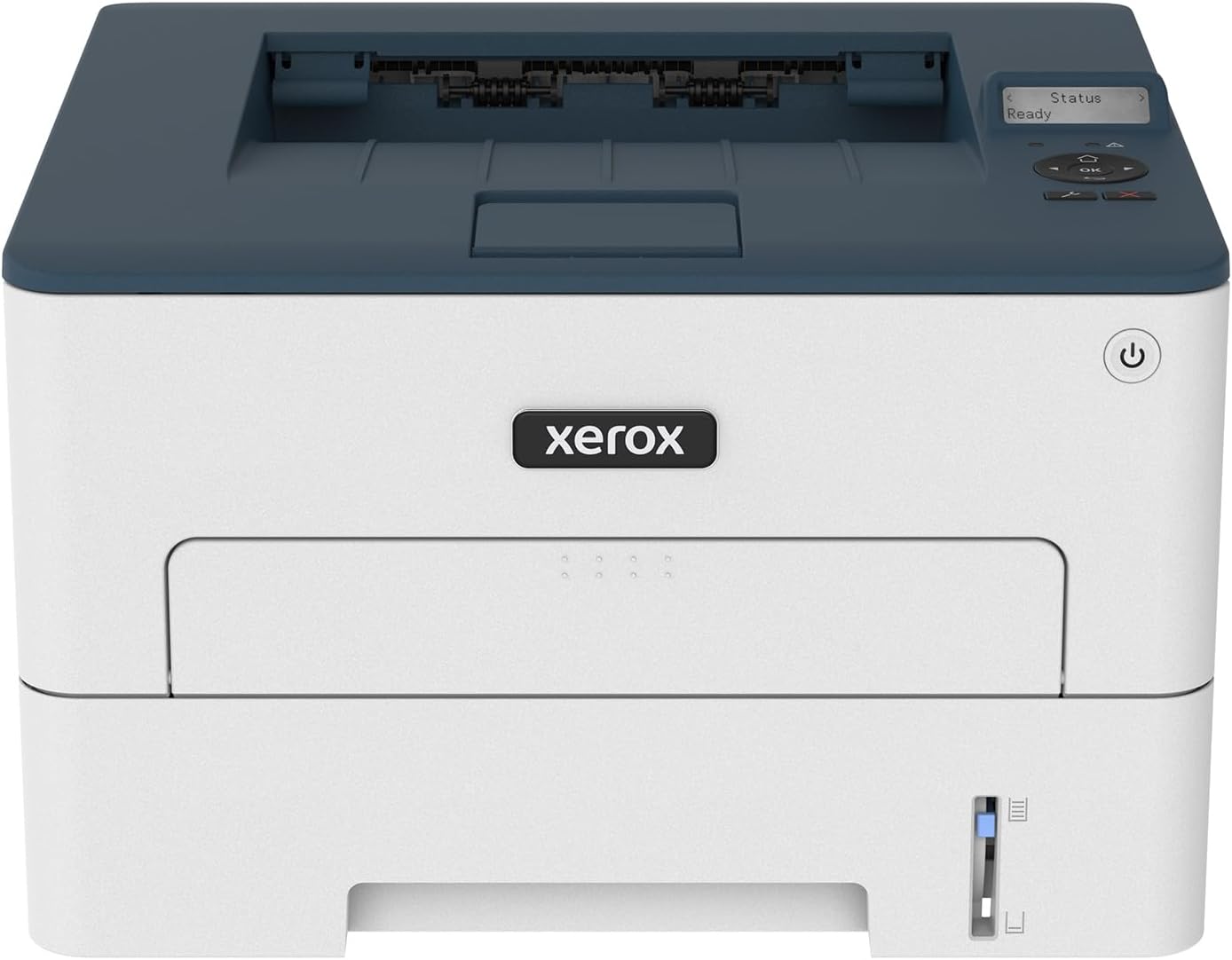
| Printer Type | Laser |
|---|---|
| Maximum Copy Speed Black and White | 36 pages_per_minute |
| Maximum Sheet Capacity | 250 |
| Duplex | Automatic |
| Printer Connectivity Type | USB, Wi-Fi |
The Xerox B230 is a compact black-and-white laser printer built for small workgroups and home offices that need reliable, no-frills printing. It prints up to 36 pages per minute and supports automatic two-sided printing, making it useful for everyday documents, handouts, and legal-size pages. Setup is straightforward with built-in Wi‑Fi, Wi‑Fi Direct and support for AirPrint and Mopria so you can print from phones, tablets, and Chromebooks without a PC. The printer includes a 250-sheet input capacity and a 1 GHz dual-core processor with 256 MB memory to handle moderate monthly volumes up to 2,500 pages. Practical benefits include fast output, simple mobile printing, and lower running waste through duplexing and toner recycling options. Limitations are that it is monochrome only and focuses on print-only functionality, so teams that need color prints, scanning, or advanced finishing will need a different model.
Best for: Buyers who want a dependable, space-efficient monochrome printer for a home office or small business where fast, straightforward document printing and easy mobile setup matter most.
Less Ideal for: Those who need color printing, scanning, copying, or multifunction features should consider an MFP or color laser instead.
- Fast black-and-white printing up to 36 ppm for quick document output
- Built-in Wi‑Fi, Wi‑Fi Direct and mobile print support (AirPrint, Mopria)
- Automatic two-sided printing and 250-sheet input reduce paper handling
- Compact footprint designed to fit in home office spaces
- Print-only device with no scan or copy functions
- Monochrome output only, not suitable for color printing needs
Verdict: A fast, compact monochrome laser that fits home offices needing reliable, mobile-friendly document printing.
Brother HL-L2480DW Laser Printer

| Printer Type | Laser |
|---|---|
| Printer Output Type | Monochrome |
| B&W Pages per Minute | 36 pages_per_minute |
| Maximum Sheet Capacity | 250 |
| Printer Connectivity Type | Ethernet, USB, Wi-Fi |
The Brother HL-L2480DW is a compact monochrome 3-in-1 laser printer aimed at home and small-office use, delivering fast black-and-white output alongside basic copy and flatbed scan functionality. It prints up to 36 pages per minute with a 2.7" touchscreen for quick local navigation and supports printing from mobile devices and cloud services via the Brother Mobile Connect app. Connectivity includes dual-band Wi-Fi, Ethernet, and USB for flexible placement and networked use, and automatic duplexing reduces paper usage for two-sided jobs. The 250-sheet tray lowers the need for frequent refills and a manual feed lets you handle envelopes and labels. Practical considerations include reliance on Brother TN830 toner cartridges and an initial in-box toner yield that may require replacement sooner under heavy printing, and the unit produces only black-and-white output so it is not suited to color documents or photo printing. For buyers focused on fast, reliable mono printing in a small footprint, the HL-L2480DW balances speed and basic multifunction features without unnecessary extras.
Best for: Buyers who prioritize fast, reliable black-and-white output for home or small-office workflows and want a compact multifunction device with straightforward mobile and network connectivity.
Less Ideal for: Users who need color printing, photo-quality output, or who expect very high monthly color workloads should look for a different model.
- High mono print speed up to 36 pages per minute for quick document throughput
- Automatic duplexing saves paper and speeds two-sided jobs
- 250-sheet paper tray reduces refill frequency for medium-volume use
- Multiple connectivity options including dual-band Wi-Fi, Ethernet, and USB
- 2.7" touchscreen plus Brother Mobile Connect app for easy mobile and cloud printing
- Monochrome only so it cannot print color documents or photos
- In-box toner yield is modest, which can increase running costs under heavy use
Verdict: Choose the HL-L2480DW if you want a fast, compact monochrome multifunction printer that handles heavy document throughput and networked mobile printing for a home office.
Canon imageCLASS LBP172dw

| Print speed | 35 ppm |
|---|---|
| Duplex | Automatic |
| Paper capacity | 250 sheets |
| Resolution | 600 x 600 |
| Connectivity | Wi‑Fi, USB |
The Canon imageCLASS LBP172dw is a single-function monochrome laser printer aimed at users who need reliable black-and-white printing without extras like scanning or copying. It prints up to 35 pages per minute and supports automatic two-sided printing to reduce paper use, while a 250-sheet input cassette keeps routine refills infrequent. Connectivity includes Wi‑Fi for mobile and desktop printing along with a USB port, and the printer works with Canon PRINT, Apple AirPrint, and Mopria for straightforward mobile workflows. Output resolution is 600 x 600, which produces sharp text and simple graphics suitable for reports, schoolwork, and invoices. The unit is compact and ENERGY STAR qualified, so it fits tight desks and helps keep energy use down. Limitations are that it is monochrome only and does not include copy or scan functions, so it is not a replacement for all‑in‑one needs, and replacement requires Canon Genuine Toner 072 cartridges which affects ongoing costs. Overall it's a practical, no‑frills printer when fast, economical black‑and‑white output is the priority.
Best for: Buyers who want a compact, reliable black-and-white printer that prioritizes speed, low-touch operation, and mobile connectivity for home or small office document printing.
Less Ideal for: If you need color printing, scanning, or copying in one device or want the lowest possible per-page cost with third-party toner, look at multifunction or different toner-compatible models instead.
- Fast monochrome printing up to 35 ppm for quick document jobs
- Automatic duplexing to save paper without manual intervention
- 250-sheet cassette reduces how often you reload paper
- Wi‑Fi and mobile printing support for printing from phones and tablets
- ENERGY STAR qualification for lower standby energy use
- No scanning or copying functionality since it is print-only
- Monochrome output only, so it cannot produce color documents
- Uses manufacturer-specific toner cartridges which influence running costs
Verdict: A fast, compact monochrome laser that delivers practical, two-sided document printing for homes and small offices that value speed and simplicity.
HP LaserJet M402N

| Printer Type | Laser |
|---|---|
| Print Speed | 40 pages_per_minute |
| Maximum Print Resolution Black and White | 1200 x 1200 dpi |
| Maximum Sheet Capacity | 250 |
| Printer Connectivity Type | Ethernet, USB |
The HP LaserJet M402N is a no-frills monochrome laser printer designed for steady, high-speed black-and-white printing in a home office or small business setting. It prints up to 40 pages per minute and wakes quickly from idle so short jobs complete fast, and it accepts A4 media with a 250-sheet tray that keeps you from constantly reloading paper. Connectivity is straightforward with Ethernet and a USB port for direct PC connections; there is no built-in Wi-Fi so this model fits wired setups. The printer ships with an introductory HP 26A toner and supports higher-yield cartridges for lower running costs. Output resolution of 1200 x 1200 dpi delivers crisp text and basic graphics, while security and energy-saving features help in managed environments. Trade-offs include no duplexing and no wireless printing, so it is less flexible for double-sided jobs or mobile printing, and it lacks color or multifunction features found on all-in-one machines.
Best for: Buyers who need a budget-friendly, high-speed black-and-white printer for home office or study use and prioritize reliable wired performance over wireless features.
Less Ideal for: Users who need automatic double-sided printing, color output, or wireless/mobile printing should look at other models that include those features.
- Fast monochrome printing up to 40 pages per minute for quick document runs
- 250-sheet input capacity reduces frequent paper refills
- 1200 x 1200 dpi resolution produces sharp text and simple graphics
- Includes preinstalled toner and supports high-yield replacement cartridges to lower cost per page
- Wired Ethernet and USB connectivity provide stable, reliable connections
- No duplex (automatic double-sided) printing
- No built-in Wi-Fi or mobile printing support
Verdict: A fast, budget-oriented monochrome laser printer that delivers reliable wired performance and low running costs for home office document printing.
HP LaserJet Pro MFP 3101sdw

| Printer Type | Laser |
|---|---|
| Print Output | Monochrome |
| Print Speed | 40 B&W ppm |
| Maximum Print Resolution | Up to 1200 x 1200 dpi |
| Input Capacity | 250 sheets |
The HP LaserJet Pro MFP 3101sdw is a compact monochrome laser multifunction printer aimed at small offices and busy home users who need dependable black‑and‑white output. It handles printing, copying, scanning (flatbed plus 50‑sheet ADF) and automatic two‑sided printing, and includes a 250‑sheet input tray so you can run longer jobs without frequent refills. Connectivity options cover Wi‑Fi, Ethernet, USB and mobile protocols like AirPrint and Mopria, and the HP app lets you print and manage tasks from a phone. Print quality and sharp text are strong thanks to up to 1200 x 1200 dpi resolution and HP toner produces professional results at up to 35–40 ppm depending on the metric you use. The practical limits are its monochrome output only and the one‑tray design if you need frequent paper switching, and firmware enforcement of genuine HP cartridges may be restrictive for users who prefer third‑party supplies. For reliability‑minded buyers this model emphasizes consistent speed, robust connectivity, and business‑grade paper handling rather than color or creative printing features.
Best for: Buyers who prioritize dependability and speedy black‑and‑white document printing for home offices or small teams and want multifunction scanning with solid paper handling.
Less Ideal for: Those who need color printing, multiple paper trays for different media, or want full flexibility to use third‑party toner without firmware restrictions.
- Fast monochrome output suitable for high‑volume document work
- 50‑sheet ADF plus flatbed for efficient multi‑page scanning and copying
- 250‑sheet input tray reduces interruptions for medium jobs
- Wide connectivity including Wi‑Fi, Ethernet, USB and mobile printing protocols
- Automatic duplex printing for two‑sided documents and lower paper use
- Prints only in black and white, so not suitable for color documents or photos
- One input tray limits easy switching between paper types or sizes
Verdict: Choose this HP if you need a reliable, fast monochrome all‑in‑one that handles heavy document workflows for a home office or small team.
Canon imageCLASS LBP6030w

| Print speed | 19 ppm |
|---|---|
| Connectivity | Wi-Fi, USB |
| Paper capacity | 150 sheets |
| Compatible cartridge | Canon Genuine Toner 125 (1,600 page yield) |
The Canon imageCLASS LBP6030w is a small, print-only monochrome laser built for basic home or home-office tasks. It prints black-and-white documents at up to 19 pages per minute with an initial page out in about eight seconds, and connects via Wi‑Fi or USB for easy mobile and laptop printing. The one-tray design holds up to 150 sheets and uses Canon Genuine Toner 125 cartridges rated at about 1,600 pages, which keeps running costs predictable. Its compact footprint and low energy draw in standby make it easy to tuck into tight workspaces. notable limitations are its lack of duplexing and scan/copy functions, so it is strictly a single-function printer; setup and driver support can be a bit dated compared with newer models. For straightforward text printing and occasional graphics, it delivers reliable, fast output without extras that complicate use.
Best for: Buyers who prioritize a simple, reliable black-and-white printer for home or small office use and who value compact size and straightforward wireless printing.
Less Ideal for: Users who need integrated scanning, copying, or automatic duplexing, or who want advanced cloud and app features found on newer models.
- Fast monochrome print speed up to 19 ppm for quick document output
- Wireless and USB connectivity for printing from laptops and mobile devices
- Compact, space-saving design suited to small desks and home offices
- Uses Canon Genuine Toner 125 with a clear page-yield for predictable supply planning
- No automatic duplexing so manual two-sided printing is required
- Print-only device with no scanning or copying capabilities
- Older model with potentially limited modern driver or app features
Verdict: Choose this compact Canon if you need a fast, no-frills monochrome laser for reliable home printing with predictable toner yields.
Brother DCP-L2640DW Laser MFP

| Printer Type | Laser |
|---|---|
| Printer Output Type | Monochrome |
| B&W Pages per Minute | 36 pages_per_minute |
| Maximum Sheet Capacity | 250 |
| Auto Document Feeder | 50 pages |
The Brother DCP-L2640DW is a compact monochrome laser multifunction printer designed for home and small-office use. It delivers fast black-and-white output up to 36 pages per minute and a quick first page time, so batch documents and homework print quickly. The 250-sheet tray and 50-page auto document feeder reduce refill and handling for multi-page copy and scan jobs, and automatic duplex printing helps cut paper use. Connectivity includes dual-band Wi-Fi, Ethernet, and USB for flexible setup with laptops, phones, and tablets, and the Brother Mobile Connect app simplifies mobile printing and scanning. Eco-minded features such as Toner Save Mode and compatibility with Brother high-yield cartridges help lower running costs when volume is moderate. Limitations to note are monochrome-only output and an LCD that is basic rather than touchscreen, so it is not suited for color tasks or advanced on-device editing. For buyers who prioritize reliable, fast black-and-white printing in a small footprint, this model handles typical home printing, scanning, and copying needs well.
Best for: Buyers who want a dependable, no-nonsense black-and-white printer for high-volume home or small-office document work and who value reliability and straightforward setup.
Less Ideal for: Users who need color printing, photo output, or an advanced touchscreen interface for on-device tasks should look at inkjet or color laser alternatives.
- Fast monochrome printing up to 36 ppm for quick document jobs
- 50-page auto document feeder speeds multi-page scanning and copying
- 250-sheet input tray reduces how often you reload paper
- Dual-band Wi-Fi plus Ethernet and USB offer flexible connectivity
- Automatic duplex printing and Toner Save Mode help reduce consumable use
- Prints only in black and white, no color printing capability
- Basic LCD and controls rather than a larger touchscreen interface
Verdict: A fast, compact monochrome MFP built for reliable, high-volume home and small-office black-and-white printing.
Choosing the Right Laser Printer for Home: Key Factors to Consider
Print Speed and Duty Cycle
Print speed affects how long you wait for documents and influences your overall workflow at home. A higher pages-per-minute rating matters if you frequently print multi-page reports, worksheets, or meeting materials, and it reduces the time your printer spends active.
Duty cycle is the maximum recommended monthly output the manufacturer supports. Even at home, choosing a model with a duty cycle comfortably above your expected monthly volume helps avoid premature wear. If your household prints intermittently, prioritize a balanced speed that favors consistent quality over raw throughput.
Cost Per Page and Toner Options
Ongoing cost is often more important than the initial purchase price. Cost per page depends on toner yield and the price of replacement cartridges. High-yield toner cartridges reduce replacement frequency and lower long-term expense, which is especially valuable if multiple household members print regularly.
Also consider whether the model accepts third-party or high-yield cartridges and how easy toner replacement is. A machine with lower advertised cost per page but difficult or messy cartridge swaps may become more costly in time and trouble.
Connectivity and Mobile Printing
Home printers need to be accessible from phones, tablets, and laptops across your network. Built-in Wi-Fi and support for common mobile print standards let you print directly from handheld devices without moving files to a computer. Ethernet ports help if you want a stable wired connection for a home office setup.
Look for easy network setup, clear app support, and reasonable security options like password-protected admin access. If multiple family members will print from different platforms, wide compatibility reduces friction and prevents repetitive setup tasks.
Footprint and Placement
Home space is often limited, so the physical footprint matters. Compact models save counter or shelf space but may have smaller paper trays and fewer finish options. Consider where the unit will sit and whether the paper path or any access doors need extra clearance for routine tasks like clearing jams or replacing toner.
Weight is relevant if you will move the printer occasionally. Also check paper capacity against your printing habits to avoid frequent reloading. A balanced footprint that supports your expected paper volume keeps the printer convenient without dominating the room.
Print Quality for Text and Basic Graphics
Laser printers generally excel at sharp, consistent text reproduction, which is central to home document printing. If you occasionally print charts, black-and-white graphics, or grayscale images, verify that the engine produces consistent halftones and solid fills without banding.
Print resolution specifications are useful, but real-world sample pages and user-oriented reviews give a better sense of how legible small type and fine lines will appear. For most home users, dependable high-contrast text is more important than ultra-high-resolution photo output.
Maintenance and Reliability
Routine upkeep affects uptime and user satisfaction. Consider how often the printer requires consumable changes, whether the paper path is prone to jams, and how easy it is to clear common issues. Models with user-replaceable parts and clear front access tend to be less frustrating.
Also check whether the manufacturer provides straightforward firmware updates and helpful onboard or app-based diagnostics. A reliable machine with simple maintenance procedures reduces the chance of disruption for household tasks and schoolwork.
Why Choose a Laser Printer for Home
Laser printers are optimized for crisp black-and-white text, fast page delivery, and generally lower cost per page compared with many inkjet alternatives for monochrome printing. For households that print documents, forms, or school assignments frequently, a laser engine usually provides the clean, smear-free pages that matter most.
They also tend to require less frequent consumable changes than inkjet cartridges and are less sensitive to long idle periods. If your household printing is mainly text-based, a laser printer often reduces ongoing hassle and yields a more predictable ownership experience.
- Sharper text and solid fills
- Faster single-page throughput
- Lower long-term cost for black-and-white printing
Setting Up Network and Mobile Printing
Plan the printer location near your wireless router or a stable wired connection for the best performance. During setup, enable secure Wi-Fi and set an administrative password to prevent unauthorized access on shared home networks.
Install the manufacturer app if available for guided setup and mobile printing. Many apps simplify wireless configuration, toner status monitoring, and basic troubleshooting, making it easier for nontechnical household members to use the device.
- Enable WPA2 or WPA3 on home Wi-Fi before setup
- Use the printer app for on-screen guided configuration
- Consider Ethernet for a fixed home office station
Paper Handling and Media Support
Consider the paper tray capacity and supported paper sizes. A standard home laser printer usually handles letter and legal sizes and common weights used for documents. If you plan to print envelopes, labels, or heavier paper stock, confirm the printer supports those media types and that loading is straightforward.
Some home-oriented models include manual-feed slots for specialty jobs. Verify feed paths and tray accessibility so routine paper swaps or occasional specialty prints do not become cumbersome.
- Check tray capacity versus expected monthly printing
- Look for manual-feed or multipurpose trays for envelopes
- Confirm supported paper weights if you use cardstock
Energy Use and Environmental Considerations
Laser printers use a fuser to bond toner to paper, which requires warm-up time and energy. For sporadic printing, a model with low idle power draw and quick wake-from-sleep helps reduce electricity use. Some printers also include energy-saving modes and programmable sleep schedules.
Consider toner recycling programs and whether high-yield cartridges reduce environmental impact by lowering the frequency of disposables. Balancing power efficiency with readiness ensures the printer is available when needed without wasting energy during long idle stretches.
- Look for low idle power and quick wake times
- Use high-yield toners to reduce cartridge waste
- Enable sleep schedules for overnight savings
Common Troubleshooting Tips for Home Users
Keep a small kit with spare paper, a lint-free cloth, and gloves for toner handling. Regularly clean the paper path and check for small debris that can cause jams. If you encounter streaks or consistent marks, run the device's built-in cleaning routine or check toner cartridge seating.
Firmware updates can resolve connectivity and performance issues, so apply updates when available. For network printing problems, confirm the printer and device are on the same subnet and restart the router or printer if connections drop.
- Clean the paper path periodically
- Run onboard cleaning routines for print artifacts
- Verify network subnet and restart hardware for connectivity issues
How We Chose the Best Laser Printer for Home
We shortlisted models that are purpose-built for home or small home-office use and then applied a clear editorial filter to identify machines most likely to satisfy everyday household printing needs. Selection began with units that explicitly target small-footprint deployment and include basic duplexing or offer efficient single-sided throughput. Evaluation prioritized measurable, user-facing criteria: print speed for common black-and-white jobs, cost per page and cartridge yield, wireless and mobile connectivity options, physical footprint and ease of setup, and routine maintenance demands like toner replacement and paper jams. We also looked at supported paper sizes and basic security features relevant for connected home networks. We excluded heavy-duty office machines, photo-specialist laser models, and any printers intended primarily for large-scale commercial environments. Models lacking clear specifications for speed, yield, or connectivity were not considered. The final picks reflect a balance of reliable daily performance, low ongoing costs, and straightforward home-oriented features.
Our full evaluation process is outlined in our review methodology.
FAQ
Are laser printers better than inkjets for home use?
Often laser printers are better for homes that print mostly text because they deliver sharper text, faster page output, and typically lower cost per page for black-and-white printing. Inkjets may be preferable if you need high-quality color photo printing.
How often do I need to replace toner in a home laser printer?
It depends on your monthly volume and the cartridge yield. Moderate home use can mean replacing toner every few months, while very light users may go much longer. Choosing high-yield cartridges reduces replacement frequency.
Can I print from my phone without a computer?
Usually yes. Most modern home laser printers support mobile printing via a dedicated app, AirPrint, or other mobile print services. Ensure the printer and your phone are on the same network and follow the app-guided setup if available.
Is duplex printing important at home?
Duplex printing saves paper and time when printing multi-page documents. If you frequently print double-sided documents, built-in duplexing is a worthwhile convenience that reduces manual page flipping and paper usage.
How large should the paper tray be for home use?
For typical household printing, a tray capacity of 150 to 250 sheets balances convenience and compact size. If several family members print regularly or you want longer stretches between refills, consider larger trays or models with optional paper feeders.
Final Verdict
For most households, prioritize print speed, cost per page, and simple connectivity when choosing a laser printer for home. Balance a compact footprint with sufficient paper capacity and easy-access toner replacement to minimize interruptions to daily tasks. Focus on dependable text quality and straightforward setup rather than feature-heavy office extras. By weighing expected monthly volume against toner yield and connectivity needs, you can select a home laser printer that delivers reliable, low-cost printing for years.