
Note: This article contains affiliate links. If you click on these links and make a purchase, we may earn a small commission at no extra cost to you. This helps support our research and content. Read our full affiliate disclosure here.
If you need quick, small-format prints without hauling a full-size machine, a mini printer can be a practical solution. These compact printers are intended for travel, home office overflow, and ad hoc photo or document tasks where space, portability, and ease of use matter most. You want dependable output, straightforward connectivity, and battery life that matches how you use the device. This guide highlights the top shortlisted mini printers across common use cases and evaluates them on print quality, battery endurance, connection options, and handling. Read on for the key tradeoffs and what to prioritize before you buy.
Top Picks at a Glance
| Best Quality Built to a higher standard if you want something more solid | Canon IVY 2 Mini Photo Printer |  |
| Best Value The sweet spot between price and what you get | KODAK Mini 2 Retro |  |
| Top Rated A top-rated pick with lots of positive feedback | Fujifilm Instax Mini Link 3 |  |
| Most Popular A crowd favorite that many people choose with confidence | HP Sprocket 2×3 Portable Printer |  |
| Best Seller A high-volume bestseller chosen again and again | Nelko PP01 Photo Printer |  |
Canon IVY 2 Mini Photo Printer

| Printer Type | Zink Technology |
|---|---|
| Maximum Media Size | 2 x 3 in |
| Maximum Sheet Capacity | 10 |
| Printer Connectivity Type | Bluetooth |
| Maximum print Resolution Color | 313×512 dots_per_inch |
The Canon IVY 2 is a truly portable ZINK printer for quick 2×3 photo prints from a compatible iOS or Android device. You pair it over Bluetooth 5.0, edit images in the Canon Mini Print app, then print peel-and-stick photos that are ready to apply to albums, journals, or surfaces. The unit emphasizes convenience: fast USB-C charging with a full charge in roughly 45 minutes, a simple paper-loading path that holds up to 10 sheets, and app tools for frames, filters, collages, and stickers. Image output is modest at 313×512 dpi, so prints have improved contrast and skin tones compared with prior models but are not suitable for large enlargements or professional work. Print speed is slow relative to standard printers, with individual prints taking up to about 50 seconds. Because it uses ZINK paper, there is no ink to replace, but ongoing cost and print quality depend on paper packs. The IVY 2 is best when you want instant, social-style photos and creative app features in a truly pocketable package rather than lab-quality photo output.
Best for: Buyers who prioritize portability and instant, shareable prints for parties, scrapbooks, or on-the-go memory keeping and who value easy app editing and sticky-back photos.
Less Ideal for: Photographers or users who need high-resolution lab-quality prints, fast batch printing, or lower per-print cost for heavy daily use.
- Truly portable pocket size with peel-and-stick 2×3 prints
- Bluetooth 5.0 pairing and Canon Mini Print app for on-phone editing
- No ink required thanks to ZINK paper, simplifying maintenance
- Fast USB-C charging and simple paper loading with 10-sheet capacity
- App creative tools for frames, stickers, collages and filters
- Low print resolution (313×512 dpi) limits sharpness and fine detail
- Slow single-print time—around 50 seconds per photo
Verdict: Choose the IVY 2 when you want a pocketable, no-ink printer that delivers creative, peel-and-stick 2×3 photos instantly.
KODAK Mini 2 Retro

| Printer Type | Dye Sublimation |
|---|---|
| Printer Connectivity Type | Bluetooth |
| Maximum Media Size | 2.1 x 3.4 inches |
| Maximum print Resolution Color | 300 dots_per_inch |
| Control Method | App |
The KODAK Mini 2 Retro is a pocketable Bluetooth photo printer that turns smartphone images into credit-card–sized dye-sublimation prints using KODAK's 4PASS process. You pair it with the KODAK Photo Printer app on iOS or Android, crop and edit in-app, then send prints wirelessly; each photo finishes with a protective laminate layer in about a minute, which helps resist fingerprints, water, and fading. The unit is genuinely portable and simple to use for scrapbooks, wallets, parties, and quick keepsakes, and the included cartridges and sheets mean you can start printing right away. Practical downsides are the small print size and modest sheet capacity, so it is best for casual prints rather than bulk photo jobs, and print speed is roughly one per minute. Connectivity is Bluetooth only, so wired USB-C is available for power and occasional transfers but not as a primary networked print option. For buyers who want instant, durable small prints with minimal setup, this delivers reliable results in a tiny package.
Best for: Buyers who want a simple, compact way to make durable, pocket-sized photo keepsakes from their phone without needing complex setup or large-format prints.
Less Ideal for: People who need larger prints, fast batch printing, or a networked home printer for documents and photos should consider other options.
- 4PASS dye-sublimation with laminated finish produces water- and fingerprint-resistant prints
- Very compact and truly portable design for on-the-go printing
- Simple Bluetooth pairing and app-based editing for quick, user-friendly workflow
- Includes cartridges and 38 sheets so you can start printing out of the box
- Prints are small credit-card size, not suitable for larger photos
- Low sheet capacity and around one print per minute limits high-volume use
Verdict: Choose this if you want a portable, easy-to-use printer that reliably makes laminated, long-lasting credit-card–sized photos from your phone.
Fujifilm Instax Mini Link 3
| Printer Type | Thermal |
|---|---|
| Print media | Glossy film |
| Maximum Media Size | 2 x 3 inches |
| Printer Connectivity Type | Bluetooth |
| Hardware Interface | USB Type C |
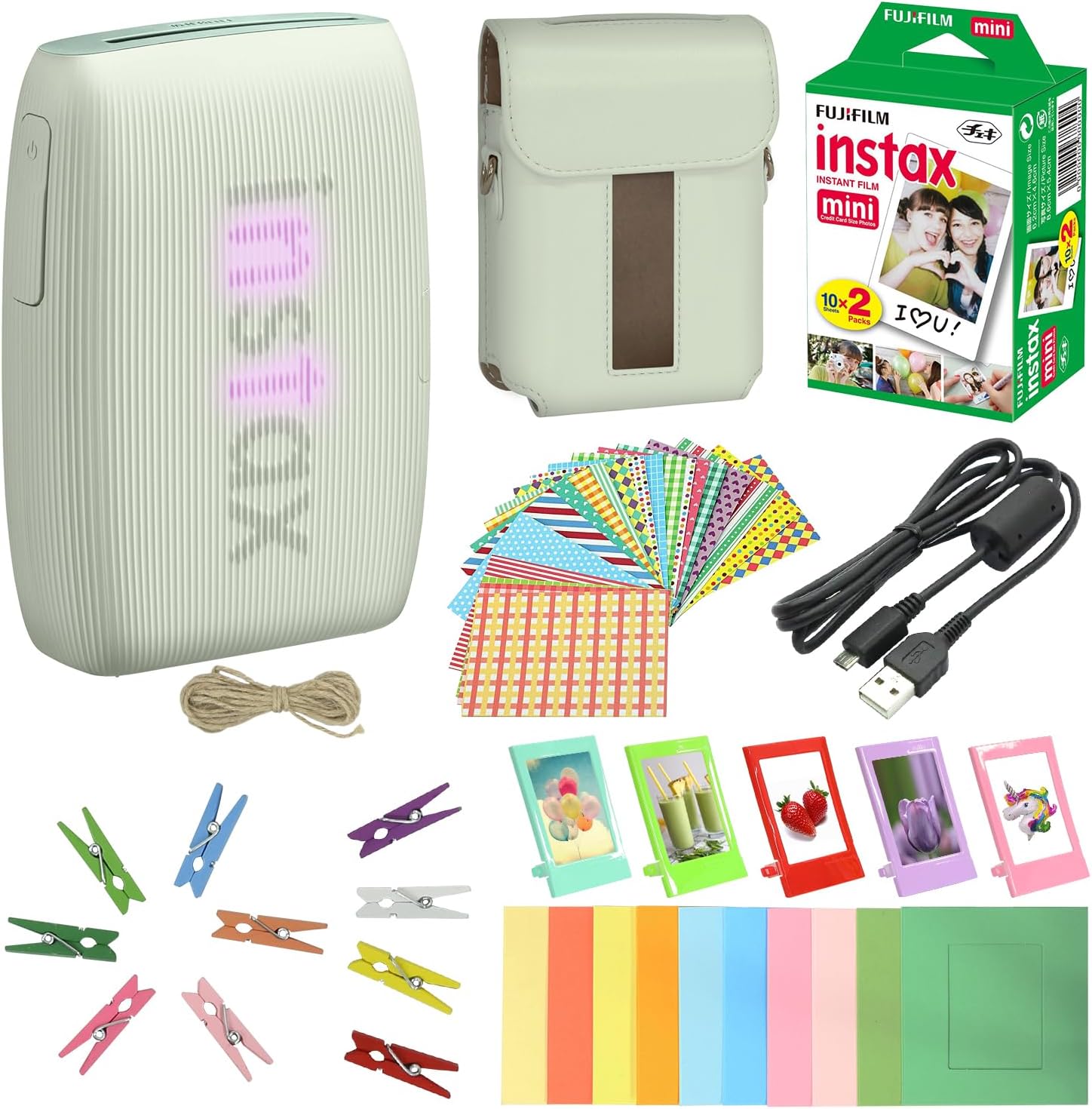
The Instax Mini Link 3 is a pocketable thermal printer that pairs with your smartphone over Bluetooth to produce credit-card sized instant prints in about 15 seconds. You use Fujifilm's companion app to crop, add frames, stickers, text, AR effects, and simple collages before sending images to the printer, and the device's tilt controls and status LEDs make basic operation intuitive. The printer charges over USB‑C and has a rechargeable battery so you can print on the go, and the bundle includes 20 sheets of Instax film plus a protective case and display frames for gifting or party use. Image resolution is modest (around 150 dpi), so prints look like classic instant photos rather than high-detail enlargements, and output size is fixed at the Instax mini format. If you want fast, reliable pocket prints with easy smartphone control and ready-to-use accessories, this model delivers; if you need large, high-resolution photographic enlargements or multifunction office printing, look elsewhere.
Best for: Buyers who prioritize dependable, easy-to-use portable printing for parties, gifts, or everyday snapshots and want a ready-to-go bundle that works without fuss.
Less Ideal for: Photographers seeking large, high-resolution prints or users who need a multifunction office printer should consider other options.
- Simple Bluetooth smartphone pairing and app controls for on-phone editing and AR effects
- Rechargeable battery with USB‑C charging for portable printing
- Prints develop quickly (about 15 seconds) and use widely available Instax mini film
- Bundle includes 20-sheet film pack and protective case plus frames and stickers for immediate use
- Print resolution is low compared with photo lab prints, producing a nostalgic instant look rather than fine detail
- Fixed 2 x 3 inch output limits use to small keepsakes
Verdict: A reliable, pocketable smartphone printer that delivers quick, fun 2 x 3 instant prints with minimal setup and useful bundled accessories.
HP Sprocket 2×3 Portable Printer

| Maximum Media Size | 2 x 3 |
|---|---|
| Maximum Sheet Capacity | 10 |
| Print Resolution | 313 x 400 DPI |
| Connectivity | wireless, USB 2.0 |
| Wattage | 32 watts |
The HP Sprocket 2×3 is a compact, rechargeable pocket printer that produces 2” x 3” sticky-backed color photos directly from iOS or Android phones via Bluetooth. Using ZINK zero-ink paper means there are no cartridges to replace and prints resist smudging and tearing, while the HP Sprocket app adds filters, stickers, borders and easy social sharing. Setup is simple: charge the unit, load up to 10 sheets, pair over Bluetooth 5.x and print at roughly one page per minute; the LED ring lets multiple users know who is printing at parties. Battery life is practical for casual use — HP claims around 35 prints per charge — and the slim design makes it easy to carry. Image resolution and color fidelity are fine for small keepsakes but will not match larger photo printers, and you're limited to 2×3 prints only. If you want instant, shareable mementos without the fuss of ink cartridges, this is a convenient choice, though it is best for snapshots and crafts rather than archival-grade photo work.
Best for: Buyers who want an easy, social-focused way to turn smartphone snaps into physical keepsakes at parties, trips, or craft projects and who value simplicity and portability over studio-quality prints.
Less Ideal for: People needing larger, high-resolution or archival prints for professional use or those who prefer traditional ink-based photo labs.
- Zero-ink ZINK printing eliminates ink cartridges and reduces maintenance
- Rechargeable, pocketable design for on-the-go printing
- Bluetooth wireless printing with app-based editing and sharing
- Sticky-backed glossy paper produces smudge- and tear-resistant prints
- LED personalization and multi-user support for parties and events
- Limited to 2 x 3 inch prints with modest resolution compared to larger photo printers
- 10-sheet paper capacity requires frequent refills during heavy use
Verdict: The Sprocket is the easiest pocket printer for instantly creating shareable 2×3 sticky-backed photos from your phone.
Nelko PP01 Photo Printer

| Printer Type | Inkjet |
|---|---|
| Print media | Glossy photo paper |
| Paper Size | 52x90mm (2×3") |
| Resolution | 600 x 600 DPI |
| Printer Connectivity Type | Bluetooth |
The Nelko PP01 is a compact Bluetooth inkjet designed for quick 2×3 sticky-backed photos from a smartphone. You connect via the Nelko app, edit or apply filters, then print a single 2×3 image in under 90 seconds on glossy adhesive paper; prints are advertised as smudge-, water- and tear-resistant. The printer ships with a USB charging cable, one ink cartridge and 20 sheets of paper, and a single cartridge is rated for many prints which keeps ongoing cost reasonable. Setup and use are straightforward for nontechnical users, but you must stay within the small 2×3 printable area and follow the brand tips to avoid paper jams and cartridge recognition issues. Print speed is slow compared with larger devices at roughly one page per minute, and the device only supports simplex printing and Bluetooth connectivity rather than Wi-Fi. For everyday memory keeping, journaling, or party favors this unit delivers vivid small prints with a handy adhesive back, though you should plan for periodic cartridge maintenance to prevent clogging if the printer sits unused.
Best for: Buyers who want a simple, low-friction way to turn smartphone photos into small adhesive keepsakes for scrapbooks, planners, and events and who prefer a straightforward app-based workflow.
Less Ideal for: People who need larger or faster prints, networked printing, or multi-function office features should consider other solutions.
- Pocket-friendly portable design for on-the-go photo printing
- Bluetooth connection and dedicated app with editing tools and templates
- Produces adhesive 2×3 prints with claimed smudge-, water- and tear-resistant finish
- 600 DPI output for clear, detailed small photos
- Print size limited to 2×3 inches, not suited for larger photos
- Slow single-page print speed around one page per minute
- Only Bluetooth connectivity and print-only function, no duplex or Wi-Fi
Verdict: A compact, user-friendly mini inkjet that reliably produces high-resolution 2×3 adhesive photos straight from your phone, ideal for memory keeping and craft use.
Choosing the Right Mini Printer: Key Factors to Consider
Print Quality and Resolution
Print quality determines whether output is suitable for documents, labels, or photos. Resolution and color fidelity matter more if you plan to print images or marketing materials from a phone or tablet. For text-heavy tasks, sharp contrast and consistent toner or ink delivery are the priority. Photo prints require higher DPI and consistent color rendering, which can increase cost per page and may favor devices with specialized paper or dye-sublimation processes.
Consider how you will use the prints. If you mostly need receipts, labels, or quick reference pages, lower-resolution models may suffice. For occasional snapshots or presentation visuals, look for mini printers that advertise higher DPI, better color profiles, and sample output that matches your expectations.
Battery Life and Charging Convenience
Battery runtime dictates how useful a mini printer is away from a power outlet. Look for stated page yields per charge and realistic estimates for mixed document/photo printing. Fast recharge via common USB-C or similar ports makes the device easier to top up between trips. Some models also allow pass-through charging while printing, which can be helpful for extended sessions.
Think about your typical usage pattern. If you need multiple print sessions during a day of travel, prioritize longer battery life and quick recharge. If the printer will mostly sit on a desk with occasional mobile use, battery capacity is still important but less critical than ergonomics and connectivity.
Connectivity and App Support
Reliable wireless connections and straightforward pairing reduce setup friction. Common options include Bluetooth and Wi-Fi Direct, and some mini printers support cloud or app-driven workflows. Check that the device supports your primary source device and operating system version. The quality of the companion app also affects usability for cropping, layout, and color adjustments before printing.
If you plan to use the printer with multiple devices, look for robust multi-device pairing or quick reconnect features. For business use, ensure compatibility with common file formats and that the app provides basic print queue and status reporting.
Paper, Media Types, and Handling
Mini printers vary in the paper sizes they accept, whether they use adhesive-backed paper or standard cut sheets, and how they handle media loading. Some are optimized for sticker-style photo rolls while others accept small cut sheets for documents. Consider the availability and cost of replacement media and whether it is easy to load in the field.
Also evaluate how the printer trims, cuts, or ejects pages and whether it supports simple duplex or multi-page jobs. For label and receipt printing, look for tear guides or auto-cut features. For photo printing, check if special coated paper is required to achieve the best results.
Size, Weight, and Durability
The compact footprint is the central appeal of a mini printer, but weight and durability determine how portable it actually is. A slightly larger device with better build quality and a stable paper feed might outperform a tiny, fragile unit in practical use. Consider protective cases or carrying options if you plan to transport the device frequently.
Also think about surface placement and ventilation when printing several pages. A low center of gravity and non-slip feet make for steadier prints, while robust exterior materials resist scratches and scuffs during travel.
Ongoing Costs and Consumables
Consumables drive long-term ownership cost. Some mini printers use thermal or dye-sublimation media that come as proprietary rolls, while others require ink cartridges. Evaluate the availability and per-page cost of paper, label rolls, and ink or thermal media. High initial savings can be offset by expensive proprietary supplies.
Also check whether the manufacturer sells refill packs or if third-party media are compatible. For sustained or high-volume use, favor designs with affordable and easy-to-replace consumables and clear instructions on replacement frequency.
Common Use Cases for Mini Printers
Mini printers are useful across several contexts where space or mobility is limited. They are popular for on-the-spot label printing, travel photo prints, quick reference documents, and event check-in slips. Independent contractors and field workers often appreciate a compact unit that fits in a bag and produces adequate legible output without setting up a full printer.
Knowing your primary use case helps narrow choices. If you need crisp text for invoices or forms, prioritize models that handle standard paper and deliver consistent contrast. If you want photos or stickers, look for devices engineered for image fidelity and compatible media.
- Event badges and receipts: fast single-sheet output with easy tear-off.
- Travel photos: compact dye-sublimation or high-res thermal options for instant prints.
- Labels and stickers: adhesive media compatibility and accurate cut or tear features.
- Mobile business documents: clear text, quick wake-from-sleep, and reliable wireless pairing.
Connectivity Tips for Reliable Mobile Printing
To avoid connection troubles, set up the printer and pair your primary device before you need to print. Test the pairing process in the environment where you will use the printer, since public networks or crowded Bluetooth conditions can interfere with connections. Keep firmware and the companion app updated to maintain compatibility with the latest phones and tablets.
If you rely on Bluetooth, verify that the app supports background pairing and reconnects after device sleep. For Wi-Fi direct printing, confirm the network creation and password process is straightforward, and consider whether the printer can fall back to USB if wireless is unavailable.
- Prefer USB-C charging for faster recharges and universal cables.
- Keep a small set of spare paper or media rolls in your bag.
- Label or document templates in the app speed repetitive tasks.
Maintaining Print Consistency
Consistent output depends on proper media storage, regular cleaning, and using the recommended settings. Heat-sensitive media should be kept away from direct sunlight, and adhesive-backed materials require clean feeding paths to avoid jams. Periodic cleaning of the print head or feed rollers helps avoid banding and streaks.
Run a test page after replacing media or updating firmware so you can adjust color and contrast before printing multiple copies. Carry basic maintenance tools such as a soft brush and lint-free cloth if you expect to print in dusty or outdoor conditions.
- Store paper in a protective sleeve to prevent moisture absorption.
- Use the app's calibration features if available.
- Avoid overfilling paper trays to prevent misfeeds.
How Photo and Document Outputs Differ
Mini printers vary widely between models optimized for documents and those built for photos. Document-focused units emphasize crisp black text and consistent margin control. Photo-focused units emphasize color depth, smooth gradients, and minimal grain. The chosen media and printing technology shape those outcomes more than raw resolution numbers.
If you need both types of output, prioritize models that offer selectable print modes or support interchangeable media types. Expect a compromise in either size or consumable cost when you aim for a true hybrid capable of delivering good quality for both documents and photos.
- Document mode: faster, lower-cost per page, better contrast.
- Photo mode: higher color accuracy, special paper, slower output.
- Hybrid models: flexible but check consumable availability.
Packing and Transport Considerations
Think about how the printer will be carried and stored. A dedicated carrying case protects the unit and keeps paper clean and ready. Also consider how accessories like charging cables and spare media are organized to avoid scratches or crush damage. If you travel by air, make sure battery capacity is within allowable limits for carry-on rules.
For frequent transport, choose a model with a solid latch or cover that protects the output slot and prevents accidental button presses. Lightweight builds are convenient but verify the chassis does not flex under typical stresses.
- Use a padded case to avoid drops and impacts.
- Keep accessories in labeled pockets for quick access.
- Verify any regulatory battery limits before packing for air travel.
How We Chose the Best Mini Printer
We shortlisted mini printers by focusing on real-world portability and daily usability. Key evaluation dimensions included print quality for both text and photos, battery life and recharge time for true mobile use, wireless connectivity options and pairing simplicity, paper and media handling flexibility, and the physical footprint and build quality for easy transport. We favored devices with reliable mobile printing workflows and clear setup processes. Products were excluded if they lacked rechargeable power, offered only obsolete connection options, or required proprietary workflows that restrict common mobile usages. We prioritized devices that balance enough output resolution for legible text and acceptable photo detail, plus practical runtime and charging behavior. These criteria align with the scorecard metrics below and reflect the considerations most buyers weigh when choosing a compact, portable printer.
Our full evaluation process is outlined in our review methodology.
FAQ
Can a mini printer produce professional-looking photos?
Often, mini printers can produce attractive snapshots, but professional-level photo quality usually requires larger dye-sublimation or lab printing. Mini devices can be excellent for casual prints and small-format giveaways, but expect some limitations in color depth and dynamic range.
How long do mini printer batteries typically last?
Battery life varies by model and usage, ranging from a few dozen prints per charge to several hundred for low-resolution thermal units. Real-world runtime depends on print complexity, wireless usage, and brightness settings.
Are mini printer consumables hard to find?
It depends on the media type. Common thermal papers and standard-cut photo sheets are widely available, while certain adhesive roll formats or proprietary packs may be less common. Check supply availability before committing to a model for regular use.
Will a mini printer work with both phones and laptops?
Many mini printers support Bluetooth for phones and Wi-Fi or USB for laptops. Compatibility depends on the device's supported protocols and the companion app. Verify that the printer's connectivity options match the devices you plan to use.
How do I keep prints from smudging or fading?
Use recommended media and allow prints to cure or dry per the manufacturer's guidance. For dye-sublimation and ink-based prints, avoid handling immediately and store prints away from direct sunlight and moisture to reduce fading.
Final Verdict
Choosing the right mini printer comes down to matching the device to your primary needs. Prioritize print quality and media compatibility if photos matter, or battery life and solid wireless pairing if you print on the go. Portability and durable construction matter for frequent travel, while easy-to-find consumables reduce ongoing cost and hassle. Balance these tradeoffs to select a compact printer that reliably meets your daily workflow and printing expectations.