
Note: This article contains affiliate links. If you click on these links and make a purchase, we may earn a small commission at no extra cost to you. This helps support our research and content. Read our full affiliate disclosure here.
If you need dependable black-and-white output, a monochrome laser all-in-one printer can deliver fast pages, crisp text, and low per-page costs for home offices or small workgroups. Choosing the right model matters because speed, duty cycle, and ongoing toner expenses directly affect day-to-day productivity and operating cost. This guide shortlists the top monochrome laser all-in-one printers across common office needs. We evaluated candidates for reliable print and scan performance, sensible feature sets for small offices, and manageable running costs. Read on to see the picks and learn which features to weigh for your setup.
Top Picks at a Glance
| Best Overall The best all-around choice for most situations | Lexmark MX431adw Monochrome MFP |  |
| Best Quality Built to a higher standard if you want something more solid | Canon imageCLASS MF462dw II |  |
| Best Value The sweet spot between price and what you get | Canon imageCLASS MF287dw |  |
| Best Budget The cheapest option that still gets the job done reliably | HP LaserJet MFP M140w |  |
| Top Rated A top-rated pick with lots of positive feedback | Brother HL-L2480DW |  |
| Most Popular A crowd favorite that many people choose with confidence | Brother DCP-L2640DW |  |
| Best Seller A high-volume bestseller chosen again and again | HP LaserJet MFP M234sdw |  |
Lexmark MX431adw Monochrome MFP

| Printer Type | Monochrome Laser |
|---|---|
| Maximum Print Speed | 42 pages_per_minute |
| Maximum Print Resolution Black and White | 1200 dpi or higher |
| Maximum Sheet Capacity | 250 |
| Duplex | Automatic |
The Lexmark MX431adw is a business-focused monochrome laser all‑in‑one that delivers fast black‑and‑white output and basic office features in a compact footprint. It prints up to 42 pages per minute with a quick first page and supports automatic two‑sided printing and two‑sided scanning, which speeds common workflows like duplex copying and email scanning. The unit offers touchscreen control, Ethernet and USB connectivity plus Wi‑Fi for mobile prints, and a single 250‑sheet tray that keeps the machine small while handling typical small-office volumes. Toner cartridges provide factory-style toner supply and the steel chassis is built for durability. Important limits are its mono-only output if you need color, a single paper tray that constrains capacity for high-volume sites, and modest 600 x 600 resolution for text and line work rather than photo-quality prints. For small offices seeking reliable speed, two‑sided scanning and network security features, this is a practical, workhorse MFP.
Best for: Buyers who want a fast, no-nonsense monochrome MFP for small to medium office workflows that prioritize speed, duplex scanning and reliable networked printing.
Less Ideal for: Users who need color printing, photo-quality output, or large multipurpose trays for very high monthly page volumes should look elsewhere.
- Fast black-and-white printing up to 42 ppm for busy offices
- Automatic duplex printing and two-sided scanning for duplex workflows
- Wi‑Fi, Ethernet and USB connectivity plus touchscreen controls for easy setup and use
- Compact, sturdy steel frame designed for small-business durability
- Single input tray limits paper capacity for very high-volume printing
- Monochrome only so it cannot produce color documents or photos
Verdict: Choose the MX431adw if you need a compact, fast monochrome all‑in‑one that handles duplex scanning and heavy text workloads for a small office.
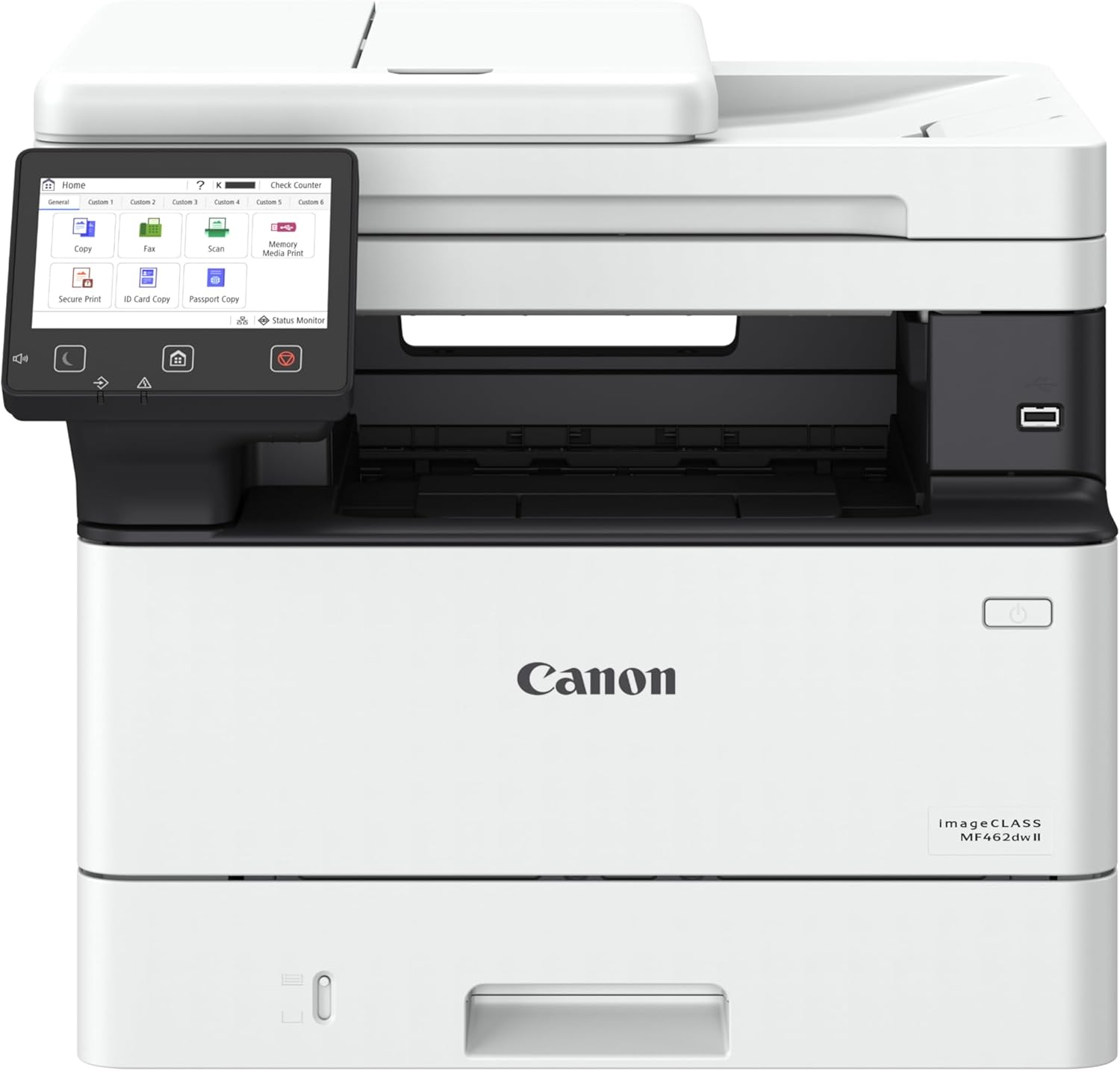
Canon imageCLASS MF462dw II
| Printer Type | Laser |
|---|---|
| Print Speed | 37 pages_per_minute |
| Duplex | Automatic |
| Compatible Cartridge | Canon Genuine Toner 070 |
| ADF Capacity | 50-sheet |
The Canon imageCLASS MF462dw II is a work-focused monochrome laser AIO built to handle steady office output with minimal fuss. It prints at about 37 pages per minute with a roughly 5 second first-page time, supports automatic two-sided printing and a 50-sheet one-pass duplex ADF for fast double-sided scanning. Setup and daily use are simplified by Ethernet/Wi-Fi, USB and mobile printing via Canon PRINT, AirPrint and Mopria, while a customizable 5-inch color touchscreen makes common tasks and app shortcuts easy to access. Paper handling is practical out of the box with a 250-sheet cassette plus a 100-sheet multipurpose tray and optional expansion to increase capacity. Canon Genuine Toner 070 and high-capacity 070 H cartridges give predictable yields for busy users. Trade-offs are typical for a monochrome desktop laser: no color output and a relatively large footprint and power draw compared with compact models, but it prioritizes speed, reliability and low-touch operation for heavy text workloads.
Best for: Buyers who need high throughput monochrome printing and reliable multifunction performance for a small office or hybrid work setup where speed and low maintenance matter most.
Less Ideal for: Users who require color printing or a very small, space-saving home printer should consider other options better suited to those needs.
- Fast black-and-white print speed up to 37 ppm for high-volume text jobs
- One-pass duplex ADF that scans both sides in a single pass for faster batch scanning
- Flexible connectivity with Ethernet, Wi-Fi, USB and mobile printing support
- Expandable paper capacity and dual trays to reduce refill frequency
- Customizable 5-inch color touchscreen for quick access to frequent functions
- Monochrome only, so it cannot produce color documents or graphics
- Relatively large and heavier than compact home printers, requiring more space
Verdict: Choose this Canon if you want a fast, dependable monochrome all-in-one that handles heavy text workloads with low intervention.
Canon imageCLASS MF287dw

| Printer Type | Laser |
|---|---|
| Print Speed (B&W) | 35 ppm |
| Maximum Print Resolution Black and White | Up to 600 x 600 dpi |
| Maximum Sheet Capacity | 250 |
| Printer Connectivity Type | Wi-Fi |
The Canon imageCLASS MF287dw is a compact monochrome laser all-in-one built for small offices or home workspaces that need reliable, relatively fast black-and-white output. It handles printing, copying, scanning and faxing, and includes an automatic document feeder and automatic two-sided printing to streamline multi-page tasks. Wi-Fi and USB connectivity plus mobile printing support (Canon PRINT, AirPrint, Mopria) make it easy to print from laptops and phones, and optional high-capacity toner reduces the frequency of replacements for higher-volume users. The 250-sheet input and 35 pages-per-minute print speed keep typical office workflows moving, and the LCD control panel makes basic setup and operation straightforward. Image resolution is limited to 600 x 600 dpi, so fine photo-quality reproduction is not a strength, and the unit is monochrome only, so color jobs require a separate device. It is fairly large for a desktop printer and uses nearly 1,000 watts at peak, so consider placement and power when adding it to a small workspace.
Best for: Buyers who prioritize reliable, fast black-and-white document workflow and want an AIO that reduces manual steps for multi-page jobs in a small office or busy home office.
Less Ideal for: People who need color printing or photo-quality output, or those who must minimize device size and power draw for very tight desks or low-power setups.
- Fast monochrome printing at up to 35 pages per minute for quick document turnaround
- Built-in automatic duplex printing and 250-sheet paper capacity reduce manual handling
- All-in-one functions with an automatic document feeder support scanning, copying and faxing
- Wireless and mobile printing support (Canon PRINT, AirPrint, Mopria) for flexible connectivity
- Optional high-capacity toner available to lower running interruptions for higher-volume use
- Maximum print/copy resolution is 600 x 600 dpi, which limits fine detail reproduction
- Monochrome output only, so it cannot produce color documents or photos
- Relatively high wattage and sizable footprint compared with basic home printers
Verdict: A dependable, fast monochrome all-in-one that streamlines document-heavy office workflows with duplexing, an ADF and mobile printing support.
HP LaserJet MFP M140w

| Printer Type | Laser |
|---|---|
| Printer Output Type | Monochrome |
| B&W Pages per Minute | 21 pages_per_minute |
| Maximum Print Resolution Black and White | 600 x 600 dpi |
| Printer Connectivity Type | USB, wireless |
The HP LaserJet MFP M140w is a small monochrome laser all-in-one designed for basic office tasks like printing documents, scanning forms, and making quick copies. It delivers up to 21 pages per minute and roughly 8.3 seconds to the first page, so it keeps short jobs moving without long warm-up delays. Setup is straightforward with wireless printing support, AirPrint and Mopria certification, and an HP Smart app for phone-based scanning and printing. The built-in flatbed scanner and single-tray paper handling mean it covers essential workflows for one to three users, and the included introductory toner gets you started right away. Expect standard 600 x 600 dpi output suitable for text and simple graphics but not for high-resolution photo work, and note there is no automatic duplexing so double-sided printing requires manual flipping. Its small footprint and Energy Star features make it a sensible fit where space and power use matter, while HP's cartridge security restrictions may limit aftermarket toner options.
Best for: Buyers seeking an affordable, space-saving monochrome MFP for a small team or home office who prioritize fast text printing and basic scanning over advanced features.
Less Ideal for: Users who need built-in duplexing, high-resolution graphic or photo printing, or frequent heavy-volume production should consider a different model.
- Compact footprint suitable for small desks and tight workspaces
- Fast single-sided printing up to 21 ppm with quick first-page-out
- Wireless printing with AirPrint and Mopria plus HP Smart app support
- Includes flatbed scanner and basic copy functions for everyday office tasks
- No automatic duplexing for two-sided printing
- Print resolution capped at 600 x 600 dpi, not ideal for high-detail graphics
- Cartridge restrictions prevent use of some third-party toner options
Verdict: A compact, budget-friendly monochrome MFP that delivers fast, reliable text printing and basic scanning for small teams and home offices.
Brother HL-L2480DW

| Printer Type | Laser |
|---|---|
| B&W Pages per Minute | 36 pages_per_minute |
| Duplex | Automatic |
| Printer Connectivity Type | Ethernet, USB, Wi-Fi |
| Compatible Cartridge | Brother Genuine TN830, TN830XL, TN830XL2PK |
The Brother HL-L2480DW is a compact 3-in-1 monochrome laser designed for small offices and home workspaces that need reliable black-and-white printing, copying, and scanning. It delivers up to 36 ppm and a quick first page time, so routine documents and multipage jobs finish fast, while the 250-sheet tray reduces reloads. Built-in dual-band Wi-Fi, Ethernet, and USB let you place the printer where it works best and print from mobile devices via the Brother Mobile Connect app. The 2.7-inch touchscreen simplifies common tasks and cloud-based scan/print workflows, and automatic duplexing cuts paper use on two-sided jobs. Using Brother Genuine TN830/TN830XL supplies maintains consistent output and is supported by an optional Refresh subscription for toner delivery. Expect the usual laser trade-offs: monochrome output only and a slightly larger footprint and higher up-front cost than basic inkjets, but you get faster, more durable text printing and lower cost per page over time. Security features and Energy Star compliance add practical value for business use.
Best for: Buyers who prioritize dependable, fast black-and-white printing and straightforward networked scanning for a small office or home workspace where uptime and consistent output matter.
Less Ideal for: Users who need color printing, photo-quality output, or an ultra-compact low-cost inkjet for occasional home use should consider other options.
- Fast monochrome printing up to 36 pages per minute for quick document throughput
- Automatic duplexing and 250-sheet tray reduce paper handling and refill frequency
- Multiple connectivity options including dual-band Wi-Fi, Ethernet, and USB for flexible placement
- 2.7-inch touchscreen and Brother Mobile Connect app simplify scanning, cloud workflows, and remote management
- Uses Brother Genuine TN830/TN830XL cartridges with higher-yield options for consistent print quality
- Prints only in black and white, so no color output for graphics or photos
- Requires Brother-specific toner for best results which can be more costly than generic alternatives
Verdict: Choose the HL-L2480DW when you need a fast, networked monochrome all-in-one that delivers consistent, business-grade black-and-white output and dependable day-to-day reliability.
Brother DCP-L2640DW

| Printer Type | Laser |
|---|---|
| B&W Pages per Minute | 36 pages_per_minute |
| Auto Document Feeder Capacity | 50 pages |
| Maximum Sheet Capacity | 250 |
| Printer Connectivity Type | Ethernet, USB, Wi-Fi |
The Brother DCP-L2640DW is a compact black-and-white laser all-in-one built for small offices and home businesses that need reliable, high-speed document workflows. It prints up to 36 ppm and wakes to the first page in about 8.5 seconds, while a 50-sheet auto document feeder and 250-sheet tray reduce manual handling for multi-page jobs. Connectivity options include dual-band Wi-Fi, Ethernet, and USB, plus mobile printing via the Brother Mobile Connect app for remote print and scan control. Automatic duplexing and a toner save mode help lower consumable and paper costs, and Brother-compatible TN830/TN830XL cartridges and an optional Refresh subscription simplify supply management. The printer is focused on text documents and straightforward scanning and copying rather than color output or photo quality, and its monochrome output and single tray design limit versatility for users who need color or heavier media handling. The unit is reasonably compact for its feature set, and Brother provides a one-year limited warranty with access to customer support.
Best for: Buyers who prioritize dependable, fast black-and-white printing and streamlined supply management for small office or home-business document workflows and who value products with proven user feedback.
Less Ideal for: People who need color printing, photo-quality output, or advanced media handling for larger-format or specialty paper should look at color or higher-end models.
- Fast monochrome printing up to 36 pages per minute for quick document output
- 50-sheet auto document feeder and 250-sheet tray reduce interruptions during multi-page jobs
- Flexible connectivity with dual-band Wi-Fi, Ethernet, USB, and mobile printing via app
- Automatic duplex printing and Toner Save Mode help lower paper and toner use
- Monochrome-only output unsuitable for color printing or photo work
- Limited to a single paper tray and standard media sizes, which reduces media flexibility
Verdict: Choose the DCP-L2640DW when you need a fast, compact, and reliable monochrome all-in-one that handles high-volume black-and-white document tasks with easy connectivity and supply options.
HP LaserJet MFP M234sdw

| Printer Type | Laser |
|---|---|
| Printer Output Type | Monochrome |
| B&W Pages per Minute | 30 pages_per_minute |
| Duplex | Automatic |
| Printer Connectivity Type | Wi-Fi |
The HP LaserJet MFP M234sdw is a small-office monochrome laser all-in-one that focuses on fast, reliable document output and straightforward mobile-first setup. It prints up to 30 ppm single-sided and offers automatic two-sided printing, plus a 40-page automatic document feeder for unattended copying and scanning. Connectivity covers dual-band Wi‑Fi with self-reset, Ethernet and USB, and the HP Smart app streamlines mobile printing, scanning to the cloud and basic job management. Print quality is standard laser 600 x 600 dpi, which is sharp for text and simple graphics but not suited for high-resolution photo work. The unit includes energy-efficient features and basic built-in security to help protect networked use. Expect modest paper capacity and standard 700-page starter toner; heavier-volume teams will need higher-capacity consumables or more frequent toner replacement. For buyers who want dependable, fast black-and-white printing with easy mobile setup, this model delivers a compact, no-frills solution.
Best for: Buyers who prioritize reliable, fast black-and-white printing and easy mobile setup for small teams or home-office use and value simple, secure networked operation.
Less Ideal for: Users who need high-resolution photo printing, color output, or very high monthly page volumes without frequent toner changes should consider different models.
- Fast monochrome printing up to 30 ppm for quick document workflows
- Automatic duplexing and 40-page auto document feeder for hands-free two-sided copying and scanning
- Dual-band Wi‑Fi plus Ethernet and USB for flexible connectivity
- HP Smart app support for easy mobile printing, scanning to cloud and simplified setup
- Built-in security features and Energy Star certification for safer, efficient operation
- Print resolution limited to 600 x 600 dpi, not intended for high-detail graphics or photo printing
- Starter toner yield is modest so regular replacement may be needed in busier offices
Verdict: Choose this MFP if you need a compact, fast, and easy-to-manage monochrome laser all-in-one for dependable document printing and basic scanning.
Choosing the Right Monochrome Laser All-in-One Printer: Key Factors to Consider
Print Speed and Warm-Up Time
Print speed determines how quickly you receive pages once a job is started, which affects throughput during busy periods. Look at pages per minute ratings for typical office documents rather than marketing burst speeds. Warm-up time is also important for small jobs. A printer that takes a long time to warm up can add several seconds to each short job, which adds up if you print many single-page documents.
Consider how the rated speed holds up under continuous printing. Some models sustain near-rated speeds for long runs, while others slow down once internal thermal limits are reached. If your workflow includes many multi-page print jobs, prioritize sustained speed and a generous duty cycle to avoid slowdowns.
Toner Yield and Ongoing Consumable Cost
Toner yield and the effective cost per page are critical for long-term affordability. High-capacity cartridges or optional high-yield supplies reduce the frequency of replacements and lower per-page costs, which is especially important in offices that print hundreds of pages each month.
Also factor in how easy the cartridges are to replace and whether third-party or remanufactured options are commonly available for that class of printer. Consider whether the model uses separate toner and drum units or an integrated cartridge, since this affects which part you must replace and the overall maintenance expense over the printer's life.
Duty Cycle and Maintenance Intervals
A printer's monthly duty cycle indicates the maximum recommended page volume it can handle. Choose a model with a duty cycle comfortably above your average monthly output to avoid premature wear. Regular maintenance parts such as imaging units, transfer belts, and rollers have recommended replacement intervals; longer intervals reduce downtime and service cost.
Also think about the accessibility of service information and how straightforward routine maintenance tasks are. Models that require minimal disassembly for common tasks are easier to keep running in an office environment.
Paper Handling and Feed Options
Paper capacity and feed flexibility affect how often you need to reload the printer and how well it handles mixed job types. Look for at least one standard input tray with 250+ sheet capacity for moderate office use, plus a multipurpose tray for envelopes and labels if you do varied print tasks.
Automatic duplex printing is essential for saving paper and producing professional two-sided documents. Consider optional extra trays or larger-capacity feeders if you expect to scale up usage or run batch jobs without frequent intervention.
Scan Features and Document Workflow
All-in-one models are valued for their scanning abilities. Check whether the scanner supports duplex scanning and what resolution it offers for text and OCR workflows. Fast, reliable duplex scanning with an automatic document feeder simplifies digitizing multi-page documents and reduces manual handling.
Assess how scanned files are delivered: direct to email, network folders, or a PC, and whether the device supports searchable PDF creation. Ease of integrating scans into your document management process can save significant time for administrative tasks.
Connectivity and Security
Modern office printers should offer a mix of wired and wireless connectivity so they can serve desktops and mobile devices. Gigabit Ethernet supports reliable networked printing in multiuser environments, while Wi-Fi helps with flexible placement. Check for basic mobile printing compatibility and any supported standards that match your environment.
Security features matter in networked settings. Look for options like secure print release, user authentication, and support for encrypted connections. Even simple administrative controls and firmware update mechanisms reduce the risk of unauthorized access or data exposure.
Workflow Tips for Busy Small Offices
Organize print jobs to minimize warm-up cycles and reduce toner waste. Group similar jobs and use duplex printing by default when appropriate. Assign one machine for high-volume batch jobs and another for ad hoc printing if possible to keep throughput predictable.
Use the printer's scheduling or energy-saving modes to balance readiness with power consumption. For example, configure sleep settings to keep key devices in a ready state during core business hours and deeper sleep overnight.
- Set default to black-and-white draft for internal documents
- Enable duplex to cut paper use and halve page counts
- Create network shares for scanned documents to centralize capture
Setting Up Scanning and OCR Workflows
Take advantage of duplex automatic document feeders and built-in OCR features to convert paper records into searchable files. Configure scan destinations such as email, SMB network folders, or cloud destinations that match your team's workflow.
Test scan profiles for common document sizes and adjust resolution settings to balance file size with readability. For archival documents, use higher resolution and lossless formats; for routine records, standard DPI with searchable PDFs usually suffices.
- Create named scan profiles for invoices, contracts, and receipts
- Use duplex scanning to preserve document order and reduce handling
Network and Security Best Practices
Place printers on a managed network segment when possible and restrict administrative access to authorized users. Keep firmware updated and change default administrator passwords during initial setup. Enable encrypted protocols for remote management and printing where supported.
For shared environments, enable secure print release to prevent sensitive documents from sitting in output trays. Log and monitor usage if the printer supports basic reporting; that helps spot unusual activity and manage consumable consumption.
- Use static IPs or reserved DHCP leases for predictable network access
- Disable unused services such as FTP or Telnet if present
Maximizing Toner Life and Reducing Waste
Choose conservative print modes for drafts and internal documents to stretch toner life. Use toner-saver or draft settings when acceptable and reserve higher-quality modes for final client-facing materials. Regularly calibrate the device to avoid toner overuse caused by misaligned imaging components.
Recycle used cartridges through appropriate programs and keep spare cartridges on hand if uninterrupted operation is critical. Storing toner cartridges in a cool, dry place preserves shelf life and reduces the chance of clogs or print defects.
- Use driver settings to switch default quality to draft for everyday prints
- Run periodic test pages to monitor print density and alignment
When to Consider a Service Plan or On-Site Support
If your office prints near the monthly duty-cycle limit of a device, a service agreement can reduce downtime and cover routine maintenance parts. Evaluate the typical response time and whether on-site support is available in your area when downtime would affect business operations.
Compare the scope of services included such as replacement parts for imaging units, preventive maintenance visits, and priority technical support. For mission-critical environments, faster response times and included maintenance tasks justify higher service costs.
- Track monthly page counts to determine if a service plan is cost-effective
- Prioritize plans that include replacement imaging units and preventive checks
How We Chose the Best Monochrome Laser All-in-One Printer
We focused on practical, measurable traits that matter to people who rely on monochrome laser all-in-one printers for regular document work. Primary evaluation criteria included sustained print speed under typical office loads, toner yield and cost per page, duty cycle and reliability indications, ease of setup and network connectivity, and scanning quality for duplex document workflows. We also considered paper handling options and how well a model integrates with common office workflows such as wired networking, Wi-Fi, and basic mobile printing. We excluded devices aimed mainly at occasional home photo printing, color laser models, and compact hobby printers that lack robust paper handling. We prioritized models with clear published toner yields and service intervals or documented duty-cycle ratings. In shortlisting, we looked for printers that balance fast, consistent black-and-white output with sensible ongoing costs and straightforward maintenance. Models without adequate documentation for toner yield, duty cycle, or connectivity options were not included.
Our full evaluation process is outlined in our review methodology.
FAQ
How do I estimate monthly toner costs for a monochrome laser all-in-one printer?
Estimate toner costs by dividing the cartridge price by its published yield to get cost per page, then multiply by your average monthly page volume. Factor in whether high-yield cartridges are available, since they usually lower per-page cost.
Is duplex scanning important for office productivity?
Yes. Duplex scanning with an automatic document feeder drastically reduces handling time for two-sided documents and speeds up digitization of multi-page records. It also reduces user error from manually flipping pages.
Can I use third-party toner cartridges safely?
Often third-party or remanufactured toner is available and can lower costs. Results can vary by supplier and device, so test compatibility and check return policies. Be aware that some manufacturers note potential support limitations when non-original supplies are used.
What print speed rating should I look for in a small office?
For small offices, aim for a rated print speed that matches your busiest periods. Typical practical ranges are 25 to 45 pages per minute for many office-focused monochrome lasers. Prioritize sustained speed and duty cycle rather than only peak marketing figures.
How important is a higher duty cycle rating?
A higher duty cycle indicates the printer can handle heavier monthly volumes without accelerated wear. Choose a device with a duty cycle well above your average monthly output to ensure longevity and less frequent maintenance.
Final Verdict
Focus on the features that match your actual workload. Prioritize sustained print speed and a duty cycle that exceeds your monthly average if you regularly print large volumes. Balance that against proven toner yields and straightforward maintenance to minimize interruptions and long-term cost. For small offices, scanning performance and connectivity are equally important. Choose a monochrome laser all-in-one that offers duplex scanning, reliable network options, and manageable consumable costs to keep operations efficient and predictable.