
Note: This article contains affiliate links. If you click on these links and make a purchase, we may earn a small commission at no extra cost to you. This helps support our research and content. Read our full affiliate disclosure here.
If you make heat-transfer decals, custom apparel, or small-batch merchandising, the right inkjet printer affects print clarity, wash durability, and transfer consistency. A dedicated inkjet printer for heat transfer reduces wasted sheets and keeps colors true through transfer steps. This guide shortlists the top options that suit craft studios and small businesses, focusing on color accuracy, ink behavior on transfer papers, and media handling. Below we summarize what matters when printing for heat transfer and explain why each shortlisted option earned a place. Read on for the evaluation criteria and practical buying considerations before the product list.
Top Picks at a Glance
| Best Overall The best all-around choice for most situations | HP Smart Tank 5101 |  |
| Best Value The sweet spot between price and what you get | Canon PIXMA G3270 MegaTank |  |
| Best Budget The cheapest option that still gets the job done reliably | HP DeskJet 2955 All-in-One |  |
| Most Popular A crowd favorite that many people choose with confidence | Epson EcoTank ET-2800 | 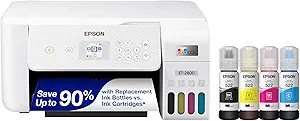 |
| Best Seller A high-volume bestseller chosen again and again | Epson EcoTank ET-2400 |  |
HP Smart Tank 5101

| Printer Type | HP Thermal Inkjet |
|---|---|
| Printer Connectivity Type | Wireless |
| Maximum print Resolution Color | 4800 x 1200 dpi |
| B&W Pages per Minute | 12 pages_per_minute |
| Maximum Sheet Capacity | 100 |
The HP Smart Tank 5101 is a cartridge-free all-in-one inkjet aimed at everyday home and small office tasks. It uses refillable ink tanks and ships with enough Original HP ink for up to two years, which lowers ongoing cost for high-volume black or color printing. Setup and mobile printing are handled through the HP Smart app, AirPrint, or Mopria, and the printer offers wireless, Wi-Fi Direct, and USB connectivity. Print quality is good for documents and occasional color graphics thanks to up to 4800 x 1200 optimized dpi, while the flatbed scanner and copy functions handle single-page scans at up to 1200 dpi optical. The unit does not include an automatic document feeder or automatic duplexing, so multi-page scanning and two-sided printing require manual handling. Speed is modest for color jobs (around 5 ppm) but adequate for text and photo drafts. For buyers focused on consistent low-cost output and straightforward mobile workflows, the Smart Tank 5101 delivers; users needing fast duplexing, ADF scanning, or production-level photo output should look elsewhere.
Best for: Buyers who want a low-cost, low-maintenance all-in-one for regular home or small-office document and occasional color printing with easy mobile connectivity.
Less Ideal for: People who need fast two-sided printing, automatic multi-page scanning, or production-quality photo printing should consider models with duplexing, an ADF, or higher photo-focused specs.
- Refillable ink tank with up to two years of included Original HP ink reduces per-page cost.
- Wireless printing via HP Smart app, AirPrint, Mopria and Wi‑Fi Direct for easy mobile workflows.
- High optimized color resolution (up to 4800 x 1200 dpi) for sharper color documents and graphics.
- Flatbed scanner with up to 1200 dpi optical resolution for single-page scans.
- No automatic duplexing; two-sided prints must be done manually.
- No automatic document feeder, which slows multi-page scanning or copying.
- Color print speed is relatively slow compared with higher-end photo or office models.
Verdict: Choose the HP Smart Tank 5101 when you prioritize very low running costs and easy mobile printing for everyday home and small-office document work.
Canon PIXMA G3270 MegaTank

| Print resolution | 4800 x 1200 dpi |
|---|---|
| Color pages per minute | 6 ppm |
| Black & white pages per minute | 11 ppm |
| Printer connectivity type | USB, Wi-Fi |
| Maximum sheet capacity | 100 |
The PIXMA G3270 is a MegaTank inkjet all-in-one that pairs very low running costs with straightforward wireless printing and basic scanning and copying. It uses refillable ink bottles that Canon rates for very high page yields, so you can print long heat-transfer test runs without continually replacing cartridges. The printer handles a wide range of media including glossy photo paper, card stock, envelopes, and custom sizes, and it supports borderless printing and high maximum print resolution up to 4800 x 1200 dpi for detailed transfers. A 1.35" LCD and app control make setup and mobile printing simple, and the rear-capable media path accepts longer sheets. Limitations for heat-transfer work are that the unit is simplex only (no automatic duplex) and the standard print speeds are modest, particularly for color; transferring multiple garments will take time. Also, like most dye-based ink systems, results on heat-transfer paper and fabrics will depend on the transfer medium and heat press settings, so expect to do test prints and calibrate heat/pressure for best washfastness.
Best for: Buyers who prioritize low ongoing ink cost and high-resolution single-sided prints for testing and small-batch heat-transfer projects and want a reliable home/workspace printer.
Less Ideal for: People needing a fast production printer with built-in duplex, glossy pigment-based inks for maximum washfastness or high-volume garment production should consider more specialized transfer solutions.
- Very high page yield from MegaTank refillable inks reduces per-print cost for transfer proofing.
- High maximum print resolution (4800 x 1200 dpi) produces detailed, crisp prints suitable for heat-transfer designs.
- Supports multiple media types and borderless printing for edge-to-edge transfers on suitable paper.
- Wireless and app control simplify mobile workflow and test printing from phones or tablets.
- Simplex-only printing means no automatic double-sided or mirrored workflow support built into the printer.
- Color print speed is relatively slow, so batch production of transfers can be time-consuming.
Verdict: Choose the PIXMA G3270 if you want a low-cost-per-print, high-resolution MegaTank inkjet for testing and small-batch heat-transfer work.
HP DeskJet 2955 All-in-One

| Printer Type | HP Thermal Inkjet |
|---|---|
| Scanner Type | Flatbed |
| Maximum Sheet Capacity | 60 |
| Connectivity | AirPrint; USB; Wireless; Wireless direct; Mopria |
| Compatible Cartridge | HP 68 series |
The HP DeskJet 2955 is a small, budget-focused all-in-one designed for basic home printing, scanning, and copying with easy mobile and wireless printing. It supports color and black-and-white output, a flatbed scanner for documents, and a 60-sheet input tray, plus an icon LCD for simple operation. The printer is compatible with HP 68-series cartridges and includes a three-month Instant Ink trial to reduce initial ink costs. Connectivity options include USB, AirPrint, Mopria, and wireless direct printing, which makes sending jobs from phones and laptops straightforward. Print speed is modest—about 7.5 ppm black and 5.5 ppm color—so it is best for occasional jobs rather than high-volume runs. For heat transfer projects this printer can produce color prints on standard paper, but it lacks high-capacity media handling, specialty transfer-paper profiles, and automatic duplexing, so you will need to feed transfer sheets manually and manage color settings through the driver or app. Its compact footprint and low power draw make it an economical choice, but users who need robust, reliable heat-transfer output for frequent garment production should consider higher-end photo or pigment-based models instead.
Best for: Buyers on a tight budget who need an affordable, compact all-in-one for occasional color prints, scans, and simple craft transfers where portability and low upfront cost matter most.
Less Ideal for: People who produce frequent or commercial heat-transfer garments or need high-capacity media handling and precise color profiles should choose a higher-end photo or dedicated transfer printer.
- Compact, space-saving design suitable for small home workspaces
- Wireless printing and mobile app support for easy phone-to-printer workflows
- Includes a 3-month Instant Ink trial to reduce initial ink costs
- Flatbed scanner and copy functions add basic multifunction capability
- Modest print speed and small 60-sheet tray limit throughput for batch jobs
- Not optimized for specialty transfer papers or high-volume heat-transfer production
Verdict: A low-cost, compact all-in-one that lets budget-minded crafters print occasional transfer designs from phones or PCs without a large upfront investment.
Epson EcoTank ET-2800

| Printer Type | Inkjet |
|---|---|
| Printer Connectivity Type | wired, wireless |
| B&W Pages per Minute | 10 |
| Color Pages per Minute | 5 |
| Maximum print Resolution Color | 5760 x 1440 dots_per_inch |
The Epson EcoTank ET-2800 is a cartridge-free all‑in‑one inkjet designed to cut ongoing ink costs and simplify home printing. It uses large refillable EcoFit ink tanks and ships with starter bottles that Epson rates as enough for up to two years of printing, so you spend far less time replacing cartridges and more time printing documents and photos. The ET-2800 prints color documents at about 5 ppm and black at about 10 ppm, offers borderless photo support, and includes a flatbed scanner and copy functions for basic office tasks. Connectivity covers wired USB and wireless printing with app and voice support, and the small color LCD and push-button controls make setup and everyday use straightforward. Image quality benefits from Epson Micro Piezo technology and high maximum DPI for sharp text and decent photos on compatible paper. Limitations to note are manual duplexing instead of automatic two-sided printing and modest color photo speed, which may slow larger print jobs. For buyers who value low ink costs and reliable everyday printing, the ET-2800 is a practical pick.
Best for: Buyers who prioritize low long-term ink costs and straightforward home printing with reliable wireless and scanning capabilities, and who value widespread user feedback when choosing a safe, established option.
Less Ideal for: Users who need fast, heavy-duty photo or production printing with automatic duplexing and very high throughput should consider higher‑end models instead.
- Cartridge-free EcoTank system with high-capacity refillable ink bottles included
- Low running costs equivalent to many replacement cartridges per bottle set
- Wireless printing with app and voice support for easy mobile workflows
- Built‑in flatbed scanner and copy functions add basic all‑in‑one versatility
- High maximum print resolution for sharp text and good photo detail
- No automatic duplex printing — two-sided prints require manual intervention
- Color print speed is modest compared with higher‑end models
Verdict: If you want to dramatically lower ink expenses while keeping a simple wireless all‑in‑one for home heat-transfer mockups and everyday printing, the ET-2800 delivers dependable, cartridge‑free performance.
Epson EcoTank ET-2400

| Printer Type | Inkjet |
|---|---|
| Connectivity | USB, Wi-Fi |
| Max Resolution | 5760 x 1440 dpi |
| Black Print Speed | 10 ppm |
| Maximum Sheet Capacity | 100 |
The Epson EcoTank ET-2400 is a cartridge-free wireless all-in-one inkjet that prints, scans, and copies using large refillable ink tanks instead of cartridges. Setup typically involves filling the color and black tanks with the included Epson bottles, connecting via Wi-Fi or USB, and using the Epson app for mobile printing. Its strengths are very low ongoing ink cost and long run lengths—Epson claims thousands of pages per replacement set—plus a high maximum resolution for sharp text and photos. The rear-fed 100-sheet input and 30-sheet output let you queue moderate heat-transfer test prints or design sheets without constant refills. Expect manual duplexing only and modest color speed at about 5 ppm, so it is better for sample runs and proofs than high-volume production. For heat-transfer work you will appreciate the high print resolution but should verify the printer's ink compatibility with your transfer paper and heat process, since EcoTank uses dye inks and Epson recommends genuine inks for best results.
Best for: Buyers who prioritize low operating cost, reliable everyday printing, and worry-free ink supply for small-batch heat-transfer proofs and design samples.
Less Ideal for: Not a good fit for users needing pigment-based inks for high-durability transfers or those who demand fast, production-scale printing of transfer sheets.
- Cartridge-free EcoTank system greatly reduces frequency of ink replacements
- High maximum print resolution (5760 x 1440 dpi) for detailed prints and proofs
- Includes starter ink bottles that cover many pages so you can print longer before refilling
- Wireless and USB connectivity with app control for easy mobile or desktop printing
- 100-sheet rear feed accommodates longer print runs without constant reloading
- Uses dye-based EcoFit inks which may not match solvent or pigment durability required for some heat-transfer methods
- Manual duplex only, so two-sided heat-transfer proofs require extra handling
- Color print speed is modest at about 5 pages per minute
Verdict: Choose the EcoTank ET-2400 if you want a low-cost, cartridge-free AIO that produces high-resolution proofs and reduces ink worries for small-scale heat-transfer work.
Choosing the Right Inkjet Printer for Heat Transfer: Key Factors to Consider
Color Accuracy and Gamut
Accurate color reproduction determines how closely your printed transfer matches the intended design. Transfers often look different after heat and pressure, so printers with broader color gamuts and finer color controls help compensate for that shift.
Look for models that allow color profiling or have dedicated photo modes. Consistent color across multiple prints reduces waste from trial-and-error adjustments and saves time when producing batches.
Media Compatibility and Paper Feed
Transfer papers and specialty coated sheets are thicker or have different surface textures than standard office paper. A printer with a straight paper path, rear feed tray, or manual feed option will handle these thicker substrates with fewer jams.
Reliable feed mechanisms also preserve registration and alignment, which is critical when printing multi-part designs or working with heat-applied vinyl where precise placement matters.
Ink Durability on Transfer Papers
How well ink adheres to transfer paper and how it reacts during heat pressing affects final wash-fastness and vibrancy. Some inks soak into paper differently or bond poorly to transfer coatings, resulting in faded or cracked transfers after laundering.
Understand whether the printer uses dye or pigment-based inks and whether those inks are known to perform well with the transfer media you plan to use. Consider testing on scraps before committing to large runs.
Print Resolution and Detail Rendering
Fine details, small text, and smooth gradients rely on high effective resolution and well-implemented halftoning. Printers with finer droplet sizes and higher dpi settings produce cleaner outlines and smoother tonal transitions, which are especially important for photographic transfers.
Resolution alone is not everything. Look for consistent edge fidelity and banding-free gradients in sample prints.
Ink System and Maintenance
Ongoing usability depends on how the printer handles inks and maintenance tasks. Refillable tanks or easily replaceable cartridges reduce downtime and running complexity, while sealed pigment systems can require less frequent head maintenance.
Consider how easy it is to clean heads, run alignment, and replace consumables. For busy shops, lower maintenance frequency and accessible supplies save time and reduce service interruptions.
Software and Color Management
Good driver settings and support for ICC profiles let you control color translation from screen to transfer paper. Software features such as custom color profiles, print preview, and media presets reduce guesswork.
If you use design software, ensure the printer supports common color-management workflows and allows you to embed or load profiles suited to your transfer media and heat-press conditions.
Preparing Artwork for Heat Transfer
Start by setting up your design in the correct color space. Use RGB or sRGB only if your workflow and profile expect it, otherwise work with profiles recommended for your printer and transfer paper. Vector artwork should be exported at a high resolution to preserve edge crispness.
Mirror your artwork when required by your transfer method so that text and directional elements read correctly after pressing. Save test prints on inexpensive transfer sheets to check color, sizing, and registration before committing to final media.
- Convert colors using an ICC profile when possible
- Export raster files at 300 dpi or higher for small prints
- Always mirror designs for heat-applied transfers that face down
Heat-Press Settings and Trial Runs
Temperature, pressure, and dwell time all affect how ink moves from paper to substrate. Follow the transfer paper manufacturer guidance as a starting point, then run short tests adjusting one variable at a time to find the best combination for your fabric or material.
Keep a log of settings and outcomes. Small changes in pressure or time can make large differences in wash-fastness and hand feel, so documenting successful combinations will speed up repeat jobs.
- Start with recommended temperature and lower time for a test
- Increase pressure gradually if transfers do not adhere fully
- Use a Teflon sheet or protective paper when needed to prevent scorching
Post-Press Care and Washing Instructions
How you treat the printed item after pressing impacts longevity. Allow transfers to cool before handling and follow any recommended curing steps. Some transfers benefit from a post-press cover and a short secondary press at low pressure.
Provide clear washing instructions for customers, such as inside-out washing on gentle cycles and avoiding high-heat drying. Proper care will maximize color retention and reduce cracking or peeling over time.
- Recommend cool or warm water and gentle detergents
- Advise turning garments inside out when washing
- Avoid bleach and strong fabric softeners that can degrade inks
Workflow Tips for Small Batch Production
Organize your jobs to minimize color changes and head-clean cycles. Group similar color profiles and media types together to reduce time spent reconfiguring the printer. Pre-cut transfer sheets when possible to speed up press workflow.
Consider a dedicated printer for transfer production if volume justifies it, so settings remain stable and maintenance becomes predictable. Use a staging area for cooled transfers to prevent smudging while handling multiple items.
- Batch print designs with similar ink coverage
- Schedule maintenance during low-demand periods
- Store transfer papers flat and in a dry environment
Common Troubleshooting Steps
If prints show banding or color shifts, run a nozzle check and alignment routine, and confirm media settings match the loaded paper type. Clean heads only when necessary, following manufacturer procedures to avoid unintended damage.
When transfers lift or crack after pressing, review your heat-press settings and test different transfer papers. Sometimes switching to a slightly lower temperature with longer dwell time improves adhesion without overexposing inks to heat.
- Verify driver media type matches physical paper
- Run color calibration if prints shift over time
- Test alternative transfer sheets if adhesion fails
How We Chose the Best Inkjet Printer for Heat Transfer
We focused on criteria that directly affect successful heat-transfer printing and real-world throughput. Color accuracy and gamut were prioritized because transfers rely on faithful color reproduction after pressing. Media compatibility and feed reliability were next, since thick or coated transfer papers need good paper handling to avoid jams and misfeeds. Ink permanence on transfer media and post-press wash resistance were included to reflect durability concerns after heat application. Print resolution and halftone rendering matter for photographic and fine-detail work, so they were assessed as measurable technical specs. Finally, ink system practicality and ongoing cost were considered because refillability and replacement ease impact how affordable repeated runs will be. We excluded general home-office models that lack support for heavier transfer papers or dye/substrate-specific inks. We also filtered out printers with unreliable paper paths or without user-adjustable color management. The shortlist emphasizes devices that balance accurate color, robust media handling, and ink systems suitable for producing durable heat transfers.
Our full evaluation process is outlined in our review methodology.
FAQ
Can any inkjet printer be used for heat transfer?
Not all inkjet printers handle heat-transfer papers well. Look for models with robust media feeds and support for thicker or coated sheets. Also consider the ink type, since some inks do not bond well to transfer coatings.
Should I use dye or pigment inks for transfers?
Dye inks often offer brighter colors, while pigment inks can provide better durability. The best choice depends on your transfer paper and the fabric finish. Test both types on your chosen media to determine which gives the desired look and wash resistance.
How do I prevent prints from fading after pressing?
Proper pressing parameters and compatible transfer paper are the first lines of defense. Ensure the correct temperature, pressure, and dwell time, and follow any curing or post-press steps. Also advise gentle washing to maintain color.
Do I need ICC profiles for heat-transfer printing?
ICC profiles help translate screen colors to print more predictably and can reduce trial-and-error. They are especially useful when color accuracy is important and when working across different media types.
How often should I perform maintenance on a transfer printer?
Frequency depends on usage and ink system. For regular production, check alignment and run nozzle checks daily or weekly, and clean printheads as needed. Proper maintenance prevents jams and color issues that can ruin transfer sheets.
Final Verdict
Prioritize color accuracy, media handling, and ink compatibility when choosing an inkjet printer for heat transfer. These three factors most directly affect transfer fidelity, durability, and production efficiency. Balance resolution needs with an ink system you can maintain affordably, and plan for test runs to dial in press settings. Ultimately, selecting the right printer means accepting tradeoffs between absolute color gamut, ease of use, and maintenance. Focus on the criteria that matter most for your workflow and run practical tests on your chosen transfer paper before committing to large batches.