
Note: This article contains affiliate links. If you click on these links and make a purchase, we may earn a small commission at no extra cost to you. This helps support our research and content. Read our full affiliate disclosure here.
If you are digitizing film, choosing the right negative scanner determines how faithfully your images are preserved and how efficiently you can work. A dedicated Negative Scanner captures fine grain, tonal range, and color accuracy that flatbed conversions often miss, and it can dramatically reduce time spent on framing and batch scanning. This guide highlights six shortlisted options that represent the best balance of optical resolution, dynamic range, and practical workflow features for home archivists and small studios. Below we summarize the factors that set these picks apart and how they perform in real scanning tasks, including resolution, color fidelity, and throughput. Read on for the evaluation criteria that guided our selections and what to consider when picking a scanner for your film collection.
Top Picks at a Glance
| Best Overall The best all-around choice for most situations | Plustek OpticFilm 8100 |  |
| Best Quality Built to a higher standard if you want something more solid | Epson Perfection V850 Pro |  |
| Best Budget The cheapest option that still gets the job done reliably | Wolverine Titan Film to Digital Converter |  |
| Top Rated A top-rated pick with lots of positive feedback | KODAK Slide N Scan Film Scanner |  |
| Most Popular A crowd favorite that many people choose with confidence | KODAK SCANZA Film & Slide Scanner |  |
| Best Seller A high-volume bestseller chosen again and again | Magnasonic FS71 24MP Film Scanner |  |
Plustek OpticFilm 8100

| Scanner Type | Film |
|---|---|
| Connection Type | USB |
| Resolution | 7200 |
| Color Depth | 48 NA |
| Optical Sensor Technology | CCD |
The Plustek OpticFilm 8100 is a compact 35mm negative and slide scanner aimed at hobbyists and photo enthusiasts who want high-resolution digital copies of film. It scans negatives and mounted slides via USB and advertises an optical resolution of 7200 DPI with 48-bit color depth, which translates to very detailed files suitable for large prints and careful restoration work. The unit ships with Plustek QuickScan and a SilverFast SE Plus bundle, giving basic image processing and dust/scratch removal workflows. Because it uses a CCD sensor and LED light source, scans show good dynamic range for shadow and highlight detail, and the bundled software helps correct color and exposure. The scanner is lightweight and comes with a carry bag for storage. Expect a learning curve to get the best results: batch scanning is possible but color calibration and best-quality output benefit from time spent in SilverFast or other editing software. The OpticFilm 8100 is not a flatbed replacement and only handles 35mm formats, so larger film or documents require other equipment.
Best for: Photo hobbyists and enthusiasts seeking a dedicated 35mm scanner that delivers high-resolution, print-ready scans and who are willing to invest time in software-based color and dust correction.
Less Ideal for: Users who need to scan larger film formats, flat documents, or want a completely hands-off instant workflow without learning scanning software.
- Very high optical resolution (7200 DPI) for detailed scans and large prints
- 48-bit color depth for rich tonal and color information
- Bundles SilverFast SE Plus for advanced scanning and dust/scratch removal
- Compact, lightweight design with included carry bag for storage and transport
- Limited to 35mm negatives and slides only, not suitable for larger film formats
- Takes time to master color calibration and software settings for best results
Verdict: Pick the OpticFilm 8100 if you want a compact, high-resolution dedicated 35mm scanner that produces large, detailed digital files when paired with its bundled software.
Epson Perfection V850 Pro

| Scanner Type | Photo |
|---|---|
| Connection Type | USB |
| Resolution | 9600 |
| Color Depth | 48 bits |
| Optical Sensor Technology | CCD |
The Epson Perfection V850 Pro is built for users who need high-fidelity scans of film and prints, offering a dual-lens CCD system with up to 6400 dpi film resolution and a 4.0 Dmax for deep shadow detail. It scans negatives, slides, and medium/large-format film using included film holders and applies Digital ICE to reduce dust and scratches during capture, while ReadyScan LED lighting eliminates warmup time. USB 2.0 connectivity and bundled scanning software make batch scanning practical for archiving projects, and the CCD sensor plus 48-bit color depth deliver smooth tonal gradations and accurate color. The unit is relatively large and heavy compared with consumer flatbeds, and workflow speed depends on chosen resolution and image restoration settings, so high-resolution scans take time and system resources. For photographers preserving negatives or making high-quality enlargements, the V850 Pro emphasizes image quality over compactness or the fastest throughput.
Best for: Photographers and archivists who prioritize maximum image quality when digitizing negatives and prints and are willing to accept slower, deliberate scanning workflows.
Less Ideal for: Casual users needing a compact, fast scanner for occasional document scans or those who want immediate, high-volume throughput.
- High-resolution film scanning up to 6400 dpi for detailed enlargements
- 4.0 Dmax and 48-bit color depth for superior shadow detail and tonal range
- Dual-lens system and ReadyScan LED provide optimized optics and no warmup
- Digital ICE reduces dust and scratch artifacts on film and prints
- Includes multiple film holders for 35mm, medium and large-format film
- Large, heavy chassis makes it less portable and needs dedicated workspace
- High-resolution scans are time-consuming and require significant processing resources
Verdict: Choose the V850 Pro when you need top-tier film and negative scans with exceptional shadow detail and color fidelity.
Wolverine Titan Film to Digital Converter

| Scanner Type | Film |
|---|---|
| Connection Type | HDMI, USB |
| Resolution | 20 Megapixels |
| Color Depth | 24 bits |
| Light Source Type | LED |
The Wolverine Titan is a straightforward, budget-friendly film-to-digital converter designed to quickly turn slides and negatives into JPEG files without a computer. It accepts 35mm, 127, 126, 110 and APS film using speed-load adapters, captures 20 megapixel images with a CMOS sensor and saves them to internal memory or an SD card. The 4.3 inch color screen and HDMI output let you preview and display scans on a TV, and the device runs from AC or USB power so it can be used on a desk or near a display. Scans are very fast—about three seconds per frame—making it useful for large batches, and the LED light source and 24-bit color depth deliver decent color and contrast for everyday archiving. Limitations include modest image fidelity compared with dedicated flatbed film scanners and reliance on manual handling for best results, so it is better for quick digitizing than for archival-grade restoration work.
Best for: Buyers who want an affordable, no-fuss way to digitize large quantities of older slides and negatives quickly without needing a computer or specialized software.
Less Ideal for: Photographers or archivists seeking the highest possible resolution and color accuracy for restoration or professional archiving should choose a dedicated film scanner.
- Standalone operation with built-in 4.3 inch screen and HDMI output so no computer is required
- Fast scanning speed of about three seconds per frame for quick batch conversion
- Supports a wide range of formats including 35mm, 127, 126, 110 and APS
- Saves 20MP JPEGs to internal memory or SD/SDHC card for easy file transfer
- Image quality and detail are lower than higher-end dedicated film scanners
- Manual loading and handling means less consistent results for damaged or curled film
Verdict: A fast, budget-friendly standalone converter that makes bulk digitizing of slides and negatives easy without a computer.
KODAK Slide N Scan Film Scanner
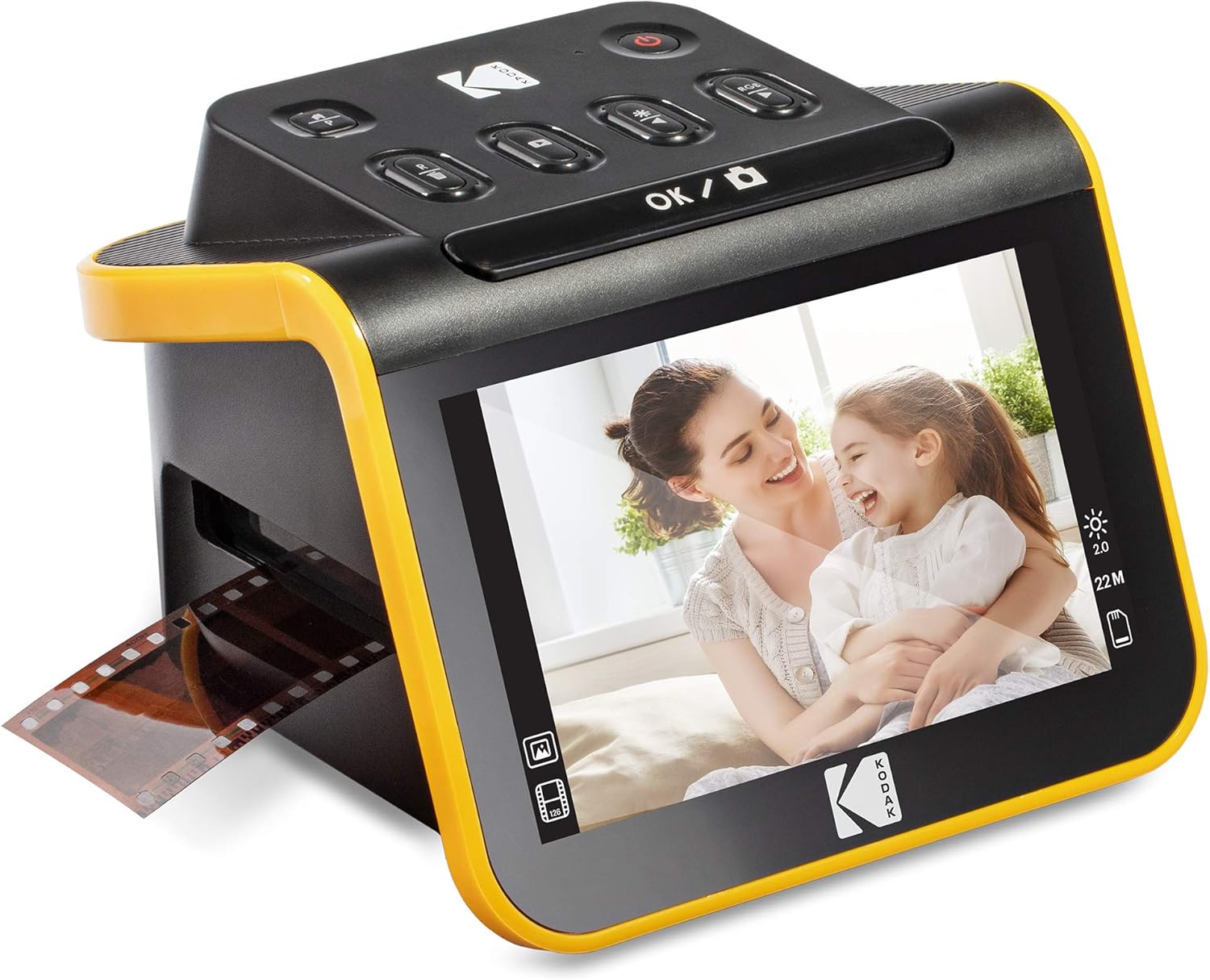
| Resolution | 13MP/22MP (interpolation) |
|---|---|
| Image sensor | 13-megapixel CMOS |
| Connection Type | HDMI, USB |
| Supports SD/SDHC | Up to 32GB |
| Media Type | Negatives, Slide |
The KODAK Slide N Scan is a straightforward film and slide scanner designed to convert 135, 110 and 126 negatives and 50mm slides into JPEG files saved to an SD/SDHC card. It uses a 13MP sensor with an optional 22MP interpolation mode and offers a large 5" LCD for previewing, basic edits and gallery display without a computer. The unit includes a quick-feed insert and adapters for multiple film formats so you can load strips or slides continuously, and it has USB and HDMI outputs for direct connection to a PC or TV. Practical features include one-touch scan, simple color/brightness adjustments, and a cleaning brush and cables in the box. Limitations to expect are interpolation for the 22MP mode rather than true optical resolution, and reliance on an SD card (not supplied) or a computer for long-term storage. The device is best for users who want a reliable, no-fuss way to digitize family negatives and slides without learning complex software.
Best for: Buyers who want a dependable, easy-to-use scanner to quickly preserve family negatives and slides without investing time in software or complex workflows.
Less Ideal for: Professionals or archival users who need true high optical resolution and raw file control should choose a higher-end scanner with native optical megapixels and advanced software features.
- Handles 35mm/110/126 negatives and 50mm slides with included adapters
- Large 5" LCD for previewing and simple on-device editing
- Quick-feeding tray for continuous scanning speeds up batch work
- Saves directly to SD/SDHC card and connects via USB or HDMI
- 22MP output is achieved by digital interpolation rather than higher optical resolution
- Requires an SD card (not included) for standalone operation
Verdict: A reliable, no-fuss scanner for quickly digitizing family negatives and slides with on-device preview and direct-to-SD saving.
KODAK SCANZA Film & Slide Scanner

| Compatible film types | 35mm, 126, 110, Super 8, 8mm |
|---|---|
| Sensor resolution | 14MP (interpolated to 22MP) |
| Display | 3.5" tilt-able LCD |
| Connection types | HDMI, USB |
| Storage | Saves to SD card (up to 128GB) |
The KODAK SCANZA is a purpose-built film-to-JPEG scanner aimed at quickly converting 35mm, 126, 110, Super 8 and 8mm negatives and slides into digital images. You load film into numbered adapters, preview and capture images on the tilt-able 3.5" LCD, then save directly to an SD card or export via USB; it also offers HDMI output for displaying scans on a TV. The unit uses a 14MP sensor with optional interpolation to 22MP and provides simple on-device editing for brightness and color. Practical benefits include fast, batch-friendly feeding with multiple inserts, a clear workflow for nontechnical users, and the convenience of not needing a PC to capture images. Important limitations are that it is snapshot-based rather than a flatbed scanner, so scans will not match professional drum or flatbed quality, and Super 8 is converted to stills not video. The unit auto-sleeps after inactivity and relies on included adapters and a microSD card for storage, so expect a straightforward, consumer-grade digitizing experience rather than archival-grade results.
Best for: Buyers who want a simple, guided way to convert family negatives and slides to digital files with minimal setup and a reliable, repeatable workflow backed by many user reviews.
Less Ideal for: Anyone seeking archival‑level scans, professional restoration, or full-motion film capture should look at higher-end flatbed or specialized film-scanning services instead.
- Supports multiple film formats including 35mm, 126, 110, Super 8 and 8mm for broad compatibility
- Built-in 3.5" tilt-able LCD and on-device controls let you preview, edit and save without a PC
- Saves captures directly to SD card and can connect via USB or HDMI for easy exporting and display
- Comes with numbered trays and adapters for faster, repeatable batch scanning
- Image capture is from an internal camera rather than a flatbed optical scan, so results are consumer-grade not archival
- Super 8 and 8mm are converted to still images only, not motion video
Verdict: A straightforward, easy-to-use scanner for quickly digitizing a variety of old negatives and slides when you want fast, usable JPEGs rather than archival-quality scans.
Magnasonic FS71 24MP Film Scanner
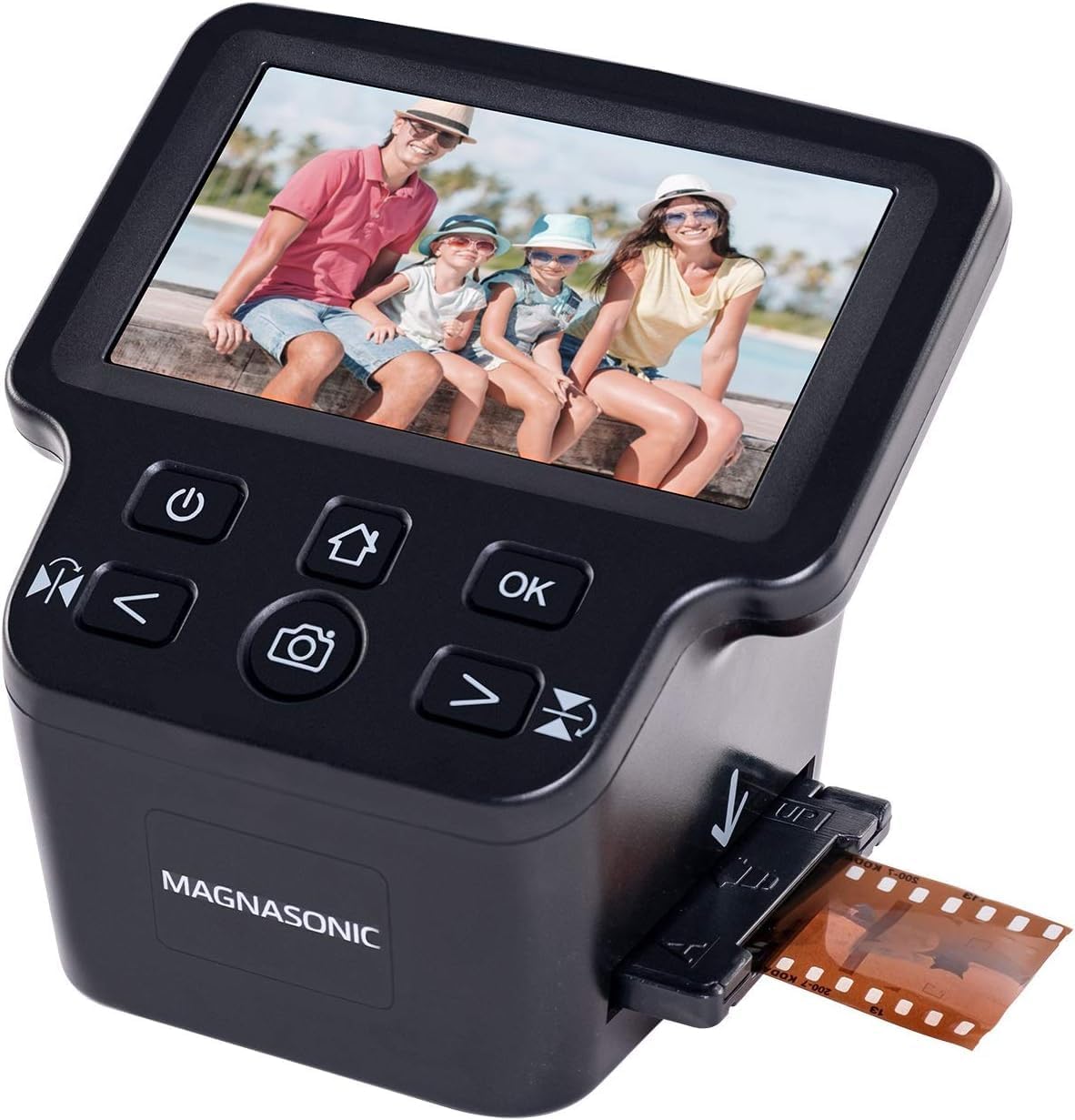
| Scanner Type | Film, Photo |
|---|---|
| Connection Type | HDMI, USB |
| Resolution | 24MP (interpolation) |
| External Memory Card | SD card up to 128 GB |
| Scan Speed | 3-5 Seconds |
The Magnasonic FS71 is a straightforward, no-frills film and slide scanner meant to digitize legacy negatives and slides without needing a computer. It accepts common film formats including 35mm, 110, 126 and Super 8 and scans each frame in about 3 to 5 seconds to a JPEG file stored on an SD card or transferred over USB. The 5" color LCD and HDMI output let you preview and show scans right away, and onboard controls permit simple exposure adjustments and basic color correction so you can tweak results before saving. The unit uses a 16 MP CMOS sensor with interpolation to 24 MP, and the LED backlight plus multiple film-format inserts make loading different film types easy. Expect fast, convenient digitizing for family archives and casual projects, though the scanner relies on interpolation rather than true high-end optics and does not support medium format rolls like 120/220, so it is best for consumer spools and slides rather than professional restoration work.
Best for: Buyers who want a low-risk, easy-to-use device to quickly digitize family slides and common film formats without dealing with software or complex workflows.
Less Ideal for: Professional photographers or archivists who need native high-resolution scanning for medium-format negatives or advanced restoration tools should look at dedicated drum or flatbed scanners.
- Simple all-in-one workflow with 5" LCD and HDMI output for immediate preview and slideshow viewing
- Fast scan speed of about 3–5 seconds per frame for quick batch digitizing
- Supports multiple common film and slide formats with included adapters
- Saves directly to SD card up to 128 GB or transfers via USB without extra software
- Image quality uses interpolation to reach 24MP rather than native optical resolution
- Does not support medium format (120/220) or uncommon film sizes
Verdict: A user-friendly, fast film scanner that lets cautious buyers preserve common slides and negatives without needing a computer or complicated setup.
Choosing the Right Negative Scanner: Key Factors to Consider
Optical Resolution and True Detail
Optical resolution determines how much fine film grain and image detail the scanner can capture. Higher optical resolution matters when you plan large prints or need to crop aggressively. Interpolated numbers are marketing figures and do not equate to real detail, so look for measured optical dpi and sample scans where possible.
Consider the intended output size and how much enlargement you will perform. For archive-quality scans of 35mm negatives that might be printed at moderate sizes, a mid-to-high optical resolution is sufficient. For medium-format or large-format negatives, prioritize scanners or capture methods that preserve the native detail without relying on software upscaling.
Dynamic Range and Tonal Gradation
A scanner's dynamic range and bit depth affect its ability to hold shadow and highlight information from negatives. Film often contains wide tonal ranges, so a higher dynamic range helps retain subtle density variations and reduces the need for aggressive editing later.
Bit depth (for example, 16-bit versus 8-bit channels) influences post-scan editing latitude. If you plan to do color correction or heavy tonal adjustments, choose a scanner and workflow that produce higher bit-depth files and accurate color rendering to avoid banding and loss of subtle gradations.
Scan Speed and Batch Workflow
Throughput matters for projects with many frames. Tools that support multi-frame holders, strip scanning, or automatic feeders can save hours compared with single-frame manual mounting. Fast single-frame scans are useful when you need high-quality results for individual shots, but batch capability is essential for larger archives.
Also consider how long it takes to process and transfer files. Some scanners have slower interface speeds or require manual steps between scans that slow overall output. Look for a balance between per-frame quality and practical throughput for the size of your project.
Software Controls and Color Management
Good scanning software makes a huge difference. Look for applications that offer manual exposure control, color profiling, dust and scratch reduction, and batch presets. Raw scan output or high-bit-depth TIFFs give more flexibility than compressed formats.
Color management is critical when preserving accurate tones. Support for ICC profiles and the ability to build or load film-specific color profiles helps maintain consistent results. Reliable drivers and macOS/Windows compatibility reduce workflow interruptions.
Build Quality and Film Handling
Physical design affects both results and long-term usability. Sturdy film holders that maintain flatness, precise alignment, and effective masking reduce edge artifacts and focusing errors. Dust control features and easy cleaning access help maintain consistent scan quality over time.
Consider how fragile film is and whether the scanner minimizes contact and abrasion. The availability of well-designed holders for 35mm strips, mounted slides, or medium-format frames is also important. A robust build reduces maintenance and keeps alignment stable across lengthy scanning sessions.
Understanding Negative Scanner Types
Negative scanners vary between single-frame CCD or CIS capture units and more specialized systems that use a high-resolution sensor with a dedicated light path. The underlying capture technology affects sharpness, dynamic range, and color accuracy more than advertised dpi numbers.
When evaluating scanner classes, think about the film formats you will scan most often. Some devices are optimized for 35mm strips, others for mounted slides or medium-format film. The right architecture will balance optical performance with the practical needs of your workflow.
- CCD-based systems typically offer higher dynamic range than basic CIS sensors.
- Dedicated film scanners often include holders that guarantee consistent film flatness.
- Some capture methods prioritize speed through strip scanning, while others focus on maximum detail per frame.
Color Workflow and Profile Management
Effective color management starts with consistent lighting and accurate scanner profiles. Use ICC profiles for your scanner and target color spaces that match your editing and output needs. For archival work, capture in a wide gamut and high bit depth to preserve color information.
Many scanning packages offer automatic color correction built on film type detection. These can be helpful time-savers but verify results on a few frames before batch-applying corrections because automated conversions can mask subtle color shifts.
- Capture to TIFF or another lossless format when possible.
- Create or use film-specific ICC profiles for consistent color.
- Test automatic corrections on representative frames before batch processing.
Dust, Scratch Reduction, and Image Restoration
Dust and scratches are inevitable when working with older negatives. Hardware or software-based infrared dust mapping can dramatically reduce manual retouching time. However, infrared methods may fail on certain film types, so have a backup plan for manual spot removal.
Optical sharpening and noise control should be applied conservatively. Over-sharpening can emphasize grain and artifacts. Plan restoration workflows that separate dust removal, color correction, and sharpening into distinct steps so you can adjust each stage without degrading others.
- Use infrared dust mapping when supported, but verify compatibility with your film stock.
- Separate restoration steps: dust removal, color correction, and sharpening.
- Keep original high-bit-depth scans archived before aggressive edits.
Maintenance and Long-Term Care
Regular maintenance extends scanner life and ensures consistent results. Keep the glass, film holders, and light path clean with appropriate tools and avoid touching film with bare fingers. Periodic recalibration and software updates help maintain color consistency and performance.
If you plan heavy use, consider the availability of replacement film holders and service parts. A design that allows easy access for cleaning and replacement reduces downtime during large scanning projects.
- Clean the scan glass and holders before each session.
- Handle film with gloves and store negatives in archival sleeves.
- Check for firmware and software updates from the manufacturer for compatibility fixes.
File Organization and Backup Strategy
A consistent naming convention and folder structure save time during post-processing and future reference. Include film roll identifiers, frame numbers, and capture date in filenames when possible. Organize both working copies and final edited files separately from master archives.
Back up original high-bit-depth scans to redundant storage. For long-term preservation, maintain an offsite copy or cloud backup in addition to local archival drives. Document your workflow so future reprocessing is straightforward if better tools become available.
- Use descriptive filenames that include film and frame metadata.
- Keep master archival files in lossless formats and separate from edited versions.
- Implement at least one local and one offsite backup for digital safety.
How We Chose the Best Negative Scanner
We focused on attributes that matter to photographers and archivists who need dependable, high-quality film-to-digital conversions. Our selection filtered for dedicated negative scanners and models designed specifically for film formats rather than general-purpose flatbeds. We prioritized true optical resolution measurements over interpolated numbers, and we checked advertised dynamic range or bit depth claims to ensure usable shadow and highlight retention. Workflow and usability factors were essential: support for batch loading, reliable holders for 35mm and medium-format strips or mounts, and software controls for color profiles and dust/scratch reduction. We excluded general flatbed scanners without a dedicated film path and consumer-level devices that lack consistent color control. Other exclusions were devices with poor software support or unclear maintenance requirements. The core evaluation dimensions were optical resolution, dynamic range and color depth, scan speed and batch handling, software features and driver stability, and build quality including film holders and dust control. These criteria guided our editorial picks and the scoring framework used across the shortlist.
Our full evaluation process is outlined in our review methodology.
FAQ
What resolution do I need for scanning 35mm negatives?
It depends on your intended output. For moderate prints and digital use, mid-range optical resolution is often adequate. For large enlargements or detailed archival scans, choose a higher optical resolution and verify actual sampled detail rather than relying on interpolated figures.
Can I use a negative scanner for slides and medium-format film?
Many negative scanners support multiple film formats through different holders. Check that the device offers the specific holders and alignment accuracy you need for mounted slides or medium-format frames before assuming cross-format compatibility.
How much does software affect final scan quality?
Software plays a large role. Good scanning software provides exposure controls, color management, dust removal, and batch processing. Even with excellent optics, poorly implemented software can produce inconsistent color or require extensive manual correction.
Are infrared dust-removal systems always reliable?
Infrared dust mapping is effective for many film types but not all. Some film emulsions or heavily damaged negatives can interfere with infrared detection, so be prepared to do manual retouching when automated methods fail.
What file format should I save master scans in?
Save masters in a lossless format such as TIFF and use a high bit depth when possible. Keep separate working copies for edits and compressed versions for sharing to preserve the original scan data.
Final Verdict
When choosing a negative scanner, prioritize the dimensions that matter most for your projects: true optical resolution for detail, dynamic range for tonal fidelity, and workflow features that match your volume of scanning. Balance high-quality capture with practical throughput and software that supports color management and dust removal. For most users, a scanner that provides reliable holders, good software controls, and documented optical performance will deliver the best long-term results. Focus on the tradeoffs between speed and archival quality, then pick the option that aligns with whether you value maximum detail or efficient batch scanning.