
Note: This article contains affiliate links. If you click on these links and make a purchase, we may earn a small commission at no extra cost to you. This helps support our research and content. Read our full affiliate disclosure here.
Picking the right photo printer for home changes how you preserve memories and produce prints for projects. Whether you want borderless 4×6 snapshots, larger framed prints, or quick phone-to-print convenience, the wrong choice can lead to disappointing color, high ink spending, or slow printing times. This guide shortlists the top home photo printers and explains the practical tradeoffs you should expect. We evaluated options for image fidelity, ease of use, and ongoing operating cost, and the selections below represent the best choices for common home photo needs. Read on to find the printer that matches how you print at home and why each criterion matters.
Top Picks at a Glance
| Best Overall The best all-around choice for most situations | Epson EcoTank ET-2800 |  |
| Best Quality Built to a higher standard if you want something more solid | Canon PIXMA PRO-200S |  |
| Best Value The sweet spot between price and what you get | Epson Expression Premium XP-7100 |  |
| Best Budget The cheapest option that still gets the job done reliably | Nelko PP01 Portable Photo Printer |  |
| Top Rated A top-rated pick with lots of positive feedback | Liene 4×6 Photo Printer |  |
| Most Popular A crowd favorite that many people choose with confidence | KODAK Step Instant Photo Printer |  |
| Best Seller A high-volume bestseller chosen again and again | Canon PIXMA TS6520 |  |
Epson EcoTank ET-2800

| Printer Type | Inkjet |
|---|---|
| Printer Connectivity Type | USB, Wi-Fi |
| Maximum print Resolution Color | 5760 x 1440 dpi |
| B&W Pages per Minute | 10 |
| Color Pages per Minute | 5 |
The Epson EcoTank ET-2800 is a home-focused all-in-one inkjet that replaces cartridges with refillable ink tanks, so you can print long runs of documents and photos without frequent replacements. It prints, copies and scans, connects over Wi-Fi or USB, and supports mobile and voice-activated printing for simple setups from phones or tablets. Photo and document detail benefit from Epson's PrecisionCore/Micro Piezo print technology and a high maximum color resolution, while a flatbed scanner handles scans and copies. Practical strengths are the included ink that covers hundreds to thousands of pages, an easy-to-fill EcoFit bottle system, and a compact footprint suited to a home desk. Downsides include modest color photo speed and no automatic duplexing, so expect manual page handling for two-sided jobs, and the printer performs best with genuine Epson ink. For balanced home users who want low running costs and decent photo quality without dealing with cartridges, the ET-2800 is a reliable choice.
Best for: Buyers who want a low-running-cost home printer that handles everyday document and photo jobs reliably with simple mobile connectivity and minimal maintenance.
Less Ideal for: Users who need fast professional-grade photo output, automatic two-sided printing, or advanced photo finishing controls should consider a dedicated photo printer instead.
- Cartridge-free EcoTank system greatly reduces frequency of ink replacements
- High maximum color resolution for detailed photo and document prints
- Wireless, mobile and voice printing make phone-to-print convenient
- Includes enough ink to print many pages before first refill
- No automatic duplex printing; two-sided jobs require manual flipping
- Print speeds are moderate for color photos compared with higher-end photo printers
Verdict: Choose the ET-2800 if you want a compact home all-in-one that minimizes ink hassle and cost while delivering solid photo-capable prints.
Canon PIXMA PRO-200S

| Printer Type | Inkjet |
|---|---|
| Ink System | 8-color dye-based |
| Maximum Print Resolution | 4800 x 2400dpi |
| Maximum Media Size | 13" x 19" (A3+) |
| Connectivity | Wi-Fi, Ethernet, USB |
The Canon PIXMA PRO-200S is a 13-inch professional inkjet photo printer aimed at home photographers who need vibrant, large-format output. It uses an 8-color dye-based ink set to deliver saturated color and smooth gradients, and supports borderless printing up to 13" x 19" across a wide range of media. Connectivity includes Wi‑Fi plus Ethernet and USB, and a 3.0" color LCD makes checking ink levels and settings straightforward. Paper handling is flexible with two trays and a maximum sheet capacity of 100, and the printer produces a bordered A3+ print relatively quickly—Canon cites about 90 seconds. Practical limitations are its simplex-only printing and modest page-per-minute throughput for text or bulk jobs, since the unit is optimized for photo quality rather than fast document production. For a home studio focused on high-quality photos, the PRO-200S balances color performance and media versatility, but those needing automatic duplexing or high-speed office printing should look elsewhere.
Best for: Home photographers and hobbyist printmakers who prioritize color accuracy and large borderless prints for photos, proofs, and art prints over fast office throughput.
Less Ideal for: Users who need automatic duplexing, high-speed document printing, or a multifunction device with scanning and copying.
- 8-color dye-based ink system for vibrant, nuanced photo color
- Borderless printing up to 13" x 19" for large-format photos and fine art prints
- Wi‑Fi, Ethernet, and USB connectivity for flexible workflow options
- 3.0" color LCD for easy status checks and basic setup
- Supports a wide variety of paper sizes and media types
- Simplex-only printing so no automatic duplex for two-sided jobs
- Low page-per-minute speed makes it slow for bulk document printing
Verdict: Choose the PIXMA PRO-200S if you want a home photo printer that delivers rich, large borderless prints with flexible media handling and color-focused output.
Epson Expression Premium XP-7100

| Print resolution | 4800 dpi |
|---|---|
| Print type | Color inkjet |
| ADF capacity | 30 sheets |
| Connectivity | Wireless, Wi‑Fi Direct, Ethernet |
| Display | 4.3 in touchscreen |
The Epson Expression Premium XP‑7100 is a compact all‑in‑one inkjet designed for home users who want strong photo output alongside everyday document printing. It uses five Claria Premium inks to deliver high-resolution prints up to 4800 dpi and supports borderless photos up to 8 x 10 in, while a 4.3-inch touchscreen and SD/USB slots let you edit and print photos without a computer. For productivity it includes a 30‑sheet Auto Document Feeder and automatic two‑sided printing, plus wireless, Wi‑Fi Direct and Ethernet connectivity for printing from phones or tablets. Practical limits are modest sheet capacity and slower color page throughput compared with laser or higher‑end photo machines, and the printer is intended for use with Epson Genuine cartridges only. If your priority is sharp consumer photo prints and flexible home office features in a single unit, the XP‑7100 balances quality and convenience; heavy volume color jobs or a requirement to use third‑party refill inks are less well served.
Best for: Buyers who want a single home printer that can produce sharp, borderless photos and also handle occasional scanning, copying and two‑sided document work with straightforward wireless setup.
Less Ideal for: People who need high‑volume color document throughput or who prefer unrestricted third‑party ink options should consider different printer types.
- Five‑color Claria Premium ink set for high photo quality and vivid color
- Borderless photo printing up to 8 x 10 inches for photo projects and scrapbooks
- 30‑sheet Auto Document Feeder and automatic duplex for convenient home office tasks
- 4.3‑inch touchscreen plus SD and USB card slots for direct, computer‑free photo printing
- Multiple connectivity options including wireless, Wi‑Fi Direct and Ethernet for phone/tablet printing
- Color page print speed is relatively slow compared with typical document printers
- Supply policy requires Epson Genuine cartridges, limiting third‑party ink options
Verdict: A versatile home all‑in‑one that prioritizes high-quality photo printing and convenient, phone-friendly workflows.
Nelko PP01 Portable Photo Printer

| Printer Type | Inkjet |
|---|---|
| Print media | Glossy photo paper |
| Compatible Devices | Smartphones |
| Print Resolution | 600 x 600 |
| Printer Connectivity Type | Bluetooth |
The Nelko PP01 is a compact Bluetooth inkjet printer made for quick 2×3 prints from your smartphone using the Nelko app. You load 2×3 sticky-backed photo paper, install a small color cartridge, pair over Bluetooth and print edited images directly from your phone; the app includes frames, stickers and simple AI edits. Prints are produced at 600 DPI and the included cartridge and supplied paper deliver vivid, adhesive-backed photos suitable for scrapbooks, party favors and on-the-go keepsakes. Because it is designed as a portable unit, expect one-page-at-a-time printing speed and manual paper handling — the tray holds limited sheets and you should avoid loading more than the recommended amount to prevent jams. Ink cartridge yields and replacement supplies are an ongoing cost to factor in, and the printer relies on the Nelko app for editing and connection rather than a full desktop workflow. For casual home use, journaling, and event prints the PP01 offers an inexpensive way to get instant, durable 2×3 photos without bulky equipment.
Best for: Buyers who want an affordable, portable solution for instant 2×3 photos for scrapbooks, parties, or travel and prioritize convenience over high-volume production.
Less Ideal for: Users who need fast, high-volume photo printing, larger print sizes, or full desktop workflow options should look at larger home photo printers instead.
- True portability and pocket-friendly size for printing anywhere
- Bluetooth pairing with iOS and Android and a feature-rich phone app for editing
- Produces adhesive 2×3 prints at 600 DPI with vibrant colors
- Includes starter ink cartridge and paper so you can start printing out of the box
- Slow single-sheet inkjet speed and small paper capacity make large runs impractical
- Ongoing cost and replacement of proprietary ink cartridges and photo paper
Verdict: If you want an inexpensive, pocketable printer for quick, adhesive 2×3 keepsakes from your phone, the Nelko PP01 is a practical choice.
Liene 4×6 Photo Printer

| Printer Type | Dye Sublimation, Thermal |
|---|---|
| Maximum Media Size | 4×6 inches |
| Maximum Sheet Capacity | 180 |
| Connectivity | Bluetooth, Wi-Fi, Ethernet |
| Maximum Print Resolution Color | 300 dpi |
The Liene 4×6 photo printer is a portable dye-sublimation printer designed for quick, home photo printing from phones, tablets, or computers. It prints 4×6 color photos at up to 300 dpi using thermal dye sublimation and includes a built-in Wi‑Fi hotspot so you can connect directly from up to five devices without relying on a home network. The bundle supplies 180 sheets of glossy photo paper and five CMYK ink cartridges so you can print immediately. Setup is straightforward: load the paper and cartridge, power on, then print via the Liene app or directly from your device over Wi‑Fi, Bluetooth, Ethernet, or USB. The dye-sublimation process deposits a protective overcoat on each print for water and scratch resistance, and the printer is engineered to avoid paper jams and guide you through errors in the app. Limits to consider are the fixed 4×6 output size and simplex-only printing, so it is not suited for larger formats or duplex tasks, and image resolution tops out at 300 dpi which is adequate for casual home use but not for professional large-format needs.
Best for: Buyers who prioritize a dependable, plug-and-play home photo printer that reliably produces consistent 4×6 prints with minimal networking hassle.
Less Ideal for: Users who need larger format prints, duplex capabilities, or higher-than-300 dpi output for professional photography or archival reproduction.
- Dye-sublimation printing produces vibrant, water- and scratch-resistant 4×6 photos.
- Built-in Wi‑Fi hotspot supports direct connection and up to five simultaneous devices.
- Bundle includes 180 sheets of photo paper and five ink cartridges for extended out-of-box use.
- Multiple connectivity options: Wi‑Fi, Bluetooth, Ethernet and USB provide flexible setup.
- App guidance and paper-loading design reduce paper jams and simplify troubleshooting.
- Prints only 4×6 size and does not support duplex printing.
- Maximum resolution limited to 300 dpi, which is modest for archival or professional enlargement.
Verdict: Choose this Liene bundle if you want a reliable, ready-to-use home photo printer that consistently delivers protected 4×6 prints with simple direct connectivity.
KODAK Step Instant Photo Printer
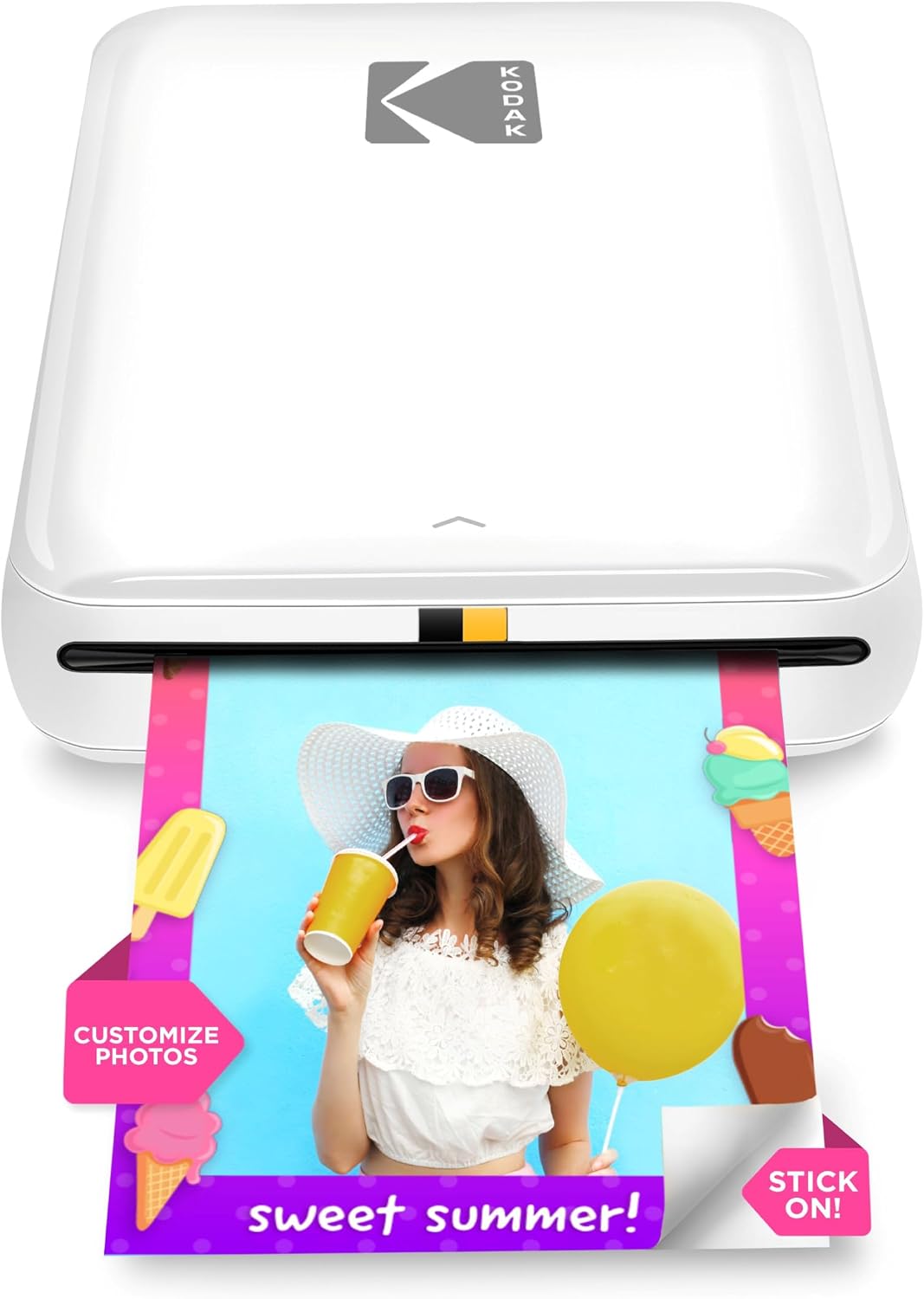
| Print media | Glossy photo paper |
|---|---|
| Maximum Media Size | 2×3 |
| Maximum Sheet Capacity | 10 |
| Printer Connectivity Type | Bluetooth, NFC |
| Initial Page Print Time | 60 seconds |
The KODAK Step is a compact Bluetooth/NFC photo printer designed to turn smartphone images into 2×3-inch sticky-backed prints without ink cartridges. You pair it with the free KODAK STEP PRINTS app to edit, add filters, create collages, and then print a protected, peel-and-stick photo in about a minute. Its ZINK zero-ink paper simplifies ownership since there are no cartridges to replace and the paper's protective coating resists smudges and moisture. A built-in rechargeable battery makes it genuinely portable and Kodak rates roughly 25 prints per charge, which is fine for parties, trips, or crafting sessions. On the downside, prints are small and the resolution is modest compared with larger photo printers, so fine detail or large-format needs won't be satisfied. The app is required for printing, so you need a compatible smartphone and Bluetooth connection to get the most from the device.
Best for: Buyers who want a simple, social-ready way to turn phone photos into small, peel-and-stick prints for parties, scrapbooks, and casual gifting and who prioritize ease of use and portability backed by broad customer adoption.
Less Ideal for: Anyone who needs high-resolution, large-format photos or a printer that works without a smartphone app should consider a different, higher-resolution photo printer.
- Truly portable with built-in rechargeable battery for on-the-go printing.
- ZINK zero-ink paper eliminates cartridges and simplifies maintenance.
- Sticky-backed 2×3 prints are water- and smudge-resistant for crafts and scrapbooks.
- App-based editing offers filters, stickers, collages, and basic image adjustments before printing.
- Small 2×3 print size and modest resolution limit detail and enlargement options.
- Requires the KODAK app and a Bluetooth/NFC-capable smartphone to print.
Verdict: If you want a no-fuss, pocketable printer to make quick, sticky-backed 2×3 photos from your phone, the KODAK Step is a reliable, widely used choice.
Canon PIXMA TS6520

| Printer Type | Inkjet |
|---|---|
| Printer Connectivity Type | USB, Wi-Fi |
| Duplex | Automatic |
| Maximum print Resolution Color | Up to 1200 x 1200 dpi |
| Color Pages per Minute | 9 pages_per_minute |
The Canon PIXMA TS6520 is a compact home all-in-one that balances photo-capable output with everyday document work. It uses a two-cartridge hybrid ink system to produce sharp text and reasonably vivid color prints up to letter size, and the printer supports borderless photo printing for casual photo projects. Setup and mobile printing are straightforward via the Canon PRINT app, Apple AirPrint, or Mopria, and dual-band Wi-Fi helps maintain stable connections. The 1.42-inch OLED and simple control panel make status and basic settings easy to check, while automatic two-sided printing cuts paper use for routine documents. Scanning is handled by a flatbed scanner for single-sheet scans and copies, but there is no automatic document feeder for high-volume scanning. Paper capacity and sheet handling are minimal, so expect frequent reloads if you print often. For risk-averse buyers this model is a reliable, familiar choice that focuses on straightforward, consistent printing rather than advanced business features.
Best for: Buyers who want a dependable, easy-to-use home printer that can handle occasional photo prints and everyday documents with minimal setup fuss and predictable performance.
Less Ideal for: Those who need heavy photo production, high monthly volumes, or multi-page scanning automation should consider higher-capacity photo printers or models with an ADF.
- Good photo-capable prints with hybrid ink system for sharper text and improved color
- Automatic duplex printing saves paper and speeds document workflows
- Reliable wireless options including dual-band Wi‑Fi and mobile printing services
- Compact footprint and intuitive 1.42" OLED display make setup and daily use simple
- No automatic document feeder for multi-page scanning or copying
- Limited sheet capacity requires frequent paper refills for heavier use
Verdict: A compact, no-nonsense home all-in-one that delivers dependable photo-capable prints and easy wireless setup for risk-averse buyers seeking straightforward performance.
Choosing the Right Photo Printer for Home: Key Factors to Consider
Print Quality & Color Accuracy
Photo prints are judged on sharpness, color saturation, and tonal gradation. For home use you want a printer that reproduces skin tones and subtle shadows without oversaturation or posterization.
Ink set and print resolution influence this directly. Printers with dedicated photo inks or extended color sets usually deliver more accurate results. Color management features and support for common color profiles also matter if you move between devices or edit photos before printing.
Running Cost and Consumables
The cost of ink, dye, or paper can quickly eclipse the initial purchase price for a home photo printer. Consider how cartridges are sold, whether refillable tanks are available, and whether the printer forces cartridge replacement even when some colors remain.
Photo paper type also affects cost. Glossy, luster, and archival papers vary in price and longevity. Estimate cost per print for the sizes you plan to use most often to compare realistic ongoing expenses.
Ease of Use and Workflow
Home printers should be simple to set up and operate. Look for intuitive mobile printing apps, reliable Wi-Fi connectivity, and clear media handling. A printer that supports direct printing from phones or memory cards makes casual use faster.
Consider maintenance tasks like printhead cleaning and cartridge replacement. Models that simplify or automate these chores reduce user frustration and downtime over the lifetime of the printer.
Supported Print Sizes and Media Types
Think about the sizes you will print most frequently. Some home photo printers excel at 4×6 and 5×7 prints while others handle up to 8.5×11 or larger. If you want framed prints or collage work, larger sheet support is important.
Also check media compatibility for specialty papers, stickers, and card stock. A machine that accepts both roll-style and cut-sheet media or that has a dedicated photo tray offers greater flexibility for creative projects.
Speed, Reliability, and Duty Cycle
Print speed matters when you produce batches of photos for events or gifts. However, faster devices sometimes compromise on color accuracy. Balance speed needs against the quality you expect.
Reliability and a realistic duty cycle are important for frequent home printing. Seek printers designed for intermittent but regular use, with easy access to support documentation and straightforward parts replacement.
Choosing the Right Ink System
Photo printers for home use typically rely on either dye-sublimation systems or inkjet technologies with multiple color inks. Dye-sublimation units often produce quick, smudge-resistant prints with smooth tonal transitions, which is ideal for snapshots and small prints. Inkjet printers with dedicated photo inks tend to offer wider color gamut and finer detail for larger prints and more critical color work.
When deciding, consider refill and cartridge sizes, whether individual color cartridges are replaceable, and the availability of high-capacity or refillable ink tanks. These factors strongly influence both print quality and long-term cost.
- Dye-sublimation: good for fast, durable small prints
- Inkjet with photo inks: better for larger prints and color fidelity
- Check whether the printer uses individual cartridges or combined color packs
Mobile and Cloud Printing in a Home Setup
Most home users print directly from smartphones or tablets. Look for reliable mobile apps that offer layout tools, borderless prints, and basic color adjustments. Built-in Wi-Fi and easy network setup reduce friction for family members who need quick access.
Cloud-print support and wireless direct printing from a mobile device make it simple to print photos shared from social apps or cloud storage without transferring files to a computer. Offline options such as USB or memory-card slots provide alternatives when networked printing is not convenient.
- Prefer printers with robust mobile apps and direct wireless printing
- Memory card or USB options are useful backups
- Look for easy setup guides and on-device help
Paper Choices and Finishing for Home Projects
Paper choice changes the look and feel of your photos more than most settings. Glossy paper yields high contrast and punchy colors, luster or satin finishes reduce reflections and fingerprinting, and matte stocks provide a softer, gallery-style appearance. For archival prints, pick papers rated for longer fade resistance.
Consider whether you will need borderless printing, adhesive-backed photo sheets, or heavier cardstock for greeting cards. Some printers include user-friendly options for printing contact sheets, collages, and borderless layouts tailored to common home projects.
- Glossy for vibrant colors, luster for balanced reflections
- Matte for a gallery look and reduced glare
- Check archival ratings if longevity matters
Color Management Basics for Better Results
Even at home, basic color management improves consistency between your screen and prints. Use simple steps like calibrating your monitor when you edit photos and choosing the correct paper profile in the printer settings. Many home-oriented printers offer presets for common paper types to streamline this process.
If you do not want to manage profiles, rely on manufacturer presets labeled for the paper you use and perform small test prints to dial in color. Trial-and-error with a few sample prints is often the fastest path to consistent, pleasing results.
- Use printer presets matched to your paper
- Do small test prints before large batches
- Consider basic monitor calibration for critical prints
Maintaining Your Home Photo Printer
Regular maintenance keeps printheads functioning and colors consistent. Run periodic cleaning cycles if the printer shows banding or missing nozzles, but avoid excessive cleanings because they consume ink. Store spare cartridges and paper in a dry environment to prevent clogs and warping.
If you print infrequently, look for models with protective features such as automatic printhead parking or user-replaceable maintenance tanks. These features help preserve printhead health and reduce the need for service.
- Perform occasional printhead checks and automated cleanings
- Store media and ink in stable, dry conditions
- Seek printers with protective maintenance features for infrequent use
How We Chose the Best Photo Printer for Home
We focused on criteria that matter for home photo printing and filtered out devices that are primarily designed for office document workflows. First, print quality was a primary filter: we prioritized printers with high color accuracy, detail resolution, and good color gamut for photos. Second, operating cost was assessed by looking at typical ink or dye-sublimation consumption patterns and media costs to reflect realistic home-use budgets. Third, ease of use for nontechnical users guided selection, including installation, mobile printing, and day-to-day maintenance. Fourth, media versatility and max print sizes were considered so the list covers small snapshots through larger home-display prints. Finally, we weighed speed and reliability for casual but frequent use at home. We excluded multifunction office printers that sacrifice photo color fidelity for text throughput, and we did not include specialty professional lab printers that require complex color management. The final picks represent machines balanced for home environments where image quality, manageable running costs, and simple workflows matter most.
Our full evaluation process is outlined in our review methodology.
FAQ
How often should I run a cleaning cycle on a home photo printer?
Run cleaning cycles only when you notice print defects like banding or missing nozzles. Excessive automatic cleanings waste consumables. If you print infrequently, perform a test print every few weeks to keep nozzles active.
Is dye-sublimation better than inkjet for home photo prints?
Dye-sublimation is excellent for fast, durable small prints with smooth tones, while inkjet with photo inks usually offers wider color gamut and finer detail for larger or more critical prints. The better choice depends on your size and quality priorities.
What paper finish should I choose for family photos?
Luster or satin finishes are a good middle ground for family photos because they balance color vibrancy with reduced glare and fewer fingerprints. Glossy finishes give punchy color but can reflect more light and show fingerprints.
Can I print directly from my phone without a computer?
Yes. Many home photo printers support direct mobile printing through dedicated apps, Wi-Fi direct, or cloud services. Check that the printer's app provides layout and basic color controls you find useful.
How do I estimate the real cost per photo?
Calculate ink or dye usage per print size plus the cost of the paper type you plan to use. Manufacturers sometimes list page yields, which you can divide into cartridge costs to estimate per-print ink expense. Include occasional maintenance consumables for a realistic figure.
Final Verdict
For home photo printing, prioritize the combination of print quality and manageable running costs based on the sizes and volumes you expect to produce. If you mainly print small snapshots, a system optimized for quick, durable 4×6 prints might be the most practical. For larger or more color-critical work, choose a printer with dedicated photo inks and wider media support. Balance ease of use and maintenance needs against long-term consumable expenses to pick a printer that fits your workflow. Focus on the criteria discussed here to select a home photo printer that delivers the results you want without unnecessary complexity.