
Note: This article contains affiliate links. If you click on these links and make a purchase, we may earn a small commission at no extra cost to you. This helps support our research and content. Read our full affiliate disclosure here.
Picking the right residential thermostat can change how comfortable and efficient your home feels. The wrong unit makes daily temperature adjustments a chore and can leave heating and cooling systems running inefficiently. You need a control device that fits your wiring and HVAC setup, is easy to set up, and offers the automation or scheduling you actually use. This guide shortlists the top residential thermostats across common homeowner needs, from simple programmable models to connected options with energy-saving schedules. We evaluated products for installation complexity, user controls, and smart features so you can match one to your house and lifestyle. Read on for concise buying guidance before the product list.
Top Picks at a Glance
| Best Overall The best all-around choice for most situations | Sensi Touch ST75 |  |
| Best Quality Built to a higher standard if you want something more solid | ecobee Smart Thermostat Premium |  |
| Best Value The sweet spot between price and what you get | Amazon Smart Thermostat |  |
| Best Budget The cheapest option that still gets the job done reliably | Honeywell Home CT30A1005 Thermostat |  |
| Top Rated A top-rated pick with lots of positive feedback | Heagstat H701W Single-Stage Thermostat |  |
| Most Popular A crowd favorite that many people choose with confidence | Google Nest Thermostat |  |
| Best Seller A high-volume bestseller chosen again and again | ecobee Smart Thermostat Essential |  |
Sensi Touch ST75

| Connectivity Technology | Wi-Fi (2.4 GHz) |
|---|---|
| Control Method | App, Touch, Voice |
| Display Type | LCD color touchscreen |
| Specific Uses For Product | Air Conditioner, Boiler, Furnace, Heat Pump |
| Power Source | AC/DC (C‑wire required) |
The Sensi Touch ST75 replaces a standard wall thermostat with a modern color touchscreen and Wi‑Fi control so you can schedule and adjust HVAC settings from the included display or the Sensi mobile app. Installation is designed for DIY with an illuminated terminal block and step‑by‑step app guidance, though a common wire is required. Once set up, it supports 2.4 GHz Wi‑Fi, remote access, geofencing, usage reports and maintenance alerts to help manage comfort and energy use. It works with major smart platforms such as Alexa, Google Assistant and Apple HomeKit for voice control and can manage furnaces, heat pumps, boilers and air conditioners. The display is easy to read and the app provides useful scheduling and energy reports, but the unit does need C‑wire power and relies on a 2.4 GHz network only. For homes that match its wiring and network needs, the Sensi Touch offers a straightforward, privacy-minded smart thermostat experience with factory-quality HVAC pedigree.
Best for: Buyers who want a reliable, easy-to-install smart thermostat that balances local touchscreen control with mobile app and voice integrations for everyday residential use.
Less Ideal for: People living in homes without a C‑wire or those who need dual‑band Wi‑Fi support or ultra‑advanced HVAC diagnostics should consider different options.
- Color touchscreen and intuitive menus make local control simple
- Works with Alexa, Google Assistant and Apple HomeKit for voice control
- Remote scheduling, geofencing and usage reports help manage energy
- Energy Star certified and includes maintenance alerts like filter reminders
- Requires a common (C) wire so it may not fit older homes without one
- Supports only 2.4 GHz Wi‑Fi which can limit network options
Verdict: The Sensi Touch ST75 is a practical, Energy Star certified smart thermostat that delivers easy DIY installation, reliable app and voice control, and meaningful energy reports for typical residential HVAC systems.
ecobee Smart Thermostat Premium

| Connectivity Protocol | Wi-Fi |
|---|---|
| Controller Type | Amazon Alexa, Android, Apple HomeKit, Google Assistant, iOS |
| Power Source | Battery Powered |
| Voltage | 24 volts |
| Number of Batteries | 1 Lithium Ion batteries required. (included) |
The ecobee Smart Thermostat Premium is a high-end wall-mounted thermostat that aims to maximize comfort while cutting energy use. It controls heating and cooling via app, supports Siri, Alexa, Google Assistant and HomeKit, and includes a SmartSensor to detect and reduce hot or cold spots. The unit adds a built-in air quality monitor, radar occupancy sensing for presence detection and security alerts, and a speaker with voice assistant for hands-free control and streaming. Installation is eased by the included Power Extender Kit for systems without a C-wire and comprehensive mounting hardware. In practice the large vibrant display and metal finish feel premium, the SmartSensor improves zone comfort when placed in key rooms, and the eco+ software and schedules can produce noticeable HVAC savings. Expect some dependence on the app and network for full features and an initial setup step to confirm compatibility with your system. This model is best when you want advanced automation, integrated voice, and air quality insights in a single thermostat.
Best for: Buyers who prioritize performance, integrated voice control, and advanced automation for a single thermostat to improve comfort and reduce HVAC runtime.
Less Ideal for: Users who want a very simple, no-frills programmable thermostat or who prefer to avoid cloud-connected devices entirely.
- Built-in voice assistant (Siri or Alexa) and speaker for hands-free control and media playback.
- Included SmartSensor helps manage hot and cold spots for better room-level comfort.
- Built-in air quality monitor provides alerts and filter reminders.
- Includes Power Extender Kit and full mounting hardware for easier DIY install without a C-wire.
- Works with major smart home platforms including HomeKit, Alexa, Google Assistant and SmartThings.
- Advanced features rely on app connectivity and network access for full functionality.
- Premium metal design and built-in speaker increase complexity compared with basic thermostats.
Verdict: Choose the ecobee Smart Thermostat Premium if you want a performance-focused, voice-enabled thermostat that combines room sensors, air quality monitoring, and advanced automation to boost comfort and reduce energy use.
Amazon Smart Thermostat

| ASIN | B08J4C8871 |
|---|---|
| Works with | Alexa and Ring |
| C-wire | Required |
| Manufacturer tech | Honeywell Home technology |
| Includes app control | Alexa app |
The Amazon Smart Thermostat is a straightforward smart thermostat that brings Alexa integration and Honeywell‑based temperature control to typical home heating and cooling systems. It installs with a C‑wire requirement and is set up through the Alexa app, which walks you through wiring and connects the thermostat to your Wi‑Fi network for on‑the‑go control. You can create schedules, use presence detection with select Alexa devices to adjust temperature automatically, and include the thermostat in Alexa routines for coordinated home automation. The unit emphasizes energy savings and links to potential local thermostat rebates, while relying on established Honeywell thermostat technology for reliable control. Limitations include the need for a C‑wire and dependence on the Alexa ecosystem for advanced automated features, so it is best when paired with other Alexa devices and an existing smart home setup.
Best for: Buyers who prioritize straightforward energy savings and easy integration into an Alexa-centered smart home and want a reliable, app-controlled thermostat they can install themselves.
Less Ideal for: People who avoid voice assistants, do not use Alexa devices, or lack a C‑wire without willingness to add one should consider alternatives.
- Alexa integration for voice control and routines
- App-based scheduling and remote temperature control
- Presence detection and automation with compatible Alexa devices
- Built on Honeywell thermostat technology for proven reliability
- Guided DIY installation through the Alexa app
- Requires a C‑wire for installation
- Advanced features depend on the Alexa ecosystem and compatible devices
Verdict: A practical, Alexa-focused smart thermostat that delivers easy app control and energy-saving schedules for homes already invested in the Alexa ecosystem.
Honeywell Home CT30A1005 Thermostat

| Controller Type | Hand Control |
|---|---|
| Additional Features | Heat Only |
| Connectivity Technology | Wired |
| Power Source | Low Voltage Control |
| Display Type | Manual |
The Honeywell Home CT30A1005 is a basic wall-mounted, heat-only thermostat designed for straightforward temperature control in homes with low-voltage heating systems. It uses a bimetal temperature sensor and a snap-action magnetic switch for reliable on/off control and is operated with a manual dial rather than a digital interface. Installation is intended for DIY use and includes a decorative backplate and mounting hardware, and the unit does not require leveling. Because it is non-programmable and lacks a display or off switch, it is best suited to users who want simple, set-and-forget heat control without scheduling or remote access. The thermostat is mercury-free and compact, which keeps it unobtrusive on the wall, but it is not compatible with heat pumps, electric baseboard heat, or multi-stage systems, so wiring and system type must be confirmed before purchase.
Best for: Buyers who want an inexpensive, no-frills thermostat to control a single-stage heating system and prefer a straightforward mechanical dial over digital setups.
Less Ideal for: People who need programmable schedules, smart or remote control, or who have heat pump, electric baseboard, or multi-stage HVAC systems should look elsewhere.
- Simple mechanical dial is intuitive and easy to use
- Includes mounting hardware and decorative backplate for quick DIY installation
- Mercury-free bimetal sensor and snap-action switch provide reliable, low-maintenance heating control
- Heat-only, non-programmable design lacks scheduling and advanced control features
- Not compatible with heat pumps, electric baseboard, or multi-stage systems
Verdict: A dependable, budget-friendly manual thermostat for homeowners who need simple, foolproof heat-only control.
Heagstat H701W Single-Stage Thermostat
| Controller Type | Non-Programmable |
|---|---|
| Systems | Conventional 1 Heat / 1 Cool Single-Stage |
| Power | 24VAC or 2 AAA batteries |
| Display Type | 4.5 sq inch backlit LCD |
| Terminals | RH, RC, G, Y, W, C |
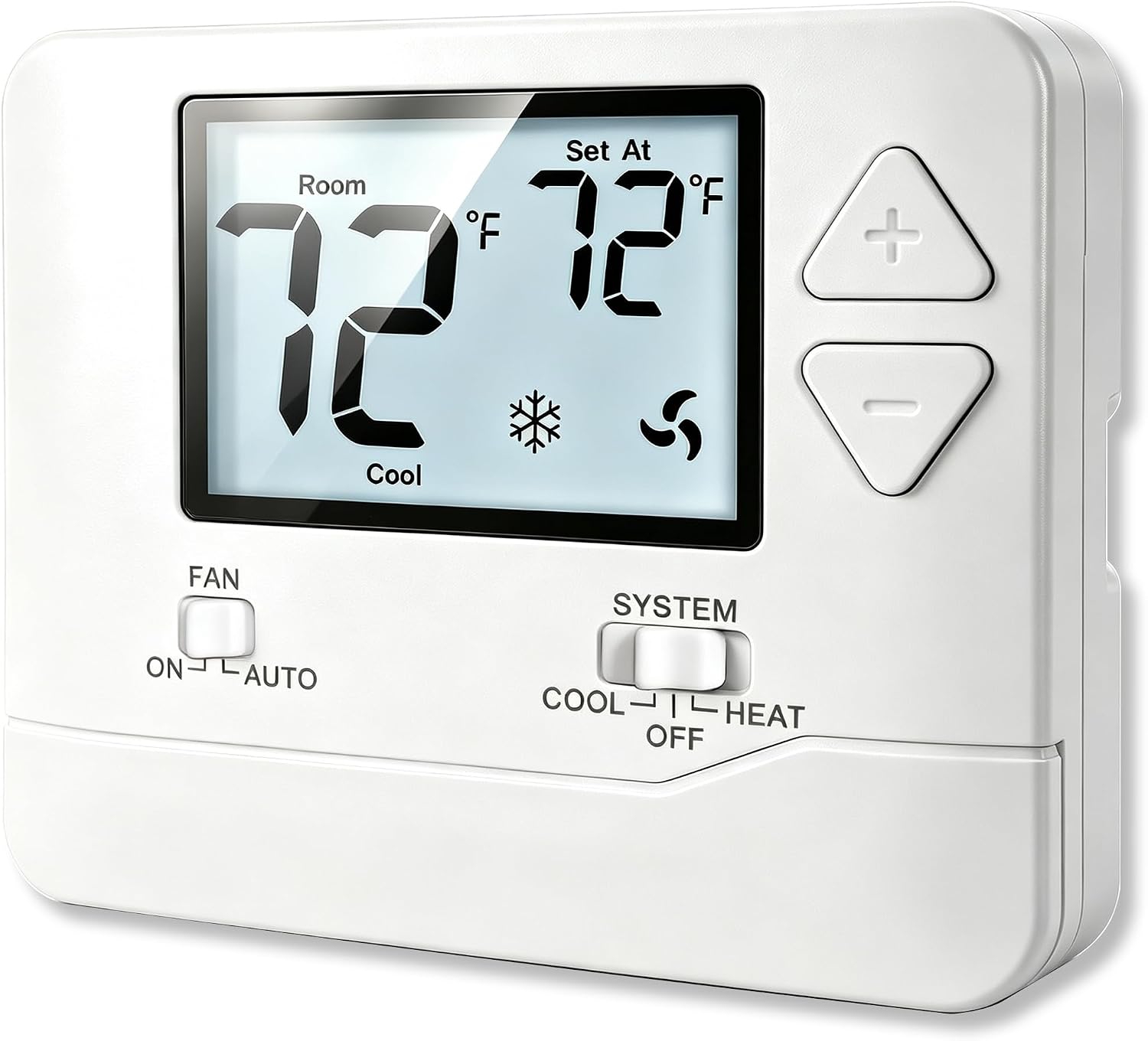
The Heagstat H701W is a manual, non-programmable thermostat designed for conventional single-stage heating and cooling systems. It offers straightforward Heat/Off/Cool operation on a large 4.5 square-inch backlit LCD, making setpoint changes and readouts easy to see. Installation supports standard RH/RC, W, Y, G and C terminals and can be powered by a 24VAC common wire or two AAA batteries, which gives flexibility in homes without a C-wire. Useful features for dependable everyday control include selectable 5-minute compressor delay protection, temperature calibration, adjustable swing settings, and a low-battery reminder. The unit is intentionally basic: there is no scheduling, zoning, or smart connectivity, and it does not support multi-stage, heat pump, or many specialized terminals. For buyers who value simple, reliable temperature control and clear manual operation, the H701W delivers predictable performance without unnecessary features, but those wanting remote access or advanced programming will need a different model.
Best for: Homeowners who want a simple, dependable thermostat for a conventional single-stage furnace or AC and prioritize straightforward manual control and reliable operation over smart features.
Less Ideal for: Users who need scheduling, remote/phone control, multi-stage or heat-pump support, or advanced HVAC integration should choose a more capable smart or programmable model.
- Large backlit 4.5 in LCD for easy visibility
- Works with standard single-stage HVAC terminals and common 24VAC power
- C-wire optional with battery backup for homes lacking common wire
- Selectable 5-minute compressor delay protects equipment
- Temperature calibration and adjustable swing improve steady control
- Non-programmable with no Wi‑Fi or smart features
- Not compatible with multi-stage systems, heat pumps, or many specialized terminals
Verdict: If you need a straightforward, factory-quality manual thermostat to reliably control a single-stage heating and cooling system, the Heagstat H701W is a practical, no-frills choice.
Google Nest Thermostat

| Connectivity Technology | Bluetooth, Wi-Fi |
|---|---|
| Connectivity Protocol | Wi-Fi |
| Power Source | Battery Powered |
| Display Type | LCD |
| Controller Type | Amazon Alexa, Android, Google Assistant, iOS, nest |
The Google Nest Thermostat is a budget-friendly smart thermostat that replaces a conventional wall thermostat and gives you app and voice control over heating and cooling. It installs on most residential HVAC systems and is designed for DIY setup in about 30 minutes using the Google Home app, with batteries included so you do not need a C wire in most homes. Once running, it supports remote scheduling, Quick Schedule edits in-app, Eco Temperatures when you leave, and HVAC monitoring that can alert you to possible system issues. Connectivity options include 2.4/5 GHz Wi‑Fi and Bluetooth Low Energy, and it works with Google Assistant and other Matter-certified voice assistants for hands-free control. The practical upside is simple remote management and energy-saving features like Savings Finder that suggest schedule tweaks. Limitations are that some less common systems may require a C wire or power accessory and advanced HVAC diagnostics still require a professional.
Best for: Buyers who value easy-to-use smart home integration and want straightforward remote and voice control to cut home energy use while relying on wide real-world adoption and support.
Less Ideal for: Homes with uncommon or high-voltage HVAC systems that need professional-grade diagnostics or where owners prefer thermostats with advanced on-device controls and displays.
- Remote control and scheduling through the Google Home app for adjustments from anywhere
- Supports voice control with Google Assistant and Matter-certified assistants
- Energy-saving features like Eco Temperature and Savings Finder that suggest schedule improvements
- Simple DIY installation for most homes with included batteries and mounting hardware
- May require a C wire or power accessory for some HVAC setups
- Alerts and HVAC monitoring are informational and do not replace professional diagnostics
Verdict: Choose the Nest Thermostat if you want a straightforward, widely compatible smart thermostat that makes remote control and simple energy-saving schedules easy.
ecobee Smart Thermostat Essential

| Connectivity Technology | Wi-Fi |
|---|---|
| Controller Type | Amazon Alexa, Android, Apple HomeKit, Google Assistant, iOS |
| Power Source | Battery Powered |
| Display Type | LCD |
| Mounting Type | Wall Mount |
The ecobee Smart Thermostat Essential is a budget-focused smart thermostat that connects to your Wi‑Fi and works with Alexa, Google Assistant, and Apple HomeKit for remote and voice control. It uses a color touchscreen for local adjustments and the ecobee app for scheduling, away detection, and monitoring energy usage. eco+ features like schedule assistant and time-of-use adjustments aim to trim heating and cooling costs, and the unit supports optional SmartSensor accessories for better room-level sensing. Installation is framed as DIY-friendly and the Power Extender Kit is available for homes without a C wire. Practical benefits include straightforward app control, compatibility with common 24 VAC systems, and Energy Star efficiency. Limitations to consider are that it is positioned as the Essential model, so it lacks some premium sensors and built-in air quality monitoring found on higher-end ecobee models, and homes with uncommon high-voltage or millivolt systems will not be compatible without additional equipment.
Best for: Buyers who want a reliable, no-frills smart thermostat that delivers remote and voice control with proven energy-saving features and straightforward setup.
Less Ideal for: People who need advanced built-in sensors, air quality monitoring, or who have uncommon high-voltage or millivolt heating systems.
- Works with Alexa, Google Assistant, and Apple HomeKit for voice and remote control
- Energy-saving eco+ features and scheduling that monitor and help reduce HVAC run time
- Color touchscreen plus mobile app makes daily adjustments and scheduling easy
- Compatible with most 24 VAC HVAC systems and supports a Power Extender Kit for no C‑wire installs
- Does not include built-in advanced sensors or air quality monitoring found in higher-end models
- Not compatible with line voltage, millivolt, or 0-10VDC systems
Verdict: A dependable, budget-friendly smart thermostat that brings app and voice control plus energy-saving automation to most 24 VAC residential HVAC systems.
Choosing the Right Residential Thermostat: Key Factors to Consider
Installation & Wiring Requirements
Thermostat installation varies from a simple swap to a more involved wiring job. Many homes have a C-wire that provides continuous power; if your system lacks one, you need a thermostat that supports power-stealing operation or offers a wiring adapter. Consider whether the unit needs a common wire, whether the installer provides a clear wiring map, and if the product supports typical home systems like single-stage heat/cool, heat pump, or multi-stage setups.
Installation complexity affects both cost and the risk of improper setup. If you plan DIY installation, prioritize models with straightforward wiring labels, good documentation, and built-in detection of common wiring errors.
User Interface and Day-to-Day Controls
Daily interaction with a thermostat should be fast and intuitive. Check whether the device has a clear on-device display for temperature and mode, tactile buttons or touch controls that are easy to operate, and accessible menu structures for scheduling. For connected models, the smartphone app should expose the most-used controls without deep menus.
A good interface reduces accidental overrides and makes scheduling simple. Consider who will operate the thermostat in the house: an older occupant may prefer large text and simple buttons, while tech-savvy users may rely almost entirely on the app or voice control.
Smart Features and Automation
Smart features range from basic remote control to advanced learning algorithms and geofencing. Remote access and scheduling let you adjust settings away from home, while adaptive learning can shape a schedule based on observed behavior. Geofencing uses your phone location to shift to away mode automatically.
Decide which automations matter. Some homeowners want full learning behavior to minimize manual scheduling, while others prefer explicit schedules for predictability. Also verify integration options if you plan to link the thermostat to a home automation ecosystem.
Energy Reporting and Savings Tools
Thermostats that provide usage reports help you understand when heating or cooling runs most and which settings drive energy use. Look for clear, periodic summaries and actionable tips like recommended setpoints or simple schedule changes. Some devices calculate estimated savings from schedule changes or feature an eco mode that nudges setpoints for efficiency.
Energy reporting alone does not guarantee savings. Combine reports with an HVAC system in good repair and sensible setpoints to realize real reductions in energy consumption.
HVAC Compatibility and Control Modes
Different homes use different HVAC control strategies: single-stage heat/cool, multistage compressors, heat pumps with auxiliary heat, or multi-zone systems. Make sure the thermostat supports the specific control signals and modes your system requires. Also confirm whether the device handles fan control, emergency heat, and legacy equipment controls that some older systems use.
Incorrect compatibility can lead to poor temperature control or system stress. When in doubt, check wiring diagrams and confirm the thermostat can operate the specific functions your system needs.
Wiring Tips for Older Homes
Older homes often lack a dedicated common wire, which many modern thermostats expect for constant power. Before buying, inspect the thermostat wall plate to check for an unused conductor in the cable bundle or consider a power adaptor or C-wire kit that some thermostats support. If neither option is feasible, look for units explicitly designed for homes without a C-wire.
When replacing a thermostat mounted over a finished wall, label each wire during removal and photograph the connection for reference. This small step avoids guesswork during reinstallation and reduces the chance of wiring errors that could affect HVAC operation.
- Confirm presence of a C-wire or plan for an adapter
- Label and photograph original wiring before removal
- Verify support for your system type: heat pump, multi-stage, or single-stage
Balancing Comfort and Energy Savings
Thermostats give you tools to save energy, but comfort expectations determine how far you can push setpoints. Small setpoint adjustments and predictable setbacks when no one is home typically yield the best balance of comfort and savings. Use scheduling or geofencing features to automate those setbacks rather than relying on manual changes.
Energy-saving modes that nudge the temperature can be useful, but monitor how they affect comfort in different parts of the house. If rooms heat or cool unevenly, consider addressing zoning or insulation issues alongside thermostat settings for meaningful improvements.
- Use scheduled setbacks rather than constant manual changes
- Combine thermostat automation with insulation and airflow fixes
- Monitor reports to see whether schedule changes reduce runtime
Using Mobile Apps and Voice Control
Mobile apps extend remote control and make scheduling more visual than on-device menus. Prioritize thermostats whose apps expose the features you will actually use, such as quick temperature adjustments, schedule edits, and usage reports. Check whether the app supports multiple home members with controlled access levels.
Voice control can add convenience but test how reliably the voice system updates the thermostat state and whether the voice assistant supports the modes you need. For privacy-sensitive homes, evaluate what data the app collects and how account sharing is handled.
- Ensure the app provides straightforward scheduling and reporting
- Check multi-user access for family members or roommates
- Confirm voice assistant support if you plan to use voice commands
When to Consider Professional Installation
Professional installation makes sense if your HVAC wiring is unclear, you have a multi-stage or commercial-style system, or you want the thermostat integrated into a larger smart-home control panel. A pro can ensure proper configuration for auxiliary heat, heat pump reversing valves, and system staging so the thermostat commands the HVAC equipment correctly.
If your home uses zoned HVAC or the wiring is old and brittle, professional installers can also tidy connections, install necessary adapters, and test system response to avoid issues after installation.
- Hire a pro for multi-stage or complex heat pump systems
- Consider a technician if wiring is damaged or unclear
- Professional setup reduces the risk of misconfigured controls
Maintaining Accurate Temperature Sensing
Thermostat placement affects temperature readings. Avoid installing thermostats in direct sunlight, near drafts, or above heat-emitting appliances. A centrally located interior wall at shoulder height is usually best for representative readings of living spaces.
Some thermostats support remote sensors to measure temperature in other rooms. Use these when you need better control over problem areas like bedrooms or sunlit rooms to avoid overcooling or overheating the rest of the house.
- Place the thermostat away from direct sun and drafts
- Use remote sensors for rooms with distinct temperature differences
- Recalibrate or verify readings if temperatures seem off
How We Chose the Best Residential Thermostat
We shortlisted thermostats that meet common residential installation scenarios and deliver reliable temperature control. Our evaluation prioritized technical compatibility with typical home HVAC wiring, the clarity and flexibility of scheduling and automation, and the quality of the user interface whether on-device or via mobile app. Energy management features like adaptive learning, geofencing, and usage reports were included as distinct criteria because they materially affect long-term savings and behavior. We also assessed installation effort and documentation, since many homeowners install thermostats themselves; products requiring uncommon wiring or professional setup were deprioritized. Build quality and accessory support, such as compatibility with common power extenders or C-wire substitutes, were considered to avoid post-install issues. Connectivity and security practices were reviewed at a feature level to ensure networked controls meet reasonable privacy expectations. Excluded from consideration were units designed solely for commercial HVAC systems or specialty industrial controls, and any products that lack basic scheduling or temperature-sensing accuracy. The result is a set of residential-focused thermostats chosen for real-world usability, compatibility, and energy-conscious features.
Our full evaluation process is outlined in our review methodology.
FAQ
Will a modern residential thermostat work with my older furnace?
Often, yes. Many modern thermostats support basic single-stage heating systems used with older furnaces. Confirm the wiring labels match the thermostat's required inputs and that any special controls like millivolt systems or oil burners are supported. If wiring or control signals are nonstandard, professional verification is wise.
Do I need a C-wire for a smart thermostat?
Many smart thermostats prefer a C-wire for reliable power, but some models work without one using power-stealing or include an adapter. Check the product documentation for no-C-wire support and consider the long-term stability of a power-stealing setup before relying on it.
How much can a thermostat realistically reduce my energy use?
Savings depend on your existing habits, system efficiency, and insulation. Simple measures like setting back temperatures while away and using programmable schedules can reduce runtime noticeably. Thermostats with adaptive learning and reporting can further help by identifying inefficient schedules, but savings vary widely home to home.
Are remote sensors necessary for accurate control?
Remote sensors are beneficial when different rooms experience different temperatures or when the main thermostat location does not reflect occupied spaces. They are not necessary for every home but can improve comfort and reduce over-conditioning of areas that do not need it.
Can I control a residential thermostat with voice commands?
Many networked thermostats support voice assistants through cloud integrations or local bridges. Voice control adds convenience for simple commands, though advanced scheduling and system setup are usually easier in the app or on-device interface.
Final Verdict
Choose a residential thermostat based on the practical match to your HVAC wiring, how you prefer to control your home, and whether you want automation or simple scheduling. If you value hands-off energy savings, prioritize reliable smart features and good energy reporting. If simplicity and low setup effort matter most, prioritize models with minimal wiring requirements and clear on-device controls. Weigh tradeoffs between installation complexity and feature set, and favor devices whose compatibility and interface align with your household routines. With those priorities in mind, you can confidently pick a thermostat that improves comfort and helps manage energy use.