
Note: This article contains affiliate links. If you click on these links and make a purchase, we may earn a small commission at no extra cost to you. This helps support our research and content. Read our full affiliate disclosure here.
A smart lock for home changes how you manage access, replacing keys with digital control and adding remote convenience. Picking the right unit matters because a lock must be both secure and easy to live with: strong authentication, reliable operation, and straightforward installation make daily use painless. This guide covers seven shortlisted smart locks that represent the best options for typical homes. We examined practical factors like installation complexity, connectivity, security features, and long-term reliability so you can pick a lock that fits your door and routine. Read on to compare the criteria we weighed and see which features matter most for your front door.
Top Picks at a Glance
| Best Overall The best all-around choice for most situations | PHILIPS 4200 Series WiFi Smart Lock |  |
| Best Quality Built to a higher standard if you want something more solid | Lockly Visage Zeno Smart Lock |  |
| Best Value The sweet spot between price and what you get | eufy Security Smart Lock C220 |  |
| Best Budget The cheapest option that still gets the job done reliably | TEEHO TE001 Keypad Deadbolt |  |
| Top Rated A top-rated pick with lots of positive feedback | eufy Security Familock E32 |  |
| Most Popular A crowd favorite that many people choose with confidence | Schlage Encode Smart WiFi Deadbolt |  |
| Best Seller A high-volume bestseller chosen again and again | Wyze Lock Bolt v2 |  |
PHILIPS 4200 Series WiFi Smart Lock

| Connectivity Protocol | Bluetooth, Wi-Fi |
|---|---|
| Control Method | App, Push Button, Remote, Voice |
| Lock Type | Biometric, Deadbolt, Keypad, WiFi Smart Lock |
| Additional Features | Anti-Drill, Auto-Lock, Back-Lit Keypad, Anti-Peeping Password, Fingerprint |
The PHILIPS 4200 Series is a full-featured smart deadbolt that replaces a front door lock with a keypad, fingerprint sensor, and built-in WiFi so you can manage access from the app without a separate bridge. It is typically used as a primary entry lock for homes, rentals, or offices — you can create permanent, recurring, one-time, or time-limited PIN codes, register multiple fingerprints for 0.3-second unlocks, and view access history and notifications in real time. Important features include direct 2.4 GHz WiFi connectivity, Alexa and Google Assistant voice control, auto-lock scheduling, anti-peep keypad entry, backup mechanical keys, and a six-month battery life with low-battery alerts. Practical benefits are streamlined guest access for Airbnb or visitors, hands-free operation when carrying groceries, and quick biometric entry for busy households. Limitations to note are the specified 2.4 GHz WiFi range recommendation and that auto-lock is off by default, requiring app setup; also batteries are not included and left/right door orientation may need resetting during installation.
Best for: Buyers who want a versatile, feature-rich smart lock that provides multiple convenient access methods and easy remote management for a primary home or short-term rental.
Less Ideal for: People who need an ultra-long WiFi range or who prefer a lock that ships ready with batteries installed and auto-lock preconfigured.
- Built-in 2.4 GHz WiFi for remote app control without a hub
- Multiple access options: fingerprint, keypad PINs, voice, app, and mechanical keys
- Supports varied PIN types including one-time and recurring codes for guest management
- Fast fingerprint recognition (0.3s) and real-time access history and notifications
- Includes matching handle set for a complete front door replacement
- Requires staying within recommended WiFi range and minimizing interference for reliable connectivity
- Auto-lock is disabled by default and must be enabled in the app
- Batteries are not included so you must supply standard alkaline cells before use
Verdict: Choose this lock if you want a single, hub-free smart deadbolt that combines fast fingerprint entry, flexible PIN options, and built-in WiFi for straightforward remote control and guest access management.
Lockly Visage Zeno Smart Lock

| Connectivity Protocol | Wi‑Fi (2.4 GHz) |
|---|---|
| Lock Type | Deadbolt |
| Controller Type | Amazon Alexa, Apple HomeKit, Google Assistant |
| Additional Features | Facial Recognition, 0.2s AI Fingerprint, PIN Genie, IP65 Waterproof, Type‑C Backup Power socket |
| Battery | 2 × 10000mAh rechargeable |
The Lockly Visage Zeno is a front‑door smart deadbolt that emphasizes fast biometric access and always‑on connectivity. It uses dual infrared facial recognition to detect and unlock as you approach, a 0.2s AI‑assisted 3D fingerprint sensor, and a dynamic PIN Genie keypad to reduce code‑guessing. Built‑in 2.4 GHz Wi‑Fi lets you lock, unlock, and receive activity alerts remotely via the Lockly Home app without a separate hub, and it also integrates with Apple Home Key, Siri, Alexa, and Google Assistant. Two rechargeable 10,000 mAh batteries are included and Lockly claims up to six months per charge under typical use, with a Type‑C backup power socket for emergencies. Installation is designed for DIY fitting on standard US doors and the exterior assembly is rated IP65 for weather resistance. Tradeoffs: the unit is a premium, feature‑heavy lock that costs more than basic smart deadbolts and depends on the vendor app for remote features and guest management, so buyers who prefer very simple local‑only locks may find it overbuilt.
Best for: Buyers who prioritize speed, multiple biometric options, and seamless remote control for a primary front door and want an advanced, modern smart‑lock experience.
Less Ideal for: People seeking a minimal, low‑cost deadbolt or those who prefer fully local only solutions without app or cloud dependence should consider simpler alternatives.
- Very fast biometric unlocking with facial recognition and 0.2s AI fingerprint sensor
- Built‑in Wi‑Fi enables remote control and notifications without a hub
- PIN Genie keypad shuffles digits to reduce code‑guessing attacks
- Supports Apple Home Key and major voice assistants for flexible unlocking methods
- Includes two large rechargeable batteries and Type‑C backup power for long runtime
- Premium feature set and price compared with basic smart deadbolts
- Remote and advanced features rely on the Lockly app and cloud services
Verdict: Choose the Visage Zeno when you want a fast, biometric‑first smart deadbolt with built‑in Wi‑Fi and broad smart‑home integration for front‑door convenience and remote control.
eufy Security Smart Lock C220
| Unlock methods | Fingerprint, passcode, app, voice, physical key |
|---|---|
| Connectivity protocol | Wi‑Fi (built‑in) |
| Fingerprint capacity | Up to 50 fingerprints |
| Passcode capacity | Up to 100 passcodes |
| Battery | 8×AA (included) |
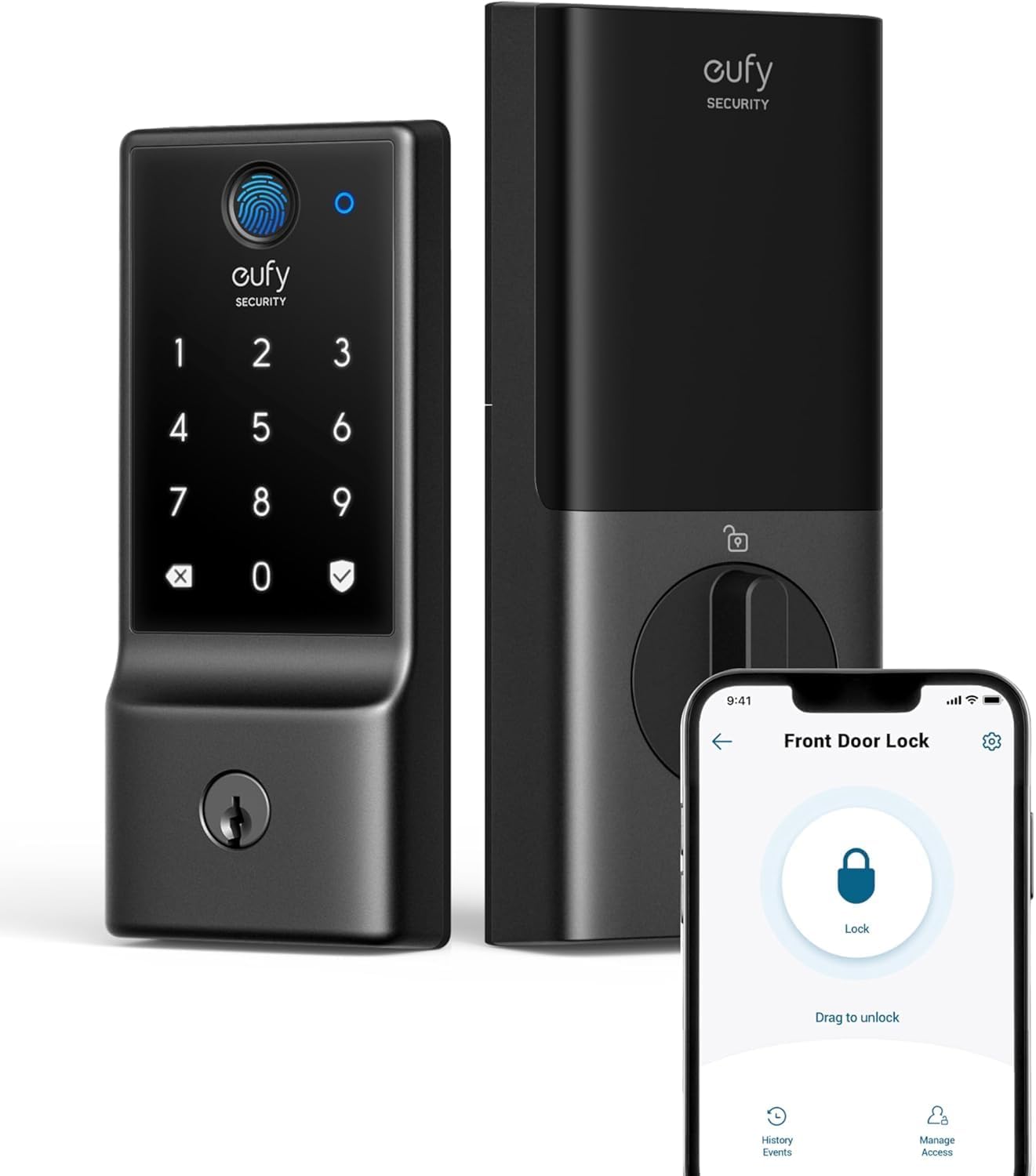
The eufy Security Smart Lock C220 is a keyless deadbolt that combines biometric fingerprint unlocking with passcode, app, voice and physical key backup. It installs on most standard deadbolts without a bridge thanks to built‑in Wi‑Fi, and the app provides remote control, user management and real‑time activity notifications. Notable features include AI‑improved fingerprint recognition, support for up to 50 fingerprints and 100 passcodes, Auto‑Lock and anti‑peep keypad protection for shared access. The lock runs on eight AA batteries and eufy states roughly eight months of typical battery life with normal use, with an external power port and two mechanical keys as failovers. The unit is BHMA Grade 3 tested and has an IP53 exterior rating, which helps with durability in typical front‑door conditions. Limitations to consider are lack of Apple HomeKit or Matter support and no compatibility with a HomeBase bridge, which narrows ecosystem options, and BHMA Grade 3 indicates entry level rather than commercial strength for very high‑abuse doors.
Best for: Buyers who want a practical, easy‑to‑manage smart deadbolt for everyday front‑door use that prioritizes simple remote control, multiple unlocking methods and straightforward installation.
Less Ideal for: If you need native HomeKit or Matter integration, enterprise‑grade security, or compatibility with a separate eufy HomeBase setup, look at other options.
- Multiple convenient unlock methods including fingerprint, app, keypad, voice and physical key.
- Built‑in Wi‑Fi lets you control the lock remotely without adding a bridge.
- Stores up to 50 fingerprints and 100 passcodes for family and frequent guests.
- Long battery runtime with included eight AA cells and an external power port for emergency power.
- BHMA testing and IP53 rating for basic durability and weather resistance.
- Not compatible with Apple HomeKit, Matter, or IFTTT and does not support a separate HomeBase bridge.
- BHMA Grade 3 is suitable for residential use but not the highest ANSI/BHMA strength level.
Verdict: A straightforward, bridge‑free smart deadbolt that delivers flexible keyless access and remote control for practical everyday home use.
TEEHO TE001 Keypad Deadbolt

| Access Codes | 20 |
|---|---|
| Waterproof Level | IP54 |
| Auto Locking | Yes |
| Lock Type | Combination Lock, Deadbolt, Keypad |
| Control Method | Push Button, Touch |
The TEEHO TE001 is a simple keyless deadbolt designed to replace a standard exterior deadbolt with a keypad-based entry option. It installs using a standard 2-1/8" bore and runs on four AA batteries with a low-battery indicator and a claimed year of battery life. The keypad supports up to 20 user PINs plus a one-time code for guests, has anti-peep functionality so extra digits can be entered around the real PIN, and offers adjustable auto-lock timing and a one-touch lock feature. The lock is built from metal with an aluminum alloy deadbolt and carries an IP54 rating so it tolerates rain and seasonal temperature swings. There is no wireless connectivity or app control, so access management is done at the lock itself and via two provided mechanical backup keys. For buyers prioritizing straightforward, low-cost keyless entry the TE001 is practical and reliable, but if you want remote control, audit logs, or smart-home integration you will need a different model.
Best for: Buyers who want an affordable, no-frills keyless deadbolt to add keypad entry and guest codes without needing app control or smart-home features.
Less Ideal for: Those who need remote unlocking, smartphone management, or integration with home automation systems should pick a connected smart lock instead.
- Supports up to 20 unique user PINs plus a one-time guest code
- Anti-peeping PIN feature increases shoulder-surfing protection
- IP54 weather resistance suitable for exterior doors in varied climates
- Long battery life with low-battery indicator and simple AA battery replacement
- One-touch lock and adjustable auto-lock make daily use quick and predictable
- No Wi-Fi or Bluetooth connectivity so no remote control or app features
- Compatible only with standard 2-1/8" bore holes, not 38mm doors
Verdict: A budget-friendly, battery-powered keypad deadbolt that delivers reliable local keyless entry and basic weather resistance without smart-home complexity.
eufy Security Familock E32
| Connectivity Protocol | Wi‑Fi |
|---|---|
| Additional Features | Auto‑Lock, Fingerprint |
| Control Method | App, Remote, Touch, Voice |
| Style Name | Matter + WiFi + Fingerprint + 8AA battery |
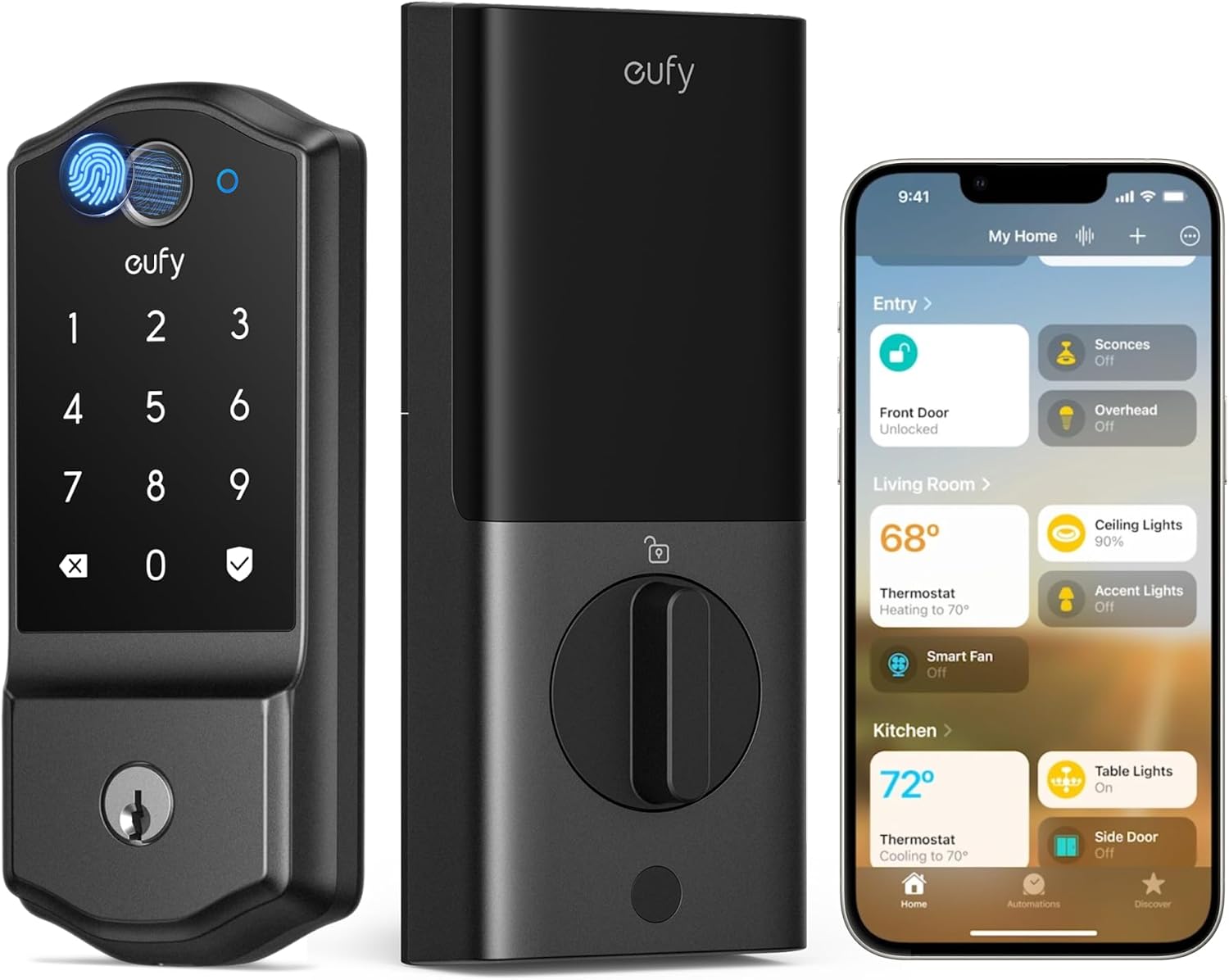
The eufy Familock E32 is a front‑door deadbolt that combines multiple access methods—fingerprint, passcode, touch, voice and app control—with built‑in Wi‑Fi and Matter compatibility to integrate into modern smart home setups. Installation is aimed at DIYers and fits standard single‑cylinder deadbolts without drilling in most cases, and the lock is weather‑rated for exterior use while the interior unit is for indoor placement only. Notable features include a self‑learning fingerprint sensor for faster recognition over time, customizable auto‑lock timing, real‑time notifications and access management through the eufy app, and up to eight months of runtime on eight AA batteries with low‑battery alerts. The lock also carries ANSI/BHMA certification for security credibility. Tradeoffs are typical of battery‑powered smart locks: you need to monitor battery levels and the interior module is not waterproof, and full Apple Home integration may require a Thread border router for the tightest Matter experience. For buyers who want straightforward, secure smart lock functionality with robust connectivity options, the E32 delivers a reliable, feature‑rich package.
Best for: Homeowners who prioritize reliable, secure everyday access and seamless smart‑home integration and want a lock that minimizes day‑to‑day fuss.
Less Ideal for: People who need a fully weatherproof interior and exterior solution for nonstandard or mortise locks, or those unwilling to monitor battery replacements periodically.
- Multiple unlocking methods including fingerprint, passcode, app, voice and touch for flexible entry.
- Built‑in Wi‑Fi plus Matter support enables native Apple Home and other smart home integrations.
- Long battery life with 8 AA batteries and app low‑battery alerts reduces maintenance frequency.
- Customizable auto‑lock and real‑time notifications give good control and situational awareness.
- ANSI/BHMA certification and weather resistance for front‑door durability.
- Interior rear unit is not waterproof, limiting exposed installation options.
- Requires a Thread border router for the smoothest Matter/Apple Home experience in some setups.
Verdict: Buy this if you want a dependable, feature‑rich front‑door smart deadbolt that balances secure biometric entry with wide smart‑home compatibility.
Schlage Encode Smart WiFi Deadbolt

| Connectivity Protocol | Wi‑Fi |
|---|---|
| Lock Type | Keypad |
| Controller Type | Amazon Alexa, Google Assistant, Vera |
| Power | 4 AA batteries (included) |
The Schlage Encode is a Wi‑Fi smart deadbolt designed to replace a standard deadbolt without additional hubs or wiring. It connects directly to your home network and the Schlage Home app so you can lock or unlock remotely, create up to 100 unique access codes, view access history, and receive push notifications. The touchscreen keypad is fingerprint‑resistant and supports one‑touch locking and configurable auto‑lock delays, and a built‑in alarm detects forced‑entry attempts. Installation is straightforward with just a screwdriver and the Snap 'n Stay design, and the package includes four AA batteries and a backup key. Practical benefits include easy guest access management for short‑term rentals or service visits, remote monitoring from anywhere, and strong BHMA‑rated security and durability. Limitations to note are battery dependence requiring periodic replacement and reliance on your home Wi‑Fi for remote features, which may be an issue in weak signal environments or during outages.
Best for: Buyers who prioritize proven security and want a straightforward smart lock that offers remote control, robust access management, and reputable brand reliability.
Less Ideal for: People who need offline, battery‑free operation or live in locations with unreliable Wi‑Fi should consider alternatives with cellular or local‑only solutions.
- Built‑in Wi‑Fi for remote lock/unlock without a hub
- Supports up to 100 unique access codes and access scheduling
- Built‑in alarm for forced‑entry detection
- Easy DIY installation with included hardware and batteries
- Depends on battery power so remote features stop if batteries die
- Remote features require a reliable home Wi‑Fi connection
Verdict: Choose the Schlage Encode if you want a reliable, BHMA‑rated smart deadbolt that gives simple remote control and scalable access management without adding a hub.
Wyze Lock Bolt v2

| Lock Type | Biometric, Deadbolt, Keypad |
|---|---|
| Connectivity Protocol | Wi-Fi |
| Additional Features | Auto-Lock |
| Included Components | AA Battery x8, Wyze Lock Bolt v2 x1 |
| Style Name | Fingerprint Smart Lock Bolt v2 |
The Wyze Lock Bolt v2 is a biometric deadbolt designed for everyday front‑door security and convenience. It uses a tempered glass fingerprint scanner and AI learning to improve recognition speed and accuracy over time, while offering keypad codes, app control via built‑in Wi‑Fi, voice control, backup physical keys and USB‑C emergency power. Typical use is simple: register fingerprints and codes for family and guests, let the lock auto‑lock after entry, and manage access or check status remotely through the Wyze app. Notable features include IP53 weather resistance, BHMA2 durability rating, tamper alarms, and an estimated eight months of battery life from the included AA cells. Practical benefits are quick contactless entry, remote access without a separate hub, and multiple fallback methods if batteries die or network issues occur. Limitations to consider are dependency on Wi‑Fi for remote features, the need to replace eight AA batteries over time, and that advanced integrations may be more limited compared with higher‑end ecosystem locks.
Best for: Buyers who prioritize reliable, easy everyday access and want a straightforward smart lock with biometric entry, remote control, and multiple backup options for family use.
Less Ideal for: Those seeking a completely maintenance‑free lock or tight integration with a specific premium smart home ecosystem should consider other models.
- Fast fingerprint unlock with AI learning that improves recognition over time
- Built‑in Wi‑Fi for remote control without requiring a separate hub
- Multiple entry options including fingerprint, keypad, app, physical key and USB‑C emergency power
- IP53 weather resistance and BHMA2 durability for outdoor front‑door use
- Requires eight AA batteries which will need periodic replacement
- Remote features rely on Wi‑Fi connectivity and the Wyze app
Verdict: Choose the Wyze Lock Bolt v2 if you want fast fingerprint entry plus Wi‑Fi remote control and multiple reliable backup methods in a budget friendly smart deadbolt.
Choosing the Right Smart Lock for Home: Key Factors to Consider
Installation Compatibility and Door Fit
Not all smart locks fit every door. Measure your door thickness and check the existing deadbolt footprint before choosing. Some locks are designed to replace only the interior thumbturn and leave the exterior hardware intact, while others require removing the whole deadbolt assembly.
Choosing a lock that matches your door reduces the need for drilling or modifying trim. Also verify backset compatibility and whether the lock supports single- or double-cylinder deadbolts. If you have a storm door, multi-point lock, or an unusually shaped knob area, those details affect fit. Paying attention to fit prevents common installation headaches and keeps the door weatherseal intact.
Ease of Setup and Daily Operation
A smart lock should be straightforward to install and configure, especially if you plan a DIY setup. Look for locks with clear, step-by-step guides and companion apps that guide pairing and access management. Quick pairing reduces the time your doorway is without a lock while minimizing the chance of misconfiguration.
Daily operation is equally important. Consider whether you want keypad entry, biometric unlock, smartphone control, or a combination. Evaluate how the lock behaves when the network or phone is unavailable and whether physical keys or thumbturn overrides are preserved. A well-designed daily workflow saves time and frustration for everyone in the household.
Security Features and User Controls
Security is the central purpose of any lock, smart or otherwise. Check that the lock uses modern encryption for local and cloud communications and offers features like unique access codes, time-limited guest codes, and event logs so you can see who locked or unlocked the door and when.
Also assess physical security features: whether the internal mechanism resists forced entry, whether the exterior assembly conceals the bolt, and how the device behaves after repeated failed attempts. Administrative controls such as multi-user management, two-step verification for account access, and the ability to revoke codes remotely are important for long-term security management.
Connectivity, Integration, and Automation
Decide which smart-home ecosystem or protocol you plan to use and choose a lock that supports it. Common options include Wi-Fi, Bluetooth, and dedicated smart-home protocols. Native Wi-Fi models communicate directly with your router, while Bluetooth locks often rely on a nearby bridge for remote access.
Integration affects automation possibilities. If you want your lock to trigger scenes, disarm security systems, or announce arrivals through voice assistants, check the lock's compatibility and the richness of its integration. Also consider how firmware updates are delivered and whether the vendor publishes security notices and patch schedules.
Battery Life and Power-Fail Behavior
Smart locks run on batteries, so predictable battery life and clear low-battery warnings are essential. Look for locks with multi-month battery life under typical use and app alerts that give you ample notice before power runs out. Models that allow you to check battery percentage remotely reduce the risk of unexpected failures.
Also review what happens if the batteries die: can you still operate the lock with a physical key or a mechanical override? Some locks support external power via a USB port for emergency unlocks. Planning for power failure avoids lockouts and ensures owners can maintain access during vacations or extended absences.
Installation Options and DIY Considerations
Most homeowners can install a smart lock with basic tools, but the level of difficulty varies. Choose a model that matches your existing deadbolt type to avoid altering door hardware. If you live in a rental or prefer a noninvasive setup, look for locks that attach to the interior side of the deadbolt without removing the exterior piece.
- Confirm door thickness and backset before purchase
- Check whether the lock replaces only the thumbturn or the entire deadbolt
- Follow manufacturer torque and screw-length recommendations to avoid damaging the strike plate
Managing Multiple Users and Guest Access
A good smart lock makes it simple to share access with family, cleaners, or short-term guests without handing out physical keys. Use time-limited codes or scheduled access to limit entry windows and reduce security risk. Keep an audit trail of issued codes and regularly revoke codes that are no longer needed.
- Create unique codes per user when possible
- Use scheduled access for recurring service visits
- Revoke or delete codes after they are no longer required
Integrating the Lock Into Home Automation
Think beyond locking and unlocking. A smart lock can trigger automations like turning on hallway lights when you arrive or arming a security system when the last user locks the door. Confirm the lock supports the automation flows you want, such as geofencing or voice-based control, and test automations before relying on them for safety-sensitive actions.
- Test automation triggers during daytime and nighttime conditions
- Ensure automations have fail-safes and do not inadvertently unlock doors
- Document who can edit automations to prevent accidental changes
Privacy and Data Practices
Smart locks collect access logs and may transmit metadata to cloud services. Review privacy settings and data retention options. Prefer devices that allow local logging or that clearly state how long they retain event history and how data is secured in transit and at rest. If you share an account with other household members, set up individual user accounts when available to keep audit trails accurate and to avoid anonymous or shared credentials.
- Limit unnecessary cloud integrations to reduce data exposure
- Enable account protections such as two-factor authentication if available
- Regularly review and purge old access logs if the option exists
Maintenance and Long-Term Reliability
Regular maintenance keeps a smart lock working reliably. Replace batteries according to the recommended schedule and periodically check mechanical parts like the strike plate and mounting screws. Clean the exterior housing to prevent grime from impeding keypads or sensors. Also keep firmware current. Vendors that issue timely security updates and clear upgrade instructions reduce long-term risk. Plan for eventual hardware replacement by noting how easy it is to migrate users and settings to a new unit.
- Schedule battery checks every few months depending on usage
- Tighten screws and examine strike alignment annually
- Apply manufacturer-recommended cleaning practices to electronic components
How We Chose the Best Smart Lock for Home
We prioritized criteria that matter to homeowners installing a smart lock for home and excluded products that require professional-only installation or are incompatible with standard residential doors. Our evaluation focused on real-world usability, lasting reliability, and security. Key dimensions we used: installation flexibility and compatibility, ease of setup and daily operation, security and encryption standards, battery life and power failure behavior, and smart-home connectivity and automation. Each candidate had to offer clear documentation and user-facing security controls such as lock logging and configurable access codes. We also checked firmware update support and whether the device limits local override options. Excluded items included deadbolts that require door modification beyond common homeowner skills, devices without documented encryption or remote lock audit features, and products that only work with proprietary hubs that restrict interoperability. The result is a list focused on accessible, secure smart locks fit for typical residential doors.
Our full evaluation process is outlined in our review methodology.
FAQ
Will a smart lock work with my existing deadbolt?
Many smart locks are designed to work with standard single-cylinder deadbolts and replace only the interior thumbturn. Check the lock's compatibility list for supported backsets and door thicknesses. If your door has an atypical setup, measure and confirm fit before buying.
What happens if the Wi-Fi or internet goes out?
Most smart locks support local operation via keypad, physical key, or Bluetooth even when Wi-Fi is unavailable. Remote features like app-based unlock will be limited without internet unless the lock has a cellular or built-in Wi-Fi connection.
How do guest codes and temporary access work?
Guest access typically uses time-limited PINs or scheduled codes that expire automatically. You can create, modify, and revoke these codes from the lock's companion app, and many systems provide event logs showing when a guest used a code.
Are smart locks secure against hacking?
Security depends on encryption, firmware updates, and account protections. Choose locks that use modern encryption, offer two-factor authentication, and publish security updates. Physical security and lock construction are also important to resist forced entry.
How long do batteries usually last in smart locks?
Battery life varies with usage and connectivity features but often lasts several months to a year. Features that increase power draw, such as constant Wi-Fi connections or frequent motorized locking cycles, will shorten battery life. Many locks provide low-battery alerts in the app.
Final Verdict
Prioritize installation compatibility, security features, and reliable power behavior when choosing a smart lock for home. Ease of setup and the quality of smart-home integrations will shape daily convenience, while encryption, user controls, and firmware support determine long-term safety. Balance your desired automation and remote access against battery life and privacy preferences. Focus on the few features you will actually use and confirm the lock fits your door before buying. With those tradeoffs in mind, you can confidently select a smart lock that secures your entry and simplifies household access.