
Note: This article contains affiliate links. If you click on these links and make a purchase, we may earn a small commission at no extra cost to you. This helps support our research and content. Read our full affiliate disclosure here.
Picking the right smart speaker matters because it affects everyday tasks from playing music to controlling lights. You want a device that sounds good, responds reliably to voice commands, and works smoothly with the smart-home gear you already own. This guide focuses on the best smart speakers under $200, showcasing the top shortlisted options that balance audio performance, voice-assistant responsiveness, and ease of setup. Below we highlight each pick and explain the criteria used to evaluate them so you can match a speaker to how you listen and what smart devices you need it to control.
Top Picks at a Glance
| Best Overall The best all-around choice for most situations | Google Audio Bluetooth Speaker |  |
| Best Quality Built to a higher standard if you want something more solid | Apple HomePod mini |  |
| Best Value The sweet spot between price and what you get | Sonos Roam 2 |  |
| Best Budget The cheapest option that still gets the job done reliably | Google Nest Mini 2nd Gen |  |
| Top Rated A top-rated pick with lots of positive feedback | Amazon Echo Dot (newest model) |  |
| Most Popular A crowd favorite that many people choose with confidence | Amazon Echo Show 5 (2021) |  |
| Best Seller A high-volume bestseller chosen again and again | Belkin SOUNDFORM Elite Speaker |  |
Google Audio Bluetooth Speaker

| Audio Output Mode | Stereo |
|---|---|
| Speaker Maximum Output Power | 30 watts |
| Connectivity Protocol | Bluetooth, Wi-Fi |
| Control Method | Voice |
The Google Audio Bluetooth Speaker is a compact smart speaker that combines Wi‑Fi and Bluetooth streaming with built-in Google Assistant for voice control and smart-home commands. It is typically used as a primary small-room speaker or as part of a multiroom setup where you can stereo pair two units or send audio around the home. The speaker houses a woofer and tweeter with tuning software and a stated 30-watt maximum output, which produces punchy bass and clear highs for casual listening, podcasts, and voice responses. Setup is straightforward through the Google ecosystem and the voice control and broadcast features make it useful around the house. It is corded power with an internal nonstandard battery requirement listed, so expect to keep it near an outlet most of the time. The enclosure is plastic and it is not waterproof, so it is best for indoor use only. For buyers wanting easy streaming, reliable smart assistant integration, and fuller sound than typical tiny Bluetooth speakers, this unit is a solid midrange choice under $200.
Best for: Buyers who want a smart, voice-enabled speaker that delivers fuller room sound and integrates smoothly with Google services for everyday listening and home control.
Less Ideal for: People who need a fully portable, weatherproof speaker for outdoor use or long battery-run sessions should consider battery-powered, rugged alternatives.
- Built-in Google Assistant for hands-free voice control and smart-home integration
- Dual connectivity with Wi‑Fi and Bluetooth for flexible streaming
- Stereo pairing and room-to-room audio for multiroom setups
- 30 watts maximum output with woofer and tweeter delivers fuller sound than typical portable speakers
- Not waterproof so unsuited for outdoor or wet environments
- Plastic enclosure and corded power limit portability compared with battery-first speakers
Verdict: Choose this speaker if you want a voice-enabled Google smart speaker that produces noticeably fuller room audio and fits into a multiroom home setup.
Apple HomePod mini

| Audio Output Mode | Stereo |
|---|---|
| Speaker Maximum Output Power | 20 watts |
| Connectivity Technology | Bluetooth, Wi-Fi |
| Water Resistance Level | Not Water Resistant |
The HomePod mini is a small smart speaker built to deliver surprisingly full sound for its size while acting as a Siri-driven smart home hub. It uses Apple's S5 chip to optimize audio in real time, producing balanced 360-degree sound with notable bass and clear highs for casual listening in bedrooms, kitchens, or small living rooms. Setup and day-to-day use are extremely simple if you are in the Apple ecosystem: handoff, multiroom playback, and direct control from iPhone, iPad, or Apple TV work without extra apps. Built-in Siri supports voice commands, messaging, timers, and HomeKit device control, and privacy features limit data sharing. Limitations include reliance on Apple services and devices for the smoothest experience and a modest 20-watt max output that will not match larger speakers in very large rooms or for critical listening. For buyers who prioritize performance per size and tight Apple integration, the HomePod mini is a strong compact choice.
Best for: Buyers who want the best compact, Apple-native smart speaker for everyday listening and voice-controlled smart home use within the Apple ecosystem.
Less Ideal for: People who need high-volume, audiophile-grade sound for large rooms or who use Android and non‑Apple streaming ecosystems as their primary devices.
- Surprising 360-degree sound tuning for its compact size
- Seamless setup and integration with Apple devices and services
- Siri built-in for voice control and HomeKit automation
- Privacy-focused design that limits data sharing
- Best functionality depends on using Apple devices and services
- Limited maximum output power not ideal for very large rooms
Verdict: If you want a powerful, compact smart speaker that delivers great sound for small rooms and effortless Apple integration, the HomePod mini is the best pick under $200.
Sonos Roam 2

| Battery Average Life | 10 hours |
|---|---|
| Water Resistance Level | Waterproof (IP67) |
| Connectivity Technology | Bluetooth, Wi‑Fi |
| Speaker Maximum Output Power | 10 watts |
| Wireless Technology | Airplay, Bluetooth, Wi‑Fi |
The Sonos Roam 2 is a pocketable smart speaker built for both outdoor use and home Sonos systems. It pairs over Bluetooth for quick mobile listening and can join your Wi‑Fi Sonos setup for multiroom playback and AirPlay streaming. The enclosure is IP67 rated for waterproofing and dust resistance so it survives beach days and light submersion, and tactile controls plus voice assistants let you manage playback hands‑free. Sonos claims around 10 hours of battery life and a 10 W max output, which delivers surprisingly full sound and bass for such a small unit, though it will not match larger speakers at high volume. Trueplay-like automatic tuning adjusts the sound to different environments, improving clarity outdoors or on a table. Limitations include modest battery life for extended outings and the premium ecosystem dependency to unlock some smart features; advanced settings and multiroom use work best when connected to Wi‑Fi and within the Sonos app. For buyers seeking compact, rugged sound that integrates with a Sonos home setup, the Roam 2 is a convenient choice.
Best for: Buyers who want a durable, portable speaker that doubles as a smart Sonos speaker at home and value seamless streaming and multiroom capability over raw loudness.
Less Ideal for: People who need all‑day battery life or reference‑level loudness for large outdoor gatherings should consider larger dedicated portable speakers.
- IP67 waterproof and dustproof design for outdoor use
- Bluetooth and Wi‑Fi connectivity including AirPlay for flexible streaming
- Compact, lightweight form that still produces clear sound and noticeable bass
- Works as a smart speaker with voice control and integrates into Sonos multiroom setups
- Tactile buttons and automatic tuning to adapt sound to different environments
- 10-hour battery life can be limiting on long trips or heavy use
- Small speaker size means limited maximum loudness compared with larger speakers
Verdict: Choose the Roam 2 if you want a rugged, pocketable speaker that brings Sonos smart features and reliable sound to both outdoor adventures and your home setup.
Google Nest Mini 2nd Gen

| Audio Output Mode | Stereo |
|---|---|
| Speaker Maximum Output Power | 15 watts |
| Connectivity Technology | Bluetooth |
| Audio Driver Size | 40 millimeters |
The Nest Mini 2nd Gen is a small, wall-mountable smart speaker designed for casual music listening, voice commands, and basic smart‑home control. It connects via Bluetooth and supports voice control for hands-free tasks, and the included universal power adapter makes it easy to use internationally. The speaker delivers surprisingly punchy bass and fuller sound than earlier Minis thanks to a larger 40 mm dynamic driver and up to 15 watts of output, making it a good fit for bedrooms, kitchens, and small living spaces. Setup is straightforward and it automatically configures language on first connection, with multi-language support available. Limitations include the lack of advanced connectivity like Wi‑Fi multiroom streaming mentioned explicitly and its small size means it will not fill large rooms or satisfy audiophiles seeking deep lows or high volume levels. For buyers who want an affordable, voice‑aware speaker for everyday listening and smart‑assistant tasks, this is a practical, space-friendly choice.
Best for: Buyers wanting an affordable, space-saving smart speaker for casual music, voice assistance, and simple smart‑home tasks in small rooms or travel use.
Less Ideal for: Users seeking high-fidelity sound for large rooms, party-level volume, or advanced multiroom streaming should consider larger, more powerful speakers.
- Compact, wall-mountable design that fits easily on nightstands and shelves
- Clearer, punchier sound than previous Mini models thanks to a 40 mm driver and up to 15 W output
- Simple setup with voice control and multi-language support out of the box
- Includes universal power adapter for use in multiple countries
- Not designed to fill large rooms or deliver deep bass for audiophiles
- Connectivity limited to Bluetooth rather than advanced multiroom streaming protocols
Verdict: A budget-friendly, compact smart speaker that delivers better-than-expected sound and easy voice control for small rooms and travel.
Amazon Echo Dot (newest model)

| ASIN | B09B8V1LZ3 |
|---|---|
| Brand | Amazon |
| Price | 49.99 USD |
| Image | https://m.media-amazon.com/images/I/61J2sQtBYDL._AC_SL1500_.jpg |
The Echo Dot is a small Alexa smart speaker meant for bedrooms, offices, and other small rooms where reliable voice control and music playback matter. It streams music and podcasts from major services or via Bluetooth, answers questions, runs timers and alarms, and controls compatible smart home devices and routines using its built‑in motion and temperature sensors. The unit also includes eero Built‑in to extend an existing eero mesh network, which can reduce dropouts in nearby rooms. Privacy controls such as a microphone off button and multiple privacy layers are included. In use it delivers clear sound for casual listening but will not match larger speakers for bass or room‑filling volume, and advanced audiophiles will want a separate speaker for critical listening. Setup is straightforward through the Alexa app and pairing with other Echo devices makes multiroom playback easy. For reliability‑minded buyers it offers consistent performance, simple controls, and useful home network integration in a compact package.
Best for: Buyers who prioritize a dependable, easy‑to‑use smart speaker for everyday voice control, routines, and casual music in small rooms.
Less Ideal for: Those wanting deep bass, high volume room‑filling audio, or an audiophile listening experience should consider larger dedicated speakers.
- Compact footprint fits on nightstands or desks
- Built‑in temperature and motion sensors enable automated routines
- Eero Built‑in can extend an existing eero mesh to reduce Wi‑Fi dropouts
- Works with major music services and Bluetooth for flexible playback
- Physical mic off button and multiple privacy controls
- Small driver size limits bass and maximum loudness
Verdict: A compact, reliable Alexa speaker with useful sensors and eero mesh integration that is perfect for dependable everyday voice control and casual listening in small rooms.
Amazon Echo Show 5 (2021)
| Display size | 5.5 inches |
|---|---|
| Camera | 2 MP |
| Controls | Microphone/camera off button and camera shutter |
| Audio | Upgraded bass and clearer vocals |
| Sustainability | Fabric and aluminum made from recycled materials |
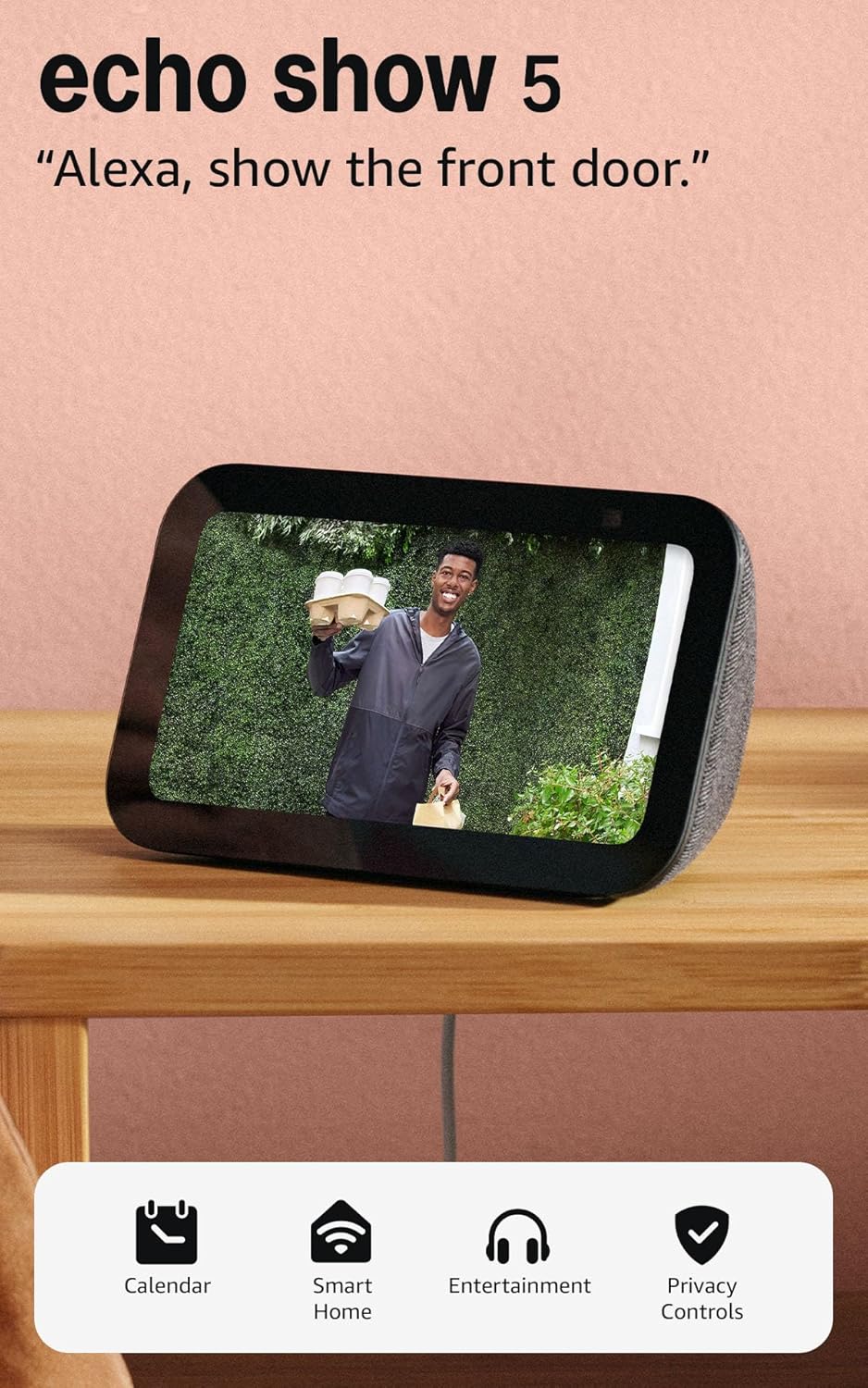
The Echo Show 5 is a small smart display that brings voice control, video calling, and visual info into kitchens, bedside tables, or small living spaces. You use it like a smart speaker with a screen: ask Alexa for news, weather, timers, or streaming music and video, make hands‑free video calls, and view compatible smart cameras and doorbells. The 5.5-inch display is large enough for glanceable content and photo slideshows, while the upgraded speakers deliver deeper bass and clearer vocals than earlier Echo Show 5 models, making music and podcasts sound noticeably better for its size. The built‑in 2 MP camera supports Drop In and video calling and includes a physical shutter and mic/camera off button for privacy. It also doubles as a smart-home controller for lights and thermostats. Limitations are the small screen for full media viewing and a modest camera resolution, so it is not a replacement for larger tablets or premium smart displays, but its compact footprint and improved sound make it a practical bedside or countertop device.
Best for: Buyers who prioritize a compact, privacy-conscious smart display with better-than-typical sound for bedroom or countertop use and want reassurance from broad user adoption and real-world performance.
Less Ideal for: Anyone wanting a large-screen entertainment hub or a high-resolution camera for detailed video will be disappointed and should consider larger premium displays.
- Compact 5.5-inch display for glanceable info and photo slideshows
- Improved speakers with deeper bass and clearer vocals compared with prior small models
- Built-in 2 MP camera with physical shutter and mic/camera off button for privacy control
- Works as a smart-home hub to view compatible cameras and control lights and thermostats
- Supports video calling and Drop In with Alexa app users and other Echo devices with screens
- Small screen and modest camera resolution limit full media or high-detail video use
- Not intended as a primary smart-display for large rooms or heavy multimedia consumption
Verdict: A compact, privacy-focused smart display that delivers stronger sound and core Alexa features for buyers who want a dependable bedside or countertop smart screen.
Belkin SOUNDFORM Elite Speaker

| Wireless charging power | iPhone 7.5W, Samsung 9W, Google 10W |
|---|---|
| Voice assistant | Alexa |
| Wireless connectivity | Bluetooth; Wi‑Fi multiroom |
The Belkin SOUNDFORM Elite combines high‑fidelity sound with smart features and a built‑in wireless charging pad, making it a practical living‑room centerpiece. It delivers room‑filling audio with emphasized bass and clear mids enabled by sound technology from Devialet, and can stream over Bluetooth or integrate into a multiroom setup for synchronized playback. The top charging pad supports fast wireless charging for iPhone, Samsung, and Google phones while vibration‑canceling design helps keep charging steady during playback. Alexa voice control adds hands‑free music, information, and smart‑home control without needing another device. In everyday use it is convenient for listeners who want better-than-phone sound, simple voice assistants, and a place to top up a phone overnight. Limitations include modest review counts and reported average overall ratings, so buyers who prioritize the absolute best audiophile detail or who need multiple high‑end inputs may prefer specialty speakers or separates instead.
Best for: Buyers who want a reliable, easy‑to‑use smart speaker that improves everyday listening, charges a phone wirelessly, and offers Alexa convenience without demanding audiophile complexity.
Less Ideal for: Audiophiles seeking the highest resolution sound staging or users who need a mix of dedicated wired inputs and professional audio features should look elsewhere.
- High‑fidelity tuned sound with enhanced bass for room‑filling playback
- Bluetooth streaming plus multiroom capability for whole‑home music
- Built‑in fast wireless charging for smartphones with vibration cancellation
- Alexa voice assistant for hands‑free control and smart‑home commands
- Not positioned as a high‑end audiophile speaker compared with separates
- Limited user review volume and middling average rating
Verdict: A practical smart speaker that pairs better-than-phone sound, Alexa smarts, and an integrated fast wireless charger for everyday home use.
Choosing the Right Smart Speaker: Key Factors to Consider
Audio Performance
How a smart speaker sounds is often the most visible difference between models. Consider frequency balance, clarity of midrange for vocals, and the strength of the low end. Rooms with hard surfaces amplify high frequencies, so a speaker with warm mids can sound more natural.
Audio performance affects how you will use the device. If you mainly use a speaker for podcasts and voice queries, clarity and midrange articulation matter most. If you plan to stream music regularly, look for models that offer fuller bass and wider soundstage to fill a living room without distortion.
Voice-Assistant Accuracy
The usefulness of a smart speaker hinges on how reliably it hears and interprets commands. Factors such as far-field microphones, noise-canceling algorithms, and wake-word sensitivity determine whether the device responds correctly from across a room.
High voice-assistant accuracy reduces frustration and speeds up routine tasks like timers, queries, and device control. Consider the typical ambient noise in the room where the speaker will live and whether the assistant supports natural-language requests you commonly use.
Smart-Home Compatibility
A smart speaker often acts as a hub or gateway for other devices. Check which smart-home ecosystems and protocols the speaker supports, such as common lighting, thermostat, and security device standards.
Compatibility affects setup complexity and long-term flexibility. A speaker that integrates natively with your existing devices avoids extra bridges or apps, making routines and voice scenes easier to create and maintain.
Connectivity Options
Reliable wireless connections are essential for streaming music and sending commands without lag. Look for stable dual-band Wi-Fi support, Bluetooth with aptX or similar codecs if you plan to use it as a Bluetooth speaker, and any low-latency modes for video or gaming.
Connectivity also determines multiroom capabilities. If you want synchronized audio across multiple rooms, ensure the platform supports multiroom grouping and that latency between grouped speakers is minimal.
Privacy and Controls
Privacy features influence whether you feel comfortable keeping a smart speaker active in shared spaces. Important controls include a physical microphone mute switch, local data processing options when available, and clear settings in the companion app for voice history and data management.
Privacy expectations vary. If you prioritize local control, favor models that provide explicit hardware toggles and straightforward ways to manage or delete stored voice interactions.
Ease of Setup and Daily Use
A good smart speaker should be quick to set up and easy to control daily. An intuitive companion app, clear prompts during onboarding, and consistent software updates reduce long-term hassle.
Daily use considerations include how the speaker handles software updates, whether voice routines are simple to create, and if the device maintains reliable connections to services and smart devices without frequent troubleshooting.
Where to Place Your Smart Speaker
Placement has a direct impact on both voice pickup and sound quality. For best voice recognition, place the speaker on a stable surface away from direct airflow from fans or HVAC vents. If you want stronger bass, position the speaker near a wall to take advantage of boundary reinforcement.
Avoid placing the speaker in enclosed spaces such as cabinets, which can muffle sound and impede microphone pickup. In open-plan homes, central placement helps distribute audio more evenly and improves the microphone's ability to hear commands from different angles.
- Keep at least a few inches of clearance on all sides for proper dispersion
- Avoid direct proximity to windows or reflective surfaces that exaggerate highs
- Place at head height for best microphone performance when standing or sitting
Multiroom Audio and Grouping Tips
If you plan to run synchronized music across several rooms, verify the platform's grouping capabilities and any limitations. Different systems handle latency and crossroom sync differently, so expect some variation depending on network quality and speaker placement.
Use wired Ethernet for at least one speaker or a stable mesh Wi-Fi system to reduce dropouts. When grouping, audition music with dynamic content to check for phasing or sync issues that are more audible on crescendo-heavy tracks.
- Prefer dual-band routers and avoid congested 2.4 GHz channels when possible
- Test grouped playback at normal listening volume to judge sync accuracy
- Place grouped speakers on the same Wi-Fi band to reduce latency
Managing Voice Profiles and Multiple Users
Many smart speakers support voice profiles so the assistant can personalize responses. Set up individual profiles for household members to get tailored calendars, reminders, and music recommendations. Teach family members the wake phrase and encourage consistent phrasing for routines.
If privacy or shared access is a concern, limit which personal data each profile can access and use guest or limited modes for temporary users. Periodically review linked accounts in the speaker's companion app to remove old devices and unused permissions.
- Create separate voice profiles for each adult household member
- Use restricted guest access for visitors to prevent accidental account access
- Review voice history settings and regularly clear entries you do not need
Optimizing Audio Settings Without Extra Gear
You can improve a smart speaker's sound using built-in EQ controls in the companion app. Reduce excessive bass if the speaker is in a small room to avoid boominess, or boost highs slightly to increase vocal clarity for spoken content.
Enable any room correction or adaptive sound features that automatically tune playback based on placement. If the speaker supports true stereo pairing, pair two identical units in the same room for an improved soundstage without external amplifiers.
- Start with small EQ adjustments and listen at typical volumes
- Use stereo pairing only with matched units for best imaging
- Turn on adaptive sound modes when available to simplify tuning
Power and Port Considerations
Check the speaker's power requirements and whether it uses a dedicated power adapter or offers battery operation. For fixed, always-on use, a direct AC connection is more convenient than relying on battery charging.
Also note available ports such as auxiliary inputs, micro-USB, or USB-C that can broaden usage. An aux-in allows connection to legacy audio sources, and USB-C provides more universal power and potential for audio over USB in some models.
- Prefer AC-powered units for continuous home use
- Aux or line-in ports expand compatibility with older devices
- USB-C power may offer easier replacement options than proprietary adapters
How We Chose the Best Smart Speaker
We shortlisted smart speakers based on practical, user-centered criteria that matter for everyday home use. Primary evaluation criteria included audio performance, measured by clarity across vocals and low-end presence for typical living spaces; voice-assistant responsiveness, assessed by wake-word accuracy and natural-language command handling; smart-home compatibility, which covers supported protocols and ease of integrating lights, locks, and thermostats; connectivity and latency, including Wi-Fi stability, Bluetooth support, and multiroom sync options; and setup and usability, focusing on app clarity, onboarding speed, and ongoing maintenance. We also considered privacy controls and on-device mute options as a separate filter for buyers who prioritize local control. We excluded products that rely on outdated wireless standards, lack ongoing software updates, or do not expose clear privacy controls. We favored devices with balanced audio suitable for medium rooms rather than ultra-compact units that sacrifice sound. The listed picks reflect a mix of strong audio, dependable voice control, and straightforward smart-home integration.
Our full evaluation process is outlined in our review methodology.
FAQ
Can a smart speaker control multiple smart devices at once?
Yes. Most smart speakers can issue commands to multiple smart devices and run routines that trigger several actions with a single voice command. The exact capabilities depend on the speaker's supported smart-home protocols and whether the targeted devices are compatible.
Will smart speakers work with my existing Wi-Fi network?
Usually. Smart speakers commonly support modern dual-band Wi-Fi networks, but older routers or congested channels can cause connectivity issues. Using a 5 GHz band or improving signal with a mesh system often fixes reliability problems.
How private are voice recordings from the speaker?
Privacy varies by device and platform. Many speakers include hardware mute buttons and options to review or delete voice history in the companion app. If privacy is a priority, look for devices that offer clear, accessible controls and local processing options.
Can I use a smart speaker as a Bluetooth-only speaker?
Often. Many smart speakers support Bluetooth playback in addition to Wi-Fi streaming, though some features may be limited in Bluetooth mode. Switching to Bluetooth can be useful for temporary playback from a phone without using the voice assistant.
Do smart speakers require constant internet access?
Most advanced voice-assistant features need internet access, but some playback functions and local Bluetooth connections work offline. For full voice queries and cloud-based services, reliable internet is necessary.
Final Verdict
When choosing a smart speaker under $200, prioritize the three areas that will shape daily experience: sound quality, voice-assistant responsiveness, and compatibility with your smart-home gear. Expect tradeoffs between compact designs and low-frequency performance, and weigh whether multiroom capability or stronger bass matters more for your space. Select a speaker that matches how you listen and how you use voice control. If you value reliable voice commands and smart-home integration, favor devices with better microphones and broader protocol support. If music is the main use, prioritize audio performance and stereo options. Either way, use the evaluation criteria above to make a confident, practical choice.