
Note: This article contains affiliate links. If you click on these links and make a purchase, we may earn a small commission at no extra cost to you. This helps support our research and content. Read our full affiliate disclosure here.
If you want smoother control, better scheduling, and energy savings for your ceiling fan, choosing the right smart switch makes a big difference. A properly matched smart switch gives you remote control, dependable speed regulation, and the ability to integrate with voice assistants or home automation routines without sacrificing safety or comfort. This guide shortlists the top smart switches for ceiling fans and explains the practical differences that matter to homeowners. We evaluated compatibility, installation complexity, and control features so you can pick a solution that works with your home's wiring and your daily habits. Read on to see which options match your setup and needs.
Top Picks at a Glance
| Best Overall The best all-around choice for most situations | meross Smart Ceiling Fan Control MFC100 |  |
| Best Quality Built to a higher standard if you want something more solid | Leviton Decora Smart Fan Controller D24SF |  |
| Best Value The sweet spot between price and what you get | Amazon Basics Smart Ceiling Fan Switch |  |
| Best Budget The cheapest option that still gets the job done reliably | SONOFF iFan04 WiFi Ceiling Fan Controller |  |
| Top Rated A top-rated pick with lots of positive feedback | Lutron Caseta Smart Fan Control PD-FSQN-WH |  |
| Most Popular A crowd favorite that many people choose with confidence | TREATLIFE Smart Fan & Dimmer Switch DS03-1 |  |
| Best Seller A high-volume bestseller chosen again and again | Kasa Smart Fan Control KS240 |  |
meross Smart Ceiling Fan Control MFC100

| Operating Voltage | 120 volts AC |
|---|---|
| Connectivity Protocol | IEEE 802.11 b/g/n 2.4GHz |
| Wattage | 120 watts (fan) / 300W INC or 150W LED/CFL (light) |
| Control Method | App, Voice |
| Compatible Devices | Apple HomeKit, Amazon Alexa, Google Home, SmartThings |
The meross MFC100 combines 4-speed fan control and a smooth light dimmer in a single wall switch so you can manage ceiling fan speed and lighting from the Meross app or with voice assistants. It is intended for single-pole setups with a required neutral and separate load wires for fan and light, and it works with Apple HomeKit, Alexa, Google Home and SmartThings over 2.4GHz Wi‑Fi. In practice the switch lets you set schedules, timers and automation, dim lights from 1 to 100 percent, and choose between three or four fan speed steps for comfort. The app can still control the device locally on your home network if internet is down, and the switch meets ETL/FCC/IC standards. Important limits: it will not work with fans that have built-in remotes or DC motors, it is not compatible with smart bulbs, and it only supports 2.4GHz Wi‑Fi. Installation requires basic wiring knowledge and a neutral wire. If your fan wiring fits those constraints, the MFC100 is a compact way to add smart control for both fan and light without extra modules.
Best for: Buyers who want a tidy, single-switch upgrade to add smart control for both a ceiling fan and its light and who prioritize broad smart-home platform support and scheduling features.
Less Ideal for: People with fans that use an integrated remote, fans with DC motors, or homes lacking a neutral wire should look for other solutions or professional rewiring.
- Integrated fan speed control and light dimming in one wall-mounted unit
- Works with HomeKit, Alexa, Google Home and SmartThings for voice and app control
- Scheduling, timers and local Wi‑Fi control keep automations running even if internet is down
- Wide dimming range (1–100%) and selectable fan speed levels for practical comfort tuning
- Meets ETL, FCC and IC standards
- Requires a neutral wire and separate load wires for fan and light, limiting compatibility
- Not compatible with fans that have built-in remotes, DC motor fans, or smart bulbs
Verdict: A compact, platform-friendly smart fan-plus-dimmer switch that adds scheduling and voice control to compatible ceiling fans without extra modules.
Leviton Decora Smart Fan Controller D24SF

| Operating Voltage | 120 volts |
|---|---|
| Current Rating | 2 A |
| Control Type | 4-speed control |
| Connectivity Protocol | Wi-Fi |
| Compatible Devices | My Leviton, Alexa, Google Assistant, Apple Home/Siri |
The Leviton Decora Smart Fan Controller (D24SF) replaces a standard fan switch to add quiet 4-speed control, scheduling, and voice control for compatible ceiling fans. It connects directly to a 2.4 GHz Wi‑Fi network and integrates with My Leviton, Alexa, Google Assistant, Apple Home/Siri and other smart platforms so you can set speeds, create schedules, or use timers without a hub. LEDs on the device indicate the current fan speed and the slim Decora-style design includes a screwless wallplate for a neat install. It supports single-pole or 3-way/multi-location setups with optional wired or wire-free companion switches. Important limitations: the controller is rated to 1.5A (approx 180 watts) and is intended for paddle fans with split capacitor or shaded pole motors, so it is not suitable for exhaust fans, fan/light combos, or fans with electronic motor controls, and it requires a neutral wire and a 2.4 GHz network. For anyone needing dependable four-speed control and smart integrations on a compatible fan, it is a practical, feature-rich upgrade.
Best for: Buyers who want reliable, step-up fan performance and smart-home integration for bedrooms, living areas, or offices and who are comfortable verifying wiring compatibility before install.
Less Ideal for: People with ceiling fans that include integrated electronic motor controls, combined fan/light kits, or homes without a neutral wire or 2.4 GHz Wi‑Fi access should look for alternate solutions.
- Adds quiet, four-speed electronic control to existing ceiling fans for improved comfort and scheduling.
- Works with major voice and smart-home platforms and the My Leviton app without a separate hub.
- Slim Decora form factor with screwless wallplate for clean, low-profile installation.
- Supports multi-location control via wired or wire-free companion switches for flexibility.
- Limited to fans with split capacitor or shaded pole motors and a maximum load of 1.5A, so not compatible with many electronically controlled fans or fan/light combos.
- Requires a neutral wire and a 2.4 GHz Wi‑Fi network, which may prevent installation in older wiring or 5 GHz-only networks.
Verdict: Choose this switch if you want dependable four-speed smart control and broad voice/home‑assistant integration for a compatible ceiling fan.
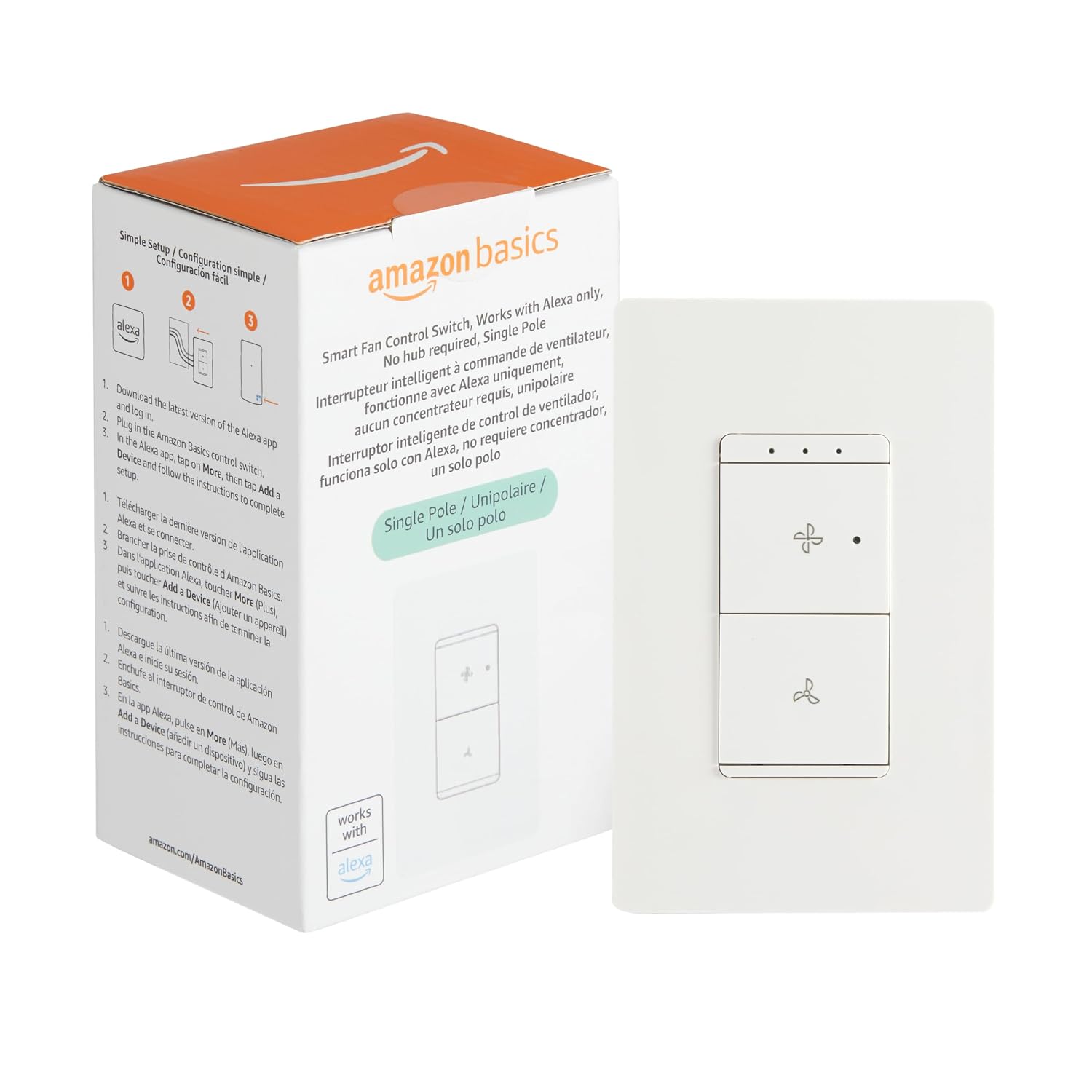
Amazon Basics Smart Ceiling Fan Switch
| Operating Voltage | 120 volts |
|---|---|
| Current Rating | 1.5 A |
| Controller Type | Amazon Alexa |
| Connectivity Protocol | Wi-Fi |
| Circuit Type | 1-way |
This smart ceiling fan switch replaces a traditional single‑pole fan control with a Wi‑Fi enabled unit that works directly with Alexa for voice control and remote scheduling. It offers four speed settings with LED indicators so you can cycle fan speeds from the wall, the Alexa app, or by voice and include the switch in Alexa routines to turn the fan on or off from anywhere. Installation requires a neutral wire and 2.4 GHz Wi‑Fi, and the package includes basic mounting hardware and terminal caps for a typical DIY swap; if you are unfamiliar with wiring, an electrician is recommended. The switch is designed specifically for one‑way fan circuits and does not need a hub or third‑party app, but it only integrates with Alexa so users of other ecosystems will be limited. Practical features like ETL listing and IP20 rating are included, while the 1.5 A current rating means it is intended for standard ceiling fan loads rather than high‑current accessories.
Best for: Buyers who want a simple, cost‑effective way to add Alexa voice control and remote scheduling to a standard single‑pole ceiling fan and prefer easy app integration over cross‑platform compatibility.
Less Ideal for: Users who need compatibility with non‑Alexa ecosystems, 5 GHz/6 GHz‑only networks, or who plan to control high‑current fan accessories should look elsewhere.
- Adds Alexa voice control and remote scheduling without a separate hub
- Four distinct speed settings with LED indicators for clear feedback
- Works over 2.4 GHz Wi‑Fi and is managed in the Alexa app so no extra apps are needed
- Includes basic mounting hardware and follows standard single‑pole wiring for straightforward replacement
- Only compatible with Alexa and 2.4 GHz Wi‑Fi, so it will not work with other voice platforms or 5 GHz networks
- Requires a neutral wire and is limited to 1.5 A current rating, restricting use to typical fan loads
Verdict: A straightforward Alexa‑first replacement switch that gives standard ceiling fans voice control and remote scheduling without a hub.
SONOFF iFan04 WiFi Ceiling Fan Controller

| Voltage | 220 volts |
|---|---|
| Display Type | App & Remote |
The SONOFF iFan04 turns a standard ceiling fan with light into a smart fixture by replacing the existing controller with a module that supports Wi‑Fi app control, a 433 MHz RF remote, and voice commands through Alexa or Google Assistant. Installation places the small controller in the fan canopy and pairs it with the eWeLink app so you can change three fan speeds, switch the light, and set timers or schedules from your phone. The included compact RF remote can be wall‑mounted or used handheld for local control when you do not want to use the app. Practical benefits include hands‑free voice control, basic automation with countdowns and repeating timers, and a simple option to upgrade an existing fan without changing the fixture. Limitations to note are the 220V spec which is region specific and the module provides only three fan speeds rather than fully variable speed control, so it may feel basic for users wanting fine speed tuning or advanced light dimming features.
Best for: Buyers who want an inexpensive, no‑hub way to add app, remote, and voice control to a ceiling fan and prefer a straightforward upgrade rather than a full fixture replacement.
Less Ideal for: People who need fine motor speed control, advanced dimming for the light, or who have a different household voltage and cannot use a 220V device.
- Adds Wi‑Fi and voice control without needing a hub
- Includes a compact 433 MHz remote that doubles as a wall switch
- App scheduling and countdown timers for automated on/off
- Simple replacement that upgrades an existing fan controller
- Supports only three preset fan speeds rather than continuous speed control
- Specified for 220 volts which limits use to matching electrical systems
Verdict: A budget-friendly module that converts an existing ceiling fan and light to basic smart control with app, remote, and voice support.
Lutron Caseta Smart Fan Control PD-FSQN-WH

| Operation Mode | ON-OFF, Speed Switch |
|---|---|
| Current Rating | 1.5 A |
| Operating Voltage | 120 volts |
| Control Type | Speed and On/Off |
| Connectivity Protocol | Wi-Fi, homeplug |
The Lutron Caseta Smart Fan Control replaces pull chains with a paddle-style wall switch that selects off plus four fan speeds and can be used with a Pico remote or the Lutron Smart Hub for app and voice control. It hard-wires into a standard 120V circuit and supports single-pole and 3-way installations, letting you mount a Pico as a secondary control without running extra wiring. With broad compatibility across Alexa, Apple Home, Google Assistant, Ring, and Sonos, the switch integrates into existing smart home setups when paired with the hub. Practical benefits include simple wall control for guests, the option to preselect a favorite speed, and reliable local control when the hub is used to avoid relying solely on cloud services. Limits to plan for are the 1.5 amp current rating, which restricts use to typical residential fans only, and the hub is required to access scheduling and advanced automation features. Installation requires a neutral and basic wiring knowledge or an electrician for safe setup.
Best for: Buyers who prioritize a dependable, well-supported upgrade to eliminate pull chains and want a fan control that integrates reliably into an existing smart-home platform with local-hub support.
Less Ideal for: People who need high-current or commercial fan support or those who want full cloud-only smart features without purchasing a hub should look elsewhere.
- Replaces pull chains with four-speed paddle control for convenient wall operation
- Works with Pico remote for wireless secondary control without extra wiring
- Integrates with major voice assistants and smart-home ecosystems when paired with the Lutron Smart Hub
- Supports 3-way installations and lets you preset a favorite speed for quick use
- 1.5 A rating limits compatibility to standard residential fan motors
- Advanced features like scheduling and app control require the separate Smart Hub
Verdict: A rock-solid, widely compatible fan switch that replaces pull chains and delivers reliable local and voice control when paired with the Lutron Smart Hub.
TREATLIFE Smart Fan & Dimmer Switch DS03-1

| Operating Voltage | 120 volts AC |
|---|---|
| Current Rating | 1.5 A |
| Control Method | App, Touch, Voice |
| Connectivity Protocol | Wi-Fi, SmartThings, Treatlife APP |
| Light Load Support | 150W LED/CFL or 300W incandescent |
The TREATLIFE DS03-1 combines fan speed and light dimming into a single wall control aimed at replacing a standard single-pole switch. Installers will need a neutral wire plus separate line, fan load, and light load connections, and the unit is incompatible with 3-way circuits or fans that use remotes, DC motors, or built-in smart controls. Once wired, control works locally via touch or remotely through the Treatlife/Smart Life app and voice assistants on 2.4 GHz Wi‑Fi, letting you set schedules, wake/sleep scenes, and timers. The switch supports four fan speeds and smooth dimming from 10 to 100 percent for dimmable LED/CFL and incandescent bulbs within the stated wattage limits, and it includes a gentle on/off lighting transition to reduce flicker. Practical limits include a 1.5 A fan load rating and a requirement to remove canopy receiver modules on some fans, so verify compatibility before buying. For buyers prioritizing app and voice automation with a combined fan-plus-light wall control, this model is a solid, no-hub option with sensible smart features.
Best for: Buyers who want a single wall-mounted smart control to automate both ceiling fan and dimmable lights via an app or voice and who are comfortable confirming wiring compatibility before install.
Less Ideal for: People with 3-way circuits, fans that use remote receivers or DC motors, homes without a neutral in the switch box, or those planning to use smart bulbs or integrated fixture controls.
- Two-in-one control for fan speed and light brightness saves wall space and centralizes control.
- Works with Treatlife/Smart Life app and Alexa/Google for remote scheduling and voice commands without a hub.
- Smooth dimming (10–100%) and four fan speeds give usable granular control for comfort and lighting scenes.
- Includes physical touch control and standard wallplate hardware for normal manual operation.
- Requires a neutral and separate fan and light load wires, making installation more complex or incompatible with older wiring.
- Not compatible with 3-way circuits, remote-controlled fans, DC-motor fans, or smart bulbs/fixtures.
- Fan load limited to 1.5 A and light load has specific wattage caps, so high-load fixtures may not be supported.
Verdict: A convenient single-gang smart switch that puts fan speed and dimmable light control into one app- and voice-ready unit for homes with proper neutral and separate fan/light wiring.
Kasa Smart Fan Control KS240

| Connectivity Protocol | Wi-Fi (2.4 GHz) |
|---|---|
| Compatible Devices | Apple HomeKit, Amazon Alexa, Google Assistant |
| Wattage | 1875 watts |
| Current Rating | 2.5 A |
| Control Method | Touch |
The Kasa KS240 replaces a standard single-pole fan/light wall control with a single device that offers four discrete fan speeds and smooth light dimming from 1 to 100 percent. It connects over 2.4 GHz Wi‑Fi and integrates with Apple HomeKit, Alexa, and Google Assistant so you can use voice commands, the Kasa app, or HomeKit automation to schedule and control fan and light levels remotely. Installation requires a neutral wire and the product ships with wire nuts and a wall plate for a crewless look, and the app includes guided setup. Practical benefits include a sleep mode that steps the fan to a gentler speed, fade on/off lighting to reduce glare, and grouping support for scenes. The KS240 is ETL listed and rated for typical household loads, but it is a single-pole device so it is intended for one-location control and needs 2.4 GHz Wi‑Fi only, which may be a limitation in homes running only 5 GHz networks or without a neutral at the switch box.
Best for: Buyers who want a reliable, factory-quality smart upgrade to a ceiling fan/light control that prioritizes simple voice and app control, safety certifications, and guided installation.
Less Ideal for: Homes without a neutral wire at the switch box, households using only 5 GHz Wi‑Fi, or installations that require multi-location 3-way switching.
- Independent control of fan (4 speeds) and light dimming for flexible comfort and ambiance
- Works with Apple HomeKit, Alexa, and Google Assistant for voice and automation control
- Remote control, scheduling, and grouping via the Kasa app for convenience and scenes
- ETL certification and built-in protections reduce risk of overload and overheating
- Requires a neutral wire and 2.4 GHz Wi‑Fi, which limits compatibility in some installations
- Single-pole design does not support multi-location (3-way) switching without additional hardware
Verdict: Choose the KS240 if you want a simple, safety-certified smart wall control that independently manages fan speed and light dimming with HomeKit and voice assistant support.
Choosing the Right Smart Switch for Ceiling Fans: Key Factors to Consider
Wiring Compatibility and Neutral Requirements
Ceiling fans are wired in a variety of ways, and smart switches differ in which configurations they support. Some smart switches require a neutral conductor in the wall box, while others use alternative approaches to operate without a neutral. Knowing whether your switch box contains a neutral, a separate fan motor feed, and a switched hot for the light is essential before you buy.
If the switch requires a neutral but your box lacks one, you will need additional wiring or a different switch model. Selecting a switch that matches your wiring eliminates surprises during installation and can reduce electrician time and cost.
Fan Speed Control Method
Not all smart switches handle fan speed the same way. Ceiling fans often use triac-based or electronic speed control, while some smart switches emulate multi-speed fan taps. Look for switches that explicitly list fan speed regulation rather than light dimming-only controls, because using the wrong control method can cause motor humming or limited speed steps.
Consider whether you need multiple discrete speeds, smooth variable control, or simple on/off with preset scenes. The control method affects user experience and compatibility with older or specialty motors.
Load Capacity and Safety Features
Switches must safely handle the electrical load a ceiling fan and its light kit present. Check rated current and power limits to ensure the switch can manage combined fan and light loads, especially for larger fans or those with high-wattage fixtures. Overload protection, thermal cutoff, and clear maximum load ratings help prevent failures.
Safety certifications and compliance with local electrical codes are important. A switch that marginally fits the load can work short-term but may shorten the lifespan of the device or fan motor.
Control Options and Integration
Decide which control workflows matter most: local paddle or pull-chain behavior, voice control, mobile app scheduling, or integration with automation platforms. Some homeowners want simple on/off and a few speeds, while others expect scene-based automation and voice commands.
Ensure the switch supports the ecosystem you use, such as common wireless protocols or cloud services, and that it offers consistent local control if your network is offline. The quality of the mobile app and the availability of firmware updates also influence long-term satisfaction.
Installation Complexity and Mounting
Installing an in-wall smart switch for a ceiling fan can be straightforward for a basic replace, but complexity increases with multi-gang boxes, shared neutrals, or remote fan controls. Consider whether you are comfortable with the required wiring changes or if you need a licensed electrician.
Also check the physical size of the switch module and whether it fits behind the wall plate or requires an accessory module in the fan canopy. Installation instructions and clear labeling reduce errors and speed up the process.
Understanding Fan Wiring Diagrams
Ceiling fans often have separate conductors for fan motor, light kit, and neutral. Before you buy a smart switch, open the switch box or consult a wiring diagram to confirm which wires are present and how they are used. Identifying the fan motor hot, the switched hot for the light, and the neutral will guide your selection and avoid mismatches.
- Locate the hot feed, fan motor lead, light lead, and neutral if present
- Confirm whether the fan uses a single combined hot or separate hots for fan and light
- If unsure, consult an electrician to verify wiring before installing a smart switch
Local Control Behavior and Physical Switches
Some homeowners prefer a tactile paddle or rocker switch that continues to work exactly as before, while others accept a different behavior such as a tap for on/off and hold for speed changes. Check how the smart switch behaves when used manually and whether it preserves manual control when the network is down.
- Look for switches with configurable local control modes
- Verify whether the switch supports multi-tap or long-press speed adjustments
- Consider models that allow restoring last state after a power outage
Network Protocols and Offline Reliability
Smart switches connect via different protocols which affect responsiveness and integration. Local-control-capable protocols reduce dependence on cloud services, improving reliability if your internet is unstable. If you use voice assistants or an existing hub, confirm compatibility and whether local control is supported for critical functions like turning the fan off quickly.
- Prefer devices that offer local control for core functions
- Check compatibility with your existing hub or ecosystem
- Evaluate whether the switch supports firmware updates over the network
Physical Fit and Multi-Gang Considerations
Some smart switch modules are larger than traditional toggles and require more space behind the wall plate. In multi-gang boxes, the fit can be tight or require relocation of the module to the fan canopy if supported. Measure the box depth and check product dimensions to ensure a clean installation and avoid forcing wiring into a cramped space.
- Measure wall box depth and compare with module depth
- Consider accessory modules for shallow boxes or canopy mounting
- Plan for neat wire management and secure mounting to avoid loose connections
Speed Presets and Automation Use Cases
Decide whether you want simple presets for ceiling fan speeds or more advanced automation such as scheduling different speeds at different times of day. Presets simplify everyday use, while automation can improve comfort and efficiency by running lower speeds at night or higher speeds when rooms are occupied. Look for switches that provide scene support or programmable speed presets so you can trigger specific fan behaviors from a hub or schedules.
- Use speed presets for common comfort settings
- Combine occupancy sensors or schedules for energy savings
- Test presets to ensure they provide the expected fan response
How We Chose the Best Smart Switch for Ceiling Fans
We focused on features and constraints that matter for ceiling-fan installations in typical homes. Each candidate had to support fan motor control methods commonly used in residential wiring while maintaining safety and electrical compatibility. We prioritized models that explicitly handle fan speed regulation rather than those designed only for lighting loads. Key evaluation criteria included wiring compatibility with 3- and 4-wire fan circuits and neutral requirements, the fine-grain of speed control and dimming separation, and secure wireless integration with common smart-home protocols. Installation complexity and the clarity of wiring instructions were assessed to reflect realistic DIY or electrician-assisted installs. We also considered the range of control options such as local switch behavior, scheduling, and scenes, plus the availability of reliable firmware updates and documented safety features. Units that required unusual wiring changes, unsupported motor types, or lacked clear documentation were excluded. We did not include devices intended solely for light fixtures or plug-in fan controllers that do not replace in-wall switches. Our selection reflects practical tradeoffs between functionality, ease of installation, and long-term reliability for ceiling fan control.
Our full evaluation process is outlined in our review methodology.
FAQ
Can I replace my ceiling-fan wall switch with a smart switch myself?
Often you can, but it depends on your wiring and comfort with electrical work. If the switch box contains the necessary conductors and you can turn off power safely, many homeowners handle installation. If wiring is unclear or if the job requires running new wires, hiring a licensed electrician is the safer choice.
Do smart switches damage fan motors?
A properly specified smart switch designed for ceiling fans will not damage the motor when used as intended. Problems arise when a light-dimmer style control is used on a fan or when a switch cannot handle the load. Choose a switch that explicitly supports fan control and matches the motor type and load rating.
Will a smart switch work with my ceiling fan's pull chain?
Yes, in most cases the fan's pull chain remains functional. Some smart switches can be configured to ignore the pull chain or to detect state changes, but behavior varies. If you rely on both the pull chain and the wall switch, test the combined behavior after installation to ensure predictable operation.
What do I need to know about the neutral wire requirement?
Some smart switches require a neutral to power their electronics, while others are designed to work without one. Check the switch documentation and confirm whether a neutral is present in your switch box. If it is missing and the switch requires it, you may need to run a neutral or choose a different switch.
Can I control fan speed through voice commands?
Usually yes, if the smart switch supports voice assistant integration. Voice control typically allows on/off and speed presets depending on the switch's capabilities. For reliable results, ensure the integration supports fan-specific speed commands rather than only generic on/off commands.
Final Verdict
Prioritize wiring compatibility and fan-specific speed control when choosing a smart switch for a ceiling fan. Confirm your wall box wiring and whether a neutral is available before selecting a device, and favor switches that explicitly support fan motor control and clear load ratings. Balance the desire for automation and voice control with installation complexity and safety. If you match the switch to your wiring and intended control workflow, you will get dependable, energy-saving fan control that fits your daily routine.