
Note: This article contains affiliate links. If you click on these links and make a purchase, we may earn a small commission at no extra cost to you. This helps support our research and content. Read our full affiliate disclosure here.
If you use electric baseboard heat, a specialist smart thermostat can give you better temperature control, easier scheduling, and clearer energy use information. The wrong thermostat will misread room conditions or be incompatible with line-voltage systems, so picking one built for baseboard heaters matters more than for low-voltage systems. This guide shortlists the top-rated smart thermostats designed for electric baseboard heat and explains why they made the cut. We evaluated compatibility, installation complexity, scheduling capability, and control accuracy to help you choose the right unit for your home. Read on to see which options fit different wiring and control needs, plus what to consider before you install.
Top Picks at a Glance
| Best Overall The best all-around choice for most situations | Mysa Smart Thermostat V2 |  |
| Best Quality Built to a higher standard if you want something more solid | Google Nest Thermostat |  |
| Best Value The sweet spot between price and what you get | Mysa Smart Thermostat LITE |  |
| Best Budget The cheapest option that still gets the job done reliably | meross Smart Thermostat MTS200 |  |
| Top Rated A top-rated pick with lots of positive feedback | ecobee Smart Thermostat Premium |  |
| Most Popular A crowd favorite that many people choose with confidence | Sensi Smart Thermostat ST55 |  |
| Best Seller A high-volume bestseller chosen again and again | Google Nest Thermostat |  |
Mysa Smart Thermostat V2

| Voltage | 240 volts |
|---|---|
| Wattage | 3800 watts |
| Connectivity Technology | WiFi, NFC |
| Control Type | App Control, Button Control and Voice Control |
| Screen Size | 3.5 inches |
The Mysa Smart Thermostat V2 replaces line‑voltage baseboard and fan‑forced heaters with a modern, app‑driven controller that supports 120–240V systems up to 3800W at 240V. It is typically mounted on the wall in rooms heated by electric baseboards and used via the Mysa app, on-unit touch controls, or voice assistants including HomeKit, Alexa, and Google. Notable features include a 3.5‑inch LED display with adaptive brightness, scheduling, geofencing, energy reports, and audible touch feedback. In practice the app makes weekly scheduling and remote temperature adjustments quick, and the energy insights help you see when the heater is running. Installation requires a compatible high‑voltage wiring setup with a neutral or second live conductor and is more involved than swapping a low‑voltage thermostat, so expect a moderate electrical DIY or electrician cost. The unit is streamlined and smaller than previous models, but it only works with line‑voltage electric systems and not with two‑wire or low‑voltage HVAC, so verify wiring before buying.
Best for: Buyers who want a balance of smart home features and energy visibility for rooms heated by line‑voltage electric baseboards and who are willing to confirm wiring or hire a pro for installation.
Less Ideal for: People with low‑voltage HVAC, two‑wire baseboard systems, or those unwilling to change wiring should look at thermostats designed for their system type.
- Designed specifically for high‑voltage baseboard and fan‑forced heaters up to 3800W at 240V
- Full smart home integration with Apple HomeKit, Alexa, Google Assistant and Wi‑Fi app control
- Adaptive LED display with sleep/wake brightness and touch controls for easy local use
- Scheduling, geofencing and energy insights for simpler remote control and usage tracking
- Requires a compatible 4‑wire high‑voltage installation so it will not fit older two‑wire baseboard systems
Verdict: If you have compatible high‑voltage electric baseboard or fan‑forced heaters and want smart‑home control plus energy tracking, Mysa V2 is a polished, purpose‑built option.
Google Nest Thermostat

| Connectivity Technology | Bluetooth, Wi-Fi |
|---|---|
| Power Source | Battery Powered |
| Display Type | LCD |
| Control Type | Remote Control, Voice Control |
| Number of Batteries | 2 A batteries required. (included) |
The Google Nest Thermostat is a user-friendly smart thermostat that lets you control heating and cooling from the Google Home app, by voice, or using the touch bar on the unit. It creates and edits schedules through the app, can automatically set Eco Temperatures when no one is home, and sends alerts if it detects potential HVAC issues. Installation is intended to be straightforward and often takes about 30 minutes, and the unit runs on two included A batteries so it can work without a C wire in many homes. It supports Wi‑Fi and Bluetooth connectivity and integrates with Google Assistant and other Matter-certified voice assistants for remote and voice control. For homes with electric baseboard heat, check compatibility before buying since some baseboard systems require a specific wiring arrangement or a compatible power accessory; the thermostat's savings and monitoring features still help reduce runtime where it is compatible. The Nest is lightweight on advanced HVAC features compared with higher-end Nest models, but it provides solid app control and energy-saving automation for typical smart-thermostat use.
Best for: Buyers who want a simple, app‑centric smart thermostat that adds remote control and basic energy-saving automation to a standard home heating system and value easy setup and Google ecosystem integration.
Less Ideal for: Homes with unconventional electric baseboard wiring or owners who need advanced HVAC tuning and professional-level diagnostics should consider thermostats explicitly designed for line-voltage baseboard systems or consult an HVAC pro.
- Easy mobile and voice control through Google Home and compatible assistants
- Programmable schedules and Eco Temperatures to reduce energy use
- Often installs without a C wire and includes required batteries and mounting hardware
- Sends HVAC monitoring alerts that can surface system issues early
- Not guaranteed compatible with all electric baseboard systems and may require a power accessory or pro installation
- Fewer advanced HVAC tuning options than higher‑end Nest models
Verdict: A simple, Google‑integrated smart thermostat that brings remote control and energy‑saving automation to compatible home heating systems.
Mysa Smart Thermostat LITE
| Connectivity Technology | Bluetooth, Wi‑Fi |
|---|---|
| Control Type | App Control |
| Control Method | App, Touch, Voice |
| Voltage | 240 volts_of_alternating_current |
| Wattage | 3800 watts |
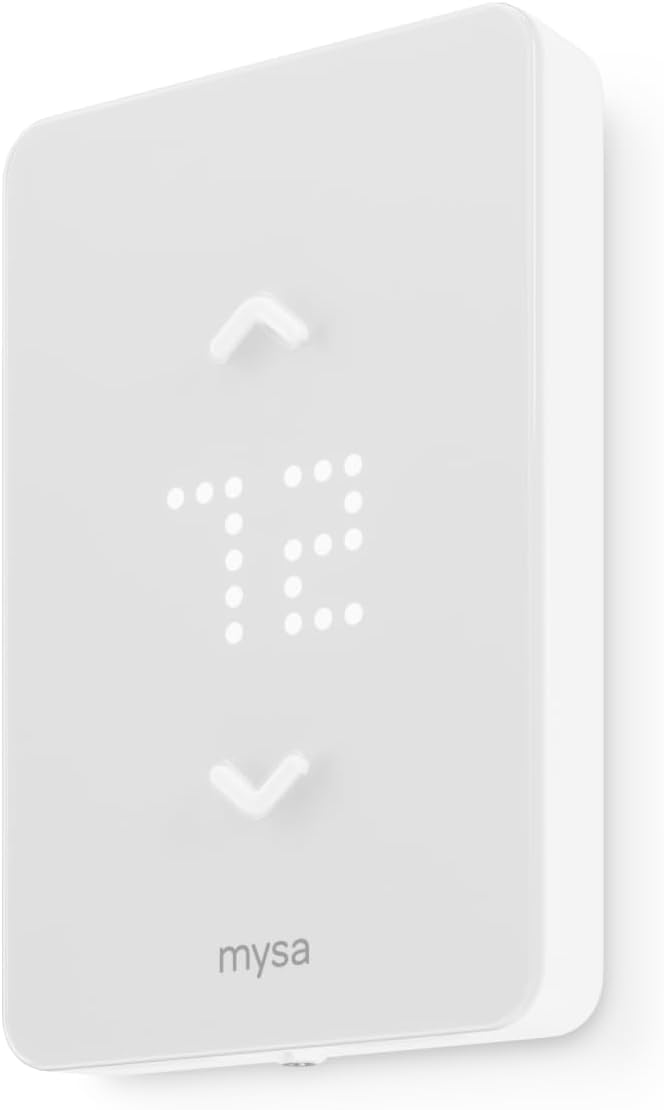
The Mysa Smart Thermostat LITE brings smart control to high‑voltage electric baseboard, fan‑forced, and convector heaters by replacing a wall thermostat with a Wi‑Fi connected, app‑driven unit. It is typically used to create 7‑day schedules, lower temperatures when away, and preheat rooms on a timer from the Mysa mobile app or via HomeKit, Alexa, or Google voice commands. Notable features include direct Wi‑Fi connectivity with no hub required, geofencing and auto‑scheduling, a backlit LCD and touch controls on the unit, and per‑room energy runtime reports delivered by email. Practical benefits are straightforward: easier remote control of individual heater circuits, potential energy savings from scheduling and runtime visibility, and a DIY friendly install workflow guided in the app. Important limitations are that it requires compatible high‑voltage wiring (120V–240V and either neutral or a second live wire) and a 4‑wire connection in many installs, so some older baseboard setups may need electrician changes before use. The LITE model also focuses on core smart features rather than advanced sensors or multi‑stage HVAC support.
Best for: Buyers who want to optimize electric heating costs per room with remote schedules and smart‑home voice control and who are comfortable checking wiring before installation.
Less Ideal for: Someone seeking a thermostat for complex multi‑stage central HVAC systems or homeowners without the required wiring for high‑voltage baseboard without professional rewiring.
- Designed specifically for electric baseboard and fan‑forced heaters with 120V–240V support
- Connects directly to home Wi‑Fi with no hub and offers app, touch, and voice control
- 7‑day scheduling, geofencing, and auto‑scheduling for per‑room energy savings
- Monthly runtime reports and per‑room energy tracking help identify high‑use zones
- Requires compatible wiring (4 wires, neutral or second live) which may need an electrician in some homes
- Focused on heating control only and lacks multi‑stage HVAC features
Verdict: Use the Mysa LITE when you want straightforward, app‑first smart control and scheduling for individual electric baseboard or fan‑forced heaters to cut runtime and heating cost per room.
meross Smart Thermostat MTS200

| Controller Type | Apple HomeKit, Alexa, Google Assistant, SmartThings |
|---|---|
| Connectivity Technology | Wi-Fi |
| Power Source | Corded Electric |
| Display Type | LCD |
| Voltage | 120 volts |
The meross MTS200 is a budget-friendly smart thermostat built for 120V–240V electric heating systems such as baseboard, convector and fan-forced heaters. It replaces a wall thermostat and gives app, voice and schedule control via Meross, Apple Home, Alexa and Google Home, plus an energy monitor to track consumption. Installation requires four or more wires in the electrical box and is intended for North American wall mounting; meross provides wiring guidance and a simple LCD interface for local adjustments. Notable features include 1°F temperature accuracy, open-window detection that pauses heating to save energy, and offline local control when your router is down. Limitations to watch: it is not compatible with low-voltage HVAC, heat pumps, underfloor electric systems, or systems lacking the required wiring, and the internal sensor sits under the casing so placement or app calibration may be needed for the most accurate room reading. For buyers wanting a straightforward, connected replacement for high-voltage baseboard heating, this model covers the essentials without premium extras.
Best for: Buyers who need an affordable, connected replacement for high-voltage baseboard or convector heaters and prioritize basic smart features, voice control and energy monitoring on a budget.
Less Ideal for: People with low-voltage HVAC, heat pump systems, electric underfloor heating, or homes without the required multi-wire electrical box should look elsewhere.
- Designed specifically for high-voltage electric baseboard and convector heaters
- Works with Apple HomeKit, Alexa, Google Home and SmartThings for voice and remote control
- Built-in energy monitor provides real-time and historical power consumption data
- 1°F accuracy with programmable 7×24 schedule and open-window detection to reduce waste
- Requires four or more wires and is not compatible with 24V HVAC, heat pumps, or electric underfloor systems
- Temperature sensor is inside the casing and may need calibration or careful placement for precise room readings
Verdict: A cost-conscious, HomeKit-compatible smart thermostat that brings scheduling, voice control and energy monitoring to electric baseboard and convector heating.
ecobee Smart Thermostat Premium

| Connectivity Protocol | Wi-Fi |
|---|---|
| Controller Type | Alexa, HomeKit, Google Assistant |
| Power Source | Battery Powered |
| Voltage | 24 volts |
| Number of Batteries | 1 Lithium Ion (included) |
The ecobee Smart Thermostat Premium is a high-end smart thermostat designed to optimize comfort and energy savings through sensors and automation. It connects to your home network via dual-band Wi-Fi and pairs with included SmartSensor units to manage hot and cold spots and prioritize occupied rooms. The unit adds built-in air quality monitoring, radar-based occupancy sensing for more accurate presence detection, and live view integration with an ecobee doorbell camera. Voice control is available from the thermostat itself with either Alexa or Siri built in, and it also works with Google Assistant and Apple HomeKit. Practical benefits include automatic savings routines, remote control through the app, and a Power Extender Kit for homes without a C-wire to simplify installation. Limitations to note are that compatibility is focused on low-voltage 24VAC HVAC systems, so it is not suitable for line-voltage setups without additional equipment, and advanced features like doorbell live view and some voice functions require matching ecosystem devices or hubs.
Best for: Homeowners who prioritize reliable automated comfort and energy savings and want a thermostat that maintains consistent room-level temperatures with sensors and smart automations.
Less Ideal for: Homes that use line-voltage electric baseboard heating without a compatible interface or relay should avoid this unit and choose a thermostat made for line-voltage systems.
- Built-in air quality monitor provides alerts and filter reminders
- Included SmartSensor helps balance temperature across rooms
- Radar occupancy sensor improves presence detection for automations
- Dual-band Wi-Fi and broad smart-home integrations including HomeKit, Alexa, and Google
- Designed for 24VAC HVAC systems so not natively compatible with line-voltage electric baseboard heat
- Some advanced features require other ecosystem devices or an Apple Home hub for full functionality
Verdict: Choose the ecobee Smart Thermostat Premium if you want a reliable, sensor-driven smart thermostat that improves comfort and saves energy in compatible low-voltage systems.
Sensi Smart Thermostat ST55

| Connectivity Technology | Wi-Fi |
|---|---|
| Control Method | App, Touch, Voice |
| Specific Uses For Product | Air Conditioner, Boiler, Furnace, Heat Pump |
| Power Source | Corded Electric |
| Number of Batteries | 2 AA batteries required (included) |
The Sensi Smart Thermostat ST55 is a Wi‑Fi programmable thermostat that gives remote control through a mobile app and supports Alexa, Google Assistant, Apple HomeKit, SmartThings and Vera. It is designed for DIY installation with included mounting hardware, wire labels and step‑by‑step app guidance, and it can operate with or without a common wire in many setups. The thermostat provides usage reports, smart alerts and filter reminders to help monitor HVAC performance, and its Energy Star certification indicates potential energy savings. The user interface uses buttons with an LED display and basic touch and voice control options, so it feels familiar to traditional thermostat users while adding remote scheduling. Limitations include a modest 5‑inch display and a plastic glossy finish that is functional but not premium, and advanced users seeking a large touchscreen or highly customizable on‑device controls may find it simpler than high‑end models. For homeowners who want reliable app control, energy reports and broad smart home integration with an easy install, the ST55 is a practical choice.
Best for: Buyers wanting a reliable, well integrated smart thermostat with simple DIY installation and clear energy reporting who prioritize proven compatibility and reviewer-backed reliability.
Less Ideal for: Users who want a large on‑device touchscreen, highly customizable local controls, or a premium industrial design should look at higher-end touchscreen models instead.
- Works with major smart home platforms including Alexa, Google Assistant and Apple HomeKit
- Easy DIY installation with included mounting hardware, wire stickers and guided app instructions
- Energy Star certified with remote scheduling and usage reports for energy monitoring
- Provides smart alerts and maintenance reminders like filter replacement
- 5‑inch LED display and button controls are less advanced than touchscreen competitors
- Plastic glossy housing is functional but lacks a premium look
Verdict: Choose the Sensi ST55 if you want an easy DIY smart thermostat with broad smart home compatibility and reliable energy reporting.
Google Nest Thermostat

| Connectivity Technology | Wi-Fi |
|---|---|
| Power Source | Corded Electric |
| Voltage | 24 volts |
| Display Type | LED or LCD |
| Number of Batteries | 2 AAA batteries required. (included) |
The Google Nest Thermostat is a compact smart thermostat designed for simple installation and everyday temperature control using the Google Home app or voice assistants. It provides programmable schedules, a touch bar for manual adjustments, and features like Savings Finder and Eco Temperature that help reduce energy use when the home is empty. The unit reports basic HVAC monitoring alerts and can suggest schedule tweaks, while Nest Renew can shift usage toward cleaner or lower-cost energy when available. It works with many common systems and is intended to install in about 30 minutes with the included mounting hardware and documentation. Important limitations for this article's scope: the Nest Thermostat requires a compatible wiring setup and for some electric baseboard systems a C wire or power accessory may be necessary, so you should check compatibility before buying; some advanced HVAC diagnostics and local controls available on higher-end Nest models are not part of this simpler model. The thermostat is best used by homeowners who want app and voice control plus straightforward energy savings without needing pro-level HVAC features.
Best for: Buyers who want a straightforward, app-first smart thermostat that brings voice control and energy-saving automation to a typical home while preferring low-risk, easy installation and everyday convenience.
Less Ideal for: Homes that rely on complex multi-zone electric baseboard controls or installers seeking advanced professional HVAC diagnostics and controls should consider more specialized thermostats or pro-installed models.
- Easy app and voice control through Google Home and compatible assistants
- Programmable schedules with Savings Finder and Eco Temperature to reduce energy use
- Includes mounting hardware and basic installation guidance for typical DIY setup
- HVAC monitoring alerts that can notify you to potential system issues
- Compatible with Nest Renew for shifting usage to cleaner or cheaper energy when available
- May require a C wire or compatible power accessory for some electric baseboard or specialized systems
- Not the most feature-rich Nest model for advanced HVAC diagnostics or multi-zone setups
Verdict: Choose the Nest Thermostat if you want a low-friction, app‑driven smart thermostat that adds voice control and basic energy-saving features to a standard home system.
Choosing the Right Smart Thermostat for Electric Baseboard Heat: Key Factors to Consider
Line-Voltage Compatibility
Electric baseboard heaters run on line-voltage circuits that differ from low-voltage furnace or central HVAC controls. Confirming a thermostat is designed for line-voltage switching avoids overheating controllers, nuisance failures, and potential safety hazards.
Check whether the thermostat supports the specific circuit type in your home, such as single-pole or double-pole switching, and whether it can handle the amperage of your heater circuits. Some smart models include mounting or wiring adapters to fit typical baseboard setups; others require a relay or professional installation. Matching the thermostat to your wiring keeps the project simpler and safer.
Temperature Sensing and Remote Sensors
Baseboard heaters heat rooms differently than central systems, often causing temperature stratification near walls and under windows. A thermostat with accurate local sensing or support for remote temperature sensors will give more reliable comfort control.
Consider whether the thermostat relies solely on its internal sensor or allows placing a remote sensor in the room where you need comfort most. Remote sensors can avoid overheating a space while another area remains cold. Also evaluate sensor responsiveness and any averaging or smoothing algorithms that affect how quickly the thermostat reacts to setpoint changes.
Scheduling Flexibility and Control Logic
Because baseboard heat has slower thermal response and higher operating cost, scheduling features matter. Look for thermostats that support multi-event daily schedules, adaptive recovery, and holiday or setback modes to avoid unnecessary run time.
Advanced control logic can reduce energy use by minimizing overshoot and by using gradual setpoint adjustments rather than abrupt changes. Features like geofencing, presence-based schedules, and integration with other home automation routines add convenience, but the core requirement is reliable timed control that fits how and when you use heat.
Load Rating and Electrical Safety
Thermostats must be rated for the current and voltage of your baseboard circuits. Underrated switches can overheat and fail, so confirm the amp and voltage ratings match your heater bank. Some smart thermostats include internal relays sized for common baseboard loads; others rely on an external relay or contactor for high-amp setups.
Also check for built-in safety features like overcurrent protection, proper isolation between control electronics and line voltage, and certifications from relevant safety bodies. These aspects affect long-term reliability and determine whether a professional electrician should perform the installation.
Installation and Wiring Complexity
Installing a line-voltage smart thermostat is usually more involved than replacing a low-voltage unit. You may need to shut off power at the breaker, identify load and line conductors, and work with junction boxes rated for line voltage. Some models require a neutral or specific wiring arrangements that older homes may not have.
Assess whether you are comfortable with basic electrical work or whether you should hire an electrician. Consider whether the thermostat supports surface-mounting, has clear wiring diagrams, or offers adapter kits that simplify installation. Lower installation complexity can reduce total project time and cost.
Connectivity, App Features, and Integrations
Smart features such as Wi-Fi connectivity, cloud scheduling, and integration with voice assistants or home automation platforms can improve convenience but are secondary to safe electrical control. Still, these features matter for remote monitoring, firmware updates, and advanced scheduling.
Look for stable app ecosystems with straightforward scheduling, energy usage reports, and reliable remote control. Consider whether the thermostat supports local control fallback if your internet or cloud service is unavailable. Integration with other smart devices can enable useful automations like setbacks when doors or windows are opened.
Wiring Basics for Electric Baseboard Thermostats
Understanding the wiring in a baseboard circuit is the first practical step before buying a smart thermostat. Most baseboard heaters use line-voltage wiring with separate load and line conductors and often no dedicated low-voltage control wiring. Identify the incoming power feed and the heater leg so you can match the thermostat terminals to the correct conductors.
If you find two hot conductors and a ground, you likely have a 240V circuit that requires a double-pole thermostat or a relay rated for 240V switching. Single-pole thermostats are suitable for 120V circuits where only one hot leg is switched. When in doubt, label wires and photograph the existing setup before removing the old thermostat or trim plate.
- Turn off power at the breaker before touching any wiring.
- Measure voltage if you are comfortable and know how, or consult an electrician.
- Note whether the existing thermostat uses a mercury switch or simple mechanical control, as replacements may need different mounting.
Using Remote Sensors to Improve Comfort
Remote sensors allow the thermostat to base control on the room temperature where people actually are rather than the wall location of the device. For rooms with odd airflow or heat sources, a remote sensor reduces hot or cold spots and avoids wasted run time caused by sensor placement near heat sources or drafts.
Many smart thermostats support one or more remote sensors, sometimes sold separately. When selecting a unit, check the maximum number of sensors supported and where they can be placed. If you plan to control multiple rooms with one thermostat, consider sensor averaging or prioritization features.
- Place sensors at typical occupant height away from direct sunlight and drafts.
- Use sensor averaging for larger open areas to avoid single-point bias.
- Verify wireless range if sensors communicate wirelessly to the thermostat.
Installation Tips to Minimize Downtime
Prepare for installation by turning off the correct breaker and confirming power is off with a non-contact voltage tester. Keep the old thermostat in place long enough to note wire labeling, then remove it and secure the conductors while you mount the new device.
If your home has a 240V circuit, label each hot leg and be careful to transfer both legs to the correct terminals. Mounting may require a deep electrical box or surface-mounting adapter. When the thermostat requires an external relay for high-amp heaters, plan for that additional component and space.
- Have wire nuts and correct gauge wiring on hand for secure connections.
- Follow local electrical codes and permit requirements for line-voltage changes.
- If you are not comfortable with line-voltage wiring, schedule a licensed electrician.
Energy Savings Expectations With Baseboard Heat
Smart thermostats can reduce wasted run time and enable setbacks, but the energy savings on baseboard systems depend on your lifestyle and the building envelope. Because baseboard heaters respond slowly, aggressive setback schedules can sometimes use more energy during recovery periods than they save if the house loses heat quickly.
To maximize savings, use modest setbacks, improve insulation and sealing, and combine thermostat scheduling with sensor-based occupancy detection. Track energy use through any reporting features the thermostat provides to understand how scheduling changes affect consumption.
- Small, steady setbacks often outperform large temperature swings in poorly insulated homes.
- Combine thermostats with weather-related scheduling to avoid unnecessary heating on mild days.
- Use reports to iterate on schedules and sensor placement for best results.
When to Call a Professional Electrician
Hire an electrician if you are unsure about circuit type, if the thermostat requires a relay for high-amp loads, or if your installation needs modifications to junction boxes or breaker sizing. Professionals can verify load calculations, install contactors, and ensure compliance with local codes.
An electrician can also advise on whether your panel has spare capacity for additional circuits or whether upgrades are necessary. Investing in a proper installation reduces the risk of failures and keeps the system safe for long-term use.
- Consult a pro for 240V double-pole installs or when load exceeds thermostat ratings.
- Get a permit where required and request documented verification of safety checks.
- Consider an electrician for timer or relay installations to support multiple heater banks.
How We Chose the Best Smart Thermostat for Electric Baseboard Heat
We focused on thermostats that explicitly support electric baseboard heating and line-voltage control, prioritizing technical compatibility above generic smart features. Each candidate was evaluated on whether it handles common baseboard wiring configurations, supports multi-wire or single-pole circuits, and provides safe switching for high-current loads. We also judged scheduling flexibility and automation options because baseboard systems respond differently to setpoint changes than forced-air systems. Accuracy of room temperature sensing and the ability to use remote sensors or adaptive learning matter for consistent comfort and energy savings. Installation complexity and available wiring adapters were scored to reflect realistic DIY or professional install paths. Connectivity and app controls were considered for remote scheduling and energy reports. We excluded devices that only support low-voltage HVAC systems or that require significant reworking of home wiring without a clear adapter path. The final list emphasizes units that balance electrical safety, control precision, and usable smart scheduling for electric baseboard applications.
Our full evaluation process is outlined in our review methodology.
FAQ
Can I replace my mechanical baseboard thermostat with a smart thermostat?
Often you can, but only if the smart thermostat supports your circuit type and amperage. Confirm whether you have 120V or 240V wiring and whether a single-pole or double-pole switch is required. If the smart thermostat cannot handle the load directly, an external relay may be necessary.
Do smart thermostats for baseboard heat save money?
They can reduce wasted run time through better scheduling and setback control, but actual savings depend on insulation, recovery time, and how you schedule setbacks. Modest setbacks and good sealing usually produce the most consistent improvements.
Are remote temperature sensors necessary for baseboard systems?
Remote sensors are not always required but are helpful when the thermostat location does not represent typical room conditions. Sensors improve comfort and can prevent short cycling or overheating of the occupied space.
Will I need to hire an electrician to install a smart thermostat for my baseboard heaters?
If you are comfortable working with line voltage and your thermostat matches your wiring and load, you may do it yourself. For 240V circuits, high-amp loads, or any uncertainty about wiring, hiring an electrician is the safer choice.
Can smart thermostats control multiple baseboard zones?
Some smart thermostats support multiple sensors or can be paired with external relays to control several heater banks, but zoning often requires additional hardware and careful wiring. Verify the thermostat's supported configurations before planning a multi-zone setup.
Final Verdict
Choosing the right smart thermostat for electric baseboard heat is primarily about matching electrical compatibility and control behavior to your heating circuits. Prioritize line-voltage compatibility, correct load rating, and reliable temperature sensing or remote sensors. Scheduling flexibility and good app controls are valuable additions but should not outweigh safety and proper switching capacity. Focus on a thermostat that fits your wiring and supports the control logic you need, and plan the installation with the right equipment or professional assistance when necessary. With the correct choice, you will gain better comfort control and more predictable energy use from your baseboard heating system.