
Note: This article contains affiliate links. If you click on these links and make a purchase, we may earn a small commission at no extra cost to you. This helps support our research and content. Read our full affiliate disclosure here.
If you want more consistent temperatures and smarter heating and cooling, a smart thermostat with sensors can make a real difference. Sensors give the system room-level insight so the thermostat does not rely on a single wall-mounted reading. That can reduce hot or cold spots, improve schedule-based comfort, and help the system run more efficiently. This guide shortlists the top smart thermostats with sensors for typical homes and shows how we evaluated them across accuracy, installation, daily use, and integration. Read on for concise guidance to help you pick a sensor-equipped thermostat that fits your home and priorities.
Top Picks at a Glance
| Best Overall The best all-around choice for most situations | Honeywell T10+ Smart Thermostat |  |
| Best Quality Built to a higher standard if you want something more solid | Honeywell Home T9 Smart Thermostat |  |
| Best Value The sweet spot between price and what you get | LUX TQX Smart Thermostat |  |
| Top Rated A top-rated pick with lots of positive feedback | ecobee Smart Thermostat Premium |  |
| Most Popular A crowd favorite that many people choose with confidence | Google Nest Learning Thermostat (4th Gen) |  |
| Best Seller A high-volume bestseller chosen again and again | Google Nest Thermostat E |  |
Honeywell T10+ Smart Thermostat

| Connectivity Technology | RedLINK 3.0 |
|---|---|
| Controller Type | Touchscreen, Amazon Alexa, Google Assistant |
| Power Source | Corded Electric |
| Number of Batteries | 1 AAA batteries required. |
The Honeywell T10+ is a touchscreen smart thermostat kit designed to prioritize comfort in specific rooms by using wireless RedLINK 3.0 sensors. It pairs with up to 20 indoor sensors for temperature averaging or zone priority and supports motion sensing so the system can focus conditioning where people are. Installation is intended for 24 VAC systems including multi-stage heat and cool, heat pump and dual fuel setups, and it integrates humidification, dehumidification, and ventilation controls when used with the appropriate modules. The thermostat offers 7-day programmable scheduling plus location-based geofencing so it can save energy when you leave and restore comfort before you return. Practical benefits include flexible zoning without new wiring, a responsive touchscreen, and compatibility with common smart assistants. Limitations include reliance on the RedLINK ecosystem for full sensor functionality and the need for HVAC knowledge or professional setup for more complex system integrations.
Best for: Buyers who want a flexible smart thermostat that can create prioritized comfort zones using wireless sensors and value location-aware scheduling and multi-system compatibility.
Less Ideal for: People who need a simple, minimal standalone thermostat without sensor ecosystems or those unwilling to involve a pro for complex HVAC wiring and integration.
- Supports up to 20 RedLINK 3.0 sensors for room-level temperature, humidity, and motion sensing
- Geofence location-based control combined with 7-day programmable schedules
- Compatible with multi-stage heat/cool, heat pump, and dual fuel systems
- Touchscreen interface with voice assistant compatibility for Alexa and Google Assistant
- Full sensor features require RedLINK accessories which are proprietary to Honeywell
- Complex HVAC setups may require professional installation or configuration
Verdict: Choose the T10+ if you want a sensor-driven smart thermostat that delivers room-level comfort control and location-aware scheduling.
Honeywell Home T9 Smart Thermostat

| Connectivity Technology | Wi-Fi |
|---|---|
| Control Type | Touch |
| Power Source | Corded Electric |
| Voltage | 240 volts |
| Included Components | Thermostat, Mounting Hardware, Sensor |
The Honeywell Home T9 is a Wi‑Fi smart thermostat designed to control heating and cooling from its touchscreen or via the Honeywell Home (Resideo) app, and it ships with one Smart Room Sensor to prioritize temperature where people are. Installation is intended for DIY with a guided setup and a C‑wire power adapter included for homes missing a C‑wire. In everyday use the T9 can use sensor data or schedules to focus on specific rooms, employ geofencing for Auto Home/Away behavior, and produce monthly energy reports so you can track consumption. It integrates with voice assistants and popular smart home platforms for hands‑free adjustments. The Smart Room Sensor adds occupancy and humidity reporting and claims up to a 200 ft range, which helps balance comfort across multiple rooms rather than relying on a single location. Limitations to note are that it requires compatibility checks (it does not support electric baseboard heat) and some setups still need a proper C‑wire for full reliability despite the included adapter.
Best for: Buyers who want precise, room‑focused temperature control and smart home integration to maximize comfort and performance across multiple rooms.
Less Ideal for: Homes that rely on electric baseboard heating or buyers who need a thermostat that works without any wiring changes in every installation.
- Smart Room Sensor lets the thermostat prioritize occupied rooms for better targeted comfort
- Works with major voice assistants and integrates with popular smart home platforms
- Guided DIY installation with a C‑wire adapter included for homes without a C‑wire
- Auto Home/Away geofencing and monthly energy reports help reduce energy use
- Not compatible with electric baseboard heating systems
- Some homes may still require a true C‑wire for optimal performance despite the adapter
Verdict: Choose the T9 if you want a sensor‑driven smart thermostat that focuses comfort where people actually are and ties into major smart home ecosystems.
LUX TQX Smart Thermostat
| Connectivity Technology | Bluetooth, Matter, WiFi, Zigbee |
|---|---|
| Power Source | System Power C-Wire |
| Controller Type | Amazon Alexa, Android, Apple HomeKit, Google Assistant, iOS |
| Display Type | LED |
| Number of Batteries | 2 CR2 batteries required (included) |
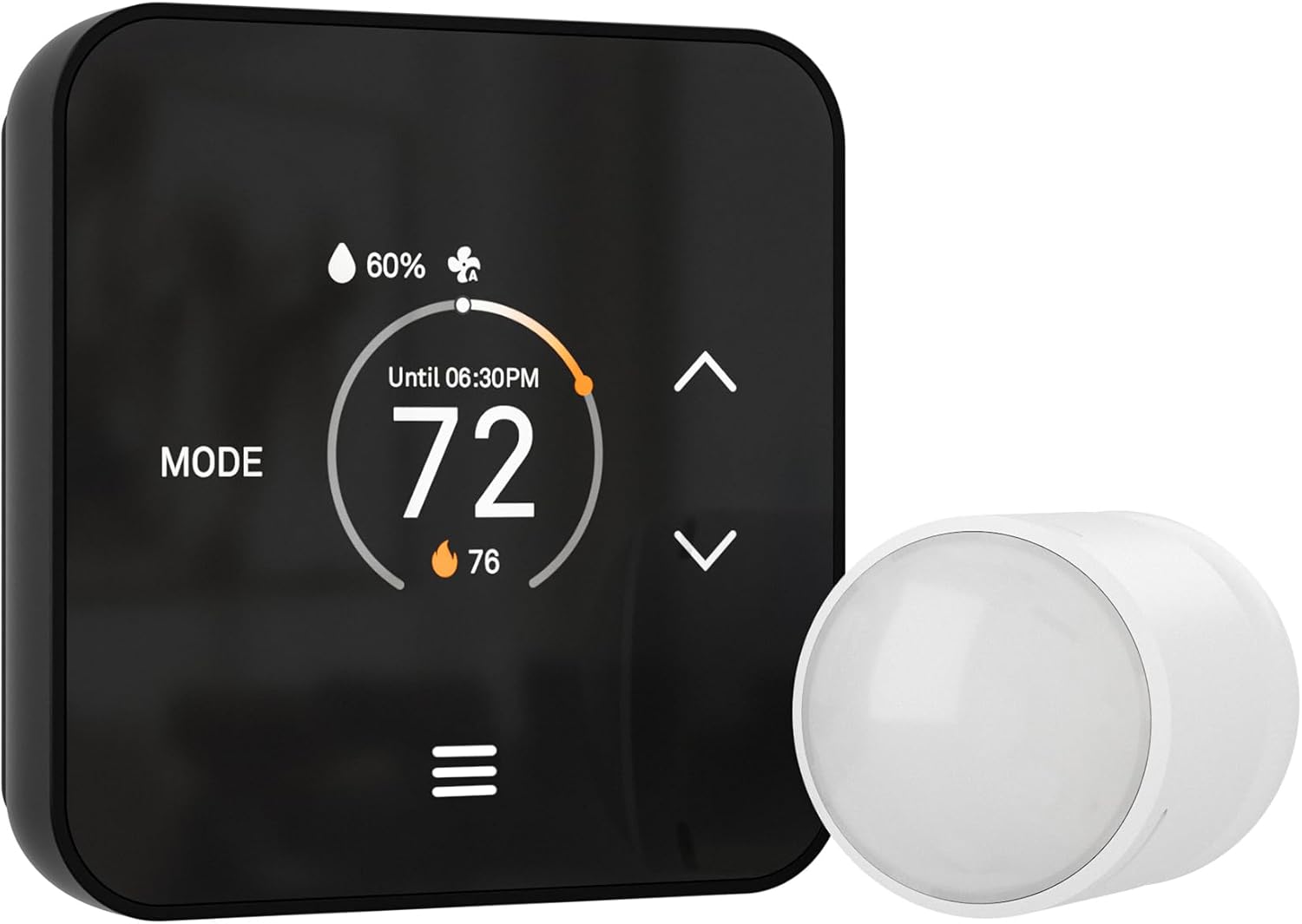
The LUX TQX is a wall-mounted smart thermostat designed to integrate directly with Matter-capable hubs and popular voice assistants for local and remote control of heating and cooling. It learns routines to build automatic schedules, uses a built-in millimeter-wave occupancy sensor and supports up to five remote sensors to combine room temperature and presence data for whole-house comfort, and includes a power bridge for systems without a C-wire. The LED display auto-adjusts brightness and can wake when people approach, and controls are available via app, touch, voice, or a physical keypad lockout for security. Practical benefits include sensor-based occupancy detection to avoid heating or cooling empty rooms and the ability to manage the system through existing smart-home apps without a separate vendor login. Limitations to note are that sensor data is combined for overall system decisions rather than controlling individual rooms independently, and the thermostat requires a compatible 24VAC HVAC system rather than line-voltage systems.
Best for: Buyers who want a sensor-driven smart thermostat that integrates with Matter and existing smart-home apps for automated, energy-minded whole-house control.
Less Ideal for: Homes that need independent temperature control for multiple rooms or properties with line-voltage HVAC systems should look for zoned controllers or line-voltage compatible options instead.
- Matter over Wi‑Fi and multi-protocol connectivity (Bluetooth, Zigbee) for integration with major smart-home ecosystems
- Built-in millimeter-wave occupancy detection plus support for up to five remote sensors for whole-house sensing
- Auto-scheduling that learns routines to save energy without manual programming
- Includes Lux Power Bridge to provide system power when a C-wire is not present
- Sensor inputs are aggregated for system-wide control and do not independently control individual rooms
- Requires 24VAC HVAC compatibility and is not suitable for 120V/240V line-voltage systems
Verdict: Choose the TQX if you want a Matter-ready thermostat that uses occupancy and remote sensors to automate whole-house comfort and work within your existing smart-home apps.
ecobee Smart Thermostat Premium

| Power Source | Battery Powered |
|---|---|
| Connectivity Protocol | Wi-Fi |
| Connectivity Technology | Bluetooth |
| Temperature Control Type | Heating, Cooling |
| Number of Batteries | 1 Lithium Ion battery (included) |
The ecobee Smart Thermostat Premium is a wall-mounted smart thermostat designed to improve comfort and reduce HVAC energy use while adding home health features. It pairs with the included SmartSensor to detect occupancy and eliminate hot and cold spots, and radar-based occupancy sensing provides broader detection without wear points. Built-in air quality monitoring sends alerts and filter reminders, and the unit supports Siri, Alexa, Google Assistant, HomeKit, and SmartThings for voice and app control. The Premium also includes a power extender kit and trim plate for easier DIY installs on systems without a C-wire and supports the majority of 24 VAC HVAC configurations. The metal chassis and large LCD make the interface easy to read, and a speaker with voice assistant lets the thermostat double as a small smart speaker. Trade-offs are that it requires an ecosystem setup for some features (Apple Home hub for Siri) and its advanced feature set may be more than needed for users who want a simple programmable thermostat.
Best for: Buyers who prioritize dependable, room-level comfort control and home-health monitoring and want a feature-rich, voice-enabled thermostat that integrates with major smart home platforms.
Less Ideal for: People who only need a straightforward, no-frills programmable thermostat or who want to avoid smart-home setup and ecosystem dependencies.
- Includes SmartSensor to manage hot and cold spots for room-level comfort
- Built-in air quality monitor with alerts and filter change reminders
- Wide smart home compatibility including Siri, Alexa, Google Assistant, HomeKit, and SmartThings
- Power Extender Kit and trim plate included for easier installation on C-wire-less systems
- Radar occupancy sensor expands detection range for reliable presence sensing
- Some advanced features require additional platform setup such as an Apple Home hub for Siri
- Feature-rich interface may be more complex than necessary for users wanting a basic thermostat
Verdict: Choose this thermostat if you want reliable, sensor-driven room comfort plus built-in air quality monitoring and broad smart home integration.
Google Nest Learning Thermostat (4th Gen)

| Connectivity Technology | Wi-Fi |
|---|---|
| Power Source | Battery Powered |
| Voltage | 24 volts |
| Display Type | Touchscreen |
| Included Components | Nest Temperature Sensor (2nd gen) |
The Nest Learning Thermostat (4th gen) is a wall-mounted smart thermostat that learns your schedule and suggests energy-saving adjustments while letting you control temperature remotely through the Google Home app or voice assistants. It ships with a Nest Temperature Sensor (2nd gen) to help manage hot and cold spots by prioritizing the temperature in a chosen room, and Dynamic Farsight makes key information visible from across the room. New features like Adaptive Eco and Natural Heating and Cooling use outdoor conditions and learned patterns to reduce runtime when conditions allow, while System Health reports can alert you to HVAC issues. Installation is designed for DIY setup on most 24V systems and includes wiring labels and mounting hardware, though some complex systems may still need professional help. The thermostat is battery powered with Matter compatibility for broader smart home integration, but advanced savings and features rely on regular app use and granting permissions for schedule changes.
Best for: Buyers who want a sensor-capable smart thermostat that actively learns household routines and provides remote room-level temperature control while prioritizing verified energy savings and system monitoring.
Less Ideal for: People who prefer entirely manual thermostats or who want a basic model without app-driven suggestions and cloud features should look elsewhere.
- Includes a Nest Temperature Sensor to control hot/cold spots remotely
- Learns schedule and suggests energy-saving adjustments automatically
- Large, easy-to-read display with Dynamic Farsight for distant visibility
- Adaptive Eco and Natural Heating and Cooling use outdoor data to reduce HVAC runtime
- Works with Google Home app and voice assistants and supports Matter for smart home integration
- Some HVAC setups may still require professional installation or a C wire
- Energy savings depend on user engagement with app notifications and suggested schedule changes
Verdict: Choose this Nest thermostat if you want a sensor-equipped, learning thermostat that combines remote room-level control with automated, app-driven energy-saving features.
Google Nest Thermostat E

| Connectivity Technology | Wi‑Fi |
|---|---|
| Control Method | Voice |
| Power Source | Battery Powered |
| Display Type | LCD |
| Number of Batteries | 1 Lithium Ion (included) |
The Nest Thermostat E is a simple smart thermostat designed to keep home temperatures comfortable with minimal fuss. It pairs with the included Nest Temperature Sensor so you can prioritize a specific room, and it connects to Wi‑Fi for remote control through the Nest app and voice control via Google Assistant or Alexa. The unit supports auto‑scheduling and Home/Away Assist to reduce heating and cooling when no one is home, and its matte white round display and button controls make local adjustments straightforward. Installation is generally user friendly and the thermostat runs on a single rechargeable lithium ion battery with 24V HVAC compatibility. Practical benefits include energy‑saving features like the Nest Leaf and Energy History, plus the convenience of remote access and multiple room sensing. Limitations are its relatively basic display and controls compared with flagship models, and it may lack some advanced schedule or integration options power users expect, but for most households it delivers reliable smart temperature control with easy setup.
Best for: Buyers who want a straightforward, low‑maintenance smart thermostat with remote control and a dedicated room sensor to improve comfort and simple energy savings.
Less Ideal for: Users who need a high‑resolution touchscreen, extensive automation rules, or deep third‑party smart home integrations should consider more full‑featured models.
- Includes a Nest Temperature Sensor to measure and prioritize a specific room’s temperature.
- Wi‑Fi connectivity with Nest app and voice control via Google Assistant and Alexa for remote adjustments.
- Auto‑Scheduling and Home/Away Assist help reduce energy use without manual programming.
- Compact, easy to install design with included mounting hardware and a rechargeable lithium ion battery.
- Simpler LCD and button interface offers fewer advanced controls and customization than premium smart thermostats.
- Not aimed at users who need highly detailed scheduling or extensive third‑party smart home integrations.
Verdict: Choose the Nest Thermostat E bundle if you want an easy‑to‑install, reliable smart thermostat with a room sensor and simple energy‑saving features.
Choosing the Right Smart Thermostat with Sensors: Key Factors to Consider
Sensor Accuracy and Placement
Accurate temperature and occupancy sensing is the core benefit of a thermostat with sensors. Sensors that report consistent temperatures across different rooms allow the system to average or prioritize readings so you do not end up chasing hot or cold spots. Placement matters: sensors should be located away from direct sunlight, vents, and exterior walls to avoid biased readings. When a thermostat supports multiple sensor placement strategies, you can choose to average readings, follow a prioritized room, or create schedules based on specific zones.
Understanding typical sensor error margins helps set expectations. A small deviation is normal, but large discrepancies between sensors and the main thermostat can signal placement issues, wireless interference, or a need for recalibration. Consider whether the system supports recalibration, and whether the sensors include additional data like humidity or motion that influence temperature decisions.
Wireless Range and Connectivity
Sensor performance depends heavily on how well the sensors communicate with the thermostat or hub. Most sensors use Bluetooth, proprietary sub-GHz radios, or Wi-Fi. Each protocol has tradeoffs in range, battery drain, and reliability. Longer-range radios or repeaters are useful in larger homes or when sensors must be placed on different floors.
Walls, metal studs, and HVAC equipment can degrade signals, so check whether the thermostat supports mesh networking or repeaters. If a system requires a hub, factor that into placement and whether the hub location provides clear line of sight to each sensor. Also consider how the system handles temporary dropouts and whether the thermostat can make sensible control decisions when one or more sensors are offline.
Installation and Wiring Compatibility
Even though sensors are wireless, the base thermostat still needs proper wiring and compatibility with the existing HVAC system. Confirm whether the thermostat requires a common 'C' wire or includes workarounds like power modules or adaptive charging. Some thermostats support single-stage, multi-stage, heat pump, and conventional systems, while others are limited. Installation complexity affects whether you can DIY or should plan for professional installation.
Sensor setup should be straightforward too. Look for systems with clear pairing procedures, helpful mobile apps, and good documentation. If the thermostat or sensors need a hub, verify how it is commissioned and whether it supports firmware updates over the air.
Automation, Scheduling, and Room Prioritization
Sensors unlock smarter scheduling and room-prioritized comfort strategies. Systems differ in how they use sensor data: some average across all sensors, some let you prioritize a particular room during certain hours, and others let occupancy trigger temporary holds. Consider which behavior matches your needs. For example, if bedrooms should be prioritized at night, choose a thermostat that supports time-based priorities or simple geofencing rules augmented by sensor input.
Also evaluate how automation integrates with other smart home devices. If your thermostat can use motion or occupancy sensors to avoid heating empty rooms, that reduces waste. Look for flexible rule builders, holiday or vacation modes, and easy manual overrides that still respect sensor inputs.
Battery Life and Long-Term Maintenance
Remote sensors are typically battery powered, so battery life and replacement ease matter. Frequent battery swaps become a maintenance chore, especially in multi-sensor setups. Check manufacturer estimates for battery life and whether the sensors use standard replaceable batteries or proprietary packs. Some sensors offer low-power modes or rechargeable options.
Consider firmware support as a maintenance factor. Regular software updates can improve sensor reliability and add features, while poor update practices may leave sensors incompatible over time. Also verify how easy it is to buy additional sensors or replacements so you can expand the system later without replacing the thermostat.
Integration With Smart Home Ecosystem
How the thermostat and its sensors integrate into your existing smart home determines long-term usefulness. Native support for voice assistants, smart home hubs, and third-party automation platforms lets you use sensor data in broader routines. For example, motion detected by a temperature sensor could trigger lights or ventilation adjustments. Open APIs and broad integration reduce lock-in and increase flexibility.
Also assess privacy and data handling practices. Sensors that send less raw data to cloud services reduce exposure, while on-device processing can perform local automations. If local control is important, prioritize systems that allow meaningful actions without constant cloud dependence.
How Sensor-Driven Temperature Control Works
Most smart thermostats with sensors use one of three strategies: single-point control, averaged readings, or prioritized-room control. Single-point control treats the thermostat sensor as authoritative, while averaging blends multiple sensor inputs to determine a target setpoint. Prioritized control lets you pick a room to follow at different times of day.
Understanding these modes helps match a thermostat to your home. Averaging is useful in open-plan spaces to avoid overcooling one area. Prioritized control is better when occupants spend long stretches in one room, such as bedrooms at night.
- Single-point: thermostat sensor dictates control
- Averaged: multiple sensors combined for a balanced setpoint
- Prioritized: one room takes precedence based on rules or schedule
Placement Tips for Accurate Readings
Place sensors away from direct sunlight, supply vents, and exterior walls to avoid skewed temperatures. Mount sensors at typical living height rather than ceiling level so they reflect the temperatures people experience.
If you use motion-capable sensors for occupancy, locate them where motion naturally occurs, such as near doorways or in the center of frequently used rooms. In multi-story homes, consider placing sensors on each floor to capture vertical temperature differences.
- Avoid direct sun and HVAC vents
- Mount at living height for representative readings
- Use one sensor per zone or per floor for balanced control
Common Installation Pitfalls and Solutions
Mismatch between thermostat wiring and system type is a common issue. Verify compatibility with your HVAC setup before installing and check whether a 'C' wire or power accessory is required. If you lack a 'C' wire, look for systems that provide a charging module or battery-assisted installation.
Wireless interference can cause sensors to drop out intermittently. If sensors lose connection, try moving the base thermostat or adding sensors closer to the hub. Also test sensor battery levels during setup to ensure strong, consistent signaling.
- Confirm wiring and system compatibility first
- Test sensor signal strength in intended locations
- Use repeaters or reposition the hub if connectivity issues occur
Using Sensors to Save Energy Without Sacrificing Comfort
Sensors allow smarter setbacks and heating strategies by focusing conditioning on occupied rooms. Rather than heating the whole house to a single setpoint, you can reduce output in unused areas and maintain comfort where it matters. Motion-based hold features can pause scheduling while rooms are unoccupied and resume when motion is detected.
To maximize savings, combine sensor-based zoning with sensible schedule design. Avoid overly aggressive setbacks that cause the system to run longer to recover temperature, and prefer gradual adjustments tied to occupancy patterns.
- Use occupancy-triggered holds to avoid heating empty rooms
- Set gentle setbacks to prevent long recovery cycles
- Combine sensor data with time-of-day rules for predictable comfort
Expanding a Sensor System Over Time
Plan sensor deployment with future expansion in mind. Choose a thermostat ecosystem that supports adding multiple sensors without complex reconfiguration. That way you can start with a few key rooms and scale to whole-house coverage later.
Check how newly added sensors are named, grouped, and prioritized in the app. Good systems let you create zones, rename sensors, and apply room-specific schedules so scaling remains manageable.
- Verify maximum supported sensors before buying
- Prefer systems with simple grouping and naming in the app
- Start with high-impact rooms and expand as needed
How We Chose the Best Smart Thermostat with Sensors
We selected smart thermostats with sensors by applying practical, buyer-focused filters that matter in everyday use. First, we required reliable sensor connectivity and documented accuracy so the thermostat can make room-level control decisions. Second, we prioritized installation clarity and wiring flexibility so homeowners and HVAC technicians can fit the thermostat into a variety of systems. Third, we weighed automation and scheduling features that use sensor input for zoned comfort and energy savings. Fourth, we considered integration with common smart home platforms and voice assistants to ensure the sensors actually influence routines and automations. Finally, we assessed long-term usability factors such as battery life for remote sensors, replacement availability, and firmware update cadence. We excluded products that lack multi-room sensor support or that depend exclusively on proprietary hub hardware without clear upgrade paths. We also ruled out devices with inconsistent wireless connectivity or unclear installation documentation. The items that made the list score well across sensor accuracy, ease of setup, automation capability, integration, and maintenance cost.
Our full evaluation process is outlined in our review methodology.
FAQ
Do remote sensors improve comfort or just complicate setup?
Remote sensors often improve comfort by reducing hot and cold spots, especially in multi-room or multi-story homes. They add setup steps, but most systems pair sensors with simple mobile workflows and clear placement guidance.
How many sensors do I need for reliable coverage?
It depends on house size and layout. A small home may need one or two sensors while larger or multi-level homes benefit from one sensor per frequently used room or per floor. Prioritize bedrooms, living areas, and rooms with known temperature variation.
Will sensors drain HVAC performance or cause excessive cycling?
When configured correctly, sensors reduce unnecessary cycling by targeting occupied rooms. Poor placement or overly strict prioritization can cause unnecessary calls for heat or cooling, so use gentle setpoint offsets and recovery windows to avoid short cycling.
Can sensor-equipped thermostats work without an internet connection?
Many thermostats perform basic local control without internet, but cloud features and remote app access typically require connectivity. Sensor reporting and local automations may still function if the system supports local networking.
Are sensor batteries hard to replace?
Most remote sensors use standard replaceable batteries and are designed for straightforward swaps. Battery life varies by radio protocol and reporting frequency, so look for published estimates and low-battery alerts in the app.
Final Verdict
When choosing a smart thermostat with sensors, prioritize how the system uses sensor data, wireless reliability, and installation compatibility with your HVAC. Balance sensor accuracy and placement convenience against battery life and expansion potential. For most homes, starting with sensors in key living spaces and bedrooms gives the biggest comfort gains without excessive maintenance. Focus on the control strategy that fits your routine—averaging for open plans or prioritized-room control for targeted comfort—and prefer systems that offer straightforward setup and ongoing support. That approach will help you get consistent, energy-conscious comfort from a sensor-equipped thermostat.