
Note: This article contains affiliate links. If you click on these links and make a purchase, we may earn a small commission at no extra cost to you. This helps support our research and content. Read our full affiliate disclosure here.
A video doorbell with a monitor puts a live feed at your fingertips without relying solely on phones or cloud subscriptions. If you prefer a dedicated in-home display for seeing visitors, two-way talk, and reviewing recent events, choosing the right system matters for everyday convenience and security. This guide summarizes the top shortlisted options in this category and explains the practical tradeoffs you should consider. We evaluate each pick on core criteria like video clarity and local storage options to help you pick the best fit for your home. Read on for features, installation notes, and use-case guidance before the product list.
Top Picks at a Glance
| Best Overall The best all-around choice for most situations | WISDOM VIEW Video Doorbell1 |  |
| Best Quality Built to a higher standard if you want something more solid | Bvavo Wireless Video Doorbell with Monitor |  |
| Best Value The sweet spot between price and what you get | SwitchBot Video Doorbell |  |
| Best Budget The cheapest option that still gets the job done reliably | Taishixing Video Doorbell Camera |  |
| Top Rated A top-rated pick with lots of positive feedback | TMEZON V20 7-Inch Video Intercom |  |
| Most Popular A crowd favorite that many people choose with confidence | AMOCAM Wired Video Intercom V70H-M4 |  |
| Best Seller A high-volume bestseller chosen again and again | TKMARS Doorbell Camera 016 |  |
WISDOM VIEW Video Doorbell1

| Video Capture Resolution | 1080p |
|---|---|
| Connectivity Protocol | Wi-Fi |
| Power Source | Battery Powered |
| Night Vision Range | 10 meters |
| Controller Type | Apple HomeKit |
The WISDOM VIEW Video Doorbell1 is a cordless doorbell camera paired with a 7-inch 1080p touchscreen indoor monitor that lets you see, talk to, and unlock the door from inside your home or via the TuyaSmart app. Installation is simple since the outdoor unit runs on a rechargeable battery and connects over Wi‑Fi, and the system supports both battery and optional AC/DC power for continuous operation. The camera offers a 160 degree wide-angle view, color night vision out to about 10 meters, and adjustable motion detection that triggers short clips saved locally to the included TF card so you avoid subscription fees. The monitor integrates call answering, live view, and an unlocking module for electric locks for hands-free convenience. Trade-offs to note: battery runtime depends on usage and the display only lasts a few hours unplugged, so heavy remote use or long monitoring sessions benefit from keeping the monitor powered, and advanced cloud features are not available because storage is local only.
Best for: Buyers who want a simple, self-contained video doorbell with an integrated indoor monitor and no monthly fees, and who value easy installation and local control.
Less Ideal for: Users who need cloud recording, extensive remote access features, or who cannot keep the indoor monitor plugged in for regular use should consider cloud-first alternatives.
- True wireless setup with battery or AC/DC power options for flexible installation
- 7-inch 1080p touchscreen monitor for easy local control and viewing
- Local TF card storage removes monthly subscription fees
- 160° wide-angle lens and adjustable motion detection reduce blind spots
- Color night vision and two-way audio for clear day/night communication
- Monitor battery life is limited so it should be kept plugged in for frequent use
- No cloud storage or advanced cloud features since recordings are stored locally
Verdict: A straightforward wireless doorbell system with a built-in 7-inch monitor that delivers full local control and 1080p video without subscription fees.
Bvavo Wireless Video Doorbell with Monitor

| Video Capture Resolution | 1080p |
|---|---|
| Viewing Angle | 160 degrees |
| Night Vision Range | 50 meters |
| Flash Memory Installed Size | 32 GB |
| Flash Memory Supported Size Maximum | 128 GB |
This Bvavo kit combines a 1080p outdoor doorbell camera with an 8-inch touchscreen monitor for local, subscription-free video and two-way communication. Install the outdoor unit wire-free and pair it to the indoor monitor over the built-in radio link, then connect the monitor to your home Wi-Fi and the Tuya app for remote viewing and alerts. The camera offers a 160 degree field of view, 1080p recording, color night vision, motion detection and a rechargeable 7,000 mAh battery intended to last 45–60 days in light use; the kit includes a 32 GB microSD for local recording and supports cards up to 128 GB. The monitor has a battery but is designed to remain plugged in for longer live monitoring sessions and for best usability. Practical benefits include straightforward DIY installation, no monthly fees for local storage, and dual-band Wi‑Fi for app access. Important limitations are that the indoor display can only be linked to one camera at a time, the live monitoring session defaults to short durations unless changed, and battery life will vary greatly with frequent use and heavy monitoring.
Best for: Buyers who prioritize on-device performance and control and want a self-contained, no-subscription doorbell that delivers full-motion 1080p video, wide coverage, and long battery standby.
Less Ideal for: People who need continuous 24/7 live monitoring from the indoor display or want a system where multiple displays simultaneously view the same camera feed.
- 1080p camera with 160° wide-angle view for broad coverage
- Local microSD recording included with support up to 128 GB avoids subscription fees
- Dual-band Wi‑Fi and Tuya app enable remote alerts and multi-user access
- Long-capacity 7,000 mAh doorbell battery for extended standby between charges
- Color night vision and motion detection improve detection and low-light visibility
- Indoor monitor has limited continuous monitoring time and should remain plugged in for extended use
- Outdoor unit wireless signal can be affected by metal surfaces and thick walls
- A camera can only be paired to one display at a time, limiting shared local viewing
Verdict: A performance-focused, self-contained video doorbell kit that delivers 1080p wide‑angle recording, local storage, and long battery standby without recurring fees.
SwitchBot Video Doorbell

| Video Capture Resolution | 1920p |
|---|---|
| Night Vision | Starlight |
| Waterproof Rating | IP65 |
| Connectivity Protocol | Wi-Fi (2.4 GHz) |
| Flash Memory Type | Micro SD (4 GB included) |
The SwitchBot Video Doorbell pairs an outdoor 2K doorbell camera with a 4.3-inch indoor monitor to deliver a standalone monitoring solution without required subscriptions. The doorbell captures a 165° ultra-wide, 16:9 head-to-toe view in 2K resolution, offers color starlight night vision and records locally to the included 4 GB microSD card (supports up to 512 GB). The indoor monitor provides instant live view, one-touch reply and playback buttons plus an integrated Wi‑Fi repeater to stabilize the 2.4 GHz connection between the outdoor unit and monitor, which is useful in apartments or houses. Two-way audio, motion alerts and tamper detection let you respond to visitors from the monitor or remote app, and the system supports Alexa and Home Assistant integrations and pairing with SwitchBot locks via Matter. Practical benefits include no monthly fees for local storage and the convenience of an always-on indoor display for households that prefer a physical chime and visual at the door. Limitations to note are reliance on the monitor for optimal range between units and that advanced cloud features require opting into a trial or subscription.
Best for: Buyers who want a practical, subscription-free doorbell system with an always-on indoor display and straightforward app and smart home integrations for everyday doorstep monitoring.
Less Ideal for: Those who need a purely cloud-first solution with long-term offsite recording by default or who cannot place the indoor monitor within the recommended range of the outdoor unit.
- 2K resolution with 165° ultra-wide, 16:9 framing for full head-to-toe coverage
- Includes a 4.3-inch indoor monitor for local live view, quick reply and playback
- Local recording with included 4 GB microSD and support up to 512 GB to avoid monthly fees
- IP65 weatherproofing and starlight color night vision for reliable outdoor use
- Built-in Wi‑Fi repeater in the monitor to stabilize 2.4 GHz connection between units
- Best performance depends on keeping the monitor and doorbell within recommended distances, limiting flexibility for some layouts
- Cloud features require opting into a trial or subscription for longer offsite storage
Verdict: This kit is the best pick for buyers who want a self-contained, monitor-first doorbell with high-resolution local recording and no mandatory subscription.
Taishixing Video Doorbell Camera

| Video Capture Resolution | 1080p |
|---|---|
| Effective Video Resolution | 1080 |
| Power Source | Battery Powered |
| Wireless Technology | Baby Monitors |
| Water Resistance Level | Waterproof |
This Taishixing kit is a straightforward plug-and-play video doorbell system that links a battery-powered outdoor camera to a dedicated indoor 4.3-inch monitor over a private 2.4 GHz wireless connection, so no WiFi or app setup is required. The camera records 1080p video with a 170-degree wide-angle view and infrared night vision, and it supports two-way audio through a semi-duplex walkie-talkie style link. The monitor is always on when plugged in and includes a small backup battery for outages, while the camera uses an 1800 mAh rechargeable battery the manufacturer says can last up to two months under typical use. The system saves clips to an SD card (sold separately) for local evidence without monthly fees. Expect easy installation and reliable direct pairing, but note there is no motion-detection feature and remote access or cloud storage via smartphone is not available, so you must be in range of the monitor to view live or recorded video.
Best for: Buyers who want a simple, budget-friendly video doorbell with a dedicated in-home monitor and no ongoing fees, and who prefer a device that works independently of home WiFi or apps.
Less Ideal for: Users who need smartphone access, cloud storage, or motion-triggered alerts for remote monitoring should consider other systems with app and cloud integration.
- One-to-one wireless connection requires no WiFi, app, or subscription
- 1080p resolution with 170-degree wide-angle and infrared night vision
- Built-in two-way audio for live conversations through the monitor
- Local recording to SD card lets you keep footage without cloud fees
- Long-life rechargeable camera battery with monitor backup battery
- No motion detection or smartphone remote access for off-site monitoring
- Indoor monitor is required to view live feed so remote alerts are limited
Verdict: Choose this kit if you want a low-cost, subscription-free doorbell system with a dedicated indoor monitor and straightforward, no-WiFi operation.
TMEZON V20 7-Inch Video Intercom

| Video Capture Resolution | 500TVL |
|---|---|
| Field Of View | 115 degrees |
| Waterproof Rating | IP67 |
| Power Source | Corded Electric |
| Number of Channels | 1 |
The TMEZON V20 is a wired video doorphone kit that pairs a 7-inch indoor color monitor with a single outdoor camera to let you see, speak with, and remotely unlock for visitors. It is typically installed as a surface-mounted, hardwired system connecting the outdoor unit, monitor, and optional electric lock using a 4-wire run (Cat5/Cat6 or RVV4), which supports long cable runs up to the vendor-stated distance. Notable features include a 115 degree wide-angle lens, IR night vision, adjustable ringtones and volume, and hands-free two-way audio with noise reduction. The monitor offers one-key monitoring so you can check the porch without a doorbell press, and the kit includes mounting hardware and a rainshade for the outdoor station. Because it is a wired system with corded power to the indoor unit, it avoids Wi-Fi complexities and offers stable local operation, though it lacks network connectivity and smartphone integration. Image resolution is standard-definition 500TVL rather than modern 720/1080p, so detail at distance is limited. For buyers prioritizing straightforward, always-on local monitoring and simple remote unlock via a wired setup, the V20 is a practical choice; those needing cloud features or higher-resolution footage should look elsewhere.
Best for: Buyers who want a dependable, local wired doorbell system that stays up without Wi‑Fi and prioritizes stable two‑way audio and remote unlock functionality.
Less Ideal for: People who need cloud recording, smartphone remote access, or high‑resolution video for identifying distant faces or license plates.
- Wired connection and corded power provide consistent local operation without relying on Wi-Fi.
- 115 degree wide-angle lens and IR night vision give broad, usable coverage day and night.
- Built-in two-way audio with noise reduction and one-key monitor enable clear, hands-free communication.
- Includes mounting hardware, rainshade, connectors, and options for long cable runs up to 100–200 meters.
- Supports electric lock control so you can remotely unlock a 12V strike from the indoor monitor.
- Video is standard-definition 500TVL rather than HD, so fine details at a distance are limited.
- No Wi‑Fi or smartphone app support for remote viewing or cloud storage.
- Requires hardwiring and some installation know-how to run the 4-wire cable and connect power and lock.
Verdict: Choose the TMEZON V20 if you want a reliable, hardwired monitor-and-camera doorphone that delivers stable local operation and two‑way audio without depending on Wi‑Fi.
AMOCAM Wired Video Intercom V70H-M4
| Screen Size | 7 inches |
|---|---|
| Video Capture Resolution | 480p |
| Viewing Angle | 92 degrees |
| Waterproof Rating | IP54 |
| Power Source | AC Adapter |
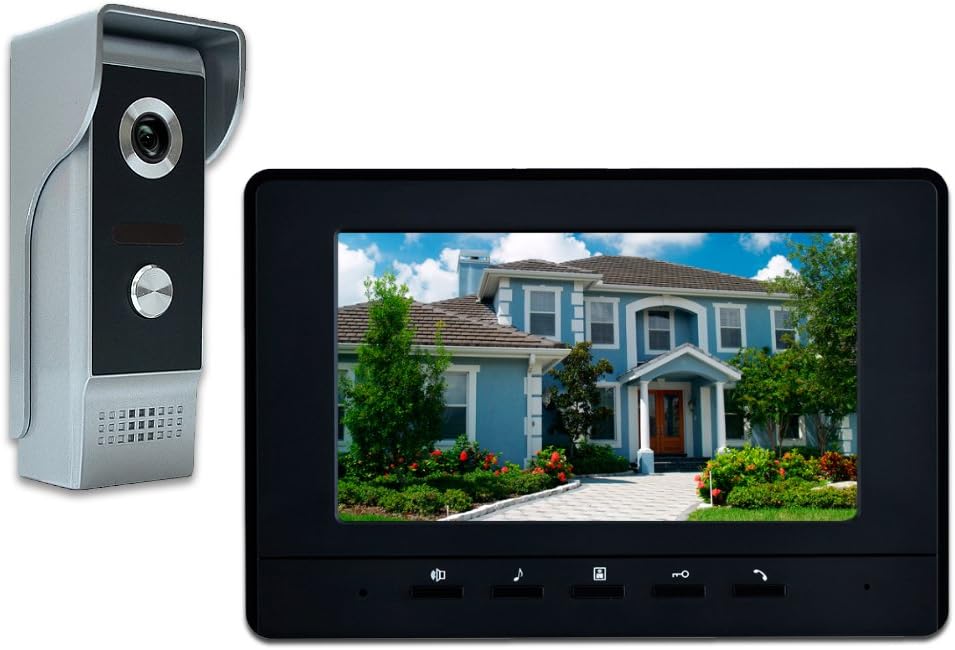
This wired video intercom system pairs a 7-inch color LCD monitor with a single outdoor camera to let you see and speak with visitors from inside the house and remotely trigger an electric lock. Installation uses a multi-conductor cable between camera and monitor so the connection is stable and avoids Wi-Fi-related dropouts, and the aluminum front panel plus included rain cover help protect the outdoor unit from weather and tampering. The monitor supports adjustable brightness, contrast and volume, 16 selectable chimes, and a hands-free intercom mode for everyday use, while the camera provides a 92 degree field of view and IR illumination for nighttime visibility. Video is standard-definition 480p and records locally in AVI format, so image detail is modest compared with modern high-definition doorbells. The system is best where a permanent wired hookup is acceptable and local recording or lock control is required, but it lacks wireless convenience and cloud features, and setup requires running cable and basic wiring knowledge.
Best for: Buyers who prioritize a stable, locally controlled doorbell system with a dedicated indoor monitor and prefer physical lock control and local recording over cloud features.
Less Ideal for: Users who want a wireless, app-first smart doorbell with cloud storage or higher-resolution video should consider other options.
- Wired connection provides stable video and two-way audio without relying on Wi-Fi
- 7-inch color monitor with adjustable brightness, contrast, and volume for clear indoor viewing
- Durable outdoor unit with aluminum front panel and included rain cover for weather resistance
- Supports electric lock control from the indoor monitor for convenient entry management
- Video resolution is limited to 480p, so fine image detail is muted compared with HD doorbells
- Requires running cable and some wiring know-how for installation, with no wireless setup option
Verdict: Choose this wired kit if you want a reliable, monitor-based doorbell system with local control and electric lock integration rather than cloud-dependent smart features.
TKMARS Doorbell Camera 016

| Video Capture Resolution | 1080p |
|---|---|
| Viewing Angle | 170 degrees |
| Screen Size | 4.3 inches |
| Power Source | Battery Powered |
| Water Resistance Level | Waterproof (IP65) |
This TKMARS kit is a self-contained video doorbell system that links a battery-powered 1080p camera to a 4.3" IPS indoor monitor over a private 2.4GHz wireless link, so no app, cloud account, or home WiFi is required. Installation is straightforward: mount the door unit, charge the batteries, and pair it to the monitor for one-button answering and push-to-talk two-way audio. The 170 degree lens and night vision give broad, usable coverage and the unit can locally store snapshots and videos to a microSD card so footage stays under your control. Practical benefits include simple operation for seniors or kids, a clear dedicated screen in the house, and IP65 weather resistance for outdoor use. Important limitations are the walkie-talkie style push-to-talk intercom instead of full duplex hands-free talk, limited built-in storage without a TF card, and a shorter monitor backup battery intended mainly for outages rather than portable daily use. Signal range can vary through walls, so placement matters for reliable reception.
Best for: Buyers who prioritize simple, private home monitoring and want a plug-and-play doorbell that does not rely on smartphones, cloud services, or subscriptions.
Less Ideal for: People who need seamless, always-on smartphone access, cloud storage, or full duplex hands-free intercom functionality should consider other WiFi-enabled solutions.
- Works without WiFi or cloud subscription, keeping video local
- Includes dedicated 4.3" IPS monitor for one-touch answering without a phone
- 1080p camera with 170° field of view and night vision for wide, clear coverage
- IP65 weatherproof rating suitable for outdoor installation
- Local recording to microSD and automatic photo capture for private storage
- Intercom uses push-to-talk walkie-talkie style rather than continuous hands-free conversation
- Monitor battery is small and intended only for short backup use, not long-term portable viewing
- Requires TF card for continuous video recording; internal storage holds only photos
Verdict: A straightforward, privacy-first doorbell kit with a built-in monitor that delivers local 1080p video and simple one-touch operation without WiFi or subscriptions.
Choosing the Right Video Doorbell with a Monitor: Key Factors to Consider
Video Resolution and Night Vision
Higher resolution and good low-light performance make it easier to identify faces, packages, and activity at the doorstep. Night vision is especially important because many doorbell events occur at dusk or night. Consider whether the system uses infrared illumination or color night modes, and whether resolution drops in low light.
Also think about how image compression affects the apparent clarity on the monitor. A monitor may upscale lower-resolution streams, which can hide lack of detail. If identity capture is a priority, favor options with consistent, usable resolution both day and night.
Monitor Size, Placement, and Responsiveness
An in-home monitor must be placed where you will actually notice visitors or review footage quickly. Larger monitors make details easier to see at a glance, but they require a convenient power and mounting location. Responsiveness is critical: laggy live view or delayed two-way audio reduces usefulness.
Evaluate whether the monitor supports multiple monitors or wall mounting, and whether it stays on standby with quick wake times. If the monitor offers motion-linked wake, verify that it wakes reliably and that alerts are audible across common household distances.
Storage Methods and Access
Decide between local-only, cloud-only, or hybrid recording. Local storage (microSD or on-device NVR) keeps footage on-site and can reduce ongoing fees, but ensure the monitor or base unit provides easy export or playback. Cloud storage offers off-site backups and remote access without port forwarding, but may incur subscriptions.
Consider retention time, clip length limits, and how clips are organized. Also check whether the system allows simultaneous local and cloud recording so you have redundancy for important events.
Power and Wiring Options
Some video doorbells rely on existing doorbell wiring for continuous power while others are battery powered. Hardwired options avoid the need to recharge but may require a compatible transformer and more involved installation. Battery models offer placement flexibility but add the chore of periodic recharging or swapping batteries.
Assess whether the monitor or base station also needs separate power and whether any power requirements impose placement limits. If you lack compatible wiring, prioritize battery or plug-in options that still support full-featured monitoring and recording.
Connectivity and Network Requirements
Stable Wi-Fi or Ethernet connectivity impacts live view reliability and recording frequency. Some monitors connect directly to the outdoor camera over a private link rather than routing all video through a home Wi-Fi network, which can improve reliability in congested networks. If you have a weak signal at the door, check whether the product supports a mesh extender, wired backhaul, or a local base station that bridges the camera and monitor.
Also review whether the system supports 2.4 GHz only or both 2.4 GHz and 5 GHz, as this affects range and throughput. Network demands grow with higher resolution and continuous recording, so plan accordingly.
Privacy Controls and Data Handling
Privacy features determine how footage is stored, who can view live streams, and whether data leaves your home. Look for systems that allow on-device encryption, local-only recording, or easy account access controls. Clear user controls for disabling remote access or pausing recording are helpful for sensitive situations.
Also check how user accounts are managed and whether the monitor grants guest viewing without exposing full account credentials. Strong privacy defaults and clear opt-in choices reduce the risk of accidental data exposure.
Installation Tips for Reliable Operation
Plan monitor placement before you buy. Place the monitor where you can hear alerts and see the screen without obstruction. If wall-mounting, verify that the unit's power adapter reaches a nearby outlet or that a clean hardwired power route exists.
When mounting the outdoor unit, keep height and angle in mind so the field of view covers the approach and sidewalk, not just the immediate porch. Use a level and the included mounting template for consistent alignment.
- Check Wi-Fi signal strength at the door; a quick smartphone speed test can reveal dead zones.
- Avoid mounting the camera directly facing reflective surfaces or bright backlight to reduce glare.
- Install the monitor where it is audible throughout common living areas to reduce missed alerts.
Choosing Between Local, Hybrid, and Cloud Recording
Local recording minimizes ongoing costs and keeps footage on-site, but ensure the monitor or base station supports easy retrieval. Hybrid systems that record locally and back up select clips to the cloud offer a balance of security and convenience.
Cloud-only systems provide remote access without manual exports but typically require subscriptions for longer retention and may raise privacy considerations. Match your storage approach to how often you expect to review footage and whether you need off-site backups.
- Local-only: best for privacy and no recurring fees.
- Hybrid: best for redundancy and remote access.
- Cloud-only: best for simple remote viewing but may cost more over time.
Practical Features That Matter Day to Day
Two-way audio reliability, quick snapshot capture, and configurable motion zones are features you will interact with every time someone approaches. Motion zone settings reduce false alerts from street traffic or trees, making alerts more relevant.
Look for straightforward monitor controls for quick playback, snapshot export, and volume adjustments. Day-to-day convenience often outweighs a few extra camera features if the monitor interface is clunky.
- Adjustable motion zones reduce nuisance alerts.
- Pre-roll recording captures a few seconds before a trigger for context.
- Expandable systems let you add additional cameras or monitors over time.
Maintenance and Weather Considerations
Outdoor doorbells face rain, sun, dust, and temperature swings. Durable housings and proper ingress protection ratings help ensure continuous operation. Periodic checks of mounting hardware and lens cleanliness prevent degraded image quality.
For battery-operated units, plan a charging schedule or check battery health regularly. Monitor firmware updates for both the camera and its monitor to maintain security and performance.
- Keep firmware current to patch security issues.
- Clean the lens with a microfiber cloth periodically.
- Inspect seals and mounting screws annually in harsh climates.
Integrating with Home Security and Smart Devices
A monitor-equipped video doorbell can be a central part of a broader home security setup. Consider whether the system supports simple integrations with existing alarm systems, chimes, or smart home platforms in a privacy-respecting way.
Even without deep integration, look for triggers that can activate other devices such as indoor lights or a chime. These small automations improve visibility and convenience around arrivals and deliveries.
- Confirm whether the monitor acts as the primary chime or simply mirrors alerts.
- Look for straightforward automation triggers like motion-activated lights.
- Verify any required account linking is optional and reversible.
How We Chose the Best Video Doorbell with a Monitor
We prioritized features and real-world usability that directly affect daily use of a video doorbell with a monitor. First, video quality and field of view were essential because clear, wide-angle footage determines whether you can reliably identify visitors and capture activity at the door. Second, monitoring and display behavior mattered: we looked for responsive local monitors with minimal lag and easy on-screen controls. Third, storage options were assessed, with preference for devices that support local recording and straightforward retrieval alongside optional cloud tiers. Fourth, installation flexibility and power choices were considered, including compatibility with existing doorbell wiring or battery operation and clear mounting requirements. Fifth, build quality and weather resistance were reviewed to ensure reliable outdoor operation. Finally, we looked at privacy features like on-device data options and simple network integration. We excluded models that lack a true integrated monitor or that force mandatory paid cloud-only recording without a local backup. The resulting shortlist balances image quality, monitor usability, storage flexibility, and installation practicality.
Our full evaluation process is outlined in our review methodology.
FAQ
Do I need a separate hub for a video doorbell with a monitor?
It depends. Some systems include a dedicated base station or monitor that acts as the hub, while others use the home Wi-Fi network and a monitor that directly connects. If you have limited Wi-Fi at the door, a system with a local bridge or hub can improve reliability.
Can the monitor work without internet access?
Many monitors and paired cameras can operate locally for live view and recording, but remote access and cloud features require internet. Verify whether the system supports local-only operation if you prefer to avoid cloud dependence.
How long does local storage typically retain clips?
Retention varies by storage capacity and recording settings. Shorter clips and motion-only recording will extend retention, while continuous or high-resolution recording uses space faster. Check capacity and whether older clips overwrite automatically.
Are battery-powered doorbells reliable with a monitor setup?
Yes, battery models are reliable and offer flexible placement, but you must manage periodic recharging. Ensure the monitor supports the same feature set and that motion alerts remain timely while on battery power.
Will weather affect video quality or the monitor?
Outdoor cameras are designed to handle typical weather, but heavy rain, snow, or direct sun can temporarily reduce image clarity. The monitor, kept indoors, is not exposed to weather but should be placed away from direct sunlight and heat to avoid screen fading.
Final Verdict
Prioritize video clarity, monitor responsiveness, and storage strategy when choosing a video doorbell with a monitor. Your specific home layout and network strength will determine whether a local-only, hybrid, or cloud-forward system is the best fit. Balance ease of installation and daily usability against desired privacy controls to find a solution that reliably alerts you and records the events that matter. With those tradeoffs in mind, pick the configuration that matches how often you check footage and how much hands-on maintenance you want to perform.