
Note: This article contains affiliate links. If you click on these links and make a purchase, we may earn a small commission at no extra cost to you. This helps support our research and content. Read our full affiliate disclosure here.
A Wi-Fi laser printer for home can speed up document workflows, reduce paper jams, and deliver sharper text than typical inkjet alternatives. Whether you print homework, invoices, occasional photos, or school projects, the right home-focused laser printer saves time and reduces frustration. This guide profiles seven top Wi-Fi laser printers for home use, each shortlisted for real-world factors like wireless setup, print speed, running cost, and ease of maintenance. Below you will find clear decision criteria and practical advice to help you pick the best model for your household needs.
Top Picks at a Glance
| Best Overall The best all-around choice for most situations | Canon imageCLASS MF462dw II |  |
| Best Quality Built to a higher standard if you want something more solid | HP LaserJet Pro MFP 3101sdw |  |
| Best Value The sweet spot between price and what you get | HP LaserJet M209dw |  |
| Best Budget The cheapest option that still gets the job done reliably | Canon imageCLASS LBP6030w |  |
| Top Rated A top-rated pick with lots of positive feedback | Xerox C245 Color Multifunction Printer |  |
| Most Popular A crowd favorite that many people choose with confidence | Brother HL-L2405W Monochrome Laser Printer |  |
| Best Seller A high-volume bestseller chosen again and again | Brother DCP-L2640DW Laser MFP |  |
Canon imageCLASS MF462dw II
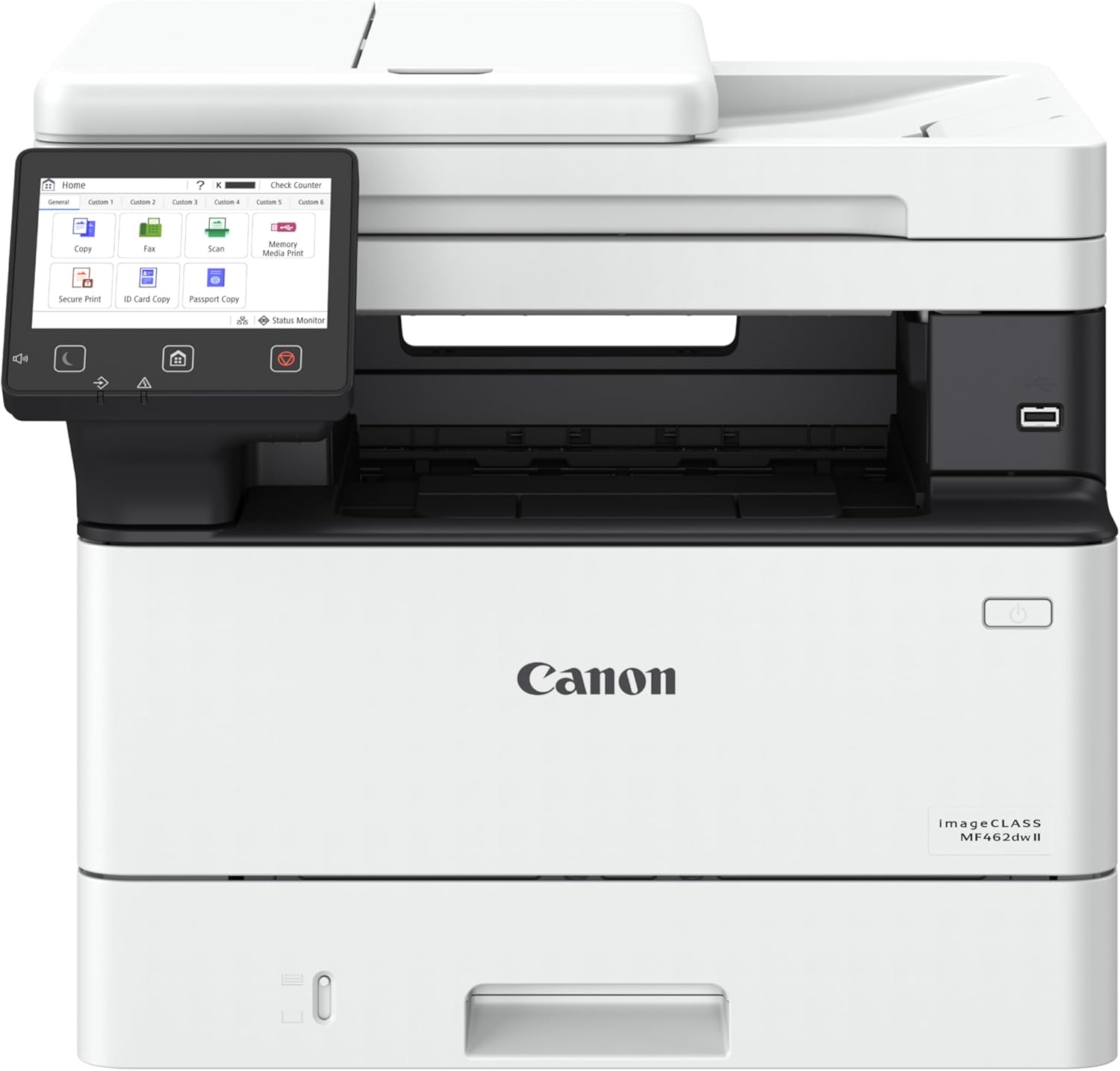
| Printer Type | Laser |
|---|---|
| Print Speed | 37 pages_per_minute |
| Scanner Type | ADF |
| Compatible Cartridge | Canon Genuine Toner 070 |
| Printer Connectivity Type | Ethernet, Wi-Fi |
The Canon imageCLASS MF462dw II is a wireless monochrome laser all-in-one that handles printing, copying, scanning and faxing for a home or small office. It prints up to 37 pages per minute with a quick first-page-out, and the 5-inch color touchscreen and Application Library make common tasks and presets easy to access. The 50-sheet one-pass duplex ADF lets you scan both sides of multi-page documents in a single pass, which speeds up workflows, and automatic two-sided printing helps reduce paper use. Paper capacity is generous out of the box with a 250-sheet cassette plus a 100-sheet multipurpose tray and optional expansion to support higher-volume jobs. Canon Genuine Toner 070 and high-capacity options provide long page yields so you change cartridges less often. On the downside this is a monochrome machine only, so it is not suitable for color output, and its physical footprint and 1250 watt maximum power draw are factors to consider for compact home setups. For users who need fast, reliable black-and-white output with simple mobile printing and duplex scanning, it is a practical pick.
Best for: Buyers who want a fast, reliable black-and-white all-in-one for home or small-office work with easy mobile printing and duplex scanning to streamline document tasks.
Less Ideal for: Users who need color printing or the smallest possible desktop footprint for tight spaces should consider a different model.
- Fast monochrome print speed up to 37 ppm for quick output
- 50-sheet one-pass duplex ADF that scans both sides in a single pass
- 5-inch color touchscreen with customizable Application Library for easy operation
- Wireless connectivity with mobile printing support (Canon PRINT, AirPrint, Mopria)
- High-capacity toner options for longer intervals between replacements
- Monochrome-only printing so no color output
- Relatively large footprint compared with compact home printers
Verdict: A fast, wireless monochrome all-in-one that delivers reliable black-and-white printing and one-pass duplex scanning for home and small-office users who prioritize speed and document workflow.
HP LaserJet Pro MFP 3101sdw

| Printer Type | Laser |
|---|---|
| B&W Pages per Minute | 40 |
| Maximum Print Resolution Black and White | Up to 1200 x 1200 dpi |
| Maximum Sheet Capacity | 250 |
| Scanner Type | ADF, flatbed |
The HP LaserJet Pro MFP 3101sdw is a compact monochrome all-in-one laser built for fast, office-style document workflows at home. It delivers quick black-and-white output with a stated top speed around 35–40 ppm and a short first-page-out time, and includes a 250-sheet input tray and 50-sheet automatic document feeder for batch scanning and copying. Connectivity covers Wi-Fi, Ethernet, USB and AirPrint so you can print from phones, tablets and PCs, and the HP app simplifies setup and mobile scanning. Print quality is sharp at up to 1200 x 1200 dpi, which is well suited to reports, drafts and text-heavy documents. The unit is optimized for business use so it accepts only HP cartridges with embedded chips and uses periodic firmware updates that can restrict third-party cartridges. It is monochrome only and uses more power than typical small inkjets, but for someone prioritizing speed, reliability and networked printing at home, it provides a professional, low-maintenance solution.
Best for: Home users who prioritize fast, reliable black-and-white printing and need networked scanning or copying for small-team style workflows.
Less Ideal for: People who need color printing, photo-quality output, or who prefer unrestricted use of third-party toner cartridges.
- High print speed (up to 35–40 ppm) for fast document throughput
- 50-sheet ADF plus 250-sheet input tray for unattended multi-page scanning and printing
- Multiple connectivity options including Wi-Fi, Ethernet, AirPrint and USB for flexible mobile and network printing
- Automatic two-sided printing and 1200 x 1200 dpi resolution for crisp monochrome text
- Monochrome-only output limits use for color documents and photos
- Firmware and chip requirements restrict third-party or refill cartridges
Verdict: Buy this if you want a fast, network-ready monochrome all-in-one that handles heavy home document workflows with reliable, professional-quality text printing.
HP LaserJet M209dw
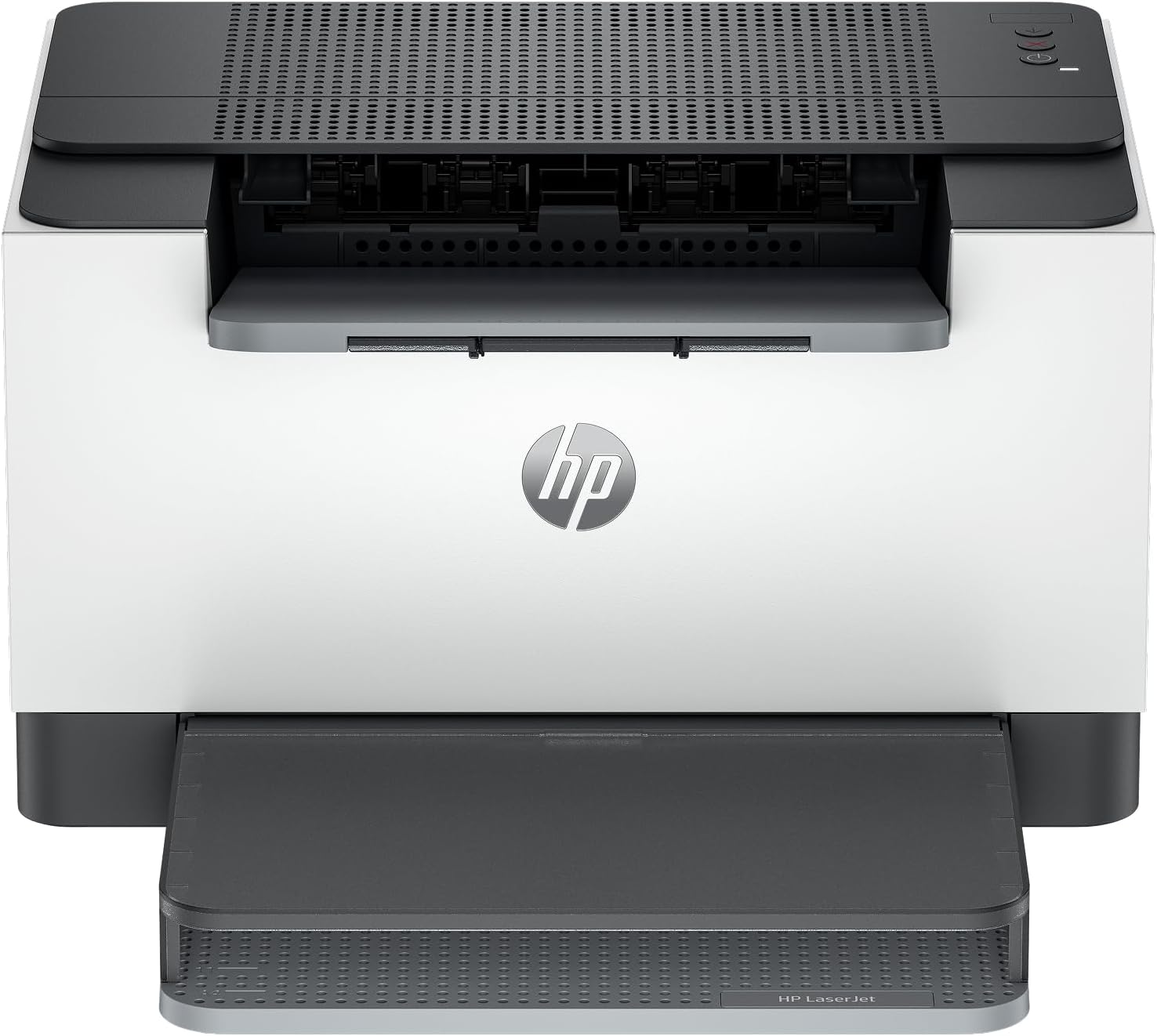
| Print speed (single-sided) | Up to 30 ppm |
|---|---|
| Print speed (duplex) | Up to 19 ipm |
| Connectivity | Dual-band Wi‑Fi |
The HP LaserJet M209dw is a small monochrome laser printer designed for home and small-team use, offering fast single- and two-sided printing over Wi‑Fi. Setup is straightforward and the printer supports mobile printing, making it easy to send jobs from a phone or laptop without cables. Its standout practical feature is speed: up to 30 ppm single-sided and about 19 ipm duplex, which keeps short reports and multipage documents moving quickly. Dual-band Wi‑Fi with a self-reset function reduces connection interruptions, and built-in security features help protect the device on a home network. Because it prints only in black and white and focuses on document throughput, it is not meant for photo work or color projects, and a laser toner workflow means occasional cartridge swaps rather than ink refills. For a compact home office that prioritizes reliable, fast text printing and simple wireless setup, the M209dw delivers a focused, efficient experience.
Best for: Home users who need a compact, reliable printer for mostly black‑and‑white documents and value speed and simple wireless setup for small-team workflows.
Less Ideal for: People who want color printing, photo-quality output, or a multifunction device with scanning and copying should consider other models.
- Fast monochrome printing up to 30 ppm for single-sided jobs
- Automatic two-sided printing to reduce paper use
- Dual-band Wi‑Fi with automatic self-reset improves wireless reliability
- Mobile printing support for easy printing from phones and laptops
- Compact footprint suited to small home offices
- Monochrome only, so it cannot print color documents or photos
- Toner cartridges require replacement and can be more expensive than ink per page
Verdict: Buy this if you want a compact, fast monochrome Wi‑Fi laser that simplifies reliable document printing for a small home office.
Canon imageCLASS LBP6030w

| Printer Type | Laser |
|---|---|
| Print Output | Black & White |
| Print Speed | 19 pages per minute |
| Connectivity | Wi-Fi, USB 2.0 |
| Compatible Cartridge | Canon Genuine Toner 125 (1,600 page yield) |
The Canon imageCLASS LBP6030w is a small, wireless monochrome laser printer designed for personal or home office printing. It prints up to 19 pages per minute with an initial page out time of about 8 seconds, so it handles single- and short-batch jobs quickly. The unit connects over Wi‑Fi and also has a USB 2.0 port for direct computer hookup, and it uses Canon Genuine Toner 125 cartridges rated around 1,600 pages for straightforward replacement and predictable yield. Its compact footprint and low energy consumption in saver mode make it easy to tuck onto a desk or shelf. Expect single-function operation only — there is no duplexing, scanning, or color printing — and the paper tray and output capacities are modest, so heavy multi-user workloads will require frequent refills and attention. Setup and mobile printing are practical for casual users, but power users needing scanning, automatic duplex, or higher monthly duty cycles should look elsewhere.
Best for: Buyers on a tight budget who need a reliable, fast black-and-white Wi‑Fi printer for occasional home or home-office documents and value small footprint and low running complexity.
Less Ideal for: Users who need color printing, scanning/copying, automatic duplexing, or a high monthly duty cycle for many users should choose a more capable multifunction or higher-volume laser printer.
- Fast monochrome print speed up to 19 ppm for quick single- and small-batch jobs
- Built-in Wi‑Fi plus USB connection for flexible placement and mobile printing
- Compact, space-saving design that fits small home office setups
- Uses Canon Genuine Toner 125 with a known yield for predictable running costs
- Low power consumption in energy saver mode
- No automatic duplex printing
- Single-function printer with no scanning or copying capabilities
- Paper tray and output capacities are modest for higher-volume users
Verdict: If you want an affordable, compact Wi‑Fi monochrome laser printer for basic home printing, the Canon imageCLASS LBP6030w delivers fast, reliable black-and-white output with low running complexity.
Xerox C245 Color Multifunction Printer

| Printer Type | Laser |
|---|---|
| Color Pages per Minute | 26 pages_per_minute |
| Printer Connectivity Type | Ethernet, USB, Wi-Fi |
| Duplex | Automatic |
| Maximum print Resolution Color | 2400×600 dots_per_inch |
The Xerox C245 is a compact color laser multifunction designed for home offices and small teams that need reliable daily printing, scanning, and copying. It delivers up to 26 pages per minute in color or black and white, automatic two-sided printing, and a 50-sheet document feeder for modest batch jobs. Connectivity includes Wi‑Fi, Ethernet, USB, and mobile printing via Apple AirPrint and Mopria, and setup is simplified with the Xerox Easy Assist app and a 2.8-inch color touchscreen. Print quality is strong for business documents with a stated 2400×600 dpi resolution and support for envelopes, labels, and glossy paper. Energy Star and EPEAT certifications plus support for high-yield toner options help control ongoing costs and power use. The unit is compact but not for heavy production use: the 50-sheet capacity and 26 ppm speed suit occasional to moderate volumes rather than busy workgroups, and the printer is relatively heavy for its footprint. For buyers wanting a dependable, small-footprint color laser with solid mobile features, the C245 covers the essentials without complex IT.
Best for: Buyers who prioritize a dependable, business-quality color laser for a home office or small team and want straightforward wireless and mobile printing without IT support.
Less Ideal for: High-volume offices or teams that need large paper capacity, very high duty cycles, or the lightest possible desktop hardware.
- Fast color and B&W output at up to 26 pages per minute
- Automatic duplexing and 50-sheet document feeder for efficient two-sided jobs
- Wi‑Fi, Ethernet, USB, and mobile printing with AirPrint and Mopria
- Simple guided setup via Xerox Easy Assist app and an intuitive touchscreen
- Energy Star and EPEAT certifications with support for high-yield toner
- 50-sheet maximum input limits sustained high-volume printing
- Relatively heavy for a compact desktop unit
Verdict: Choose the C245 when you want a compact, reliable Wi‑Fi color laser that delivers professional-looking prints and easy mobile setup for a home office.
Brother HL-L2405W Monochrome Laser Printer

| Printer Type | Laser |
|---|---|
| Printer Output Type | Monochrome |
| Print Speed | 30 pages_per_minute |
| Max Print Resolution | 1200 x 1200 dots_per_inch |
| Connectivity | USB, Wi-Fi |
The Brother HL-L2405W is a small, single-function monochrome laser printer built for straightforward home and home-office printing. It prints one-sided black and white pages at up to 30 pages per minute with a 250-sheet main tray and a manual feed for envelopes or specialty paper, so it handles typical document runs without frequent refills. Dual-band Wi‑Fi plus a USB 2.0 port make connecting from laptops and mobile devices easy, and Brother Mobile Connect lets you send jobs from a phone and monitor toner remotely. Print quality is sharp at 1200 x 1200 dpi for text and line art, and Brother recommends its TN830 family of toners including higher-yield XL options. The unit is compact and energy efficient for a laser, but it lacks automatic duplexing and only prints in black and white, so it is not suited for color output or heavy double-sided workflows. The in-box toner yield is modest, and ongoing cost depends on whether you use standard or high-yield cartridges or enroll in Brother Refresh subscription plans.
Best for: Buyers who prioritize reliable, fast black-and-white printing for a home or small office and value easy wireless setup plus strong social proof from an established brand.
Less Ideal for: People who need automatic two-sided printing, color output, or a multifunction device with scanning and copying built in should consider alternative models.
- Fast mono print speed up to 30 ppm for quick document output
- Dual-band Wi‑Fi and USB connectivity for easy mobile and desktop printing
- 250-sheet tray reduces the need for frequent paper refills
- 1200 x 1200 dpi resolution produces sharp text and detailed monochrome prints
- Supports Brother Mobile Connect app for remote printing and supply management
- No automatic duplexing so two-sided printing is manual
- Monochrome only, not suitable for color printing needs
- In-box toner yield is limited compared with high-yield replacement cartridges
Verdict: A compact, reliable Wi‑Fi monochrome laser that delivers fast, sharp black-and-white prints and is well suited to home and small office users who want simple, dependable wireless printing.
Brother DCP-L2640DW Laser MFP

| Printer Type | Laser |
|---|---|
| Printer Output Type | Monochrome |
| Max Print Speed | 36 ppm |
| Auto Document Feeder | 50 pages |
| Paper Capacity | 250 sheets |
The Brother DCP-L2640DW is a compact monochrome laser multifunction printer aimed at home and small-office users who need reliable black-and-white output. It prints quickly—up to 36 ppm—and includes a 250-sheet tray and 50-page automatic document feeder to handle medium-volume jobs without frequent refills. Connectivity is flexible with dual-band Wi‑Fi, Ethernet, and USB, and the Brother Mobile Connect app makes mobile printing and scanning straightforward. Practical features include automatic duplexing to save paper, a flatbed plus sheetfed scanner for mixed originals, and compatibility with TN830/TN830XL toners for predictable replacement routines. Its strengths are dependable speed, straightforward setup, and eco-minded modes like Toner Save. Limits to consider are that it is monochrome only and does not support color printing, and the initial in-box toner yield is modest compared with some high-yield alternatives, which could raise running costs for very heavy users.
Best for: Buyers who prioritize dependable, fast black-and-white printing with simple mobile and network setup and want a conservative, low-risk choice for home or small-office use.
Less Ideal for: Anyone who needs color printing, photo-quality output, or the lowest possible cost per page for very high monthly volumes should look at other models.
- Fast monochrome printing up to 36 pages per minute for quick document output
- 50-sheet auto document feeder and 250-sheet tray reduce manual feeding for multi-page jobs
- Dual-band Wi‑Fi, Ethernet, and USB provide flexible, secure connectivity options
- Automatic duplex printing and Toner Save mode help reduce paper and toner usage
- Brother Mobile Connect app enables remote printing, scanning, and supply management from mobile devices
- Prints only in black and white so no color output is possible
- In-box toner yield is relatively low compared with high-yield kits, increasing replacement frequency for heavy users
Verdict: A reliable, fast monochrome MFP with solid Wi‑Fi and network features that makes a safe choice for home users who need dependable black-and-white printing.
Choosing the Right Wi-Fi Laser Printer for Home: Key Factors to Consider
Wireless Setup And Network Reliability
A home Wi-Fi laser printer must join your wireless network and stay connected. Easy initial setup saves time for less technical users, and robust reconnection behavior matters if your router reboots or when the printer sleeps. Look for clear mobile and desktop setup instructions, support for modern Wi-Fi security standards, and features like WPS or built-in setup wizards.
Network reliability affects everyday use more than peak speed. A printer that drops off the network or requires frequent manual reconnection will interrupt printing tasks and create avoidable troubleshooting time. For multi-device households, check for reliable simultaneous connections and good range so the printer works from bedrooms, home offices, and living areas without degraded performance.
Print Speed And Real-World Throughput
Declared pages-per-minute numbers provide a baseline for how quickly a printer produces text pages, which is important when printing longer documents or batches. However, real-world throughput also depends on first-page-out time, warm-up behavior, and duplexing speed. For typical home use, a faster first page and good small-batch performance will feel noticeably quicker than a machine optimized only for long runs.
Consider how often you print in bursts versus single pages. If you frequently print multi-page reports or homework, favor models with higher sustained throughput and reliable duplexing to save time and paper. For occasional single-page prints, low first-page latency is more important than absolute ppm.
Operating Cost And Toner Yield
Toner cost and yield determine the long-term expense of owning a laser printer. A low upfront price can be offset quickly by high cost per page if the toner yields few pages. Evaluate the stated toner yield and consider whether higher-capacity cartridge options or compatible third-party consumables are available and supported.
Operating cost affects whether a printer is economical for household volumes. For light users, standard-yield toners might be fine, while families with frequent printing will benefit from high-yield cartridges. Also factor in whether the model supports refillable or page-count tracking features that help manage supply replacement ahead of running out.
Paper Handling And Media Flexibility
Home printers should accommodate the paper sizes and media types you actually use. Check paper tray capacity, support for legal or ledger sizes if needed, and whether the feeder handles envelopes or heavier media. A larger tray reduces the need to reload paper for family printing tasks.
Duplex printing is a useful feature for saving paper and producing two-sided handouts or booklets. Also consider output capacity and whether the device jams when handling mixed media. Ease of clearing jams and accessible paper paths matter more in day-to-day use than raw maximum capacity.
Usability And Mobile Printing Features
Most home users print from smartphones, tablets, and laptops. Native mobile printing support and easy driver availability simplify setup and reduce friction. Look for models with clear control panels, helpful status indicators, and reliable cloud or app printing options.
Usability extends to the physical interaction with the machine. Intuitive toner replacement, accessible paper trays, and simple firmware update processes lower the maintenance burden. If you plan to share the printer across a household, user management and guest printing options can be useful.
Size, Footprint, And Noise
A home-friendly laser printer needs to fit into your available space and operate at an acceptable noise level. Laser printers can be larger and louder than compact inkjets, so check the footprint and whether the device fits on a shelf, desk, or cabinet. Noise during warm-up and active printing can be disruptive in small apartments or during night-time use.
Consider ventilation needs and where toner replacement occurs relative to the overall size. A slightly larger unit with better ergonomics and quieter operation can be more pleasant to own than a smaller but fiddly alternative.
Setting Up A Home Wi-Fi Laser Printer
Successful setup begins with preparing your network. Place the printer within good range of your router and temporarily disable any isolated guest networks during the initial pairing. Use the printer's setup wizard or mobile app to complete network configuration and confirm the printer receives a stable IP address from your router.
After the initial connection, test printing from the devices you use most often. Install the official driver or app on a laptop and a phone to verify both platforms can discover and use the printer. Enable automatic firmware updates if available to keep wireless performance and security current.
- Perform a quick network range test before permanent placement
- Use a wired connection for the first setup if wireless setup fails
- Record the printer's IP address for troubleshooting
Managing Toner And Consumables At Home
Track toner levels proactively to avoid unexpected runouts. Many models report remaining toner in the device app or on the control panel. For busy households, ordering higher-yield cartridges or keeping a spare cartridge on hand prevents downtime when a project is due.
Store toner cartridges in a cool, dry place and avoid touching the drum or internal components during replacement. Follow manufacturer guidance for disposal or recycling to reduce environmental impact.
- Keep one spare toner if your household prints frequently
- Check for eco or recycling programs offered by the manufacturer
Optimizing Print Settings For Home Use
Adjust default settings to match typical home jobs. Set draft quality for internal documents to save toner, and reserve higher quality settings for important prints. Enable duplexing by default to save paper when two-sided prints are acceptable.
Use grayscale mode for text documents to avoid wasting color toner for black-and-white prints. When printing photos, verify the paper type setting to reduce graininess and get the best result from the laser engine.
- Set lower quality for everyday prints to reduce cost per page
- Use specific paper trays or custom feed for envelopes and labels
Where To Place Your Home Laser Printer
Choose a location with good ventilation and stable level surface. Avoid placing the printer in cramped cabinets during operation because heat and toner particulate removal may be restricted. If noise is a concern, locate the device in a room that is not a primary living space or use sound-dampening furniture.
Factor in paper and consumable access when planning placement. A printer tucked into a tight shelf can be difficult to service, so leave space for opening trays and replacing toner easily.
- Allow a few inches of clearance on each side for airflow
- Keep the printer away from direct sunlight and humidity sources
Eco Considerations And Energy Use
Laser printers consume more power during warm-up and active printing than inkjets. Look for energy-saving features such as sleep modes and scheduled power-off to reduce electricity use. Enabling sleep reduces idle power but may slightly increase first-page latency when waking.
Consider duplexing and draft modes to reduce paper and toner consumption. Recycling toner cartridges and selecting models with remanufactured or high-yield options can lower the environmental footprint of home printing.
- Enable sleep mode but test wake behavior to ensure acceptable first-page times
- Prefer high-yield consumables for lower total resource use
How We Chose the Best Wi-Fi Laser Printer for Home
We shortlisted printers that best match what homeowners actually use a Wi-Fi laser printer for: daily document printing, light photo and color graphics, and occasional scanning or copying. Our selection filters prioritized reliable wireless connectivity, consistent print speed, and reasonable ongoing operating cost for typical household volumes. Usability was another key filter, so we favored models with straightforward mobile printing, intuitive controls, and simple cartridge or toner replacement processes. We also considered duty cycle and paper handling to ensure chosen units can handle small bursts of heavy use without frequent reloads or strain. We excluded office-grade high-volume machines and single-function specialty units that lack home-friendly features such as compact footprint or easy mobile setup. The criteria we applied focused on measurable specs and real-world usability: network setup and stability, declared print speed, estimated cost per page, maintenance ease, and paper handling flexibility. These dimensions reflect what matters most to people buying a Wi-Fi laser printer for home use.
Our full evaluation process is outlined in our review methodology.
FAQ
Can I print from my phone to a Wi-Fi laser printer for home use?
Yes. Most home-targeted Wi-Fi laser printers support mobile printing through a vendor app or common standards like AirPrint or Mopria. Setup and feature availability vary, but printing basic documents and photos from phones is usually straightforward.
How often will I need to replace toner in a household?
Toner replacement frequency depends on your print volume and the cartridge yield. Light users may go months between changes, while busy households could need replacements every few weeks. Choosing higher-yield cartridges reduces replacement frequency.
Is a Wi-Fi connection reliable enough for family printing?
Often it is. A stable home Wi-Fi network with good coverage provides reliable printing for most families. If you experience dropouts, check router placement, firmware, and the printer's network settings. In persistent problem cases, a wired connection during setup can help diagnose issues.
Do home Wi-Fi laser printers support duplex printing?
Many do. Duplex printing is common on home-friendly laser printers and can be automatic or manual depending on the model. Automatic duplexing saves paper and is worth prioritizing if you print two-sided documents regularly.
Are laser printers noisy in a home environment?
Laser printers are generally louder during warm-up and active printing than compact inkjets. Noise levels vary by model and duty cycle. If noise matters, look for published sound levels and consider placing the printer in a less-used room.
Final Verdict
Choose a Wi-Fi laser printer for home by weighing wireless reliability, print speed, and operating cost against the space and noise constraints in your house. Prioritize a model with straightforward network setup and reasonable toner yield if you print frequently, or favor low first-page times and compact size if you print infrequently. Balancing these tradeoffs will help you pick a printer that stays out of the way while delivering dependable results for schoolwork, household paperwork, and occasional photo jobs. Focus on the criteria that match how you print most often to make a confident choice.