
Note: This article contains affiliate links. If you click on these links and make a purchase, we may earn a small commission at no extra cost to you. This helps support our research and content. Read our full affiliate disclosure here.
If you ship regularly, a dependable wireless printer for shipping labels can cut packing time and reduce misprints. You want crisp, scannable labels, fuss-free connectivity, and a device that fits your workspace and shipping volume. This guide shortlists the top-performing wireless printers designed for label printing, focusing on real-world needs like print speed, connection reliability, and media handling. Below are the best picks for a range of shipping setups, plus clear guidance on what matters when choosing hardware for label printing. Read on to find the right balance of speed, durability, and ease of use before you add a unit to your packing station.
Top Picks at a Glance
| Best Overall The best all-around choice for most situations | MUNBYN RealWriter 130B |  |
| Best Quality Built to a higher standard if you want something more solid | Brother QL-1110NWB Label Printer |  |
| Best Value The sweet spot between price and what you get | Phomemo 241BT 4×6 Label Printer |  |
| Best Budget The cheapest option that still gets the job done reliably | Rongta RP425 Thermal Label Printer |  |
| Most Popular A crowd favorite that many people choose with confidence | NULLTONEX Y813 Thermal Label Printer |  |
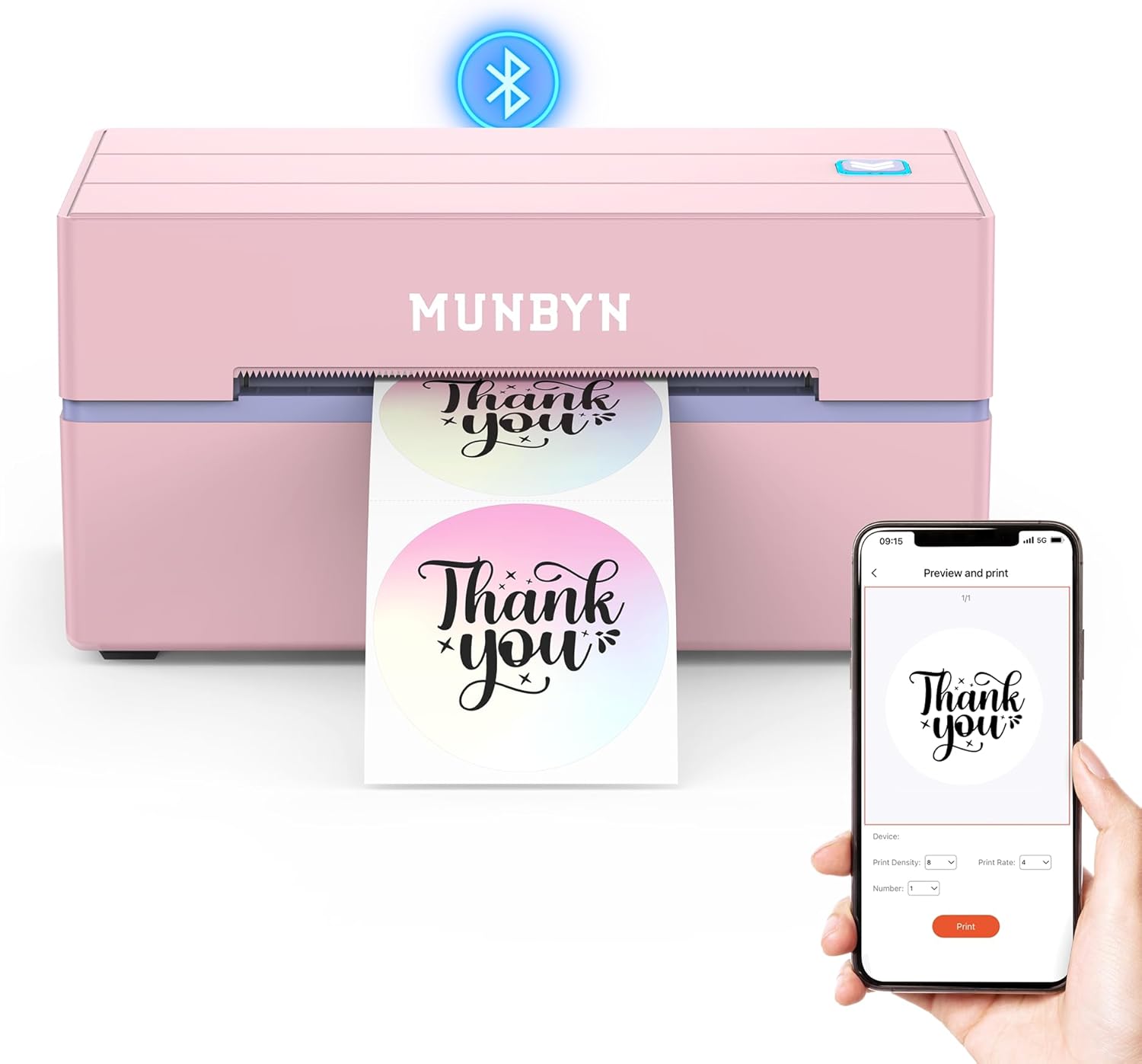
MUNBYN RealWriter 130B
| Printer Type | Thermal |
|---|---|
| Maximum Media Size | 4 x 6 inch |
| Resolution | 203 x 300 dpi |
| Printer Connectivity Type | Bluetooth |
| Control Method | App |
The MUNBYN RealWriter 130B is a small Bluetooth thermal printer made for shipping labels, stickers, and basic monochrome thermal printing without ink. It connects via Bluetooth to iOS and Android using the MUNBYN Print app, and can also print from a desktop through the Munbyn Editor in Chrome or by USB when Bluetooth is not available. The printer handles standard 4×6 shipping labels and smaller circular or rectangular labels, prints at 203 dpi, and offers fast monochrome throughput suitable for packing stations and small offices. App features include thousands of templates, fonts, OCR import, and compatibility with major shipping platforms which simplifies label design and workflow. Practical limits are the 203 dpi resolution (adequate for barcodes and shipping but not fine-art labels), potential platform quirks noted for some UPS thermal paper, and modest tray/output capacities that mean frequent media swaps in high-volume scenarios. For everyday shipping and organization tasks it is straightforward and efficient, but heavier fulfillment operations may need a higher-capacity unit.
Best for: Buyers who need a compact, easy-to-use wireless label printer for shipping, small-business fulfillment, and home office organization where simple setup and mobile printing are priorities.
Less Ideal for: Those running high-volume fulfillment or needing photo-quality label prints should choose a higher-capacity or higher-resolution industrial printer instead.
- Wireless Bluetooth pairing with iOS and Android plus USB option for desktops
- Prints standard 4×6 shipping labels and multiple smaller label formats
- App and Chrome editor offer templates, fonts, OCR and direct integration with shipping platforms
- 203 dpi thermal printing gives clear barcodes and readable text without ink
- Compact, portable footprint suitable for small offices or home shipping stations
- 203 dpi limits fine-detail or photo-quality labels
- Modest sheet/output capacities require frequent label refills in busy workflows
- Manufacturer recommends using Munbyn labels for best results and notes potential issues with some UPS thermal paper
Verdict: A compact, mobile-friendly thermal printer that delivers reliable 4×6 shipping labels and easy Bluetooth printing for small businesses and home shippers.
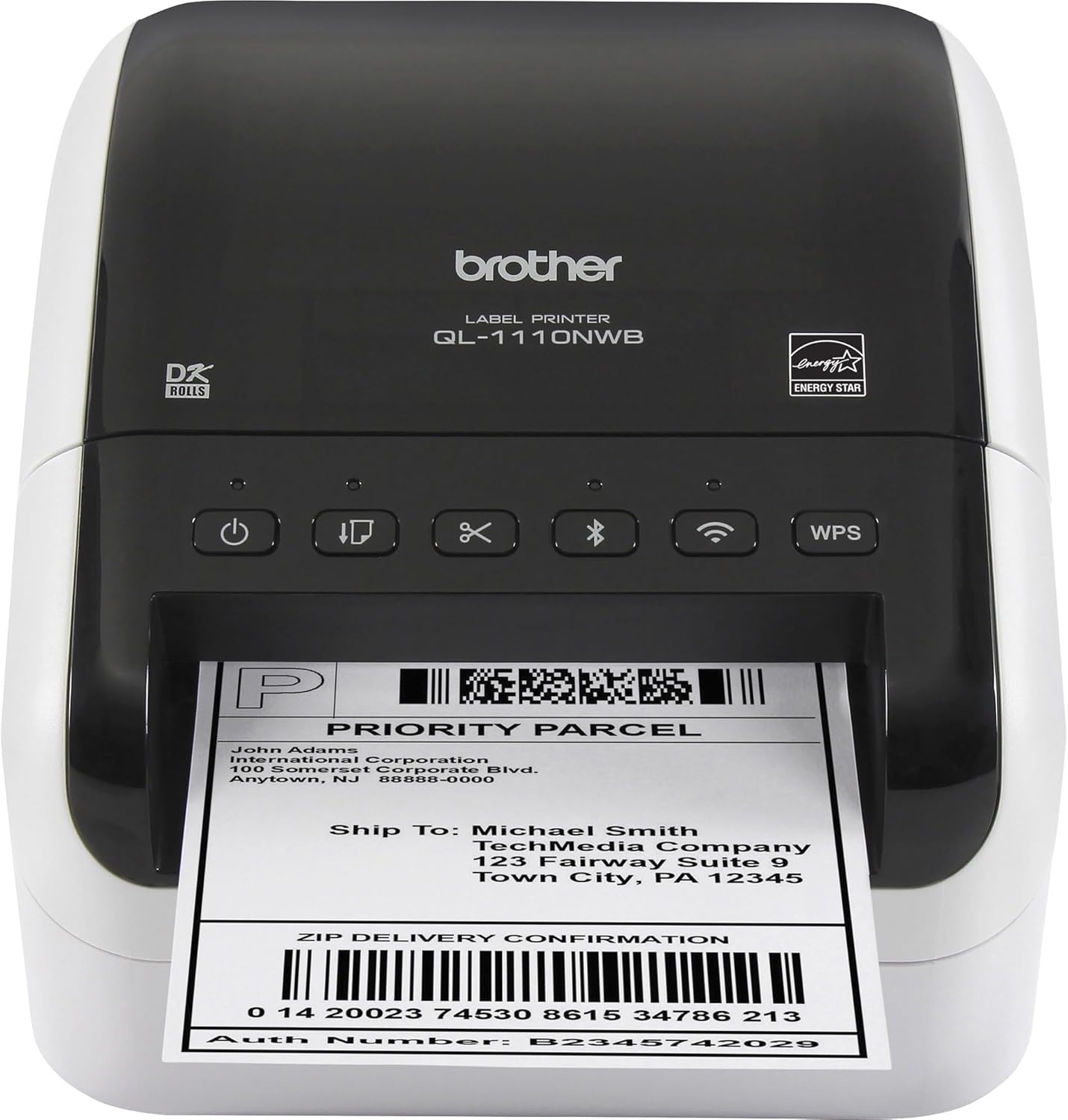
Brother QL-1110NWB Label Printer
| Printer Type | Thermal |
|---|---|
| Print media | Labels |
| Maximum Media Size | 11 x 17 inch |
| Paper Size | 4 inches |
| Printer Connectivity Type | Bluetooth, Networkable, USB, Wireless |
The Brother QL-1110NWB is a professional direct-thermal label printer aimed at high-volume shipping and barcode tasks. It prints up to 4-inch-wide labels and reaches speeds cited around 69 standard address labels per minute, which keeps a busy packing station moving. Connectivity is flexible with Bluetooth, Wi-Fi (802.11b/g/n), Ethernet and USB so you can print from PCs and mobile devices using Brother apps or SDKs. The automatic cutter, support for Brother DK rolls, and a crop function for barcode templates (Windows) simplify label production and reduce wasted paper. Resolution is 300 x 300 dpi, which yields clear barcodes and postage markings required by carriers. This is a print-only, monochrome thermal device, so it needs compatible DK rolls and offers no ink or color printing; features like the barcode crop tool and network management are most powerful on Windows. The unit includes starter label rolls and P-touch software to get a shipping workflow running quickly, making it suited to small warehouses, e-commerce sellers, and busy mailrooms that prioritize speed and reliable networked printing.
Best for: Buyers who need a dependable, high-speed label printer for shipping and barcode workflows and who prioritize networked and mobile printing in a busy packing or mailroom environment.
Less Ideal for: Casual or infrequent users who only print occasional labels, or buyers who need color printing or long-term archival labels that resist fading.
- Wide-format printing up to 4 inches for shipping and postage labels.
- Multiple connectivity options including Bluetooth, Wi‑Fi, Ethernet and USB for flexible placement.
- Fast printing speed (up to 69 address labels per minute) for high-throughput workflows.
- Automatic cutter and support for Brother DK rolls simplify roll changes and finishing.
- 300 x 300 dpi resolution produces legible barcodes and postal markings.
- Direct thermal only, so labels can fade over long-term exposure to heat or sunlight.
- Requires Brother DK label supplies rather than generic rolls.
- Advanced features like barcode cropping and database integration are Windows-focused.
Verdict: A fast, network-ready wide-format thermal label printer built for high-volume shipping and barcode work where speed and reliable wireless connectivity matter.
Phomemo 241BT 4×6 Label Printer

| Printer Type | Thermal |
|---|---|
| Maximum Media Size | 4 x 6 inch |
| Resolution | 203 x 203 DPI |
| Printer Connectivity Type | Bluetooth, USB |
| B&W Pages per Minute | 66 pages_per_minute |
The Phomemo 241BT is a small thermal label printer built for printing 4×6 shipping labels and other monochrome labels from mobile devices and PCs. It connects via Bluetooth to the Labelife app for iPhone and Android and also supports USB printing from Windows, macOS and Chrome OS with a driver, making it flexible for home or small-business shipping workflows. The printer uses direct thermal technology so you never need ink or toner and it supports label widths up to 4.6 inches, which covers standard 4×6 shipping labels; Phomemo recommends using their thermal labels for best results. Notable conveniences include an OLED status display, app control for templates and barcode/QR generation, and a high quoted speed useful for batch shipping. Expect practical limitations typical of thermal-only units: only black-and-white output and dependency on compatible thermal label stock for optimal longevity and clarity, plus driver setup for desktop printing. For straightforward, cost-conscious label printing tied to mobile apps and simple desktop integration, the 241BT performs its core job well.
Best for: Buyers who want a compact, economical shipping-label printer that pairs with a phone app for fast, repeatable label printing and who prioritize low operating cost over color output.
Less Ideal for: People who need color label printing, plug-and-play desktop printing without drivers, or heavy industrial throughput for large warehouses.
- Bluetooth and USB connectivity for phone and computer printing
- Direct thermal printing removes need for ink or toner
- Supports standard 4×6 shipping labels and up to 4.6 inch widths
- OLED display and app control for templates, barcodes and quick setup
- Fast quoted print speed suited to batch shipping
- Prints only in monochrome so no native color labels
- Desktop use requires downloading and installing a driver
- Optimal results depend on using compatible thermal label stock
Verdict: A compact, budget-friendly Bluetooth thermal printer that delivers fast, reliable 4×6 shipping labels with minimal operating cost.
Rongta RP425 Thermal Label Printer

| Maximum Media Size | 4 x 6 inch |
|---|---|
| Printer Connectivity Type | Bluetooth, USB |
| Hardware Interface | USB Type C |
| Maximum Print Resolution Black and White | 203 dots_per_inch |
| Maximum Sheet Capacity | 100 |
The Rongta RP425 is a compact thermal label printer that connects over Bluetooth or USB-C to print common shipping and barcode labels up to 4×6 inches. It is typically used by small businesses, home sellers, and office teams to produce postage, barcode, and product labels from phones, tablets, or computers using the Rongta app or drivers. Notable features include automatic label detection and feed, Bluetooth support for iOS and Android, and a 203 dpi thermal print head for readable shipping labels. The printer is lightweight and portable so it fits on a crowded desk or can be moved between workstations, and the fanfold label handling supports stacks up to 100 sheets. Practical benefits are easy mobile printing, low running cost since it uses direct thermal labels with no ink, and straightforward Windows and macOS driver availability. Important limitations are modest print resolution and basic feature set compared with higher-end models, and reliance on thermal labels that can fade over time if exposed to heat or sunlight.
Best for: Small business owners or budget-minded sellers who need a simple, portable printer for routine shipping and barcode labels and prefer mobile or USB-C connectivity.
Less Ideal for: Users who need high-resolution label graphics, long-term archival labels, or heavy industrial throughput should consider more advanced industrial thermal printers.
- Bluetooth and USB-C connectivity for printing from phones, tablets, and computers
- Automatic label detection and feed simplifies loading common label sizes
- Direct thermal printing requires no ink or toner, lowering running costs
- Compact and portable design fits small workspaces or mobile setups
- 203 dpi resolution is adequate for shipping but not for very small text or high-detail graphics
- Thermal labels are sensitive to heat and sunlight and may fade over time
Verdict: A budget-friendly, portable Bluetooth label printer that handles everyday 4×6 shipping labels with low operating cost and simple mobile printing.
NULLTONEX Y813 Thermal Label Printer

| Printer Type | Thermal |
|---|---|
| Print Resolution | 203 x 203 dpi |
| Maximum Media Size | 4 x 6 Inches |
| Printer Connectivity Type | Bluetooth, USB, wireless |
| Power Consumption | 24 watts |
The NULLTONEX Y813 is a straightforward direct-thermal 4×6 label printer aimed at high-volume shipping tasks. It prints monochrome labels at 203 dpi using direct thermal media, so there is no ink or toner to replace, and it supports sustained runs with built-in overheat protection. Connectivity is flexible: pair phones or tablets over Bluetooth with the FlashLabel Pro app for quick mobile printing or use USB for a more stable laptop connection. The app supplies many templates and fonts for shipping, barcode, and mailing labels, and the printer accepts label widths from about 1.57 to 4.3 inches while including 25 4×6 labels to get started. Performance is solid for its class, with manufacturer-stated speeds up to 72 labels per minute, though real-world throughput will depend on label design and connection type. Limitations include monochrome-only output, no duplex capability, and a 203 dpi ceiling that is adequate for most shipping barcodes but not for very fine graphics. Setup can require driver/app steps on some systems, particularly for Bluetooth on Windows.
Best for: Buyers who prioritize dependable, low-maintenance shipping label printing and want flexible wireless or USB connectivity backed by many user reviews and practical app templates.
Less Ideal for: Users who need color labels, very high-resolution graphics, or plug-and-play simplicity without installing an app or drivers should consider other options.
- Direct thermal printing eliminates ink or toner and reduces running costs.
- Bluetooth and USB connectivity let you print from phones, tablets, and computers.
- Compact, durable design with built-in printhead overheat protection for long runs.
- Includes starter labels and a companion app with many templates for shipping workflows.
- Print is monochrome only and limited to 203 dpi resolution.
- Bluetooth setup can require app or driver steps, which may be confusing for some Windows users.
Verdict: A practical, low-cost 4×6 thermal label printer that reliably handles high-volume shipping labels with both Bluetooth and USB connectivity.
Choosing the Right Wireless Printer for Shipping Labels: Key Factors to Consider
Print Quality and Barcode Readability
Clear, high-contrast printing is essential because shipping labels must be readable by humans and barcode scanners. Higher dpi yields sharper text and finer barcode bars, reducing scan errors during transit.
When evaluating print quality, also consider toner or thermal technology compatibility with your label stock. Thermal printers typically produce durable, smudge-resistant labels suitable for most shipping scenarios. Consistent print density across the label prevents unreadable zones that can trigger scanning delays or misrouting.
Print Speed and Daily Duty Cycle
Print speed determines how quickly you can process batches of shipments. For occasional sellers, moderate speeds are acceptable, but high-volume merchants need printers rated for sustained throughput and higher monthly duty cycles.
Duty cycle ratings indicate how many pages or labels a device can handle without accelerated wear. Match the printer's rated capacity to your busiest shipping days to avoid premature failures or performance slowdowns.
Wireless Connectivity and Network Integration
Reliable wireless connections reduce interruptions on a busy packing table and enable printing from mobile devices or cloud-based shipping platforms. Look for printers that support modern Wi-Fi standards, easy network setup, and clear instructions for connecting phones and tablets.
Consider whether the printer supports both local network printing and direct wireless modes such as Wi-Fi Direct or Bluetooth for temporary setups. Strong security options and firmware update paths are important for keeping the device accessible but protected on your network.
Media Handling and Label Compatibility
Shipping labels come on different roll sizes and materials, so the printer must accept the roll diameter, label width, and adhesive types you use. Features like adjustable label guides, gap/black mark sensors, and platen pressure adjustment help ensure clean feeding and accurate cuts or peels.
Also evaluate how the printer accepts media—top-loading versus rear-loading, and whether a supply cover is easy to open during label changes. Poor media handling increases jams and slows down packing operations.
Software, Drivers, and Platform Support
Smooth integration with shipping software, marketplaces, and operating systems saves time. Check for native drivers for your computer OS and mobile apps or cloud printing services that work with your shipping platform.
APIs or command language support can be important for custom workflows or batch printing scripts. Regular firmware updates and active developer resources reduce friction when your shipping tools evolve.
Maintenance, Consumables, and Reliability
Uptime is a priority in shipping operations. Consider how easy it is to replace consumables, clean printheads or rollers, and source parts. User-replaceable components and widely available media reduce downtime and support costs.
Look for designs that minimize common wear points and offer clear maintenance intervals. A printer that is easy to service will keep throughput steady during peak periods.
Thermal Vs. Inkjet Options for Label Printing
Thermal direct and thermal transfer technologies are the most common choices for shipping labels because they are optimized for durable, high-contrast output on roll stock. Thermal direct uses heat-sensitive paper and requires no consumable ink, while thermal transfer uses a ribbon to transfer resin or wax-based ink onto labels for greater durability on certain materials.
Inkjet label printers can produce high-resolution graphics and color, but they are generally less suited to roll-fed shipping labels and can be more expensive to maintain for high-volume shipping. Consider thermal options first for standard address and barcode labels.
- Thermal direct: low maintenance, no ink, good for short- to medium-term labels
- Thermal transfer: better for heavy handling or outdoor exposure, requires ribbons
- Inkjet: color-capable but often slower and costlier for label rolls
Setting Up Wireless Printing in a Shipping Station
Place the printer within strong Wi-Fi coverage and minimize obstacles that can cause packet loss. If your packing area uses a separate access point for devices, ensure the printer is on the same network segment as the shipping computer or mobile devices to avoid communication issues.
Follow the manufacturer's wireless setup steps using the control panel or companion app. Enable any recommended security features and test from all device types you will use, including laptops, tablets, and phones.
- Prefer 5 GHz Wi-Fi for less interference when supported
- Use a stable IP address assignment or reserve an address in your router for predictable connectivity
- Test label printing from each shipping platform you use before peak periods
Optimizing Label Layouts and Templates
Standardize label templates to match carrier requirements and to reduce wasted labels. Templates should align barcode placement, margins, and text fields so scanners read them consistently and the adhesive area is fully used.
Use template features in your shipping software to automate returns labels, customs forms, and multi-label pages. Consistent templates also make it easier to diagnose printing issues because you remove layout variability from the troubleshooting equation.
- Keep barcode areas clear of decorative elements
- Match template DPI to printer capability to avoid scaling artifacts
- Include a test page template for quick scanner verification
Managing Consumables and Reducing Downtime
Maintain an inventory of labels, ribbons (for thermal transfer), and cleaning supplies that matches your shipping cadence. Reorder threshold practices help prevent last-minute shortages that can halt fulfillment.
Schedule routine cleaning and roller inspections to prevent sticky residue and label dust buildup, which are common causes of jams. Train staff on quick media reload procedures to keep the packing line moving.
- Keep a week or two of label stock on hand for predictable volumes
- Stock at least one spare ribbon roll if using thermal transfer
- Use manufacturer-recommended cleaning wipes on a regular schedule
Troubleshooting Common Label Printing Problems
Print faint or uneven labels often indicate dirty print elements, incorrect media type selection, or worn components. Start with a cleaning cycle and confirm the printer is set to the correct media type and sensor mode.
Frequent jams usually point to misaligned guides, incorrect roll tension, or incompatible label core sizes. Recheck media orientation and guide settings, and swap to manufacturer-recommended label rolls if problems persist.
- Run the printer's self-test to isolate hardware issues
- Confirm firmware is up to date for connectivity fixes
- Verify label roll specs against the printer's supported sizes
How We Chose the Best Wireless Printer for Shipping Labels
We evaluated candidates against practical, shipping-focused criteria that matter to people printing labels daily. First, print quality and durability were assessed through specification checks for dpi and recommended label materials to ensure barcodes and address text stay scannable after handling. Second, print speed and duty cycle considerations determined which printers can handle low- to high-volume shipping routines without bottlenecks. Third, connectivity and setup looked at wireless standards, range, and ease of integration with common shipping platforms and mobile devices. Fourth, media handling and label support examined roll sizes, gap sensing, and adjustable platen features to reduce jams and downtime. Finally, reliability and maintenance addressed parts accessibility, common wear points, and user-replaceable consumables. We excluded general-purpose office printers that lack robust label handling or explicit support for continuous/roll media, and we filtered out models without clear wireless setup guidance. The list emphasizes specs and real-world usability rather than marketing claims, so our selections favor machines with documented label support, good-rated duty cycles, and straightforward wireless connectivity.
Our full evaluation process is outlined in our review methodology.
FAQ
Can I print shipping labels from a smartphone?
Yes. Many wireless printers support mobile printing via a companion app, Wi-Fi Direct, or standard network printing. Confirm the printer supports your phone's OS and test printing before relying on it during busy shipping periods.
Do I need thermal transfer or thermal direct labels?
Thermal direct works for most short-term shipping labels and avoids ribbon consumables. Choose thermal transfer if labels need to resist abrasion, chemicals, or prolonged outdoor exposure, but remember it requires compatible ribbon stock.
How wide should my labels be for common courier services?
Label width depends on the carrier's requirements, but many shipping labels use standard widths such as 4 inches. Verify the carrier specification and ensure your printer supports that maximum label width and roll diameter.
Will a wireless printer work across multiple computers on my network?
Usually. A network-connected wireless printer can accept print jobs from multiple devices on the same network, provided drivers or compatible printing methods are installed. Reserving a stable network address can reduce intermittent connectivity issues.
How often should I clean my label printer?
Cleaning frequency depends on volume, but a weekly visual check and monthly cleaning of the print path is a good baseline for moderate use. Increase cleaning during heavy usage periods or if you notice print quality decline.
Final Verdict
Choose a wireless printer for shipping labels by prioritizing print quality, reliable wireless setup, and the media handling features that match your label sizes and volume. Expect tradeoffs between cost of consumables and durability when selecting thermal direct versus thermal transfer technologies. Focus on a unit with straightforward wireless integration, accessible maintenance, and the print speed suited to your busiest days. With those priorities clarified, you can pick a printer that keeps your packing line efficient and your labels consistently scannable.