
Note: This article contains affiliate links. If you click on these links and make a purchase, we may earn a small commission at no extra cost to you. This helps support our research and content. Read our full affiliate disclosure here.
If you are equipping a workshop or small production line, choosing the right 3D printer for businesses changes how quickly you iterate, the consistency of finished parts, and how much time you spend on maintenance. Business users need machines that can run predictable shifts, produce repeatable prints, and integrate into a simple workflow. This guide covers seven shortlisted 3D printers for businesses that meet those needs. We evaluated machines for speed, uptime, material support, and serviceability to surface production-ready options. Read on to see the decision factors used and the criteria that matter most for light manufacturing and prototyping workflows.
Top Picks at a Glance
| Best Overall The best all-around choice for most situations | Creality K1C 3D Printer |  |
| Best Quality Built to a higher standard if you want something more solid | Original Prusa MK4S |  |
| Best Value The sweet spot between price and what you get | Bambu Lab A1 3D Printer |  |
| Best Budget The cheapest option that still gets the job done reliably | Entina Tina2C 3D Printer |  |
| Top Rated A top-rated pick with lots of positive feedback | Original Prusa CORE One+ kit |  |
| Most Popular A crowd favorite that many people choose with confidence | Creality Ender 3 V3 SE |  |
| Best Seller A high-volume bestseller chosen again and again | FLASHFORGE Adventurer 5M |  |
Creality K1C 3D Printer

| Max printing speed | 600 mm/s |
|---|---|
| Max hotend temperature | 300 ℃ |
| Supported materials | PLA, ASA, ABS, TPU, PLA-CF, PET-CF |
| Build volume | 8.66 x 8.66 x 9.84 inch |
The Creality K1C is a ready-to-run desktop 3D printer built for speed and convenience in small-business settings. It ships mostly assembled and boots with a smartphone-style guide so you can be printing within minutes; auto Z-offset and auto bed leveling remove much of the fiddly setup work. The machine targets high throughput with a 600 mm/s top speed and high acceleration for quicker part turnaround, while a clog-free direct extruder with a steel-tipped copper nozzle and titanium-alloy heatbreak lets it handle abrasive carbon-fiber blends as well as standard PLA, ABS, TPU and PET variants. An AI camera provides real-time monitoring and failure detection, and an upgraded multi-fan cooling layout helps with bridging and layer quality. Practical limitations include a relatively small build volume (8.66 x 8.66 x 9.84 inches) that restricts large parts and a focus on speed that may require tuning for the best surface finish on detailed prints. For teams that need fast prototyping of small to medium parts with minimal setup, the K1C is a solid, business-friendly option.
Best for: Small engineering teams and design shops that need rapid prototyping of small to medium parts with minimal setup time and hands-on maintenance.
Less Ideal for: Production workflows that require large-format printing or consistently pristine high-detail surface finish without additional tuning should consider larger or more precision-focused machines.
- Designed for quick start: mostly assembled with guided boot-up and auto calibration
- Very high maximum printing speed and acceleration for faster part turnaround
- Clog-free direct extruder rated to 300°C supports carbon-fiber and high-temp filaments
- AI camera for live monitoring and spaghetti/failure detection
- Multi-fan cooling system improves bridging and layer adhesion
- Small build volume limits printing of large components
- High-speed focus can require tuning to optimize fine-detail surface finish
Verdict: Buy this if you run a small business that values fast, low‑setup prototyping of small to medium parts and needs a printer that handles abrasive filaments reliably.
Original Prusa MK4S

| Print size | 9.84 x 8.3 x 8.6 in |
|---|---|
| Included filament | 1 kg Prusament PLA |
| Item model number | MK4S-COM-PEI |
| Manufacturer | Josef Prusa |
The Prusa MK4S targets users who need fast, repeatable FDM prints with good surface finish and dimensional accuracy. It ships fully assembled with a 1 kg spool of Prusament PLA and offers a 9.84 x 8.3 x 8.6 inch build volume for small production runs and prototyping. Notable features include input shaping for reduced ringing at higher speeds, a platform and firmware that are part of Prusa's open-source ecosystem, and a design aimed at day-to-day reliability in workshops or studios. In practice the MK4S accelerates turnaround on functional parts and detailed models while staying straightforward to operate for trained staff. Its professional support and upgrade paths make it a durable choice for businesses that expect to evolve their toolchain. The main compromises are the modest build volume compared with larger industrial machines and the FDM process limits for ultra-fine surface detail compared with resin printers, but for many production and prototyping workflows the MK4S balances speed, quality, and long-term serviceability well.
Best for: Small businesses and production-focused teams that prioritize fast, repeatable FDM output and long-term serviceability for prototyping and short-run manufacturing.
Less Ideal for: Companies that need very large-format printing or the ultra-fine surface finish of SLA resin systems should consider other equipment.
- Input shaping reduces ringing for cleaner edges at higher print speeds
- Fully assembled out of the box with a 1 kg spool of Prusament PLA included
- Built on an open-source, upgradeable platform with ongoing firmware and hardware support
- Designed for reliable day-to-day operation suited to workshops and light production
- Build volume is limited compared with larger production-class printers
- FDM printing cannot match resin printers for ultra-fine surface detail
Verdict: Choose the MK4S when you need a dependable, upgradeable desktop FDM printer that delivers faster, cleaner prints for business prototyping and light production.
Bambu Lab A1 3D Printer

| Build Volume | 256×256×256 mm³ |
|---|---|
| Max Speed | 500 mm/s |
| Max Acceleration | 10 m/s² |
| Supported Filaments | PLA, PETG, TPU, PVA |
The Bambu Lab A1 is a beginner-friendly open-frame FDM printer that prioritizes speed, automation, and ease of use for day-to-day printing. It handles full-auto calibration of Z-offset, bed leveling, resonance and nozzle pressure so users spend less time tuning and more time printing, and active flow rate compensation helps maintain consistent extrusion for smoother surfaces. The machine supports high-speed motion control for quicker prints and can be paired with the AMS lite for reliable multi-color jobs. Practical features such as a touchscreen interface, 1-clip quick-swap nozzle, LAN/cloud connectivity with a privacy-focused LAN-only option, and built-in print monitoring make it straightforward to manage prints in small business workflows. Limitations to note are the open-frame design, which is less suited to high-temp materials like ABS without enclosure, and multi-color capability requires the AMS accessory. For businesses seeking predictable, low-touch production of PLA/PETG parts, the A1 delivers strong throughput and dependable first-time prints.
Best for: Small businesses or makers who need a low-maintenance, high-throughput printer for reliable PLA/PETG production and minimal daily tuning.
Less Ideal for: Facilities that require enclosed, high-temperature printing for ABS/ASA or heavy-duty industrial materials should choose an enclosed industrial printer instead.
- Full-auto calibration reduces setup and tuning time for repeatable prints
- Active flow rate compensation improves extrusion consistency and surface finish
- High-speed motion control increases throughput compared with typical entry-level printers
- Touchscreen, 1-clip nozzle, and LAN/cloud options simplify day-to-day operation and maintenance
- Open-frame design limits printing of high-temperature materials and can expose prints to drafts
- Multi-color printing requires purchasing the AMS lite accessory separately
Verdict: Choose the A1 when you want a fast, largely hands-off printer that maximizes throughput and reliability for everyday PLA/PETG business printing.
Entina Tina2C 3D Printer

| Print volume | 3.9 × 3.9 × 3.9 inches |
|---|---|
| Connectivity | 2.4G WiFi, TF card |
| Compatibility | Windows, macOS, Linux, Chromebook; Cura and Simplify3D |
| Features | Auto leveling, power-loss recovery, magnetic build plate |
The Entina Tina2C is a fully assembled, kid- and beginner-oriented mini FDM printer designed to get first prints running quickly using the Poloprint Cloud app and Wi‑Fi or TF card input. Setup is guided in-app and the unit includes auto leveling, power-loss recovery, a flexible magnetic build plate for easy part removal, and a quick-swap printhead to simplify maintenance. The package emphasizes classroom and family use with low-noise operation, integrated LED lighting, and a small footprint so it fits on a desk; the advertised 3.9 × 3.9 × 3.9 inch build volume makes it best for small models, prototypes, and STEM exercises rather than large parts. Practical benefits include app one-click printing, an extensive model library and creative modules for learning, plus compatibility with common slicing software for more advanced tweaking. Expect limits on part size and likely slower throughput compared with larger, industrial desktop printers, so this unit is most useful as a learning tool, prototyping aid for tiny parts, or a classroom resource rather than a production machine.
Best for: Small businesses or educators seeking a low-cost, easy-to-use machine for teaching, quick prototyping of small parts, or classroom STEM projects where simplicity and guided workflows matter more than production throughput.
Less Ideal for: Companies that need larger build volumes, faster print speeds, or higher throughput for manufacturing or heavy prototyping should consider desktop or industrial printers instead.
- Beginner-friendly guided setup via Poloprint Cloud app for fast first prints
- Wi‑Fi and TF card printing provide flexible workflow options
- Auto leveling, power-loss recovery, and quick-swap printhead reduce maintenance and failed prints
- Compact, low-noise design and integrated LED lighting suitable for classroom or home use
- Very small build volume limits parts to miniature models and prototypes
- Designed for beginners so it lacks the speed and capacity needed for business production
Verdict: Pick the Tina2C if your business needs an inexpensive, classroom-ready 3D printer for teaching and small-part prototyping rather than production-scale printing.
Original Prusa CORE One+ kit

| Build volume | 250 x 220 x 270 mm |
|---|---|
| Filament diameter | 1.75 mm |
| Layer height | 0.05-0.30 mm |
| Max nozzle temperature | 290 °C |
| Max chamber temperature | 55 °C |
The Prusa CORE One+ is a DIY kit that assembles into a fully enclosed CoreXY 3D printer built around a steel exoskeleton for long-term stability and factory-grade accuracy. It is typically used by small businesses and advanced hobbyists who need repeatable results and the ability to print PLA, PETG and advanced engineering filaments such as ASA, ABS, PA and PC blends thanks to a chamber that reaches up to 55°C and active temperature control. Notable features include the Nextruder direct-drive system with 360° cooling for strong overhang performance, a high-flow 0.4 mm brass nozzle, Trinamic stepper drivers, and a custom 32-bit mainboard, all supported by factory-tuned PrusaSlicer profiles for 200+ filaments. Practical benefits are fast print speeds without sacrificing dimensional accuracy, compact footprint for denser production setups, offline operation for secure workflows, and easy maintenance with widely available parts. Important limitations are that it ships as a kit requiring 15–20 hours of assembly and basic mechanical familiarity, and it is heavier and more industrial than typical consumer printers, which may limit portability.
Best for: Businesses and advanced users who prioritize a durable, factory-tuned printer they can maintain and run reliably for repeatable production and advanced-material prints.
Less Ideal for: Casual users who want a plug-and-play, out-of-the-box desktop printer or teams that need a very lightweight, portable machine for frequent relocation.
- Fully enclosed steel exoskeleton offers rigidity and long-term stability for repeatable production prints
- Active chamber temperature control up to 55°C enables printing of ABS, ASA, PA and other advanced materials
- Factory-tuned PrusaSlicer profiles and Input Shaper reduce setup time and improve first-print success across many filaments
- Nextruder with 360° cooling and direct drive improves overhang performance and material control
- Offline-capable operation and removable Wi-Fi module protect intellectual property in business environments
- Requires substantial assembly time and mechanical skill to build the kit before printing
- Relatively heavy and bulky compared with consumer desktop printers, limiting quick relocation
Verdict: Choose the CORE One+ if you need a rugged, factory-profiled CoreXY kit that delivers reliable, repeatable prints with advanced materials for business use.
Creality Ender 3 V3 SE

| Printing speed | Up to 250 mm/s |
|---|---|
| Extruder | Sprite direct extruder |
| Auto leveling | CR Touch with strain sensor |
| Mainboard | 32-bit silent mainboard |
The Creality Ender 3 V3 SE is a hobby-to-light-business desktop FDM printer designed to get prints running quickly with minimal fuss. It uses a Sprite direct extruder that handles PLA, PETG and flexible filaments more reliably than Bowden setups, and built-in auto filament load/unload plus a CR Touch and strain sensor for automatic Z offset reduce setup time. Dual Z-axis mechanics and twin Y-axis linear shafts add rigidity for steadier layer registration, and a flexible spring-steel build plate makes part removal straightforward. The 32-bit silent mainboard gives quieter operation and more precise motor control, which helps at higher speeds; the unit claims up to 250 mm/s with high acceleration while keeping reasonable quality. Practical limits include a modest build volume relative to industrial machines and fewer factory-level controls for large‑scale production, so this is better for rapid prototyping, small runs, or offices needing quick iterations rather than continuous manufacturing. Assembly is quick and the UI visualizes leveling, which helps teams get consistent first layers without deep tuning.
Best for: Teams and small businesses that need a compact, easy-to-use printer for rapid prototyping, short runs, or iterative design checks where setup speed and filament flexibility matter.
Less Ideal for: Operations that require large build volumes, heavy continuous production, or industrial-grade process controls should consider larger commercial machines instead.
- Sprite direct extruder for reliable feeding of PLA, PETG and TPU
- CR Touch and strain sensor provide automatic leveling and Z offset for faster first-layer setup
- Dual Z-axis and dual Y linear shafts improve stability and print accuracy
- Built-in auto filament load/unload simplifies filament changes and reduces downtime
- 32-bit silent mainboard reduces noise and gives smoother motor control at higher speeds
- Build volume is limited compared with larger business-grade printers
- High advertised speeds may require calibration to maintain top print quality
Verdict: A fast, user-friendly desktop printer that lets small teams prototype quickly with reliable filament handling and automated leveling.
FLASHFORGE Adventurer 5M
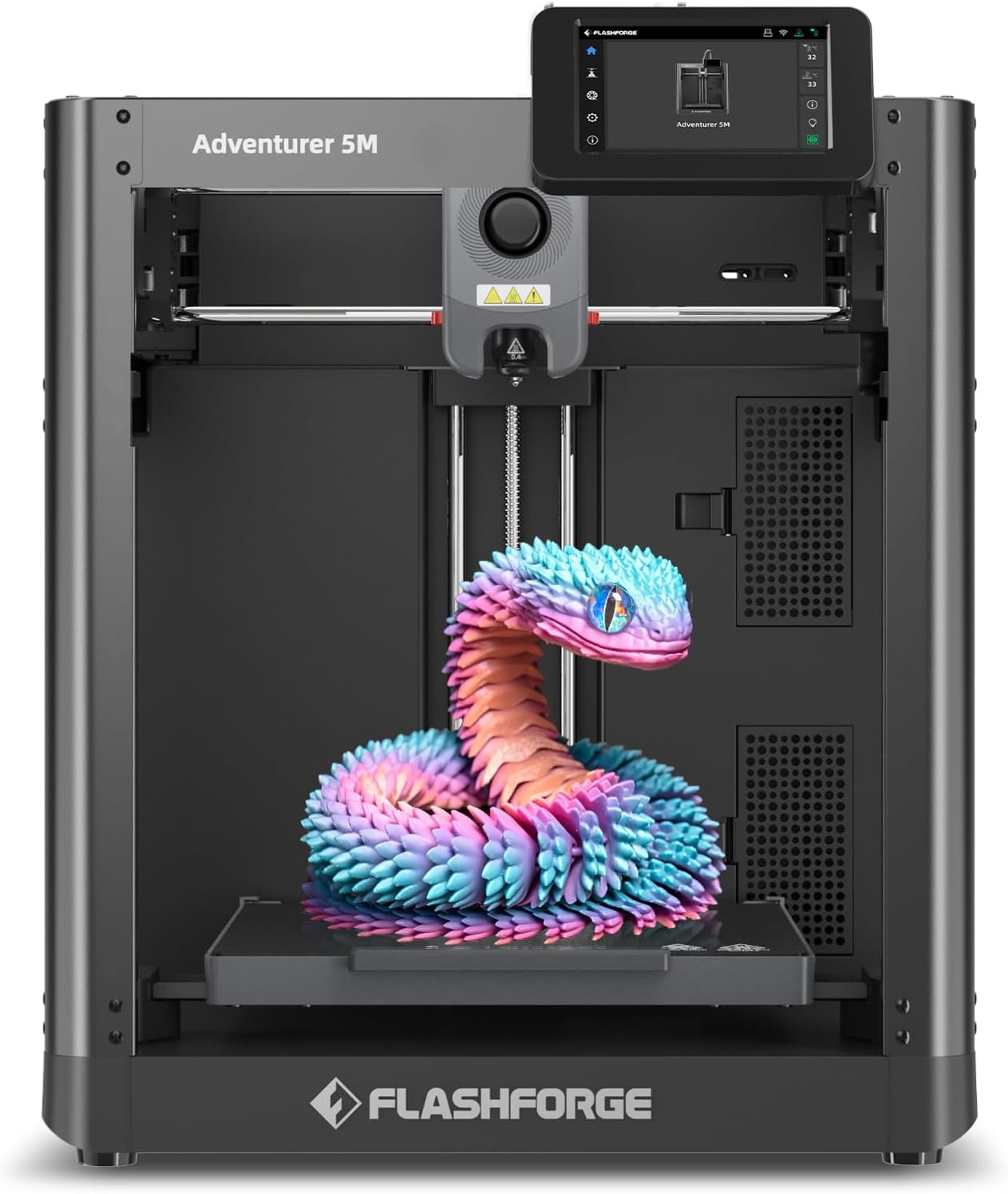
| Build Volume | 220 x 220 x 220 mm |
|---|---|
| Max Nozzle Temp | 280°C |
| Travel Speed | 600 mm/s |
| Platform Type | Double-Sided PEI Platform |
| Structure | All-metal Core XY Structure |
The FLASHFORGE Adventurer 5M is a CoreXY desktop 3D printer built for higher-speed prototyping and small-batch production. It uses a one-button automatic bed leveling system and a 280°C direct-drive extruder with quick-change nozzles to simplify setup and material swaps, while a double-sided PEI platform aids part removal. The AD5M targets speed with a reported 600 mm/s travel and high acceleration, plus vibration compensation and multiple nozzle size support for balancing detail versus throughput. It supports common engineering filaments including PLA, ABS, PETG, TPU and carbon-fiber blends, and offers app-based monitoring for remote job checks. For businesses the printer reduces operator intervention and shortens cycle times, but buyers should note the modest 220 mm cubic build volume limits larger parts and truly industrial workloads, and squeezing top speed without dialing in profiles can require tuning. Regular maintenance like nozzle cleaning remains important to preserve reliability under frequent use.
Best for: Small engineering teams or production shops that need a reliable, relatively low‑touch desktop printer to speed prototyping and short-run parts while minimizing daily setup time.
Less Ideal for: Operations needing large-format printing, full factory-scale throughput, or heavy industrial continuous printing should consider larger industrial machines instead.
- Automatic one-button bed leveling reduces setup time and improves first-layer reliability
- CoreXY all-metal structure and high travel/acceleration targets faster prints and consistent motion
- 280°C direct-drive extruder with quick 3-second nozzle swap supports a wide range of engineering filaments
- Double-sided PEI platform makes part removal and bed prep more convenient
- Mobile app monitoring lets operators check prints remotely and manage jobs off the factory floor
- 220×220×220 mm build volume is small for larger prototypes or assembly fixtures
- Achieving advertised top speeds may require profile tuning and experience
Verdict: Buy this if your business needs a compact, faster desktop printer that cuts operator setup and accelerates prototyping without moving to full industrial hardware.
Choosing the Right 3D Printer for Businesses: Key Factors to Consider
Print Reliability And Consistency
Businesses need printers that deliver consistent results across many builds. A machine that produces repeatable parts reduces waste and rework, which directly affects production cost and delivery timelines.
Reliability covers mechanical robustness, stable motion systems, bed adhesion strategies, and consistent extrusion. For business use you should expect longer duty cycles, so components designed for continuous operation and good cooling or heat management are important to avoid mid-run failures.
Material Compatibility And Supply Chain
The range of usable materials determines what parts you can produce. Businesses often require engineering-grade plastics, flexible filaments, or materials with higher temperature resistance for functional prototypes and short-run production.
Consider how easily you can source filament or resin in commercial quantities and whether the printer supports third-party supplies or only proprietary consumables. Material handling, storage recommendations, and safe disposal practices also matter when scaling production.
Throughput And Print Speed
Throughput is about how many usable parts a printer can produce in a given time, not just raw layer speed. Look for machines with fast, reliable motion systems and features that reduce per-part setup time, like larger build volumes or multi-part nesting tools.
Faster printers matter most when you need multiple iterations or small-batch production. However, speed should not compromise dimensional accuracy. Evaluate how the machine balances velocity, acceleration, and print resolution to achieve practical throughput.
Serviceability And Maintenance
Minimizing downtime is a top priority for business users. Machines that are easy to service, with modular components and widely available spare parts, keep production moving when issues arise.
Check whether routine tasks such as nozzle replacement, bed leveling, or filament path cleaning are straightforward and whether the manufacturer supplies clear maintenance guides. Look for replaceable wear parts and a service network or documented self-service procedures.
Workflow Integration And Software
A printer that fits cleanly into your production workflow saves time. Reliable network printing, support for common file formats, and easy-to-use slicing software reduce the friction between design and finished parts.
Automation features, print queuing, remote monitoring, and cloud or local network integration help scale operations. Consider whether the software supports nested printing, batch job handling, and standardized profiles to keep output consistent across operators.
Choosing The Right Build Volume
Build volume dictates the maximum part size you can produce without splitting a model into multiple pieces. For small-batch manufacturing, larger beds enable multiple parts to be printed in one run, improving per-part throughput and reducing post-processing labor.
- Estimate the largest part you will print and add margin for fixturing or supports.
- Consider a balance: very large volumes increase machine footprint and may affect temperature stability.
Enclosures, Ventilation, And Shop Safety
Enclosures stabilize ambient temperature and reduce warping with temperature-sensitive materials. They also contain fumes when printing certain resins or higher-temperature filaments, so ventilation and filtration options matter for a safe workspace.
- Look for machines with sealed enclosures or available add-on covers for consistent thermal performance.
- Verify recommended ventilation and filtration if you will use nylons, ABS, or specialty resins that emit odors or particulates.
Post-Processing And Finishing Workflows
Consider the downstream steps required after printing: support removal, sanding, finishing, and any curing processes for resin parts. A printer that reduces supports or prints with orientations that minimize finishing can save time and labor costs.
- Plan bench space and tooling for typical post-processing tasks.
- Account for curing stations, solvent baths, or media blasting if you will produce finished consumer-facing parts.
Scaling From Prototyping To Small Production
Moving from single prototypes to short-run production changes priorities from experimental features to repeatability and throughput. Evaluate whether the printer can be left running unattended for longer cycles and whether it supports job queuing or batch printing tools.
- Consider how many printers you would need to meet daily output targets rather than relying on a single unit.
- Assess operator training requirements and whether non-specialist staff can reliably operate the machine.
Material Storage And Handling Best Practices
Proper storage prevents moisture uptake and contamination that degrade filament and resin performance. Businesses should implement sealed storage, desiccants, and first-in-first-out inventory practices to maintain part quality over time.
- Label material batches and track lot information for traceability.
- Keep recommended storage and handling procedures documented for operators.
How We Chose the Best 3D Printer for Businesses
We selected products the way a busy shop would: by prioritizing uptime, predictable output, and maintainability over hobbyist features. Our evaluation focused on practical, business-oriented dimensions that affect operating costs and throughput. Key criteria included print reliability across long runs, supported industrial materials, and effective thermal and motion systems that reduce failed builds. We also considered ease of integration into existing workflows, including network printing and standard file compatibility. Serviceability and parts availability were weighted because businesses need predictable repair paths and minimal downtime. Safety features and enclosure design were reviewed for shop-floor suitability. Excluded items included purely hobbyist hobby-grade machines, single-purpose novelty printers, and experimental prototypes that lack documented reliability data. We filtered out devices without clear documentation on material compatibilities, replacement parts, or professional support channels. The final shortlist balances throughput, material versatility, and maintainable operation for business use.
Our full evaluation process is outlined in our review methodology.
FAQ
How do I estimate how many printers my business needs?
Estimate daily part demand and average runtime per part, including setup and post-processing. Divide the total required production hours by the practical available runtime of one machine to determine how many units you need, and add capacity for maintenance and unexpected downtime.
Can business 3D printers run overnight or unattended?
Many printers designed for business use can run longer shifts unattended, but this depends on the model and materials. Ensure the machine has reliable bed adhesion, filament monitoring, and enclosure temperature control before leaving it running unsupervised.
What maintenance should I plan for on a regular schedule?
Routine maintenance typically includes cleaning or replacing nozzles, lubricating motion rails, checking belts and pulleys, and verifying bed level. Schedule preventive checks based on runtime hours rather than calendar intervals for best uptime.
Are industrial materials and filaments necessary for product development?
It depends on your requirements. For functional prototypes or end-use parts that must meet mechanical or thermal demands, engineering-grade materials are often necessary. For concept models or visual prototypes, standard filaments may be sufficient.
How important is software compatibility with existing CAD tools?
Software compatibility is important for efficiency. Printers that accept standard file formats and offer export/import options for common CAD and slicing tools reduce conversion steps and the risk of errors during preparation.
Final Verdict
When choosing a 3D printer for businesses, prioritize machines that balance reliable, repeatable output with maintainable operation. Focus on print reliability and material compatibility first, then assess throughput and how the device will fit into your existing workflow. Accept tradeoffs between top speed and long-term consistency. Give extra weight to serviceability and parts availability if uptime matters most. With those priorities in mind, you can select a production-capable printer that meets both prototyping and short-run manufacturing needs.