
Note: This article contains affiliate links. If you click on these links and make a purchase, we may earn a small commission at no extra cost to you. This helps support our research and content. Read our full affiliate disclosure here.
If you want finely detailed tabletop figures that hold up to handling and painting, selecting the right 3D printer matters. Miniature printing demands exceptional surface detail, stable resin or filament performance, and predictable post-processing so you can spend less time fixing prints and more time painting or gaming. This guide shortlists the top choices for printing D&D miniatures, focusing on machines that consistently deliver crisp features, reliable layer adhesion, and practical workflow for hobbyists. Below are our curated picks, followed by the criteria we used to evaluate them and practical advice to help you pick the right printer for your hobby needs.
Top Picks at a Glance
| Best Overall The best all-around choice for most situations | Bambu Lab A1 Mini |  |
| Best Quality Built to a higher standard if you want something more solid | ELEGOO Saturn 4 Ultra 16K |  |
| Best Value The sweet spot between price and what you get | Creality Ender 3 V3 SE |  |
| Best Budget The cheapest option that still gets the job done reliably | phrozen Sonic Mighty 4K |  |
| Top Rated A top-rated pick with lots of positive feedback | phrozen Sonic Mini 8K S |  |
| Most Popular A crowd favorite that many people choose with confidence | ANYCUBIC Photon Mono 4 |  |
| Best Seller A high-volume bestseller chosen again and again | Bambu Lab P1S Combo |  |
Bambu Lab A1 Mini
| Item model number | PF002-M-EU |
|---|---|
| Item Weight | 12.1 pounds |
| Date First Available | February 28, 2026 |
| Manufacturer | Shenzhen Tuozhu Technology Co., Ltd |
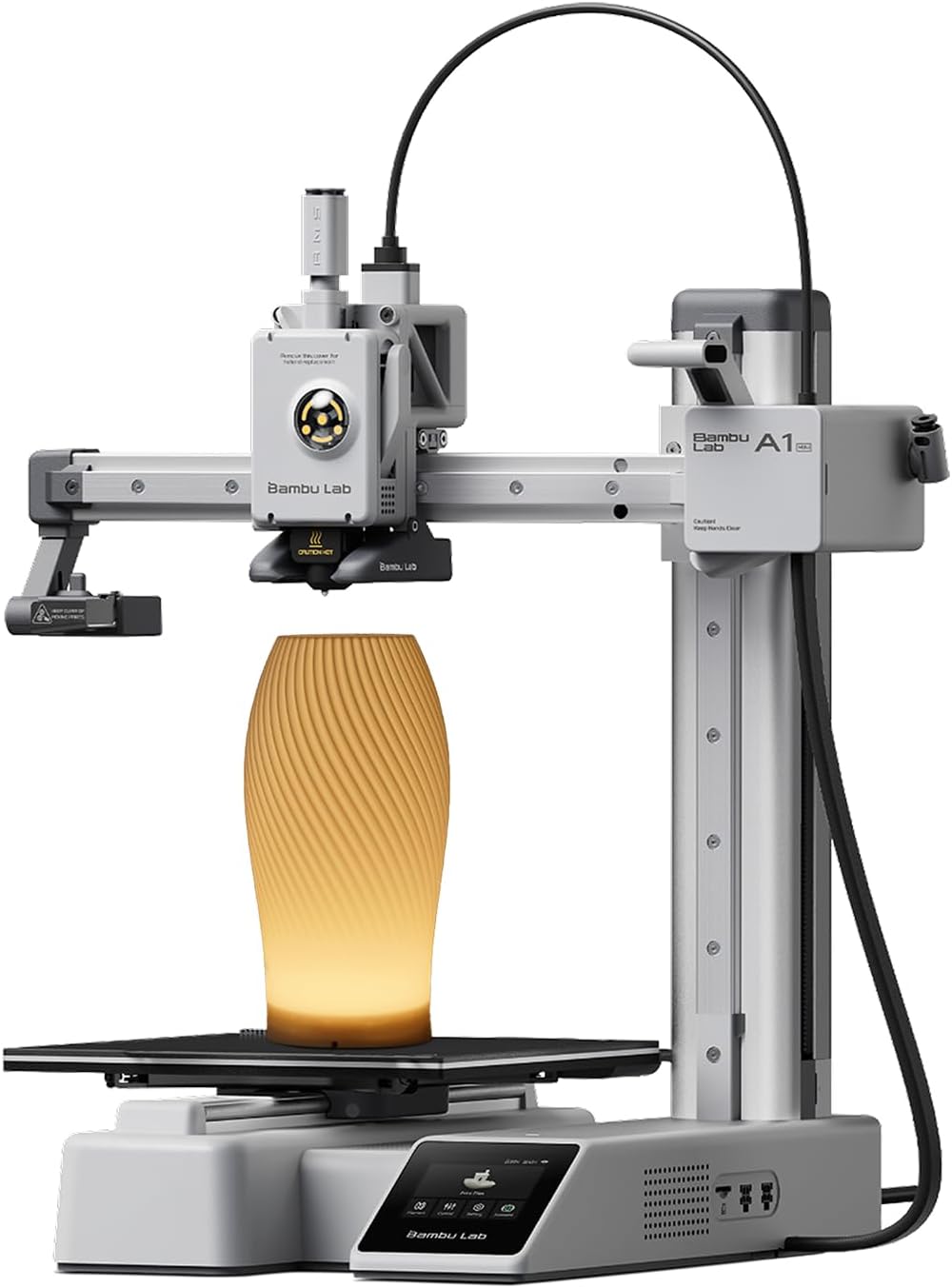
The Bambu Lab A1 Mini is a small, user-friendly desktop 3D printer sold as a kit that includes an LED lamp accessory for printing decorative light projects. It is aimed at beginners and hobbyists who want a quick setup experience thanks to full-auto calibration, an ecosystem that provides ready-to-print models, and simple app-based print management. The printer emphasizes speed and quiet operation, so it can run in a home or studio environment without much disruption, and active flow rate compensation helps maintain consistent extrusion for cleaner small parts. Practical benefits include a compact footprint for limited workspaces and the bundled lamp kit that encourages immediate, tangible projects. Limitations to note are its smaller build volume compared with larger hobbyist machines, which constrains print size and batch printing of many miniatures, and the open-frame design that offers less thermal stability for advanced resins or temperature-sensitive filaments. For tabletop miniatures the A1 Mini is convenient for straightforward PLA prints and fast iterations, though users who need very large or high-temperature multi-material workflows may find it limiting.
Best for: Hobbyists and tabletop players who want a compact, easy-to-use printer for printing standard PLA miniatures and quick iterations without a steep setup curve.
Less Ideal for: Users who require large build volumes, extensive multi-material or high-temperature printing, or a fully enclosed system for advanced resins should consider a different machine.
- Full-auto calibration and app control simplify setup and day-to-day use
- Compact footprint and quiet operation suitable for home or small studios
- Active flow rate compensation improves extrusion consistency for small details
- Includes LED lamp kit that enables ready-to-print decorative projects
- Smaller build volume limits printing large miniatures or multiple parts at once
- Open-frame design provides less thermal enclosure for challenging filaments
Verdict: Pick the A1 Mini if you want a fast, quiet, beginner-friendly printer that gets you printing playable tabletop miniatures and creative lamp projects right away.
ELEGOO Saturn 4 Ultra 16K

| LCD size | 10" 16K Mono LCD |
|---|---|
| Build volume | 211.68 x 118.37 x 220 mm³ |
| Printing speed | Max. 150 mm/h |
| Connection method | USB, Wi‑Fi |
The Saturn 4 Ultra 16K is a high-resolution resin printer aimed at capturing extremely fine detail for small, intricate models. It uses a 10-inch 16K monochrome LCD with a COB plus Fresnel collimating lens for improved uniformity and low astigmatism, and a smart heated tank that holds resin at about 30 °C to improve fluidity and layer adhesion. Practical features include automatic self-check and auto-leveling for an easier setup, an AI camera with real-time monitoring and time-lapse, and tilt-release technology that speeds part separation for faster throughput up to 150 mm/h. Those systems make it well suited for printing many miniatures with crisp surfaces and thin details while reducing failed prints from poor adhesion or cooling. The printer is sizable and sits between desktop and workshop class, so expect to allocate bench space and manage resin post-processing and ventilation. The AI detection and heated tank improve success rates, but you will still need standard resin handling safety and curing steps for polished final miniatures.
Best for: Hobbyists and miniature painters focused on maximum detail and high print success rates who want a near plug-and-play resin system for producing large batches of finely detailed D&D miniatures.
Less Ideal for: Casual tinkerers who need a compact, low-maintenance hobby printer or users unwilling to handle resin safety and post-curing procedures.
- Ultra-high 16K mono LCD for very fine surface detail
- Smart tank heating to maintain resin temperature and reduce layer defects
- Auto-leveling and self-check streamline setup and reduce fiddly calibration
- AI camera monitoring with alerts and time-lapse for remote oversight
- Tilt release technology and up to 150 mm/h printing speed for faster prints
- Large physical footprint and heavier than typical hobby resin printers
- Requires usual resin safety, ventilation, and post-processing workflow
Verdict: If you want top-tier fine detail and higher first-print success for tabletop miniatures, the Saturn 4 Ultra 16K delivers pro-level resin performance with user-friendly automation.
Creality Ender 3 V3 SE

| Max print speed | 250 mm/s |
|---|---|
| Extruder | Sprite direct drive |
| Auto-leveling | CR Touch |
| Mainboard | 32-bit silent |
The Creality Ender 3 V3 SE is a user-focused desktop 3D printer that balances speed and reliability for everyday projects and hobby prints. It uses a Sprite direct drive extruder for improved filament control with PLA, PETG, and TPU, and a CR Touch auto-leveling system that reduces time spent dialing in the first layer. The dual Z-axis and 32-bit silent mainboard yield steadier tall prints and quieter operation, which is helpful when running lengthy miniature batches at home. Auto filament loading/unloading and an upgraded visual UI make routine tasks faster, while the flexible PC spring steel build plate simplifies part removal. The printer supports high-speed printing up to 250 mm/s, which can shorten production time for small runs, but achieving top speed may require tuning and can reduce fine surface detail compared with slower settings. Power-loss recovery is a practical safeguard for longer prints. For hobbyists focused on printing tabletop miniatures, the Ender 3 V3 SE offers a sensible mix of convenience features and stability, though achieving the best fine-detail finishes will depend on careful calibration and slicer settings.
Best for: Hobbyists and practical builders who want a compact, reliable printer that speeds routine work and reduces setup time while still allowing tuning for higher-quality miniatures.
Less Ideal for: Users who need flawless, ultra-high-detail miniatures straight out of the box without spending time on calibration and slicer optimization.
- CR Touch auto-leveling simplifies bed calibration and speeds setup
- Sprite direct drive extruder improves feeding for TPU and reduces common extrusion issues
- Dual Z-axis and 32-bit silent mainboard deliver steadier, quieter prints
- Auto filament loading/unloading and improved UI make routine operations faster
- Power-loss recovery and flexible spring steel build plate help protect prints and ease removal
- Maximum advertised speed (250 mm/s) may require tuning and can sacrifice fine detail
- Fine-detail surface finish depends on calibration and slicer settings rather than out-of-the-box perfection
Verdict: Choose the Ender 3 V3 SE if you want a fast, convenient desktop printer that shortens setup and print management while still delivering stable results for batches of tabletop miniatures with some calibration.
phrozen Sonic Mighty 4K

| XY Resolution | 52 µm |
|---|---|
| Printing Volume | 7.9 x 4.9 x 8.7 inches |
| LCD Size | 9.3" monochrome |
| Connectivity | USB |
The phrozen Sonic Mighty 4K is a compact resin printer built for detailed tabletop models and miniatures. It uses a 9.3" monochrome LCD with 4K resolution to produce roughly 52 µm XY detail, and a 7.9 x 4.9 x 8.7 inch build volume that fits small squads and single large models. Reinforced dual linear rails stabilize the Z axis for consistent layer alignment and cleaner tall prints, and the unit accepts most 405 nm UV resins so you can choose standard, high-temperature, or engineering materials. Typical use is hobby work: printing finely detailed D&D figures, small parts, and prototype pieces where surface quality matters. Setup and controls are aimed at newcomers, and the compact footprint makes it easy to place on a desk or workbench. Limitations include the modest build area if you want to mass-produce large batches and the usual post-processing needs for resin printing such as washing and curing. For budget-minded hobbyists focused on miniatures, it balances print quality and user-friendliness in a small package.
Best for: Hobbyists and tabletop players who prioritize crisp detail on single minis and small batches and want a compact, beginner-friendly resin printer that accepts common resins.
Less Ideal for: Users who need to print large numbers of minis at once or who prefer larger-format production should look at printers with bigger build areas or resin-vat systems designed for throughput.
- High 4K monochrome LCD for fine detail suited to miniatures
- Dual linear rails for improved Z stability and more consistent layer alignment
- Compatible with a wide range of 405 nm resins including specialty formulations
- Compact footprint that fits on a hobby desk or small workbench
- Build volume is relatively small for batch printing many minis at once
- Resin printing requires separate washing and post-curing equipment and workflow
Verdict: A compact, budget-friendly resin printer that delivers the fine detail tabletop miniatures need while staying easy to set up and use.
phrozen Sonic Mini 8K S

| Printing Volume | 6.5 × 2.8 × 7.1 in |
|---|---|
| XY Resolution | 22 µm |
| Connectivity | USB, Wifi |
The phrozen Sonic Mini 8K S is a tabletop resin LCD printer built for detailed miniature work, using an 8K monochrome 7.1" screen and 22 µm XY resolution to capture fine features. It is typically used for small models and tabletop figures, where users prepare files in common slicers (Lychee, ChiTuBox, Tango), load resin, and print batches of miniatures that often need post-wash and post-cure. Notable features include the high-resolution 8K mono LCD for crisp surface detail, open-source slicer compatibility for workflow flexibility, and a compact footprint that fits on a hobby desk. Practical benefits for dungeon and dragon miniatures are very sharp detail, quick layer curing thanks to monochrome LCD longevity compared with color screens, and straightforward Z-axis calibration for consistent layer accuracy. Important limitations are the relatively small build volume tailored to individual miniatures rather than large dioramas, and the usual resin workflow demands such as ventilation, handling safety, and post-processing time. This printer strikes a balance between reliability and print fidelity for hobbyists focused on finely detailed figures.
Best for: Hobbyists and dungeon masters who prioritize reliable, high-resolution prints for detailed D&D miniatures and want a compact machine that integrates with common slicers.
Less Ideal for: Modelers who need to print large dioramas or high-volume production runs should consider larger-format or batch-oriented printers instead.
- 8K monochrome LCD with 22 µm XY resolution for very fine detail
- Compact tabletop footprint that fits hobby workspaces
- Compatible with popular open-source slicers for flexible workflow
- Accurate Z-axis calibration for consistent layer accuracy
- Small build volume suited to single miniatures rather than large multi-part prints
- Requires standard resin workflow including ventilation and post-curing
Verdict: If you want a compact, reliability-minded resin printer that delivers exceptional fine-detail for D&D miniatures, the Sonic Mini 8K S is a focused, high-resolution choice.
ANYCUBIC Photon Mono 4

| LCD Type | 7'' Mono LCD |
|---|---|
| XY Resolution | 9024×5120 (10K) |
| Build Area | 6.04'' x 3.42'' x 6.49'' |
| Max Printing Speed | 70mm/h or 50mm/h |
| Light Source | Matrix (LighTurbo) |
The ANYCUBIC Photon Mono 4 is a resin (MSLA) desktop printer aimed at high-detail work, using a 7-inch 10K mono LCD and Anycubic's LighTurbo matrix light source to produce fine surface detail and reduced layer artifacts. It is typically used for small, detail-heavy models where XY resolution matters, such as tabletop miniatures, jewelry prototypes, and dental models. Notable features include the 10K (9024×5120) XY resolution, a reworked laser-engraved print platform to improve adhesion and ease removal, and a four-point leveling workflow that simplifies initial setup. Practical benefits for miniature makers are very fine detail, a reasonable build volume that fits multiple minis per run, and a resume-after-power-loss function that helps protect long prints. Important limitations are the usual consumables and maintenance of resin printing: FEP film replacement, screen life around 2000 hours, and the need to manage post-processing and fumes; the Anycubic app is not supported for this model so slicing and workflow rely on Photon Workshop or compatible slicers. For buyers prioritizing crisp detail for Dungeons & Dragons miniatures, the Mono 4 delivers a strong balance of resolution and user-friendly features.
Best for: Hobbyists and tabletop painters who value the finest surface detail and reliable print finishes for small models and miniatures and who want a printer that is beginner-friendly but tuned for high-resolution output.
Less Ideal for: Users who need large-format printing, fully plug-and-play cloud workflows, or who prefer filament (FDM) printers with less post-processing and no resin handling.
- Very high XY resolution (9024×5120) for extremely fine detail
- LighTurbo matrix light source gives uniform illumination and smoother surfaces
- Laser-engraved build platform improves adhesion while keeping part removal straightforward
- Power-loss resume protects long prints from being wasted
- LCD screen rated for about 2000 hours, so replacement is a medium-term cost
- Requires regular FEP film replacement and resin-specific tuning
- No Anycubic app support for this model, so slicing relies on Photon Workshop or third-party tools
Verdict: Choose the Photon Mono 4 if you want a compact resin printer that prioritizes ultra-fine XY detail for tabletop miniatures while offering practical features like improved platform adhesion and power-resume.
Bambu Lab P1S Combo

| Build Volume | 256×256×256 mm³ |
|---|---|
| Max Speed | 500 mm/s |
| Max Acceleration | 20 m/s² |
| Supported Filaments | PLA, PETG, TPU, PVA, PET, ABS, ASA |
The Bambu Lab P1S Combo is a CoreXY 3D printer bundled with an AMS multi-spool feeder that targets fast, multi-color, and multi-material desktop printing. It prints in a 256×256×256 mm enclosed build area and supports common filaments such as PLA, PETG, TPU, PVA, PET, ABS and ASA while offering higher-speed capability up to 500 mm/s and high acceleration for quick turns. Practical features include an enclosed chassis to help with temperature-sensitive materials, automatic bed leveling to reduce failed prints, a direct-drive extruder for broader filament compatibility, and an onboard camera for time-lapses. The AMS enables up to 16-color workflows when connected, which is useful for layered or multi-material miniatures. Trade-offs to consider are the learning curve and workflow changes that come with multi-material setups and the need to connect and manage the AMS for full multi-color capability; very abrasive or heavily filled composite filaments are not recommended. For someone focused on detailed tabletop miniatures, the P1S Combo delivers strong speed and multi-color options while keeping print success features that reduce setup risk.
Best for: Buyers who want reliable, fast prints and multi-color capability for detailed tabletop miniatures but prefer a system with built-in features that reduce failed prints and simplify setup.
Less Ideal for: Users who need a plug-and-play toy-level printer with no learning curve or those who plan to print heavily abrasive composite filaments frequently.
- High maximum speed and acceleration for faster print turnaround
- Enclosed build chamber improves printing with temperature-sensitive filaments
- Automatic bed leveling reduces first-layer failures and setup time
- Direct-drive extruder expands usable filament types including flexible materials
- AMS accessory enables multi-color and multi-material builds
- AMS must be connected for multi-color capability and adds workflow complexity
- Not recommended for abrasive or carbon/glass-filled filaments
Verdict: The P1S Combo is a fast, enclosed CoreXY printer with AMS multi-color capability that trims setup risk and speeds up production for detailed D&D miniatures.
Choosing the Right 3D Printer for D&D Miniatures: Key Factors to Consider
Print Resolution & XY Detail
Tiny features like facial details, fingers, and intricate armor rely on both layer height and horizontal resolution. For resin printers, pixel size or LCD/mask resolution determines XY fidelity, while for filament printers nozzle diameter and extrusion precision matter.
Higher native resolution produces crisper sculpts with less sanding or sculpt correction. However, extremely fine settings can increase print times and may require more frequent calibration. Match the printer's resolution capability to the scale you plan to print most often to avoid overpaying for unnecessary precision.
Material Compatibility and Supply
Different printers support different consumables and resin chemistries, which affects surface finish, strength, and paintability. Hobby miniatures often benefit from specialty resins for flexible supports, high-detail photopolymer resins, or standard PLA variants formulated for fine layers.
Consider the availability and handling requirements of those materials. Some resins require post-curing with UV and strict ventilation, while some filaments need heated beds or enclosures. Easy access to compatible materials reduces downtime and keeps your painting schedule on track.
Reliability and Repeatability
A reliable machine consistently delivers the same result across multiple prints with minimal intervention. Reliability comes from stable mechanics, rigid frames, quality linear motion components, and robust firmware.
Repeatability reduces wasted material and time repairing or reprinting failed pieces. Look for designs with consistent first-layer adhesion controls, clear leveling procedures, and a track record of stable long-run prints to maintain progress on long sculpt batches or multipart miniatures.
Workflow and Software Usability
The path from model to finished miniature includes slicing, print setup, support generation, and post-processing. Intuitive software with presets for miniature scales, sensible default support structures, and straightforward orientation tools speeds the process and reduces failed prints.
Also consider file transfer options, on-device slicing, and community-developed profiles that simplify settings for hobby resin and filament. A smooth workflow lets you iterate faster on poses, test conversions, and crank out campaign-ready figures without a steep learning curve.
Post-Processing and Paint Readiness
After printing, miniatures typically need support removal, sanding or filing, washing, and curing before priming and painting. The ease of removing supports without damaging fine details, and how well surfaces accept primer and paint, are crucial.
Evaluate whether the printer's typical surface texture requires heavy finishing work or is paint-ready with minimal prep. Consider whether included accessories or recommended third-party tools will streamline washing and curing steps to produce consistent, paint-ready miniatures.
Workspace Needs and Safety
Printing miniatures can require dedicated bench space for the printer and a separate area for resin handling, washing, and curing. Ventilation, spill containment, and proper disposal of cleaning solvents matter, particularly with resins.
Assess the footprint of the machine, noise levels, and whether an enclosure is required for temperature control. Ensuring a safe, organized workspace reduces hazards and keeps miniature production consistent and manageable over multiple print runs.
Resin Vs Filament: Which Is Better for Miniatures?
Resin printers excel at fine surface detail and crisp undercuts, making them a common choice for sculpted fantasy miniatures. They produce smoother walls and can capture submillimeter features, but they require more intensive post-processing like washing and UV curing.
Filament printers using small nozzles can produce acceptable minis, especially for larger-scale or more durable terrain pieces. Filament is generally easier to handle and less messy, but getting the same level of facial detail and thin feature fidelity as resin is more difficult.
- Resin: Best for highest detail and smooth surfaces; needs careful handling and curing.
- Filament: More forgiving materials handling and lower running complexity; limited in extreme fine detail.
Scaling, Supports, and Orientation Tips
How you orient a miniature on the build plate and where you place supports has a major impact on final detail and the amount of finishing required. Angling miniatures slightly and using thinner supports on high-detail faces preserves sculpting, but increases the chance of layer artifacts on less visible surfaces.
Scaling models up slightly can reduce fragile print failures without changing perceived scale at tabletop distances. When printing multipart models, plan joins and tabs so assembly is secure but gaps remain minimal after painting.
- Angle detail faces away from heavy supports to avoid blemishes.
- Use smaller, denser supports near thin appendages like weapons or fingers.
- Test-scale a single figure before committing to full batches.
Preparing Miniatures for Painting
Successful painting starts with proper post-processing. Remove supports carefully, wash prints to remove uncured resin or filament dust, and cure consistently to ensure paint adhesion. Light sanding or microfiles smooth tiny layer lines without losing sculpted detail.
Priming technique also matters. Use thin, even primer coats to preserve micro-detail. Consider a contrast primer or a light zenithal spray to reveal sculpt detail and guide shading during painting.
- Wash and cure resin prints according to material guidelines.
- Use microfiles and fine-grit sanding for delicate touch-ups.
- Apply thin primer layers and consider pre-shading for depth.
Setting Up a Miniature Printing Workflow
Designate distinct zones for printing, post-wash, and curing to prevent contamination and speed turnaround. Keep tools like resin scrapers, disposable gloves, and cleaning stations within reach. Label consumables and maintain an inventory of common support and finishing supplies.
Develop a checklist for each print run that includes leveling, temperature checks, slicing profile verification, and a visual inspection after the first few layers. A repeatable routine reduces failed batches and saves time on reprints.
- Separate print, wash, and cure areas to protect finished pieces.
- Maintain a pre-print checklist to catch setup errors early.
- Stock spare consumables like vats, FEP sheets, or nozzles to minimize downtime.
Common Troubleshooting for Miniature Prints
Layer separation, visible layer lines, and failed fine appendages are frequent issues when printing miniatures. Troubleshooting starts by checking bed adhesion, correct exposure or extrusion settings, and support placement. Small adjustments to exposure or extrusion multipliers can often salvage difficult details.
If you encounter frequent failures on thin parts, try increasing support density in those zones, reducing print speed, or slightly enlarging fragile features in the 3D model. Regular calibration and monitoring early layers prevents cascading failures on longer prints.
- Verify first-layer adhesion before leaving a print unattended.
- Tweak exposure or extrusion in small increments to refine detail.
- Increase local supports or slightly thicken fragile elements in the model.
How We Chose the Best 3D Printer for D&D Miniatures
We evaluated printers using criteria that matter for miniature modeling and hobby tabletop use. Primary evaluation points included achievable layer resolution and XY detail, because tiny facial features and fine sculpting depend on the machine's minimum layer height and pixel or nozzle precision. Material compatibility and handling were assessed to ensure the printer supports hobby-friendly resins or filaments and that supplies are readily usable for post-curing, priming, and painting. We also considered build consistency and reliability, looking for machines with stable mechanics, repeatable calibration, and reliable first-layer adhesion to reduce failed prints. Workflow and usability were measured by examining slicing software compatibility, the presence of useful presets for small models, and the convenience of loading/unloading consumables. Lastly, we judged maintenance needs and parts accessibility since frequent adjustments or hard-to-source components slow hobby progress. We excluded machines that are strictly industrial-scale or that lack the minimum fine-detail capability needed for tabletop miniatures. We did not include printers that are unsupported by common hobby resins or lack community resources for troubleshooting. The result is a focused shortlist tailored to hobbyists who prioritize detail, consistent output, and an efficient printing-to-painting workflow.
Our full evaluation process is outlined in our review methodology.
FAQ
What minimum resolution should I look for when printing D&D miniatures?
For high-detail miniatures, aim for a layer height of 0.05 mm or lower and an XY resolution that supports sub-50 micrometer features on resin machines. Filament setups will need smaller nozzles and careful tuning to approach similar perceived detail.
Can I paint directly on printed models or do they need special priming?
Most printed miniatures require priming to ensure paint adhesion and to reveal surface detail. Resin and filament both benefit from a thin primer layer; some hobbyists also use a light sanding and a wash to improve primer adherence.
How important is ventilation when printing miniatures with resin?
Ventilation is important because uncured resin emits fumes that many people find unpleasant. Use a well-ventilated area or fume extraction, and follow manufacturer safety guidelines for handling and disposal.
Are supports difficult to remove without damaging miniature details?
Support removal can be delicate work. Using well-placed, minimal supports and thin contact points reduces damage risk. Removing supports with precision tools and finishing with microfiles or sanding helps preserve sculpted features.
Do miniature prints require frequent printer maintenance?
Miniature printing puts emphasis on consistent calibration rather than heavy maintenance. Regular checks on bed leveling, VAT or nozzle condition, and cleaning of optical surfaces or extruders will keep prints reliable and reduce failed runs.
Final Verdict
Choose a printer that matches the scale and level of detail you plan to produce and balance that capability with the materials and workspace you can support. Prioritize machines with proven fine-detail performance if faces and small accessories matter most, but do not neglect workflow, post-processing needs, and long-term reliability. With the right combination of resolution, material support, and a repeatable process, you can reliably produce crisp, paint-ready D&D miniatures for tabletop play.