
Note: This article contains affiliate links. If you click on these links and make a purchase, we may earn a small commission at no extra cost to you. This helps support our research and content. Read our full affiliate disclosure here.
Picking the right 3D printer can make the difference between weeks of tinkering and producing usable parts quickly. Whether you want prototypes, functional parts, or hobby models, a good printer minimizes failed prints, reduces setup time, and fits your workspace. This guide covers the top shortlisted 3D printers across several use cases and experience levels, focusing on print quality, build reliability, and everyday usability. Below you will find our top picks followed by the criteria we used to evaluate them and practical advice to match a printer to your needs.
Top Picks at a Glance
| Best Overall The best all-around choice for most situations | Bambu Lab A1 Mini |  |
| Best Quality Built to a higher standard if you want something more solid | Original Prusa MK4S |  |
| Best Value The sweet spot between price and what you get | Creality K1C 3D Printer |  |
| Best Budget The cheapest option that still gets the job done reliably | Entina Tina2C Mini 3D Printer |  |
| Top Rated A top-rated pick with lots of positive feedback | Creality Ender 3 V3 SE |  |
| Most Popular A crowd favorite that many people choose with confidence | FLASHFORGE Adventurer 5M |  |
| Best Seller A high-volume bestseller chosen again and again | Bambu Lab P1S Combo |  |
Bambu Lab A1 Mini
| Item model number | PF002-M-EU |
|---|---|
| Item Weight | 12.1 pounds |
| Manufacturer | Shenzhen Tuozhu Technology Co., Ltd |
| Customer Reviews | 4.4 out of 5 stars |
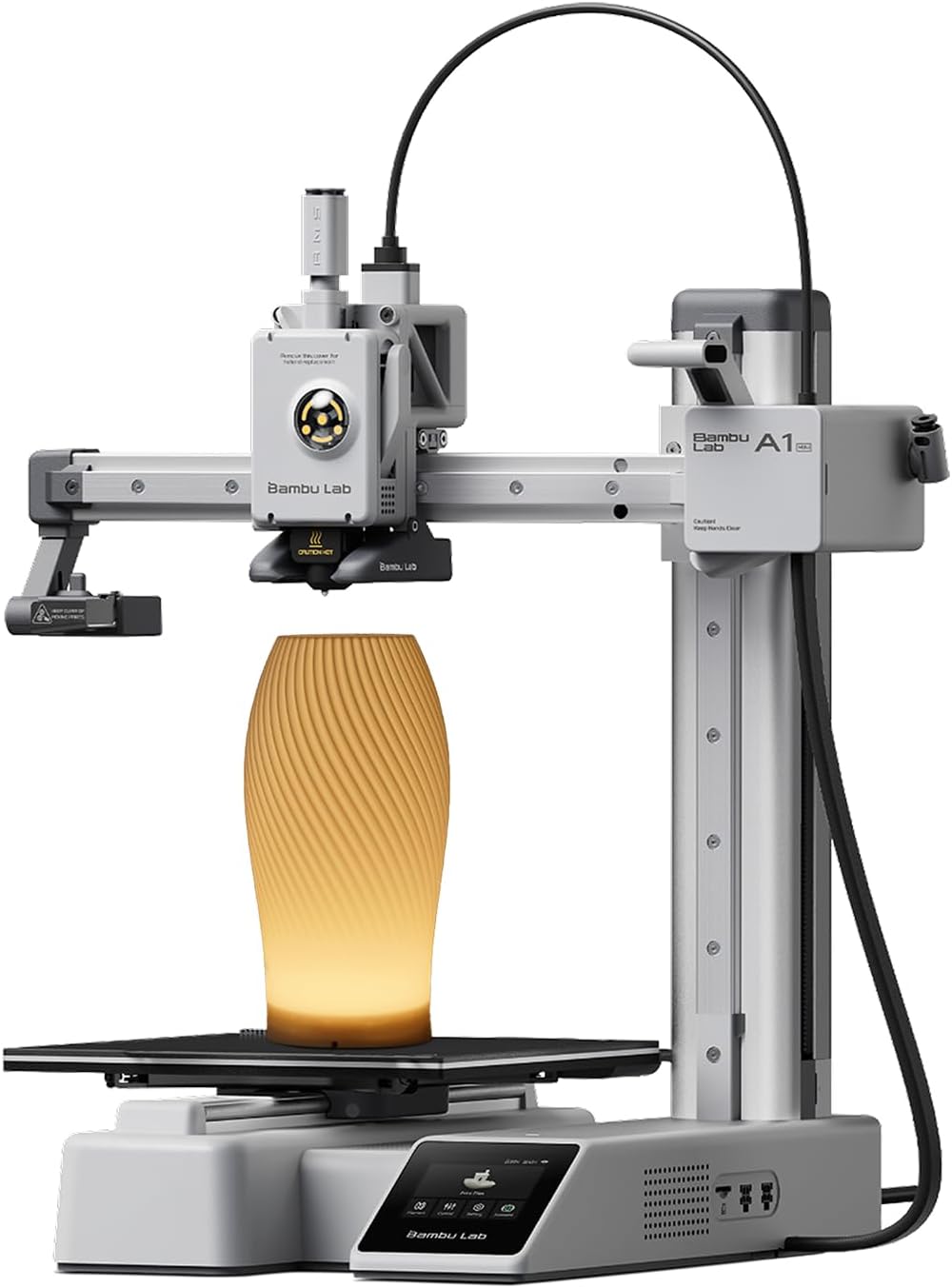
The Bambu Lab A1 Mini is a compact, ready-to-use 3D printer bundle aimed at hobbyists and newcomers who want a simple setup and reliable prints. It ships as a plug-and-play kit with an included LED lamp accessory for printing decorative light projects, and the printer handles full-auto calibration and active flow rate compensation to reduce fiddling during routine prints. In daily use the A1 Mini is quiet and fast for its size, supports common filaments like PLA and TPU, and ties into Bambu Lab's MakerWorld library and Handy app for easy model access and print management. The open-frame design keeps the unit compact but means it is best used in a clean, temperature-stable room rather than outdoors or in dusty workshops. Practical limits include a smaller build volume compared with larger models, so it is best for small objects, prototypes, and hobby pieces rather than large functional parts. For someone seeking a balanced, user-friendly machine that minimizes setup and maintenance, the A1 Mini delivers a strong, approachable experience.
Best for: Buyers who want an easy-to-use, near–plug-and-play 3D printer for hobby projects, prototypes, and decorative prints and who value low setup time and a friendly ecosystem.
Less Ideal for: Users who need large-format printing, industrial-grade enclosure temperature control, or heavy continuous production should look at larger enclosed printers.
- Automatic calibration and active flow rate compensation reduce manual tuning
- Compact, quiet operation that fits well in home or small studio spaces
- Includes LED lamp kit for creative printed lighting projects
- Access to MakerWorld model library and Handy app simplifies finding and managing prints
- Smaller build volume limits the size of printable parts
- Open-frame design is less suited to temperature-sensitive materials and dusty environments
Verdict: A compact, beginner-friendly 3D printer that minimizes setup and tuning while giving fast, quiet performance for small to medium hobby projects.
Original Prusa MK4S

| Print size | 9.84 x 8.3 x 8.6 in |
|---|---|
| Included material | 1 kg Prusament PLA Galaxy Black |
| Item model number | MK4S-COM-PEI |
The Prusa MK4S is a ready-to-run desktop FDM printer aimed at users who need consistent, high-quality prints at faster speeds. It ships fully assembled and includes a 1 kg spool of Prusament PLA so you can start printing immediately. Notable features include input shaping to reduce ringing and vibrations, a build volume suitable for most hobby and small-prototype work, and an open-source design with ongoing firmware and hardware upgrade paths. Practical benefits are strong: the motion-compensation yields sharper edges at higher speeds, the well-engineered platform promotes day-to-day reliability in a workshop or studio, and the integrated ecosystem simplifies material and software choices. Trade-offs are typical for this class: it is a dedicated FDM machine so it will not match resin printers for ultra-fine surface detail, and advanced users seeking larger build volumes will need a different model. For performance-focused makers and small-scale production the MK4S balances speed, repeatability, and serviceable print quality in a compact footprint.
Best for: Buyers who prioritize fast, repeatable FDM prints for prototyping or small-batch production and want a reliable, serviceable machine backed by an active ecosystem.
Less Ideal for: People who need ultra-high-resolution resin-level detail or who require very large build volumes for single-piece prints.
- Fully assembled and ready to print out of the box, including 1 kg of Prusament PLA.
- Input shaping reduces ringing and allows cleaner edges at higher speeds.
- Built for consistent, professional-grade operation suitable for workshops and prototyping.
- Open-source, upgradeable platform with ongoing firmware and hardware support.
- FDM technology limits the finest surface detail compared with resin printers.
- Build volume is moderate and may be small for large-format production needs.
Verdict: Choose the MK4S when you want a high-speed, reliable desktop FDM printer that delivers consistent, production-ready results out of the box.
Creality K1C 3D Printer

| Print volume | 8.66 x 8.66 x 9.84 inch |
|---|---|
| Max nozzle temperature | 300 ℃ |
| Supported filaments | PLA/ASA/ABS/TPU/PLA-CF/PET-CF |
| Auto features | Auto Z offset, auto leveling |
The Creality K1C is a ready-to-run FDM desktop printer aimed at speeding up hobby and light-prototyping workflows. It arrives mostly assembled and boots quickly, letting you start prints within minutes; auto Z offset and auto leveling simplify setup and reduce fiddling. The machine is built around a clog-free direct extruder with a reinforced feed mechanism and a steel-tipped copper nozzle, enabling higher-temperature materials up to 300°C and compatible carbon-fiber blends for functional parts. Creality highlights a high top speed and acceleration for fast results, while an upgraded multi-fan cooling system improves layer cooling, reduces stringing, and helps with bridges. The integrated AI camera gives live monitoring and basic failure detection plus time-lapse capture, which is handy for unattended runs. Trade-offs are typical for compact enclosed printers: the build volume is modest, and extracting maximum quality at the highest advertised speeds will require tuning. Still, for users who value quick setup, robust filament handling, and remote monitoring, the K1C is a practical choice.
Best for: Buyers who want a fast, low-fuss desktop printer for prototyping and functional parts and who prioritize quick setup, reliable filament feeding, and remote monitoring.
Less Ideal for: Users needing large-format printing or industrial continuous production should look at larger-capacity machines designed for extended duty cycles.
- Mostly assembled, plug-and-play setup with auto leveling and auto Z-offset
- Clog-free direct extruder that supports up to 300°C and carbon-fiber filaments
- High acceleration and top printing speed for faster part turnaround
- Integrated AI camera for live monitoring, failure detection, and time-lapse
- Upgraded multi-fan cooling to reduce stringing and improve layer quality
- Relatively small build volume limits large parts
- Achieving top advertised speeds may require careful tuning and quality compromises
Verdict: The K1C is a fast, plug-and-play desktop printer built for quick prototyping and reliable high-temperature filament handling.
Entina Tina2C Mini 3D Printer

| Print volume | 3.9 × 3.9 × 3.9 inches |
|---|---|
| Connectivity | 2.4G WiFi, TF card |
| Operating systems | Windows, macOS, Linux, Chromebook |
| Slicer compatibility | Cura, Simplify3D |
The Entina Tina2C is a fully assembled mini FDM 3D printer aimed at first-time users and kids, designed to get you printing quickly using the Poloprint Cloud app. Setup is guided in-app so a first print can be ready in minutes, and Wi‑Fi or TF card printing lets you choose between wireless control or offline slicing. Notable features include intelligent auto leveling, a removable magnetic build plate, a quick-swap printhead, self-cleaning nozzle design, and power-loss recovery to resume interrupted prints. The compact footprint and low-noise operation make it suitable for classrooms, hobby desks, and family projects, and integrated LED lighting helps monitor prints without glare. The trade-offs are its very small 3.9 x 3.9 x 3.9 inch stated print volume, which limits projects to small models, and the mini form factor likely reduces maximum print speed and large-part reliability compared with larger hobby printers. It is compatible with common slicers and major desktop OSes, making it a practical entry point for learning 3D printing and STEM experimentation.
Best for: Buyers who want an affordable, kid-friendly way to learn 3D printing and start printing quickly with guided app workflows and minimal setup.
Less Ideal for: People who need to print large functional parts or who require a highly tunable, high-speed printer for advanced prototyping should consider larger desktop models instead.
- Guided app setup and one-click printing that speeds first prints for beginners
- Wi‑Fi plus TF card support offers flexible wireless or offline printing
- Auto leveling and power-loss recovery improve first-layer success and reduce failed prints
- Magnetic build plate and quick-swap printhead make removal and basic maintenance easier
- Very small build volume limits projects to miniature models and prototypes
- Designed for beginners so advanced users may find limited high-end tuning and expandability
Verdict: If you want an inexpensive, low-friction starter 3D printer for kids and STEM projects, the Tina2C gets beginners printing fast with guided app control and easy maintenance.
Creality Ender 3 V3 SE

| Print speed | Up to 250 mm/s |
|---|---|
| Extruder type | Sprite direct extruder |
| Mainboard | 32-bit silent mainboard |
| Auto leveling | CR Touch with strain sensor |
| Build plate | PC spring steel flexible plate |
The Creality Ender 3 V3 SE is a user-friendly FDM printer that prioritizes dependable, higher-speed printing for hobbyists and makers. It prints up to 250 mm/s with 2500 mm/s² acceleration while retaining respectable quality, and a 32-bit silent mainboard keeps noise and vibration down during long jobs. Setup is straightforward — Creality claims a three-step assembly in about 20 minutes — and CR Touch auto-leveling plus a strain sensor for auto Z offset make getting a good first layer easier, which reduces failed prints. The Sprite direct extruder handles PLA, PETG and flexible TPU cleanly and the auto filament load/unload feature simplifies filament changes. The dual Z-axis and twin Y-axis linear shafts add rigidity that helps reduce Z-wobble and produce more consistent layers. Practical limits include a modest build volume compared with larger machines and the usual need to tweak slicer settings for best results at higher speeds, so novices should expect a learning curve to extract peak performance. For reliability-focused users this printer delivers solid core hardware and useful automation that lowers routine failure points.
Best for: Someone who values a reliable, well-built printer that reduces common failure points and speeds up print cycles while still being approachable for makers who will calibrate settings.
Less Ideal for: Buyers who need very large build capacity or out-of-the-box perfection at extreme speeds without investing time in tuning should consider other options.
- Fast top speed up to 250 mm/s for quicker print turnaround
- CR Touch auto-leveling and strain sensor simplify getting a good first layer
- Sprite direct extruder supports PLA, PETG and TPU with reliable feeding
- Dual Z-axis and robust Y-axis shafts reduce Z-wobble and improve dimensional consistency
- 32-bit silent mainboard lowers noise and provides smoother motor control
- Build volume is relatively compact compared with larger desktop printers
- Achieving best quality at high speeds requires slicer tuning and parameter adjustments
Verdict: Choose the Ender 3 V3 SE if you want a compact, reliability-focused desktop printer with auto-leveling and a proven direct extruder that reduces common failure points.
FLASHFORGE Adventurer 5M
| Build Volume | 220 x 220 x 220 mm |
|---|---|
| Extruder Max Temp | 280°C |
| Travel Speed | 600 mm/s |
| Structure | All-metal Core XY |
| Platform Type | Double-sided PEI Platform |
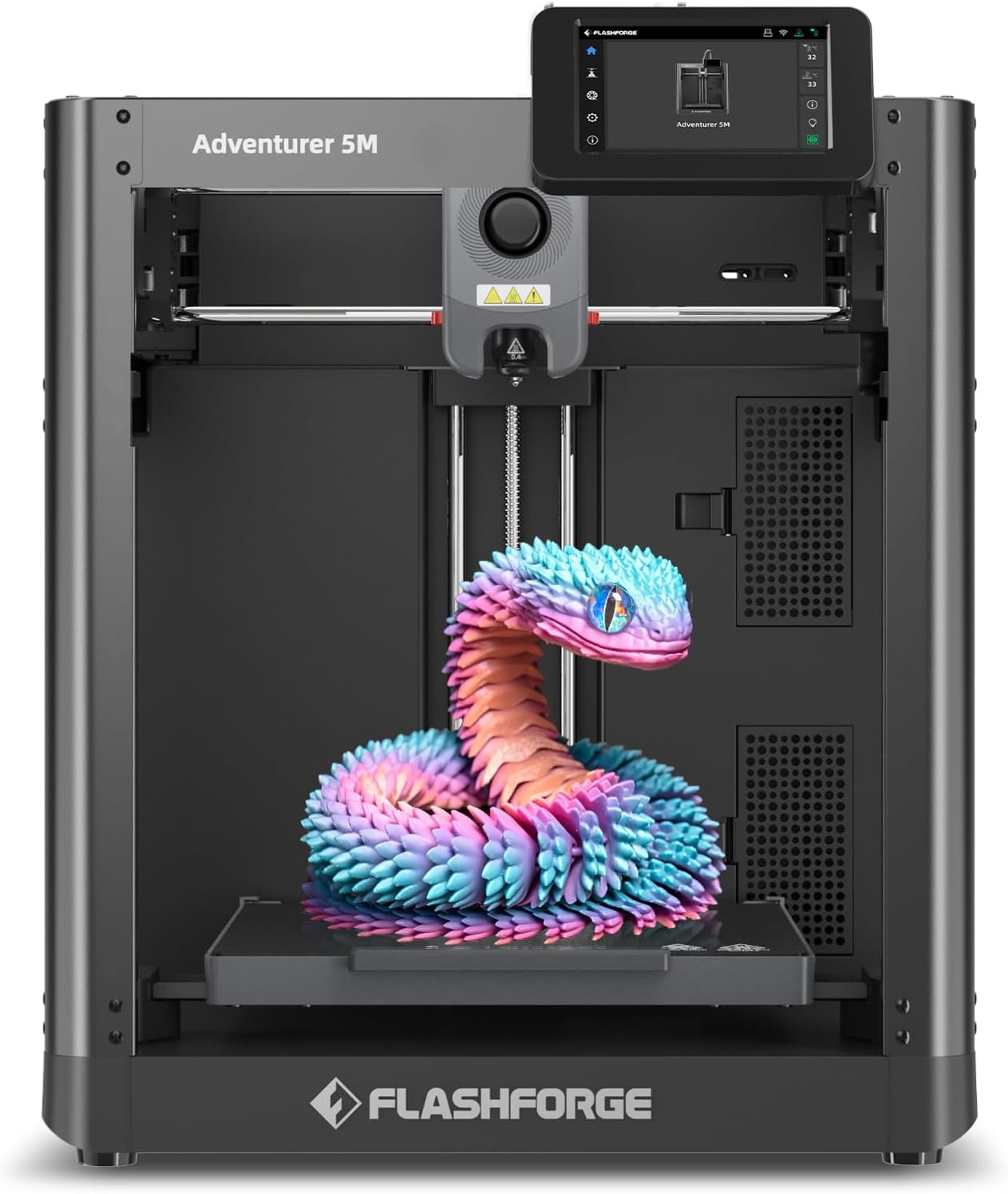
The FLASHFORGE Adventurer 5M is a CoreXY desktop 3D printer built for speed and consistent results. It uses one-button automatic bed leveling and a double-sided PEI platform to simplify first-layer adhesion and part removal, while a 280°C direct-drive extruder and multiple nozzle sizes (0.25–0.8 mm) let you print a range of materials including PLA, ABS, PETG, TPU and carbon-fiber blends. The machine's CoreXY structure, 600 mm/s travel speed and aggressive acceleration reduce cycle times for rapid prototyping, and a high-flow nozzle with quick 3-second swaps supports sustained high-speed output. Practical touches include a fast warm-up to printing temperature, dual-fan cooling and app-based remote monitoring for job oversight. Expect strong performance on standard hobby and small-run production prints, but keep in mind high-speed settings demand tuned slicer profiles and well-maintained hardware to avoid ringing or adhesion issues; engineering filaments and frequent high-temp use will also require attention to nozzle and enclosure options. For buyers who value faster turnaround without giving up material versatility, the Adventurer 5M is a compelling midrange choice.
Best for: Buyers who want a faster, reliable desktop printer for prototyping and small production runs and who prefer a machine with automated leveling and remote monitoring to reduce setup fuss.
Less Ideal for: Users seeking a plug-and-play classroom printer for young children or those who need a fully enclosed, high-temperature industrial chamber out of the box should look elsewhere.
- CoreXY all-metal structure for higher-speed, more repeatable motion
- One-button automatic bed leveling and double-sided PEI platform for easier first layers and part removal
- Max 280°C direct-drive extruder and multiple nozzle sizes for broad material compatibility
- High travel speed (600 mm/s) and fast warm-up to cut prototype cycle times
- Mobile app and remote monitoring for convenient job oversight
- High-speed printing requires careful slicer tuning and routine maintenance to avoid print artifacts
- No enclosed heated chamber included by default for consistently optimal results with high-temp or moisture-sensitive filaments
Verdict: Choose the Adventurer 5M if you need a midrange desktop printer that prioritizes high-speed prototyping and material versatility with easy leveling and remote monitoring.
Bambu Lab P1S Combo

| Build Volume | 256×256×256 mm³ |
|---|---|
| Max Speed | 500 mm/s |
| Max Acceleration | 20 m/s² |
| Supported Filaments | PLA, PETG, TPU, PVA, PET, ABS, ASA |
The P1S Combo pairs Bambu Lab's P1S CoreXY printer with an Automatic Material System to deliver high-speed, multi-color and multi-material printing in an enclosed chassis. It is designed for users who want fast turnaround on parts, offering top speeds up to 500 mm/s and high accelerations for shorter print times, while automatic bed leveling and a ready-to-use setup reduce fiddly calibration work. The enclosed body helps when printing temperature-sensitive filaments and the direct-drive extruder broadens material compatibility to include flexible and engineering filaments. Practical additions like an onboard camera for timelapses and a larger 256 × 256 × 256 mm build volume make it useful for both prototyping and hobbyist projects. Buyers should note the Combo requires the AMS to unlock the full multi-color capability, and very high speeds demand careful tuning and appropriate filament to avoid artifacts. For risk-averse users this package minimizes manual setup and delivers predictable, repeatable prints once properly configured.
Best for: Buyers who want a fast, mostly plug-and-play desktop 3D printer that reduces manual calibration and supports a wide range of common filaments for reliable prototyping and hobby work.
Less Ideal for: People who need a bare-bones, lowest-cost printer or those who expect perfect multi-color prints without adding the AMS and spending time on tuning.
- High top speed (500 mm/s) and strong acceleration for much shorter print times
- Enclosed design and auto bed leveling improve first-layer success and stable prints with advanced filaments
- Direct-drive extruder expands usable materials to include TPU and other flexible filaments
- Built-in camera and a 256×256×256 mm build volume support larger projects and timelapse documentation
- Multi-color/multi-material printing requires connecting the AMS, which is necessary to realize the advertised color capability
- Very high speeds increase the need for careful tuning and may introduce artifacts if not dialed in
Verdict: Choose the P1S Combo if you want a fast, enclosed desktop printer that simplifies setup and reliably handles a broad set of common filaments while enabling true multi-color printing with the AMS.
Choosing the Right 3D Printer: Key Factors to Consider
Print Quality & Layer Resolution
Print quality defines how accurately a machine renders fine details and how smooth curved surfaces appear. Higher resolution reduces visible layer lines and improves dimensional accuracy, which matters for functional parts that must fit together or for small models where detail is critical.
Consider both the native nozzle diameter and the machine's minimum layer height. A printer that can reliably print at lower layer heights will deliver finer surface finish, but may increase print time. Also look for consistent extrusion and stable temperature control, because thermally driven variability can undo the advantages of a high-resolution mechanical setup.
Reliability And Build Stability
Mechanical reliability affects how often you need to intervene during a print and how long the printer lasts without major repairs. Stiff frames, quality linear motion components, and well-designed bed leveling systems reduce wobble and layer shifts.
Also consider the bed fastening and hotend mounting. A rigid bed and a secure hotend reduce vibration and maintain dimensional accuracy on taller prints. Machines that require frequent recalibration will slow projects and add maintenance overhead.
Ease Of Setup And First-Print Experience
How quickly you can go from unboxing to a successful first print is a major usability factor. Clear assembly instructions, pre-calibrated units, and guided first-run wizards reduce friction for new users. Automatic or assisted bed leveling and preconfigured profiles for common filament types greatly simplify initial setup.
Good documentation and straightforward hardware access for routine tasks like nozzle changes or bed cleaning also speed ongoing use. If you need a printer for rapid prototyping or classroom settings, favor models that minimize setup complexity.
Software Compatibility And Slicing Support
Slicing software translates 3D models into printer instructions and directly influences print success. A printer that works with well-supported slicers gives you access to advanced settings like retraction tuning, print-time optimizations, and adaptive layering.
Check for community profiles or manufacturer-provided profiles for popular slicers. Compatibility with common file formats and reliable firmware updates are also important to maintain performance over time and to add features without hardware changes.
Build Volume And Future Expandability
Build volume determines the maximum part size and how you might design assemblies. Larger volume gives flexibility for bigger prototypes but increases footprint and may require a more stable frame to maintain precision across the bed.
Consider whether the printer supports modular upgrades such as larger beds, direct-drive extruders, or enclosure kits. Expandability extends the useful life of a purchase and can make a midrange machine suitable for more demanding tasks.
Common Print Materials And When To Use Them
Different filaments offer tradeoffs in strength, ease of printing, and finish. PLA is easy to print and good for visual prototypes and hobby parts. PETG adds toughness and chemical resistance while remaining accessible for most desktop printers. ABS and engineering-grade filaments require higher temperatures and often an enclosure to print well.
Specialty materials like flexible TPU, composite-filled filaments, and high-temperature polymers extend the range of printable applications but demand appropriate extruders, heated beds, and sometimes hardened nozzles. Match the printer's hotend and extruder capabilities to the materials you plan to use.
- PLA: Low-warp, good for detail and beginners
- PETG: Tougher, better for functional parts
- TPU: Flexible parts, needs direct-drive or tuned Bowden setup
- ABS/Nylon: Strength and heat resistance, best in an enclosed, heated environment
Workspace, Ventilation, And Safety Considerations
Set up the printer on a stable, level surface with enough clearance for maintenance and part removal. Consider ventilation needs for higher-temperature materials that emit fumes. An enclosure can help with temperature stability and reduce warping for certain filaments.
Pay attention to safety features such as thermal runaway protection, filament runout sensors, and accessible power switches. If you plan to run prints unattended, choose machines with reliable failsafes and consider installing smoke detectors in the workspace.
- Allow room for filament spools and filament paths
- Provide airflow for machines printing with low-odor filaments
- Use an enclosure for ABS/Nylon to maintain ambient temperature
Maintenance Tasks That Keep Prints Reliable
Routine maintenance reduces print failures and extends component life. Regularly check belt tension, lubricate motion rails as recommended, and inspect pulleys and idlers for wear. A quick weekly visual inspection can catch issues before they cause print defects.
Clean the build surface and replace or recoat it when adhesion problems arise. Keep spare consumables like nozzles and bed tape on hand, and make a schedule for firmware and slicer updates to benefit from bug fixes and improvements.
- Tighten belts and check for signs of loosening
- Replace nozzles periodically to avoid extrusion issues
- Keep firmware and slicer profiles up to date
Choosing Between Bowden And Direct-Drive Extruders
Bowden systems place the extruder motor away from the hotend, reducing moving mass and enabling faster travel speeds. They work well with rigid filaments but can struggle with flexible materials due to the longer filament path.
Direct-drive extruders mount the drive mechanism close to the hotend, improving control over filament retraction and enabling reliable printing of flexible filaments. Consider the materials you will print most often when choosing between these configurations.
- Bowden: Lower moving mass, higher top speeds, better for rigid filaments
- Direct-Drive: Better filament control, ideal for TPU and composite filaments
Upgrading And Customizing Your Printer Over Time
Many desktop 3D printers support incremental upgrades that improve usability and capability. Common upgrades include all-metal hotends for higher-temperature filaments, improved bed surfaces, and quieter stepper drivers for reduced noise.
Plan upgrades that align with your most common projects. Adding an enclosure or better part cooling can drastically change print success rates for certain materials, while a larger bed lets you print bigger parts without splitting models into multiple pieces.
- Start with basic upgrades like improved build surfaces
- Consider hotend and extruder upgrades if printing high-temp or abrasive materials
- Evaluate community support for upgrade kits before purchasing
How We Chose the Best 3D Printer
We shortlisted 3D printers using practical, buyer-focused filters that matter for real-world printing. We prioritized printers that deliver consistently high print quality, measured by layer resolution and dimensional accuracy. Reliability and mechanical stability were another key filter, favoring machines with robust frames, consistent bed leveling systems, and durable motion components. Ease of setup and firmware stability were included because many users want minimal time spent calibrating. We also evaluated software and ecosystem maturity, including slicing compatibility, driver support, and available community resources. Build volume and expandability were considered to ensure the printers can grow with changing projects. Finally, we assessed safety and convenience features like enclosure options, filament runout detection, and accessible maintenance points. We excluded machines that are purely experimental without stable firmware, units with consistently reported mechanical failures, and printers lacking basic safety features. The criteria above reflect what we actually measured conceptually: print fidelity, mechanical reliability, user setup experience, software support, and practical features for ongoing use.
Our full evaluation process is outlined in our review methodology.
FAQ
What size build volume do I need for typical hobby projects?
For many hobby prints, a moderate build volume around 200 x 200 x 200 mm is sufficient. Choose a larger volume if you plan to print big functional parts or full-scale prototypes, but remember larger beds require more calibration and can increase print time.
How important is automatic bed leveling?
Automatic bed leveling greatly reduces initial setup friction and improves first-layer consistency, especially for beginners. However, a well-built fixed bed with good manual leveling can also produce excellent results if you are comfortable with occasional adjustments.
Can I print flexible filaments on any 3D printer?
Flexible filaments often need a printer with a compatible extruder design. Direct-drive extruders or Bowden setups with very short, constrained filament paths handle flexible materials best. Check the extruder type and filament path before attempting TPU-style materials.
How often should I replace the nozzle or perform maintenance?
Frequency depends on usage and filament types. For standard PLA use, replacing the nozzle every few months or after several hundred hours is common. Abrasive filaments and heavy use require more frequent changes. Regularly inspect belts, pulleys, and bed surfaces for wear.
Do I need an enclosure for better prints?
An enclosure helps control ambient temperature and reduces warping with high-temp filaments like ABS or Nylon. For PLA and PETG, an enclosure is not strictly necessary but can still improve temperature stability and print consistency.
Final Verdict
Match your priority to the most concrete attributes when choosing a 3D printer. If fine detail and dimensional accuracy matter most, prioritize print quality, a precise extrusion system, and solid motion hardware. If material flexibility or durability is the focus, look for compatible extruders, higher-temperature hotends, and an enclosed build area. Balance build volume against footprint and maintenance. Consider future upgrades and software ecosystem support to keep the printer useful as your projects evolve. With those tradeoffs in mind, pick the machine that best aligns with the materials you intend to use and the time you are willing to spend on setup and upkeep.