
Note: This article contains affiliate links. If you click on these links and make a purchase, we may earn a small commission at no extra cost to you. This helps support our research and content. Read our full affiliate disclosure here.
If you print shipping, inventory, or product-identification labels regularly, the right 4×6 thermal label maker can save time and reduce errors. These machines use direct-thermal or thermal-transfer technology to produce durable, high-contrast 4×6 labels that stick reliably to boxes, bins, and packages. This guide covers a short list of the top 4×6 thermal label makers for business and home-office workflows. We evaluated each pick on print speed, media handling, connectivity, and long-term reliability to help you find a model that fits your daily volume and setup. Read on for the factors we used to narrow the field and practical advice for matching a label maker to your workflow.
Top Picks at a Glance
| Best Overall The best all-around choice for most situations | Westinghouse WHTP203e Thermal Label Printer |  |
| Best Quality Built to a higher standard if you want something more solid | Rollo Wireless 4×6 Label Printer |  |
| Best Value The sweet spot between price and what you get | NULLTONEX Y813 Thermal Label Printer |  |
| Best Budget The cheapest option that still gets the job done reliably | Rongta RP425 Thermal Label Printer |  |
| Top Rated A top-rated pick with lots of positive feedback | Rollo USB Shipping Label Printer X1038 |  |
| Most Popular A crowd favorite that many people choose with confidence | JADENS 4×6 Thermal Label Printer |  |
| Best Seller A high-volume bestseller chosen again and again | KNAON Y813BT Thermal Label Printer |  |
Westinghouse WHTP203e Thermal Label Printer

| Maximum Print Resolution | 203 DPI |
|---|---|
| Maximum Media Size | 4 x 6 inch |
| Printer Connectivity Type | Ethernet, USB |
| Maximum Sheet Capacity | 100 |
| B&W Pages per Minute | 60 |
The Westinghouse WHTP203e is a desktop thermal shipping label printer built for small business and e-commerce use. It prints 4×6 labels at up to 6 inches per second with 203 DPI resolution, producing legible text and simple graphics for shipping, barcode, and packing workflows. Setup includes a USB flash drive with drivers and a USB cable and it supports Ethernet for networked printing; it is compatible with Windows, macOS, and Linux and can accept fanfold labels or label rolls. Because it is a direct thermal design it does not require ink or toner, which keeps operating costs and maintenance low but means labels can fade with heat or sunlight over time. The unit is compact and made for daily commercial use, with a 100-sheet capacity and hardware interfaces that fit typical desktop or small warehouse environments. It lacks Bluetooth and does not include an Ethernet cable or USB-C adapter, so plan for those accessories if you need them. For straightforward, high-volume label printing this model covers the essentials without extra frills.
Best for: Buyers who want a reliable, no-frills 4×6 label printer for regular shipping and e-commerce packing that prioritizes simple setup, networked desktop use, and low consumable costs.
Less Ideal for: People who need long-term durable labels exposed to heat or sunlight, or those who require wireless/Bluetooth mobile printing without additional adapters.
- Prints standard 4×6 shipping labels at up to 6 in/s with 203 DPI for clear text and basic graphics
- Direct thermal operation eliminates ink or toner consumables
- Includes starter labels, USB flash drive with drivers, USB cable, and power adapter for out-of-the-box setup
- Ethernet and USB ports allow shared network or direct desktop connections
- Commercial-grade build geared for daily ecommerce and warehouse use
- Direct thermal labels are more vulnerable to heat and sunlight than thermal-transfer labels
- No Bluetooth or USB-C adapter included, and Ethernet cable is not supplied
Verdict: A practical, commercial-grade 4×6 thermal label printer that delivers reliable, high-speed shipping labels with minimal consumable hassle.
Rollo Wireless 4×6 Label Printer

| Printer Type | Thermal |
|---|---|
| Print Resolution | 203 x 203 DPI |
| Maximum Media Size | 4.1 inch wide |
| Printer Connectivity Type | USB, Wi-Fi |
| Paper Size | 4 x 6, 2 x 1 inches |
The Rollo Wireless is a direct thermal label printer designed for fast, high-volume 4×6 shipping label production without ink or toner. It connects over Wi‑Fi with AirPrint for iPhone, iPad and Mac or via Wi‑Fi/USB for Windows, Android, Chromebook and Linux, letting you print directly from native apps or the Rollo Ship Manager. At 203 DPI and up to about 150 mm/s (roughly one 4×6 label per second) the output is clear and scannable for carriers and barcode systems. The printer handles fan‑fold or roll labels from about 1.57
Best for: Buyers who ship frequently and prioritize fast, reliable label throughput and native wireless printing from mobile and desktop devices.
Less Ideal for: Users who need full‑color labels, Bluetooth-only mobile printing, or occasional hobby use where an all‑in‑one ink printer is preferred.
- Fast direct thermal printing rate (about one 4×6 label per second)
- AirPrint and Wi‑Fi support for printing from iPhone, iPad and Mac without drivers
- Compatible with major shipping platforms and the Rollo Ship Manager app for streamlined postage and label workflows
- High print longevity claimed (prints rated to approximately 650,000 labels)
- Works with a wide range of label widths including standard 4×6 labels
- No color printing since it is a monochrome thermal printer
- No Bluetooth connectivity option
Verdict: Choose the Rollo Wireless if you need a fast, no‑ink 4×6 label printer that delivers high-throughput, scannable shipping labels and native wireless printing from phones and computers.
NULLTONEX Y813 Thermal Label Printer

| Printer Type | Thermal |
|---|---|
| Maximum Media Size | 4 x 6 Inches |
| Resolution | 203 x 203 dpi |
| Printer Connectivity Type | Bluetooth, USB, wireless |
| Power Consumption | 24 watts |
The NULLTONEX Y813 is a direct thermal 4×6 label printer aimed at small businesses and shipping stations that need fast, no-ink printing. It connects via Bluetooth for mobile printing or USB for a stable desktop link and pairs with the FlashLabel Pro app that provides templates, fonts, and offline storage for quick label creation. At 203 dpi the print quality produces sharp barcodes and text that scan reliably, and the unit claims speeds up to 72 labels per minute for high-volume batches. The printer is compact and includes 25 4×6 thermal labels, a USB cable, and a power cord so you can start right away, and built-in overheat protection helps maintain uptime during long runs. Important limitations are that it prints monochrome only and requires thermal labels (no ink), and Bluetooth pairing may need the manufacturer app and driver steps on some PCs. For buyers focused on efficient, daily shipping label output, it delivers a practical, low-maintenance solution.
Best for: Buyers who prioritize efficient, low-maintenance shipping label printing for small business or frequent mail fulfillment and want a compact unit that pairs with mobile devices for on-the-go printing.
Less Ideal for: Those who need color labels, multi-function printing (scanning or copying), or users who prefer a plug-and-play Bluetooth experience on all PCs without installing drivers or an app.
- Direct thermal printing eliminates ink or toner and lowers maintenance
- Bluetooth and USB dual connectivity for mobile or desktop workflows
- 203 dpi resolution produces clear barcodes and readable text
- Compact footprint with included starter labels and cables for immediate setup
- Fast claimed print speed suitable for busy shipping workflows
- Prints only in black and white with no color capability
- Requires compatible thermal labels and occasional printhead cleaning for best results
Verdict: A compact, no-ink 4×6 thermal printer that delivers fast, scan-ready shipping labels for efficient small-business fulfillment.
Rongta RP425 Thermal Label Printer

| Printer Type | Thermal |
|---|---|
| Resolution | 203 x 203 dpi |
| Maximum Media Size | 4 x 6 inches |
| Printer Connectivity Type | Bluetooth, USB |
The Rongta RP425 is a small, no-ink thermal label printer built for printing 4×6 shipping labels from a phone or computer. It connects over Bluetooth for mobile printing or via USB for PCs and macOS, and uses direct thermal labels so you do not need ink or toner. Setup requires installing the free RONGTA app for phones or the driver from the Rongta website for computers, and Bluetooth pairing codes are provided in the instructions. At 203 x 203 dpi it delivers clear black-and-white labels suitable for shipping, barcodes, and address stickers, and the printer accepts standard 4×6 media rolls or fan-fold labels. The unit is lightweight and compact, which makes it easy to tuck into a shipping station, and it prints quickly enough for small business volume. Limitations include mono-only output and a modest resolution that is fine for shipping but not for high-detail graphics, and occasional driver setup on macOS or Windows may take a little time compared with plug-and-play models.
Best for: Shippers and small businesses that need an inexpensive, space-saving printer for regular 4×6 shipping labels and want low ongoing costs without buying ink.
Less Ideal for: Designers or users who need color labels, photographic-quality prints, or advanced label formatting workflows for high-volume industrial shipping.
- Direct thermal printing requires no ink or toner
- Bluetooth and USB connectivity support phone and computer printing
- Accepts standard 4×6 media for shipping labels
- Compact, lightweight footprint fits tight workspaces
- Included driver and app options for multiple operating systems
- Mono-only printing and 203×203 dpi limit fine detail and color graphics
- May require manual driver installation and pairing on some computers
Verdict: An affordable, compact 4×6 thermal printer that delivers reliable black-and-white shipping labels with low operating cost for budget-minded small shippers.
Rollo USB Shipping Label Printer X1038

| Printer Type | Thermal |
|---|---|
| Print Resolution | 203 x 203 DPI |
| Paper Size | 4 inch x 6 inches |
| Printer Connectivity Type | wired |
| Hardware Interface | USB |
The Rollo USB Shipping Label Printer X1038 is a straightforward direct-thermal desktop printer built for shipping and barcode tasks where speed and uptime matter. It connects over USB to Windows and Mac systems, detects labels automatically, and prints standard 4×6 shipping labels and smaller widths between 1.57 and 4.1 inches. In practice it delivers one 4×6 label per second at a 203 dpi resolution, which keeps batches moving for small business packs or e-commerce shipping stations. Because it uses direct thermal technology there is no ink or toner to replace, lowering operating cost and service touchpoints, though labels must be direct-thermal compatible. Setup is driven by downloadable drivers and the vendor provides a shipping app and live support options for troubleshooting. The unit is compact and designed for continuous runs with a 30-sheet handling reference, but it is a USB-only wired model so it needs a nearby host computer and a USB port. For teams that prioritize dependable, high-throughput label printing without consumable inks, the Rollo performs well; shoppers who need wireless printing or higher DPI for photo-quality labels should consider other options.
Best for: Small business and e-commerce sellers who need a reliable, fast desktop printer to churn through shipping and barcode labels with minimal maintenance.
Less Ideal for: Users who need wireless printing, very high-resolution photo labels, or a standalone printer that does not require a constantly connected computer.
- Direct thermal printing requires no ink or toner, reducing ongoing consumable costs.
- Fast output capable of about one 4×6 label per second for high-volume shipping workflows.
- Automatic label detection supports a range of widths from 1.57 to 4.1 inches for versatile label types.
- Compatible with major shipping platforms and provides a dedicated shipping app and live support.
- Wired USB-only connectivity limits placement and requires a connected host computer.
- 203 dpi resolution is adequate for shipping and barcode labels but not for high-detail graphics or photo-quality prints.
Verdict: Choose the Rollo USB X1038 when you want a fast, low-maintenance 4×6 thermal printer that reliably handles high-volume shipping labels without ink or toner.
JADENS 4×6 Thermal Label Printer

| Printer Type | Thermal |
|---|---|
| Resolution | 203 x 203 DPI |
| Maximum Media Size | 4 x 6 inches |
| Printer Connectivity Type | Bluetooth |
| Total Usb Ports | 1 |
The JADENS 4×6 thermal label printer is a compact shipping label printer that prints 4×6 and smaller labels using a 203 x 203 DPI thermal head, so no ink or toner is required. It pairs via Bluetooth for wireless printing from desktops and can connect over USB to Windows and Mac machines, while Android and iOS users can print through the vendor app. The unit accepts roll or fanfold media and holds up to 50 sheets, making it suitable for small-batch packing and light warehouse tasks. Setup is straightforward and the included test labels, USB cable, and basic driver support simplify first use. At typical speeds for desktop thermal units it handles common shipping workflows and integrates with popular shipping platforms. Limitations to note are modest resolution compared with higher-end models, and mobile Bluetooth printing requires the specific app rather than native phone printing, which can complicate multi-user setups in busy environments.
Best for: Shippers and small online sellers who want an affordable, compact 4×6 thermal printer that integrates into common desktop shipping workflows and is easy to set up.
Less Ideal for: High-volume fulfillment centers or users who need native multi-phone printing and the highest print resolution should consider a more robust commercial printer.
- Thermal printing with 203 x 203 DPI delivers clean, inkless 4×6 shipping labels
- Bluetooth and USB connectivity support both wireless and wired workflows
- Works with roll and fanfold media and accepts multiple label sizes down to 2×1 inches
- Includes basic accessories and drivers for quick setup out of the box
- Mobile printing on Android/iOS requires JADENS app rather than standard native printing
- Resolution and print quality are basic compared with premium commercial label printers
Verdict: A compact, easy-to-set-up 4×6 thermal label printer that suits small sellers and light shipping needs with wireless and USB options.
KNAON Y813BT Thermal Label Printer
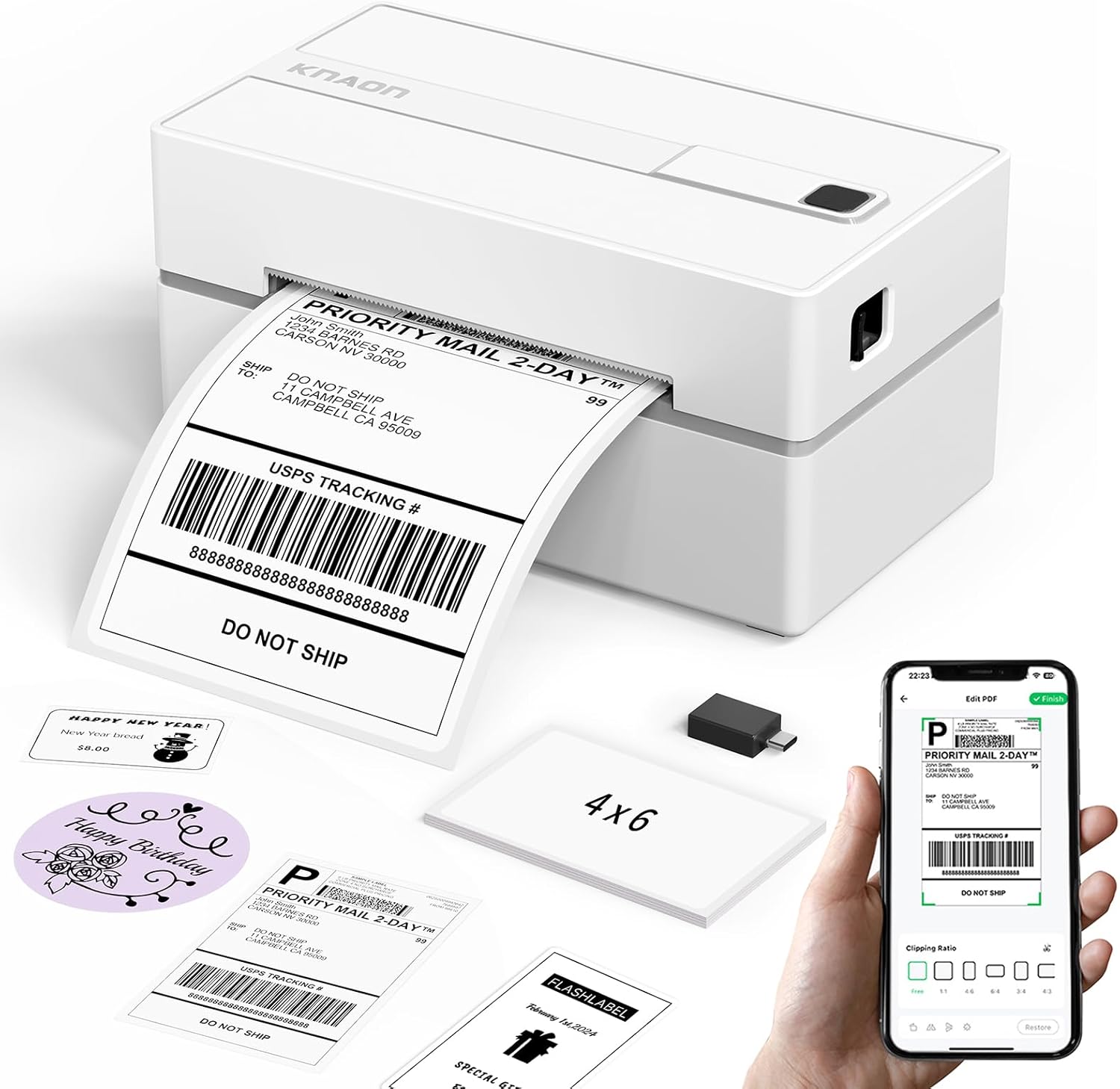
| Printer Type | Thermal |
|---|---|
| Maximum Print Resolution Black and White | 203 dpi |
| Printer Connectivity Type | Bluetooth |
| Maximum Media Size | 4.2 inches |
| B&W Pages per Minute | 60 pages_per_minute |
The KNAON Y813BT is a compact 4×6 thermal label printer built for simple shipping and labeling tasks. It connects by Bluetooth or USB and works with a dedicated FlashLabel Pro app for iPhone, Android, Windows, macOS and ChromeOS, letting you print saved PDF shipping labels or create custom tags from templates. The printer handles label widths up to about 4.2 inches and ships with sample labels and a USB cable and adapters for quick setup. At roughly 203 dpi resolution and a rated high printing speed, it delivers crisp black-and-white address and barcode labels for packing, inventory, or small retail uses without ink. The practical benefits are easy mobile printing, many built-in templates and icons for DIY labels, and a small footprint that fits tight workspaces. Limitations to note are that Bluetooth printing requires using the vendor app rather than native OS pairing, and advanced users may need to import platform PDFs rather than direct app integrations for some shipping services.
Best for: Buyers who want a low-risk, easy-to-set-up 4×6 label printer for occasional to moderate shipping, inventory, or retail labeling and prefer an app-driven workflow over complex drivers.
Less Ideal for: People who need deep platform-native integrations, direct printing from all web shipping services without PDF workarounds, or high-resolution color label printing should look elsewhere.
- Wireless Bluetooth and USB connectivity for phones and computers
- Supports standard 4×6 shipping labels and multiple thermal paper widths up to 4.2 inches
- Includes starter media, USB cable and adapters for quick out-of-box setup
- App provides thousands of templates, icons and fonts for DIY labels
- Compact, lightweight design suitable for small workspaces
- Bluetooth printing requires using the FlashLabel Pro app rather than native OS print dialogs
- No color printing or duplex capability since it is a monochrome thermal printer
Verdict: A compact, app-driven 4×6 thermal printer that delivers fast, reliable monochrome shipping and barcode labels with minimal setup for small businesses and home offices.
Choosing the Right 4X6 Thermal Label Maker: Key Factors to Consider
Print Speed & Throughput
How fast a label maker prints matters when you are processing many shipments or tagging inventory. Higher print speeds reduce bottlenecks at packing stations and keep workflows moving, especially during peak periods.
Throughput also includes how quickly the device wakes, how it handles consecutive jobs, and whether it supports batch printing. Consider the typical daily volume you expect and choose a machine with some headroom so it does not become a new constraint.
Media Compatibility
Not all 4×6 label makers handle the same media types. Some units only accept direct-thermal media, which is fine for short-term shipping labels but less durable for long-term storage. Others support thermal-transfer ribbons for more durable prints on coated or synthetic labels.
Also check supported adhesive types, core sizes, and whether the device accepts continuous or pre-perforated rolls. Media flexibility reduces the chance you must switch hardware when your labeling needs evolve.
Connectivity And Driver Support
Reliable connectivity is essential when printing from shipping software, inventory management systems, or multiple workstations. Look for devices with USB, Ethernet, and optional wireless support depending on your layout.
Driver availability for your operating system and compatibility with common label design or shipping platforms will minimize setup headaches. Machines with robust, well-documented drivers and network printing options scale better in multi-user environments.
Print Quality And Durability
Clear barcodes and legible text are nonnegotiable for scans and address readability. Evaluate resolution specifications and real-world print consistency to ensure barcodes scan reliably across different scanners and lighting conditions.
Thermal-transfer options and higher-resolution printheads are worth considering if labels will be exposed to moisture, abrasion, or long-term storage. Durable labels reduce reprints and failed scans during fulfillment.
Roll Capacity And Ease Of Loading
Roll capacity affects how often you need to change media. Larger-capacity spindles reduce downtime in busy operations. Equally important is the ease of loading rolls and swapping rolls quickly without tools or complex steps.
Look for intuitive roll paths, clearly marked guides, and features like media sensors or automatic calibration that speed up roll changes and reduce operator errors.
Maintenance And Long-Term Reliability
Consider how easy the unit is to clean and maintain. Accessible printheads, replaceable platen rollers, and clear maintenance procedures extend the useful life of a label maker and reduce service interruptions.
Assess expected duty cycle and build materials when choosing a model for frequent use. Durable mechanisms and straightforward maintenance are especially valuable in busy shipping or warehouse settings.
Choosing Between Direct-Thermal And Thermal-Transfer Printing
Direct-thermal printing uses heat-sensitive paper and eliminates the need for ink or ribbon. It is simple and cost-effective for short-term labels like shipping labels that do not need long-term durability. Direct-thermal is lighter on maintenance but labels can darken over time when exposed to heat or sunlight.
Thermal-transfer printing uses a ribbon to transfer ink onto the label surface and produces more durable prints that resist abrasion and environmental exposure. This method is better when labels must last in storage, handle chemicals, or remain scannable after rough handling. Thermal-transfer setups are slightly more complex and have ongoing ribbon costs.
- Pick direct-thermal for high-volume, short-lifespan shipping labels.
- Pick thermal-transfer for durable labels and harsh environments.
- Confirm your preferred media type is supported before buying.
Connectivity Options For Different Workflows
If your label printing is tied to a single workstation, USB connectivity is usually sufficient. For multi-user or networked packing stations, wired Ethernet provides stable, low-latency printing. Wireless connections add flexibility but check for network reliability and security.
Also consider device management features, such as remote firmware updates or web-based configuration, if you run multiple printers across locations. Good driver support for Windows and macOS, plus compatibility with common shipping platforms, simplifies integration.
- USB: Best for single-user setups.
- Ethernet: Best for stable, networked environments.
- Wi-Fi: Best for flexible station placement with proper network support.
Practical Label Design Tips For 4X6 Labels
The 4×6 format offers ample space for shipping addresses, barcodes, and tracking information. Use high-contrast fonts and barcodes sized to the scanner specifications to avoid misreads. Leave a small margin around critical elements to prevent truncation during cutting or peeling.
When designing labels for barcode scanning, follow barcode size and quiet zone guidelines. Include human-readable text for addresses and tracking numbers so people can manually read information when needed.
- Use sans-serif fonts and bold for important details.
- Place barcodes on a flat area of the label and preserve quiet zones.
- Test prints with your actual scanners before bulk printing.
Setting Up A Small Labeling Station
Arrange your label maker, roll storage, and packing supplies so rolls and labels are easy to access. A dedicated space for media storage helps prevent adhesive contamination and keeps rolls at the correct humidity. Consider a desktop stand or shelf that positions the printer near the packing table to reduce walking and handling time.
Label dispensers or peeler attachments can speed manual application when packing small batches. For higher throughput, look into automation or conveyor-fed applicators that integrate with the label printer.
- Keep spare rolls and ribbons within arm's reach.
- Use a peeler or dispenser for small-batch manual labeling.
- Consider integration options for high-volume operations.
Common Troubleshooting And Maintenance Tips
If labels skip or print with gaps, check the printhead for dust or adhesive buildup and clean it per manufacturer guidance. Ensure media sensors are aligned and that the correct media profile is selected in the printer settings. Regularly check platen rollers for wear and replace them when prints begin to smear or skip.
For networked printers, keep firmware updated and verify IP addresses after router changes. Maintain a small toolkit of spare parts like spare rollers and spare cores to minimize downtime during maintenance.
- Clean printhead regularly with recommended swabs and cleaners.
- Verify media type in driver settings to prevent print quality issues.
- Keep firmware up to date to address connectivity and bug fixes.
How We Chose the Best 4X6 Thermal Label Maker
We focused on criteria that matter for real-world label printing across shipping, warehousing, and small-business workflows. First, print speed and throughput were prioritized because high-volume users need devices that keep up with packing and fulfillment. Second, media compatibility and roll capacity were crucial so the devices can handle different 4×6 paper stocks, adhesive strengths, and longer runs without frequent roll changes. Third, connectivity and driver support were assessed to ensure reliable USB, network, or wireless printing from common shipping and inventory systems. Fourth, print quality and durability were weighed to ensure barcodes and text remain readable over time and through transit handling. Fifth, build quality and maintenance requirements were considered to estimate long-term ownership effort. We excluded models that only print smaller formats or that lacked consistent 4×6 support. We also filtered out units with poor driver support or limited media options likely to cause workflow friction. The resulting shortlist reflects devices that balance speed, reliable media handling, and practical connectivity for daily label printing needs.
Our full evaluation process is outlined in our review methodology.
FAQ
Can a 4×6 thermal label maker print other label sizes?
Many 4×6-focused machines can print smaller labels by changing media settings or using the appropriate roll width. However, confirm the device supports variable-width media and check the maximum and minimum print widths before relying on it for other sizes.
How long do direct-thermal 4×6 labels last?
Direct-thermal labels typically last months to a few years depending on storage conditions and exposure to heat or sunlight. For long-term durability or harsh conditions, thermal-transfer labels with ribbons are usually a better choice.
What should I check for when matching labels to a label maker?
Confirm the label width and core size the printer supports, adhesive type, and whether you need pre-perforated or continuous rolls. Also check whether the printer requires direct-thermal stock or supports thermal-transfer ribbons for more durable labels.
Is wired or wireless connectivity better for a shipping station?
Wired Ethernet offers more stable performance for busy shipping stations, while Wi-Fi provides placement flexibility. For mission-critical throughput, wired connections are usually preferred unless your wireless network is robust and well-managed.
How often should I perform maintenance on a label maker?
Light cleaning of the printhead and rollers every few weeks is common in moderate use scenarios. For heavy daily use, inspect and clean these parts weekly and perform deeper maintenance according to operational hours and the manufacturer's guidance.
Final Verdict
When choosing a 4×6 thermal label maker, prioritize the factors that will most affect your daily workflow: print speed for throughput, media compatibility for the label types you need, and connectivity for your setup. Balance print quality and durability against maintenance needs and operating costs. Decide whether direct-thermal simplicity or thermal-transfer durability better fits your use case, then choose a model with proven driver support and easy media handling. Those tradeoffs will guide you to a reliable label maker that reduces downtime and improves fulfillment accuracy.