
Note: This article contains affiliate links. If you click on these links and make a purchase, we may earn a small commission at no extra cost to you. This helps support our research and content. Read our full affiliate disclosure here.
When your network, entertainment center, or home office has dozens of cords, a Cable Label Maker can eliminate confusion and speed repairs. The right label maker produces durable, easy-to-read labels that stick to different cable jackets and survive handling. This guide presents seven shortlisted Cable Label Makers chosen for common home and small-office wiring tasks. We evaluated usability, print clarity, label material options, and adhesion so you can pick a tool that fits your workflow. Read on for practical buying factors and expert-minded tips before the product list.
Top Picks at a Glance
| Best Overall The best all-around choice for most situations | Brady M210 Label Printer |  |
| Best Quality Built to a higher standard if you want something more solid | Brother P-touch EDGE 510VP |  |
| Best Value The sweet spot between price and what you get | Brother P-touch Pro PTH111 |  |
| Best Budget The cheapest option that still gets the job done reliably | VolenGo H1100 Label Maker |  |
| Top Rated A top-rated pick with lots of positive feedback | NIIMBOT M2 Thermal Transfer Label Maker |  |
| Most Popular A crowd favorite that many people choose with confidence | SUPVAN E11 Label Maker |  |
| Best Seller A high-volume bestseller chosen again and again | VolenGo H1100 Label Maker |  |
Brady M210 Label Printer

| Printer Type | Thermal |
|---|---|
| Resolution | 203 x 203 dpi |
| Control Method | App |
| Built-In Media | Includes M21 nylon labels and accessories |
| Specific Uses For Product | Professional |
The Brady M210 Label Printer Kit is a rugged handheld thermal printer built for creating multi-line identification labels for wires, panels, circuit boards and other industrial uses. It prints monochrome labels at 203 dpi from a variety of Brady cartridges and materials, and the keypad plus backlit LCD make it usable in low-light jobsite conditions. The kit includes a rechargeable Li-ion battery, AC adapter, a sample M21 nylon label cartridge and a hard carrying case so the unit is ready for field work out of the box. Drop-resistant construction and rubber bumpers improve durability when moved between locations. Print speed is modest and optimized for label output rather than bulk document printing, and connectivity is primarily via a single USB port with app control rather than broad wireless options, so it is best suited to technicians who need portable, durable labeling rather than high-throughput or networked shop workflows.
Best for: Technicians and electricians who need a durable, ready-to-use portable label printer for clear wire, panel, and cable identification on jobsites.
Less Ideal for: Users who require high-volume desktop printing or extensive networked printing features should consider a bench or network label printer instead.
- Rugged, drop-tested design with molded rubber bumpers for jobsite durability
- Includes battery, AC adapter and hard case for immediate portable use
- Backlit LCD and full keypad enable on-device label creation in low light
- Supports 90+ cartridges and 12 material types for versatile industrial labeling
- Relatively slow print throughput compared with desktop label printers
- Limited connectivity options beyond a single USB port and app control
Verdict: A rugged, field-ready portable label printer kit that delivers reliable industrial cable and panel identification for technicians who value durability and on-device labeling.
Brother P-touch EDGE 510VP

| Maximum Media Size | 24mm |
|---|---|
| Paper Size | 24mm, 18mm, 12mm, 9mm, 6mm, 3.5mm |
| Maximum Print Resolution Black and White | 203 dpi |
| Printer Connectivity Type | USB |
| Battery | Rechargeable Li-ion battery |
The Brother P-touch EDGE 510VP is a rugged handheld thermal label printer built for industrial cable, patch panel, and faceplate labeling. It prints laminated tapes and heat-shrink tubes from 3.5mm up to 24mm using Brother TZe-compatible tapes and stores up to 99 label designs locally so templates and databases are available on site. Quick application keys and a patch-panel ruler speed common tasks like cable wrap, cable flag, and punch block labels, while the dual auto-cutter produces half-cut strips for easy peel-and-apply. USB-C connectivity lets you charge the unit and design labels in the P-Touch Editor on a PC, and the rechargeable Li-ion battery plus ambidextrous hand strap and utility ring make it comfortable to carry on long jobs. Print resolution is 203 dpi for crisp monochrome text and barcodes, but the unit lacks wireless connectivity, so workflows that rely on mobile Bluetooth printing will need a tethered laptop or cable. For heavy industrial labeling where durability and speed of application matter, this model focuses on reliable, professional results.
Best for: Technicians and installers who prioritize durable, on-site industrial labeling and need a handheld tool that speeds cable, patch panel, and faceplate work without relying on wireless networks.
Less Ideal for: Users who require mobile Bluetooth printing from phones or those who need the fastest desktop-style throughput for very high-volume printing.
- Prints laminated labels and heat-shrink tubes from 3.5mm to 24mm, covering common cable and patch-panel sizes
- Dual automatic cutter with half-cut function creates peel-and-apply strips for faster installation
- Local storage for templates and databases lets you print on site without a network connection
- USB-C connectivity and rechargeable Li-ion battery support tethered PC design and all-day field use
- Quick application keys and included patch panel ruler streamline common industrial labeling tasks
- No wireless/Bluetooth connectivity, requiring a wired connection or local templates for some workflows
- Relatively slow print throughput compared with desktop label printers at about 1.2 inches per second
Verdict: Choose the P-touch EDGE 510VP when you need a tough, handheld label maker that speeds cable and patch-panel labeling with durable laminated tapes and a dual auto-cutter.
Brother P-touch Pro PTH111

| Print Resolution | 180 x 180 dpi |
|---|---|
| Printer Type | Thermal |
| Print media | Labels |
| Printer Connectivity Type | USB |
| Built-In Media | Black on White Flexible ID Tape 12mm x 8m |
The Brother P-touch Pro PTH111 is a handheld thermal label printer designed for durable laminated labels used in electrical, workshop and general organization tasks. It prints monochrome labels from Brother TZe tapes in multiple widths and includes one-touch keys for cable wrap, cable flag, faceplate and serialize templates that speed common cable and panel labeling jobs. The LCD preview and touch controls let you see two-line layouts before printing, reducing wasted tape, and the unit ships with a 12mm black-on-white flexible ID tape and a wrist strap for easy portability. It runs on six AAA batteries or an AC adapter (sold separately), and USB connectivity supports simple wired connections. Limitations to consider are the basic 180 x 180 dpi resolution and monochrome output, which are fine for text and symbols but not for detailed graphics, and the reliance on proprietary TZe tapes that add ongoing consumable costs. For routine cable labeling and workshop use the PTH111 balances durability, portability and workflow-focused keys effectively.
Best for: Buyers who prioritize efficient, durable cable and panel identification and want a portable, workflow-oriented labeler to streamline organization and electrical labeling.
Less Ideal for: Users who need full-color labels, very high-resolution graphics, or want to avoid proprietary tape systems should consider other solutions.
- One-touch template keys for cable wrap, cable flag, faceplate and serialize speeds common electrical labeling tasks
- Durable laminated TZe tape output suitable for wires, panels and tool identification
- Portable lightweight design with wrist strap and battery or USB power options
- LCD preview and touch controls let you check two-line labels before printing to reduce errors
- Monochrome 180 x 180 dpi resolution limits fine graphic detail
- Uses proprietary TZe tapes, which require ongoing purchases
Verdict: A compact, purpose-built cable labeler that speeds and toughens electrical and workshop labeling with durable laminated TZe tapes.
VolenGo H1100 Label Maker
| Print Resolution | 203 DPI |
|---|---|
| Printer Connectivity Type | USB |
| Hardware Interface | USB Type C |
| Tape Width | 12mm |
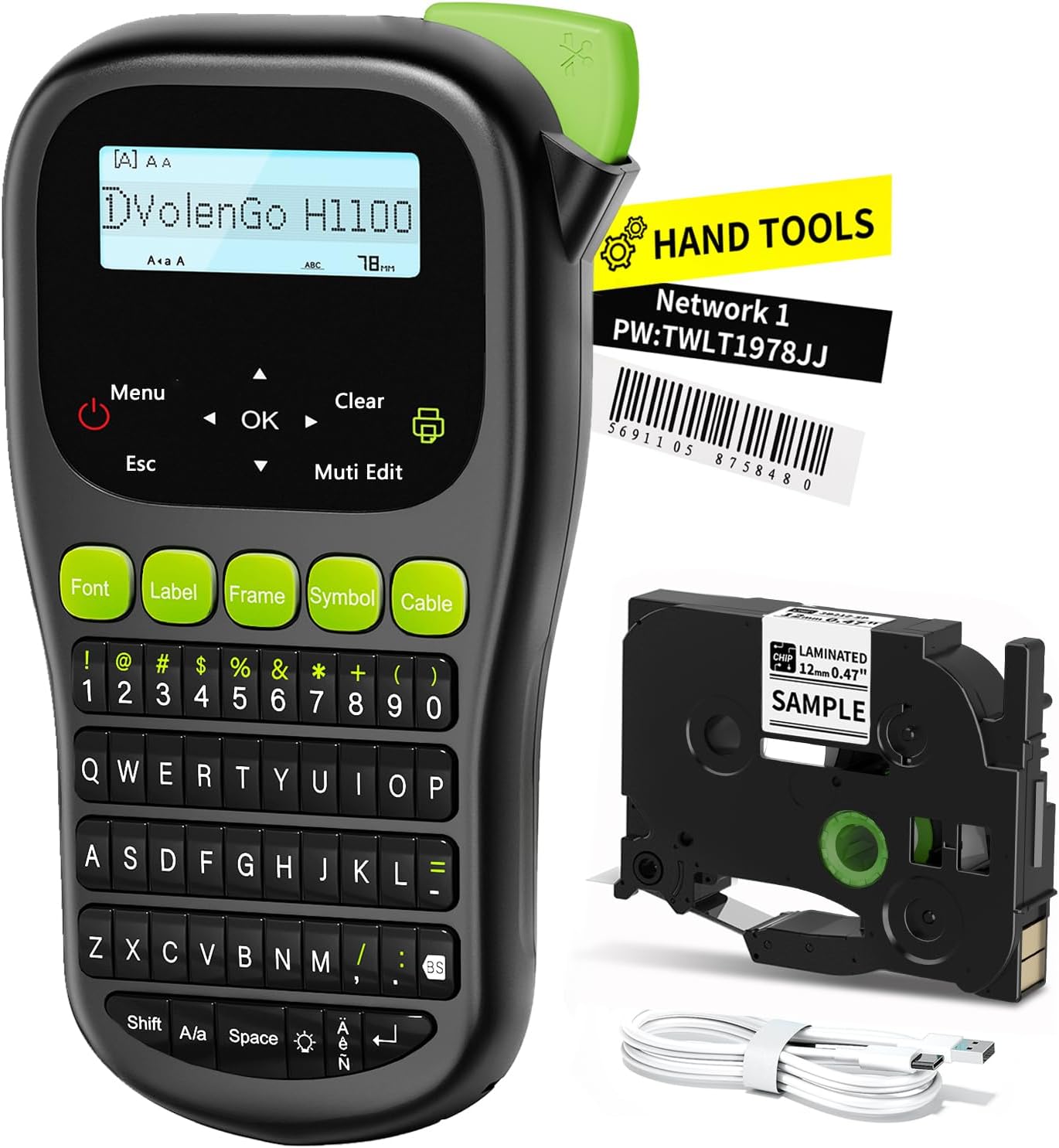
The VolenGo H1100 is a compact handheld label maker meant for everyday organization and cable labeling tasks. It prints on 12mm laminated waterproof tape and offers a backlit LCD and USB Type-C connectivity for recharging or firmware updates. The unit includes built-in tape, a cutter holder and a one-touch key for quick printing, plus multiple text tools such as 16 fonts, 100 frames and 800 symbols that make creating cable markers, pantry tags or classroom labels straightforward. Practical features for cable work include three cable modes and a narrow setting that reduces waste when printing many small labels, and laminated tapes resist water, oil and abrasion so markings stay legible. Limitations worth noting are basic monochrome output and simplex printing only, so it is strictly for simple text/symbol labels rather than color or graphic-rich needs, and the interface is menu-driven which can feel slower than smartphone apps for complex layouts. For budget buyers who need durable, no-frills cable and asset labeling, the H1100 delivers useful features at a modest level of complexity.
Best for: Buyers looking for an inexpensive, durable handheld labeler to tidy cables, pantry items, and basic office assets who prioritize durable laminated labels over advanced styling.
Less Ideal for: People who need full-color, graphic-rich labels or a mobile app workflow for heavy-duty professional labeling should look at higher-end models.
- Uses 12mm laminated waterproof tape that resists water, oil and abrasion
- Backlit LCD makes it usable in low-light spaces
- Three cable modes and narrow setting reduce tape waste for cable labeling
- Includes built-in tape, cutter holder and USB Type-C connectivity
- Prints only black-on-white monochrome labels with no color or graphic printing
- Menu-driven interface can be slower for complex label layouts compared with app-based labelers
Verdict: A budget-friendly handheld labeler with waterproof laminated tape and cable-focused features that makes quick, durable cable and asset labels without extra frills.
NIIMBOT M2 Thermal Transfer Label Maker

| Printer Type | Thermal Transfer Tech |
|---|---|
| Resolution | 300 x 300 |
| Maximum Media Size | 2 INCH |
| Printer Connectivity Type | Bluetooth, USB |
| Compatible Devices | Smartphones, PC |
The NIIMBOT M2 is a compact thermal transfer label maker built for durable labeling tasks like cable tagging, lab vials, asset IDs, and outdoor or freezer storage. It connects to iOS/Android devices over Bluetooth (supports multiple paired phones) or to a PC over USB and prints monochrome labels using a thermal transfer ribbon, which the manufacturer says yields waterproof, oil-proof, scratch-resistant labels rated for 8–10 years and able to withstand -4°F to 248°F. The 300 dpi resolution produces clear text, barcodes, and small icons, and the app supplies templates, logos, QR codes, and Excel import to speed batch labeling. Practical benefits include automatic label recognition, adaptive print density, and a 2-inch maximum media width with included tape and ribbon. Expect some mechanical noise during printing because the ribbon-and-label process is more active than direct thermal printing, and you must use M2-compatible thermal transfer labels and ribbons rather than standard thermal paper. Setup requires the app or PC driver but once configured the M2 is well suited to repeated cable and equipment labeling where longevity matters.
Best for: Buyers who prioritize durable, long-lasting cable and asset labels and need a portable printer that integrates with phones or a PC for batch and repeat labeling.
Less Ideal for: People who need color labels, silent operation, or who prefer printers that work with standard thermal paper should consider other label makers.
- Thermal transfer printing for waterproof, scratch and chemical-resistant labels rated for long storage life
- 300 dpi resolution produces sharp text, barcodes and small graphics
- Bluetooth and USB connectivity for smartphone and PC workflows
- App templates, Excel import, and auto label recognition speed batch and repeat labeling tasks
- Requires M2-series thermal transfer labels and ribbons, not compatible with standard thermal paper
- Printing produces noticeable mechanical noise compared with direct thermal printers
Verdict: Choose the M2 when you need a portable label maker that produces high-resolution, fade-resistant cable and equipment labels built to last.
SUPVAN E11 Label Maker

| Printer Type | Thermal |
|---|---|
| Resolution | 203 dpi |
| Connectivity | Bluetooth |
| Power | 1200 mAh rechargeable battery |
| Printer Output Type | Monochrome |
The SUPVAN E11 is a small handheld thermal label printer that offers two ways to create labels: the built-in keyboard for quick on-device printing and a Bluetooth-linked smartphone app for more customized designs. It is typically used for cable and electronics labeling, pantry and storage organization, and light office tasks thanks to laminated, waterproof tapes that resist oil and abrasion. Notable features include a rechargeable 1200 mAh battery for extended portable use, a USB-C port for charging, and app tools that provide 30+ fonts, 50+ frames and over 660 icons plus barcode/QR support. The E11 prints at 203 dpi and supports both continuous and die-cut E series tapes, and its minimal 0.2 inch margin saves tape when you need long labels for cable runs. Limitations: it uses SUPVAN E-series cartridges only and the monochrome thermal output means no color printing, so it is focused on durable functional labels rather than decorative multicolor tags.
Best for: Buyers who want a reliable, portable labeler for cable runs and home or small-office organization and who value app-driven templates plus a hardware keyboard for quick labels.
Less Ideal for: Those who need multicolor or decorative labels, or who prefer open tape compatibility and third-party cartridges for lower cost per foot.
- Two input modes: built-in keyboard for fast single labels and Bluetooth app for customized templates
- Rechargeable 1200 mAh battery and USB-C charging for portable, on-the-go use
- Prints laminated waterproof labels suitable for cable, pantry, and tool organization
- Minimal 0.2 inch margin reduces tape waste for long labels
- App offers many fonts, frames and 660+ icons including barcode and QR support
- Accepts only genuine SUPVAN E-series tapes, limiting tape sourcing options
- Monochrome thermal printing with no color output
Verdict: A compact, rechargeable thermal label maker that pairs keyboard speed with a flexible Bluetooth app, making it a strong pick for tidy, durable cable and small-office labeling.
VolenGo H1100 Label Maker
| Print Resolution | 203 DPI |
|---|---|
| Tape width | 12mm |
| Connectivity | USB Type C |
| Power | 6 AAA or USB‑C |
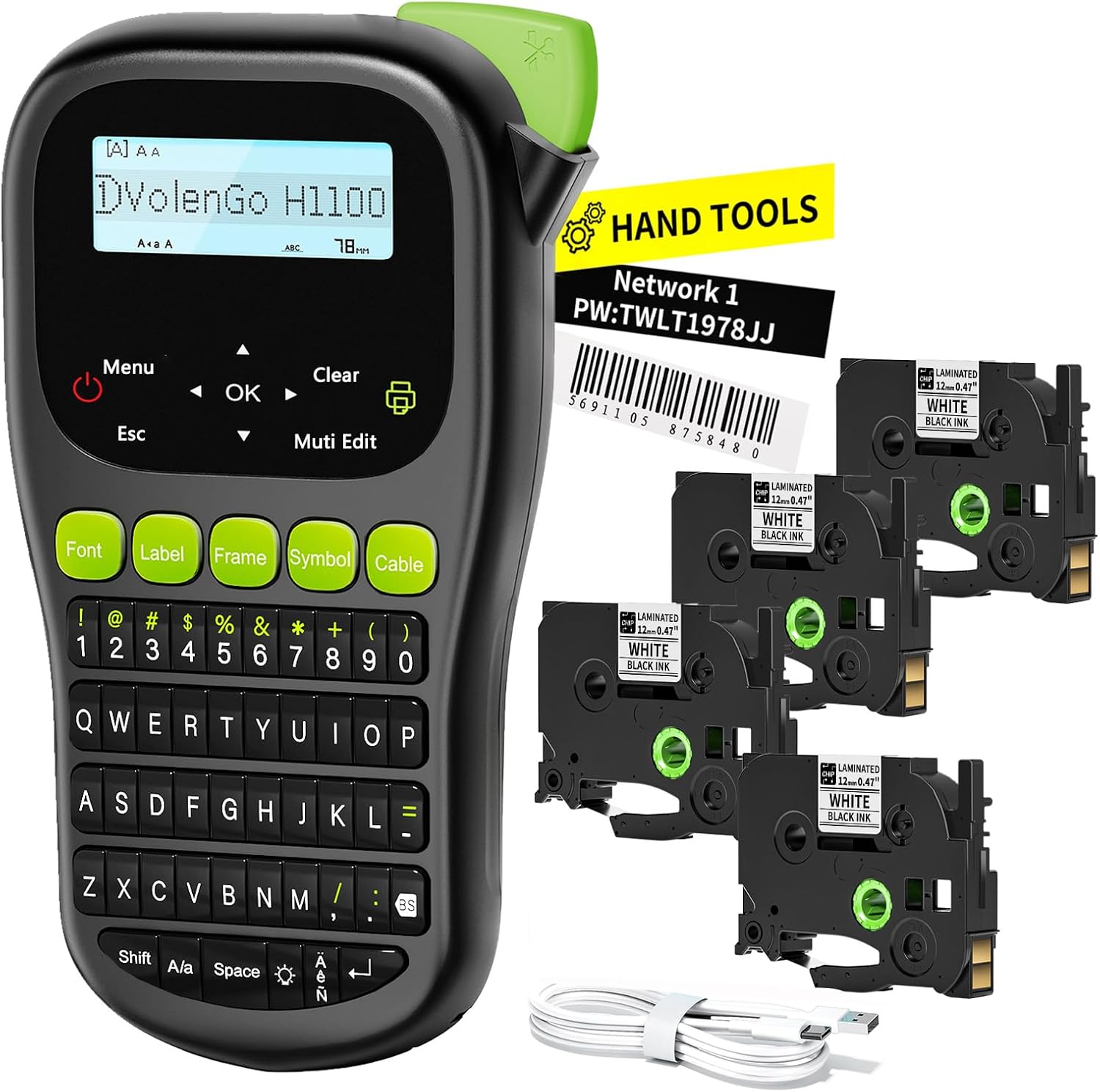
The VolenGo H1100 is a compact handheld labeler designed for everyday cable and office organization. It prints monochrome, laminated 12mm labels at a 203 DPI resolution and offers a backlit LCD that makes composing text easy in dim workspaces. The unit supports three cable modes for wrapping wire labels, and the included waterproof laminated tapes resist water, oil, abrasion, and fading—useful for labeling network runs, power cords, and home AV setups. Setup is straightforward: load a tape, type on the push-button controller, and print either on battery power (six AAA cells) or via the included USB‑C cable. There are useful formatting options—multiple fonts, frames, and symbols—and the small footprint keeps it handy on a workbench or desk. Limits to expect are basic connectivity and print output: it is a print-only, monochrome device without advanced PC or Bluetooth editing, and tape width is limited to the 12mm media that ships with the unit. For buyers who want a simple, reliable cable labeler, the H1100 covers the essentials well.
Best for: Buyers who want a low-risk, easy-to-use cable labeler for home or small office tasks and prefer a ready-to-run handheld unit with durable, waterproof labels.
Less Ideal for: Users who need multi-width tape support, color printing, or computer/Bluetooth integration for complex label templates should look elsewhere.
- Waterproof laminated tapes that resist oil, abrasion, and fading
- Backlit LCD for easy use in low-light conditions
- Three cable modes for neat wire and cable labeling
- Includes four 12mm tapes and a USB‑C cable out of the box
- No Bluetooth or PC app connectivity for advanced label design
- Prints only monochrome labels and only on 12mm media
Verdict: A straightforward, durable handheld labeler that reliably produces waterproof cable labels with minimal setup.
Choosing the Right Cable Label Maker: Key Factors to Consider
Print Legibility and Font Sizes
Legibility is the primary purpose of a Cable Label Maker. Small font sizes are often required for thin cables and tight spaces. Evaluate how crisp characters look at the smallest supported size and whether the device offers bold, condensed, or monospaced options to improve readability.
Consistent spacing and clear contrast between text and background reduce misreads in dim equipment racks or near power LEDs. Label templates that include icons or separators can further clarify meaning without relying solely on long text.
Label Material and Finish
Label materials range from paper-style tapes to laminated plastic and heat-shrink sleeves. Paper tapes are fine for temporary runs but wear quickly under abrasion. Laminated tapes resist abrasion, moisture, and fading and are usually best for long-term cable identification.
Heat-shrink labels are ideal when you need a permanent, snug fit on round cables and require marking right at the jacket. Check whether the label maker supports different widths and finishes so you can match the material to the cable environment and expected handling.
Adhesion and Environmental Resistance
Good adhesion prevents labels from peeling off bundled or warm cables. Adhesive chemistry matters: some tapes lose grip on braided or oily cable jackets. Look for tapes rated for varied surfaces and temperature ranges if cables live in warm electronics racks or outdoor enclosures.
Environmental resistance covers water, oils, solvents, and UV exposure. If cables will be handled frequently or run outdoors, choose materials and adhesives specified for the expected stresses to avoid relabeling later.
Ease of Use and Workflow
A label maker should speed your workflow, not slow it. Consider input methods: built-in keyboards and screens are quick for ad hoc labels, while mobile apps or desktop software help with batch jobs and templates. Check how the device handles text entry, special characters, and label preview before printing.
Also note tape loading, cutter quality, and how the unit handles alignment and margins. Fast, reliable cutting and easy tape replacement matter when you need a large number of labels at once.
Connectivity and Batch Printing
Batch printing is essential for labeling many cables consistently. Devices that accept CSV or support app-based templates can export a list of labels and print them in sequence, saving time on projects like rack builds. Wireless connectivity enables quick edits from a phone stationed near the work area.
If you often replicate label sets across multiple devices, prefer models with reliable file import and template saving. Also consider whether the device retains label memory for repeated projects.
Label Widths and Compatibility With Cable Types
Cables vary from very thin patch cords to thick power lines. A good Cable Label Maker should support multiple tape widths and, when applicable, heat-shrink sizes so labels fit cleanly without obscuring connectors. Narrow tapes work well for dense bundles, while wider tapes provide room for more descriptive text.
Confirm compatibility between label widths and the cable diameters you use most often to prevent oversized labels that snag or tiny labels that are unreadable.
When to Use Heat-Shrink Labels
Heat-shrink labels provide a permanent, snug marking on round cables and are the best option when labels must stay in place under heavy handling. They slide over the cable, print pre-shrink, and then are heated to form a tight sleeve that resists peeling and twisting.
Use heat-shrink for critical connections or where a low-profile label is needed directly on the jacket. Remember that application requires a small heat source and a bit more time per label compared with adhesive tapes.
- Ideal for round power and signal cables
- Provides permanent, tamper-resistant labeling
- Requires heat application after placement
Setting Up Label Templates for Racks and Panels
Templates save time and keep labeling standardized across racks and patch panels. Create concise templates that include rack unit, port number, and device role to minimize the text you need to print for each cable.
Use consistent delimiters and abbreviations so anyone reading the labels understands the scheme. If the device supports importing CSV files, prepare spreadsheets that map ports to label text for fast batch printing.
- Use short standardized abbreviations
- Include essential info only to keep labels readable
- Leverage CSV import for large patch panel jobs
Tape Width Selection and Placement Best Practices
Choose tape widths that match the cable diameter and expected viewing distance. Narrow tapes fit in dense bundles but restrict characters; wider tapes allow for more readable text and icons. Consider trimming label edges for a cleaner fit on small cables.
Place labels where they are visible but not prone to friction against other cables or equipment. For patch cords, label near the connector boot or use both ends for identification in long runs.
- Match tape width to cable diameter
- Label near the connector for patch cords
- Avoid placing labels where abrasion occurs
Maintaining Consistency Across Multiple Installations
Consistency matters when teams manage multiple rooms or sites. Standardize label templates, color coding, and abbreviation lists so everyone interprets markings the same way. Keep a single source of truth for naming conventions to reduce confusion.
Document your scheme and store common templates on the label maker or associated software so new jobs reuse the same standards.
- Standardize templates and colors
- Document abbreviation rules in a shared file
- Save templates for repeatability
Troubleshooting Common Labeling Problems
If labels fail to adhere, check the cable surface for dust, oil, or silicone and clean with isopropyl alcohol before applying. For braided or textured jackets, laminated tapes or heat-shrink sleeves typically work better than standard paper tapes.
Faded printing usually indicates low-contrast tape or worn print heads. Replace consumables as recommended and store spare tapes in a cool, dry place to preserve adhesive performance.
- Clean cable jackets before applying labels
- Use laminated or heat-shrink for textured cables
- Replace worn print heads and store tapes properly
How We Chose the Best Cable Label Maker
We focused on tools that make cable identification quick, long-lasting, and practical for home and small-office wiring. Selection prioritized devices that print clearly at small font sizes, support durable label materials, and offer adhesive formulations that bond well to common jacket materials like PVC and braided sleeving. Usability mattered: we favored models with straightforward input methods, reliable character spacing, and sensible template options for common labeling needs such as port numbers, device names, and color codes. We also evaluated label longevity attributes including weather resistance, abrasion resistance, and whether laminated or heat-shrink options were available. Connectivity and workflow integration were considered when present, such as mobile app support or convenient file import for batch printing. We excluded devices intended solely for office paper labeling or industrial heavy machinery where cable labeling is a minor use case. Final picks balance print quality, material versatility, and ease of regular use.
Our full evaluation process is outlined in our review methodology.
FAQ
Can I use general-purpose label tapes on all cable types?
General-purpose tapes work on many smooth-jacket cables but may underperform on braided or oily surfaces. For textured or outdoor cables, choose laminated tapes or heat-shrink sleeves rated for those materials.
Is a desktop software connection necessary for home use?
Not always. Built-in keyboards and displays are often sufficient for occasional home jobs. Desktop software or mobile apps become useful when you need batch printing, templates, or CSV imports for larger projects.
How durable are printed labels under frequent handling?
Durability depends on tape material and adhesion. Laminated tapes and heat-shrink sleeves are much more resistant to abrasion and oils than paper-style tapes, so they last longer under frequent handling.
Do heat-shrink labels require special tools?
They require a heat source to shrink the sleeve, such as a heat gun or hot-air tool. Careful application avoids damaging nearby insulation or connectors.
How should I store unused label tapes?
Store tapes in a cool, dry place away from direct sunlight and high humidity. Proper storage preserves the adhesive and prevents premature degradation of the tape backing.
Final Verdict
Prioritize legibility, durable materials, and the right tape widths when choosing a Cable Label Maker. If you label cables frequently or work on racks and patch panels, favor models that support batch printing and laminated or heat-shrink options. For occasional home use, ease of use and straightforward tape replacement may matter most. Balance the tradeoffs between permanence and convenience: laminated and heat-shrink labels last longer but need more setup, while paper-style tapes are quick for temporary needs. Focus on the factors that match how often you label and the environments your cables live in to choose confidently.