
Note: This article contains affiliate links. If you click on these links and make a purchase, we may earn a small commission at no extra cost to you. This helps support our research and content. Read our full affiliate disclosure here.
If you run a small business, neat, consistent labeling can make inventory, shipping, and customer-facing packaging look more professional. A color label maker for small businesses streamlines those tasks by producing clear, durable labels on demand without relying on external print runs. This guide covers seven shortlisted options that suit different workflows and volumes, from occasional countertop labeling to continuous backroom use. We evaluated each pick for print quality, speed, and ease of integration with common small-business tools. Read on to find the features that match your daily labeling needs and the tradeoffs to expect.
Top Picks at a Glance
| Best Overall The best all-around choice for most situations | Brother ColAura VC500W |  |
| Best Quality Built to a higher standard if you want something more solid | Primera LX500 Color Label Printer |  |
| Best Value The sweet spot between price and what you get | NIIMBOT B1 Pro Label Maker |  |
| Best Budget The cheapest option that still gets the job done reliably | MUNBYN FM226 Label Printer |  |
| Top Rated A top-rated pick with lots of positive feedback | NIIMBOT M2 Label Maker |  |
| Most Popular A crowd favorite that many people choose with confidence | Brother P-Touch Cube PTP300BT |  |
| Best Seller A high-volume bestseller chosen again and again | Liene PixCut S1 DHP700 |  |
Brother ColAura VC500W

| Print media | Labels |
|---|---|
| Maximum Media Size | 3 x 5 inch |
| Maximum print Resolution Color | 313 dpi |
| Printer Connectivity Type | Wi-Fi |
| Color Pages per Minute | 1 |
The VC500W is a small, networked color label and photo printer aimed at creative projects and light business labeling. It prints full-color adhesive-backed labels and photos using ZINK Zero Ink paper, so you never need ink cartridges, ribbons, or toner; that makes setup and supply management simpler for small operations. You create and send designs from Brother's Color Label Editor 2 app or AirPrint-enabled apps on mobile devices, and the built-in cutter offers half or full cuts for custom lengths up to 17 inches. Connectivity includes wireless direct printing and a USB port for desktop use, and the unit ships with starter rolls and a cleaning cassette so you can start right away. Print speed is modest at about one color page per minute, and resolution is 313 dpi, which is fine for labels, tags, and photos for display but not for high‑end photo proofing. The VC500W is compact and easy to use, but ongoing costs depend on proprietary ZINK rolls and the adhesive-backed paper sizes you need.
Best for: Small business owners and makers who value easy, full-color label and sticker printing from mobile devices for packaging, events, and merchandising.
Less Ideal for: Businesses that need fast, high-volume production or photo-lab quality prints should consider a different color printer or a dedicated production service.
- Zero-ink ZINK printing eliminates cartridges and simplifies maintenance
- Wireless direct printing and AirPrint support for mobile-first workflows
- Built-in cutter for custom-length adhesive labels up to 17 inches
- Includes starter paper rolls and a cleaning cassette to get started out of the box
- Print speed is slow at roughly one color page per minute
- Uses proprietary ZINK rolls so supply choices are limited
Verdict: Choose the VC500W if you want a simple, zero-ink color label printer that makes mobile-friendly, adhesive-backed labels and stickers with minimal setup.
Primera LX500 Color Label Printer

| Printer Type | Inkjet |
|---|---|
| Maximum print Resolution Color | 4800×1200 dpi |
| Maximum Media Size | 4" x 24" |
| Compatible Cartridge | Single tri-color dye Ink cartridge |
| Printer Connectivity Type | USB |
The Primera LX500 is a desktop roll-fed color label printer aimed at small businesses that need short to medium runs of high-quality labels. It uses a single tri-color dye ink cartridge and prints up to 4800 x 1200 dpi, producing photo-quality labels in 16.7 million colors and handling media from 0.5" square up to 4" x 24". The unit includes a starter roll of labels, a USB 2.0 cable, and a built-in cutter for finished rolls, and it is controlled via supplied drivers and design software for Windows and Mac. Connectivity is USB-based and the printer has app control and push-button operation for basic tasks. Practical benefits include excellent image detail for product, retail, or promotional labels and the convenience of a cutter so output is ready for application. Limitations for performance-focused buyers include reliance on a single dye cartridge that can increase running costs for heavy color use and USB-only connectivity which restricts networked workflows compared with dedicated Ethernet or robust wireless options.
Best for: Small business owners and makers who need high-resolution, full-color labels for product packaging, retail, or short-run promotional work and prioritize print quality over networked fleet management.
Less Ideal for: Operations that require centralized network printing, high-volume continuous throughput, or the lowest possible per-label ink cost should consider production-grade or networked label systems instead.
- High print resolution up to 4800 x 1200 dpi for photo-quality color labels
- Built-in cutter allows roll-fed output to be trimmed cleanly without extra tools
- Accepts a wide range of roll media sizes from 0.5" x 0.5" up to 4" x 24"
- Includes starter labels, ink, and vendor software for immediate use
- USB-only connectivity limits shared/networked printing in busy shops
- Uses a single dye-based tri-color cartridge which can raise ink costs under heavy color printing
Verdict: Choose the LX500 when you need compact, photo-quality color labels with a built-in cutter for short to medium runs where print quality is the top priority.
NIIMBOT B1 Pro Label Maker
| Printer Type | Thermal |
|---|---|
| Print Resolution | 300 dots_per_inch |
| Printer Connectivity Type | Bluetooth |
| Duplex | Automatic |
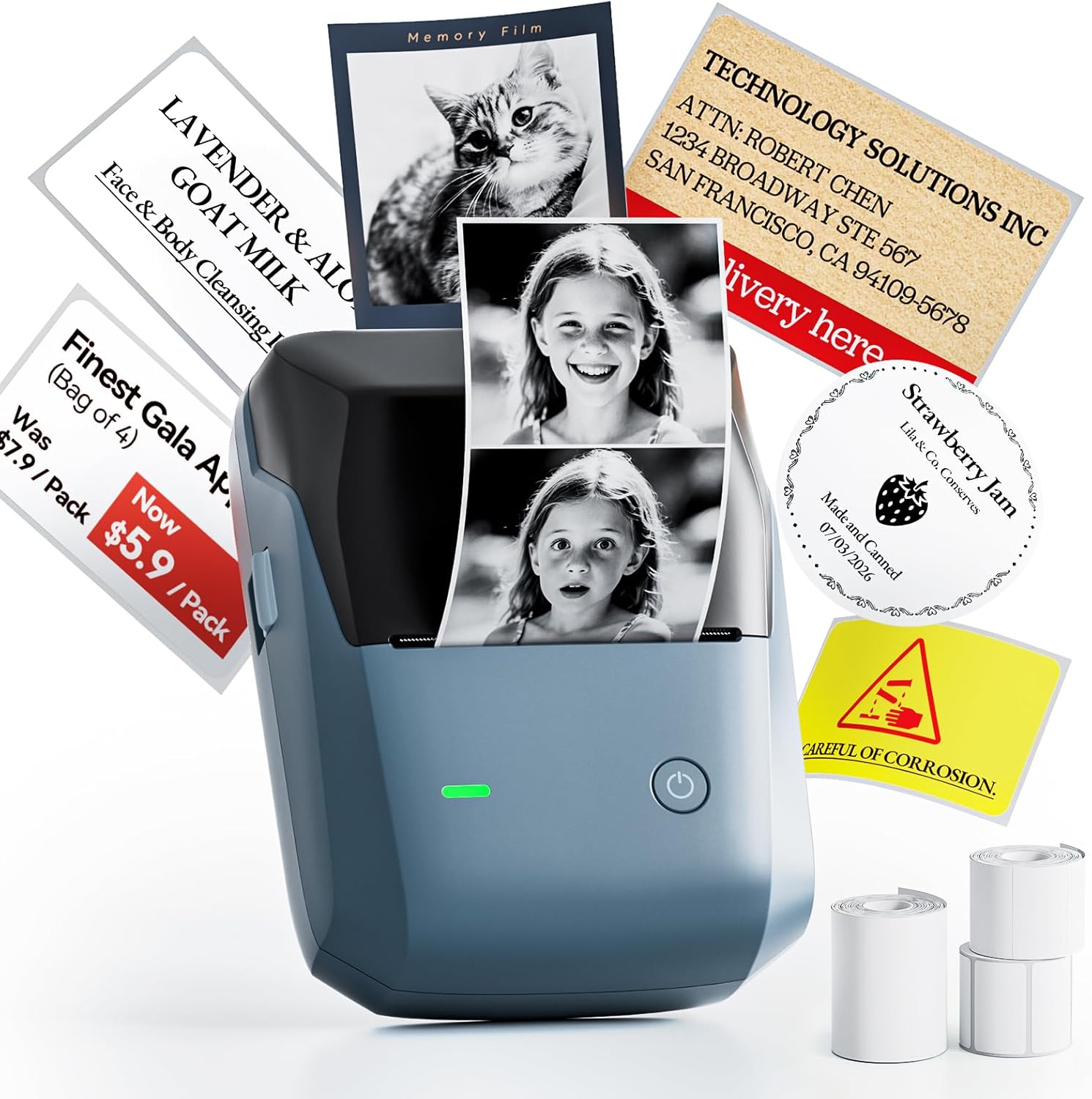
The NIIMBOT B1 Pro is a portable thermal label printer built for crisp, small-format labels and light commercial use. It prints at 300 DPI, so text, small barcodes and grayscale images come out noticeably sharper than lower-resolution desktop label makers, and it also supports red-and-black dual-color labels for price tags or emphasis. Bluetooth connectivity lets multiple phones and a PC connect simultaneously, which is handy for a small shop or team that needs to print from different devices. The unit is sold as a kit with three label rolls that cover common sizes for tags, asset marking and photo-style stickers. Because it is thermal, there are no inks to replace, though specialty photo and red/black media are separate purchases. The printer is compact and portable, making it easy to move around a counter or take to events, but it is optimized for small media widths so it is not intended for very large-format printing. For businesses that need crisp, photo-capable and dual-color labels from mobile devices, the B1 Pro is a practical, compact option.
Best for: Small business owners and shop staff who prioritize crisp, mobile-friendly labels and need a compact device for pricing, asset tags and product stickers.
Less Ideal for: Teams that require large-format labels, high-volume industrial printing, or an all-in-one desktop printer with wide media support should look elsewhere.
- High 300 DPI thermal resolution produces sharp small text and grayscale images
- Supports red-and-black dual-color labels for emphasis and pricing
- Bluetooth allows multiple devices to connect simultaneously (iOS, Android, Windows)
- Includes three preselected label rolls for common retail and labeling tasks
- Thermal printing requires no ink cartridges
- Specialty media for photo and dual-color printing must be purchased separately
- Limited to small label widths and not suitable for large-format printing
Verdict: Choose the B1 Pro when you need a compact, 300 DPI mobile label printer that delivers crisp text and supports dual-color tags for small-business retail and organization.
MUNBYN FM226 Label Printer

| Printer Type | Thermal |
|---|---|
| Connectivity | Bluetooth |
| Resolution | 203 x 203 dpi |
| Paper Size | 50mm*50mm |
The MUNBYN FM226 is a portable thermal label printer aimed at small businesses and home organizers that need quick, low-cost labeling. It connects over Bluetooth to phones, tablets, and computers and uses a dedicated app for design, templates, icons and PDF/batch printing, so you can print price tags, barcodes, product stickers and expiration labels without a PC driver. The unit supports multi-size labels from about 0.8 to 2 inches and an upgraded auto-center alignment helps reduce crooked prints and wasted labels. Dual-color capability (red/black or blue/black) adds visual emphasis for pricing or warnings but requires MUNBYN dual-color thermal labels to work. Print quality is standard thermal 203 dpi, which is fine for barcodes and text but not for high-detail graphics. Battery life and exact duty cycle are not specified, so heavy continuous shipping-label workloads are not its target. For budget-minded small businesses that want color accents and easy mobile printing, it offers strong value; for high-volume or full-color photo needs look elsewhere.
Best for: Small-business owners and budget-focused sellers who need a portable, app-driven label printer for price tags, product labels, and barcode stickers with occasional color accents.
Less Ideal for: Businesses that need full-color graphics, 4×6 shipping labels, or a high-volume industrial printer should consider other solutions tailored to those workloads.
- Bluetooth app control with template library and PDF/batch printing for quick mobile or browser workflows
- Dual-color thermal printing option for red/black or blue/black accents
- Auto-center alignment to reduce crooked prints and label waste
- Supports a range of label widths from about 20 mm to 50 mm for versatile small-business uses
- Dual-color printing requires proprietary MUNBYN two-color labels
- 203 dpi thermal resolution limits fine-detail or photo-quality printing
- Not compatible with 4×6 shipping labels and not designed for very high-volume industrial printing
Verdict: An affordable, mobile-friendly thermal label printer that delivers practical dual-color accents and easy batch printing for small-business labeling needs.
NIIMBOT M2 Label Maker

| Printer Type | Thermal |
|---|---|
| Resolution | 300 x 300 dpi |
| Maximum Media Size | 2inch |
| Printer Connectivity Type | Bluetooth |
| Hardware Interface | USB |
The NIIMBOT M2 is a compact thermal transfer label maker built for small businesses that need durable, high-resolution color and black labels. It uses ribbon plus label rolls to produce 300 DPI prints that resist water, oil, alcohol, fading and extreme temperatures, so labels last in refrigeration, outdoor or lab conditions. Setup and design are handled through the NIIMBOT app over Bluetooth for phones, with an option to connect to a Windows PC by USB when you need driver-based editing or batch imports. The printer intelligently recognizes label width from 20 to 50 mm, supports barcode and QR code printing, and offers automatic rewind and density adjustment to reduce wasted tape. The M2 ships with a black ribbon and one label roll but requires buying colored ribbons separately for color work, and it demands M2-series thermal transfer label rolls for best results. It is rechargeable and portable, but using thermal transfer consumables adds ongoing cost and requires occasional print-head cleaning to maintain peak quality.
Best for: Small businesses and labs that prioritize durable, professional-looking labels for refrigerated, outdoor, or long-term storage and want a compact printer that connects to phones or a PC for quick template-based printing.
Less Ideal for: Casual home users who only need occasional basic labels or buyers looking for a zero-consumables inkless solution, since thermal transfer requires ribbons and specific label rolls.
- 300 DPI thermal transfer printing yields clear, long-lasting labels that resist water, oil and fading
- Supports color ribbon printing for multi-color labels and standard black ribbon for high-contrast text
- Bluetooth mobile app plus USB connection to PC for flexible editing and batch printing
- Automatic label width recognition and adaptive print density reduce wasted tape
- Requires proprietary M2-series label rolls and separate color ribbons, raising consumable cost
- Color ribbons are sold separately so full color capability is not ready out of the box
Verdict: Choose the M2 when you need high-resolution, weatherproof color and black labels that will reliably last in harsh or refrigerated small-business environments.
Brother P-Touch Cube PTP300BT

| Printer Type | Thermal |
|---|---|
| Printer Connectivity Type | Bluetooth |
| Maximum print Resolution Color | 180 dpi |
| Maximum Media Size | 3 x 5 inch |
| Built-In Media | Starter TZe 12mm tape, AC adapter |
The Brother P-Touch Cube PTP300BT is a small thermal label printer that pairs over Bluetooth with the free Design&Print2 smartphone app so you can design and print color labels from an iPhone or Android device. It uses Brother P-touch TZe laminated tapes up to 12 mm wide and offers a wide range of templates, symbols, frames and fonts, which makes creating consistent, branded labels quick for shipping, product tags, storage bins and office organization. Setup is straightforward through the app and the device is powered from the included AC adapter; the starter tape is included in the box. Print resolution and speed are modest — 180 dpi and slower color throughput compared with full-size desktop label printers — so it is best for short runs and clear, attractive small-format labels rather than high-volume batch printing. The compact footprint and smartphone control make it easy to keep on a counter or a packing station, but buyers who need faster or wider industrial labeling should look elsewhere.
Best for: Small business owners who need a compact, easy-to-use label maker to produce branded, durable color labels for low- to moderate-volume tasks and on-demand printing from a phone.
Less Ideal for: Businesses that require fast, high-volume production, wider labels, or industrial-grade throughput should consider larger desktop or industrial label printers instead.
- Bluetooth smartphone app control for on-the-go label design
- Supports color and laminated Brother TZe tapes up to 12 mm for durable, professional-looking labels
- Includes starter tape and AC adapter for quick setup
- Compact, lightweight design that fits on counters and packing stations
- 180 dpi resolution and modest color print speed limit output detail and throughput
- Maximum tape width 12 mm restricts label size for larger packaging or signage
Verdict: A compact Bluetooth label maker that delivers durable, full-color small-format labels from your smartphone, ideal for small businesses needing on-demand, branded labeling.
Liene PixCut S1 DHP700

| Printer Type | Thermal Dye Sublimation |
|---|---|
| Maximum print Resolution Color | 300 dpi |
| Maximum Media Size | 4×7 inches |
| Printer Connectivity Type | Bluetooth |
The Liene PixCut S1 combines a 300 dpi thermal dye-sublimation photo printer with an integrated cutting system to produce laminated, durable stickers and labels from your phone or tablet via Bluetooth. Designed for small creative projects, it uses Liene 4×6 and 4×7 photo and sticker papers and an app that handles AI image extraction, template editing, and one-step print-and-cut jobs in roughly two minutes per sheet. The bundled cartridge and sheets let you start quickly and the four-layer dye-sublimation process yields waterproof, scratch-resistant outputs suitable for long-lasting labels or product stickers. Practical benefits include a simple mobile workflow, precise contour cutting for custom shapes, and no subscription access to a large template library. Important limitations are the slow throughput at about one page per minute, a single small media size (4×6/4×7), and a dependence on brand-specific paper and ink cartridges for guaranteed results, which raises ongoing consumables considerations for business use. For risk-averse buyers the straightforward setup and integrated app reduce complexity, but volume labeling needs or larger formats will require a different solution.
Best for: Small-business owners or makers who need a simple, low-risk way to produce high-quality custom stickers and labels on demand and value ease of setup and app-driven design.
Less Ideal for: Businesses that need large-format labels, high daily volumes, or full-scale production workflows should look at higher-capacity label printers and cutters.
- Prints and die-cuts in a single integrated workflow for ready-to-use stickers
- Thermal dye-sublimation with automatic lamination produces waterproof, scratch-resistant outputs
- App control with AI image extraction and large template library for easy design
- Compact footprint with starter media and cartridge included to begin producing immediately
- Supports only small media sizes (4×6 and 4×7) which limits label dimensions
- Low throughput at about one page per minute makes it unsuitable for high-volume runs
- Requires Liene-brand paper and cartridges for optimal results, adding ongoing consumable dependency
Verdict: A reliable, easy-to-use all-in-one sticker printer and cutter for small businesses that need high-quality, durable custom labels in small batches.
Choosing the Right Color Label Maker for Small Businesses: Key Factors to Consider
Print Quality and Color Accuracy
High print quality ensures text and small barcodes remain readable and that brand colors look consistent across labels. For small businesses that use labels on packaging, shelves, or product tags, slight color shifts can undermine brand presentation or obscure important information. Consider devices that offer fine resolution and predictable color profiles. If you need exact color matching, look for printers with software support for color calibration or the ability to work with common color spaces.
Color accuracy also affects scanning reliability when labels include QR codes or small barcodes. Blurred edges or low contrast can lead to scanning errors during packing or at point of sale. If your labels include small fonts or packed layouts, prioritize machines with higher DPI settings and sharp text rendering.
Print Speed and Production Throughput
Speed matters when you produce labels in batches for restocking, shipping, or events. A printer that is fast on single labels but slows with longer runs can create workflow pinch points. Evaluate both per-label print time and continuous throughput for sessions of dozens or hundreds of labels.
Also consider warm-up time and how the device handles queued jobs. Some color label makers pause between jobs to process color data or to feed media, which increases total run time. If you regularly print large batches, choose a device designed for sustained output rather than occasional single-sheet use.
Connectivity and Workflow Integration
Small-business labeling often relies on templates pulled from spreadsheets, inventory systems, or design files. Look for label makers that support the interfaces and file types you use, such as CSV import, direct printing from a computer or mobile device, or integration with common label-design apps. Wireless connectivity can free you from locating the device near a workstation, while USB or wired Ethernet provides stable connections for high-volume stations.
Also check whether the manufacturer supplies user-friendly editing software or whether the device works with third-party label design tools. Saved templates, batch printing, and easy font and barcode support speed up repetitive tasks and reduce manual errors.
Media Versatility and Label Durability
Different tasks require different label stocks. Product labeling may need water-resistant or oil-resistant materials, while shelf or pantry labels require removable adhesives that leave no residue. Ensure the label maker supports the sizes and adhesive types you need and that consumables are readily available in small-business quantities.
Durability also covers fade resistance and surface hardness. For labels exposed to sunlight, handling, or moisture, choose materials and print technologies rated for those conditions. Media roll sizes and cost per label affect running costs and how often you must change consumables in busy operations.
Ease of Setup and Daily Use
A device that is hard to set up or maintain will slow down even the best workflows. Look for straightforward media loading, clear status indicators, and accessible maintenance steps like printhead cleaning. Simple interfaces and built-in templates reduce the learning curve for staff who only occasionally touch labeling tasks.
Consider support resources such as documentation, quick-start guides, and software updates. If multiple people will use the device, user permissions and template locking can prevent accidental changes to critical labels.
Label Sizes and Template Planning
Before you pick a label maker, list the label formats you will use most often. Common small-business sizes include small product tags, medium shipping labels, and narrow shelf labels. Knowing your typical dimensions helps you choose a device that accepts the right roll widths or pre-cut sheets.
Plan templates that standardize where key information appears, such as product name, SKU, and regulatory text. Standardized templates speed up batch printing and reduce the risk of missing information during fulfillment or retail display.
- Measure the most frequent label use cases and match printer media options.
- Create reusable templates for different product lines to save time.
Consumables and Ongoing Cost Considerations
Color labeling often uses specialized media and inks or ribbons. Track the cost per label and the available pack sizes to understand ongoing expenses. Some devices use single integrated color cartridges while others rely on separate consumables for each color or a combined print ribbon.
Check lead times and minimum order quantities for the media you prefer. Running out of a specific adhesive type mid-cycle can interrupt fulfillment, so plan stock levels based on your average monthly label volume.
- Estimate monthly label counts to determine how often you need consumables.
- Prefer widely available label stocks to avoid sourcing delays.
Placement, Adhesive Choice, and Environmental Factors
Think about where labels will be applied and the surfaces they must adhere to. Rough cardboard, curved glass, plastic containers, and fabrics all require different adhesives and materials. Match adhesive strength and flexibility to the surface and temperature conditions the label will face.
Environmental exposure such as refrigeration, sunlight, or moisture calls for media rated for those conditions. For items stored in cold or wet environments, select materials and adhesives formulated for low temperatures and water resistance.
- Test adhesives on typical packaging materials before committing to a large purchase.
- Use weather-resistant media for exposed or refrigerated products.
Simple Workflow Automation Tips
Small businesses can save time by automating parts of the label-creation process. Use CSV imports for batch jobs, set up saved templates for recurring SKUs, and leverage barcode generation inside label software to avoid manual entry errors.
Integrate the label maker with your inventory system where possible so that SKU, price, or stock level fields populate automatically. Even light automation reduces repetitive tasks and improves accuracy during peak periods.
- Use batch import for repeating label sets.
- Create naming conventions for templates to make them easy to find.
Maintenance and Longevity
Regular maintenance extends the life of a color label maker. Keep printheads and feed paths free of dust and adhesive residue, use recommended cleaning kits, and replace worn media rollers when they begin to affect print alignment. Periodic firmware and software updates can also fix bugs and improve compatibility with design tools.
Train at least one staff member to handle routine maintenance and consumable changes. Clear instructions and a small maintenance schedule prevent downtime during critical labeling runs.
- Schedule a monthly quick cleaning for moderate use devices.
- Keep spare media rolls and a basic cleaning kit on hand.
How We Chose the Best Color Label Maker for Small Businesses
We focused on tools that help small businesses produce color labels reliably and quickly. Key evaluation criteria included print quality and color accuracy, since legibility and brand consistency matter for packaging and product information; print speed and media handling, because fast turnaround reduces bottlenecks in fulfillment and restocking; connectivity and workflow integration, covering USB, Wi-Fi, Bluetooth, and mobile app support for exporting templates and batch printing; media versatility and durability, including available label sizes, adhesive types, and resistance to water or abrasion; and ease of use and setup, from touchscreen navigation to template libraries and label editing software. We excluded industrial, high-volume thermal printers that require industrial consumables and heavy electrical infrastructure, as well as handheld basic monochrome labelers that do not support full-color output. Our shortlist favors devices that balance office-friendly footprints and reliable color printing for small-business contexts. We prioritized products with clear documentation, straightforward media replacement, and features that reduce repetitive manual work such as batch import and saved label templates.
Our full evaluation process is outlined in our review methodology.
FAQ
Can a color label maker print small barcodes and QR codes reliably?
Often yes, provided the device has sufficient print resolution and you choose a clear contrast between the code and the background. Small barcodes require higher DPI and crisp edges, so verify the printer's resolution and test sample labels before committing to large runs.
What is the typical lifespan of label media once opened?
It usually depends on storage conditions and media type. Kept sealed and stored in a cool, dry place, most label rolls remain usable for many months to a year. Exposure to heat, humidity, or direct sunlight can reduce adhesive performance and color stability.
Do color label makers require special software to design labels?
Many include basic label design software and apps that cover common layouts, while more advanced users can import graphics and use third-party design tools. Check whether the device supports the file formats you plan to use and whether it offers template and batch import features.
How do I choose the right adhesive strength for my labels?
Select based on the surface and expected conditions. Removable adhesives suit temporary shelf or promotional labels, while permanent or high-tack adhesives work for rough or curved surfaces. If labels will be refrigerated or exposed to moisture, choose adhesives rated for those conditions.
Can multiple users print from the same label maker?
Usually yes. Devices with network or wireless connectivity support multiple users, either directly or through shared software. For shared environments, set up standardized templates and user permissions where supported to avoid accidental changes to critical label formats.
Final Verdict
Choosing a color label maker for small businesses comes down to matching capacity, media flexibility, and workflow integration to your daily operations. Prioritize print quality and media durability if labels are customer-facing, or focus on speed and batch features if you produce many labels per day. Consider connectivity and software support to streamline batch import and template management, and factor in consumable availability and maintenance needs. Balance these tradeoffs against your expected monthly label volume and typical application surfaces to pick a device that minimizes interruptions and keeps labeling consistent and professional.