
Note: This article contains affiliate links. If you click on these links and make a purchase, we may earn a small commission at no extra cost to you. This helps support our research and content. Read our full affiliate disclosure here.
When you run a small business, clear labeling saves time, lowers errors, and makes your operation look more professional. A good label maker cuts the minutes you spend looking for inventory, tracking supplies, or prepping product packages. This guide covers seven shortlisted label makers for small businesses, each chosen because it meets common needs for durability, legibility, and everyday workflow. We evaluated features such as print resolution, connectivity, tape durability, and ease of use to help you pick a unit that fits how you work. Read on for practical advice on matching a label maker to your business tasks and to see which capabilities matter most.
Top Picks at a Glance
| Best Overall The best all-around choice for most situations | NULLTONEX Y813 Thermal Label Printer |  |
| Best Quality Built to a higher standard if you want something more solid | Rollo USB Shipping Label Printer X1038 |  |
| Best Value The sweet spot between price and what you get | NIIMBOT B1 Label Maker |  |
| Best Budget The cheapest option that still gets the job done reliably | Nelko P21 Label Maker |  |
| Top Rated A top-rated pick with lots of positive feedback | Brother P-touch PTD210 | 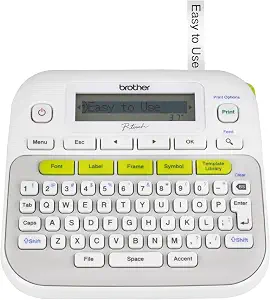 |
| Most Popular A crowd favorite that many people choose with confidence | DYMO LetraTag 100H Label Maker |  |
| Best Seller A high-volume bestseller chosen again and again | TYPONOS PM240 Label Maker |  |
NULLTONEX Y813 Thermal Label Printer

| Printer Type | Thermal |
|---|---|
| Print Resolution | 203 x 203 dpi |
| Maximum Media Size | 4 x 6 Inches |
| Connectivity | Bluetooth, USB, wireless |
| Power Consumption | 24 watts |
The NULLTONEX Y813 is a direct-thermal 4×6 shipping label printer built for small business workflows. It prints monochrome labels at 203 dpi and up to about 72 labels per minute, making it suitable for batch shipping, barcode labeling, and general mailing tasks. You can connect via Bluetooth to the FlashLabel Pro mobile app for on-the-go label creation or use USB for a stable desktop connection, and the app includes many templates and font options so you can quickly format waybills or barcode labels. The printer is compact and energy efficient, uses no ink or toner, and ships with starter 4×6 labels so you can begin printing immediately. Limitations include single-color thermal output and no duplex capability, so it is only appropriate for standard black-on-thermal-label jobs rather than multi-color printing or document copying. Some users may need to tweak density and speed or clean the printhead for the best barcode scannability.
Best for: Small business owners or operators who need a reliable, compact shipping-label solution that can print batches quickly and work from phones or laptops using an app-driven workflow.
Less Ideal for: Teams that require color labels, multi-function printing, or advanced finish options should consider other label or laser printers instead.
- Direct thermal printing eliminates ink or toner and lowers maintenance
- Bluetooth and USB dual connectivity for mobile or desktop workflows
- Compact, energy-efficient design suited to small workspaces
- 203 dpi resolution yields readable barcodes and crisp text
- Includes starter labels and cables to start printing out of the box
- Prints only in black and white using thermal labels
- No duplex or multi-function printing capability
Verdict: A compact, app-friendly 4×6 thermal printer that delivers fast, low-maintenance black-and-white shipping labels for busy small businesses.
Rollo USB Shipping Label Printer X1038

| Printer Type | Thermal |
|---|---|
| Print Resolution | 203 x 203 DPI |
| Maximum Media Size | 4.1 Inch Width |
| Connectivity | USB (wired) |
| Paper Size | 4 inch x 6 inches |
The Rollo USB Shipping Label Printer X1038 is a direct-thermal desktop label printer built for volume shipping and product labeling tasks. It connects over USB to Windows and Mac computers and prints standard 4×6 shipping labels, barcode labels, and custom sticker labels without ink or toner. Notable features include auto label detection, a 203 DPI print head for clear scannable output, and a claimed print speed of about one 4×6 label per second, which keeps packing lines moving. It accepts labels from roughly 1.57 to 4.1 inches wide and holds fan-fold or roll media with a 30-sheet output capacity noted for small batches. Practical benefits are low per-label cost because of inkless thermal printing, broad compatibility with shipping platforms and a dedicated app for label design and shipping rate discounts. Limitations are wired-only USB connectivity on this model, so mobile or wireless printing requires a different Rollo variant, and the printer relies on thermal labels which can fade with heat or sunlight over time. Setup and driver installation are straightforward but require the Rollo drivers on the host computer.
Best for: Small business operators and high-volume shippers who prioritize speed and low per-label cost and will run labels from a dedicated workstation with a laptop or PC.
Less Ideal for: Businesses that require wireless or mobile printing directly from phones or tablets, or those needing long-term UV-stable printed labels for outdoor use.
- Direct thermal printing eliminates ink and toner costs
- Fast printing speed suitable for high-volume shipping workflows
- 203 DPI print head produces sharp, scannable barcodes and address text
- Auto label detection supports a range of label widths without manual adjustments
- Compatible with major shipping platforms and includes a shipping app for streamlined workflow
- USB-only wired connection limits printing from mobile devices or networks
- Uses direct-thermal labels that can fade if exposed to heat or sunlight
Verdict: Buy this if you need a fast, reliable, low-cost, inkless 4×6 label printer to handle heavy shipping and packing workloads from a desktop computer.
NIIMBOT B1 Label Maker

| Printer Type | Thermal |
|---|---|
| Maximum Media Size | 2 inches |
| Resolution | 203dpi |
| Connectivity | Bluetooth, USB |
| Wattage | 1500 milliamp_hours |
The NIIMBOT B1 is a portable thermal label maker that connects over Bluetooth to iOS/Android phones and can be used with Windows PCs via USB and a desktop app. It prints inkless monochrome labels up to 2 inches wide with 203 dpi resolution and uses a rechargeable battery for cordless use, making it handy for on-the-spot labeling in small retail or office settings. The companion NIIMBOT app auto-detects label size, offers many fonts, borders, and symbols, and lets you save templates for fast reprints, which speeds repetitive tasks like pricing, inventory tags, and product labeling. Build quality is lightweight ABS plastic and the device accepts proprietary NIIMBOT rolls for reliable label detection and consistent prints. Limitations include mandatory use of genuine NIIMBOT labels for best performance and a single-color output, so it is not suitable where color or third-party media flexibility is required. The B1 is best when you need quick, accurate monochrome labels and template-driven workflows rather than full-featured color printing or wide media compatibility.
Best for: Small business owners who prioritize fast, repeatable label production and mobile workflows and want a compact, battery-powered printer to label inventory, pricing, or small product tags.
Less Ideal for: Businesses that need color labels, want to use third-party label stock, or require wide-format printing should consider other models.
- Bluetooth pairing with iOS and Android for mobile printing
- App auto-detects label size and saves templates for fast reprints
- Inkless thermal printing removes the need for cartridges or ribbons
- Compact, rechargeable design for portable use around a shop or office
- Requires genuine NIIMBOT label rolls for optimal operation
- Monochrome printing only, no color output
Verdict: A portable, app-driven thermal label printer that accelerates template-based labeling for small businesses that need quick, consistent monochrome tags.
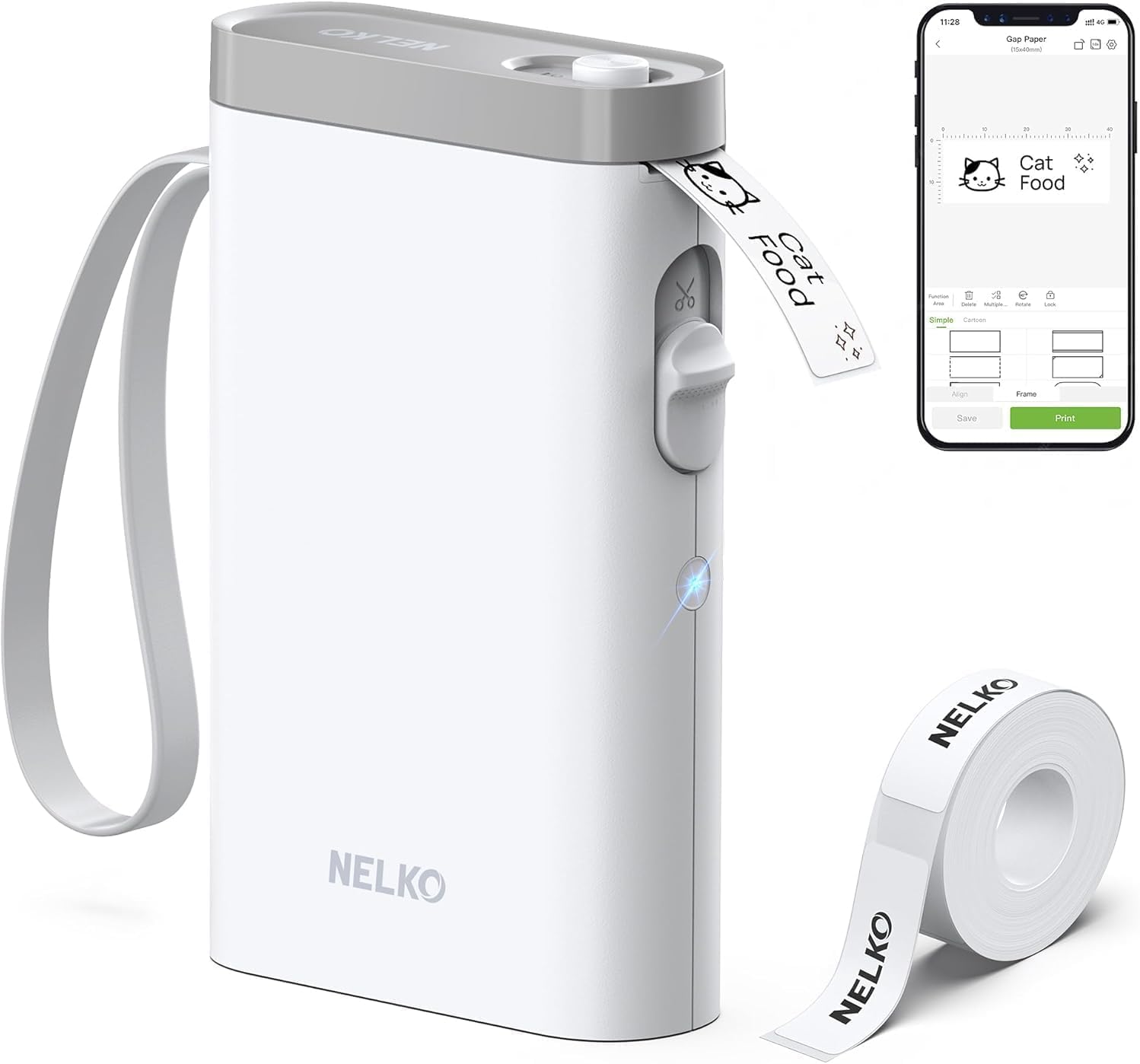
Nelko P21 Label Maker
| Printer Type | Thermal |
|---|---|
| Printer Connectivity Type | Bluetooth |
| Resolution | 203 x 203 DPI |
| Print media | Labels |
| Hardware Interface | USB Type C |
The Nelko P21 is a pocketable Bluetooth thermal label maker that prints monochrome labels from iOS and Android phones using the Nelko app. It uses direct thermal technology at 203 DPI so you get crisp black text, barcodes, and QR codes without ink or toner, and the built-in rechargeable battery keeps it ready for occasional label runs. Setup is app-driven: choose a tape size, pick templates or icons, and send jobs over Bluetooth; the app includes many templates, borders, and materials to style labels for pricing, files, classroom bins, or pantry jars. The machine supports common tape sizes (14 × 40 mm and larger) and has a built-in cutter for clean edges. Limitations to note: printing is monochrome only and the device depends on the proprietary app for design and Bluetooth pairing, and it is not compatible with computers or some Android 14 phones. For small business use it handles price tags, inventory stickers, and organization tasks well as long as you accept app-only control and single-color output.
Best for: Small-business owners who need an inexpensive, portable label printer for price tags, inventory labels, and general organization and who prefer a phone-driven workflow over a desktop solution.
Less Ideal for: Businesses that require multi-color labels, batch printing from a PC, or strict compatibility with the latest Android desktop integrations should consider a different model.
- Direct thermal printing requires no ink or toner
- Compact, lightweight and rechargeable for portable use
- 203 DPI resolution produces clear black text, barcodes, and QR codes
- Large template and icon library in the companion app for fast label design
- Built-in cutter and support for several common tape sizes
- Monochrome printing only, no native color printing capability
- Relies on the Nelko mobile app for all design and Bluetooth pairing
- Not compatible with computers and may have issues on Android 14
Verdict: A budget-friendly, portable thermal label maker that delivers clear monochrome labels via a feature-rich phone app, ideal for small businesses needing on-the-go tagging and organization.
Brother P-touch PTD210

| Print media | Labels (TZe laminated tapes) |
|---|---|
| Maximum lines | 2 lines on 12 millimeters |
| Fonts and symbols | 14 fonts, 600+ symbols |
| Connectivity | USB |
| Power | 6 AAA batteries or AC adapter (sold separately) |
The Brother P-touch PTD210 is a straightforward, battery- or AC-powered handheld labeler designed for quick label creation in small offices. It prints on 12 mm TZe laminated tapes and can output up to two lines, with one-touch keys to access 14 fonts, 10 styles, 97 frames, and over 600 symbols plus 27 ready templates for common tasks. A small LCD preview helps reduce mistakes before printing, and the unit includes a starter TZe tape so you can print out of the box. It is portable and light enough to move around a workspace; USB connectivity is available for PC linking when you need to create labels from a computer. The PTD210 is built for dependable everyday use rather than high-volume industrial work, so it excels at folder labels, shelf tags, cable IDs, and craft projects but is not intended for continuous heavy printing. Expect clear, durable laminated labels and a simple, reliable interface that minimizes setup time and errors for small-business workflows.
Best for: Small-business users who need a reliable, easy-to-use labeler for everyday organizational tasks, quick on-demand labels, and occasional PC-based label creation.
Less Ideal for: Operations that require wide-format labels, industrial-grade throughput, or continuous high-volume printing should consider more heavy-duty label printers.
- Easy one-touch access to fonts, frames, symbols, and templates for fast label creation
- Supports durable laminated TZe tapes for long-lasting, readable labels
- Lightweight and portable with battery or AC power options
- LCD preview reduces mistyped prints and wasted tape
- USB connectivity for PC-based label design when needed
- Limited to 12 mm tape width and two-line printing which restricts larger label formats
- Not designed for high-volume continuous printing in busy production environments
Verdict: A compact, dependable label maker that delivers durable, professional-looking labels with minimal fuss for small-business organization and daily use.
DYMO LetraTag 100H Label Maker

| Print technology | Direct thermal printing, 200 dpi |
|---|---|
| Power source | 4x AA batteries (not included) |
| Tapes included | 3 LT label tapes |
| Font styles | 5 font sizes, 7 print styles, 8 box styles |
The DYMO LetraTag 100H is a portable thermal label maker built for home and small-office tasks like filing, pantry organization, and simple asset labeling. It prints on DYMO LT paper and plastic cassettes using direct thermal technology so there is no ink or toner to replace, and the package includes three starter tapes (paper, plastic white, and clear). The unit offers a small graphical LCD that previews text effects, supports two-line printing, and provides five font sizes plus multiple box and style options for clearer labels. It runs on four AA batteries and has auto-off to conserve power, making it easy to take to different rooms or a small storefront. Limitations for business use are the slower handheld workflow compared with desktop label printers and the restricted tape widths and formatting compared with commercial thermal-transfer systems, so it is best for occasional labeling rather than high-volume batch jobs.
Best for: Small business owners who need an inexpensive, portable labeler for spot labeling, organizing supplies, and occasional asset or file tags and who prioritize reliability and ease of use backed by many user reviews.
Less Ideal for: Businesses that require high-volume, continuous label production or advanced label formatting for barcode and shipping applications should choose a desktop thermal-transfer or commercial label printer instead.
- No ink or toner needed thanks to direct thermal printing
- Includes three starter LT tapes for immediate use
- Graphical display that previews labels before printing
- Compact, lightweight handheld design with auto-off power saver
- Battery powered only which can be inconvenient for heavy daily use
- Limited tape widths and formatting compared with larger desktop label printers
Verdict: A simple, portable thermal label maker that gives reliable, no-ink labeling for small-business spot tasks and quick organization.
TYPONOS PM240 Label Maker

| Printer Type | Thermal |
|---|---|
| Resolution | 203 x 203 dpi |
| Connectivity | Bluetooth, USB |
| Built-In Media | 1 PM240 Label Maker, 1 USB Cable, 3 label rolls |
| Wattage | 5.55 watts |
The TYPONOS PM240 is a pocketable thermal label maker aimed at small business and office tasks. It prints monochrome labels at 203 dpi without ink, and connects to phones, tablets, or a PC via Bluetooth or USB Type-C. The Labelnize app supplies thousands of templates, fonts, and icons plus Excel import, batch printing, OCR, and automatic label-size detection via built-in RFID tags on compatible rolls, which speeds up repetitive tasks like price tags, shipping labels, jar labeling, and classroom organization. The unit includes three label rolls and a USB cable and has a rechargeable battery for mobile use; app and driver support make it straightforward to set up for nontechnical users. Limitations include single-color prints only and the need to use compatible TYPONOS label rolls for automatic detection and best results, and Bluetooth cannot be used simultaneously with USB. Overall it is a practical, space-saving choice for routine labeling workflows that favor convenience over advanced color or heavy-duty industrial use.
Best for: Small business owners and office managers who want a reliable, easy-to-use label printer for routine tasks like pricing, shipping, and inventory labeling and who value app-driven templates and straightforward setup.
Less Ideal for: Users who need full-color labels, high-volume industrial thermal printers, or those who prefer complete vendor flexibility in third-party label stock.
- Thermal printing at 203 dpi delivers crisp monochrome labels without ink or toner
- Bluetooth and USB Type-C connectivity for phones, tablets, and PC
- Labelnize app with many templates, Excel import, batch printing, OCR and automatic label-size detection via RFID
- Includes three label rolls and a USB cable so it is ready to use out of the box
- Rechargeable battery and compact weight make it portable for on-the-go labeling
- Prints only in monochrome so no color labels or color-coded printing
- Relies on compatible TYPONOS rolls for automatic size detection and optimal performance
Verdict: A compact, app-first thermal label maker that simplifies small business labeling with strong template and batch-printing features.
Choosing the Right Label Maker for Small Businesses: Key Factors to Consider
Print Quality and Resolution
Print quality affects how easy your labels are to read at a glance. Higher resolution provides sharper text and finer barcodes, which is important for shelf tags, shipping labels, and barcode scanning. Consider whether you need bold text, multiple font sizes, or dense layouts for small SKU labels.
Resolution also interacts with tape material. Some tapes show ink or thermal transfer more clearly than others, so check how the device renders fonts and codes on the specific label stock you plan to use.
Tape and Material Compatibility
Different labeling tasks require different media. Thermal tapes, laminated labels, cloth tags, and adhesive-backed polyester offer varying levels of weather, chemical, and abrasion resistance. A small business that ships products needs weatherproof, smudge-resistant labels while a retail counter may prioritize decorative or branded options.
Also consider tape widths. Narrow tapes suit file tabs and shelf edges, while wider tapes work better for shipping or product front labels. The ability to print on multiple media types increases a label maker's usefulness across tasks.
Connectivity and Software Integration
Speed and accuracy improve when a label maker can connect to your PC, tablet, or cloud templates. USB and Bluetooth enable direct printing from inventory spreadsheets or point-of-sale software. Built-in templates and mobile app support speed up repetitive label jobs and reduce formatting errors.
If you run inventory management or use barcode systems, check whether the label maker supports common barcode formats and can import data files. Integration matters most when multiple staff need consistent label formats.
Ease of Use and Learning Curve
A straightforward interface reduces training time and mistakes. Look for clear displays, simple navigation, and reliable preview features. Keyboard-style handheld units are quicker for on-the-spot labels; app-driven models can be faster for bulk runs from a laptop.
Consider how often different employees will create labels and whether template saving, undo options, and quick-access styles are supported. Software that is regularly updated and has helpful documentation is a practical plus.
Durability and Portability
A label maker should survive the environment where it will be used. Durable housing and a stable feed mechanism are important if the device is transported to markets or used in a busy warehouse. Battery-powered units offer portability but check battery life and charging options to avoid downtime.
Portability also affects where you can place printing tasks. A compact desktop model sits on a counter for high-volume printing, whereas a rugged handheld unit is better for aisle labeling, restocking, and on-site service calls.
Label Longevity and Adhesion
How long a label remains readable and stuck to a surface can affect operations and customer experience. Adhesive formulation and label substrate influence performance on cardboard, plastic, glass, and fabric. Choose materials rated for the typical temperatures and handling your items see.
Consider whether labels will be exposed to sunlight, moisture, or frequent handling, and choose tapes with matching longevity ratings. Removable adhesives are useful for temporary tags, while permanent adhesives are necessary for long-term inventory tracking.
Label Formats Commonly Used by Small Businesses
Small businesses typically need a few standard label formats: barcode labels for inventory, address and shipping labels, price or shelf tags, and product ingredient or care labels. Each format favors different tape widths and durability levels.
Barcodes require precise printing to scan reliably, so choose label widths and resolutions that match your barcode density. Address labels and shipping tags can be wider and may need weather-resistant materials if packages travel long distances.
- Barcode and inventory tags: narrow widths, high print clarity
- Shipping and address labels: wider tapes, stronger adhesion
- Shelf tags and price labels: readable fonts and quick reprinting
- Product labels: laminated or coated materials for longevity
Choosing Between Handheld and Desktop Units
Handheld, battery-powered label makers are convenient for on-the-spot labeling, aisle marking, and quick fixes. They are usually compact and easy to carry, which helps at pop-up markets or when relabeling shelves.
Desktop models often deliver higher print speeds, advanced media compatibility, and better integration with computers and inventory systems. They work well when you produce labels in batches or need broader tape options for product packaging.
- Handheld: portability, instant labeling, simpler feature sets
- Desktop: higher throughput, more media sizes, computer integration
Integrating Labeling Into Your Workflow
Think about how labels will be created and who will make them. Centralized printing from a backend system reduces format inconsistencies, while distributed handheld units speed local tasks. Establish templates for common label types to ensure consistent branding and information.
If you use spreadsheets or inventory software, look for devices that accept CSV imports or connect via USB or Bluetooth. Automating label generation for repetitive tasks saves time and minimizes human error.
- Create and save templates for recurring label types
- Use barcode standards compatible with your scanners
- Automate imports where possible to reduce manual entry
Maintenance, Supplies, and Ongoing Costs
Supplies are a recurring expense. Estimate how often you replenish tapes and choose a device with readily available media in the widths and materials you need. Consider buying in bulk if your volume is consistent.
Maintenance is usually minimal but include a plan for cleaning print heads and replacing worn feed rollers. Keep spare tapes and replacement batteries or chargers on hand to avoid interruptions during busy periods.
- Check availability of tape widths and materials
- Budget for replacement tapes and batteries
- Follow simple cleaning steps to extend device life
Label Design Tips for Small Business Use
Prioritize legibility by using high-contrast color combinations and simple fonts. Avoid overcrowding labels with unnecessary text. For product and ingredient labels, ensure mandatory information is prominent and readable at typical viewing distances.
For barcode labels, include human-readable numbers below the code. For pricing and shelf tags, keep the most important information, like price and SKU, in the largest type. Consistent styling across labels reinforces brand recognition and speeds identification.
- Use bold, sans-serif fonts for clarity
- Keep essential info large and secondary details smaller
- Test barcode scans before running large print jobs
How We Chose the Best Label Maker for Small Businesses
We selected products based on criteria that matter for small business workflows and daily labeling tasks. Print quality and material options were prioritized because clear, durable labels reduce misreads and withstand shipping, shelving, and handling. Connectivity and workflow integration were another key filter; models that support USB or wireless printing and simple templates make multi-label jobs faster. We also weighed user ergonomics and software usability since staff will use these tools repeatedly. Tape size compatibility and label material options were required features so devices can handle inventory tags, product labels, and address labels. Battery life and portability were considered for on-the-go labeling at markets or pop-ups. Excluded from the shortlist were units intended only for hobby or single-use office tasks, devices with very limited tape choices, and models lacking basic durability. Final picks focus on balance across the practical dimensions above rather than niche single-purpose gadgets.
Our full evaluation process is outlined in our review methodology.
FAQ
What tape type should I choose for shipping labels?
Choose weather-resistant, laminated or polyester tapes with strong adhesive for shipping. These materials resist moisture and scuffing during transit and remain readable after handling.
Can I print barcodes from a handheld label maker?
Many handheld label makers support common barcode formats, but barcode quality depends on resolution and tape width. For high-volume barcode printing, desktop units with higher resolution usually yield more reliable scans.
How do I integrate a label maker with my inventory spreadsheet?
Look for models that accept CSV imports or offer a desktop app that can pull data from spreadsheets. Bluetooth or USB connectivity facilitates direct printing from a computer or tablet when batch printing labels.
Are rechargeable battery label makers a good choice?
Rechargeable units are convenient and reduce battery replacement costs. Consider battery life ratings and charging options to ensure the device lasts through busy labeling sessions without frequent recharging.
What width of tape is best for shelf tags?
Shelf tags typically work well with narrow to medium-width tapes, which allow clear pricing and SKU information without occupying too much shelf space. Choose a width that fits your shelving and formatting needs.
Final Verdict
Choosing the right label maker for a small business comes down to matching media compatibility, print clarity, and connectivity to your daily tasks. Prioritize the tape materials and widths you will use most, and pick a unit with the connectivity and template features that fit your workflow. Accept tradeoffs between portability and throughput. If you print labels in batches, favor desktop models with broader media support. If you need on-the-spot labeling, select a durable handheld unit with good battery life and simple software. Focus on the functional criteria discussed here to choose confidently.