
Note: This article contains affiliate links. If you click on these links and make a purchase, we may earn a small commission at no extra cost to you. This helps support our research and content. Read our full affiliate disclosure here.
If you make custom apparel or small-batch textile goods, choosing the right DTF printer determines print consistency, transfer durability, and daily throughput. You need a machine that produces sharp detail, handles the inks and films you plan to use, and fits your workflow without frequent downtime. This guide shortlists six top DTF printers that suit a range of production needs from hobbyists to light commercial shops. We evaluated candidates for print quality, ink and film compatibility, ease of setup, and ongoing maintenance requirements. Read on to see the criteria we used and what matters when matching a DTF printer to your studio or shop.
Top Picks at a Glance
| Best Overall The best all-around choice for most situations | Lancelot M1630 Pro DTF Printer |  |
| Best Quality Built to a higher standard if you want something more solid | DSV X13 DTF Printer |  |
| Best Budget The cheapest option that still gets the job done reliably | HIXSOP A4 L805 DTF Printer |  |
| Top Rated A top-rated pick with lots of positive feedback | MZK A3 Pro F1080 DTF Printer |  |
| Most Popular A crowd favorite that many people choose with confidence | WJTZXY A3+ XP600 DTF Printer |  |
| Best Seller A high-volume bestseller chosen again and again | Lancelot M1630 Pro A3+ DTF Printer |  |
Lancelot M1630 Pro DTF Printer

| Printer Type | Inkjet |
|---|---|
| Print Resolution | 720 x 1440 dpi |
| Ink Color | Cyan, Magenta, Yellow, Black, White |
| Paper Size | 13*19 inches |
| Printer Connectivity Type | USB |
The Lancelot M1630 Pro is a dedicated DTF inkjet printer bundle built for small shops and serious hobbyists who need reliable garment transfers. It prints in color plus white with 720×1440 dpi resolution and offers dual modes for sheet or roll film feeding, plus an automatic film cutter to streamline production. The kit highlights an automated maintenance "Holiday Mode" and white-ink circulation to reduce nozzle clogs and extend head life, while onboard ink and waste-level alerts cut downtime. Setup is simplified by a preloaded Windows laptop and included maintenance tools, making it approachable for startups. Practical benefits include faster throughput than older models and fewer consumable surprises thanks to monitoring; limitations are its USB-only connectivity and Windows-only support, and the machine is sizable and heavier than typical desktop printers so it needs a dedicated workspace. Expect some ongoing maintenance for white ink and to follow recommended inks and environment ranges for best results.
Best for: Small garment businesses, print studios, and committed hobbyists who want a production-capable DTF solution that minimizes nozzle clogs and simplifies setup so they can focus on steady, high-quality transfers.
Less Ideal for: Casual users who need a compact, lightweight home printer or anyone who requires Mac support or networked printing features.
- Prints with white ink plus CMYK for vibrant transfers and 720×1440 dpi detail
- Auto-cleaning Holiday Mode and white ink circulation reduce nozzle clogs during downtime
- Supports both A3/A4 sheets and roll film with an auto film cutter for faster workflow
- Includes preloaded laptop and maintenance toolkit for easier setup and operation
- Real-time ink and waste-level alerts help prevent print interruptions and material waste
- Connectivity limited to USB and 1 USB 2.0 port, no network or Wi‑Fi options
- Large and heavy unit that requires a dedicated workspace and may need assistance to install
Verdict: Buy this if you need a production-ready DTF bundle that reduces clogging and gets you printing quickly with sheet or roll film support.
DSV X13 DTF Printer

| Maximum Media Size | A3 |
|---|---|
| Resolution | 2880 x 1440 |
| Ink Color | CMYKW |
| Printer Connectivity Type | USB |
| Warranty Type | 1 Year |
The DSV X13 is a dedicated DTF inkjet printer built for small shops and high-volume hobbyists who need reliable, high-detail fabric transfers. It prints up to A3/13-inch wide media at a claimed 2880×1440 dpi using a six-color CMYKW ink set and an F1080 printhead that the manufacturer says is roughly twice as fast as legacy L1800/XP600 heads. The unit includes an electric roller for easier film feeding, a powder shaker and purifier, and a 5" LED touch panel to schedule smart timed printhead cleaning and other maintenance tasks. Practical benefits include automated cleaning routines that reduce nozzle clogs, color-coded low-ink alarms, and a two-year refill supply program that covers ink, cleaning fluid, and powder (you pay shipping). Trade-offs are its slow per-page throughput in PPM terms despite faster head tech (the listing shows about 0.4 pages per minute for full-size jobs) and a USB-only connection approach, so workflow integration may require a dedicated PC and careful job batching. Setup and ongoing servicing aim to be user-friendly, and the included consumables and support make it easier to keep running in production use.
Best for: Buyers who prioritize print quality, automated maintenance, and a ready-to-run consumable plan for frequent DTF production will appreciate this unit.
Less Ideal for: If you need a compact desktop unit for occasional hobby use or require native network printing and faster per-job throughput, look for simpler or LAN-enabled alternatives.
- High native resolution (2880×1440 dpi) for detailed, vibrant DTF transfers.
- Includes starter consumables and a powder shaker plus a two-year supply plan for refills.
- Automated maintenance features: timed self-cleaning and a 5" touch panel for scheduling.
- Electric roller and film feeding system that simplify media loading and reduce setup time.
- Dual alarm system for low-ink and waste-ink overflow helps avoid mid-run failures.
- Listed pages-per-minute rate is low for individual prints, so single-job throughput can be slow.
- Connectivity limited to USB which may complicate networked workflows in busy shops.
Verdict: Choose the X13 when you want high-resolution, production-oriented DTF output with strong automated maintenance and a multi‑year consumable plan to keep prints flowing.
HIXSOP A4 L805 DTF Printer

| Printer Type | Direct To Film |
|---|---|
| Maximum Media Size | A4 |
| Maximum print Resolution Color | 1440 x 1400 dpi |
| Printer Connectivity Type | USB |
| Color Pages per Minute | 5 pages_per_minute |
The HIXSOP A4 L805 is a compact direct-to-film printer aimed at small-scale T-shirt and apparel creators. It prints A4 media using a 6-color system plus white and advertises 1440 x 1400 dpi output for detailed transfers, while the built-in roll feeder and automated cutter simplify continuous printing and reduce film waste. The white ink circulation system—including stirring and filtration—is intended to prevent clogs and keep white ink consistent for reliable results on dark fabrics. It connects over USB and works with Windows 7/10/11 via the bundled RIP software, making setup straightforward for a basic workstation. Practical benefits include the small footprint for hobbyists, integrated feeder and cutter to speed batch work, and technical support resources. Important limitations are that this is an A4-capable, entry-level unit best for low-volume production; it lacks advanced connectivity and true duplex printing, and users should expect to manage inks, maintenance, and learning curve typical of DTF workflows.
Best for: Creators and small business starters who need an affordable, compact DTF solution to produce professional-looking transfers in low to moderate batches and value an all-in-one feeder and white-ink system.
Less Ideal for: High-volume production shops or users who need larger-format prints, advanced network features, or a turnkey commercial press for continuous heavy use.
- Integrated roll feeder and automated cutter reduce film handling and waste
- White ink circulation system with stirring and filtration helps prevent clogging
- High advertised print resolution for detailed transfers
- Bundled RIP software and USB connectivity simplify setup for Windows users
- Designed for A4 media only, so throughput is limited for larger jobs
- Limited connectivity options beyond USB and no duplex printing capability
Verdict: Choose this compact A4 DTF printer if you want an affordable, entry-level machine with an integrated feeder and white-ink circulation that makes small-batch apparel transfers easier.
MZK A3 Pro F1080 DTF Printer

| Printer Type | self-cleaning Inkjet |
|---|---|
| Maximum print Resolution Color | 2880×1440 dpi |
| Ink Color | cyan, magenta, yellow, black, white |
| Maximum Media Size | 13 x 41 inches |
| Printer Connectivity Type | USB |
The MZK A3 Pro F1080 is a DTF printer built for small shops and serious hobbyists who need continuous, reliable production of transfers. It uses an upgraded F1080 printhead and an XP600‑generation platform to push high resolution up to 2880×1440 dpi while the 33cm (13in) print width handles common apparel transfer sizes. Key conveniences include a 5" LED touchscreen for nozzle checks and one‑click ink filling, a circulating white‑ink system to reduce clogging, timed automatic cleaning and negative‑pressure suction to keep film flat during prints. The package ships with starter consumables—inks, film, powder—and user tutorials so you can start testing transfers quickly. Tradeoffs are typical for DTF rigs: the printer is USB‑connected only and depends on Windows‑only software, so workflow requires a dedicated PC, and print speed versus industrial models is moderate despite manufacturer speed claims. Expect periodic consumable costs and some setup learning for powder handling and curing. For reliability‑minded users the automated maintenance and ink monitoring reduce downtime and make this unit practical for consistent small‑batch production.
Best for: People building a dependable small apparel printing setup who prioritize uptime and automated printhead maintenance to avoid frequent manual servicing.
Less Ideal for: Operators who need networked or macOS-compatible printing or those seeking the absolute fastest industrial throughput should look elsewhere.
- High maximum print resolution (2880×1440 dpi) for detailed transfers
- Automatic timed cleaning and one‑click ink extraction to reduce nozzle clogs
- Circulating white ink system and ink level alarms that support continuous use
- Includes starter inks, film, powder and tutorials to get a small shop running quickly
- USB‑only connectivity and Windows‑only software limit integration with other workflows
- Requires routine consumables (ink, powder, film) and operator handling for curing and powder application
Verdict: If you want a reliable A3 DTF workhorse with automated anti‑clog systems and ink monitoring to minimize downtime, this MZK model is a strong choice.
WJTZXY A3+ XP600 DTF Printer
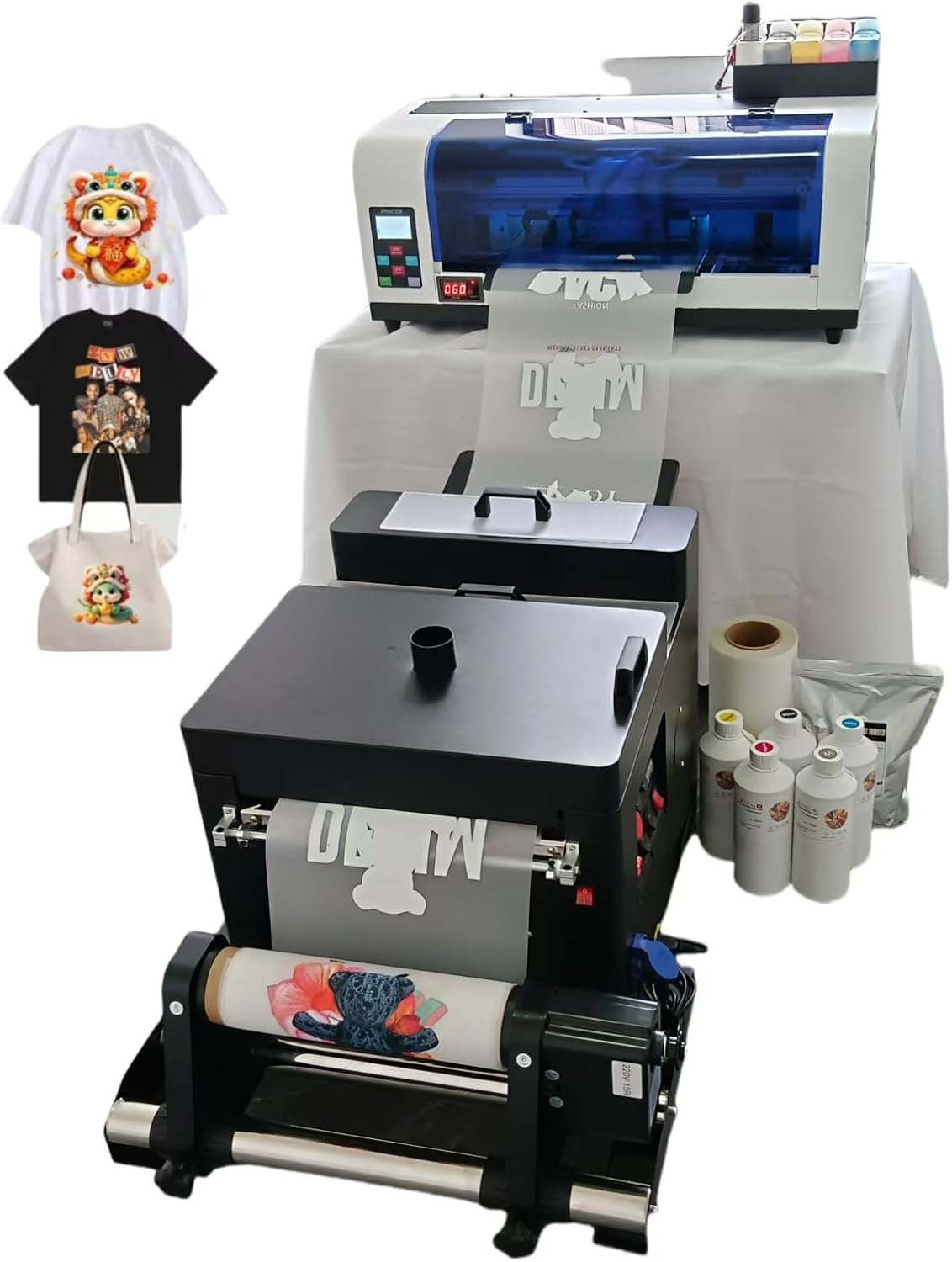
| Printhead | F1080 (XP600) |
|---|---|
| Max printing width | 13 inches |
| Ink colors | K C M Y WH |
| Power consumption | 50 watts |
The WJTZXY A3+ XP600 is an industrial-style DTF printer aimed at small production runs and garment customization. It uses an Epson F1080 (XP600) printhead and a multi-color setup including white ink with a circulation/stirring and filtration system to reduce clogging and keep white ink usable during prints. The package bundles essential consumables and a shaking dryer so you can feed printed film into powdering and curing without sourcing parts separately. Setup and daily use are oriented to Windows PCs and the included RIIN/Hoson software; control is USB-based and the printer supports common bitmap file types for textile transfers. Practical benefits are higher throughput than many desktop DTF options and built-in white-ink maintenance that lowers head-failure risk. Important limitations are its industrial footprint and weight, a USB-only connection with no network options, and that Windows-only software and drivers are required; this is not a plug-and-play consumer photo printer. Buyers should also plan for ventilation and space for the dryer when running continuous jobs.
Best for: Buyers who want a ready-to-run A3+ DTF setup for small-batch garment production and who prioritize uptime and included consumables over a compact footprint.
Less Ideal for: Hobbyists needing a lightweight, desktop printer or teams that require macOS or networked printing and remote workflow integration.
- Includes shaking dryer and starter consumables (inks, film, powder) so you can start printing right away.
- Uses XP600/F1080 printhead with white ink circulation and filtration to reduce clogging and improve uptime.
- 13-inch maximum print width suits small-format garment and textile transfers.
- Higher print speed than many desktop DTF conversions, making it better for short production runs.
- USB 2.0-only connectivity limits workflow integration and remote control.
- Requires Windows PC and vendor software; macOS and network printing are not supported.
- Large, heavy unit that needs dedicated space and ventilation for the dryer during operation.
Verdict: Choose this A3+ XP600 kit if you need a bundled, production-oriented DTF solution with white-ink circulation and a shaking dryer to keep prints moving quickly.
Lancelot M1630 Pro A3+ DTF Printer

| Printer Type | DTF |
|---|---|
| Resolution | 720 x 1440 |
| Ink Color | CMYK |
| Maximum Media Size | 13 x 19 inches |
| Printer Connectivity Type | USB |
The Lancelot M1630 Pro A3+ DTF printer bundle packages an A3+ DTF printer with an XP600 printhead together with a powder shaker, dryer, mobile workstation and a preloaded Windows laptop so you can go from design to cured transfer in a single station. It prints up to 720 x 1440 dpi for sharp details and vibrant gradients and supports both roll and sheet film workflows for single designs or small batches. Maintenance-focused features such as Holiday Mode, white ink circulation and auto-cleaning reduce the chance of clogged nozzles after idle periods, and the included shaker and dryer streamline powdering and curing. The bundle is USB-connected and is geared toward a portable, all-in-one setup for apparel shops or serious hobbyists. Trade-offs include a limited warranty on the printhead and a reliance on a USB interface rather than network options, so shops that need centralized network printing or enterprise-scale throughput may need a different solution.
Best for: Buyers who want a ready-to-run DTF station to start or expand a small apparel printing operation with minimal configuration and lower maintenance risk.
Less Ideal for: Large production shops that require networked printers, higher throughput, or extended factory warranties should consider industrial-scale equipment instead.
- Complete bundle with printer, powder shaker, dryer, workstation and laptop for a single-station workflow
- XP600 printhead delivering up to 720×1440 dpi for detailed, vibrant transfers
- Holiday Mode, white ink circulation and auto-cleaning to reduce maintenance after idle periods
- Supports both roll and sheet film workflows for flexible small-batch production
- Connectivity limited to USB with a single port, no built-in network interface
- Printhead warranty period is short (print-head: 3 month)
Verdict: Choose this bundle if you need a compact, maintenance-minded A3+ DTF station that gets you printing transfers quickly with minimal setup.
Choosing the Right DTF Printer: Key Factors to Consider
Print Resolution and Color Consistency
Resolution and color consistency directly determine how detailed and accurate transfers look on fabric. Higher native dpi and reliable color management produce finer halftones and smoother gradients, which matter for photographic or multi-color artwork.
Consistent color across runs reduces waste from reprints and customer complaints. Look for printers that support ICC profiling or have good RIP software integration. Understand that resolution alone does not guarantee good color; stable ink formulation and a predictable white underbase workflow are equally important.
Ink System and Adhesion
Ink formulation and how well ink bonds through the film to the fabric are central to transfer longevity. Some inks offer better washfastness or flexibility after curing, which reduces cracking and fading over time.
Consider the white ink system too, since white underprints carry heavy pigment loads and require reliable circulation or agitation to prevent clogging. Also evaluate recommended curing temperatures and dwell times, as these affect compatibility with different fabric types and finishing equipment.
Film Handling and Feed Reliability
Film alignment, tension control, and feed mechanisms influence registration accuracy and material waste. Poor feeding can cause skewed prints, misaligned multi-pass transfers, or film jams that interrupt production.
Evaluate whether the printer supports roll-to-roll or sheet feeding depending on your typical job sizes, and whether it has adjustable tension, edge guides, or vacuum/platen options that help keep film flat during printing and curing.
Throughput and Duty Cycle
Throughput matters when you have repeat jobs or tight deadlines. Higher-speed printers shorten turnaround, but speed should not sacrifice print quality. Understand rated pages per hour or square foot per hour under actual production settings rather than ideal test modes.
Also check duty cycle and recommended daily use. A machine intended for light hobby use will wear faster under commercial loads. Match the printer's advertised workload to your expected job volume to avoid premature maintenance needs.
Ease of Maintenance and Consumable Access
DTF printers require regular maintenance including printhead cleaning, white-ink circulation, and occasional part replacement. Machines designed with accessible service points and modular replaceable parts reduce downtime and simplify repairs.
Consider how easy it is to procure consumables and replacement parts within your region. Assess whether routine tasks like nozzle checks, wiper replacements, or ink system purges can be performed without specialized service to keep ongoing costs predictable.
Software Workflow and Color Management
A reliable workflow that integrates design files, RIP software, and printer drivers reduces errors and speeds job turnaround. Good RIP solutions offer spot color mapping, white underbase control, and nesting to save film.
Evaluate how the printer handles file formats and whether it supports ICC profiles for accurate color matching. Automated features like step-and-repeat, layout previews, and built-in color correction can save time and reduce trial prints.
Preparing Artwork for DTF Printing
Start artwork preparation with high-resolution files and flattened layers where appropriate. Vector files or high-dpi raster images reduce jagged edges and produce cleaner separations for halftones.
Separate or mark areas that need heavy white underbase, and avoid fine hairline text that may not reproduce well through film. Convert colors to the printer workflow color space and use spot colors only when necessary.
- Use at least 300 dpi for photographic images at final print size
- Create a dedicated white underbase channel where the RIP allows
- Simplify tiny details that can clog or fail to transfer cleanly
Post-Print Curing and Finishing Best Practices
Proper heat pressing or curing after printing is essential to transfer adhesion and wash resistance. Follow recommended time and temperature windows rather than guessing; overcooking can alter fabric hand and undercooking reduces durability.
Cool-down and protective steps matter too. Some workflows advise a short peel or cold-peel process depending on film type. Test on sample fabric swatches to dial in the best cure profile for each material.
- Use consistent pressure and even heat distribution on the platen
- Test cure profiles on representative fabric samples before production
- Allow transfers to rest briefly before additional finishing
Space, Ventilation, and Shop Setup
DTF printers and their associated curing or heat-press equipment require a stable workspace with level surfaces and enough clearance for rolls, loading, and operator movement. Allocate space for drying, curing, and storage of films and inks.
Ventilation is important when curing inks at elevated temperatures. Ensure adequate air circulation and, if required, local extraction to control fumes and heat buildup in the production area.
- Keep the printer on a level, vibration-free surface
- Store films and inks in a climate-controlled area to extend shelf life
- Plan workflow with separate zones for printing, curing, and packing
Scaling From Hobby to Small Commercial Production
When scaling up, evaluate whether current equipment supports increased volume without sacrificing quality. Consider redundancies for high-wear components and plan preventive maintenance intervals to avoid unexpected downtime.
Also review labor and process flow. Faster machines often demand more consistent consumable replenishment and stricter maintenance routines. Budget time for training operators on routine care, color management, and troubleshooting.
- Match machine duty cycle to expected production hours
- Implement a spare-parts and consumables plan for critical failures
- Document standard operating procedures for consistent output
Common Troubleshooting Steps
Start with nozzle checks and a thorough cleaning routine when facing banding or missing colors. Confirm white ink circulation is active and that the white channel has not separated or settled in the lines.
If registration or skew occurs, inspect feed tension, platen flatness, and film edge guides. Keep a log of recurring faults to identify patterns and prevent future issues.
- Run nozzle test prints daily if using white-heavy jobs
- Keep spare wipers and maintenance fluids on hand
- Record adjustments and outcomes to build a local troubleshooting guide
How We Chose the Best DTF Printer
We started with machines that are purpose-built for direct-to-film textile transfers and applied practical, production-oriented filters to narrow the list. Key evaluation criteria included print resolution and color consistency, which determine final transfer look; ink system and adhesion performance, which affect durability and washfastness; film handling and feed reliability, which influence waste and operator time; and serviceability and maintenance demands, which affect uptime and running cost. We also considered throughput and suitability for the intended workload, from occasional custom jobs to steady small-batch production. Usability factors such as software workflow, driver stability, and setup complexity were assessed because time spent troubleshooting reduces productive hours. Exclusions applied to machines primarily designed for other printing methods or tabletop novelty use; we focused on true DTF-capable printers and proven ink/film ecosystems. The result is a shortlist of six printers that met these operational filters and practical durability standards.
Our full evaluation process is outlined in our review methodology.
FAQ
How long do DTF transfers usually last on garments?
Durability depends on ink formulation, curing, and fabric type. With proper ink adhesion and correct curing, transfers often withstand many wash cycles, but performance varies by materials and care instructions.
Do I need special inks for different fabrics?
Different inks and primers can perform better on certain substrates. While many DTF inks work across common fabrics, testing on representative swatches is important to confirm adhesion and hand feel before production.
How often should I perform routine maintenance on a DTF printer?
Maintenance frequency depends on usage. Light users can perform weekly checks, while commercial shops may need daily nozzle checks and white-ink circulation tasks. Regular maintenance prevents clogging and extends component life.
Can I use standard heat presses for curing DTF transfers?
Standard heat presses are commonly used, but they must deliver even heat and correct pressure for the recommended time. Match press settings to the film and ink manufacturer's guidance and test on samples to ensure consistent results.
What causes banding or color shifts in prints?
Banding can result from clogged nozzles, misaligned heads, or feed issues. Color shifts often stem from unstable color management, ink contamination, or inconsistent curing. Systematic checks of hardware and workflow usually identify the root cause.
Final Verdict
When choosing a DTF printer, prioritize the combination of consistent print resolution, a reliable white-ink system, and film-handling features that match your typical job sizes. Balance speed against the duty cycle and maintenance demands to ensure the machine can meet your production rhythm without frequent interruptions. Finally, invest time in setting up a repeatable workflow for artwork, curing, and routine care so you get predictable, durable transfers from each run.