
Note: This article contains affiliate links. If you click on these links and make a purchase, we may earn a small commission at no extra cost to you. This helps support our research and content. Read our full affiliate disclosure here.
If you need labels that survive heat, abrasion, and outdoor exposure, heat-shrink label makers are the tool for the job. These devices print on specialized heat-shrink tubing that contracts around wires, pipes, and components to create permanent, professional-looking identification. Choosing the right label maker affects print legibility, tubing fit, and how long markings last in harsh conditions. This guide covers seven shortlisted heat-shrink label makers that excel at common labeling tasks, and it explains the practical evaluation points used to compare them. Read on for the criteria that matter and tips for matching a unit to your labeling needs.
Top Picks at a Glance
| Best Overall The best all-around choice for most situations | DYMO Rhino 4200 Label Maker |  |
| Best Quality Built to a higher standard if you want something more solid | Brother P-touch EDGE 510VP |  |
| Best Value The sweet spot between price and what you get | Vixic E1000 Industrial Label Maker |  |
| Best Budget The cheapest option that still gets the job done reliably | VolenGo E1000 Label Maker |  |
| Top Rated A top-rated pick with lots of positive feedback | Makeid P31S Portable Label Printer |  |
| Most Popular A crowd favorite that many people choose with confidence | SUPVAN G15M Mini Label Maker |  |
| Best Seller A high-volume bestseller chosen again and again | VolenGo E1000 Heat Shrink Label Maker |  |
DYMO Rhino 4200 Label Maker

| Printer Type | Thermal |
|---|---|
| Print Resolution | 200-300 dpi |
| Maximum Label Width | 0.75" |
| Connectivity | Ethernet, USB |
The DYMO Rhino 4200 is a rugged, handheld thermal label maker built for industrial marking tasks and heat-shrink tube printing. It uses a familiar QWERTY keyboard and one-touch hot keys to speed creation of wire/cable wraps, flags, fixed-length labels and bar codes, while a Favorites key stores frequently used formats. The machine prints up to 3/4"-wide labels on industrial nylon, permanent polyester, vinyl and heat-shrink materials and includes rubber bumpers to withstand job-site drops. Connectivity options include USB and Ethernet for PC use and it offers a basic LCD for layout and symbol selection from a built-in library of electrical and facilities symbols. Expect modest print speed and monochrome output with 200-300 dpi resolution, so it is optimized for durable identification rather than high-volume page throughput or photo-quality graphics. The Rhino's industrial tape compatibility and job-focused shortcuts make it a strong choice for electricians, AV technicians and facilities teams who need reliable, standards-compliant heat-shrink labeling in the field.
Best for: Professionals who need durable, standards-compliant heat-shrink and industrial labels on job sites and want a handheld unit that speeds recurring label formats without complex setup.
Less Ideal for: Users who need fast, high-volume label printing or color/graphic-quality labels for marketing and packaging tasks should look elsewhere.
- Prints direct to heat-shrink tubes and industrial label materials up to 3/4" wide
- QWERTY keyboard and dedicated hot keys speed common label formats and symbols
- Built for job-site durability with integrated rubber bumpers
- Compatible with USB and Ethernet for PC connection and template printing
- Relatively slow print/page throughput not suited for high-volume office printing
- Monochrome output and 200-300 dpi limit graphic/detail fidelity
Verdict: Choose the Rhino 4200 if you need a rugged, job-site ready labeler that prints durable heat-shrink and industrial tapes with fast access to common electrical and cable label formats.
Brother P-touch EDGE 510VP

| Maximum Media Size | 24mm |
|---|---|
| Paper Size | 24mm, 18mm, 12mm, 9mm, 6mm, 3.5mm |
| Resolution | 203 x 203 dpi |
| Printer Connectivity Type | USB |
| Battery | Rechargeable Li-ion battery |
The Brother P-touch EDGE 510VP is a handheld thermal label printer built for industrial heat-shrink and cable identification tasks. It prints laminated labels and heat-shrink tubes from 3.5mm to 24mm and uses quick application keys for common label types like cable wrap, patch panels and faceplates so technicians can format and print on-site without needing wireless setup. The unit includes a dual auto-cutter with half-cut for peel-and-apply strips, onboard storage for templates and databases, an ambidextrous hand strap and a rechargeable Li-ion battery for mobility. USB-C lets you charge and connect to Brother's P‑Touch Editor to design complex labels on a PC, and compatible TZe/HGe tapes provide durable laminated output. Expect modest print speed and 203 dpi black-and-white resolution suited to barcodes and clear text rather than photo-quality prints, and the 1.2 pages-per-minute figure reflects its focus on label jobs rather than bulk page throughput.
Best for: Technicians and facilities managers who need a rugged, portable tool to produce durable heat-shrink and cable labels on site with reliable template storage and simple, repeatable workflows.
Less Ideal for: Users who need wireless or mobile-only printing workflows or those who require very fast, high-volume label throughput should consider different solutions.
- Prints laminated labels and heat-shrink tubes up to 24mm for industrial marking
- Dual auto-cutter with half-cut makes peel-and-apply labeling fast
- Onboard storage for templates and databases supports secure, repeatable printing on site
- USB-C connectivity and rechargeable Li-ion battery enable charging and PC design via P‑Touch Editor
- Quick application keys simplify common industrial label formats (cable wrap, patch panel, faceplate)
- No wireless connectivity so printing from phones requires wired transfer or saved templates
- Print speed is modest, designed for label tasks rather than high-volume page throughput
Verdict: Choose the P-touch EDGE 510VP when you need a portable, factory-quality handheld labeler that reliably produces durable heat-shrink and industrial labels on site.
Vixic E1000 Industrial Label Maker

| Maximum Media Size | 12mm |
|---|---|
| Print Resolution | 203 x 203 dpi |
| Connectivity | USB Type C |
| Built-In Media | 4 x 12mm laminated tapes (8m each) |
The Vixic E1000 is a portable, keyboard-driven label maker built for field and shop use, especially when you need durable heat-shrink and laminated cable labels. It prints black-on-white labels at 203 dpi and supports 12mm BZ laminated tape out of the box; mirror mode makes it easy to prepare heat-shrink tube labels and the cutter produces clean edges without scissors. The QWERTY keyboard, multi-line printing, 16 fonts, 500+ symbols including electrical icons, and copy/chain-print features speed up repetitive jobs and reduce waste. Power options include USB-C or six AAA batteries for on-site flexibility. Limitations are modest print width (12mm max) and monochrome output only, so it is focused on wire and shrink-tube identification rather than wide-format or multi-color labeling. For technicians who need long-lasting, weatherproof cable markers with simple, fast operation, this unit delivers dependable, jobsite-ready labels.
Best for: Technicians, electricians, and maintenance pros who prioritize rugged, weatherproof cable and heat-shrink labeling and want a fast, keyboard-based tool to produce consistent, long-lasting markers on site.
Less Ideal for: Users who need wide-format, multi-color, or high-volume office-style label printing should look at broader desktop label printers instead.
- Includes four 12mm laminated BZ tapes that resist water, oil, sunlight and dishwasher conditions
- Dedicated mirror mode and heat-shrink support for creating shrink-tube labels
- Full QWERTY keyboard and many symbols/fonts speed label creation for technical jobs
- USB-C power plus battery option for use on the bench or in the field
- Built-in cutter and chain-printing reduce wasted tape and speed repetitive jobs
- Prints only up to 12mm width and only in monochrome, limiting larger or color labels
- Uses proprietary BZ tape format so replacements must match the compatible cartridge type
Verdict: Buy this if you need a compact, jobsite-ready labeler that makes durable heat-shrink and laminated cable labels quickly and reliably.
VolenGo E1000 Label Maker

| Print media | Labels |
|---|---|
| Maximum Print Resolution Black and White | 180 DPI |
| Printer Connectivity Type | USB |
| Power options | 6 AAA batteries or USB‑C |
| Tape width | 12mm |
The VolenGo E1000 is a portable labeler designed for cable and industrial wire marking, combining a familiar QWERTY keyboard with dedicated cable modes and heat-shrink tube support. It prints on 12mm laminated tapes that are water, oil, and abrasion resistant, and the device can run on six AAA batteries or from the included USB‑C cable for longer jobs. One-touch keys and fixed-length and barcode presets speed up repetitive marking work, while the built-in 180 dpi monochrome print engine produces clear, durable text suited to panels, breaker labels, and shrink-tube ID. The unit ships with a 4m laminated tape and a spare cutting holder, and its ability to print batches (up to 20 labels at once) reduces tape waste for frequent use. Limitations include a basic LCD and modest resolution compared with desktop label printers, and the device relies on AAA cells for untethered operation which adds ongoing battery cost; it also supports only USB connectivity rather than wireless mobile apps.
Best for: Buyers who need a cost-conscious, handheld solution for durable cable and panel marking and value easy typing and heat‑shrink capability for industrial or home network work.
Less Ideal for: Users who need high-resolution graphic labels, wireless mobile control, or a heavy-duty desktop labeler for large-volume office printing should consider other options.
- Heat‑shrink tube support for durable wire identification
- 12mm laminated tapes that resist water, oil, abrasion, and fading
- QWERTY keyboard and one‑touch shortcuts for fast label entry
- USB‑C power option in addition to battery operation
- Batch print mode to reduce tape waste
- Monochrome 180 dpi output is lower resolution than larger desktop labelers
- No Bluetooth or app connectivity for phone-based design
Verdict: A budget-friendly handheld labeler that brings heat‑shrink tube capability and durable laminated tape printing to everyday cable and electrical marking jobs.
Makeid P31S Portable Label Printer

| Printer Type | Thermal /Thermal Transfer |
|---|---|
| Resolution | 300 x 300 dpi |
| Connectivity | Bluetooth |
| Maximum Media Size | 0.8 inches x 1.57 inches |
| Battery | 2600 mAh rechargeable |
The Makeid P31S is a handheld thermal transfer label printer built for jobsite and industrial marking where durability matters. It prints with a 1-inch print head at 300 dpi using integrated label and ribbon cartridges, producing weather, oil, and water-resistant labels meant to last outdoors and on wiring. You can print vinyl, PET, self-laminating wraps, nylon cloth and heat-shrink tubing, and the included app or PC software lets you create multi-line cable schedules, barcodes and QR codes or import bulk data. The printer is battery powered with a 2600 mAh rechargeable pack and a long standby life intended for extended projects, and Bluetooth makes mobile use straightforward. Practical strengths are its rugged thermal-transfer output and cartridge system that simplifies durable labeling; limitations include dependence on proprietary MakeID cartridges and a modest maximum media width that limits very large tags. For anyone needing long-lasting heat-shrink and wire labels on site, the P31S focuses on printable reliability rather than general-purpose tape flexibility.
Best for: Technicians and installers who need durable, standards-compliant heat-shrink and wire labeling on-site and prioritize long-lasting, weatherproof prints and dependable battery-powered operation.
Less Ideal for: Users who want a general-purpose office labeler with wide-format label options or those who prefer using third-party or generic cartridges.
- Thermal transfer printing produces weather-, oil-, and water-resistant labels suitable for outdoor and harsh environments
- Supports heat-shrink tubing and a wide range of industrial label materials for wire, cable, and equipment marking
- 300 dpi resolution and up to 1-inch print head allow sharp multi-line text, barcodes and QR codes
- 2600 mAh rechargeable battery with long standby designed for extended jobsite use and portability
- Bluetooth plus PC/app support enables design, bulk import and on-site mobile printing
- Uses proprietary MakeID integrated cartridges only, which limits third-party tape options
- Maximum media width is narrow, restricting very large tags or wide-format labels
Verdict: Buy this if you need a portable labeler that reliably produces long-lasting heat-shrink and wire labels for demanding jobsite conditions.
SUPVAN G15M Mini Label Maker
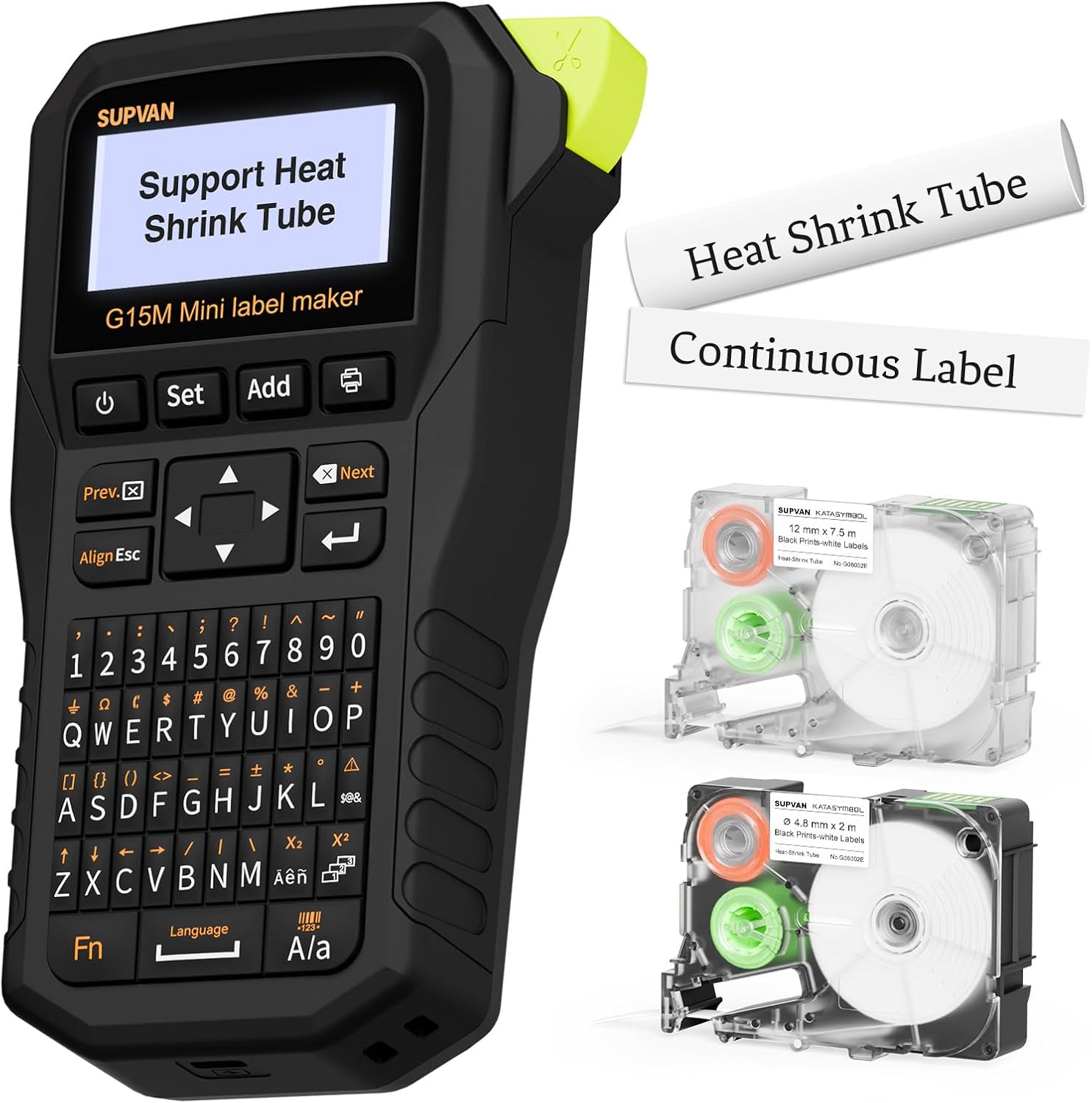
| Printer Type | Thermal |
|---|---|
| Resolution | 203dpi |
| Built-In Media | Heat Shrink Tube Φ 4.8mm x 2 m; White Continuous Label Tape 12 mm x 7.5 m |
| Connectivity | USB Type C |
| Wattage | 10 watt-hours |
The SUPVAN G15M is a compact thermal transfer label printer built for versatile labeling tasks at home, garage, or office. It prints heat-shrink tube plus continuous, cable, wrap-around, and die-cut labels using thermal transfer, producing laminated, water-, UV- and heat-resistant labels intended to last up to ten years. The G15M includes a backlit LCD and a full keyboard for on-device editing, offers minimal 0.19-inch margins to reduce waste, and ships with a small heat-shrink tube and a 12 mm continuous tape ready to use. It runs on a rechargeable battery with advertised long standby life and connects via USB-C for charging and data if needed. Practical trade-offs are its reliance on on-device controls only (no Bluetooth app), a single USB port, and modest print resolution (203 dpi) that is fine for text and icons but not for fine graphics. For buyers prioritizing durable, outdoor-capable heat-shrink labels in a portable package, the G15M is a focused, material-efficient choice.
Best for: Buyers who want a portable, rechargeable label maker that can produce durable heat-shrink and outdoor-ready labels directly from the device without relying on a smartphone.
Less Ideal for: If you need wireless app control, higher-resolution graphic printing, or multiple simultaneous connections, consider models with Bluetooth or higher dpi instead.
- Supports heat-shrink tubing plus multiple label types for cable, wrap-around, and continuous labels.
- Thermal transfer laminated labels designed to resist water, UV, heat and last up to 10 years.
- Backlit LCD and full keyboard let you create labels without a phone or computer.
- Minimal 0.19-inch printing margin reduces tape waste and lowers operating cost.
- Rechargeable battery with USB-C charging for portable use.
- No wireless connectivity or companion app for phone-based templates and backups.
- Single USB-C port limits simultaneous wired connections or accessories.
- 203 dpi resolution is adequate for text but not ideal for detailed graphics.
Verdict: Choose the SUPVAN G15M when you need a portable, rechargeable label maker that reliably prints durable heat-shrink and weatherproof labels from the device itself.
VolenGo E1000 Heat Shrink Label Maker

| Maximum Media Size | 0.47 inch |
|---|---|
| Printer Connectivity Type | USB |
| Hardware Interface | USB Type C |
| Maximum Print Resolution Black and White | 180 DPI |
The VolenGo E1000 is a handheld industrial label maker built around cable and wire identification. It uses a QWERTY keyboard for fast typing and supports three cable modes plus continuous and two-line printing for wraps, flags, and fixed-length labels. The unit ships with heat-shrink and flexible wire label tapes and can run on six AAA batteries or a USB-C connection, which makes it usable on site or at a bench. Practical benefits include laminated, waterproof tapes that resist oil, abrasion, and fading, a 2:1 heat-shrink ratio for secure fits, and one-touch shortcut keys that speed up common label formats. Print resolution is modest at 180 DPI but fine for black-on-white wire markers, and the device claims features to reduce tape waste when printing multiple labels. Limitations are typical for a focused tool: it prints monochrome only, maximum media width is 12 mm so larger tags are not an option, and it is a print-only device without advanced PC software features. For electricians, network techs, and maintenance teams who need rugged, portable wire marking, it covers the essentials without complexity.
Best for: Buyers who want a reliable, no-frills tool for on-the-job wire and cable identification and prefer rugged, easy-to-use hardware over complex software workflows.
Less Ideal for: Users who need full-color labels, larger-format tags, or advanced PC-based label design and database integration should look at more feature-rich desktop label printers.
- Designed specifically for wire and cable labeling with heat-shrink and flexible flag tape included
- QWERTY keyboard and one-touch shortcut keys for faster label creation
- Two power options: USB-C for bench use or six AAA batteries for portable work
- Laminated, waterproof tapes that resist oil, abrasion, and fading
- 3 cable modes and continuous printing for varied wire identification tasks
- Monochrome printing only with 180 DPI resolution limits graphic/detail capability
- Maximum media width limited to 12 mm, restricting larger label formats
Verdict: A straightforward, portable heat-shrink label maker that delivers durable wire markers and fast, familiar typing for field technicians who prioritize reliability.
Choosing the Right Heat-Shrink Label Maker: Key Factors to Consider
Print Durability and Ink/Thermal Technology
Durable print is the core purpose of heat-shrink labels because they are often used in harsh environments. Understand whether the device uses thermal transfer, thermal direct, or resin-based printing and what that means for resistance to abrasion, chemicals, and UV exposure.
A label maker that produces high-contrast, heat- and solvent-resistant markings will outlast cheaper alternatives when wrapped around cables, exposed junctions, or outdoor piping. Durable prints reduce rework and misidentification risk in maintenance scenarios.
Tube Fit, Shrink Ratio, and Inner Diameter Options
Accurate tube sizing determines how snugly a label fits after shrinking, which affects legibility and mechanical retention. Look for clear specifications on pre-shrink outer diameter, post-shrink inner diameter, and the shrink ratio used by the product's tubing.
Availability of multiple inner diameter options matters if you label both thin wires and thicker harnesses. Choosing tubing with the right post-shrink inner diameter ensures the label conforms to the substrate without gaps or excessive creasing.
Material Compatibility and Rated Temperature
Tubing material affects flexibility, chemical resistance, and the temperature range the label can tolerate. Common materials include polyolefin and PVC variants; each has different shrink temperatures and environmental tolerances.
Select tubing rated for the lowest and highest temperatures it will see in service and verify compatibility with any surface coatings or lubricants present on wires and pipes. Material data also affects long-term adhesion and whether the tubing will resist cracking or discoloration.
Character Size, Font Options, and Readability
Readability depends on both character size and font clarity after shrinking. Smaller fonts can become unreadable if the shrink ratio is high or if the printer's resolution is low. Ensure the maker offers character sizes suitable for the smallest physical label you need while still producing sharp text.
Additional features such as bold, underline, and simple symbols improve the usefulness of small labels by emphasizing key information at a glance.
Workflow Features and Connectivity
Consider how you will generate labels: via built-in keyboard, desktop software, or mobile apps. Batch printing, template storage, and import of CSV or database records save time for repetitive tasks. Connectivity options like USB or Bluetooth influence how easily the unit integrates into existing workflows.
For field technicians, battery life and offline operation matter. For shop environments, the ability to queue and print large batches from a computer is often more important.
Ease Of Use and Ergonomics
The physical design affects how quickly you can produce and apply labels. Look for clear displays, logically laid out controls, and easy loading of shrink tubing. Features such as built-in cutters, peel-and-apply modes, and tactile keyboards speed production in repetitive use.
Also consider how intuitive the software is for creating multi-line labels or alignment marks. Better ergonomics reduce errors and the fatigue associated with large labeling jobs.
What Heat-Shrink Tubing Sizes Actually Mean
Manufacturers list tubing sizes using either pre-shrink outer diameters or post-shrink inner diameters, and the shrink ratio tells you how much the tubing will contract when heated. Knowing both figures helps you pick tubing that will conform properly to the target component after shrinking.
Measure the largest dimension of the item you will label and choose tubing where the post-shrink inner diameter is equal to or slightly smaller than that measurement. This ensures a snug fit without excessive wrinkling or inability to slide the tubing into place.
- Pre-shrink size indicates how easy it is to install over a connector or splice.
- Post-shrink inner diameter determines final fit and legibility.
- High shrink ratios allow a wider range of pre-install sizes but can reduce text clarity if overused.
Best Practices for Applying Heat-Shrink Labels
For consistent results, center printed text on the tube before shrinking and support the component to avoid twisting during heat application. Use a controlled heat source, such as a heat gun on a low setting or a calibrated oven when appropriate, to avoid scorching the print or the underlying material.
Allow the tubing to cool fully before handling. Cooling helps the printed characters set and prevents smearing or distortion. When labeling harnesses, apply heat uniformly along the length of the tubing to ensure even contraction.
- Pre-fit tubing while cool for easier alignment.
- Use a heat gun at recommended distance and temperature settings.
- Avoid open flames or uncontrolled heat that can char or deform tubing.
Label Design Tips for Maximum Readability
Use high-contrast text and avoid overly small fonts for labels that experience significant shrinkage. Abbreviations can save space but pick standard, unambiguous terms to reduce confusion during maintenance.
Where space is tight, prioritize essential information and use symbols or color-coding to convey additional data. Test-print a sample and shrink it on a scrap piece of tubing to confirm legibility before running a batch.
- Prefer sans-serif fonts for small labels.
- Use bold settings for critical identifiers.
- Keep line counts low and avoid crowded text.
Maintenance and Replacement of Consumables
Label makers need occasional maintenance to keep printheads and cutters functioning. Follow the manufacturer guidance for cleaning the printhead and removing debris from the feed path. Replace tubing stocks before they degrade from UV or humidity exposure.
Store shrink tubing in a cool, dry place to preserve material properties. Keep an organized inventory of inner diameter sizes and colors so you can swap consumables quickly during a job.
- Clean printheads with recommended solvents or wipes.
- Check cutter blades for dullness and replace when necessary.
- Rotate stock to use older tubing first and avoid long-term storage damage.
Using Software and Databases for Batch Labeling
When you need to label many items with systematic names or serial numbers, software integration becomes a major time saver. Desktop or cloud-based label editors that support CSV imports let you automate sequential numbering, barcode generation, and template application.
Ensure the label maker supports the file formats and connections you plan to use. Test a short batch to validate layout and shrink impact before committing to large runs.
- Use CSV import for serial or inventory-based labeling.
- Leverage templates for repeated label types.
- Validate one sample after shrinking to confirm alignment and font size.
How We Chose the Best Heat-Shrink Label Maker
We selected products that consistently deliver legible, long-lasting markings on heat-shrink tubing and that are suitable for both field work and workshop labeling. Our editorial filters prioritized print durability, tube sizing accuracy, adhesive and material compatibility, and ease of use for common cable and component identification tasks. We also weighed connectivity and workflow features that speed repetitive labeling, such as keyboard layout, template support, and file import options. Exclusions included devices intended solely for flat-surface thermal transfer labels, tools that cannot print on shrinkable tubing, and units without clear specification for tube inner diameters and shrink ratios. The final list focuses on makers that specify compatible tubing materials and shrinking performance, offer clear character sizes for legibility, and provide practical workflow features for technicians and makers. We favored models that include or support a useful range of tubing diameters and that document expected post-shrink dimensions and temperature ranges.
Our full evaluation process is outlined in our review methodology.
FAQ
Can I print barcodes on heat-shrink tubing?
Often you can. Many label makers and their software support simple linear barcodes and some 2D codes. Keep in mind that barcode scanners require sufficient contrast and segmentation after shrinking, so test barcodes at final shrink size to confirm scan reliability.
What heat source is best for shrinking tubing without damaging the print?
A controlled heat gun set to the recommended temperature or a calibrated oven is usually best. These provide even heat that avoids scorching. Maintain the recommended distance and move the heat source continuously to prevent localized overheating.
How do I ensure labels stay readable in outdoor or chemical-exposed environments?
Choose tubing material and print technology specified for chemical and UV resistance. Look for materials with suitable temperature ratings and a proven resistance to solvents. Properly shrunk tubing that fits tightly will also help protect the printed surface.
Do I need special tubing for very small wires?
Yes. Very small wires require tubing with a correspondingly small post-shrink inner diameter and a high shrink ratio so you can slide it over the wire before shrinking. Verify the maker lists compatible small-diameter tubing sizes and that the font sizes remain legible after shrinking.
How long do heat-shrink labels typically last?
Lifespan varies depending on material, environment, and print method. In benign indoor settings, they can last many years. In harsh outdoor or chemical environments, expect reduced life unless you choose high-spec materials and durable printing methods.
Final Verdict
Focus on the combination of print durability and correct tubing fit when choosing a heat-shrink label maker. Prioritize units that document tube shrink ratios and material compatibility, and match character sizes to the smallest labels you need to produce. Consider workflow features like batch import and connectivity if you print many labels regularly. Weigh the tradeoffs between portability and batch-printing capability, and test a sample label at final shrink dimensions before committing to large runs. With those priorities in mind, you can pick a heat-shrink label maker that delivers reliable, long-lasting identification for cables, pipes, and components.