
Note: This article contains affiliate links. If you click on these links and make a purchase, we may earn a small commission at no extra cost to you. This helps support our research and content. Read our full affiliate disclosure here.
If you manage inventory, assets, or safety signage in a busy warehouse or manufacturing environment, the right industrial label maker matters. You need devices that produce durable labels quickly, connect reliably to your systems, and stand up to solvents, abrasion, and temperature swings. This guide shortlists the top industrial label makers for heavy-duty use and evaluates each based on real buyer concerns like print longevity, throughput, and ease of integration. Read on to find options that match your workflow and duty cycle, and to see the evaluation criteria we used to select these top picks.
Top Picks at a Glance
| Best Overall The best all-around choice for most situations | DYMO Rhino 5200 |  |
| Best Quality Built to a higher standard if you want something more solid | Primera LX500 |  |
| Best Value The sweet spot between price and what you get | Makeid D50 Industrial Label Printer |  |
| Best Budget The cheapest option that still gets the job done reliably | VolenGo H1100 Label Maker |  |
| Top Rated A top-rated pick with lots of positive feedback | Brother P-touch EDGE 310BTBP |  |
| Most Popular A crowd favorite that many people choose with confidence | Brother P-touch PT-D610BT |  |
| Best Seller A high-volume bestseller chosen again and again | Brady M210 Handheld Label Maker |  |
DYMO Rhino 5200

| Printer Type | Thermal |
|---|---|
| Print Resolution | 300 dpi |
| Connectivity | USB |
| Print Output | Monochrome |
| Includes | 2 rolls of vinyl labels |
The DYMO Rhino 5200 is a purpose-built industrial label maker for electricians, network installers, and maintenance crews who need ANSI/TIA-compliant labels on the go. It prints monochrome vinyl labels and includes two rolls (3/4" and 3/8") and a durable carrying case, with one-touch Hot Keys that automatically size, space, and format text for patch panels, wire wraps, faceplates, and terminal blocks. The unit prints barcodes (Code 39 and Code 128), offers an LCD for previewing text, and connects to a PC over USB for more complex jobs. Its thermal printing and 300 dpi resolution produce legible, durable labels quickly, and the device is rechargeable for extended field use. Limitations include basic monochrome output only and a relatively small maximum media width, so it is not suited for large-format signage or color labels, and advanced desktop software features depend on PC connection.
Best for: Technicians and tradespeople who need a tough, standards-compliant labeler that speeds common field tasks like patch panel, wire, and terminal labeling and integrates with PC workflows when needed.
Less Ideal for: Users who need color labels, wide-format signage, or a desktop-only label solution with advanced software features out of the box.
- Rugged, job-site oriented design with included carrying case and industrial vinyl label rolls
- One-touch Hot Keys that speed label formatting for patch panels, cable flags, and terminal blocks
- Prints Code 39 and Code 128 barcodes for asset and cable management
- Rechargeable thermal printing with 300 dpi resolution for clear, durable monochrome labels
- USB connectivity for PC-based label creation and expanded formatting
- Monochrome-only output limits use where color or multi-color coding is required
- Maximum media width is small, so it cannot produce large-format labels
Verdict: Buy this if you need a fast, rugged, standards-compliant handheld labeler that speeds field labeling tasks and supports PC connectivity.
Primera LX500

| Printer Type | Inkjet |
|---|---|
| Maximum Media Size | 4" x 24" |
| Maximum print Resolution Color | 4800×1200 dpi |
| Compatible Cartridge | Single tri-color dye Ink cartridge |
| Connectivity | USB |
The Primera LX500 is built for high-quality, short- to mid-run label production where color fidelity and resolution matter. It uses a single tri-color dye ink cartridge to deliver up to 4800 x 1200 dpi output and prints labels as small as 0.5" square or as long as 24" on roll-fed media, making it suitable for product, retail, and promotional labels. The built-in cutter and included starter roll let you start jobs quickly, and USB connectivity plus bundled design software streamline file transfer from a computer. Practical benefits include excellent photo-quality color for branding and small-batch customization, a compact footprint for tight production spaces, and automatic/manual duplex capability for specialized workflows. Limitations to consider are reliance on dye-based ink for vibrant color rather than pigment durability, single USB connectivity without native network/Ethernet, and ongoing cost of labels and ink for continuous high-volume use.
Best for: Buyers who prioritize color accuracy and high-resolution output for product, retail, or promotional labels and need a compact desktop unit for short- to mid-volume runs.
Less Ideal for: Facilities requiring heavy continuous high-volume throughput, remote networked printing, or maximum outdoor durability from pigment inks should consider industrial models with enterprise connectivity and pigment-based supplies.
- Very high print resolution (4800 x 1200 dpi) for photo-quality, full-color labels
- Roll-fed design accepts wide media range up to 4" x 24" for flexible label lengths
- Built-in cutter and starter media let you begin production immediately
- Compact desktop footprint suitable for small production areas
- Bundled design software and drivers for Windows and Mac simplify setup
- Uses a single dye-based ink cartridge which is less fade-resistant than pigment options
- Connectivity limited to USB 2.0 rather than wired network or Wi‑Fi
Verdict: Choose the LX500 when you need compact, photo-quality full-color labels for short- to mid-volume industrial or retail production runs.
Makeid D50 Industrial Label Printer

| Print resolution | 300 dpi |
|---|---|
| Maximum media size | 2 inches |
| Connectivity | Bluetooth, USB Type C |
| Battery | 2600mAh Li‑ion |
The Makeid D50 is a compact industrial thermal transfer label printer built for on‑site marking tasks like cable and pipe labels, asset tags, and safety signage. It prints monochrome labels at 300 dpi to produce sharp, durable text and barcodes and supports a 2‑inch media width. The printer connects over Bluetooth to a mobile app or via USB‑C to a PC for more detailed editing, and it accepts integrated label-and-ribbon cartridges for quick consumable swaps. An automatic cutter and a 2600 mAh battery that supports long standby times make it convenient for field use, and the OLED display plus PC editor simplify template selection. Because it uses thermal transfer media the labels are water resistant and rated for outdoor use and long life. Limitations to consider are that it is print‑only with no color printing and relies on Makeid Z‑series cartridges, so you will be tied to proprietary consumables for specialty tapes and ribbons.
Best for: A technician or facilities manager who needs a durable, portable label printer that produces professional, long‑lasting labels quickly on job sites or around a plant.
Less Ideal for: Designers or users who need color labels, or operations that prefer open third‑party tape compatibility for a wide range of specialty materials.
- Thermal transfer printing at 300 dpi for long‑lasting, outdoor‑resistant labels
- Bluetooth and USB‑C connectivity with mobile app and PC editor for flexible workflow
- Integrated label-and-ribbon cartridges for fast media changes
- Automatic cutter speeds batch label production
- Portable with 2600 mAh battery and OLED for field use
- Prints only in monochrome so no colored labels or highlighting
- Requires Makeid Z‑series cartridges which limits third‑party tape options
Verdict: Buy this if you want a rugged, portable thermal transfer printer that delivers sharp, weather‑resistant industrial labels and fast consumable changes for job‑site work.
VolenGo H1100 Label Maker
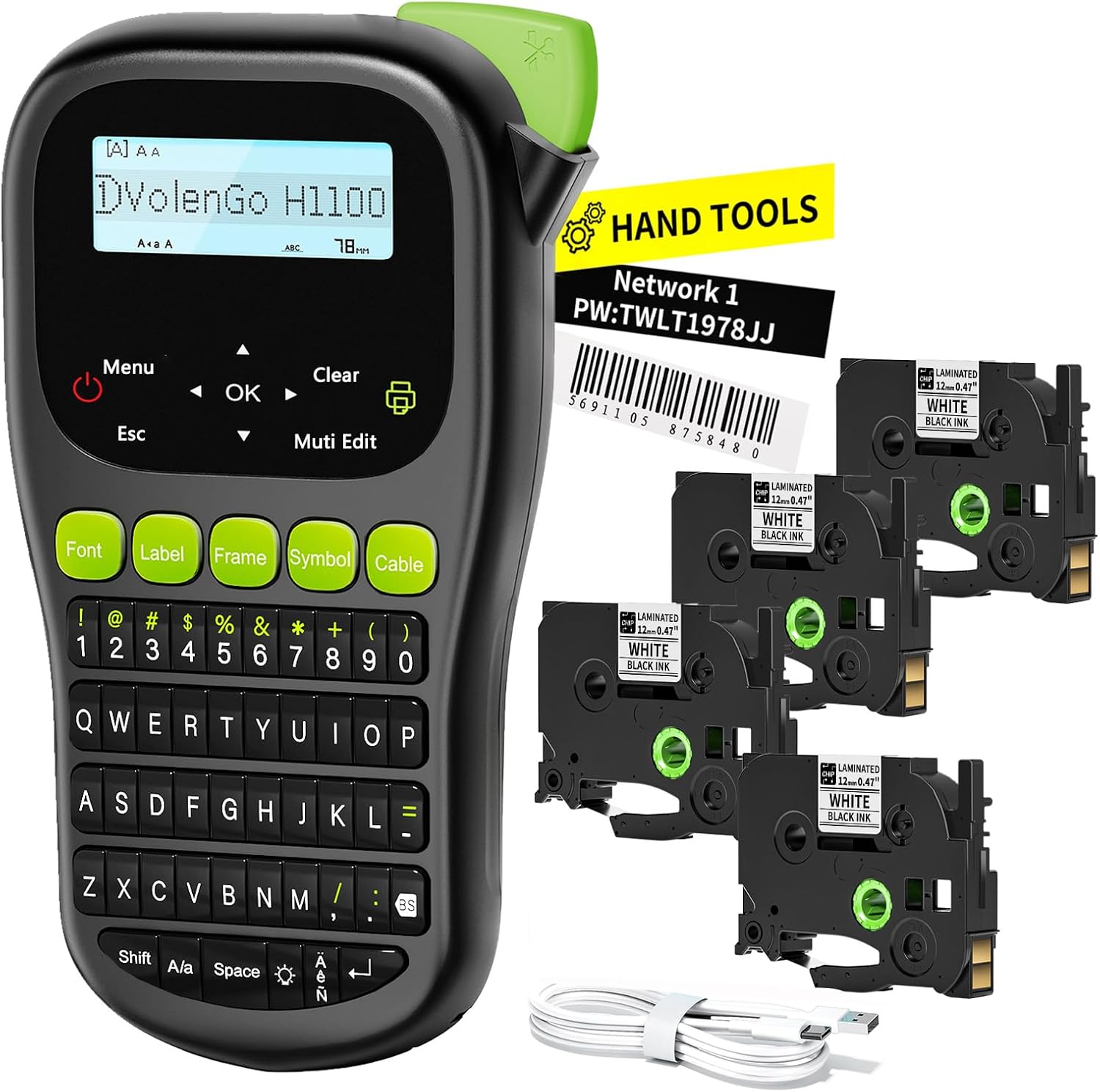
| Print Resolution | 203 DPI |
|---|---|
| Tape Width | 12 mm |
| Printer Type | Laminated |
| Connectivity | USB Type C |
| Power | 6 AAA cells or USB‑C |
The VolenGo H1100 is a portable handheld labeler designed for straightforward office and industrial-style organization tasks. It prints at 203 DPI on laminated 12mm tapes that resist water, oil, and abrasion, and the built-in backlit LCD and push-button controls make it usable in low-light or cluttered workspaces. The unit offers cable modes for wire labeling, a variety of fonts, frames, and symbols for customized tags, and two power options: six AAA cells or USB‑C power for on-the-go or desk use. Included in the box are four 12mm x 8m laminated tapes and a USB‑C cable, so you can start labeling immediately. Practical limitations are its monochrome output and single tape width, which restricts very large-format or multi-color labeling, and the reliance on AAA batteries if you need long untethered runtime without access to USB power. For routine industrial cable marking and general equipment tags the H1100 balances useful features with a straightforward, budget-friendly design.
Best for: Buyers who need a low-cost, durable handheld labeler for cable marking, equipment tags, and everyday workshop or office organization and value durability and ease of use over color printing.
Less Ideal for: Users who need multi-color labels, very wide-format printing, or extended battery-powered operation without access to USB power should consider a different model.
- Laminated tapes that resist water, oil, abrasion and fading for durable labels.
- Backlit LCD and simple push-button controls for easy use in low light.
- USB‑C connectivity plus battery power for flexible deployment.
- Includes four 12mm tapes and USB‑C cable to start labeling out of the box.
- Prints only in monochrome and supports a single tape width.
- AAA battery runtime can be limited for heavy mobile use.
Verdict: A budget-friendly handheld labeler that delivers durable laminated labels and flexible USB‑C or battery power, ideal for industrial cable marking and everyday tagging.
Brother P-touch EDGE 310BTBP

| Printer Type | Thermal |
|---|---|
| Maximum Media Size | 18 mm |
| Connectivity | Bluetooth, USB-C |
| Resolution | 181 x 181 dpi |
| Included Media | 5 tapes |
The Brother P-touch EDGE 310BTBP is a handheld industrial thermal label printer kit built for on-site and mid-size labeling tasks. It prints durable laminated labels and heat-shrink tube up to 18 mm and includes five starter tapes, a rechargeable Li-ion battery, USB-C cable, carrying case, wrist strap and a patch panel ruler so you can get to work right away. Quick application keys and stored templates speed common tasks like cable wrap, patch panel and faceplate labels, while Bluetooth and USB-C let you design on a phone or PC and print without extra adapters. The unit stores label designs and databases for repeat jobs and supports QR and linear barcode printing for inventory or asset tagging. Practical limits are its 181 dpi thermal resolution and modest media width cap, which are fine for text, barcodes and cable IDs but not for high-detail graphics. Battery yield and cutter style are suited to daily field work but power-hungry continuous production may need spare batteries or an AC adapter. For reliability-focused users this kit emphasizes rugged, repeatable labeling with sensible workflow tools rather than photo-quality output.
Best for: Technicians and maintenance teams who need a rugged, reliable handheld labeler that simplifies repeat industrial labeling tasks and integrates with mobile or PC workflows.
Less Ideal for: Users who need photo-quality printing, very high-resolution graphics, or continuous, high-volume shop production without adding extra power or supplies.
- Prints laminated labels and heat-shrink tubes up to 18 mm for durable industrial identification.
- Includes five useful starter tapes and a carrying case so it is ready for field use.
- Bluetooth and USB-C connectivity allow mobile and PC label design and printing.
- Stores templates and databases on the printer to speed repeat jobs and serialization tasks.
- Quick application keys simplify common label formats like cable wrap, patch panel and faceplate labels.
- 181 dpi thermal resolution limits fine graphic detail and small-font clarity compared with higher-resolution printers.
- Not optimized for high-volume continuous production without spare batteries or optional AC power.
Verdict: Choose this kit when you want a durable, field-ready industrial labeler that reliably produces rugged cable and asset labels and streamlines repeat jobs.
Brother P-touch PT-D610BT

| Printer Type | Thermal |
|---|---|
| Maximum tape width | 24mm (~1") |
| Resolution | 180 x 360 dpi |
| Connectivity | USB, Bluetooth |
| Display Type | Full-color LCD |
The Brother P-touch PT-D610BT is a business-focused desktop label maker that connects by Bluetooth or USB so teams can design and print labels from smartphones, tablets, or PCs. It prints up to roughly 1-inch (24mm) laminated TZe tapes with high-resolution thermal output for crisp barcodes, logos and multi-line text, and includes a built-in automatic cutter for faster batch jobs. A large two-line full-color LCD shows a preview before printing and the QWERTY keyboard plus one-touch formatting make on-device label creation quick for common tasks. The unit stores frequently used labels and offers 175 preset templates along with extensive fonts, frames and symbols for inventory, asset tagging, price labels, and cable marking. Important practical limits are its reliance on Brother TZe consumables and the desktop form factor, which makes it better suited to a fixed workstation than true pocket portability. Power and connectivity are strong for commercial workflows, but ongoing tape cost should be considered when planning high-volume deployments.
Best for: Buyers who need a reliable, office-ready label maker for inventory, asset tracking, retail price tags, or warehouse labeling and who value clear previewing, multi-user connectivity, and durable labels.
Less Ideal for: Users who need an ultralight handheld labeler for field work or those who want the lowest-cost consumables for very high-volume, continuous printing.
- Bluetooth and USB connectivity for mobile and PC printing
- Prints durable laminated TZe tapes up to 24mm for outdoor-grade labels
- Full-color preview display and QWERTY keyboard reduce formatting errors
- Automatic cutter and stored templates speed high-volume labeling workflows
- High print resolution suitable for clear barcodes and logos
- Uses proprietary TZe tape cartridges which add recurring cost
- Desktop size and weight make it less convenient for truly mobile, on-the-go labeling
Verdict: A robust desktop label maker for businesses that need durable, high-resolution labels with mobile and PC connectivity for shared, high-efficiency workflows.
Brady M210 Handheld Label Maker

| Printer Type | Thermal |
|---|---|
| Print Resolution | 203 x 203 dpi |
| Maximum Media Size | 0.75 inch |
| Control Method | App |
| Compatible Cartridge | M21-750-499 |
The Brady M210 is a compact handheld thermal label maker built for on-site industrial use. It prints monochrome safety and identification labels up to 0.75 inch wide using Brady M21 compatible cartridges and is controlled via an app on a smartphone, which streamlines text entry and template selection when working in the field. The unit is ruggedized for jobsite use with drop resistance to six feet and an easy-to-read LCD for quick status checks when not using the app. Print quality is factory-standard 203 dpi, which is sharp enough for safety text, barcodes, and cable marking, and the device handles short runs and multiple small labels efficiently. Limitations include a modest print speed and a maximum run of 50 copies per job, so it is best for intermittent label creation rather than high-volume continuous printing. Connectivity is basic with a single USB 2.0 port for wired connections when needed. For technicians who need a durable, portable labeler that pairs with a phone app for quick setup, the M210 is a practical choice; heavier print workflows may require a desktop industrial printer instead.
Best for: A careful buyer who needs a durable, portable label maker for occasional to moderate industrial labeling tasks and values reliability and app-driven ease of use.
Less Ideal for: Facilities or shops that require high-volume, continuous label production or color printing should choose a larger desktop or industrial printer instead.
- Rugged handheld design rated for 6-foot drops suited to jobsite use
- Smartphone app control simplifies label creation and templates on the go
- 203 dpi thermal printing produces legible text and barcodes for safety labeling
- Compatible with Brady M21 cartridges for established industrial label supplies
- Slow print speed and low maximum copies per run compared with desktop label printers
- Monochrome output only, so no color-coded label printing
Verdict: Buy the Brady M210 if you want a rugged, smartphone-controlled handheld labeler for reliable on-site industrial labeling.
Choosing the Right Industrial Label Maker: Key Factors to Consider
Print Durability and Material Longevity
Industrial labels are often exposed to harsh conditions such as chemicals, abrasion, sunlight, and extreme temperatures. Materials and print technologies vary, and you should choose a printer that supports label stocks and ribbons rated for the environment where they will be used. Durable materials reduce relabeling frequency and ensure barcodes and safety information remain legible over time.
Consider how the printer applies the image to the media. Thermal transfer printing with industrial ribbons typically offers superior resistance to solvents and abrasion compared with direct thermal options. Confirm manufacturer specs for resistance to common chemicals and UV exposure to match your application.
Print Speed and Throughput
Throughput matters when you have high-volume labeling tasks such as bulk shipments, production lines, or rapid asset tagging. A faster printer reduces bottlenecks and labor cost per label, but speed should not compromise print quality or durability. Review duty cycle ratings and continuous-run performance to understand whether a model suits intermittent use or sustained production runs.
Also assess label roll capacity and how often consumables must be changed. Larger rolls and easier ribbon replacement cut downtime and operator interruptions during busy shifts.
Connectivity and Software Integration
Industrial environments often require integration with databases, inventory systems, or label-design software. Look for printers that offer multiple connection options such as Ethernet, USB, and optional wireless modules, plus drivers or SDKs for custom integrations. Built-in support for common label formats and barcode standards reduces setup time and compatibility issues.
Consider the software workflow for operators. Intuitive label design tools, template management, and the ability to push labels from a central server help maintain consistency and reduce human error across teams.
Build Quality and Maintainability
A rugged frame and reliable internal components reduce breakdowns in demanding settings. Metal chassis, reinforced feed mechanisms, and protected print heads are features to look for. Ease of serviceability is also important: accessible print heads, straightforward platen roller replacement, and clear error diagnostics keep downtime low.
Evaluate warranty terms and the availability of replacement parts or field service. A model that is easy to clean and maintain will provide more consistent output and lower total cost of ownership over its service life.
Media and Label Size Flexibility
Different applications require different label sizes, adhesives, and materials. Ensure the printer supports the range of media widths, lengths, and adhesive types you need, including specialty stocks such as polyester, vinyl, or tamper-evident materials. Flexibility to handle variable formats, quiet or continuous labels, and different core sizes prevents future limitations as labeling needs evolve.
Check for support of common barcode symbologies and variable data printing if you need serialized labels, batch codes, or RFID encoding in the future.
Operator Usability and Safety
In industrial settings operators may be nontechnical and work under time pressure. A clear control panel, straightforward loading procedure, and reliable error messages reduce training time and mistakes. Consider safety features such as guarded cutters or automatic shutoffs to prevent accidents when labels are dispensed at high speed.
Also factor in the environment where the unit will live. Controls and displays should be readable in low light or dusty conditions, and the design should minimize pinch points and exposed moving parts.
Choosing the Right Print Technology
Industrial label makers typically use thermal transfer or direct thermal printing. Thermal transfer with ribbons produces more durable labels that resist solvents and abrasion, making it the common choice for exposed or long-lived labels. Direct thermal is simpler and eliminates ribbons but is best for short-term uses where labels will not face harsh conditions.
Match the print technology to the expected lifespan and exposure for your labels. If you need chemical resistance or long-term asset tags, prioritize models that support thermal transfer ribbons and industrial label stocks.
- Thermal transfer: best for long-term, durable labels.
- Direct thermal: low maintenance, good for short-term labels.
- Consider ribbon formulation to match solvents and temperature exposure.
Integrating Labeling Into Your Workflow
Think about where labels are created and how data is fed to the printer. Centralized printing from a server requires robust network connectivity and driver support. Mobile or on-the-spot labeling benefits from easy-to-use software and wireless options.
Standardize templates and barcode formats to reduce operator errors. Look for printers that support template locking and remote template updates to maintain consistency across multiple devices.
- Use Ethernet or Wi-Fi for centralized control and high-volume sites.
- Choose drivers and SDKs that match your inventory or ERP systems.
- Enable locked templates for consistent labeling across shifts.
Media Handling and Consumable Management
High-volume operations should plan for consumable logistics. Larger rolls mean fewer changes and less interruption, while ribbon economy affects operating cost. Verify compatible core sizes and whether the printer supports pre-printed or specialty stock without frequent adjustments.
Consider spare-part stocking for wear items like platen rollers and print heads to minimize downtime. Some models offer predictive maintenance indicators or tool-free part replacement to speed repairs.
- Maximize roll capacity to reduce consumable swaps.
- Confirm availability of industrial-grade label stocks and ribbons.
- Stock common wear parts to limit production stoppages.
Label Design and Data Management Best Practices
Good label design improves readability and scanning performance. Use appropriate font sizes, contrasting colors, and quiet zones for barcodes. Avoid cluttering labels with too much information; prioritize required elements such as part numbers, handling symbols, and expiration or batch dates.
For serialized or variable data printing, implement a reliable data source and validation checks before printing. Integrate barcode verification in the workflow when accuracy is critical to downstream scanning systems.
- Keep barcodes simple and high-contrast for reliable reads.
- Validate variable data at the source to prevent misprints.
- Include human-readable text for quick visual verification.
Environmental and Safety Considerations
Assess the physical location where labels and printers will be used. Dust, moisture, and temperature extremes can affect both prints and mechanical components. Look for enclosures or IP ratings where necessary and place printers in protected areas if exposure is likely.
Train staff on safe handling of ribbons and cutters and on basic maintenance procedures. Good housekeeping around the print station, such as keeping surfaces clean and free of adhesive debris, extends service intervals and reduces jams.
- Position printers away from direct dust or spray where possible.
- Use enclosures for harsh environments when needed.
- Train operators on safe consumable changes and basic troubleshooting.
How We Chose the Best Industrial Label Maker
We prioritized tools built for sustained commercial use and accuracy under real-world industrial conditions. Selection focused on print durability, throughput and speed, connectivity and software support, ease of use for operators, and media versatility. We favored units with robust build quality and serviceability features that reduce downtime, such as easily replaceable print heads or clear maintenance access. For durability we looked at rated resistance to chemicals, temperature, and abrasion. For connectivity we emphasized USB, Ethernet, and wireless options plus software or driver support for enterprise workflows. Excluded from consideration were consumer-grade handheld printers and products intended strictly for home or office craft use. We also filtered out devices lacking documented specifications for label longevity or commercial-rated duty cycles. The final list reflects a balance between fast output, durable print materials, and integration capabilities that matter to businesses and facilities managers.
Our full evaluation process is outlined in our review methodology.
FAQ
What label materials should I pick for chemical resistance?
For chemical resistance, choose synthetic materials such as polyester or polypropylene paired with a thermal transfer ribbon formulated for solvent resistance. Verify manufacturer specifications for compatibility with the specific chemicals used in your facility.
Can an industrial label maker connect to my inventory system?
Many industrial label makers support Ethernet, USB, and SDKs or drivers for integration with inventory or ERP systems. Confirm the printer offers the connectivity and protocol support required by your software before purchasing.
How often do print heads and rollers need replacement?
Replacement frequency depends on usage, media abrasiveness, and maintenance. Heavy daily use with abrasive labels may require more frequent head or roller changes. Regular cleaning and using recommended consumables extend component life.
Are direct thermal labels acceptable for asset tagging?
Direct thermal labels are suitable for short-term tags and indoor use where exposure is limited. For long-term asset tagging or outdoor exposure, thermal transfer labels with appropriate ribbons are usually a better choice.
Do industrial label makers support serialized printing?
Yes, many models support variable data and serialized printing, either through built-in counter functions in the printer firmware or via host software. Ensure your chosen workflow supports the data source and validation you need.
Final Verdict
Choosing an industrial label maker comes down to matching print durability, throughput, and connectivity to your operational needs. Prioritize printers that support durable media and ribbons if labels face chemicals, abrasion, or temperature extremes. Balance speed and roll capacity against maintenance requirements to minimize downtime. Focus on integration and operator usability when deploying multiple devices across a facility. With those tradeoffs in mind, you can select a model that delivers consistent, long-lasting labels while fitting into your existing workflow and maintenance practices.