
Note: This article contains affiliate links. If you click on these links and make a purchase, we may earn a small commission at no extra cost to you. This helps support our research and content. Read our full affiliate disclosure here.
When you are labeling panels, conduits, junction boxes, or wiring runs, the right label maker for electricians makes identification fast and reliable. You need prints that stay legible under grime, resist solvents, and adhere securely to metal, plastic, and cable jackets. This guide presents a shortlist of the top label makers selected for professional electrical work and summarizes the evaluation criteria electricians care about. We vetted options based on print durability, legibility, tape and cartridge variety, and jobsite usability. Read on to find tools that simplify organization and reduce relabeling down the line.
Top Picks at a Glance
| Best Overall The best all-around choice for most situations | DYMO Rhino 4200 Labelmaker |  |
| Best Quality Built to a higher standard if you want something more solid | Brady M210 Handheld Label Maker |  |
| Best Value The sweet spot between price and what you get | NIIMBOT M2 Thermal Transfer Label Maker |  |
| Best Budget The cheapest option that still gets the job done reliably | ORGSTA S001 Label Maker |  |
| Top Rated A top-rated pick with lots of positive feedback | Brother P-touch PTD210 | 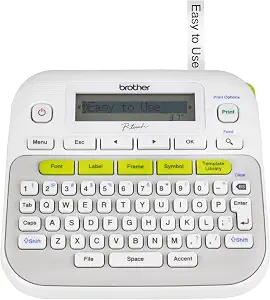 |
| Most Popular A crowd favorite that many people choose with confidence | DYMO LetraTag 100H |  |
| Best Seller A high-volume bestseller chosen again and again | Brother P-touch PT-N20 |  |
DYMO Rhino 4200 Labelmaker

| Printer Type | Thermal |
|---|---|
| Print media | Labels |
| Maximum Print Resolution Black and White | 200-300 dpi |
| Printer Connectivity Type | Ethernet |
| Compatible Devices | PC |
The DYMO Rhino 4200 is a handheld thermal label printer built for electricians and other tradespeople who need fast, durable on-site labeling. It uses a familiar QWERTY keyboard and one-touch hot keys to quickly format wire/cable wraps, flags, fixed-length labels and bar codes, and a Favorites key stores commonly used labels. The unit prints up to 3/4" wide on industrial nylon, polyester and vinyl tapes and can print directly onto heat-shrink tubes, which makes it useful for identifying wires, panels and components. Rugged details like integrated rubber bumpers and industrial-strength tape options help it survive drops and harsh conditions. Print speed and resolution are modest, and the device is a dedicated print-only tool that connects to a PC via USB or Ethernet for certain workflows, so it is not suited to heavy desktop batch printing. For electricians who need field-ready, ANSI-compliant labels and quick formatting shortcuts, the Rhino 4200 makes labeling fast and reliable on the jobsite.
Best for: Electricians and field technicians who want a rugged, job-site focused labeler that speeds creation of ANSI-style wire and component labels with durable tape options.
Less Ideal for: Users who need high-volume desktop batch printing, advanced office multifunction features, or faster print resolution should consider a dedicated desktop label printer instead.
- QWERTY keyboard and hot keys speed label creation for common electrical formats
- Prints on industrial nylon, polyester, vinyl tapes and heat-shrink tubes for durable identification
- Favorites and Custom keys let you save frequent label formats for one-touch recall
- Rugged construction with rubber bumpers suited for job-site use
- USB and Ethernet connectivity supports PC integration when needed
- Modest print speed and resolution compared with desktop label printers
- Print-only design lacks additional office features like scanning or copying
Verdict: Choose the Rhino 4200 when you need a rugged, electrician-focused labeler that prints durable tape and heat-shrink IDs quickly on the jobsite.
Brady M210 Handheld Label Maker

| Printer Type | Thermal |
|---|---|
| Maximum Media Size | 0.75 inch |
| Resolution | 203 x 203 dpi |
| Control Method | App |
| Compatible Cartridge | M21-750-499 |
The Brady M210 is a rugged handheld thermal label maker aimed at professional field use. It prints monochrome labels up to 0.75 inch wide from built-in media and pairs with a smartphone app for on-the-go layout and printing, which simplifies creating wire, panel, and safety labels at a job site. The unit is built to withstand drops up to six feet and uses a single compatible cartridge (M21-750-499), while its 203 dpi resolution delivers crisp text and simple symbols suited to electrical identification. Print speed is modest at about 0.39 pages per minute, so large batch jobs will be slow compared with desktop or industrial printers, but the compact form, LCD, and single-handed operation make it convenient for quick runs and spot labeling. Connectivity includes a USB 2.0 port for wired transfers if needed. For electricians who need durable, easy-to-read labels in the field, this is a practical handheld choice, though it is not optimized for high-volume or color labeling tasks.
Best for: Electricians and field technicians who prioritize a durable portable labeler for on-site identification and quick single-run labels controlled from a smartphone.
Less Ideal for: Users who need fast high-volume printing or full-color labels should choose a desktop or industrial label printer instead.
- Rugged design rated for 6-foot drops suitable for jobsite use
- Smartphone app control for quick on-site label creation
- 203 dpi thermal print resolution for clear text and symbols
- Compact handheld form factor with LCD for single-handed operation
- Slow print speed makes large batches time-consuming
- Monochrome-only output limits color-coded labeling options
Verdict: A rugged, app-controlled handheld built for electricians who need durable, legible monochrome labels on site.
NIIMBOT M2 Thermal Transfer Label Maker

| Printer Type | Thermal Transfer Tech |
|---|---|
| Resolution | 300 x 300 (300 dpi) |
| Maximum Media Size | 2 INCH |
| Connectivity | Bluetooth, USB |
| Print media | Labels |
The NIIMBOT M2 is a compact thermal transfer label maker designed for durable identification tasks. It pairs with iOS/Android devices over Bluetooth (and with a PC via USB) and prints at 300 dpi using a carbon ribbon for labels that resist water, oils, chemicals and extreme temperatures for years. Typical uses include cable and equipment marking, asset tagging, lab vials and outdoor labels where longevity matters. The app provides templates, icons, barcode and QR code support and can store print history when you sign in, while the device supports multiple phone connections simultaneously for team use. Practical features include automatic label recognition, adaptive print density and fast charging, but it only accepts NIIMBOT M2 thermal transfer labels and uses a ribbon, so you cannot use standard thermal rolls. The printing process is mechanical and can be noisier than direct-thermal printers, and continuous high-volume runs may emphasize that sound and the ribbon replacement cadence. For electricians who need crisp, long-lasting cable and panel labels, the M2 delivers reliable, weather-resistant output in a small, portable package.
Best for: Electricians and technicians who prioritize durable, long-lasting cable, panel and equipment labels and want a portable, app-driven printer that produces clear, professional identification that stands up to harsh conditions.
Less Ideal for: Users who need silent, very high-volume continuous printing or who prefer wide third-party media compatibility should consider other label printers.
- 300 dpi thermal transfer printing for crisp, high-detail monochrome labels
- Labels rated to resist water, oil, chemicals and temperatures from -4°F to 248°F for long-term durability
- Bluetooth and USB connectivity for smartphone and PC use plus multi-device pairing
- App templates, barcode/QR and saved designs make repeated labeling quick and consistent
- Compact, portable design with included ribbon and label roll for immediate use
- Only compatible with NIIMBOT M2 thermal transfer labels and ribbon, limiting media choices
- Mechanical printing with a ribbon is noticeably louder than thermal-direct models
Verdict: If you need portable, high-resolution labels that survive heat, chemicals and outdoor conditions, the NIIMBOT M2 is a practical, durable choice for electricians.
ORGSTA S001 Label Maker

| Printer Type | Thermal |
|---|---|
| Print Resolution | 203 dpi |
| Maximum Media Size | 0.47 inches (12mm) |
| Connectivity | Bluetooth |
| Power Consumption | 5 watts |
The ORGSTA S001 is a pocketable Bluetooth thermal label maker that pairs with a phone app to print short laminated labels and continuous tape up to 12 mm wide. In use it is best for quick identification tasks: marking cables, labeling small junction boxes, tagging tools, and printing barcodes or simple QR codes from the Snap & Tag app. It prints at 203 dpi using direct thermal technology so output is sharp for text and simple symbols, and the laminated tape is water and oil resistant for rough workshop conditions. Setup is straightforward via Bluetooth and USB‑C charging, and the built‑in cutter and keyring make it easy to carry on a job. The S001 is limited to narrow 12 mm media and simplex printing, so it is not suitable for wide panel labels or long multi-line datasheets, and battery life depends on how often you print continuous long runs. For electricians who need compact, on‑the‑spot labeling for wires, terminals, and small components, it covers the essentials without extras aimed at office use.
Best for: Electricians who want a low-cost, ultra-portable labeler for on-the-spot cable, terminal, and tool identification and who prefer controlling prints from a smartphone.
Less Ideal for: Users who need wider industrial panel labels, multi-line schematic labels, or heavy continuous production printing should choose a wider-format, dedicated industrial labeler instead.
- True thermal printing at 203 dpi for clear text and symbols
- Laminated tape that is water, oil, and scratch resistant
- Bluetooth control from smartphone app with templates, QR and barcode support
- USB‑C rechargeable battery and compact keyring design for on‑site portability
- Limited to narrow 12 mm media so larger panel or multi-line labels are not possible
- Simplex printing only and no onboard keyboard means reliance on phone app for every print
Verdict: A compact, budget-friendly Bluetooth thermal labeler that delivers durable narrow laminated labels ideal for quick wire and terminal marking on the job.
Brother P-touch PTD210

| Print media | Labels |
|---|---|
| Paper Size | 12 millimeters |
| Display Type | LCD |
| Printer Connectivity Type | USB |
| Print Resolution | 300 dpi |
The Brother P-touch PTD210 is a compact handheld thermal label maker designed for quick, on-the-spot label creation. It prints monochrome labels up to 12 mm wide and offers one-touch access to 14 fonts, 97 frames, more than 600 symbols, and 27 templates so you can produce consistent, readable labels without a PC. The built-in 12 mm starter TZe tape and LCD preview reduce wasted tape by letting you check text before printing, and the unit runs on 6 AAA batteries or an optional AC adapter for portable or bench use. For electricians needing durable identification on small cables, panels, and terminals, the PTD210 delivers simple, repeatable labels that are easy to read and quick to produce. Limitations include a narrow maximum label width and monochrome-only output, so it is not suited for wide industrial signage or color-coding large bundles, and advanced database or PC-driven printing workflows require different models.
Best for: Electricians who prioritize a reliable, portable tool for producing clear, repeatable small-format labels on-site and want a simple, standalone device that minimizes setup time.
Less Ideal for: Those who need wide-format, color labels or expect to print large batches from a computer or database should consider a different model with PC connectivity and wider tape options.
- One-touch keys and 27 templates speed up label creation for repetitive tasks
- Large library of fonts, frames, and symbols supports clear terminal and panel marking
- Built-in starter TZe tape and preview LCD reduce wasted labels and typing errors
- Lightweight, battery-powered design for portable use at job sites
- Prints only monochrome labels and maxes at 12 mm width, limiting larger or color-coded marking
- No built-in rechargeable battery or advanced PC connectivity for bulk or database printing
Verdict: A dependable, portable label maker that produces consistent small-format monochrome labels quickly for on-site electrical identification tasks.
DYMO LetraTag 100H

| Power Source | 4x AA Batteries (not included) |
|---|---|
| Print Technology | Direct Thermal Printing |
| Print Resolution | 200 dpi |
| Included Tapes | Paper, plastic black-on-white, plastic black-on-clear (3 total) |
The DYMO LetraTag 100H is a small, battery-powered handheld label maker designed for quick on-the-job labeling and home organization. It prints with direct thermal technology so no ink or toner is required, and ships with three common tape types — paper, plastic white, and clear — to handle basic surface labeling. The unit offers a clear graphical display for previewing text, multiple font sizes, box styles and print effects, plus two-line printing and nine label memories for repeating common labels. Setup is simple: insert four AA batteries and a cassette, type on the ABC keyboard and print. For electricians the LetraTag can produce neat wire, panel and small box labels quickly, and the plastic tapes are wipeable for durability. Limitations include modest print resolution and small label widths compared with professional wire-label printers, and reliance on AA batteries rather than rechargeable power, so heavy daily use may require frequent battery changes. Its portability, easy-loading cassettes and preview screen make it a practical choice for light to moderate electrical labeling tasks.
Best for: Electricians who need an affordable, portable labeler for on-site wire, panel and small-box labeling and who value easy setup and quick, repeatable labels.
Less Ideal for: Technicians who require high-resolution, wide-format or heavy-duty wire-loom labels for large-scale commercial installations should consider specialized professional labelers instead.
- Direct thermal printing requires no ink or toner, reducing upkeep
- Includes three tape types (paper, plastic white, clear) for versatile labeling
- Graphical display lets you preview labels before printing
- Compact, lightweight handheld design for portable, on-site use
- Multiple font sizes, box styles and nine label memories speed repeat tasks
- Limited print resolution and narrow tape width compared with professional wire labelers
- Uses four AA batteries instead of built-in rechargeable power
Verdict: A compact, easy-to-use handheld label maker that delivers quick, wipeable plastic and paper labels for light to moderate electrician labeling tasks.
Brother P-touch PT-N20

| Print media | Labels |
|---|---|
| Maximum Media Size | 12mm |
| Display Type | LCD, 16 characters |
| Printer Connectivity Type | USB |
| Battery Power | 6 AAA (not included) |
The Brother P-touch PT-N20 is a user-friendly desktop label maker that produces vibrant 12mm Btag labels for home and light professional use. You type on the full QWERTY keyboard, preview up to 16 characters on the LCD, then print two-line labels with built-in cutting for clean edges. It includes a set of creative options—three fonts, seven styles, 15 frames and 250 symbols—which makes it easy to create color-coded tags for wires, panels, tools, or small parts. The unit runs on six AAA batteries or an optional AC adapter and uses Brother Btag tapes that are water, temperature and dishwasher resistant, so labels stay readable in many environments. Limitations include a modest 16-character display (so longer text must be scrolled while editing) and a maximum tape width of 12mm, which constrains very wide labels or multi-line technical diagrams. For straightforward, durable colored labels and quick on-desk printing, the PT-N20 is a practical pick.
Best for: Electricians who want a simple, reliable desktop labeler for clear, color-coded identification of cables, panels, and small parts and who prioritize durability and ease of use over wide-format labels.
Less Ideal for: Technicians who need wide or multi-line engineering labels, long-form text, or integrated Bluetooth/mobile design workflows should consider more feature-rich or wide-format models.
- Full QWERTY keyboard and preview screen speed label creation and reduce typos
- Prints colorful Btag tapes that are water, temperature and dishwasher resistant
- Built-in cutter produces clean, ready-to-apply labels
- Includes a wide library of frames, symbols and font styles for clear visual organization
- Maximum tape width limited to 12mm, restricting larger or multi-column labels
- Small 16-character display can make editing long label text less convenient
Verdict: A straightforward, durable desktop label maker for electricians who need fast, colorful 12mm labels they can apply in wet or heated environments.
Choosing the Right Label Maker for Electricians: Key Factors to Consider
Label Durability and Material
Durability determines how long a label remains readable in real-world electrical environments. Industrial tapes and thermal-transfer materials resist abrasion, heat, oil, and common solvents encountered in industrial and residential settings. Choosing a label material rated for UV exposure and temperature extremes reduces the need for frequent relabeling.
Durable materials also maintain adhesion on challenging substrates like textured metal boxes, painted surfaces, and bundled cable jackets. Consider the expected exposure—indoors, outdoors, or inside equipment enclosures—when selecting tape composition and adhesive strength.
Print Legibility and Size Options
Labels must be clear at a glance, sometimes from several feet away or under poor lighting. A label maker that offers high-contrast tape colors, crisp thermal print quality, and multiple font sizes helps you create readable legends for panel directories and wire markers.
Flexible sizing is important for fitting alphanumeric codes on conduit tags, cable wraps, and terminal blocks. Also look for built-in symbol sets and the ability to adjust character spacing to meet common electrical labeling standards.
Tape and Media Compatibility
Electricians encounter many surfaces and labeling needs, so tape versatility is critical. Devices that accept a range of widths, materials (vinyl, polyester, heat-shrink sleeves), and adhesive strengths let you prepare everything from permanent panel labels to removable temporary tags.
Availability and ease of loading cartridges or rolls affect downtime on jobs. Confirm the ecosystem supports industrial-grade options such as printable heat-shrink tubing for wire identification and strong permanent adhesive tapes for metal surfaces.
Battery Life and Portability
On-site work often means long days without convenient recharging, so battery life is a core practical factor. Label makers that run on replaceable AA batteries or offer robust rechargeable packs reduce interruptions. Weight and ergonomic design matter when you carry the tool in a pouch or use it for extended periods.
A compact handheld profile helps when working in tight panels or on ladders. Also consider charging options and whether the unit can continue to print while connected to power for paced shop work.
Ease of Use and Formatting Speed
Speed is money on service calls and installations. Quick-access templates, one-touch common labels, and simple editing controls let you produce consistent labels fast. A responsive keyboard or companion app with bulk import features reduces repetitive typing for long panel schedules.
Look for features like saved templates, repeat-print, and preview functions that minimize formatting errors before you print multiple copies.
Connectivity and Software Features
Modern label makers offer Bluetooth or USB connectivity to import lists, use industry-specific templates, or sync with desktop software. These features help when you need to print entire panel legends or generate sequences of cable numbers from spreadsheets.
Software that supports custom label libraries, standard electrical symbols, and multiple-language character sets will increase flexibility for complex jobs and team workflows.
Common Label Types Used by Electricians
Understanding which label materials serve which purpose helps you choose the right tape and format. Permanent polyester or vinyl tapes are typical for panel directories and conduit tags because they resist chemicals and abrasion. For wiring, heat-shrink sleeves or printable shrink tubing produce durable wire identification that stays put on round cables.
Removable tapes are useful for temporary tags during commissioning or testing. High-contrast color coding, such as yellow for warning or red for emergency circuits, speeds visual identification when mounted in crowded panels.
- Vinyl and polyester: durable, weather-resistant panel and conduit labels
- Heat-shrink tubing: durable, conforming wire identification
- Removable tape: temporary jobsite tags and checklists
- Colored tapes: quick visual coding for circuits and phases
Label Standards and Best Practices
Follow consistent naming and numbering schemes to avoid ambiguity. Use short, standardized abbreviations for common terms and keep character sets simple to preserve legibility. Document your labeling convention and apply it across the site to make future troubleshooting and maintenance easier.
Place labels where they remain visible after doors are closed and on both the source and destination sides of long runs when practical. Use aligned, left-justified text for terminal strips and consider using block capitals for better readability.
- Keep labels concise and consistent
- Place labels for maximum visibility
- Use color coding to indicate circuit type or phase
- Prefer standardized abbreviations over free-form text
Preparing Surfaces for Reliable Adhesion
Surface preparation is often overlooked yet critical for adhesion longevity. Clean surfaces with a solvent or isopropyl alcohol to remove oils, dust, and paint dust before applying a label. Rough or porous substrates may require an adhesive primer or alternative mounting method such as cable ties with retainers.
Allow freshly painted surfaces to fully cure before labeling, and apply labels at recommended temperature ranges. For curved or textured surfaces, use flexible tapes or wider widths to ensure full contact and reduce peeling.
- Wipe surfaces with isopropyl alcohol
- Avoid applying labels to wet or freshly painted surfaces
- Use wider or conformable tapes on curved surfaces
- Consider heat-shrink sleeves for small-diameter cables
Using Templates and Bulk Printing Efficiently
When you need to print dozens or hundreds of labels for a panel or project, batch import and template features save significant time. Prepare spreadsheets with consistent identifiers and import them through the label maker's app or desktop software to produce sequential or grouped labels quickly.
Save commonly used formats as templates so technicians in the field can reproduce professional-looking labels without reformatting. Confirm the device supports previewing and error checking to avoid wasting tape on misformatted runs.
- Create spreadsheet-ready label lists for bulk jobs
- Save and share templates across the team
- Preview labels before printing to minimize waste
- Use repeat-print and cut-after-print features for efficiency
Maintaining Your Label Maker on the Jobsite
Routine maintenance extends the usable life of your device. Keep the print head and rollers free of dust and adhesive residue by following the manufacturer cleaning instructions. Store spare cartridges and an extra battery pack in your tool bag to avoid downtime.
Protect the label maker from drops and exposure to excessive dust or moisture. Regularly check that tape feeds smoothly and replace worn feed rollers or cutter blades when print quality degrades.
- Clean print head and rollers regularly
- Carry spare tape media and batteries
- Inspect feed paths and replace worn parts
- Store device in a padded pouch to prevent damage
How We Chose the Best Label Maker for Electricians
We focused on features and performance that matter specifically for electrical work. First, we prioritized print durability: adhesives and label materials that resist abrasion, heat, moisture, and common solvents used in maintenance. Second, legibility at a distance and in low light was essential, so candidates needed crisp fonts, high-contrast tapes, and flexible sizing options. Third, tape and cartridge compatibility mattered for varied substrates including metal, plastic, and cable jackets. Fourth, we evaluated jobsite usability, including battery life, handheld ergonomics, and quick-format templates for consistent circuit and panel labeling. Finally, we considered connectivity and data-entry speed for pros who import text or use templates on a mobile device. We excluded lightweight consumer-only models lacking durable industrial tape options or minimal adhesive types. Also removed were devices with limited font or symbol support that would hinder standard electrical labeling conventions. The resulting picks balance rugged label materials, readable output, and features that reduce time spent on repetitive identification tasks.
Our full evaluation process is outlined in our review methodology.
FAQ
What tape material is best for marking wiring?
Heat-shrink tubing designed for printable use is typically best for wiring because it conforms to cable shapes and provides a permanent, abrasion-resistant identification. For larger cables, wide printable sleeves or wrapped polyester tags also work well.
How do I ensure labels stick to metal enclosures?
Clean the metal with isopropyl alcohol to remove oils and surface contaminants, then apply a high-shear permanent adhesive polyester or vinyl tape. Allow pressure to set the bond and avoid stressing the label during the adhesive cure period.
Can I create custom electrical symbols and templates?
Many professional label makers and their software support custom symbols and saved templates. Use the companion app or desktop editor to import symbol libraries and create reusable templates for consistent panel and cable labeling.
Are removable labels useful on electrical jobs?
Removable labels are useful for temporary tagging during testing or when circuits will be renumbered during commissioning. They are not recommended for permanent identification because they may lose adhesion over time.
How should I label multi-conductor cables?
Use heat-shrink sleeves or wrap-around labels sized to the cable bundle. Include clear identifiers and, when necessary, sequential numbers for individual conductors. Ensure labels remain readable after installation and under insulation or conduit.
Final Verdict
Prioritize label durability, legibility, and media versatility when choosing a label maker for electricians. Consider how your typical jobs expose labels to heat, solvents, and abrasion, and choose tapes and formats that match those conditions. Also weigh battery life, template and bulk-printing features, and the ease of applying labels on curved or textured surfaces. By focusing on those tradeoffs you will reduce relabeling, speed identification tasks, and maintain consistent documentation across installations. Select a tool that balances rugged media options with efficient workflows to get the best results on site.