
Note: This article contains affiliate links. If you click on these links and make a purchase, we may earn a small commission at no extra cost to you. This helps support our research and content. Read our full affiliate disclosure here.
If you run a small shop, warehouse, or home-based fulfillment operation, durable labels and consistent printing save time and reduce mistakes. A thermal label maker for small businesses replaces handwritten tags and inconsistent ink devices with fast, scannable labels that hold up in transit and storage. This guide covers our shortlisted options that suit a range of volumes and workflows, and explains the practical criteria we used to evaluate them. Read on to see which features matter most for speed, connectivity, and long-term reliability before you pick the unit that fits your daily operations.
Top Picks at a Glance
| Best Overall The best all-around choice for most situations | MUNBYN RealWriter 941 |  |
| Best Quality Built to a higher standard if you want something more solid | Brother QL-800 Label Printer |  |
| Best Value The sweet spot between price and what you get | KNAON Y813BT Thermal Label Printer |  |
| Best Budget The cheapest option that still gets the job done reliably | Ponek M100 Label Maker |  |
| Top Rated A top-rated pick with lots of positive feedback | Rollo USB Shipping Label Printer X1038 |  |
| Most Popular A crowd favorite that many people choose with confidence | JADENS JD268BT Thermal Label Printer |  |
| Best Seller A high-volume bestseller chosen again and again | TYPONOS PM240 Label Maker |  |
MUNBYN RealWriter 941

| Printer Type | Thermal |
|---|---|
| Maximum Media Size | 4 x 6 inch |
| Resolution | 203 x 203 DPI |
| Printer Connectivity Type | USB |
| Print Speed | 150 mm/s |
The MUNBYN RealWriter 941 is a straightforward 4×6 direct thermal label printer built for shipping, inventory, and general label tasks. It connects over USB to Windows and macOS systems and uses a 203 dpi thermal head to produce clear barcodes and address labels without ink or toner. Setup is simple via a Chrome-based one-click installer or the supplied drivers, and the unit auto-detects label width (from about 1.57" to 4.3") and feeds labels reliably, which helps when batching shipping jobs. With a stated high print speed (150 mm/s) and automatic gap detection, it keeps throughput steady for small business volumes. The printer lacks built-in wireless options on this USB-only version, so it must stay near the host computer, and resolution is typical for thermal labels rather than high‑resolution graphics. Overall it is a practical, cost-conscious choice if you need dependable 4×6 label printing and want to avoid ongoing ink expenses, but plan for a wired setup and standard thermal print quality.
Best for: Small business owners who need a reliable, low-cost 4×6 shipping label printer for steady daily batches and prefer wired, plug-and-print simplicity.
Less Ideal for: Users who require wireless printing from multiple devices or need high-resolution label graphics should consider networked or higher-DPI alternatives.
- Direct thermal printing so no ink or toner required
- Auto-detects label width and auto-feeds for easier batch printing
- Compatible with major selling and shipping platforms for straightforward workflow
- 203 dpi print head produces clear barcodes and readable shipping labels
- Compact desktop footprint with simple USB connectivity
- This USB-only model does not include Wi‑Fi or Bluetooth for wireless printing
- 203 dpi is standard for labels but not suited for fine graphic detail
Verdict: A no-fuss, inkless 4×6 thermal printer that delivers reliable shipping and barcode labels for small businesses that work from a single wired workstation.
Brother QL-800 Label Printer

| Printer Type | Thermal |
|---|---|
| Resolution | 300 x 300 dpi |
| Print Speed | Up to 93 labels per minute |
| Printer Connectivity Type | USB |
| Built-In Media | Includes DK1201 and DK2251 starter rolls |
The Brother QL-800 is a desktop thermal label printer built for high-volume labeling tasks like shipping, file folders, and name badges. It prints at up to 93 labels per minute at 300 dpi, uses direct thermal DK rolls so no ink or toner is required, and supports dual-color black/red printing with compatible DK-2251 rolls for attention-grabbing labels. Setup is straightforward via the included USB cable and Brother software or direct Plug & Label integration with Microsoft Office, and the automatic cutter and continuous-roll support make it easy to produce custom-length labels or batches. Practical benefits include very fast throughput for busy small business workflows, sharp 300 dpi text and barcodes for reliable scanning, and reduced consumable complexity thanks to thermal printing. Limitations are typical for thermal models: prints are susceptible to heat and sunlight over time and color options are limited to Brother's compatible black/red media, and connectivity is USB-only which may require a dedicated workstation or a connected PC for some workflows.
Best for: Small business operators or office managers who prioritize fast, reliable label production for shipping, inventory, and badge tasks and need a machine that keeps pace with high daily volumes.
Less Ideal for: Users who need wireless or network printing from multiple workstations or those who require fully fade-resistant labels for outdoor or long-term archival use.
- Very fast label output up to 93 labels per minute for high-throughput tasks
- High 300 dpi resolution produces clear text, barcodes, and small graphics
- Direct thermal printing eliminates ink or toner and uses drop-in DK rolls
- Built-in automatic cutter and support for continuous-length tapes simplify batching
- Dual-color black/red printing capability for more noticeable labels
- Thermal prints can fade with heat or prolonged light exposure compared with toner-based labels
- Limited connectivity options with USB-only interface
- Color printing requires specific Brother DK black/red media
Verdict: Choose the QL-800 when you need a fast, high-resolution thermal label printer that can handle heavy small-business labeling workloads.
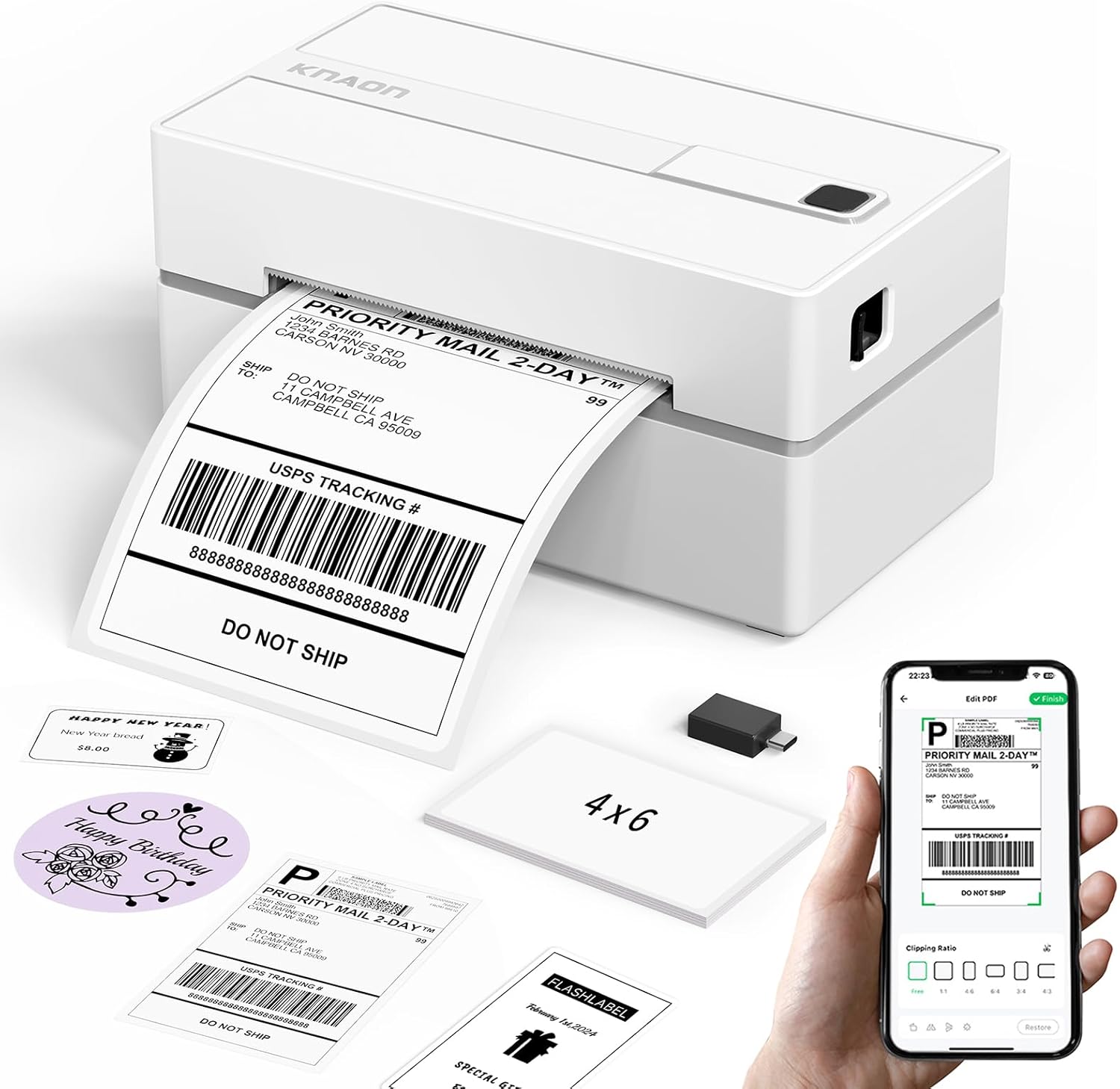
KNAON Y813BT Thermal Label Printer
| Print media | Labels, Thermal Paper |
|---|---|
| Printer Connectivity Type | Bluetooth |
| Hardware Interface | USB |
| Maximum Print Resolution Black and White | 203 dpi |
| Maximum Media Size | 4.2 inches |
The KNAON Y813BT is a compact thermal label printer built for small business shipping and general label tasks. It prints monochrome thermal labels up to about 4.2 inches wide and connects via Bluetooth or USB to smartphones, Windows, macOS, ChromeOS and Linux systems using the FlashLabel Pro app and included drivers. The unit is portable and comes with starter label paper and a USB-C adapter, and its app offers many templates, icons and fonts for creating shipping labels, barcodes, price tags and thank-you stickers. At a practical level you get fast output suitable for batch shipping thanks to an advertised high print speed, and the inkless thermal mechanism means lower ongoing consumable cost. Limitations to note are the 203 dpi resolution, which is fine for shipping and barcode labels but not ideal for high-detail graphics, and the reliance on the vendor app/driver workflow for mobile printing which can add setup steps for some platforms.
Best for: Small business owners who need a compact, no-ink shipping label printer that integrates with phones and computers and prioritizes speed and template flexibility for order fulfillment.
Less Ideal for: Buyers who need high-resolution or photo-quality label printing or who require a completely driverless, platform-agnostic mobile printing workflow.
- Bluetooth and USB connectivity for flexible placement and mobile printing
- Supports common label widths up to 4.2 inches suitable for 4×6 shipping labels
- Includes starter label media and a USB-C adapter for quick out-of-box use
- App with thousands of templates, icons and fonts simplifies label creation
- Thermal, inkless printing reduces ongoing ink costs and maintenance
- 203 dpi resolution limits fine-detail or photo-quality printing
- Mobile printing requires use of the vendor app and saved PDFs for some shipping platforms
Verdict: A fast, compact thermal printer that lowers consumable costs and speeds up shipping label production for small businesses.
Ponek M100 Label Maker

| Printer Type | Thermal |
|---|---|
| Printer Connectivity Type | Bluetooth |
| Maximum Print Resolution Black and White | 203DPI |
| Maximum Media Size | 0.78-2Inch |
| B&W Pages per Minute | 20 pages_per_minute |
The Ponek M100 is a portable thermal label printer that connects via Bluetooth or USB and prints monochrome labels at 203 DPI using direct thermal technology. It is typically used to make address labels, barcodes, QR codes, jar and pantry labels, and safety or office tags; setup is handled through the Print Master mobile app (Android/iOS) or a PC app and driver. Notable features include wide media compatibility (0.78 to 2 inches), a large template and icon library in the app, and a battery designed to print thousands of labels per charge with first-label rewinding to reduce waste. Practical benefits include no-ink operation, a small pocketable footprint for printing on the go, and simple app editing for varied label types. Limitations to consider are monochrome-only output and the app's premium templates behind a paywall, and some users may need a short learning curve to get the most from the template and barcode tools.
Best for: Small business owners or home entrepreneurs who need an affordable, portable label printer to produce barcodes, address labels, and organizational stickers with minimal setup and operating cost.
Less Ideal for: Users who need color printing, very high-volume industrial throughput, or advanced standalone label design features without relying on a companion app.
- Direct thermal printing requires no ink or toner
- Bluetooth and USB connectivity for phone and PC printing
- Supports label widths from 0.78" to 2" for versatile uses
- Compact, lightweight design suitable for mobile or countertop use
- Prints only in monochrome so no color labels
- Some app templates and features require a premium subscription
Verdict: A budget-friendly, portable thermal printer that delivers fine monochrome labels and easy Bluetooth/USB printing for small-business labeling needs.
Rollo USB Shipping Label Printer X1038

| Print Resolution | 203 x 203 DPI |
|---|---|
| Maximum Media Size | 4.1 Inch Width |
| Paper Size | 4 inch x 6 inches |
| Printer Connectivity Type | wired |
| Hardware Interface | USB |
The Rollo USB Shipping Label Printer X1038 is a commercial-grade direct thermal printer built for high-volume shipping and label tasks. It connects over USB to Windows and Mac machines and prints standard 4×6 shipping labels, barcode labels, and custom stickers without ink or toner. The unit uses a 203 DPI print head and pushes labels quickly — about one 4×6 label per second — which keeps packing stations moving. Auto label detection and support for common shipping platforms make setup and workflow integration straightforward, and the included power adapter and USB cable mean it is ready to run out of the box. Because it is a simplex thermal-only device, it is limited to monochrome output and requires thermal-compatible labels, but that also means very low ongoing consumable costs and less maintenance than inkjet alternatives. For operations that need straightforward, fast, dependable label printing, the Rollo USB delivers consistent results with minimal fuss.
Best for: Small business owners and shipping teams who prioritize reliable, high-throughput label printing and want a low-maintenance, inkless solution that integrates with major shipping platforms.
Less Ideal for: Users who need color labels, portable wireless printing, or multifunction print features like scanning and copying should consider other device types.
- Direct thermal printing eliminates ink and toner costs
- Fast output speed roughly one 4×6 label per second for high throughput
- 203 DPI print head produces clear, scannable barcodes and text
- Auto label detection simplifies loading and reduces misfeeds
- Compatible with major shipping platforms and common ecommerce tools
- Wired USB-only connectivity limits mobile or wireless placement
- Prints monochrome only and requires direct-thermal labels
Verdict: Choose the Rollo USB X1038 when you need a dependable, high-speed inkless label printer that keeps a small business shipping operation moving.
JADENS JD268BT Thermal Label Printer

| Print resolution | 203 x 203 DPI |
|---|---|
| Maximum media size | 4 x 6 inches |
| Connectivity | Bluetooth, USB 2.0 |
| Maximum sheet capacity | 50 |
The JADENS JD268BT is a compact 4×6 thermal label printer built for shipping and general label tasks. It uses a 203 x 203 DPI thermal print head so you get crisp monochrome shipping labels without ink or toner, and it accepts fanfold or roll media in common sizes up to 4×6 inches. Connectivity includes Bluetooth for wireless printing and a USB 2.0 port for Mac and Windows, while Android and iOS users can print through the vendor app. Setup is straightforward and the package includes a power cord, USB cable and 50 test labels, which helps you start printing right away. Practical benefits are fast label output, low running cost because it is inkless, and support for marketplace shipping software commonly used by small sellers. Limitations are modest resolution compared with higher-end models and the Bluetooth printing workflow on phones requires the specific app, which can add a step for multi-device shops. The unit is best when you need a simple, space-saving printer for regular shipping labels rather than photo-quality or heavy industrial throughput.
Best for: Small-business sellers and office users who need a compact, low-cost printer for regular shipping labels and who prioritize ease of setup and low running costs.
Less Ideal for: Businesses that require high-volume industrial printing, multi-station native mobile printing, or photo-quality label output should consider more robust or higher-resolution models.
- Inkless thermal printing eliminates ink and toner mess and lowers running costs
- Supports standard 4×6 shipping labels and multiple smaller label sizes
- Bluetooth plus USB connectivity covers desktop and wireless printing needs
- Includes starter accessories (power cord, USB cable, 50 test labels) for immediate use
- Smartphone Bluetooth printing requires the vendor app which may be less seamless than native printing
- 203 x 203 DPI is adequate for text and barcodes but not for high-resolution graphics
Verdict: Choose the JADENS JD268BT if you want an affordable, compact thermal label printer that reliably produces standard 4×6 shipping labels with minimal running cost.
TYPONOS PM240 Label Maker

| Printer Type | Thermal |
|---|---|
| Print Resolution | 203 x 203 dpi |
| Connectivity | Bluetooth, USB |
| Built-In Media | Includes 3 label rolls |
| Wattage | 5.55 watts |
The TYPONOS PM240 is a portable thermal label maker aimed at small businesses, classrooms, and home offices that need quick, durable labels without ink or toner. It prints at 203 dpi and reaches about 40 monochrome pages per minute, using 1 to 2 inch label rolls included in the box; the unit recognizes label sizes automatically via an RFID chip to reduce setup steps. You can print from iOS or Android with the Labelnize app over Bluetooth or connect to a PC with USB Type-C and the supplied driver, and the app offers many templates, icons, Excel import and batch printing for product tags, price labels, barcodes and address stickers. The PM240 is lightweight and rechargeable with a long standby time, making it easy to move between workstations. Practical limits include monochrome-only output, a single USB port, and a maximum media width of 50x80mm, so it is best for label-focused tasks rather than full-page printing or color badges.
Best for: Small business owners and managers who need a reliable, portable label printer that reduces setup time and supports batch printing and template-driven workflows.
Less Ideal for: Teams that require full-color labels, high-volume continuous roll printing beyond 2-inch media, or multi-port desktop printing setups should consider other solutions.
- Thermal printing at 203 dpi provides clear, durable monochrome labels without ink or toner
- Bluetooth app with 3,800+ templates, Excel import and batch printing streamlines small business workflows
- Includes three label rolls and automatic label-size detection via RFID for fast setup
- Rechargeable battery with long standby and a lightweight, portable form factor
- Monochrome-only output limits use where color labels or graphics are required
- Single USB Type-C port and inability to use Bluetooth and USB simultaneously can complicate some PC workflows
Verdict: A portable, app-driven thermal label maker that speeds up small-business label creation with automatic size detection and robust template/batch features.
Choosing the Right Thermal Label Maker for Small Businesses: Key Factors to Consider
Print Speed and Throughput
Print speed matters for small businesses because faster throughput reduces packing time and prevents bottlenecks during peak shifts. If you process dozens or hundreds of packages a day, a label maker with higher lines-per-second or higher labels-per-minute capability keeps orders moving. Consider both peak single-label speed and how the device handles sustained printing. Some compact models deliver quick single labels but overheat or buffer slowly under continuous load, which can slow an entire packing station.
Also factor in the interface that drives printing. Devices with robust network or USB connections usually sustain higher throughput than units that depend on slower wireless pairing or mobile app buffering. Match the rated speed to your busiest realistic workload rather than occasional peak bursts.
Connectivity and Integration
How a label maker connects determines how smoothly it becomes part of your workflow. USB and wired Ethernet offer stable, low-latency links for desktop shipping stations and integrated POS setups. Bluetooth and Wi-Fi provide flexibility for mobile labeling on the floor or in pop-up events, but check for reliable driver support and solid mobile apps or SDKs for your order management software.
Integration also means compatibility with common platforms and label creation software. Look for devices with native support or documented APIs for popular shipping, inventory, and POS systems. If you plan to print from tablets or cloud-based order systems, confirm the unit supports that path without frequent re-pairing or driver issues.
Supported Label Sizes and Adhesive Types
Small businesses often need more than one label size for shipping, shelf tags, barcode labels, and returns. Choose a thermal label maker that handles the widths and roll diameters you use most, and that accepts different adhesive strengths for boxes, clothing tags, or refrigerated items. A device with easy switching between formats or adjustable guides saves time and reduces media waste.
Also check if the printer supports continuous rolls and die-cut sizes for die-cut sticker sheets or if special cores or adapters are required. Media availability and the range of compatible suppliers will affect long-term usability and cost.
Ease of Setup and Daily Use
A straightforward setup and low daily friction are essential for small teams. Setup considerations include driver installation, first-time media loading, and onboarding staff to label templates. Devices with clear loading paths, visible media windows, and intuitive control panels reduce training time and mistakes.
Daily-use features such as quick-access cancel buttons, label preview in the app, and simple firmware update paths also improve uptime. For small teams, avoid devices that require complex driver configuration each time a different computer connects.
Maintenance and Consumable Costs
Thermal label makers rely on consumables and occasional maintenance. Although thermal printing eliminates ink, costs arise from label rolls, specialty adhesives, and replacement printheads or platen rollers. Estimate monthly consumable spend based on your daily label volume and check whether common roll sizes are widely available from multiple suppliers.
Maintenance ease influences total cost of ownership. Removable printheads or tool-free access to the media path make occasional cleaning fast and reduce downtime. Consider whether replacement parts are standard sizes or require manufacturer-specific components.
Durability and Physical Footprint
Durability matters when a label maker sits on a busy counter or is moved around a fulfillment area. Look for robust chassis materials, secure media doors, and straightforward latches. A compact footprint frees counter space in small operations, but balance size with accessible media loading and roll capacity.
Also evaluate expected operating environment. If labels will be printed in a dusty warehouse or near packing adhesives, sealed controls and easy-to-clean surfaces will extend service life and reduce callouts for repairs.
Matching a Label Maker to Your Daily Workflow
Start by quantifying typical daily label volume and peak-period demand. A device that handles your average will save money, but one that cannot sustain your busiest hour will create costly slowdowns. Combine that volume estimate with the types of labels you need to print to choose a model with appropriate roll capacity and media compatibility.
Think about where printing happens. A centralized packing bench benefits from wired connections and higher-capacity rolls, while mobile price-checking or stock-labeling favors wireless units with reliable Bluetooth and a solid mobile app. Also account for who will operate the machine and how much training time you can allocate.
- Measure peak labels per hour, not just per order.
- List the label sizes and adhesive strengths you use regularly.
- Decide if printing is stationary or mobile before choosing connectivity.
Setting Up Templates and Barcodes for Speed
Templates reduce repetitive work and standardize label contents across staff. Use the label maker's software to create templates for shipping, shelf tags, and returns that include variable fields pulled from your order system. Look for software that supports common barcode formats and can import CSV or connect to your order database.
Also plan for testing barcode readability before full deployment. Print a batch, scan through your normal scanning hardware, and verify label durability in the environments the items will encounter.
- Create distinct templates for each use case: shipping, inventory, pricing.
- Test barcode scans after printing to avoid misreads at packing or checkout.
Optimizing Media Usage and Reducing Waste
Do not overbuy roll sizes that lead to frequent changes or underbuy and require constant reloads. Match roll core and outer diameters to the printer's capacity to minimize downtime. Where possible, choose label widths that maximize space utilization and reduce blank margins on printed labels.
Some businesses benefit from using pre-perforated or die-cut labels to reduce trimming tasks. Also evaluate whether thermal direct or thermal transfer labels are better for your environment, since thermal transfer with ribbons can improve longevity on items exposed to heat or abrasion.
- Pick roll sizes that align with your printer's recommended capacity.
- Compare continuous and die-cut media for ease of use and waste levels.
Common Troubleshooting and Preventive Care
Routine cleaning of the printhead and media path prevents streaks and misfeeds. Use recommended cleaning pens or isopropyl wipes following the manufacturer instructions. Regularly inspect rollers and guides for adhesive buildup from sticky labels.
If the printer intermittently fails to connect, verify drivers and app versions first, then check firmware updates. Keep spare media and a backup USB cable or charged mobile device available to avoid interruptions during peak packing periods.
- Schedule monthly printhead cleaning if usage is heavy.
- Keep replacement media and basic tools on hand to limit downtime.
Scaling as Your Business Grows
Choose a platform that can grow with you. Early on, a compact unit may suffice, but as volume and integration needs increase, you may need devices with larger roll capacity or networked printers for multiple packing stations. Select hardware that offers an upgrade path such as models that accept the same media or share software ecosystems.
Consider standardizing on one label width across operations to simplify reordering and reduce spare parts complexity. Planning the upgrade path prevents disruptive rip-and-replace transitions as order volume grows.
- Prefer printers that support the same media sizes your future plans require.
- Standardize label sizes to streamline inventory and spare parts.
How We Chose the Best Thermal Label Maker for Small Businesses
We prioritized tools that meet the real-world needs of small businesses: reliable thermal printing, durable label materials, and connectivity that fits common workflows. Evaluation emphasized print speed and throughput for busy packing stations, the range of supported label sizes and adhesive types for diverse inventory, and connection options such as USB, Bluetooth, and network support to integrate with point-of-sale and shipping systems. We also weighed ease of setup and daily use, including driver and app quality, label template flexibility, and the simplicity of media loading. Build quality and long-term reliability were scored by examining user-focused durability signals and replacement-part availability. Finally, we considered maintenance burden and operating cost factors like consumable pricing and typical lifespan. We excluded devices intended solely for home craft use or for industrial-line heavy manufacturing because they do not match small-business throughput or integration needs. The resulting picks prioritize balanced performance, connectivity, and predictable running costs for small business workflows.
Our full evaluation process is outlined in our review methodology.
FAQ
Do thermal label makers need ink or toner?
Thermal direct printers do not use ink or toner; they print by applying heat to coated labels. Thermal transfer models use a ribbon to transfer ink onto the label. The choice affects longevity and resistance to heat or abrasion.
Can I print from tablets or smartphones?
Many models support Bluetooth or Wi-Fi printing from mobile devices through an app or driver, but reliability varies. Verify that the device offers a compatible app or documented SDK for your mobile platform before relying on it for critical workflows.
What label material should I use for refrigerated goods?
For refrigerated or freezer items, choose labels and adhesives rated for low temperatures. Some adhesives lose tack in cold conditions, so look for freezer-grade materials that remain sticky and legible when chilled.
How long does a printhead typically last?
Printhead lifespan depends on usage and media type. With routine cleaning and standard label materials, a printhead can last many months to years. Abrasive materials and heavy-duty adhesives shorten life, so factor in expected volume and media when estimating replacement intervals.
Are thermal transfer labels better for outdoor use?
Thermal transfer labels paired with suitable ribbons usually resist fading and abrasion better than direct thermal labels. For prolonged outdoor exposure, select durable label stocks and ribbons formulated for UV and solvent resistance.
Final Verdict
Focus on the features that directly affect daily operations: enough print speed for peak periods, reliable connectivity for your workflow, and media compatibility for the kinds of labels you need. Balance a compact footprint and ease of use against roll capacity and durability to minimize downtime. Prioritize devices with straightforward maintenance and broadly available consumables to reduce long-term costs. With those tradeoffs in mind, you can pick a thermal label maker that fits your current volume and scales as your small business grows.